This is topic Light leaks through in Flat in forum Digital Cinema Forum at Film-Tech Forum ARCHIVE.
To visit this topic, use this URL:
https://ft-forum.com/ft/cgi-bin/ubb/ultimatebb.cgi?ubb=get_topic;f=16;t=000504
Posted by Elise Brandt (Member # 5552) on 02-05-2010, 10:05 AM:
I don't know how else to say it ![[Big Grin]](biggrin.gif) when the picture is Flat, (and the screen is scope size, so black on the sidelines), sometimes during the movie the left edge of the screen looks as if light is bleeding through from outside the screen. So it's not the picture's left edge that bleeds but the left edge of the screen. What could it be? I admit to being -again- dumbfounded by the little oddities of digital projectors. Oh yes, the projector is Barco DP1200 with Dolby software. Anyone encounter the same?
when the picture is Flat, (and the screen is scope size, so black on the sidelines), sometimes during the movie the left edge of the screen looks as if light is bleeding through from outside the screen. So it's not the picture's left edge that bleeds but the left edge of the screen. What could it be? I admit to being -again- dumbfounded by the little oddities of digital projectors. Oh yes, the projector is Barco DP1200 with Dolby software. Anyone encounter the same?
I watched Holmes yesterday and this totally ruined the movie for me as I sat there not staring at the picture but at the edge of the screen wondering to myself what's going on and why hasn't anyone addressed this already, how long has it been there... (or does it annoy anyone but me?)
Posted by Steve Guttag (Member # 268) on 02-05-2010, 10:15 AM:
It sounds like flare. Try removing your port glass and see if it goes away.
Steve
Posted by Elise Brandt (Member # 5552) on 02-05-2010, 10:33 AM:
You know I'm a rookie in digital cinema when the first thing that comes to mind when you say "port glass" is a glass of port wine, right after I think "there's no glass in the port, it's just a piece of metal". I recognise the danger of sounding like an idiot but I'll say it anyway; can you explain?
(and thank you so much for even answering)
Posted by Demetris Thoupis (Member # 833) on 02-05-2010, 10:40 AM:
Port Glass is the glass which exists between the projector and the auditorium usually put for the mere reason not to have sound leaking through the auditorium. This type of glass should be specially coated to allow 100% light pass and not reduction (a standard glass which is what usually people use due to cost).
Of course the other case is that your technician did not set the masking of the projector at the correct ratio and thus you see this light leak which could be the DLP chip simply being at its darkest.
Demetris
Posted by Elise Brandt (Member # 5552) on 02-05-2010, 10:50 AM:
Ahh, thank you. The glass should be fine, at least it's been fine all this time but the problem did indeed occur the last time the technician came to "correct" the settings. So... I'm inclined to think it's not a coincidense, but where will I start looking at to fix it I wonder.
I thought port glass was something inside the projector I do have to chuckle at myself a bit here. Well there Is a port in the film projector... at least that's what we call it in Finnish.
Posted by Kris Verhanneman (Member # 5562) on 02-05-2010, 11:42 AM:
It's something in the DCP (in europe) that does that. I have just the same thing here in France.
I'm not quit sure but the ratio of the image isn't the full 1.85.
It's like you project a 1.77 image (HD TV). But less obvious.
Posted by Carsten Kurz (Member # 5396) on 02-05-2010, 03:27 PM:
You can approach the screen and try to cast shadows on the sides. That might give you an idea about where the light comes from. Then you start moving towards the projector.
- Carsten
Posted by Ian Parfrey (Member # 5122) on 02-05-2010, 03:48 PM:
Hi Elise.
Sometimes it is possible to think that the problem originates from one source when it may well be from a totally different direction.
Also, do the easy things first. ![[Smile]](smile.gif)
Things I would try in order are...
1. Make sure there is nothing to the side of the screen that is casting flare over the picture area....e.g Exit lights, backstage lighting left on, &tc.
2. Clean your projection port glass.
3. Make sure the lens is spotless. Fingerprints on a lens can destroy picture contrast and cause flaring.
4. Cycle through all ratios available on your Barco and see if same effect happens on all ratios or just one.
5. Depending on the results found from step 4, either rectify the problem if you feel you can..or phone your tech and fill him in on the problem.
Best of Luck and keep us posted.
![[thumbsup]](graemlins/thumbsup.gif)
Posted by Jussi Siponen (Member # 5572) on 02-05-2010, 04:27 PM:
Let's rule out that this is not something you should expect to see. Here's a slide from my D-Cinema PPT deck:
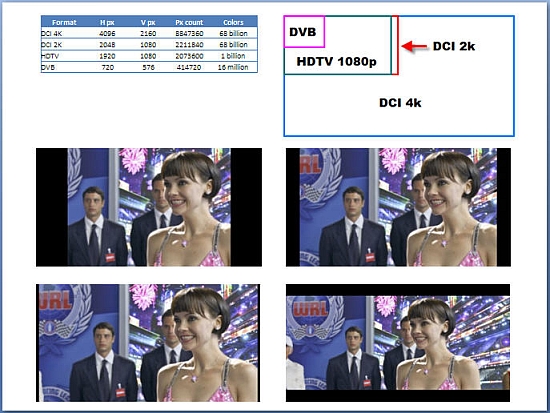
Is light leakage anything like the black bars on the upper right one of the four samples?
If so, you are seeing the un-used (on this particular aspect ratio) parts of the DLP chip. The mirrors are in the off position, but some light will leak through. That is the best the projector electoronic masking can do. Further left and right on your screen (when using flat aspect ratio) are areas which get no light from the projector at all, except for flares and reflections (if any).
For scope, the slightly-lighter-than-black bars are going to be above and below the screen.
That being said, Barcos do let out some internal reflection from the light engine through the lens -- mostly towards "south-west" from the projected image. I suppose you *could* be seeing that, though it really is quite minimal and should hit way off screen. Could that leak be hitting something and get reflected towards the screen?
Black adjustable masks would help -- alas, your cinema does not have them. Alternatively, cut a mask or tape the port glass (be sure to remember to drink the wine first ![[Wink]](wink.gif) ) as tightly as possible to catch stray light while not obscuring the projected image on any aspect ratio in use.
) as tightly as possible to catch stray light while not obscuring the projected image on any aspect ratio in use.
Posted by Demetris Thoupis (Member # 833) on 02-06-2010, 12:06 AM:
There are files available for Flat and Scope masking at least in the Dolby Server. That is the one of the most precise ways to be sure you are masking correctly.
Demetris
Posted by Kris Verhanneman (Member # 5562) on 02-06-2010, 03:51 AM:
I don't think it's a dolby / masking issue.
Never saw it before on my screen (only when I use HD Tv signals).
There are simpel ways to test it. As said by the previous poster there are the dolby files or just take another movie and play it. If your projector has a masking problem you should also see it with other content.
Posted by Elise Brandt (Member # 5552) on 02-06-2010, 04:59 AM:
Great ideas, thank you! Tomorrow morning will be the time to test where the light might be coming from or reflecting off something, I did ask the projectionist on duty today to check for when the problem might be visible, if it also shows its ugly head during 3D or just the 2D flat but I have a flaw in not trusting any eyes but my own. (stuck on the ticket-selling side of the show today, not being able to go snooping)
Jussi, although the lighter black bars bug me as well I do expect to see them. I wish I'd get them to go away too
Will take measures, will report. Thank you so much for helping a girl out! ![[beer]](graemlins/beer.gif)
Posted by Elise Brandt (Member # 5552) on 02-07-2010, 04:11 AM:
Update after an hour of standing in front of the screen and running to the booth for some idea or other. Mainly just scratching head in puzzlement. But something figured;
It is consistent, for one. The left side of the screen simply gets more light than the right. Doesn't affect the picture it seems (odd?) but just the area that's not taken by the picture. I don't have a light meter so I'm not sure about this. But what I am sure of is; when standing in front of the screen on the right-hand side, I can barely see my own shadow. On the left side, I can see it quite clearly. The sidebar goes darker toward the picture but the left edge is really light all the way up, there's no straight line but a fading one. As far as I can tell the light isn't reflected off anything but comes straight from the projector.
Inside the booth, I do see that the circle the light makes around the, hehe, port glass as it travels out, is not on dead center but a bit on the left side. Can that affect something? Should the projector be re-aligned or does it matter?
Uih. I bet if Jussi was here he'd have an answer ready and make me look like a fool in a good way.
Posted by Mark Gulbrandsen (Member # 72) on 02-07-2010, 04:46 AM:
Lamp alignment possibly. What did the technician do to the projector last time he was in the your booth? I'd be callin him back to correct the problem he created.
Mark
Posted by Elise Brandt (Member # 5552) on 02-07-2010, 05:14 AM:
After talking to everyone it seems the problem was there before (so not since the last visit but nevertheless due to the same technician) but it's been a long while since there was a darker-hued 2D film in flat in that auditorium. The lighter edge can be seen when the picture is darker, if the picture is light the eye goes to where there is more light so it seems to disappear. (looking at close range, it doesn't disappear but from the audience it looks like it does) and the 3D glasses filter out so much of the light that it's nearly invisible.
So it's very possible it has been there for some time and I've just failed to spot it.
Posted by Kris Verhanneman (Member # 5562) on 02-07-2010, 07:01 AM:
Elise, what kind of 3D do you have on that theater? Dolby, Xpand, RealD / Masterimage?
Posted by Elise Brandt (Member # 5552) on 02-07-2010, 07:05 AM:
Xpand it is, and happy to say so.
Powered by Infopop Corporation
UBB.classicTM
6.3.1.2