This is topic DSS200 GPIO and automation cues in forum Digital Cinema Forum at Film-Tech Forum ARCHIVE.
To visit this topic, use this URL:
https://ft-forum.com/ft/cgi-bin/ubb/ultimatebb.cgi?ubb=get_topic;f=16;t=000564
Posted by Carsten Kurz (Member # 5396) on 05-09-2010, 02:55 PM:
Does anyone know how to get a grip on DSS200 GPIOs and automation cues? The installation manual only mentions the GPIO usage for 'Lights On' and has a general reference to the serial and ethernet automation option. Ho do I set up and use automation cues in playlists for these automation interfaces?
- Carsten
Posted by Demetris Thoupis (Member # 833) on 05-09-2010, 04:18 PM:
The GPIO is actually only enabled in the latest software version only for triggering transport buttons on the server via external contact closures. For anything mire advanced you need to hook an NA10 unit.
Demetris
Posted by Carsten Kurz (Member # 5396) on 05-09-2010, 05:09 PM:
Thanks. Anything known about the serial interface?
I guess that Dolby would at least enable it to control older CPs without ethernet?
- Carsten
Posted by Demetris Thoupis (Member # 833) on 05-10-2010, 01:48 AM:
Sorry to dissapoint you but for the time being nope!
![[Big Grin]](biggrin.gif)
Posted by Pete Naples (Member # 761) on 05-10-2010, 02:22 AM:
Or use a serial automation interface. You could program a PLC if you're that way inclined.
There are various devices on the market from various manufacturers.
I designed one for our installs, fairly basic it gives you 16 relay output, and 16 opto-isolated inputs. In reality you only really want Stop, Start, Pause and Emergency. In real reality we've only ever used Start and Emergency. We can control Tabs, Masking, House Lights, Stage Lights & Sound Format.
The NA10 is a good piece of kit, but way over specified for most installs, and very expensive. Also there is no dedicated easy way to define a Emergency (Fire Alarm) input.
Posted by Carsten Kurz (Member # 5396) on 05-10-2010, 05:17 AM:
Hmm, would I be able to use this serial automation interface from the DSS200? Maybe I don't get your approach?
You mean I could use external automation and control the DSS200 through GPIO the way Demetris described it - just basic transport?
- Carsten
Posted by Steve Guttag (Member # 268) on 05-10-2010, 06:39 AM:
The current software (4.x.x) will allow transport controls via the GPIO and I believe there are a couple of outputs status given.
Via serial, you can define the strings you want the DSS200 to listen to or to send out as "cues"...thus any serially controlled device can get a cue.
As for the NA10 and Emergency...oh that is defined...just not written anywhere. I'm not near my notes but it is something to the effect of "ShowStopOn" or something near that. The actual command will stop the show and turn the lights on.
Steve
Posted by Pete Naples (Member # 761) on 05-10-2010, 08:26 AM:
Carsten,
From the DSS200/100, via serial we control theatre functions, I named them as I described above, but you can of course name them how you wish. We also have the DSS200/100 listening for control via serial. Whilst you can program the output cues as you wish, you are limited to STOP, START and PAUSE for serial input cues. In the real world this is fine.
Steve,
The issue with the NA10. Here in the UK, depending on the mood of local council licensing and fire inspectors, it is usually a legal requirement to extinguish the lamp as well as raise lights and stop show. We couldn't find an easy way of doing that, in fact to the letter of the law it should shut down on xenon lamp failure too. Both easily enough done with our box, and you can knock a '0' off the end of the price of an NA10.
Posted by Matt Fields (Member # 3211) on 05-10-2010, 08:53 AM:
I use the Christie ACT for serial automation with my Dolby servers and it works well, less expensive then the Dolby automation as well.
Posted by Carsten Kurz (Member # 5396) on 05-10-2010, 09:43 AM:
>Via serial, you can define the strings you want the DSS200 to listen to or to send out as "cues"...thus any serially controlled device can get a cue.
Thanks - that's what I was looking for. Where and how do I define these strings, there must be some kind of macro/cue editor in the software then?
- Carsten
Posted by Pete Naples (Member # 761) on 05-10-2010, 11:12 AM:
Carsten, it's all in Show Manager, either local or the PC Client. Details are in the installers manual.
Posted by Carsten Kurz (Member # 5396) on 05-10-2010, 05:27 PM:
I just received the DSS200 Installation manual PDF, issue 1, software version 4.1
And yes, seems to be there, on page 48, 'Importing and Exporting Serial Automation Cues' (from/to USB-Memory). Doesn't say anything about the format of the file I expect it to write. Probably just look into it and find a simple ASCII table. One needs to get a configuration password from Dolby to be able to do this using the 'serial' login name.
- Carsten
Posted by Kevin Fairchild (Member # 4985) on 05-10-2010, 06:32 PM:
Carsten, do you even have a Dolby server?
Just go to the system tab, then click on serial automation.
If you cant see serial automation, click on auditorium and check the box that says "this auditorium uses serial automation"
Just type in any name and serial command that you want.
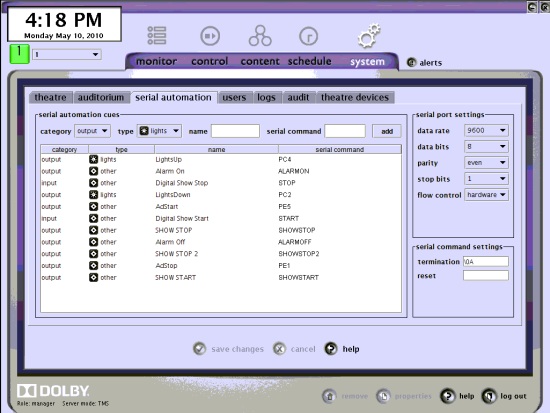
Posted by Mark Gulbrandsen (Member # 72) on 05-10-2010, 09:18 PM:
I was told recently that the NA-10 will soon be phased out in favor of GPIO automation.
Mark
Posted by Pete Naples (Member # 761) on 05-11-2010, 05:38 AM:
Carsten, you're confusing setting up the serial cues with importing/exporting them. Only import/export involves USB sticks and serial passwords. Setting them up in the first place is all done through the GUI Show Manager.
A word to the wise about iporting/exporting cues. The system will export cues to a USB drive and import them from a USB drive. But it does not import/export the serial settings (baud rate etc).
Mark, that would not surprise me, it's way over spec'd and way over priced.
Posted by Carsten Kurz (Member # 5396) on 05-11-2010, 06:22 AM:
Thanks, Kevin,
right, I am not working on a DSS200 yet, I'm trying to prepare myself for setting up an automation. While it's certainly nice to have online documentation on the Dolby servers, it's sometimes a bit cumbersome to discuss issues or learn things without a written/PDF manual. The PDF installation manual only explains the import/export procedure, nothing about using the Screen Manager.
- Carsten
Posted by Pete Naples (Member # 761) on 05-11-2010, 07:15 AM:
Carsten,
My mistake, the configuiring of the cues is bizzarely not in the book. I could have sworn I'd read it in there, perhaps it was in one of the earlier versions.
There is however a document entitled "Configuring_Serial_Automation_v2" which Dolby will send you, all will become clear on reading it.
Posted by Carsten Kurz (Member # 5396) on 05-11-2010, 07:30 AM:
Thanks, will try to get this document.
- Carsten
Posted by System Notices (Member # 2357) on 09-08-2011, 06:57 AM:
It has been 484 days since the last post.
Posted by Kris Verhanneman (Member # 5562) on 09-08-2011, 06:57 AM:
Hello, what interface board do you use to connect the serial automation to?
Posted by Steve Guttag (Member # 268) on 09-08-2011, 10:53 AM:
Standard serial cable (DB9)...it is right on the back of the unit.
-Steve
Posted by Kris Verhanneman (Member # 5562) on 09-08-2011, 03:19 PM:
Sorry my question was maybe not very precise.
It is the hardware board that contains the outputs (relays) and inputs.
I would like to know what you use for that.
Posted by Steve Guttag (Member # 268) on 09-08-2011, 03:58 PM:
The GPIO is not the serial connector...it is just that a General Purpose I/O (DB37 pin). Some of the pins are permanently defined (for start, stop, pause, failsafe) but most are available for programming.
One has to create their definitions in XML format...in the current manual (for version 4.2 installation), they do list the schema. One can set them to pulse or latched. I hear they are actual relays, not just open-collector outputs...I don't know the current carrying capacity. I suspect they can handle dimmers and low-voltage masking systems just fine. The inputs are Opto-isolators. So if one just needs a dimmer and masking control...no external automation is necessary. I also think they have the pins suitably defined to handle those functions if you don't mind the names being GPO6, GPO7...etc.
Since Dolby was rather late in getting the GPIO thing user definable...it is a bit odd in how one defines them...you have to do it via the "config" script at the command prompt.
I have not personally done GPIO definitions (but have done the serial thing MANY times).
-Steve