This is topic Trouble with Barco DP2K-12C in forum Digital Cinema Forum at Film-Tech Forum ARCHIVE.
To visit this topic, use this URL:
https://ft-forum.com/ft/cgi-bin/ubb/ultimatebb.cgi?ubb=get_topic;f=16;t=000627
Posted by Jussi Siponen (Member # 5572) on 08-13-2010, 01:49 PM:
A brand new Barco DP2K-12C (lamp just over 70 ours) which was working earlier today suddenly developed a problem in the green color. We're experiencing alternating stripes (approx. 36 pixels high) of green pixels working and being off. Just a hint of green is visible in the dead stripes. The projector is also throwing green light low left outside of the active picture area, which it normally doesn't do.
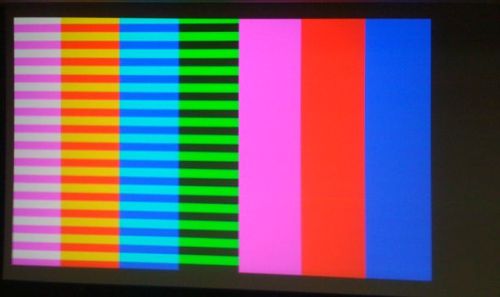
- Projector internal diagnostics find nothing wrong
- The problem is visible also in the ICP generated test patterns so it must be the ICP or something after it (green formatter, cables, the green DMD...)
- The Barco Info-T 910: "ICP Scaler bypassed when shutting down projector with ICP testpatern on in TI release 1.4.x" does not apply - I've checked with Enigma Control software that the "Scaler bypass" mode is not on.
- While in the Enigma Control software I also checked the "Blank screen" (no effect) and "Mirror park" functions (bright green horizontal strip at the bottom of the screen)
Any ideas, I don't know what else I could do? Service call to local Barco representative ASAP?
Posted by Demetris Thoupis (Member # 833) on 08-13-2010, 02:21 PM:
It seems that is on the half of the image. You could have a half broken green 0.98' chip. When you project the white testpattern is the result the same? Did you try projecting an uncorrected test pattern?
Demetris
Posted by Jussi Siponen (Member # 5572) on 08-13-2010, 04:04 PM:
Striping is not visible on the right side because the color bars on the right hand side do not use green. The whole picture is affected.
"LUT-DG Bypass" and "LUT-CLUT Bypass" in Enigma Control had no effect. I haven't tried showing un-corrected patterns, I'll try that as soon as I can.
But at this point I'm suspecting a hardware fault rather than software problems.
Posted by Pete Naples (Member # 761) on 08-13-2010, 04:41 PM:
I concur Jussi,
We've seen odd things like this, often reseating the light engine and the cards in the ELCA box resolves it, thereby wiping the contacts.
Sometimes triggering a self test via the communicator PC/touchpanel software will clear it.
Check the log files, you may well see formatter communication errors.
For example;
From the cinema front end log
0021 2010JUL09 16:24:36 EFIB Datapath Test Fail
0022 2010JUL09 16:24:36 EFIB PLL Lock Glitch Counter = 0X76543111
0023 2010JUL09 16:24:35 EFIB Alternat2 Sig Green: C0F89787 8B070000
0024 2010JUL09 16:24:35 EFIB Alternat1 Sig Green: C0F89787 8B070000
0025 2010JUL09 16:24:35 EFIB Datapath Sig Green: C0F89787 8B070000
0026 2010JUL09 16:24:35 ModFmt-Green Datapath Test Fail
0027 2010JUL09 16:24:35 ModFmt-Green Slave-DP Sig: 73592A1D D1836D2
0028 2010JUL09 16:24:35 ModFmt-Green Master-DP Sig: 0505DA9C D1836D
0029 2010JUL09 16:24:33 DiagFail-FmtBoard[EFIB/DC2K] (1/2): G I
0030 2010JUL09 16:24:33 EFIB Datapath Test Fail
Posted by Tony Bandiera Jr (Member # 2365) on 08-13-2010, 05:18 PM:
Ahh, the joys of D-Crapema surface in a new and exciting way. ![[Big Grin]](biggrin.gif)
Never saw a film projector lose sync on a color. ![[Roll Eyes]](rolleyes.gif)
Posted by Chase Taylor (Member # 778) on 08-13-2010, 08:21 PM:
Its definatly your ICP board or green formatter or the chip. Tell us what the lights on the ICP card on the outside of the projector are doing.
The only other thing I can think of is that something might have come lose on the Signal Back Plane, sort of what Pete was saying but with series two they don't have an ELCA box and the light engine does not seat into it so don't pull the light engine out because all of the connections are on the signal back plane. When dealing with the Signal Back Plane you are getting into something that can be easily f'ed up if you don't know what your doing, you might but if you don't leave it alone.
Chase
Posted by Brendan Penny (Member # 5041) on 08-14-2010, 12:53 AM:
Dud formatter
Posted by Pete Naples (Member # 761) on 08-14-2010, 04:18 AM:
Sorry, my bad, didn't twig we were talking about a Series II.
I suppose though, "A brand new Barco", should have given that away!
Must learn to read......
Signal backplanes are fun to change
Posted by Jussi Siponen (Member # 5572) on 08-15-2010, 05:54 AM:
Thanks for the suggestions, guys! Alas, this seems to be bit too complicated to try to handle on my own at this point. ![[Frown]](frown.gif)
I've now downloaded logs from the projector and a quick review found very few errors/fails, none of which seem to be related to the issue.
I've sent the logs to Barco and let them/the local rep figure it out.
When this issue is resolved, I'll let you know what was wrong.
Posted by Tom Bert (Member # 5719) on 08-16-2010, 09:31 AM:
Hello Jussi, this looks like an error in the light engine, not in ICP.
The experts will tell you what the cure is.
Posted by Jussi Siponen (Member # 5572) on 08-20-2010, 02:25 PM:
Tom Bert, looks like you were right. Barco sent us a new engine and after pulling the old engine out and plugging the new one in we're back in business.
![[beer]](graemlins/beer.gif)
Posted by Demetris Thoupis (Member # 833) on 08-21-2010, 01:40 AM:
The light engine consists of many parts. One of them inside the engine has failed and others have posted above probable causes. Replacing the light engine is like getting a whole new car because a wheel broke down.
Demetris
Posted by Jussi Siponen (Member # 5572) on 08-22-2010, 02:54 PM:
As far as resolving the problem goes, I fully appreciate the route Barco took here -- the most immediate concern was, after all, getting picture back on the screen as quick as possible. Also, some repairs to the engine are difficult (if not impossible) to perform on the field.
However, the intellectual curiosity about the actual issue was not satisfied. Let's hope I'll eventually find out from the factory precisely what was broken.
Jussi
Posted by Chase Taylor (Member # 778) on 08-22-2010, 06:01 PM:
Barco claims they don't do engine repair in the field.
Posted by Steve Guttag (Member # 268) on 08-22-2010, 08:44 PM:
I am not aware of any of the projector companies that do field light engine repairs...it is generally an assembly replacement.
Steve
Posted by Todd McCracken (Member # 4718) on 08-23-2010, 11:58 AM:
We just had Christie do a field repair of our light engine in our lab (albeit a rather minor one according to the lab guys) however we are partners with them and that may have something to do with it.
Posted by Steve Guttag (Member # 268) on 08-23-2010, 12:37 PM:
I recently priced out an upgrade for CP2000-ZX from an EFIB to an FFIB based system...they said it was ONLY doable at the factory and NOT field upgradeable.
I'm sure it depends on the degree of what is being changed.
Steve
Posted by Sam D. Chavez (Member # 1841) on 08-23-2010, 01:04 PM:
And how far you are from the factory.
Posted by Bill Gabel (Member # 1105) on 08-23-2010, 01:17 PM:
Two months ago a Sony field tech did a light engine upgrade on our SRX-R105 projector.
Powered by Infopop Corporation
UBB.classicTM
6.3.1.2