Example with Doremi:
* Device Manager application
* enable the device "subtitle engine"
* disable "enable subtilte" on the projector device
* let's play your movie
Need to be admin access on the Doremi - which is the default maintenance user of Doremi servers.
For other server brands, consult your documentation (User Manual / Installation Manual).
Hope this help.
Posted by Frederick Lanoy (Member # 5416) on 09-10-2011, 07:09 AM:
Hi Steve and Olivier,
Thanks for your help. I understand better now.
All the best.
Posted by Jussi Siponen (Member # 5572) on 09-11-2011, 01:23 PM:
Hi Frederick,
Like Steve said, one possible cause for text cropping is too much masking. I'm not sure how much of the following is specific to Barco projectors / applies to Series II across different brands, but here's another possible issue I've personally seen "in the wild":
At one point, the firmware of at least Barco's Series II projectors had a firmware bug causing the picture to flicker in Scope. As a temporary work-around, the installer putting the projector in used Flat settings as a starting point to get at least *something* on screen (after all, commercial cinemas tend not to be impressed if you go "sorry guys, it's not possible do Scope for now"...) with the intention of fixing it later.
Well, we all know what happens to such hacks -- it's no surprise that also this one lived on even after the firmware issue had been fixed.
At the time, Cinecanvas subtitles didn't work at all in Series II projectors. As a work-around, movies were distributed with subtitles burned in, so no-one noticed the problem initially. Eventually, TI released a ICP version with working Cinecanvas implementation, the release got rolled out to the cinemas and distributors went back to Cinecanvas subtitles. And suddenly, the cinema starts complaining about cropped subtitles in Scope...
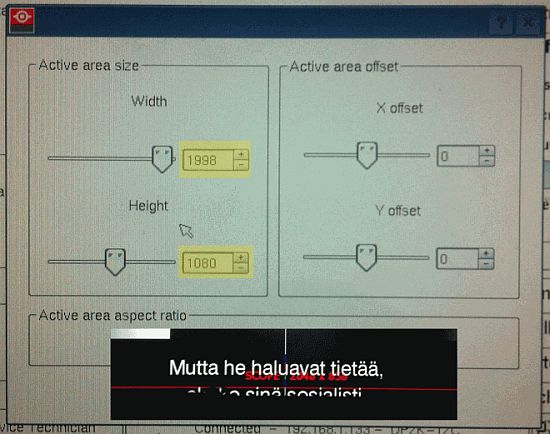
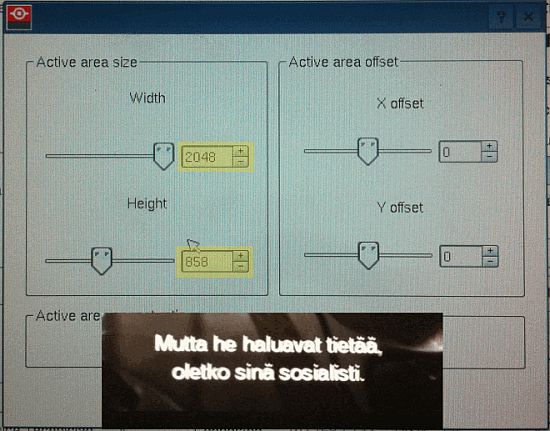
After a *lot* of head scratching I finally noticed that the Scope macro was using Active Area of 1998 x 1080 and the whole sad story was revealed. Turns out, subtitle rendering position is relative to Active Area -- which in this case was much taller than the picture, resulting in subtitles being drawn too low and therefore getting cropped.
Naturally, the bad Scope macro had to be scrapped and done again, but the root cause for the subtitle problem was the incorrect Active Area.
Posted by Frederick Lanoy (Member # 5416) on 09-11-2011, 01:52 PM:
Thanks Jussi, i was'nt aware of this problem. Your explanation is interesting. I going to check my projector setting.
Best regards.
Frédérick.
Posted by Steve Guttag (Member # 268) on 09-11-2011, 03:12 PM:
Please note...if this was the cause of the problem (and I never ran into the scope issue in the US), then it would affect ALL DLP projectors since that is on the TI portion of the system. The Active area is defined in the PCF section of the projector but Barco does break that part out...which is handy if one needs to use the scaler function.
But I can see that if the active area is not entered correctly that the subtitled might not be rendered in the correct place.
I have also seen where PCF files had the active area be the entire chip (2048 x 1080) for both Flat and Scope. Depending on your masking system, you would notice this...that is, if you needed to shift your image down for a top-only masking and you didn't want to use lens shift.
-Steve
Posted by Elise Brandt (Member # 5552) on 09-12-2011, 05:59 AM:
Thanks Jussi, of course this was the first thing to come to mind since we did experience this particular problem, but I do not have the expertise to express the root cause so nicely. Thanks for doing so.
Posted by Waiyawit Wiangchan (Member # 6518) on 09-15-2011, 03:23 AM:
Is it adjustment about Subtitle delay preview with Barco?
Would be very much appreciated.
Posted by Jussi Siponen (Member # 5572) on 11-12-2011, 12:37 PM:
Hi Frederick,
Are you still around? You never reported back on the status of your subtitle problem (what the problem was, how it was resolved, etc.)...
Posted by Frederick Lanoy (Member # 5416) on 11-12-2011, 02:52 PM:
Hi Jussi,
Yes, i'm still around. Actually, some projectionnists told me they had some subtitles problems with serie II projectors.
I never had problem with my Barcos (serie 01 and 02). However, i wanted to know more about this trouble and what we can do to solve it.
Posted by System Notices (Member # 2357) on 11-06-2013, 02:40 PM:
It has been 724 days since the last post.
Posted by Giorgio Volpi (Member # 1182) on 11-06-2013, 02:40 PM:
Hi Guys!
I have this same problem, but with a NEC NC1200C & Dolby DSS220 server + IMB board.
what are the procedures to solve it?
When I'm projecting at Scope format subtitles are very low, so I have to change to Flat, and subtitles are readables on the black zone under the frame.
Thanks in advance,
Giorgio.
Posted by Steve Guttag (Member # 268) on 11-06-2013, 03:51 PM:
Make sure your IMB is set to 2K. In the Title set up, make sure you are using a DCDM_XYZ_185 (or 239 for scope) it is key that you specify that you have a 2K source...1998x1080 for flat and 2048x858 for scope. NEC will often use nothing (for auto) and the way subtitles are defined is a measurement off the bottom of the image...therefore you have to ensure that it is measuring from 1080, not 2160 (4K).
Posted by Giorgio Volpi (Member # 1182) on 11-07-2013, 06:50 AM:
Thank Steve.
This morning I checked that and the scope file was DCDM_XYZ_AUTO.
I changed it to DCDM_XYZ_239 and problem solved!
Giorgio.
Posted by Brenard Cabiles Jr. (Member # 7462) on 11-18-2013, 01:13 AM:
Hello Everyone,
i have gone through the comments so i just sneaked in as i think my situation is relevant to the topic.
i have had the similar issue with subtitles when playing 4K content with 4K PNGs on all our systems as it is BIGGER than the usual when projecting the image on the screen.
the solution we did is to ask the movie distributor to send us a 2K PNGs to correct the issue.
but i dont want to do this all the time whenever we have 4K content.
can you advise on how to correct this issue? will appreciate your comments.
thanks,
Brenard
Posted by Harold Hallikainen (Member # 5405) on 11-18-2013, 07:46 AM:
This is being discussed within SMPTE for SMPTE timed text files (which are not yet being shipped - We're still on Interop Cinecanvas). For SMPTE, the PNGs are supposed to be designed for direct usage on the main picture. If the main picture is 4k, and the projector scales it down to 2k, the PNGs also need to be scaled down.
I'll have to dig out my copy of Cinecanvas to see how it is supposed to behave.
Harold
Posted by Steve Guttag (Member # 268) on 11-18-2013, 03:51 PM:
If you do...give a copy to TI...they don't seem to know how it is supposed to behave either.
Posted by Harold Hallikainen (Member # 5405) on 11-18-2013, 08:31 PM:
In a quick review of the CineCanvas spec, I'm not seeing anything about PNG resolution. I think the issue is coming upwhen the subtitles are projector rendered and the server scaled 4k main picture to 2k before sending it to the projector. The server did not rescale the pngs, and the projector does not know this was originally 4k (if it did know, could it scale the pngs, or would the server need to do it?).
So, it appears the mainpicture is getting scaled, butthe pngs are not.
Harold
Posted by Peter Maddock (Member # 7652) on 12-30-2013, 11:53 AM:
Interesting topic on subtitle problems. I have previously posted on a different issue with subtitles projecting up to three minutes too early with some features played in our normal playlist including advertising and trailers. When this happens I split the show and play the feature on its own which times the subtitles correctly.
We have a Barco DP2K 10s and Dolby DSS220 Player and IMB. The installer is waiting on an update from Dolby to correct the problem. Looks like we might need to check on updates for the ICP as well!
We have also experienced problems with subtitles being below the bottom of the image on scope. I put this down to the subtitles being "subsumed" which had also occurred with some ecinema files we played some time ago. So if there are two lines in the subtitle the bottom line appears below the bottom of the scope image, in some cases. In these situations we leave the bottom mask down. We have had this happen with ecinema (.mpg) and dcinema (DCP).
In our cinema we cannot zoom out fully for scope so we normally lift the bottom mask up to the scope image.
Posted by Harold Hallikainen (Member # 5405) on 12-30-2013, 12:02 PM:
I know there have been closed caption and probably subtitle timing issues if you mix frame rates (includind 3D) in a play list. You can look at the Resource Presentation List that is used by both captions and subtitles and see that the timeline offset for reels after the different frame rate reel is wrong.
Dolby builds a single RPL for the entire show. Doremi does one for each composition, avoidingvthis issue since a composition is all the same frame rate. GDC did do one RPL per show, but recently changed to one RPL per composition.
Your "show splitting" is a good workaround for now.
Harold
Posted by Steve Guttag (Member # 268) on 12-30-2013, 12:51 PM:
Dolby 4.7.0.42 is available now and does address subtitles with different frame-rate CPLs.