This is topic NEC Series 2 Projectors (NC1600C, NC2000C, NC3200S) Issues, Tips, and Tricks in forum Digital Cinema Forum at Film-Tech Forum ARCHIVE.


To visit this topic, use this URL:
https://ft-forum.com/ft/cgi-bin/ubb/ultimatebb.cgi?ubb=get_topic;f=16;t=000898

Posted by Justin Hamaker (Member # 2165) on 09-22-2011, 06:25 PM:
 
With so many theatres having digital projectors now, I was thinking Film-Tech needs to have threads for each specific brand/type of D-Cinema equipment in order to address the issues specific to each. And maybe lumping all of the NEC series 2 projectors into one thread is too broad for this. It might even be worthwhile to have a separate forum specifically for DCinema equipment, without general DCinema discussion.

One thing I discovered is that when you build format changes into your play list, you need to make sure to allow enough time for the lens to move accordingly. And it's best to program duplicate cues because the first is sometimes missed for some reason. I also have my format cues programmed as the first thing on my play list. I allow about 12 seconds between the format cue and any other cue.

Under normal circumstances I am running our advertising slide show through the DVI-A input, so the lamp is already on at show start. Because of this, I have format changes twice for every showing - once to DVI-A, and once to the show format.
 
Posted by Monte L Fullmer (Member # 2797) on 09-22-2011, 06:30 PM:
 
I've see 15 up to 25 seconds for format cue durations.

I have one NEC where I have a 15 sec format cue set in the SPL template. this allows for the masking change and lens zoom adjustments.
 
Posted by Carsten Kurz (Member # 5396) on 09-23-2011, 01:54 AM:
 
As a matter of fact, the longish change to scope can be used 'theatrically'. We used to have a final digital slide in our electronic preshow programming to signal 'Cinemascope' in 35mm. That is, we had a 20-30s intermission to change lens, masking, etc., During that intermission, the '...now converting for Cinemascope' slide came up.
If you play such a slide with dowser open WHILE the lens and masking is adjusted, this gives a nice 'wow' effect on screen.
Only if you have constant height, of course.

- Carsten
 
Posted by Monte L Fullmer (Member # 2797) on 09-23-2011, 03:12 AM:
 
quote: Carsten Kurz
...now converting for Cinemascope' slide came up.
If you play such a slide with dowser open WHILE the lens and masking is adjusted, this gives a nice 'wow' effect on screen.
Only if you have constant height, of course.

I worked in a large cinema where we had both top and side adjustable maskings and doing the above really produced the "WOW!" effect when trailers were in flat and feature was in CinemaScope..with the trailer reel in Machine Nr.1 and the Feature in Machine Nr.2 and doing the changeover along with controlling the maskings.
 
Posted by Mark Gulbrandsen (Member # 72) on 09-23-2011, 08:51 AM:
 
The amount of time it takes is purely a matter of which lens you happen to have. Each model lens is different and a couple are actually pretty dam quick, I believe the Fujinons are the quickest. I have experienced focus drift with three of the the N-Vision lenses. They are actually very sharp lenses but I plan to steer clear of them until this issue has been solved. Has anyone else had this issue?

The slow lamp light time is due to the fact that NEC ramps up the lamp current slowly and this also gives the lamp time to stabilize. Even after you hit the screen with an NC-2000 or 3240 the lamp will still slowly continue to climb to it's pre-set current level over a few minutes time.

I have had several failures of the white on-off/circuit breaker switch. To those users that go to fully off every night beware of this issue. You won't find this out until you go to turn it back on some day... it fails mechanically inside! Interestingly it is a German made circuit breaker and IS NOT available off the shelf.

Other than the above switch issue the NC-2000's have been extremely reliable projectors.

Mark
 
Posted by Monte L Fullmer (Member # 2797) on 09-23-2011, 11:22 AM:
 
quote: Mark Gulbrandsen
ramps up the lamp current slowly
I've noticed that on our 2500 that we have..that it starts out around 70% at the beginning then by end of the prevues, I'm up to 94% by time the feature hits.

We leave our breaker switch alone - just use the standby button to power down the unit. Only time I do use the switch if the unit gets a brain cramp where the macros doesn't work and have to reboot the projector.
 
Posted by Justin Hamaker (Member # 2165) on 09-24-2011, 04:22 PM:
 
In the last two weeks I've had two instances where the NEC and GDC lost communication and I had to restart both (one time on two different houses). In both cases, the lamp had been on for 15-20 minutes running our pre-show content, so I had to wait for the lamp to cool for 5 minutes to reboot the projector.

When this happens, do I actually need to wait for the lamp to cool, or can I switch off the projector power and turn it back on. Will switching it off before the 5 minutes are up create any kind of error on the projector?
 
Posted by Mike Blakesley (Member # 26) on 09-24-2011, 05:15 PM:
 
Justin - no need to wait for the cooling, you can just switch it off and back on again. I've had to do that here a few times.
 
Posted by Monte L Fullmer (Member # 2797) on 09-24-2011, 06:41 PM:
 
Most definitely - why you have a stack fan to pull the heat out.

I'm with Mike - having to do a restart with the lamp on, but knowing that my roof exhaust on to help out.
 
Posted by Steve Guttag (Member # 268) on 09-24-2011, 09:20 PM:
 
If it has not been done so already, in the DCC, there is a tick-box on the main page to allow restriking the lamp during the cool down period.

-Steve
 
Posted by Michael Brown (Member # 890) on 09-25-2011, 02:13 PM:
 
quote: Monte L Fullmer
I've see 15 up to 25 seconds for format cue durations.

We have our NEC's set for 13 seconds to change from flat to scope. Nice to have the customers sitting in the dark for 13 seconds. [Frown] One of the advantages of 35mm - a turret can spin in about 2 seconds.
 
Posted by Justin Hamaker (Member # 2165) on 09-25-2011, 04:23 PM:
 
quote: Michael Brown
Nice to have the customers sitting in the dark for 13 seconds.
That's a matter of where you place your house light cues. Nothing says those cues have to be placed before the light will hit the screen.
 
Posted by Mark Hajducki (Member # 1732) on 09-25-2011, 04:47 PM:
 
One workaround for long lens change issues is to run the adverts and trailers with the lens in its scope position, scaling the 1.85 image to the right size on screen.

The other is to close your curtains, raise the tab warmers and play a short clip of appropriate music. Unfortunately most cinemas equipped to do that have been demolished or are sitting derelict.
 
Posted by Steven J Hart (Member # 2340) on 09-25-2011, 06:55 PM:
 
I think I may finally see an advantage to the Common Width screen our theater is stuck with (Because of our very narrow auditorium). Our NEC 2000 simply switches to a different Screen File When switching from flat to scope so there is no zooming and really is no delay at all.
A question this brings to mind.... I see that there are provisions for anamorphic lenses in the dcc software for the NEC, but wonder if there are any formats where an anamorphic lens is actually used. It seems kind of a waste that the resolution for flat is actually higher than for scope with digital projection. I assume that common height screens just zoom the lens to make the scope image fit the screen.
 
Posted by Frank Cox (Member # 6258) on 09-25-2011, 07:07 PM:
 
My projector is a Christie but it has an auxiliary lens that automatically slides into place for Cinemascope. The tech that installed it told me that my screen is a borderline size that required the auxiliary lens as a simple zoom wouldn't do the job. He also told me that it was the first auxiliary lens he had set up on a digital projector.
 
Posted by Frank Angel (Member # 248) on 09-25-2011, 07:28 PM:
 
I think it is really cool that well into the digital era, you guys still call the 2.39:1 ratio, CinemaScope. It's a nice nod to that historical, very significant presentation-changing process. But don't forget the capital S.
 
Posted by Steve Guttag (Member # 268) on 09-25-2011, 07:51 PM:
 
The Anamorphic lens is strictly for common height screens...while modern lenses often can be zoomed, one looses about 23% of their light that way...it isn't a resolution thing, it is a light thing.

Also, an anamorphic or WCL lens will not require any zooming/focus of the prime lens resulting in more stable settings as all projectors with motorized lenses drift...some worse than others.

Now earlier in the Series 1 days, lenses did not have such a wide zoom range and they didn't have overlapping zoom ranges...those projectors REQUIRED an anamorphic or WCL lens to achieve both Flat and Scope on a common height screen.

If you have common width and you don't zoom your lens a little, then some format is being compromised. The Scope image is wider than the Flat (2048 versus 1998)...If You don't zoom, you are either cropping or scaling your Flat image to get it to work.
-Steve
 
Posted by Brad Miller (Member # 2) on 09-25-2011, 08:15 PM:
 
quote: Steven J Hart
Our NEC 2000 simply switches to a different Screen File When switching from flat to scope so there is no zooming and really is no delay at all.
quote: Steve Guttag
If you have common width and you don't zoom your lens a little, then some format is being compromised. The Scope image is wider than the Flat (2048 versus 1998)...If You don't zoom, you are either cropping or scaling your Flat image to get it to work.
Exactly! I just love how so many people (including some dealers) tell people with common width screens that they don't need the zoom motor kit and intentionally chop off part of the picture or scale it because it makes them a fast sale.

Digital done wrong.
 
Posted by Steven J Hart (Member # 2340) on 09-25-2011, 09:40 PM:
 
quote: Steve Guttag
If you have common width and you don't zoom your lens a little, then some format is being compromised. The Scope image is wider than the Flat (2048 versus 1998)...If You don't zoom, you are either cropping or scaling your Flat image to get it to work.
Our Flat picture is slightly narrower than Scope, so I move the side masking in to compensate when we play a flat feature. I don't think we are doing any scaling or cropping. I guess I could go in and set up a lens file for Flat that Zooms the lens out to fill the full width. Then I wouldn't have to move the side masking. This is all very new to me as we are just playing our second digital feature this weekend.

One thing I really enjoy about the digital projector is being able to sit in a comfy seat in my auditorium and tweak the zoom, focus and lens shift from my laptop. My installer set the projector up for Flat and Scope features, but did very little for the Blu-Ray player, so I've set up screen files and lens files for the common aspect ratios found on Blu-Ray's and DVD's and assigned them to macros. One thing I'm a little confused about is the tic box on the screen setup page in the dcc for "letterbox" I guess I need to read the manual...
 
Posted by Brad Miller (Member # 2) on 09-25-2011, 11:04 PM:
 
Either way Steven, and it is doing it right. (Moving the masking in a little bit or zooming.)
 
Posted by Justin Hamaker (Member # 2165) on 09-26-2011, 06:37 PM:
 
Does anyone know how I would go about getting a custom screen layout file into the DCC/NEC projector. The pre-installed files are not really very good, and the XYZ file which comes on the GDC server is only good enough to get you close. And none of these if very good for getting the best focus across the screen.

When I was configuring my screens, I mainly relied on flat and scope trailers to set the picture for each format.
 
Posted by Brad Miller (Member # 2) on 09-29-2011, 12:42 AM:
 
Are you saying all 4 corners cannot be sharply focused at once? If so, your installation technician *@&$^!#$|% up.

Or do you just want something for general focus?
 
Posted by Justin Hamaker (Member # 2165) on 09-29-2011, 01:45 AM:
 
What I'm saying is the files that come installed on the projector and the GDC do not have anything on them which allows you to see the focus on all parts of the screen. I'm not talking about the competence of anyone, just the lack of a tool to accomplish what needs to be accomplished.

There is a file on the GDC called DCI XYZ Framing, which has some arrows and lines, but it is hardly adequate for getting your picture right on the screen. And it doesn't really have text in the middle which allows you to set the focus.
 
Posted by Dave Macaulay (Member # 813) on 09-29-2011, 08:07 AM:
 
Focus uniformity is an installation adjustment done with tools, at the lens mount. Christie calls it "boresight", Barco calls it Scheinpflug" or something like that, I dunno what NEC calls it. The lens has to be angled correctly to get the best possible focus uniformity on your screen, there isn't a "perfect" adjustment from the factory that will always work. If you have a flat screen and the projector square to the screen, the factory setup should be OK. If you have tilted the projector or your screen is tilted (for example) it will usually need to be adjusted. This should be done as part of any installation (I do lamp alignment, rough aim and level, boresight, convergence, final aim and level, lens files, screen files, colour and light level - in that order).
I suggest you check convergence as well: a single pixel white line grid pattern is good if NEC doesn't include a convergence pattern. If the installer skipped the boresight setup I suspect he/she skipped the convergence as well. A white line should be a white line: misonvergence will give the lines a coloured fringe. I don't expect a perfect convergence over the whole screen but it should be damned close.
 
Posted by Mark Gulbrandsen (Member # 72) on 09-29-2011, 09:39 AM:
 
I agree that NEC puts so little in terms of usable focus alignment files as to be useless. They do include the standard convergence file, thankfully. I have actually been using some of the BARCO alignment files and installing them onto the NEC T.I. on a few occasions. Barco has by far the best screen alignment files that exist, but you have to know how to access the T.I. and then "Put" the files in there using the T.I. file manager. Strong can supply you with their screen alignment file that will drop into the NEC the same way and it is certainly more useful for alignment then anything that comes on the projector, but because the NEC displays it's alignment files full chip only it is still best played back from the server! You can use Free DCP to build any of these files for play back on a server. GDC also now includes another alignment file other than the XYZ file that is a bit more useful for sizing images, I suggest you contact support and request it from them on a thumb drive. When it comes to creating screen files playing back the alignment image from your server instead of the projector is highly reccomended. Don't forget the NEC will make these images the full chip, ok for focus but not really so good for screen alignment! I've always liked the set up files Dolby provided to do screen files. If you can get a large thumb drive or a full CRU insert then begin collecting and saving these files for future use. For instance... "The Help" had a very good framing-focus snip on it that ran about 5 min. I was told that in the near future upcomming GDC OS upgrade it will include being able to off load content onto the CRU... That will make saving these easier.

Mark
 
Posted by Scott Norwood (Member # 30) on 09-29-2011, 10:45 AM:
 
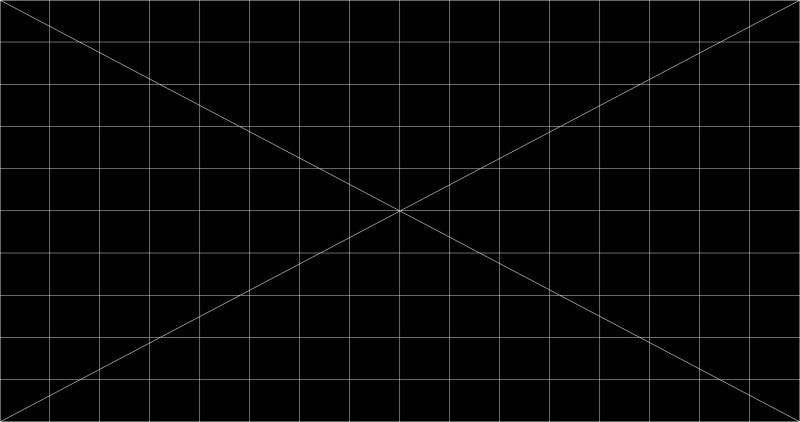
What does everyone want for a focus/convergence test pattern? Would something like this work? (single-pixel grid)

 -

Or should there be separate patterns for 1.85 and 2.39? What about the grid density?
 
Posted by Mark Gulbrandsen (Member # 72) on 09-29-2011, 02:37 PM:
 
Thats a little too basic... Focus bulls eyes in the center area and near the four corners and definition of scope height and flat width are also necessary.
 
Posted by Steve Guttag (Member # 268) on 09-29-2011, 08:48 PM:
 
My favorite remains the Barco "Focus" target. It has 5 targets (one in each corner and one in the center. It is VERY easy to use. They even have it in the green-only version so you don't mistake bad convergence for bad focus. The green only version has many more targets too.

However, if you can create .PNG files, you have a way to create your own targets.

As Mark has noted...via the TI ICP program, one can "collect" ones favorite targets and use them on any DLP projector. They all have patterns that the others don't have but can be useful.

-Steve

-Steve
 
Posted by Justin Hamaker (Member # 2165) on 10-01-2011, 03:30 AM:
 
Another question is what parts should you keep on the shelf for the NEC projectors? Any of the fans or boards prone to failure and inexpensive enough to justify keeping on the shelf.
 
Posted by Bob Bregazzi (Member # 5623) on 10-01-2011, 04:08 AM:
 
Thats a little too basic... Focus bulls eyes in the center area and near the four corners and definition of scope height and flat width are also necessary.
-------------------------------------------------------------------

why not a dgital version of the rp40 target film you can't go wrong on that
 
Posted by Chris Knighten (Member # 5894) on 10-01-2011, 04:22 PM:
 
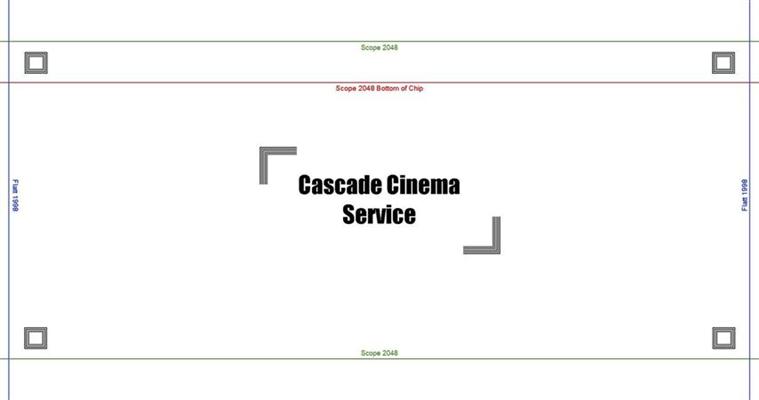
Here is the graphic that I use to setup NEC projectors. It includes framing lines for both flat, scope, and scope at the bottom of the chip. It also includes squares in each corner with lines that are 2 pixels wide and 1 pixel wide to ensure an even focus. I have screen files that correspond to the test pattern exactly.
You can make your own test pattern and save it as a PNG image for Series 2 projectors. For Series 1 just save it as a TGA.
As everyone has stated the test patterns that come with the NEC's are garbage.

 -
 
Posted by Mark Gulbrandsen (Member # 72) on 10-02-2011, 02:10 PM:
 
Justin... The only part I have had repeat failure on is the white power-breaker switch. It seems to fail mechanically and when it does will not allow you to power on the projector... so much for NEC having used a high end german made switch! I've had one failure of a cpu module but that was in a brand new NC-3240. I had no trouble getting any modules if needed. Strong has been very good at supplying parts. The breaker... Like the OS hard drive in the gdc will keep you off the screen!!!
 
Posted by John Wilson (Member # 269) on 10-02-2011, 06:46 PM:
 
quote: Carsten Kurz
As a matter of fact, the longish change to scope can be used 'theatrically'. We used to have a final digital slide in our electronic preshow programming to signal 'Cinemascope' in 35mm. That is, we had a 20-30s intermission to change lens, masking, etc., During that intermission, the '...now converting for Cinemascope' slide came up.
If you play such a slide with dowser open WHILE the lens and masking is adjusted, this gives a nice 'wow' effect on screen.
Only if you have constant height, of course.

Is there a way to make the dowser stay open for the lens change on a 1600C or a 2000C?
 
Posted by Mark Hajducki (Member # 1732) on 10-02-2011, 07:08 PM:
 
At my previous site the douser stayed open when changing formats (on a first gen NEC 800C) but the slow lens shift (and refocusing) would not really give much of a wow factor to the audience.

I think it would just require a change to the macros.

On a second gen projector the format change would be quicker, but probably still not that impressive.
 
Posted by Monte L Fullmer (Member # 2797) on 10-03-2011, 01:41 AM:
 
The Commander software that is in the tech's laptop has this override function to leave douser open, if needed manually.

Otherwise, it would be set up in the playlist cue macros to stay open when programmed.
 
Posted by Justin Hamaker (Member # 2165) on 10-03-2011, 03:04 AM:
 
I don't know if the issue still exists with the version 3 firmware, but we found that leaving the douser open reduced the number of errors we had at start-up. The projector automatically closes, then opens the douser, when you strike the lamp.
 
Posted by John Wilson (Member # 269) on 10-03-2011, 03:29 AM:
 
I'm sure I can find something to throw on screen while the lens change is happening that would be better than 10 seconds of black...only to open up again and find it STILL hasn't finished.
 
Posted by Mark Gulbrandsen (Member # 72) on 10-07-2011, 11:06 AM:
 
On a side note.... I just got a few samples of the new Osram XBO 2000W/HPN OFR lamp which is a short gap 2kw 2400 hour lamp for the NEC. It's also a relatively inexpensive lamp to buy.

Mark
 
Posted by Peter Howard (Member # 3491) on 10-21-2011, 06:07 AM:
 
quote: Mark Gulbrandsen
I have had several failures of the white on-off/circuit breaker switch. To those users that go to fully off every night beware of this issue. You won't find this out until you go to turn it back on some day... it fails mechanically inside! Interestingly it is a German made circuit breaker and IS NOT available off the shelf.

Yes, we've had these fail on each of our two NC2000C's in the past 18 months one of which led to the loss of a session, but we've now sourced a couple of spares to keep in stock in case it ever happens again. My advice is to be very gentle with them.
 
Posted by Mark Gulbrandsen (Member # 72) on 10-21-2011, 07:16 AM:
 
Leave your projectors in standby after the day's over. All my customers do that for the most part. So the switch won't fail then.

quote: John Wilson
Is there a way to make the dowser stay open for the lens change on a 1600C or a 2000C?
Sure, just go in and remove the dowser blade.
 
Posted by Sam D. Chavez (Member # 1841) on 10-21-2011, 09:53 AM:
 
The douserectomy does not work very well on Barco series one as there are microswitches that detect it has gone missing and you get a red tail light. This red light hides other problems that may also light the tail light.

I had to put it back and then cut off the blade but not the axle.
 
Posted by Monte L Fullmer (Member # 2797) on 10-21-2011, 11:02 AM:
 
Only time I hit the power breaker is to do a weekly power down and restart. Otherwise, I do leave my NEC 2500 in standby after close.

? .. why would one want to remove the douser blade-what is the advantage, or reason to this practice?
 
Posted by Sam D. Chavez (Member # 1841) on 10-21-2011, 01:23 PM:
 
Barco had problems with the douser staying closed and not opening manually from the panel or the internal command.

Not cool when you are trying to hit the screen and the content is rolling. With film you just reach over and open it manually or with the changeover button.

I don't know about the NEC.
 
Posted by Mark Gulbrandsen (Member # 72) on 10-23-2011, 08:25 PM:
 
I'm installing a bunch of them over the next two weeks so will take pics of the douser as it appears in the NEC and post it back here...
 
Posted by Adam Fraser (Member # 1074) on 01-04-2012, 03:11 PM:
 
Is the white power switch still a problem part?

I have a new NC2000C with version 3.222 SP3.3 firmware, GDC SX2000A & GDC IMB in the projector.

What is the recommended procedure for shutdown for the night? Leave the projector in standby mode with the internal fans running, shut down at breakers on the projector, or shut down at breakers on the pedestal?

Thanks
 
Posted by Steve Guttag (Member # 268) on 01-04-2012, 04:21 PM:
 
The recommended procedure varies by circuit and what they want powered on.

My rule of thumb on what switch to use when powering down things is based on the ease of finding its replacement. That is, most breakers are available at places like Home Depot for cheap...they are the logical switch point. That said, MOST breakers are NOT switch rated so NEVER use a breaker as a switch unless the load is off or substantially off...OR it is switch rated.

If your breaker on the console is not a Square-D or like easy to source breaker, have on handy for when it wears out. Whatever you use as a switch WILL WEAR OUT. Odds are though, a common breaker or switch or contactor will be less expensive than a specialized, imported switch.

The white switch is indeed the common fail switch and it is pretty expensive, as switches go. Note too, if people get in the habit of not using those switches, they won't be as likely to leave the power supply breaker (double pole) off (it has happened many times...I get the call...LPS failure...only to find the stupid LPS breaker is off).

I give Strong a lot of credit to going to Square-D QO breakers in their power distribution panels...they are the best breakers to begin with...last as long as any in the biz and are easily sourced if they are needed.

-Steve
 
Posted by Mark Gulbrandsen (Member # 72) on 01-04-2012, 04:22 PM:
 
Strong no longer makes bases or anything. The manufacturing end of Strong has completely ceased. They will be distributing the Eprad bases and they also use all Square-D electrics...

Mark
 
Posted by Adam Fraser (Member # 1074) on 01-04-2012, 04:50 PM:
 
Thanks for the replies guys. I will not use the white switch unless needed. The only people in the booth are myself and one other qualified person.

The other question would be should I completely power off the projector nightly or less frequently? I thought someone mentioned on this board of a glitch that happened more often when the projector was powered off nightly, but I could be wrong.
 
Posted by Mike Blakesley (Member # 26) on 01-04-2012, 04:54 PM:
 
The thing I wonder whether to power off is the server. As everybody knows, the hardest thing a computer does is boot-up, and that's when failures usually occur. I have an office computer from 2004 or so that's been running continually since we put it in (well except a couple times a year during our frequent stupid power failures), and I have 2 Dell PCs at my day job from about the same era that run all the time too. Never a lick of trouble out of any of them.

So I'm thinking about just leaving the server running. Do others do this or is it the conventional wisdom to power them off?
 
Posted by Kevin Fairchild (Member # 4985) on 01-04-2012, 05:59 PM:
 
We turn off all equipment at the end of the night by putting the projector into standby and then flipping the breakers on the pedestal. The breakers are cheap enough to keep on hand. In fact, they are probably the cheapest part of the whole system.

Same with the servers. They are turned off nightly. Yes booting is probably hard on the hard drives, but what else? Again, hard drives are the cheapest and easiest part to replace in a server. Enterprise drives also come with a five year warranty.

The best surge protector is a turned off breaker. Not to mention dust prevention.

I choose to keep the proprietary equipment turned off as much as possible. Less usage means less breakage... theoretically

Edit....
PS. Never use the breaker on the side of the projector. Too expensive to replace.

PPS. We just got a couple of NEC 3240s. BEAUTIFUL!
Thanks to Bevan at MIT [Smile]
 
Posted by Mark Gulbrandsen (Member # 72) on 01-04-2012, 09:04 PM:
 
@ Mike... You can leave them on if you desire to but most people turn them off unless it's a large complex with lots of TCC transfers going on after hours. There are air filters in "the other" server so they will stay clean. And your's is on rack slides so cleaning it is very easy. The UPS will protect it from any AC related problems and yes, the drives will last longer if it's left on.

@ Kevin... I agree, the 3240 is very nice. I've installed a number of them including some of the very first ones. Would like to see more 4K content comming down the pipe line though...
 
Posted by Steven J Hart (Member # 2340) on 01-04-2012, 10:24 PM:
 
Mike, we are closed tues-weds-thurs so I generally shut the server down during that period. I leave it on the rest of the week. My only reason for shutting it down is I'm pretty sure that thing is a serious power hog, even when its idling. Our electric usage has gone up about 15% since switching over to digital.
 
Posted by Monte L Fullmer (Member # 2797) on 01-05-2012, 12:56 AM:
 
What I can't get over why the hot air coming out of the back end of these Series 2 units where the Series 1 was drawing air in and had a filter back there in the same place...

Why not simply exhaust up all the heat up the stack?
 
Posted by Philip Jones (Member # 6677) on 01-15-2012, 02:40 PM:
 
We had an NEC2000 put in our main screen and an NEC1200 in our second screen in November with Dolby DSS200 servers in each.

For the most part they've been great, although we have had a few small problems.

A couple of weeks ago the NEC2000 wouldn't connect with the server and eventually only a complete server reboot sorted it and after it came on it downloaded projector logs for about 5 minutes (it normally does this at the end of each show and take like 10 seconds).

Then tonight it had been running fine all day until the last show when there no picture came on. The NEC had red lights on the back and on the side pannel it said "System Error - Green Satellite". A reboot of the projector solved that.

Are these issues likely to be anything serious to worry about or are they just software glitches or whatever?
 
Posted by Monte L Fullmer (Member # 2797) on 01-15-2012, 03:24 PM:
 
When you start a feature in a NEC2000 and the screen goes all wacky-like a bad DVD playback (what happens is that it didn't get the right format cued in for the feature and it's using a different format macro of sorts), go back and forth between the flat and scope format and it should clear.

Otherwise, prior to a glitch like this, build a playlist titled "reset", which would contain just two cues - an "end" and "douser close" and save it as 'reset'. That way, when you get stuck, just stop your feature, dump it out, then load in this 'reset' program and run it. This will return the system back to the beginning and will not shut down the bulb.
 
Posted by David Favel (Member # 1125) on 01-16-2012, 04:34 AM:
 
re "System Error - Green Satellite"
Talking to a tech today who said that used to be quite common, just needs a cable tie somewhere in the top of the projector to stop a connection coming loose.
 
Posted by Philip Jones (Member # 6677) on 01-16-2012, 05:57 AM:
 
Thanks David.

I did actually just spoke to the people who put it in and they said basically the same thing. They to just carry on as normal but if it happens again they'll send someone out to reseat the card
 
Posted by Adam Fraser (Member # 1074) on 01-16-2012, 10:58 AM:
 
I was reading the owners manual for my NC2000 and it specifically says not to power the projector on or off at the breaker without using the switches on the side of the projector first or serious damage would occur, anyone know why? Looks like I'll be ordering a spare just in case.

Also, I wish we could leave the server on 24/7 and the projector off during the time when we are closed. When done that way the GDC wants the projector on first saying IMB not found and to power up the projector before turning on the server.
 
Posted by Justin Hamaker (Member # 2165) on 01-16-2012, 01:42 PM:
 
Adam, we power down the projector every night and leave the GDC running. In the morning we power down the GDC, turn on the projector, then reboot the GDC.
 
Posted by Adam Fraser (Member # 1074) on 01-16-2012, 02:02 PM:
 
Justin, thanks for the info, I will try it out.
 
Posted by Monte L Fullmer (Member # 2797) on 01-18-2012, 08:47 PM:
 
Can't you just put the NEC units in standby instead of total shutdown?
 
Posted by Justin Hamaker (Member # 2165) on 01-18-2012, 09:14 PM:
 
You can, but keeping 5 projectors in standby for 12+ hours per night uses as lot of extra electricity unnecessarily (mid week during the school year it would actually be 18+ hours in standby). Unless someone can show that turning the projector all the way off increases the risk for damage and/or wear and tear, why would we want to keep it up powered up all those extra hours.

I am aware of the issue with the white switch that Mark or Steve pointed out, but I have one on the shelf. The cost of a new switch and my labor to change it is far less than the extra electricity used by not shutting down.
 
Posted by Monte L Fullmer (Member # 2797) on 01-19-2012, 03:20 AM:
 
...or, just dump the triple 50A breaker in the panel and leave the proj breaker alone....(I dunno .. [Shrug] )

Odd that a simple breaker on the projector has to be that fragile where it can't be used too often....
 
Posted by Steven J Hart (Member # 2340) on 01-19-2012, 07:30 AM:
 
Adam and Justin,
We power down our NEC projector every night while leaving the GDC server on. We don't have to restart the GDC after powering up the NEC the next day. Our system was installed in September. Wonder if we have different software/firmware?

Steve
 
Posted by Adam Fraser (Member # 1074) on 01-19-2012, 08:16 AM:
 
Steven,

Do you have an IMB in the projector or is it built into the server? Mine has an IMB in the projector, which isn't powered unless the projector is completely on.
 
Posted by David Zylstra (Member # 4230) on 01-19-2012, 10:25 AM:
 
quote: Monte L Fullmer
Odd that a simple breaker on the projector has to be that fragile where it can't be used too often
Christie's orignal CP2000H projectors had the same issue, using the breaker on the console too much led to many failures.
 
Posted by Steven J Hart (Member # 2340) on 01-20-2012, 12:07 PM:
 
Adam, I believe the Media Block is in the server.
 
Posted by Jorgen Larsen (Member # 5302) on 01-21-2012, 07:32 AM:
 
If you are a VPF Cinema the screenservers and library must be on 24/7/360 no discussion about that......
 
Posted by James Ness (Member # 4631) on 03-06-2012, 11:08 PM:
 
Anyone know how I can get a Doremi server macro to make an NEC NC2000C go into standby or shutdown?
 
Posted by William F Green (Member # 3192) on 07-10-2012, 11:28 AM:
 
quote: James Ness
Anyone know how I can get a Doremi server macro to make an NEC NC2000C go into standby or shutdown?
It should just be the macro called 'Lamp off' (on an NEC 800 it in fact puts the projector into standby).

If you don't have this macro you can create it in macro editor.
 
Posted by Olivier Lemaire (Member # 5579) on 07-10-2012, 12:36 PM:
 
James :
quote: James Ness
Anyone know how I can get a Doremi server macro to make an NEC NC2000C go into standby or shutdown?
You should have a try to:
* create a raw device named (for example) "Projector Chassis" - raw device, IP = projector IP, TCP port = 43278
* use a macro (binary send to this device), where message depends on what you want to do (see below)

Messages:
* 020000000002 to turn on the projector
* 020100000003 to place the projector in stand by mode

Not bullet proof tested. You should ask a NEC specialist (I'm not).

Hope this'll help.
 
Posted by Pete Naples (Member # 761) on 07-10-2012, 04:51 PM:
 
quote: Jorgen Larsen
If you are a VPF Cinema the screenservers and library must be on 24/7/360 no discussion about that......
I keep hearing this.

I've asked countless times of cinemas in VPF schemes, and even of VPF providers. No one has ever been able to show me any written evidence, quote from a contract or guidelines to this effect.

Makes me think it's another of the many urban myths surrounding D Cinema.
 
Posted by System Notices (Member # 2357) on 08-31-2015, 09:52 PM:
 

It has been 1147 days since the last post.


Posted by Justin Hamaker (Member # 2165) on 08-31-2015, 09:52 PM:
 
What is the most current firmware I should be running on NC2000C. My projectors are currently on 4.212. I saw there is a 4.216.
 
Posted by Marcial Feliciano Ramos (Member # 1989) on 09-01-2015, 12:15 AM:
 
Today I saw 4.217 and downloaded it but haven't install it yet.
 
Posted by Ian Freer (Member # 1940) on 09-01-2015, 12:48 AM:
 
Do not use 4.2.1.5 or 4.2.1.6
They both have a potential issue as described elsewhere in the forum. 4.2.1.7 corrects this issue (but may of course introduce other unintended issues as with any software update).
 
Posted by Steve Guttag (Member # 268) on 09-01-2015, 06:52 AM:
 
All of our NECs are now on 4.217 and we have not had any ill effects. Note, we didn't have any ill effects on 4.216 either but apparently that problem didn't show itself unless you powered down your projector for a week or more.

4.217 seems to be safe/solid. If you are on 4.212 I think you still have Enigma 1.6 which IS a problem so updating to 4.217 should be a priority of yours.
 
Posted by Justin Hamaker (Member # 2165) on 10-26-2015, 12:18 AM:
 
Doing the 4.217 update the SIB firmware update initially failed on every projector, but installed fine on the second pass.
 
Posted by Steve Guttag (Member # 268) on 10-26-2015, 06:20 AM:
 
What version were you on previously? I'm pretty sure all of ours were on 4.216 and NONE had any failures on update at any time. I have had failures that you described on previous updates but nothing universal that I could predict it would happen on all of them. It is possible that if you jump over too many versions that things are not ready for an update until other areas are updated first. That has been the NEC way...if at first you don't succeed...try, try again.
 
Posted by Fernando Caldeira (Member # 5680) on 10-26-2015, 12:08 PM:
 
NC3240s. I´ve been having some complaints from directors (not many) about the projectors lac of contrast..or to much light or lack of blacks.

Is this just poor calibration? does anybody else have this problem?

We aimed at 14FL...
 
Posted by Justin Hamaker (Member # 2165) on 10-26-2015, 12:23 PM:
 
All of the projectors were on 4.212 prior to doing this update.
 
Posted by Steve Guttag (Member # 268) on 10-26-2015, 01:12 PM:
 
All 4K Xenon based DLP projectors have a contrast issue...they are less than their 2K counterparts. Same with the econo .69" based projectors (1/4 of the 4K chip)...also low-contrast.
 
Posted by Marco Giustini (Member # 4544) on 10-26-2015, 02:44 PM:
 
I believe NEC recommend to unplug dvi cables from the PIB before upgrading. It's detailed somewhere. ..
 
Posted by Justin Hamaker (Member # 2165) on 10-26-2015, 10:28 PM:
 
Going back to the issue of the white switch and powering down the projector. We now have all of our projectors plugged into a switched power supply, where we also have a few auxiliary components plugged in. Rather than switching off the white switch at night, we turn off this switch power supply. This power supply is plugged into a UPS which will keep the projector side powered during an outage.

Of course this option only works if you have the projector and lamp house power split.
 
Posted by Mark Gulbrandsen (Member # 72) on 10-27-2015, 10:37 AM:
 
I never unplug the DVI cables to do updates, how the hell would you do that remotely? Most of the world is remotely updating Digital Cinema equipment! I;ve not had an update fail in years. It is more likely your DCC or Firmware developed a slight glitch in it that after rebooting or re-logging in and connecting again managed to clear itself.

I had recently two serial number issues at different theaters... And these projectors had never been touched other than past updates. So that was a factory issue. I did wait till someone was at the theater to double confirm the printed serial numbers on those projectors because once you choose a number you can't go back again...

Mark


Powered by Infopop Corporation
UBB.classicTM 6.3.1.2