This is topic Yellow splotches on the screen? in forum Digital Cinema Forum at Film-Tech Forum ARCHIVE.
To visit this topic, use this URL:
https://ft-forum.com/ft/cgi-bin/ubb/ultimatebb.cgi?ubb=get_topic;f=16;t=000957
Posted by Mark J. Marshall (Member # 1409) on 11-18-2011, 09:14 PM:
I'm sitting in a DLP equipped theater right now. Not sure what projectors they're using. There are splotches of yellowish color across the bottom of the screen. They are not on the surface of the screen. They're being projected. What could cause that?
Posted by James Westbrook (Member # 3690) on 11-18-2011, 09:20 PM:
Do the splotches look like pixels?
Posted by Mark J. Marshall (Member # 1409) on 11-18-2011, 11:29 PM:
Nope. Big yellowish smears across the screen. Image on porthole is over under... Implying Sony projector.
Posted by Paul Mayer (Member # 355) on 11-19-2011, 12:37 AM:
Not necessarily. RealD's XLS double-barreled lens is indeed for Sony's, but RealD also makes the XL and XLW units that will fit onto NEC's (and I assume other projectors) - they too produce a over-under double image on the port glass, with the top image being larger than the bottom one on the glass.
As for yellow at the bottom of the image, not sure. Sounds like the bottom of the blue imager is being masked or cropped by something...
Posted by Robert Grandrath (Member # 6483) on 11-19-2011, 12:40 AM:
Perhaps a misalignment of the integrator rod? I had this happen with a BARCO series one. The yellow is just the edge of the "shadow" caused by the misalignment.
Posted by Marco Giustini (Member # 4544) on 11-19-2011, 12:50 PM:
I don't know Sony, but as Robert said, I saw this yellowish border when the intergrator rod or the cold mirror were not aligned on a Barco. They were not splotches though.
Posted by Mark J. Marshall (Member # 1409) on 11-19-2011, 03:43 PM:
Ok, I grabbed some images from my phone. This is not the first time I've seen this phenomenon. The snipe at the beginning claimed that we were watching Sony 4K. The images on the porthole were the same size. This was a Regal theater if that helps.
Anyway, first the blank screen. They had the work lights on while they were seating in this theater due to the size of the crowd.
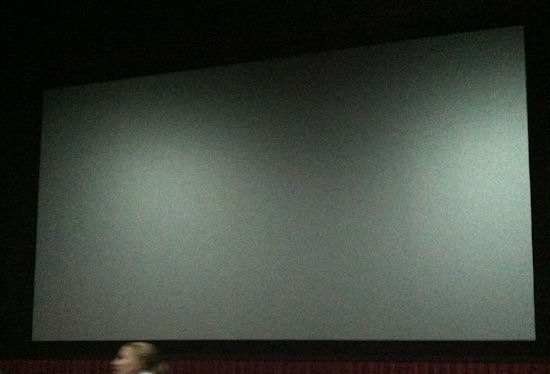
No splotches on the screen.
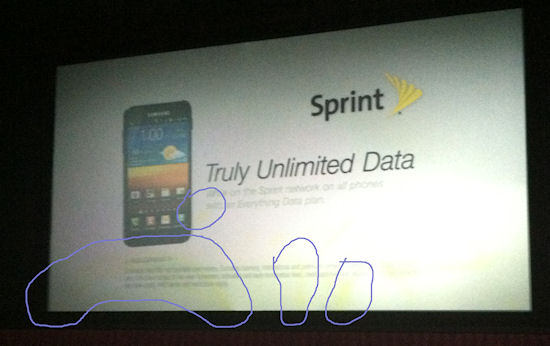
Next, here's a shot from the Sprint ad. Some of the yellow splotches are circled.
Here's another ad with arrows pointing to the same spots.
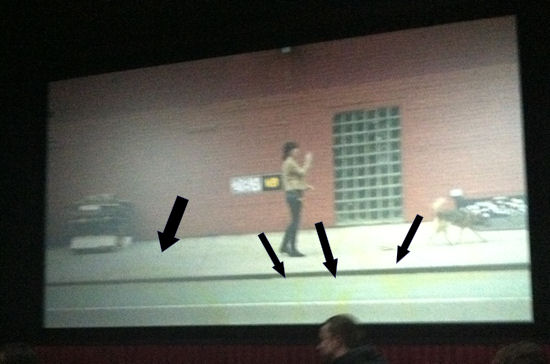
Note the huge arch on the left. And a few lines and spots on the right and across the middle. There were a few others higher up in the middle of the image too, but they were hard to see on with my camera phone.
Finally one more ad:
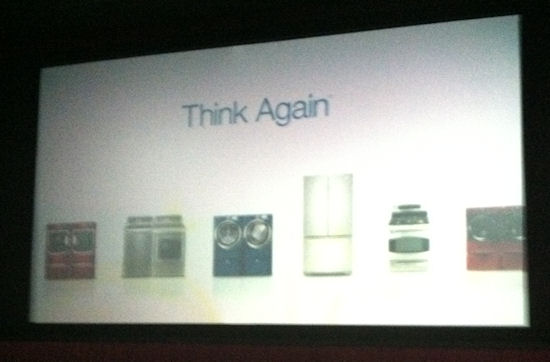
I've seen a damaged reflector on a 35mm projector show yellowish spots on the screen like that, but the damage was the result of a bulb explosion and the discoloration was very easy to see. This was a bit more subtle.
Any thoughts?
Posted by Monte L Fullmer (Member # 2797) on 11-19-2011, 10:32 PM:
wonder if these are fingerprints on the polarizers breaking up the light spectrum since I heard that the polarizers can now be swung out of the way for 2D showings and returned to their stops for 3D showing...
Was it like this also during the feature, or just during their "first look" video presentations?
Posted by Paul Mayer (Member # 355) on 11-19-2011, 10:36 PM:
Given that they ran the 4K Sony CineAlta snipe, and this was at a Regal, and the images on the port glass were the same size, yes it was a Sony using the RealD XLS double-lens.
As for the splotches, eww! I've only read about this and not seen it with my own eyes, but that looks like the description of a blue SXRD imager or optics that has been over-heated or cracked. Or it could be that the blue optics are just very dirty. Or any combination of these things.
Posted by Mark J. Marshall (Member # 1409) on 11-20-2011, 06:46 AM:
Thanks for the info, guys. I've not worked on these before, nor do I know much about them. But is there any reason why the blue imager would be more prone to those things than any other color? I've seen it in a couple of auditoriums in this area. I'd like to be able to tell the managers what the problem is since they would likely not have a clue where to start looking.
Sorry the images from my phone were so crappy. They really don't show off the problem all that well. You can see it in the pictures, but trust me the yellow is ugly as hell seeing it in person. It's not a slight yellow tint like in the pictures I posted. It's not a bright solid yellow either in the way that a stuck pixel is a bright solid color that never changes. But it is a "really-hard-to-miss" yellow tint. Anything black and white really shows it off. If you've been a projectionist trained to look for problems your whole life your eyes will be drawn right to it.
Posted by Dominic Espinosa (Member # 2122) on 11-20-2011, 11:20 AM:
Paul hit it on the head.
The blue imagery in the prd.
Sony says that spectrum is stronger. My guess is proximity to the light source.
Its the coating on the prism that gets toasty.
Although there could be fingerprints on it accelerating its decay. Usually it presents as an even area, not splotches.
Posted by Mark J. Marshall (Member # 1409) on 11-22-2011, 02:52 PM:
So would damage / dirt on a different color imager produce different colored artifacts on the screen?
Posted by Paul Mayer (Member # 355) on 11-22-2011, 04:44 PM:
Using additive (not subtractive) color mixing as in the prism optics of a digital projector -
R+G = Yellow
G+B = Cyan
B+R = Magenta
So, a blue channel blockage will yield a yellow image, a red channel blockage will yield a cyan image, and a green channel blockage will yield a magenta image.
Posted by Ron Funderburg (Member # 4561) on 11-22-2011, 04:59 PM:
Paul if a specific color on the prism has damage or is being fed improperly wouldn't the color problem be picture wide? That is to say all over.
Posted by Mark J. Marshall (Member # 1409) on 11-22-2011, 06:34 PM:
Great, Paul. Makes perfect sense. Now the only question I have left is why do I keep seeing yellow? Why is it the blue imager that is always the problem around here? Does it get the hottest for some reason? Is it the one that's easiest to touch by accident? Or is it all just a coincidence?
Posted by Paul Mayer (Member # 355) on 11-23-2011, 01:06 AM:
Good questions - I don't know. I think Dominic has it though - when the light engine is allowed to overheat enough, the optical coatings get scorched. On a Sony, perhaps it's the blue channel that gets the hottest and therefore gets scorched first.
As for the whole imager/prism surface discoloring at the same rate - in theory I suppose that can happen. But if a lamp isn't aligned just right, the distribution of light and heat within the optical patch will not be even. Any overheating or scorching that would occur would not be evenly distributed across the output field, hence the splotches.
That's my guess anyway.
Posted by Carsten Kurz (Member # 5396) on 11-23-2011, 09:03 AM:
Has to do with energy content at the blue side of the spectrum, I guess. Or spectral weakness of that specific coating. As it occurs local, I assume it has to originate near the imager, otherwise it would have to extend more over the whole screen. Local damage due to local contamination could also be a possible reason. Or, no real damage, but 'just' contamination.
I have no idea wether the pictures shown indicate the 'weakness' of Sonys SXRD Technology as it has been mentioned by a lot of Sony sceptics in the forum.
I can say, though, that I have seen similiar effects on a burnt LCD consumer projector, where the blue panel or polarizers seem to have been 'burnt' by extended usage, resulting in a picture with centered yellow blotching.
Would be interesting to know:
- bulb type (power)
- type of machine (220/320)
- age
- typical day schedule, like 2 or 5 screenings a day, 3D, etc.
- Carsten
Posted by Mark Gulbrandsen (Member # 72) on 11-25-2011, 09:23 AM:
Paul is right. Something with the blue. I've had bad integrator rods.(cracked) before on Christie's and that affects all three colors. It might be a coolant leak on the light engine...
Mark
Posted by Dominic Espinosa (Member # 2122) on 11-28-2011, 04:33 PM:
Silly Mark, what coolant?
All air cooled, baby! Youknow...like an old Volkswagen ![[Wink]](wink.gif)
The blue prism is in the middle of the pro assembly so its. Probably not proximity.
Im going with intensity of light at that end of the spectrum.
More often what I see is the coating bubbles up in the middle/it gets popcorn oil on the underside of the prisms and in the lrd, especially the Fresnel lens. That seems to introduce a nice yellow hue to the right and bottom, of the screen.
Posted by Mark Gulbrandsen (Member # 72) on 11-28-2011, 06:39 PM:
Depends on the projector. If it's a Barco then it is probably a coolant leak since nothing else could contaminate the prism. The Series 2 NEC blue DMD is also in a slight downward position... hard to get to so you align red and green to it. Popcorn oil is certainly a possibility and just switching brands can often alleviate that mess!! Could also be a booger from the last tech that happened to sneeze while standing looking down in the projector... ![[eyes]](graemlins/eyes.gif)
Posted by Jonathan Althaus (Member # 5042) on 11-29-2011, 10:32 AM:
Color splotches (on a Barco) like that could be caused by ICP or CCB
Posted by Mark Uhde (Member # 5357) on 11-29-2011, 12:34 PM:
Well, my experience isn't in cinema (I joined this forum to read the overlapping areas), it's in concert/lighting/theatre tech. Here's what I can say:
Yellowing is a problem with LCD. Which is what, at the end of the day, Sony SXRD projectors are. Fancy, modern, LCD units. Texas Instruments refers to this as "color decay" and here is their page on it:
http://www.dlp.com/projector/dlp-advantages/picture-reliability.aspx
It was my big concern when the local cinemas here in my town chose Sony projectors for digital cinema that the day would come when show after show was noticeably yellow and they will do nothing about it. LCD proponents will try to claim that larger projectors are better-cooled and don't have this problem. They do, it may take longer to show up - but they do. They'll try to claim LCoS (like Sony's projectors) don't have this problem. They do, Sony settled a lawsuit over their SXRD TV's having this problem.
Will the SXRD digital cinema projectors prove to do the exact same thing LCDs have always done (turn yellow)? I don't doubt it one bit.
Is your picture an example of that? Eh, maybe. But it looks more "splotchy" - burnt out LCD panels tend to look much more evenly degraded, worst around the center - not the bottom edge. Still, it's an issue worth at least considering as a possibility.
Posted by Mark Gulbrandsen (Member # 72) on 11-30-2011, 04:50 PM:
Because the light passes through the Sony imagers instead of bouncing off like on DLP the Sony imagers eventually become cooked and turn brownish in color. The green which passes ~54% of the light fails first since it is running the hottest. This is why Sony projectors are very limited on screen size capability. About 40 foot wide max. There is nothing that Sony has been able to do except replace the imagers as they fail.
Mark
Posted by Mark Uhde (Member # 5357) on 12-01-2011, 01:08 AM:
Mark, the LCoS (SXRD) panels actually are reflective, they're a reflective version of LCD. Still, they're subject to the same type of degradation LCD is, though supposedly less so.
Are you sure Sony's seeing green panels fail first typically? That would be quite unusual. Blue panels usually fail first in LCDs (which is all SXRD really is, a reflective LCD) due to the energy of the blue light, and the blue materials not being as durable. Thus yellowing (red + green = yellow. If green failed first, you'd get purple splotches. Which is rare for panel/polarizer failure).
However, like I said, the first image doesn't look like TYPICAL blue panel burn spots.
Just the ramblings of a stage and concert guy... who has a passionate dislike for LCD projection in any form because when they get old the projectors invariably look like junk. Which lots of rental gear does. I was disappointed when our local cinema multiplex chose to use Sony SXRD projectors. Not because of how they look now, but because I can imagine them being yellowed and ugly in five years and them doing nothing about it.
Posted by Mark Gulbrandsen (Member # 72) on 12-01-2011, 05:37 AM:
Yea, technician friends that repair them always replace the green first. It is because it is dealing with a higher percentage of the light hence it gets cooked faster. BTW: I was told the light passed through them which is why Sony can actually do decent blacks...
Yea, your local cinema will regret installing the Sony's sooner then they probably want to admit. Aside from the self consuming imagers Sony absolutely sucks as a company.
Mark
Posted by Ron Funderburg (Member # 4561) on 12-01-2011, 09:13 AM:
I was going to make a smart ass comment but decided I wouldn't. How strange I must be tired!
Posted by Mark Uhde (Member # 5357) on 12-06-2011, 02:42 AM:
Mark, oddly enough in addition to keeping the imager cooler, one of the benefits to LCoS vs transmissive LCD is better contrast. I find it amazing how little about the underlying technology some techs can know.
Second, as to the green panels failing first (so they're failing to a purple color?), Sony has to be doing something really, seriously wrong in their design. Blue light contains the most energy in the visible spectrum. Thus, it destroys the blue panel first. I can't imagine what Sony could be doing WRONG with their green panels that they'd fail first despite simple physics demonstrating the blue should die first.
Sony is using an inorganic material in part of the panel, combined with the reflective design, it's supposed to last longer than traditional LCDs - http://www.sony.net/SonyInfo/News/Press_Archive/200302/03-008E/
But it doesn't look like it's working. I ALWAYS recommend DLP. I've seen far too many LCD projectors die far too young in my life (you see some low-end conference and home DLP projectors die of shattered color wheels, but it's much rarer than blue panel failure in LCD units)
Posted by Carsten Kurz (Member # 5396) on 12-06-2011, 11:25 AM:
The projectors with the highest contrast so far are LCoS projectors from JVC and Sony. Whereas most DLPs max out around 2000-3000. Sonys contrast specs for their SXRD projectors is on par with those for DLP, if not higher.
Although I would like so see comparable measurements for sequential (on/off) and ANSI contrast for both type of machines.
It is amazing how little we actually know about real life performance for digital cinema projection systems, be it projectors or 3D systems. The black level or current DLP machines don't impress me, they are only acceptable with a decent amount of ambient light level. However, there are cinemas with a very nice low level of safety lights where this flaw of the current breed of projectors really annoys me.
- Carsten
Posted by Mark Uhde (Member # 5357) on 12-07-2011, 01:17 AM:
Carsten, both SXRD and DLP exceed the contrast ratio of movie film. That's one of the things I LOVE about D-Cinema, better contrast.
I must say that, personal opinion, I prefer the TI DLP setups I've seen to Sony's SXRD. Granted, the ONLY SXRD I've seen is here in Kalispell. One multiplex does not define a technology. I've talked with one of their upper management guys, and they've made significant improvements. The switch to in-server ghostbusting helped their Real-D performance a ton, for example (Real-D was a horrible mess on the SXRD setup here before that, whereas I've never found it too objectionable at DLP Cinema theaters). Still, I've only seen Dolby 3D once, but I was so much more impressed by it, the difference is astonishing.
That's one of the biggest differences between you guys' work, and mine. You care about contrast ratio, I don't. Under stage lights, I couldn't care less what the contrast ratio of the image is. Just how bright I can get it. Still, traditional transmissive (not reflective LCoS) LCD projectors stink for contrast ratio - that's why they're never used for digital cinema.
Anyways long rant for the end point being that from everything I've ever seen, DLP is a vastly superior technology to LCD/LCoS. The only benefit I can see to LCD is cost. LCD is far cheaper than DLP (for three-chip DLP). Single-chip DLP (not used in cinema ever) is less efficient and some people find the color flashing to be objectionable.
When does TI's patent expire again?
Posted by Mark J. Marshall (Member # 1409) on 12-07-2011, 03:21 AM:
quote: Mark Uhde
both SXRD and DLP exceed the contrast ratio of movie film.
I know some people here who would take issue with this comment.
Posted by Brad Miller (Member # 2) on 12-07-2011, 04:57 AM:
quote: Mark Uhde
Carsten, both SXRD and DLP exceed the contrast ratio of movie film. That's one of the things I LOVE about D-Cinema, better contrast.
Ummmm sure...if you were comparing using shitty 35mm lenses.
Posted by Carsten Kurz (Member # 5396) on 12-07-2011, 07:38 AM:
And shitty highspeed prints. Most prints I see recently have the same bad black levels as digital projectors.
- Carsten
Posted by Mark Uhde (Member # 5357) on 12-21-2011, 07:23 AM:
Yes, I should be clear, a GOOD film print can theoretically beat DLP and SXRD panels for contrast. But what I know is the real world. And that is film prints generally shown in movie theaters have horrible contrast. I enjoy going to the movies here so much more since they switched to digital cinema, and the deeper, darker blacks are THE main reason why.
Posted by Mark Gulbrandsen (Member # 72) on 12-21-2011, 03:51 PM:
quote: Mark Uhde
Second, as to the green panels failing first (so they're failing to a purple color?), Sony has to be doing something really, seriously wrong in their design. Blue light contains the most energy in the visible spectrum. Thus, it destroys the blue panel first. I can't imagine what Sony could be doing WRONG with their green panels that they'd fail first despite simple physics demonstrating the blue should die first.
The only energy that blue light might contain is some enrgy is UV that has not been filtered out enough. The color split is actually this and although these figures may not be 100% correct they are very very close. Green 56%, Red 28% Blue 16%. All of this color percentage today is still based on the original color tv studies of the 1940's and the division of the colors is purely based on the color sensitivity of the human eye... nothing more, nothing less. In Sony and DLP this is based on green, blue, and red wratten filters that are cemented to the prism to filter the light. In DLP is is filtered before the light hits the DMD.
This is why the green panels fail first, they are doing all the work. When your local Sony fails you will know it as the image will develop first a yellowish brown cast to it and then become very brown if it is not tended to soon.
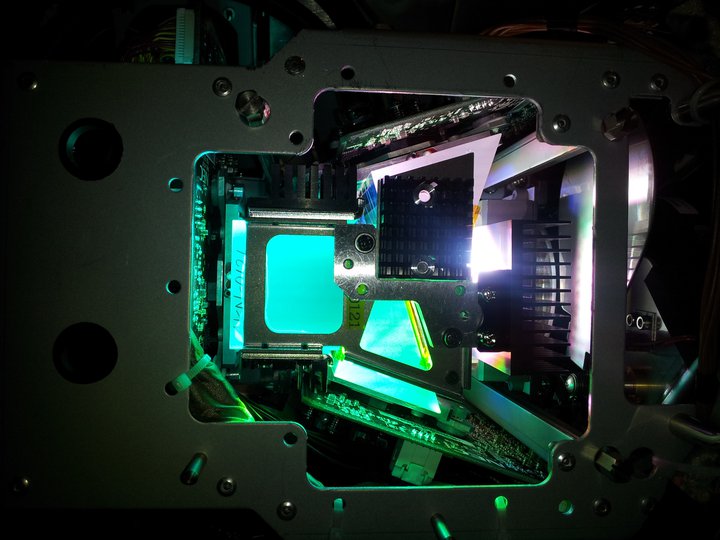
The best way to see this color division is to look at the individual Green, blue, and red color test patterns that are available on any decent DLP projector. It will become immediately obvious to you that as you go from green to red to blue they become progressively harder to see. In the old NTSC color days the blue channel in any given TV camera was ALWAYS noiseier then red or green. Usually a specially selected "Blue Tube" which had a specially treated target was used in that channel in attempt ot gain a littloe more sensitivity and generate less noise. Blue channels even in modern HDTV CCD cameras are still exttremely difficult to align properly because of the lack of output.
White light through a prism. Blue DMD at the bottom red DMD at the top and green DMD at the left. Blue is so weak as to be over powered by green. Some red is visible at the top...
Posted by Mark Uhde (Member # 5357) on 12-21-2011, 11:04 PM:
I'm referring to the energy of the wavelength, not the overall percentage of the light. Blue is the shortest wavelength.
http://wiki.answers.com/Q/What_is_the_relationship_between_wavelength_and_energy
The higher energy of blue light (as well as any stray UV as you noted) has traditionally caused blue imager panels to fail first.
The human eye is most sensitive to green, and makes up the abundance of what needs reproduced for "natural" color reproduction, as you noted.
EDIT - to further clarify, I'm NOT referring to the total amount of energy hitting the panel. I'm referring to the energy of each photon. Blue photons are the highest energy in the visible spectrum, and thus the most destructive.
Posted by Mark Gulbrandsen (Member # 72) on 12-22-2011, 09:41 AM:
Thats nice Mark and I understood all that way back in High School Physics class but all the energy that can be damaging is filtered out way before it hits the prism. In fact you can hold your hand in the light comming out of a projector with a 4kw lamp (the largest a Sony can take) for a considerable length of time before your hand gets hot. As I hinted at above all the UV which are the damaging short wavelengths near the blue spectrum is almost zip by the time it hits the prism. Further, there are filters right on each prism that shape each DMD's actual color operating spectrum. Now, my friends that service Sony's say it's the green chip that fails first but you claim it's the blue... perhaps you should all meet in a room some where and hammer this out. At any rate it has been said that AMC demanded an extra light engine from SOny be with each Sony projector they installed. In my world the terms "Sony" and "LCD" don't even exist as I would never urge anyone to buy anything Sony...ever, and a great majority of my customers switched to running preshow through the D-Cinema machine eliminating their LCD boxes.
Mark
Posted by Mark J. Marshall (Member # 1409) on 12-23-2011, 07:28 AM:
Sony makes great headphones. And pretty good Spiderman movies.
Posted by Jeff Kane (Member # 6372) on 12-23-2011, 01:36 PM:
If the light engine/SXRD chips are similar technology to what's in their consumer devices, Sony's had this issue a loooong time and they've been hit with a class action suit over it.
Google Site on Sony SXRD/LCD issues
Edit: That document is mostly about LCD failures but does mention SXRD/LcOS issues as well.
Posted by Monte L Fullmer (Member # 2797) on 12-23-2011, 01:45 PM:
Heard that the color shift in that image was possibly due to the plastic frame around one of the prisms getting too hot causing the prism to get scorched thus creating a blue haze over the face of the prism-thus offsetting the color output in that scorched area.
![[Shrug]](graemlins/shrug.gif)
Posted by Mark J. Marshall (Member # 1409) on 12-23-2011, 02:50 PM:
That's a great article, Jeff. Thanks for posting that. I can't help but think that the problems the article refers to and the issue I noticed in the theater are very similar if not the exact same problem.
Posted by Mark Uhde (Member # 5357) on 12-24-2011, 06:05 PM:
@Mark G.
I have NO experience with digital cinema, and very little with LCoS. I don't make any claims to know what's failing most frequently in Sony Digital Cinema projectors.
What I said is it's very strange if they're having green panels fail first (which would give the image a magenta discoloration). In traditional LCDs, and from what I've heard - the business and home versions of LCoS projectors - the blue panels fail first due to the energy of the blue photons and stray UV photons.
This LCD yellowing - degradation in both the panels themselves and other components of the blue optical path - is a well-known phenomenon that has plagued LCD projection since it's inception. LcOS/SXRD is essentially just a reflective version of LCD. The reflective nature is SUPPOSED to allow for better cooling to reduce this problem. I know at least HOME AND SMALL BUSINESS LCoS projectors still have high failure rates. Actually I'm up in the control booth at a venue I'm at frequently (I'm on lights but still) staring at the image coming off an LCD projector with a totally destroyed blue imager... horribly yellow
P.S. Mark G. I just noticed you refer to DMDs... the issue with damaged blue panels does not affect DMDs. Something that TI was making a big point about for awhile.
Posted by Carsten Kurz (Member # 5396) on 01-15-2012, 05:06 PM:
quote: Mark J. Marshall
That's a great article, Jeff. Thanks for posting that. I can't help but think that the problems the article refers to and the issue I noticed in the theater are very similar if not the exact same problem.
Mark - your first post suggests you were sitting in a DLP equipped theater. Now how can SXRD yellowing show up in a DLP equipped theatre?
- Carsten
Posted by Mark J. Marshall (Member # 1409) on 01-16-2012, 09:34 AM:
I'm not sure if that is meant as a rhetorical question or not, but here's my answer. If you're referring to the difference between Texas Instruments DLP and Sony's digital projectors, when I said "DLP equipped theater" I was using DLP as a generic term meaning "digital" - as in, "I'm sitting in a digital projector equipped theater." Maybe I'm not understanding your question though.
Powered by Infopop Corporation
UBB.classicTM
6.3.1.2