This is topic I have crossed over to the Dark Side...My first D-Cinema install in forum Digital Cinema Forum at Film-Tech Forum ARCHIVE.
To visit this topic, use this URL:
https://ft-forum.com/ft/cgi-bin/ubb/ultimatebb.cgi?ubb=get_topic;f=16;t=000998
Posted by Tony Bandiera Jr (Member # 2365) on 12-07-2011, 09:33 PM:
My journey toward the Dark Side has now begun...I am set to do my first D-Cinema install for UC Irvine. ![[Big Grin]](biggrin.gif)
![[Eek!]](eek.gif)
It is not going into HIB 100, the big room in the pics on here, but the smaller room I built for them in 2009.
Once the project is complete I will get full pics of that room for the warehouse here.
Even a stubborn old fart like me has to give in eventually.
Posted by Mark Gulbrandsen (Member # 72) on 12-07-2011, 09:43 PM:
If it's a Sony don't ever come back here again .
Mark
Posted by Brad Miller (Member # 2) on 12-07-2011, 11:02 PM:
Have you been certified, or are you just going to install it anyway? What projector? Server? Any automation (or lack thereof)?
Posted by Tony Bandiera Jr (Member # 2365) on 12-08-2011, 12:22 AM:
Mark: How dare you use that four-letter "S" word at me.
Grand Poo-Bah:
I can sense your disapproval..the disturbance in the Force is strong.
Christie CP-2210, Dolby DSS 200 and it will be integrated with my existing AMX automation.
I do have the services of a certified integrator at my side to make sure I don't muck it up and to help with the final setup. That integrator shall remain nameless to protect them from all the ridicule I am sure to get about this.
I will mainly be doing the mechanical installation and AMX programming, since this is my first I am more than willing to bring in that integrator to ensure I do it right.
This setup will spend the majority of it's time playing alternate content (dvd's, etc.) for academic instruction.
I have a 14 year reputation with the University to uphold so this is, for me, a relatively high pressure install.
Posted by Jim Henk (Member # 3628) on 12-08-2011, 12:27 AM:
Does it count if I've been told that I'm certifiable?
Posted by Tony Bandiera Jr (Member # 2365) on 12-08-2011, 12:30 AM:
Ask Brad.
Come to think of it, Brad "knows" me well enough to know that I am certifiable.
And what are you doing up this late?
We just had a small earthquake....
Posted by Brad Miller (Member # 2) on 12-08-2011, 12:47 AM:
Not disapproval, just being sarcastic because so many companies are keeping their techs overworked and on such restricted install timelines that many screens don't even get color calibrated, boresight/Sheimpflug tweeking, convergence tweeks with a telescope, re-adjusting the masking stops for exact aspect ratios, etc. Most of what we see in the field are people who don't even freakin' lens shift, they just angle the projector and focus from the booth without even having any sort of binoculars or telescope!
Its just frustrating. You would think when people are spending this much money the installer could take an extra hour or two and get it dead on...but few people are doing it and digital doesn't look as good as it CAN because of it. Then again the spec sheets for this equipment is mostly fluff and doesn't take into account real life conditions either. ![[fu]](graemlins/fu.gif)
Digital done RIGHT really can look good. I hope whomever your secret tech is does it right, but the fact he is secret probably says no. You know they'll certify anyone these days. Heck, they certified Mark! ![[Razz]](tongue.gif)
![[Wink]](wink.gif)
![[beer]](graemlins/beer.gif)
Thank god though it wasn't a Sony. Like Mark said, I may have had to ban you. ![[evil]](graemlins/evil.gif)
Posted by Tony Bandiera Jr (Member # 2365) on 12-08-2011, 12:57 AM:
Brad, I was also being facetious with the disapproval remark and I can assure you and everyone out in FT land that the "secret" tech/company is well known with a very good reputation.
I have the advantage in this case that the room will be down for almost a month on holiday break so there is plenty of time to get it right.
As anal as I am, it will be right or else heads will roll.
I do have you to thank though, as you have provided guidance and important information about what needs to be done to do it right...
LOL if they wanted a Sony I would have banned myself.
And we did indeed for real have an earthquake, it was 2.8 and epicentered less than 1/4 mile from my apt.
And what are YOU doing up this late?
Posted by Brad Miller (Member # 2) on 12-08-2011, 01:42 AM:
I'm just waiting to pick on Mark some more.
Posted by Gordon McLeod (Member # 33) on 12-08-2011, 12:03 PM:
Brad you dont need an excuse to pick on mark just do it ![[Smile]](smile.gif)
Posted by Scott Norwood (Member # 30) on 12-08-2011, 12:10 PM:
Are you putting in a scaler for SD/HD video as well? If so, which one?
I love film and will always prefer it for material originally released that way, but even I will admit that video material looks great on a D-cinema setup. We have come a long way from just a decade ago, where large-screen video projection was just embarrassing for all concerned.
Posted by Claude S. Ayakawa (Member # 1401) on 12-08-2011, 02:20 PM:
Because I am only a movie patron, I am totally in the dark when it comes to the quality of digital motion picture exhibition hardware so forgive me when I ask what is wrong with Sony? The theatre I frequent on a regular basis is Regal's Pearl Highland 12 in Pearl City, Hawaii and their digital houses all have Sony 4K units and I have been very impressed with both their RealD and 2-D image quality as well as the sound.
-Claude
Posted by Brad Miller (Member # 2) on 12-08-2011, 02:24 PM:
Claude,
Here is an instructional video on Sony and why you feel it looks good. (You only need to watch to 0:42.)
Posted by Aaron Garman (Member # 1653) on 12-08-2011, 05:07 PM:
Poor Sony...
AJG
Posted by Mark Gulbrandsen (Member # 72) on 12-08-2011, 05:30 PM:
Brad or Tony... I have a used DSS-200 available just pulled it out of service. Do either of you want it?? Comes with cables, rack rails, and in the original boxes... Still under warranty.
Mark
Posted by John Wilson (Member # 269) on 12-08-2011, 06:25 PM:
AND it's FREE!!!
Posted by Monte L Fullmer (Member # 2797) on 12-09-2011, 12:10 AM:
Let's say when one works with Sonys and after figuring them out how they tick, they can behave.
But, these units are like an APPLE sytem - so proprietory and they have their particulars.
The light engine is a nightmare in itself. You can't use higher wattage bulbs in them. 4K is high as you can go. Thus, their destined for smaller houses.
..just a technician's nightmare when one has to work on them..
Posted by Brad Miller (Member # 2) on 12-09-2011, 12:12 AM:
Sony isn't just a nightmare to technicians, it is a nightmare to the theater owner's pocketbook! With as extremely high cost as they are to operate, it is amazing theaters that chose Sony projectors are still scraping along with their doors open.
Digital Cinema isn't the worst thing to happen to movie theaters...Sony projectors are.
(Now somebody come post behind me that overused comment "why don't you tell us how you really feel?")
Posted by Monte L Fullmer (Member # 2797) on 12-09-2011, 12:40 AM:
Kinda looks like it was the "4K" resolution that SONY came out with back a few years ago became the greatest thing to baked bread and made it very attractive - to be the "first kid on the block" to have 4K presentation.
True, the chipset can do 4K resolution and actual 4K content presented does look good, but 99% of the content that comes in on HD's are still in 2K resolution.
Thus the brain inside the projector takes the 2K information and scales up the content to fill the 4K chipset.
With the twin lens setup, it's even worse since both flat and scope 2D and 3D are not even in HD quality being that the chip is split in half, thus you only have half the resolution quality, esp in flat where not all of the chip is used. Only advantage with 3D is there is no triple flash-each eye is a dedicated image.
Posted by Brad Miller (Member # 2) on 12-09-2011, 12:45 AM:
quote: Monte L Fullmer
Thus the brain inside the projector takes the 2K information and scales up the content to fill the 4K chipset.
That's similar to at least one IMB out there, except that IMB takes the 4K information, scales down to 2K, then scales back up to 4K for the projector.
Posted by John Wilson (Member # 269) on 12-09-2011, 04:21 AM:
*cough* Digital Cinema Forum *cough*
Posted by Monte L Fullmer (Member # 2797) on 12-09-2011, 11:37 AM:
..gee, so we love to ramble on about digital tech stuff...
Posted by Marco Giustini (Member # 4544) on 12-09-2011, 01:25 PM:
quote:
Not disapproval, just being sarcastic because so many companies are keeping their techs overworked and on such restricted install timelines that many screens don't even get color calibrated, boresight/Sheimpflug tweeking,
It's so true. I do believe the boresight/scheimpflug adjustment is a great advantage over 35mm (al least over the projectors that did not have that feature) and most of the technicians are not considering it *at all*.
Posted by Brad Miller (Member # 2) on 12-09-2011, 03:52 PM:
Geez. I used to do that on all of my 35mm installs ANYWAY! Heck in my screening room the throw is so short and because I have 3 projectors, if I didn't get in there and shim everything precisely the picture would be WAY out of focus.
Posted by Mark Gulbrandsen (Member # 72) on 12-10-2011, 12:49 PM:
As an FYI: The used Dolby DSS-200 sold for 9K and is going into a prominent critic's screening room.
Mark
Posted by Brad Miller (Member # 2) on 12-10-2011, 12:54 PM:
Wow. The prominent critic spent too much money on that.
Posted by Mark Gulbrandsen (Member # 72) on 12-11-2011, 03:29 PM:
Well, one would HOPE that the Dolby name would keep some of it's value even over the short time this server was installed...
Mark
Posted by Mike Blakesley (Member # 26) on 12-11-2011, 03:46 PM:
If he's a REALLY prominent critic he probably doesn't care about what things cost!
Posted by Brad Miller (Member # 2) on 12-11-2011, 04:28 PM:
Mark - yes I agree Dolby and Doremi hold their value very well (unlike others), but you obviously do not have current Dolby pricing. The critic got screwed, but whatever.
Mike - if he doesn't care what things cost, he would have bought new.
Posted by Mark Gulbrandsen (Member # 72) on 12-11-2011, 08:17 PM:
Actually all three hold their value very well because the amount of used series 2 equipment is basically zip. All three are made from the same Chineese parts two use the same Super Micro motherboard. Dolby and "the "Other brand" use the exact same hard drives!! So Dolby had to lower their pricing did they? Interesting because they are still being outsold 6 to 1 by the "other brand" while "your brand" had to hire an industry expert to figure out why.
Mark
Posted by Brad Miller (Member # 2) on 12-11-2011, 09:04 PM:
Hardware doesn't make a good server all on its own Mark. Brainwashing does appear to work well though.
Posted by Mark Gulbrandsen (Member # 72) on 12-11-2011, 09:21 PM:
So 6 to 1 people have been brainwashed... ok! Thats a very good thing. Actually, good hardware is VERY important to the longevity of a given product.
Posted by Tony Bandiera Jr (Member # 2365) on 12-11-2011, 10:03 PM:
Jeeze, I can't leave the room without you kids fighting....
Anyways, the install officially starts this coming Weds. with the installation of the new rack (the existing rack has 1 RU of space available) and running of various conduits and cables.
I also have to reset the shelf for the projector.
BTW Mark, all equipment was already bought and paid for.
I'll check in periodically with updates as this progresses.
Y'all try to behave in the meantime.
Posted by Brad Miller (Member # 2) on 12-11-2011, 10:35 PM:
Don't worry about us Tony. It's just Mark constantly changing his mind on what is good and what is bad. You've seen it for years.
There were an awful lot of SDDS systems installed back in the day. I guess by Mark's logic that made it the best and most reliable choice for theaters. Similarly most music these days is now sold on mp3 formats. There again, a much needed improvement over those poor quality records and CDs. ![[Roll Eyes]](rolleyes.gif)
Mark - the best hardware in the world still sucks when the design of the hardware was not properly thought out and the software is shit.
Pictures Tony, pictures!
Posted by Tony Bandiera Jr (Member # 2365) on 12-11-2011, 11:25 PM:
LOL yep I have seen Mark change his endorsements as often as he changes his socks.
And yes, of course pictures will be provided. I'll pick two for this thread and send the rest of the lot to you for the Warehouse. ![[thumbsup]](graemlins/thumbsup.gif)
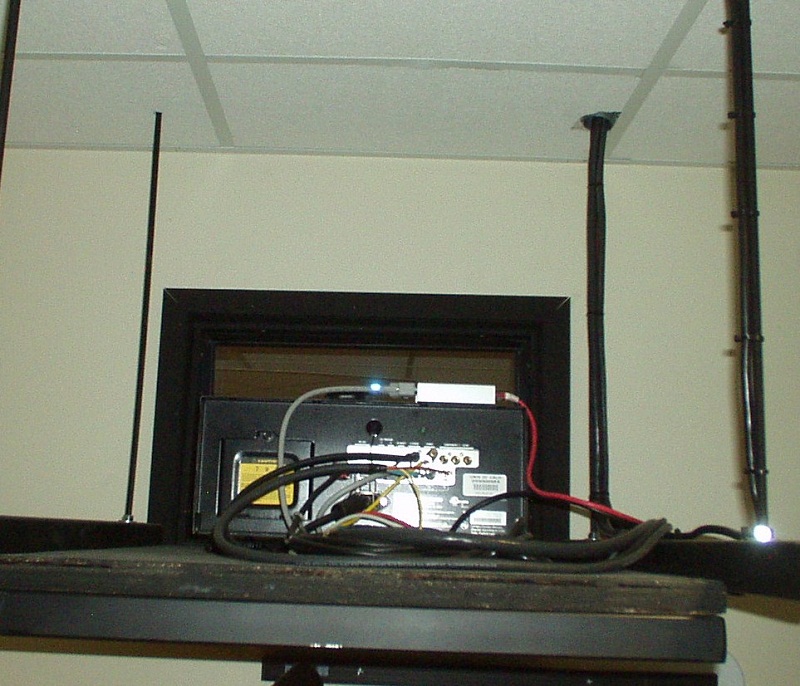
EDIT: Here's the existing projector and shelf:
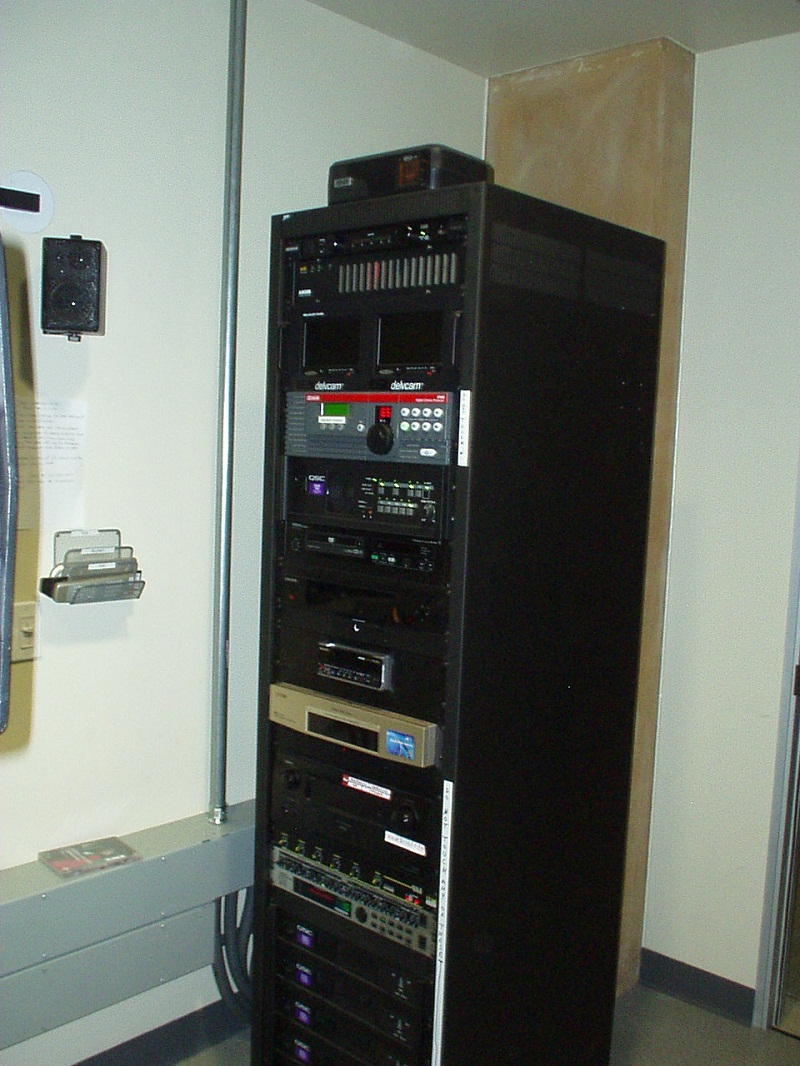
And here's the existing rack:
Oh, and this:
quote: Brad Miller
....the best hardware in the world still sucks when the design of the hardware was not properly thought out and the software is shit.
Has to be the quote of the year, if not the summary of the whole Digital Cinema conversion process.
Posted by Brad Miller (Member # 2) on 12-12-2011, 01:50 AM:
That VHS is gonna look SWEET on the DLP projector!
Posted by Joe Redifer (Member # 3) on 12-12-2011, 02:09 AM:
Kind of looks like a D-VHS deck to me.
Posted by Paul Gordon (Member # 3320) on 12-12-2011, 05:58 AM:
I think its one of those weird japanese Minidv/DVCAM on one side VHS and the other decks... I had one a few years back.
Posted by Tony Bandiera Jr (Member # 2365) on 12-12-2011, 11:27 AM:
Brad: Yep.
Joe: I wish..it's just a plain jane VHS..sort of....see next:
Paul: Nope, what it is, is a world-wide VHS deck. Will play any VHS tape and can output NTSC (Never The Same Colors), PAL or SECAM.
Oh, and that little gem was $1,700.00 (Plus another $100 for the Middle Atlantic Rack mount.)
The deck directly above the VHS is a four-letter S-word MiniDV/DVCAM/HDV deck that can record and playback. I have not connected any record inputs much to the chagrin of some professors and students. (The University has MiniDV editing suites.)
Posted by Paul Mayer (Member # 355) on 12-12-2011, 11:43 AM:
"Four-letter S-word"... Love it!
Soon Only Not Yet
September Of Next Year
Posted by Joe Redifer (Member # 3) on 12-12-2011, 05:40 PM:
Why would anyone be bothered that you didn't hook anything to the inputs of the DV deck? The booth is for presenting programs and the such, not recording them.
Posted by Carsten Kurz (Member # 5396) on 12-12-2011, 06:15 PM:
Is it! Is it?
- Carsten
Posted by Tony Bandiera Jr (Member # 2365) on 12-12-2011, 06:50 PM:
quote: Joe Redifer
Why would anyone be bothered that you didn't hook anything to the inputs of the DV deck? The booth is for presenting programs and the such, not recording them.
Have you ever dealt with University professors and students Joe? I have told people I work in the world of macadamia...when they try to correct me I tell them no, I mean macadamia...because they're all nuts.
I used the presentation only position and the argument that to set up record capability would leave them open to possible copyright violation liability.
Remember this is the same place where the Gospel Choir director totally destroyed the acoustics of HIB 100 with all those damn wood panels..just so he could use the room for six months until the Arts Building was finished.
They do have odd quirks sometimes there, but they always pay the bills on time and overall treat me pretty good.
Posted by Scott Norwood (Member # 30) on 12-12-2011, 07:32 PM:
I could see using the DVCAM deck as an easy way to combine, say, multiple shorts on DVD onto one tape for a continuous program. I have also seen rooms that have a security-type video camera mounted in the ceiling, which could be connected to a recording device to videotape speeches and such. Lots of these rooms are multi-use facilities (ugh!) where film/video exhibition is only a small part of the purpose that they serve.
Sure, it's not a production facility, but it is not unreasonable for people to want an easy way to record stuff.
Agreed with Tony on colleges and universities. They don't "get" film exhibition at all (for the most part), but they are generally good people and they do pay their bills on time (mostly...sometimes they cannot figure out which department to bill).
Posted by James Wallor (Member # 6154) on 12-13-2011, 07:46 PM:
At the university that I attend, it's a student org that deals with the movies shown. Very few people in the university even have access to the booth we have our equipment in, and absolutely no professors have access. There is nothing that we record in our booth, since... well, there's absolutely no reason to. The university has it's own equipment room with recording equipment for distance learning or offering lectures online for the students to view/download.
I think I'd immediately revoke the privileges if one of my projectionists tried to record something we were showing. There's no way I'd stand for any equipment like that being brought in, for any reason.
Posted by Tony Bandiera Jr (Member # 2365) on 12-13-2011, 08:06 PM:
Scott: They have edit facilities available for combining clips, and they always rip the result to a dvd (or run it off a laptop as a .mov or .avi file). The Mini DV deck was mainly intended for the now-defunct "Film and Video Center" (FVC) program, where outside filmmakers have brought in MiniDV and DVcam tapes in the past.
Those desiring to tape lectures have used film studies students to tape the lectures. I had thought about a fixed camera for use in that room but they didn't want it.
James: Yep, we also have a student org (ASUCI) that deals with a lot of the film screenings (mainly sneak previews) now. The FVC program used to be my sweet deal there, anywhere from 8 to 14 35mm screenings per Quarter.
I too have threatened to rip the balls off of ANY student or others who try to bring recording devices into any of my screenings. Some of the ASUCI shows have the full Security presence, and laptops, phones, etc. have to be left outside. On one show they even took MY cell phone away during the screening.
Posted by James Wallor (Member # 6154) on 12-13-2011, 11:38 PM:
We used to deal with 35mm, but we haven't had a 35mm print since April of 2010. Everything since has been digital. I'd love to get another 35mm print, but there's a bit of work that needs to be done on our projector before it's ready to be used again, haha.
Also, lucky them. We haven't had a sneak preview since Adventureland. But standard, we do at least 14 movies per semester. Often times we'll show something for another student org, but that's almost always something on DVD. Most orgs can't fork out the $1K to show the type of shows we normally do.
Are there pictures in the warehouse of the setup they (ASUCI) use?
Posted by Tony Bandiera Jr (Member # 2365) on 12-14-2011, 10:58 PM:
Yep James, they run in HIB 100, pics are in the warehouse HERE
The install I am speaking of in this thread is in the room I installed in late 2009, full series of pics will be sent in for the warehouse soon.
LOL if I recall, Adventureland was also our last sneak preview.
Posted by James Wallor (Member # 6154) on 12-15-2011, 01:16 AM:
I thought that might be it Tony, but I wasn't sure. Thanks for the confirmation though.
Do you think it will ever be used for digital movies?
Posted by Tony Bandiera Jr (Member # 2365) on 12-15-2011, 09:52 PM:
You're welcome James.
I have been pushing for a D-Cinema system for HIB 100, but it may never happen unless a donor steps up..or they see how it works in the room I am doing (with only 94 seats) and realize they NEED one in the "big room".
The student organization is looking into funding a setup for a room in the Student Center, but it is not an ideal room.
Posted by James Wallor (Member # 6154) on 12-17-2011, 12:00 PM:
It worked great for us and some other places. Can throw them This article too, if it helps.
Hurry up and get pictures up, I'm eager to see this
Posted by Tony Bandiera Jr (Member # 2365) on 12-29-2011, 11:03 PM:
Update:
After getting the projector very late (Fri 23rd) the install is almost done. I have pretty much finished all the wiring, conduits and so forth. I will be firing up the projector tomorrow and test with the alternate content.
I will be getting a Trail Mix drive for testing next week, and the "secret" integrator will come out to do the fine alignment on the projector.
It has been a much longer process that I wanted it to be because first off, due to a delay in payments, all the equipment got ordered later than I wanted, my rigger was tied up until today when we got the projector shelf reset for the much larger projector, and the AMX programmer I planned on using pissed me off so now I am going to have to do all the new code myself.
But overall it has gone together pretty well.
I have been way too busy to take "milestone" pics (and the booth was a disaster area for most of the time) so y'all will have to wait for the finished product.
Stay tuned...my journey toward the Dark Side continues...
Posted by Mark Gulbrandsen (Member # 72) on 12-30-2011, 10:36 AM:
This is becomming more of a black hole than just a dark side! You do all the grunt work and then give the gravy job to some one else?? It's too easy... You hand a wireless node on the local switch and sit in the auditorium and do all the adjustments... Learning to navigate the software can take a little while but you have to learn eventually.
Mark
Posted by Tony Bandiera Jr (Member # 2365) on 12-30-2011, 09:41 PM:
Mark, I would prefer to handle all the projector setup myself, but I do not have the the color spectrometer to set the color balance properly, and more importantly I do not have the time to play around with it, this whole project is already behind schedule.
If and only if I get into a situation where I can line up several more installs, you can bet I will get all the necessary gear and training and do the adjustments myself.
On a humorous note, I powered up the projector today.....but couldn't even access the LampLoc to set the Xenon lamp...because I don't have the default passwords to get into the Admin or Service menus. Doh!!
Oh, and the "lamphouse" setup on this projector is TIGHT....this was the first time in over 20 years I was ever nervous installing a bulb...and also the first time in over 25 years that I wore the full protection gear.
Posted by Mark Gulbrandsen (Member # 72) on 01-02-2012, 06:16 PM:
Tony,
I'm just yankin yer chain but what I said is absolutely true! I'm glad you're not throwing int the towel and I think you'll be good with digital.
Mark
Posted by Tony Bandiera Jr (Member # 2365) on 01-02-2012, 09:11 PM:
Thanks Mark.
We'll see how this one turns out to see if I am DCI compatible.
Posted by Tony Bandiera Jr (Member # 2365) on 01-06-2012, 11:07 PM:
Well, the results are in.
After some more music-hall comedic errors and so forth, the system is up and running.
The Christie projector rocks in both light output and image quality is much better than expected. (Of course I am on a fairly small screen (7'h x 16'wide) so I actually have too much light.) Convergence and boresight needed only minor tweaks, I set the masking stops, we set up the color settings to spec and it all went well.
The Server and my "remote Client" host computer put up a fight for the IT settings but that got solved quickly. (Mainly my fault as I misunderstood a few things and set some things incorrectly.)
We fired off the registration form to Dolby so they can get content.
There is still more control integration to be done with the AMX system, but it is working to the level that they can control Alternate Content for classes which start Monday.
Overall, I would say that I did indeed enjoy this first foray in the Dark Side, and I actually look forward to doing more. Now that I have the initial system done, I can say that future installs will go smoother, but also acknowledge that I have a lot more to learn.
God help us all, I may actually begin to like D-Crapema(TM) and have to change the trademark I established.
Posted by Mark Gulbrandsen (Member # 72) on 01-08-2012, 08:45 AM:
I hope you put the server, projector electronics and associated stuff on a UPS!! You can put up a sign that reads... "After powering on the server go for coffee and come back in a half hour."
Posted by Brad Miller (Member # 2) on 01-08-2012, 11:52 AM:
Mark, have you been smoking the weed with Tom again?
Posted by Tony Bandiera Jr (Member # 2365) on 01-08-2012, 11:56 AM:
EDIT: Good one Brad!!
And Mark, what server out there takes a half-hour to boot up from a cold start? The DSS 200 only takes a few minutes. And the projector cooldown cycle is 10 minutes max.
END EDIT
Mark, Mark, Mark.....you know me better than that.
Of course all the vitals are on a UPS.....a 2200va Middle Atlantic to be precise.
The following are all UPS protected:
AMX system power, Dolby CP650, QSC DCM10, Projector electronics, DSS200 (both supplies), video scaler, remote client computer and monitor. The total load on the UPS is around 40% so I have about 15-25 minutes of runtime in an outage.
The MA UPS is a pretty solid unit, uses a 48v battery pack, additional packs can be added hot at any time, and is a 2RU very heavy chassis.
The only thing I am not fond of is their monitoring software, it is buggy. But it does log a lot of parameters and can send email alerts for any of the parameters.
Pics will be coming to the warehouse in the next week or so...
Posted by Brad Miller (Member # 2) on 01-08-2012, 12:13 PM:
Don't worry Tony. That was Mark's best shot. Since he is going to play that game, here is one from the collection of mine. At least you don't have to worry about having a server where the entire operating system and critical media block information relies on ONE regular sata hard drive with no form of RAID or anything. In fact I can hear that conversation now.
quote:
"What do you mean we can't run the show? This is an important show!"
"Sorry Sir, the server's hard drive failed. It'll be a few days to buy another from the manufacturer that is specific to this serial number machine and have it overnighted in."
"But the server has a RAID in it. Isn't the OS on the RAID, or a flash memory chip or something?"
"No Sir. It was probably done that way to cut all corners possible in the name of profit."
"Well THAT'S a really stupid design!"
"I agree, but you were the one that listened to Mark Gulbrandsen when you ordered it."
"Can't you just grab a drive from a local store and re-install it to save the show?"
"No sir, only Dolby servers can do that."
FACT: ALL hard drives fail. The typical lifespan is 3 years, although most hard drive manufacturers are changing that to only 1 year.
FACT: Dolby and Doremi do not rely on a single non-RAIDed hard drive for the OS.
FACT: If for whatever reason you wanted to, with the Dolby server you can put an install CD in it and 15 minutes later it is just like a brand new machine! Of course whenever a drive does die, you can simply hot swap it and it will rebuild on its own.
FACT: Both Dolby and Doremi are the cheapest servers out there to purchase, but any IT professional will be able to compare them to Mark's server and be able to point out that shortcuts were not taken in the hardware quality and design.
I'm sure Mark will be back with some more words of wisdom from his ass.
Posted by Tony Bandiera Jr (Member # 2365) on 01-08-2012, 12:42 PM:
Lol thanks Brad.
Now a question, in your real world experience with Dolby Servers, with the servers being on 24/7, what failure rate have you seen with the drives?
In the case of my install, they will rarely be running D-Cinema content and even so it won't be grinding out 5 or more shows per day, if that makes any difference.
Posted by Steve Guttag (Member # 268) on 01-08-2012, 02:02 PM:
I normally tell people to expect a RAID drive failure each year for each system. Since the 1TB Hitachi drives came out, they have been going longer. The 500GB Seagates have been my worst drives (in conventional PCs as well as RAIDs).
I think GDC should have added a mirror OS drive...relatively cheap insurance. That would get them their fast boot up (which they do have) and be fully backed up.
-Steve
Posted by Martin McCaffery (Member # 37) on 01-08-2012, 02:13 PM:
Will annual, or after x hours, replacement of drives be considered standard maintenance in the near future? They're cheaper than xenon bulbs which get rotated out regularly.
Posted by Brad Miller (Member # 2) on 01-08-2012, 03:00 PM:
Tony, with digital cinema just like servers, it is turning the things on and off that seem to do the most damage. Regardless there are a few simple rules to follow on the big 3:
DOLBY - keep a spare drive of the same size handy (and preferably same make/model, but it isn't a requirement) for when one dies. (Their OS is stored on the raid, so there is no other concern.)
DOREMI - keep a spare drive of the same size handy (and make/model as they are pickier about the RAID being matched) for when one dies. It is also recommended you keep one OS flash memory chip in each complex in case one fails. (Although failure of these is rare, it does happen as flash memory isn't perfect.)
GDC - keep a spare drive of the same size handy (like Doremi, same make/model) in case one dies. If you care about uptime, it is also just about mandatory to purchase a spare pre-configured OS drive for each server (as they are all specific to that particular server) to keep on the shelf for when the non-protected OS drive fails.
Steve, I begged GDC at the first of this year to mirror their OS drive, but they aren't interested, despite it being in the end user's best interest.
I'm surprised Mark's ass hasn't posted yet.
Posted by Mark Gulbrandsen (Member # 72) on 01-08-2012, 06:20 PM:
Sorry Brad,
I've been in route to an install site and just arrived...
Actually(and I quote S.Guttag himself) "the DSS-200 can take as long as 8 min to boot". I've seen ~6 min. being the average. Plenty of time to go get a cup of coffee... That's also why you need to have it on a UPS!!
Brad and Steve can spout off all they want to but I was just asked to yank a 1 year old DSS-200 because the theater owner prefered his GDC's way better after using several others... and Brad in all fairness I had a GDC die in Southern Utah this past week. Something with the motherboard, (the same Super Micro MB that Dolby uses). Yes, the server had been installed last July and GDC same day'd a brand new server to replace that one at no cost. Interestingly the same site has a single DSS-100 with a diagnosed by Dolby bad raid card which Dolby is not even sure can be repaired. LAst I checked they don't have any raid cards in stock any more. More than likely that DSS-100 will be making way for another GDC in the very near future and become a parts macine for the few others in this chain... Oh, and I'm still awaiting my first OS drive failure and with 70+ GDC's I have in the field it will no doubt happen but as with all other GDC related issues it will be no big deal and won't even require a KDM to reload the OS. It can literally be back up and running in 10 min.
Now you probalby think I hate Dolby... not at all the case... it's totally my customers preferences speaking for themselves after using both brands. And the GDC actually costs slightly more $$! I could also install Dolby for any customer that prefers it and sleep just fine at night.
Watch for GDC's new IMB which was shown and demoed at Show East and will be available for purchase starting around Cinemacon. It is a stand alone system of it's own requiring literally any kind of external IT type server to feed it's data via PCIE or CAT 6. The hard drive(an SSD) will be integrated into the IMB eliminating completely the need for any local server and considerably lowering the cost to install equipment in a multiplex.
The present GDC servers will probably also see a SSD upgrade some time next year as well. That should shorten it's boot up time to less than 40 seconds and basically make the single drive system failure proof, perhaps even more failure proof than Dolby's 3Ware hardware raid card is. The future of storage lays in solid state, not mechanical stuff.
Mark
Posted by Brad Miller (Member # 2) on 01-08-2012, 07:57 PM:
Oh Mark, so many things wrong here.
quote:
Actually(and I quote S.Guttag himself) "the DSS-200 can take as long as 8 min to boot". I've seen ~6 min. being the average. Plenty of time to go get a cup of coffee... That's also why you need to have it on a UPS!!
I agree with the 6 minutes average boot time, but anyone who installs servers without a UPS is just nuts so I don't see this as a problem.
quote: Mark Gulbrandsen
and Brad in all fairness I had a GDC die in Southern Utah this past week. Something with the motherboard, (the same Super Micro MB that Dolby uses).
Yet the GDC has a 10/100 nic on that "same" motherboard vs gigabit on the Dolby.
quote: Mark Gulbrandsen
Yes, the server had been installed last July and GDC same day'd a brand new server to replace that one at no cost.
Absolutely. Every company has a dud leave the shop every so often. We can't fault GDC for that, but I've had a Dolby server fail out of the box and Dolby did the same thing, so it really isn't anything all that special to boast about (unless Doremi wouldn't do it, but I would assume that they would).
quote: Mark Gulbrandsen
Interestingly the same site has a single DSS-100 with a diagnosed by Dolby bad raid card which Dolby is not even sure can be repaired.
We need to keep the discussion fair. GDC hasn't been around that long whereas the DSS-100s have. (That being said I was never a big fan of the DSS-100. You know that as you were in the same class that I was.)
quote: Mark Gulbrandsen
Oh, and I'm still awaiting my first OS drive failure and with 70+ GDC's I have in the field it will no doubt happen but as with all other GDC related issues it will be no big deal and won't even require a KDM to reload the OS. It can literally be back up and running in 10 min.
Bullshit. Do you keep spare GDC OS hard drives pre-configured which are specific to each server at all 70 of your sites? No of course you don't. You will have to call it into GDC and have them make you one special. Don't try and bullshit me, I've spoken to the tech guys at GDC and that is the procedure. That is the #1 issue I have with the GDC server. As long as the customers are ok playing that gamble, then I can sleep well at night selling them GDC and be perfectly fine with it.
As far as having a KDM to reload the OS, you imply that Dolby requires it, but that again is more Mark bullshit. Any OS reload is just a CD in the drive away.
quote: Mark Gulbrandsen
Now you probalby think I hate Dolby... not at all the case... it's totally my customers preferences speaking for themselves after using both brands.
I have yet to talk to anyone that has used both and didn't think the GDC interface wasn't a total disaster. Regardless, if that is what a customer wants, that is what they should get. We just installed a few last month and I am sad to say, they did not perform well. There were stuttering issues during playback that according to the GDC techs was caused by the booth being excessively hot and the media block overheating. We sent one of our techs to the site who reported it was no more than 70 degrees in the booth and he felt the entire server during operation and it was cool to the touch all over. No content was loading, pushing or pulling either when playback was stuttering.
Now in fairness, we gave GDC remote access to the machine (the same day we sent one of our techs to check the temperature) and their techs claimed they did nothing, but miraculously and immediately afterwards all of the playback problems stopped and have not re-appeared for the last few weeks since. Coincidence? Or did they fix some bug they didn't want to admit to? I will never believe coincidence (because they claimed they did not alter or do anything to the servers), but whatever, because at the end of the day as long as the servers operate without causing playback issues they can keep their little secret.
quote:
Watch for GDC's new IMB blah, blah, blah
Yeah whatever Mark. Christie has the same thing and others will too.
quote:
The present GDC servers will probably also see a SSD upgrade some time next year as well. That should shorten it's boot up time to less than 40 seconds and basically make the single drive system failure proof,
Blah, blah, blah. There you go on your GDC crusade again. Seriously though, what is your fascination with boot time? What idiots are turning off the server between every show???
Anyway to get to your point, yes a SSD would in theory help the reliability factor, but it would NOT make it failure proof. In the last 3 years I have owned 5 SSD drives. 4 out of those 5, all from different manufacturers mind you, have failed. Outright failed dead! How is that better? Oh yeah, it isn't. Personally I'm done with SSD drives until more time passes and they are able to get it right. If GDC starts putting SSD drives into their machines, that will not impress me at all. They need to setup a RAID 1 on their OS and go to a 4 drive content raid. Then I will consider joining you on some of your crusades for GDC.
To end this on an upnote, I can currently report all of our sites are running perfectly (now that GDC did whatever they did to their servers). So do I hate GDC? Nope. Was the server hardware designed well? Nope. Is their user interface a disaster? In my opinion and everyone outside of you I have spoken to, absolutely. Does the server work? Yup. Is it as reliable as Dolby/Doremi? From a design standpoint, the design dictates that it won't be, but let's keep it fair and say time will tell.
Please keep your comments fair in the future and not misleading.
Posted by Scott Norwood (Member # 30) on 01-08-2012, 09:04 PM:
Statistically, SSDs are less reliable than mechanical disks. At least as of earlier this year. That may change in the future, but I would not personally use them in a situation where reliability is important. Seek time is amazing with SSDs, though.
Posted by Tony Bandiera Jr (Member # 2365) on 01-08-2012, 09:16 PM:
LOL great debate guys. (Brad/Mark).
Brad, I assume it is safe for me to pull a drive with the server on so I can note make/model to pick up a spare? Since they are hot swappable it would seem to be so.
They have the first class in the room tomorrow, but will be only running alternate content.
Posted by Brad Miller (Member # 2) on 01-08-2012, 10:22 PM:
You don't want to do it with the server on or you will initiate an unnecessary raid rebuild. Just power it off, wait 20 seconds for the drives to finish spinning down, then pop one out.
We have some amazing pricing on those drives btw.
quote: Scott Norwood
Statistically, SSDs are less reliable than mechanical disks.
No Scott, you are wrong. Mark says so. That means it must be true!
Posted by Tony Bandiera Jr (Member # 2365) on 01-08-2012, 11:06 PM:
Man....this next question is really gonna make me sound like a noob....other than yanking the plugs (which I would think is bad) how does one power down a Dolby server? I don't recall seeing an option on the User Interface..but may mean I just wasn't looking in the right place...
My brain was so fried by last Friday I was a zombie during all the final setup....
And I don't have a copy of the DSS 200 manual on my laptop (and the disc is at UCI).
Posted by Mike Blakesley (Member # 26) on 01-08-2012, 11:09 PM:
Well... I can't speak to the technical side but I will say that I agree with Brad that the GDC interface is nothing special. It works fine, but it's clunky. It doesn't have the look and feel of a system that costs tens of thousands of dollars. It isn't user friendly and it makes you do more steps than you should have to.
For example, why doesn't "shift-click" work to select a range of trailers for deletion? No, you gotta click each one individually. Maybe they will fix this sometime. We can hope.
Disclaimer: I haven't worked with any of the other systems so I can't say if any others are better or not. Just my opinion as an average theatre-owning computer user.
Posted by Brad Miller (Member # 2) on 01-08-2012, 11:52 PM:
There is a small hole by the USB ports on the front you can put a paper clip or a ballpoint pen into. Or you could just pull the power cords.
At least the thing is smart enough that when you re-apply power IT ACTUALLY TURNS BACK ON!!! Seriously --->
Posted by Tony Bandiera Jr (Member # 2365) on 01-08-2012, 11:59 PM:
Excellent, thanks Brad!!
LOL yeah earlier in the install when I was moving some things around I actually pulled the plugs without thinking and had one of those oh shit moments..like I said, I was a zombie most of the week anyways, and yep it started right up again for me when I plugged it back in.
My one gripe with that DSS 200 is that those fans in it are LOUD!!
Between it and the projector the booth is almost as noisy as it was when running the 35mm's during a changeover. Luckily it is inaudible in the auditorium.
Posted by Brad Miller (Member # 2) on 01-09-2012, 12:07 AM:
Yup, welcome to digital cinema. I'll have to actually measure how loud each of the server's fans are someday. I'm not sure which is the loudest/quietest server.
Posted by Victor Liorentas (Member # 5272) on 01-09-2012, 10:19 AM:
This begs the questions,are the servers louder than the actual projector and where does a booth less theater keep the servers?
Posted by Mark Gulbrandsen (Member # 72) on 01-09-2012, 06:47 PM:
quote: Brad Miller
Yet the GDC has a 10/100 nic on that "same" motherboard vs gigabit on the Dolby.
They are both gigabit ethernet jacks. Pick a jack and feed in your content transfers in works into either jack at gigabit speed.
quote: Brad Miller
We need to keep the discussion fair. GDC hasn't been around that long whereas the DSS-100s have. (That being said I was never a big fan of the DSS-100. You know that as you were in the same class that I was.)
Yes, in fact the GDC's have actually been around considerably LONGER than the Dolby DSS-100 has been. Ask Dr. Chong at the next sales meeting!!
quote: Brad Miller
Bullshit. Do you keep spare GDC OS hard drives pre-configured which are specific to each server at all 70 of your sites? No of course you don't. You will have to call it into GDC and have them make you one special. Don't try and bullshit me, I've spoken to the tech guys at GDC and that is the procedure. That is the #1 issue I have with the GDC server. As long as the customers are ok playing that gamble, then I can sleep well at night selling them GDC and be perfectly fine with it.
Two choices here. Yes, you can keep a spare drive around with a copy of the image from the original drive on it. Even you SHOULD know that. 2nd choice.... keep a brand new drive on the shelf with the OS loaded as it is suplied from GDC and then once it is installed GDC will remote in and "unlock" that drive so it will work in that server. This has been done before, just not by me.
quote: Brad Miller
I will never believe coincidence (because they claimed they did not alter or do anything to the servers), but whatever, because at the end of the day as long as the servers operate without causing playback issues they can keep their little secret.
Look in the logs and see what/if they did anything. Any change will be in there. Mike B's booth get lots hotter than that, 80+ in the summer some times and he's never had any studdering issues.
As to SSD's, I have yet to have one fail. The 5 laptops I have all have them, some are pretty old too, over 4 years old... The laptop I had at Dolby training when you sat next to me still has it's same SSD. Don't defrag them... that will kill them. They do not need to be defraged. And many thousands of write cycles might kill some of one but then in a server they are doing read cycles 98% of the time anyway. A server may be the best place to use HD's. I have a Dell 2950 in my rack at home that has dual 80 gig SSD's running the OS for over three years in raid 1. Time to get rid of the polyester pants and sneakers when you handle the dam things Brad!!
Humm, Cant hot swap a drive in a Dolby with it going into rebuild. Why would it go into rebuild even matter, kind of inconvenient and defeating of the hot swap feature in the first place isn't it?. The GDC can do both while it's on... hot swap and rebuild and hot swapping a drive doesn't send it into a tizzy.
All I can say is it's a good thing Dolby has brought someone into straighten things out, hopefully the 6 min. boot time can be reduced to just enough time to get a cup of hot chocolate. And yes, you wouldn't believe how many installs I have encountered with out a UPS. There are still unscrouplous dealers out there selling systems by cutting out the important stuff. But no matter what GDC still continues to be the only T.I. approved and accepted server on the market no matter how you look at it. Ask Tony from T.I. next time you talk to him.
Now back to work...
Mark
Posted by Chris Slycord (Member # 4239) on 01-09-2012, 07:08 PM:
quote: Mark Gulbrandsen
Two choices here. Yes, you can keep a spare drive around with a copy of the image from the original drive on it. Even you SHOULD know that. 2nd choice.... keep a brand new drive on the shelf with the OS loaded as it is suplied from GDC and then once it is installed GDC will remote in and "unlock" that drive so it will work in that server. This has been done before, just not by me.
To be fair, Brad was specifically responding to the claim that "hard drive failures are no biggie. It can literally be up and running in 10 minutes" which you've essentially now said that this claim was valid while explaining because you mean "hard drive failures are no biggie when you have an identical brand new spare sitting around."
Posted by Scott Norwood (Member # 30) on 01-09-2012, 07:10 PM:
Why is boot time even an issue? In a commercial theatre, you want the thing to be running 24x7. In a special-venue situation with occasional screenings where the server might be powered down, I would think that the operator would always arrive 30-60 minutes before the screening, anyway (actually, earlier for a D-cinema show, which would require loading the movie and keys into the server).
The idea that any server of any type would have non-redundant storage for anything other than temp files is pretty laughable. Disks fail and there is no reason for this to result in a dark screen. Even with the recent price increases due to the flooding in Thailand, storage has never been cheaper. To cheap out on a $200 disk that is part of a $40-60k system seems crazy.
(I have not seen the GDC server. I have seen the current Dolby server and, the lack of useful documentation notwithstanding, believe it to be a quality product.)
Posted by Mike Blakesley (Member # 26) on 01-09-2012, 08:36 PM:
quote: Victor Liorentas
are the servers louder than the actual projector
In our booth, no. The server isn't much louder than a noisy desktop computer. The projector is probably 10x as loud, at least.
(GDC server, NEC projector)
Posted by James Wallor (Member # 6154) on 01-09-2012, 08:43 PM:
quote: Brad Miller
There is a small hole by the USB ports on the front you can put a paper clip or a ballpoint pen into. Or you could just pull the power cords.
I've been using a Dolby server for nearly two years now and I did not know about this. We always just killed the power after each night.
Posted by Brad Miller (Member # 2) on 01-09-2012, 09:05 PM:
quote: Mark Gulbrandsen
They are both gigabit ethernet jacks. Pick a jack and feed in your content transfers in works into either jack at gigabit speed.
No Mark, eth0 on at least the current GDC model is a 10/100 port. However even on the eth1 port (which is actually gigabit), content transfers are noticeably slower than when using a Dolby server or a Doremi DCP-2K4. Sorry buddy, FACT.
quote: Mark Gulbrandsen
Yes, in fact the GDC's have actually been around considerably LONGER than the Dolby DSS-100 has been.
I will take your word on GDC making cinema servers longer than Dolby. The reason I believed otherwise was because a GDC tech told me last summer that their servers were only introduced into the field about 3 years ago and agreed it would be coming time pretty soon to start seeing lots of OS drive failures since they were non-redundant, and I had never heard of them until the last few years. But of course I'm sure you are right. You are right about everything.
quote: Mark Gulbrandsen
Two choices here. Yes, you can keep a spare drive around with a copy of the image from the original drive on it. Even you SHOULD know that. 2nd choice.... keep a brand new drive on the shelf with the OS loaded as it is suplied from GDC and then once it is installed GDC will remote in and "unlock" that drive so it will work in that server. This has been done before, just not by me.
Again, GDC told me of the "procedure" for an OS drive and we laughed at it. To provide a counter-argument, with a Dolby you can pop a cd in and 15 minutes later without ANY effort the entire OS is reinstalled. GDC can't even begin to touch that one. Regardless, as a result of GDC's design, I have a firm policy that no GDC server will leave our shop before we have made (and tested) an image of the drive and mounted it in an empty space inside the server. This is because we don't want our customers to get screwed when that OS drive fails. Perhaps you should consider doing that for your customers instead of leaving it to them to scramble and lose shows.
$1 says Mike's GDC that you installed for him has no backup drive ready to go. With him being a single-screen, that would kill his business, as if the drive failed Friday evening, his likely best chance of re-opening his theater would be Tuesday. (Yes I got that timeline from a GDC tech.) It is IMPERATIVE that dealers put their customer's best interest ahead of their own. Dealers that don't do that IMHO don't deserve to be in business.
quote: Mark Gulbrandsen
Look in the logs and see what/if they did anything. Any change will be in there. Mike B's booth get lots hotter than that, 80+ in the summer some times and he's never had any studdering issues.
You act as if I really care. If the thing works, I really don't care to waste my time looking through logs. And I agree there are lots and lots of booths hotter than that one. Still, the fact there are lots of booths hotter than that one is why I said the explanation for the failure was a load of ![[bs]](graemlins/bs.gif) I'm glad you agree.
I'm glad you agree.
quote: Mark Gulbrandsen
As to SSD's, I have yet to have one fail.
Well you go girl! Lucky you. Most people aren't so lucky.
quote: Mark Gulbrandsen
Humm, Cant hot swap a drive in a Dolby with it going into rebuild. Why would it go into rebuild even matter, kind of inconvenient and defeating of the hot swap feature in the first place isn't it?
Well, since you don't understand the purpose of hot swapping and raids, it is because when a drive fails, being able to hot swap a new drive in place of a dead one substantially decreases the chances that the other drives will die before the raid rebuild occurs. This is because powering on/off the drives is what does the most damage, so the concept is to keep them running!
quote: Mark Gulbrandsen
The GDC can do both while it's on... hot swap and rebuild and hot swapping a drive doesn't send it into a tizzy.
Seriously, how much is GDC paying you to constantly dish out "features" that are essentially useless? Seriously you are turning into a troll and I'm not the only one tired of it.
quote: Mark Gulbrandsen
All I can say is it's a good thing Dolby has brought someone into straighten things out, hopefully the 6 min. boot time can be reduced to just enough time to get a cup of hot chocolate.
Hey Troll! Who gives a crap??? It doesn't matter if the boot time is 10 seconds or 10 minutes!!! Stop grasping for straws here.
quote: Mark Gulbrandsen
But no matter what GDC still continues to be the only T.I. approved and accepted server on the market no matter how you look at it.
Given the constant sales pitches you post here about GDC, I honestly don't believe you for a minute. But then again, it doesn't matter! If using any other server was a problem, the studios wouldn't be permitting it. As long as the studios are happy, I couldn't care less if TI "approves" of a server or not.
One final warning, stop trolling.
Posted by Tony Bandiera Jr (Member # 2365) on 01-09-2012, 09:11 PM:
Mark, where are you (and Steve) getting the 6 minute boot time from? During my peek at the drives today I powered down and when I powered back up the ENTIRE boot sequence was done and I could play my trailers in about 3 minutes.....maybe since I don't have a crapload of content loaded that speeds up the boot time...maybe...or perhaps the newest version of software boots faster..all part of my learning curve in any event.
Scott, as Brad has posted here on other threads, powering down the server daily is the worst thing you can do to the drives. They prefer to stay spinning rather than be subjected to the on/off cycles.
This install qualifies as a special venue in the sense that it will not be grinding 5 shows a day, 7 days a week. But the schedule has the projector working pretty hard 3 days a week.
Victor, I cannot vouch for other venues with actual observations, but I'm willing to bet they have the servers all in one central location (an IT closet perhaps?) so the noise would be confined to that location.
I was sort-of involved with a DSS-200 installation in a private screening room, and I don't recall the fans being so noisy. I do know they move a LOT of air...either Dolby changed the fan specs or my server is running the fans faster than normal. (It really screams when shutting down or starting up, fan-wise.) I would imagine the fans are sped up as the temperature rises and slow down as it drops.
The class today was impressed with the image quality.
Posted by Brad Miller (Member # 2) on 01-09-2012, 09:18 PM:
Tony, yes the newer firmware loads faster. Still though, shame on you for not waiting until the last 60 seconds before a show starts to turn the server on. Mark clearly did not train you well.
Posted by Tony Bandiera Jr (Member # 2365) on 01-09-2012, 09:42 PM:
I hang my head in shame. ![[eyes]](graemlins/eyes.gif)
Hey, when do I get my own smiley like some of our other illustrious members? Since I have joined the Dark Side I think the time is right.
Posted by Joe Redifer (Member # 3) on 01-09-2012, 09:49 PM:
quote:
This is because powering on/off the drives is what does the most damage, so the concept is to keep them running!
I cannot stress this enough. While there is no magic technique to keep a hard drive running for infinity, in my experience the ones that have failed have always been in computers that I powered off and back on between uses. The more you cycle the power, the much more likely the drive will fail sooner rather than later. The ones that stay on 24/7 last much, much longer. I don't even let the drives idle when not in use.
Posted by David Favel (Member # 1125) on 01-10-2012, 12:07 AM:
Brad, I read in a previous discussion that you were going to publish running costs. Have you done this, and have I missed it?
Posted by Brad Miller (Member # 2) on 01-10-2012, 12:29 AM:
David,
To be super accurate about it, we have to know various specific information about your situation. For example, everything from your screen size to type of screen, port window, electricity costs, your bulb pricing, etc must be taken into account.
If you just want the quick answer in projector comparisons though without any sort of energy management solution like we offer with the Film-Tech DCS, just comparing projector to projector I can offer the following:
NOTE - this is for series 2 only:
Barco wins in virtually every scenario.
Christie will win in a couple of small situations, but only barely.
NEC never wins against Barco or Christie.
Sony is unbelievably expensive to operate!
With series 1 it was a different story and Christie almost always won the war.
The problem is every sales guy will tell you their projector is the most efficient and has the lowest operating costs. That's why I always tell everyone to never trust a salesman. I then follow it with "don't even trust me" and have them do their own research on the claims we make on our system. We have nothing to hide, as our numbers stand on their own.
Fact of the matter is the DCS has THE absolute lowest cost of operation out there, even if you want it with an NEC that wouldn't normally win in a typical system. This is because of the way the DCS handles energy management and operational efficiency. Many people are only interested in the price of the system though, not what it will cost them. (There is a BIG difference in price vs. cost!) The ones that do the actual math however, get it and they reap the benefits.
Posted by Bob Bregazzi (Member # 5623) on 01-10-2012, 02:51 AM:
brad, are you yourself not a salesman?, everyone will say that their system is best, be it right or wrong.
Posted by Brad Miller (Member # 2) on 01-10-2012, 02:58 AM:
Apparently you missed this.
quote: Brad Miller
That's why I always tell everyone to never trust a salesman. I then follow it with "don't even trust me" and have them do their own research on the claims we make on our system. We have nothing to hide, as our numbers stand on their own.
Posted by Steve Guttag (Member # 268) on 01-10-2012, 06:49 AM:
For the record...you can pull a RAID drive and replace it in a Dolby player without sending it into a "tizzy." It will rebuild. The suggestion of powering down is to avoid the whole process. Also, if you accidentally release the wrong drive when you have a bad one, you would lose two drives...which would crash (any) RAID. As Brad states...Mark is bragging about a non-feature. Dolby's RAID will automatically rebuild without human intervention...I don't think GDC (or Doremi) will do that.
As to Dolby's boot up time...the last time I timed it...it was closer to 8-minutes...clearly others have timed it faster. I'm about to load the latest GA release 4.3.5.9 onto some players...I'll put the stop watch on it. I'd be AMAZED if Tony's 3-minute boot up is accurate. Especially since there will also need to be handshaking with the projector before it will allow you to play the trailer. However, in the boot up time, I measure from when power is applied to when "Monitor" screen is displayed in the SMS.
-Steve
Posted by Louis Bornwasser (Member # 3063) on 01-10-2012, 10:09 AM:
Drives (and other things) fail because of bearing temperature cycling. A bearing brought up to speed and maintained runs at a constant temperature; this causes the least wear. (Proven thousands of times with tape players at radio stations. Eventually a field bulletin went out to strap the motor contantly ON.) Louis
Posted by Steven J Hart (Member # 2340) on 01-10-2012, 09:53 PM:
quote: Steve Guttag
Dolby's RAID will automatically rebuild without human intervention...I don't think GDC (or Doremi) will do that
When our GDC was new several months ago we had some intermittent problems with playback. The tech did a remote login and found that one of the drives in the RAID was flakey. GDC overnighted me three new drives which i installed (with the server powered down) Upon boot up everything was normal. The only human intervention was the physical installation of the drives.
I re-loaded our DCP's and things have rolled happily on since.
I am a bit disturbed by the lack of redundancy on the GDC's boot drive. I thank this thread's contributors for bringing me up to speed on that issue. Considering my remote location I'm gonna have to find out what its going to cost to have a spare boot drive on hand.
Posted by Brad Miller (Member # 2) on 01-10-2012, 09:55 PM:
There are lots of GDCs in the field, so to any of you running them, have you had issues ingesting from a CRU during playback?
Posted by Mike Blakesley (Member # 26) on 01-10-2012, 11:25 PM:
No problems, but it slows to a crawl. A feature will normally ingest in about 20 minutes but if you start it at the beginning of a show, it'll be at about 40 to 50% by the end of that show.
Posted by Joe Elliott (Member # 4006) on 01-10-2012, 11:35 PM:
quote: Brad Miller
I will take your word on GDC making cinema servers longer than Dolby. The reason I believed otherwise was because a GDC tech told me last summer that their servers were only introduced into the field about 3 years ago
Remember, GDC had those orange and purple monsters out 8 years ago. They are supposed to be able to play 2k content with updates, but I have not run into any theaters that have been running them. The 10 to 15 minute boot up time of those old machines is just too much.
As for the GDC ingest, no I haven't seen that. It may be likely in a case like that, that one of the hard drives may be bad, and not identified by the system yet. I have seen that happen on both GDC and Dolby, tiling and freezing when doing something that should not interfere with playback, but does. Send the logs to GDC/Dolby and voila . . . they find signs of a failing drive that was not identified by the system. I would imagine, that there are similar problems with Doremi, but I don't have any in Doremi's in my market that I service, so I can't speak on that. That seems more like a general fault of the RAID, not the operating system or manufacturer.
Personally, I far prefer the GDC's to Dolby's. That may be prejudiced by the fact that most of the Dolby's that I service are DSS100's, not 200's.
quote: Brad Miller
Regardless, as a result of GDC's design, I have a firm policy that no GDC server will leave our shop before we have made (and tested) an image of the drive and mounted it in an empty space inside the server. This is because we don't want our customers to get screwed when that OS drive fails.
I agree, that actually should be added to the GDC firmware period. Having it back up it's on OS drive should be done automatically. However, I have had an OS drive fail on (luckily) Thursday. (New movie, and the server wouldn't ingest, rebooted, and the OS drive wouldn't boot at all) I contacted them at 9pm on Thursday, and it came it at 9:30am Friday, I restored the config, tested and the theater live-played the 11:00, and ingested it between the next shows. Overnight works as well on Saturday, as it does on Friday. However, to be fair, with your solution, I would think you could even steal one of the Raid drives, and drop the OS image on it, then just replace the Raid drive when a new drive comes in.
Posted by Monte L Fullmer (Member # 2797) on 01-11-2012, 02:38 AM:
quote: Mike Blakesley
but if you start it at the beginning of a show, it'll be at about 40 to 50% by the end of that show.
Even Doremi's are about the same. BUT, don't even think on doing this with SONY's - damned things will suffer serious brain cramps up to freezing playback content...and that calls for a total cold reboot.
Posted by Brad Miller (Member # 2) on 01-11-2012, 03:10 AM:
quote: Mike Blakesley
No problems, but it slows to a crawl. A feature will normally ingest in about 20 minutes but if you start it at the beginning of a show, it'll be at about 40 to 50% by the end of that show.
quote: Joe Elliott
As for the GDC ingest, no I haven't seen that.
Both of the comments above is the behavior I expected. Every server will slow down a bit, some perhaps more than others, to protect playback. I would have to play the same file on each server while trying to ingest the same content to each from a dedicated source doing nothing else to see if one was noticeably faster than another. Still though it is good to see you guys can ingest during a movie without disrupting playback. We have to do our ingestions after hours because these just can't do it without the playback stuttering.
quote: Joe Elliott
It may be likely in a case like that, that one of the hard drives may be bad, and not identified by the system yet.
I'm with Joe, it could very well be a bad drive in the raid...but all of the servers? I guess since they were all essentially sequential serial numbers there could've been a bad batch of hard drives (or maybe somebody dropped the case of drives and did a slight amount of damage to them). I am going to make a trip to the site myself to test it after hours and get a better grasp on what the limitations are and what must be done to resolve it. For now, we are simply refraining from ingesting during playback.
quote: Joe Elliott
Personally, I far prefer the GDC's to Dolby's. That may be prejudiced by the fact that most of the Dolby's that I service are DSS100's, not 200's.
Joe, I don't think comparing what is essentially a series 1 era unit to a series 2 unit is fair at all. Case in point, I don't compare a DCP2K4 or a DSS200 to the "GDC orange and purple monsters" you speak of. It simply isn't a fair comparison.
quote: Joe Elliott
I would think you could even steal one of the Raid drives, and drop the OS image on it, then just replace the Raid drive when a new drive comes in.
Again, each OS drive is specific to THAT machine on a GDC. If only the scenario was that easy. Fortunately your time zone and failure date saved your entire weekend from being down.
This is where the Dolby really shines above all the others. First off a hard drive wouldn't have knocked you off the screen at all...but let's say you had TWO hard drives fail (unlikely, but let's just say it happened). You could run down to a local store, purchase a couple of drives, pop them in, drop the install cd into the tray and 15 minutes later you would have a freshly loaded machine just as if it was brand new. I've even done the theoretical test of not being able to find a matching drive by putting a mix and match of drives in a Dolby and running an install disc. It doesn't care. It just works. (Obviously you should always keep the hard drives identical in the raid, but I'm 99% sure there exists no other D-cinema server that can boast that.) The cd auto-install disc is an AWESOME feature which was well thought out when the server was designed. Still though, one dead drive won't even knock you off screen.
If you have a failure of the OS chip in a Doremi and you have a spare, you can swap them out too. The nice part about the Doremi OS chips is that one-size-fits-all. They aren't serial specific, so you're well covered if you have a spare in the building.
Posted by Steve Guttag (Member # 268) on 01-11-2012, 06:53 AM:
I have several DSS100/DSP100 systems out there in theatres and screening rooms...I'll put them up agains ANY other player still. The SMS remains the best and I don't have problems with them. The biggest issue is not Dolby specific...it has been the 500GB Seagate drives. They seem to have a higher failure rate. About the only thing the DSS100 won't do that the DSS200 will do is self-rebuild the RAID. All one has to do is click on the rebuild button in the SMS to rebuild it...big deal.
As to the GDC with the bad drive...why replace all three? If there was just one bad drive, change it and the RAID shouldn't lose any information. (no content to reload).
Though this starting to stray from the topic...I'm REAL curious as to WHY you "much prefer" the GDC to the Dolby. It is the exact opposite of what we have found from our customers.
Posted by Steven J Hart (Member # 2340) on 01-11-2012, 07:33 AM:
quote: Steve Guttag
As to the GDC with the bad drive...why replace all three? If there was just one bad drive, change it and the RAID shouldn't lose any information. (no content to reload).
The GDC tech said they made a running change in production from Seagate drives to Toshiba or Hitachi (I can't remember what they shipped me). He said that they had many problems with the Seagate's so they stopped using them. Thus they wanted me to change all three drives.
Posted by Scott Norwood (Member # 30) on 01-11-2012, 08:01 AM:
Out of curiousity, what model of Seagate keeps failing? Are they the consumer-grade Barracudas or the semi-enterprise-grade Constellations?
Posted by Steve Guttag (Member # 268) on 01-11-2012, 11:46 AM:
Scott,
No lie...all of my failures regardless if it is a laptop, desktop or DCinema player...when a drive fails, 99 times out of 100...it is a Seagate. The ones that Dolby supplied (I don't know if they use them on the 500GB anymore either...they use Hitachi on the 1TB drives) are supposed to be high-end uber tested...etc and they still drop at the rate of about 1 a year in a 4-drive system...and that is an average...you may get 2 in one month and then go for a stretch with no failures.
-Steve
Posted by Scott Norwood (Member # 30) on 01-11-2012, 12:11 PM:
Interesting. I have had good luck with the Cheetahs, but they don't make a SATA version of those.
I have no direct experience with the Barracuda or the Constellation.
Hitachi and Fujitsu also make good drives.
Hitachi's storage division was recently sold to Western Digital, so who knows what will happen to their quality. I am not a fan of Western Digital in general, although we have a bunch of desktops at work that have WD Velociraptors in them and none of those has failed yet.
I have no experience with or opinion about Samsung.
Obviously, SSDs are the future, but they have a ways to go in the reliability department.
Posted by Adam Fraser (Member # 1074) on 01-11-2012, 12:41 PM:
Our GDC server shipped with WD1003fbyx RE4 1tb drives. I haven't ran anything on it so can't comment as to quality.
Posted by Tony Bandiera Jr (Member # 2365) on 01-11-2012, 01:16 PM:
This is great, I'm glad to see all the discussion on this topic, I am learning quite a bit from all of you.
Since I have a Dolby Server/Christie projector setup, let's hear from those running that gear for any comments/suggestions/precautions I need to be aware of.
Posted by Jason Raftery (Member # 6291) on 01-11-2012, 01:38 PM:
quote: Scott Norwood
Out of curiousity, what model of Seagate keeps failing? Are they the consumer-grade Barracudas or the semi-enterprise-grade Constellations?
The 500GB Seagates in a DSS100 we received were from the Barracuda ES2 series. I believe they were model ST3500320NS. Three of the four have died (each at a different time). The original drives supposedly shipped with defective firmware from the factory. Dolby's system software upgrade program automatically updated the drive firmware when we went from system 3 to system 4.
Seagate recently acquired Samsung's disk drive business and Western Digital is in the process of obtaining approval to buy Hitachi's business (though WD recently told the EU they'd divest their 3.5" drive business as a condition of the sale).
As 500GB drives are slowly being phased out by manufacturers, can one simply replace them with 1TB drives on a 1:1 basis as they fail (obviously the extra capacity will be wasted so long as at least one drive in the RAID array is a 500GB model)? Or must all drives in the array be upgraded at once if changing capacity?
If the former, once the last 500GB drive in an array fails and is replaced by a larger drive, will the array automatically be resized to take advantage of the extra space? Or must the entire array be scraped and recreated to make use of the added space?
Posted by Philip Jones (Member # 6677) on 01-11-2012, 03:15 PM:
What size and make HDDs are in new DSS200s?
Posted by Brad Miller (Member # 2) on 01-11-2012, 04:32 PM:
The standard DSS200 drives that Dolby uses are 1TB (creating a 2.7TB raid). They are Hitachi 0A39289.
Posted by Kris Verhanneman (Member # 5562) on 01-11-2012, 05:01 PM:
quote: Jason Raftery
If the former, once the last 500GB drive in an array fails and is replaced by a larger drive, will the array automatically be resized to take advantage of the extra space? Or must the entire array be scraped and recreated to make use of the added space?
No you will need to rebuild the complete raid (so loose everything) by reinstalling the Dolby.
Posted by Steve Guttag (Member # 268) on 01-11-2012, 05:36 PM:
Scott...for the record, I've had nothing but happiness with the WD drives I've had...in fact, with each Seagate that has dropped in my personal use, I've replaced it with a WD and life was bliss.
Note, Dolby does not officially support 1TB drives in the DSS100. It all depends on what hardware is inside for the RAID to work with 1TB in a DSS100. That said, I've done two without incident.
-Steve
Posted by Tony Bandiera Jr (Member # 2365) on 01-11-2012, 10:28 PM:
quote: Brad Miller
The standard DSS200 drives that Dolby uses are 1TB (creating a 2.7TB raid). They are Hitachi 0A39289.
Yep those are the exact drives in my DSS200.
Posted by Joe Elliott (Member # 4006) on 01-12-2012, 12:06 AM:
quote: Steve Guttag
I'm REAL curious as to WHY you "much prefer" the GDC to the Dolby. It is the exact opposite of what we have found from our customers.
Out of all of the servers, I have had the least trouble from the GDC's than the other two. To be fair again however, remember the majority of the Dolby's I deal with are DSS 100's. With the GDC's, all I have had to deal with is drive failures.
Posted by Brad Miller (Member # 2) on 01-12-2012, 01:32 AM:
How old are your GDCs and what were the issues you had with the older Dolby DSS100s?
Posted by Steve Guttag (Member # 268) on 01-12-2012, 04:47 AM:
Joe, specifically...what "trouble" have you had with the DSS100? About all I've had has been the Seagate drives...and unfortunate choice by Dolby (and even GDC).
-Steve
Posted by Joe Elliott (Member # 4006) on 01-12-2012, 06:44 AM:
quote: Brad Miller
How old are your GDCs and what were the issues you had with the older Dolby DSS100s?
All of the GDC's are sa2100's, I service about 140 or so, most are a year and a half old but about 20 are older, maybe 3 to 5 years. The DSS100's I have had problems with have had either connection issues with the dsp100's, or have had problems freezing up. I service about 20 in my area. I have had 2 with the freezing problem, and after cleaning, reseating, replacing all of the hard drives, updating, reinstalling, reinstalling, reinstalling . . . etc, the problem was not fixed, and so Dolby eventually did repair exchanges on them because they were unsure what the problem was. I have about 6 that upon occasion, will not communicate with their Dsp100's. They eventually connect, but they take sometimes 5 to 10 min. I have 2 that read a degraded raid array. At various times one, or all of the drives have been replaced, software has been upgraded and then later reinstalled, but they still read degraded array, and Dolby is uncertain why, as they cannot find anything in the logs. They are working just fine, however. So the decision has come down, that if it works, don't fix it. Have had specific problems with the LMS and communication, especially of late, but I do not believe I am allowed to speak about that, so I will not. I have not signed a NDA, but I would be quoting others who have.
quote: Steve Guttag
About all I've had has been the Seagate drives...and unfortunate choice by Dolby (and even GDC).
Yes, all of the drives I have had to replace are the Seagate drives in both Dolby and GDC, I believe all barracuda drives.
Posted by Steve Guttag (Member # 268) on 01-12-2012, 08:52 PM:
Thanks for the info! I have not personally had the image freezing problems but it is nice that someone finally quantifies just what have brought about the negative opinion of the product. Image freezes would bother the heck out of me too.
-Steve
Posted by Brad Miller (Member # 2) on 01-12-2012, 09:55 PM:
Interesting, the only connection issues I'm aware of that Dolby had was on the original firmware for series 2 projectors. Then again we did the first install of Dolby servers with Christie series 2 projectors, so we got into that early on. Were yours with series 1 or series 2? I would be curious to know what version you were running if you happen to remember.
On your degraded raid problem, I've seen it happen and it was a result of the drives not being fully seated in the cage when the install disc was ran. This is the solution that always works for me:
Physically remove the hard drives and put them into a drive dock connected to your laptop. This one works well, or for only $4 more you can get this one and do 2 at a time. This is your best bargain.
Let Windows connect to the drive dock so it can see the drives.
Open a command prompt and type "diskpart" <enter>
Type "listdisk" <enter>
Type "select disk _" (whatever the disc number you want to wipe is) <enter>
***Do not select your laptop hard drive***
Type "listdisk" <enter>
Verify the drive you really want to wipe has an * beside it.
Type "clean" <enter>
About 2 seconds later the drive will be completely wiped. Do this for all 4 drives, then reinstall into the server and run the Dolby install disc.
Once you have ran the install disc and are rebooting the server, watch to see that all 4 drives are shown in the boot sequence.
I cannot stress this enough, always, always, always type "listdisk" that second time and make damn sure your laptop hard drive doesn't have the * beside it before you type "clean"!
Posted by Sean Weitzel (Member # 244) on 01-13-2012, 03:20 PM:
Diskpart isn't entirely stupid. It won't let you clean the drive you are booted from:
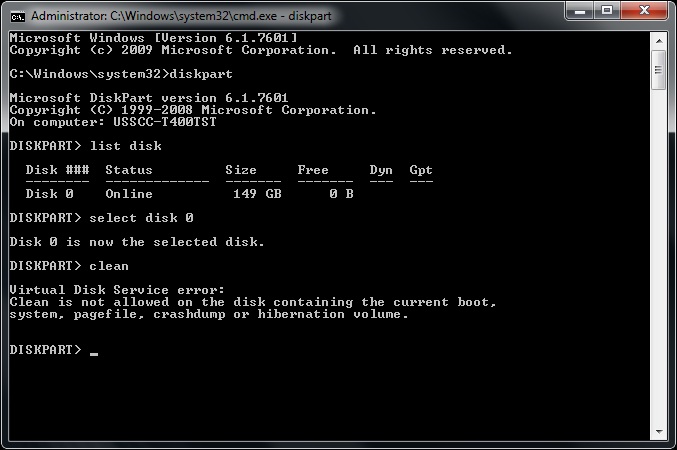
Posted by Brad Miller (Member # 2) on 01-13-2012, 07:37 PM:
Good to know. I was told otherwise and didn't want to test the theory.
Posted by Sean Weitzel (Member # 244) on 01-13-2012, 09:28 PM:
It's always better to be safe than sorry. I would still recommend your instructions with the added double check.
Posted by Tony Bandiera Jr (Member # 2365) on 01-14-2012, 06:37 PM:
Thankfully that procedure is idiot proof so even I can't screw it up too badly.
Posted by Chris Slycord (Member # 4239) on 01-14-2012, 06:46 PM:
quote: Rick Cook
Programming today is a race between software engineers striving to build bigger and better idiot-proof programs, and the Universe trying to produce bigger and better idiots. So far, the Universe is winning.
Posted by Tony Bandiera Jr (Member # 2365) on 01-21-2012, 08:26 PM:
Ok, time to throw out a few more noob questions:
1: After submitting the form to Dolby to register our installation, how long should it take to get a response from them? I was asked about it yesterday.
2: Is it possible to transfer content from the RAID to a drive in the CRU? (I want to archive the trailers and snipes loaded for future posterity.)
That Christie is a super efficient projector..I had to run the lamp at minimum and defocus the z axis to get the light down to an acceptable level. (Around 20fl 2D).
The next hurdle is coming up with a way to remote shutdown my entire AMX system (or put it under a time clock of sorts) as the system was left on overnight by inattentive faculty. If I hadn't walked in yesterday to check on some things it would have been on all weekend too.
If I do the time clock idea it is pretty simple to do (just a few lines of code) but with my luck the day after I set it up someone will schedule an event that doesn't end until after the shutdown time.
Or I may make that shutdown conditional...if it sees a button press within a specified window it delays an additional period of time.
Posted by Brad Miller (Member # 2) on 01-21-2012, 10:41 PM:
1. I always hear from them within 24 hours. Usually within an hour or two.
2. Yes.
Posted by Tony Bandiera Jr (Member # 2365) on 01-22-2012, 12:48 PM:
Brad, thank you.
So as for the first, we have a problem then as we haven't heard from them since we submitted the form on the 6th.
As for the second, thanks.
BTW I sent you a check for the drives.
Posted by Steve Guttag (Member # 268) on 01-22-2012, 02:14 PM:
Tony,
They don't always respond to a submittal unless you request a copy of the certificate...note some email servers will block the email with the attachments. What the submittal form does is allows Dolby to register your media block with the studios for KDM generation as well as allow them to complete their database. As such, there is nothing to communicate to you directly.
If you request the certificate (I would in your application) then you will know they have it. The purpose of getting the certificate is when you run non-Hollywood content...the foreign entity will request the certificate to generate the KDM.
-Steve
Posted by Tony Bandiera Jr (Member # 2365) on 01-22-2012, 02:17 PM:
Thanks for the info Steve.
I'll have the department head submit the request.
Powered by Infopop Corporation
UBB.classicTM
6.3.1.2