This is topic bulb life for Barco DPK20c in forum Digital Cinema Forum at Film-Tech Forum ARCHIVE.
To visit this topic, use this URL:
https://ft-forum.com/ft/cgi-bin/ubb/ultimatebb.cgi?ubb=get_topic;f=16;t=001002
Posted by Melanie Loggins (Member # 6454) on 01-19-2012, 02:26 PM:
We just replaced our bulb for the second time. The first bulb had just under 800 hours on it, and the second had just at 600. Both started flickering pretty noticeably. Both were Sylvania XPO 4000w bulbs. (The new one is as well.) We've been open for one year and one month and gone through two bulbs, but we see evidence online of people getting well over the 1000 hours promised by Sylvania.
We also figured something out about our setup: all macros were set to CLO mode, rather than normal. This was done by the guy who installed our equipment and, after a few other things that have gone wrong, we're beginning to think he didn't always have our best interest at heart. (We sold us the other two bulbs for $300 more than we paid for this one.) So my question is: is CLO burning out our bulbs? Or could it be something else?
Posted by Dave Macaulay (Member # 813) on 01-19-2012, 02:49 PM:
CLO (Constant Light Output) varies lamp power to maintain screen light as the lamp ages, and compensate for the brightness difference between 2D and 3D. My opinion is that it should be used. You can check actual lamp power by picking "service" on the top screen of the touchscreen. If you just pick a preset macro (ie 2D flat or 2D Scope) with the lamp on then check the "service" screen for lamp power you will see what power your lamps actually run at. Assuming you have 3D, the power should be close to maximum for one 3D format - depending on your masking one will have a larger image than the other - and above minimum for both 2D formats. If it's in CLO mode and assuming the LSC setup is correct you will also see the target and actual screen brightness in Ft-L.
If you have the ST password and know what you're doing (you can totally screw up the projector as ST) you can check what LSC files are set up and what macro uses them. A proper (in my opinion) installation will have LSC files for 2D flat, 2D scope, 3D flat, and 3D scope... and the associated macros will call that file and then set the lamp in CLO mode with a relevant target.
There are lots of theories about lamp life. I don't see Osram lamps getting much past warranty life in Barco lamphouses, and doing so is unwise because once fully out of warranty should a lamp explode, the lamphouse damage isn't covered. I find that the 4kW lamps usually get to warranty, but that's no longer 1000Hr - it's 700Hr according to Osram although Barco hasn't changed the lamp data in the projector. At 1000Hr you've used up the additional 300Hr rupture warranty and a lamp explosion will almost certainly cost you for the mirrors and front plate.
Posted by Monte L Fullmer (Member # 2797) on 01-19-2012, 03:11 PM:
My Barcos are in normal mode and I easily pull 1000h before changeout.
I would think that running in CLO mode (where it's using its built-in light sensor for a set lumen output that is adjustable in the ST program of the Commander screen. I bet your technician ran that setting up quite high where its causing the bulb to be overpowered at all times which will shorten the life of any bulb) isn't too fair on the bulb since the power to the bulb is adjusting between modes. In 2D mode, the power to the bulb can actually drops to almost 50% of the run where the bulb isn't designed to run at such a low amperage which can cause problems towards the end of its life. Then, in 3D mode, the power kicks up to over 100% to get more light out which is over powering the bulb and the results is less life.
If you know how to use the ST switching the program from normal to CLO is quite easy, but true..it can be a trick to set the luminance factors in CLO why I stay with normal and run the rectifier scale up to the max at 255 for both 2D and 3D showings.
Are you using DHP4000W bulbs in that Barco? They carry a 1000H warranty .. and 100% throughout the entire run of the bulb -no pro rated warranty.
Or could use USHIO 40 (don't know the model number right off hand for the USHIO bulbs) in the Barco, but the pro rate on the warranty begins after a certain number of hours.
Plus, you need tonnage of exhaust (like 800cfm as a minimum) for these units even though it's said that you don't need external exhaust with these smaller units...
Posted by Sam D. Chavez (Member # 1841) on 01-19-2012, 06:01 PM:
I've installed several Barco's of this size and always meet warranty hours and the bulb looks quite good when the red light comes on.
I would want to know what you are using for an external exhaust fan and what the CFM figure as really measured, not estimated.
I used Fan Tech 500 CFM fans in line fans directly above the projector. Not to say it can't be done some other way but more CFM is almost always better. A cool down cycle on the external fan at the end of the night is mandatory as far as I'm concerned.
I've used both Ushio and Osram in these sizes and both worked well.
Posted by Dave Macaulay (Member # 813) on 01-19-2012, 07:16 PM:
Osram XBO4000W/DHP lamps have a 700 hour warranty, with a 300 hour extended warranty on envelope failure. You can call that a 1000 hour warranty if you want, but there is no warranty past 700 hours for a lamp that flickers or won't start.
I agree on looking at the exhaust flow. This must be checked on installation. There's no airflow switch on a 20C so it will work with insufficient airflow, the light engine cooling will be acceptable with sub-par airflow, but the lamphouse will be overheating.
Running the lamp at 100% all the time in "standard" mode is not a great idea. In a 3D house the screen will be grossly overbright in 2D with washed out blacks. Setting up the LSC light level files and the preset macros for CLO mode is easy, a competent tech will do it during installation and annual maintenance. If you neglect the LSC files it's possible to inadvertently disable the lamp alignment mode: without an LSC file the lamp level reading is always 0 Ft-L and you have no way of adjusting the lamp alignment.
Posted by Steve Guttag (Member # 268) on 01-20-2012, 06:22 AM:
Our only short-lived lamps in the Barcos have been Osrams. Ushios have, thus far, always gone the distance (1000Hours on a 4K).
Monte, you, once again, do not know what you speak. The Barco projector will NOT run a lamp outside of the manufacturer's specifications. Unlike Christie projectors, there is no 110% mode...the range of the lamp is part of what is set when one identifies the lamp to the projector.
Having the lamp output fixed means that, at most, one format is at the correct light output. In a 2D only theatre, I could see splitting the difference between Flat/Scope and letting the lamp output be fixed (and occasionally boosting it up a bit for aging) but in a 2D/3D theatre...there is no good way to have the "proper" amount of light on all formats with a fixed lamp setting. Thems the facts.
The downside to swinging the current between the extremes is it WILL make a lamp less stable as it ages. We always recommend separate lamps for 2D and 3D and occasionally get folks to do it! This is a case where Barco has the other two DLP companies beat...separate lamphouses and the lamphouse will keep track of what lamp and how many hours are on it. The nice thing is that 3D lamphouse could be used in several of their 3D theatres (if the lamp size is correct)...it need not be locked into say Screen #1. It also makes for a nice ready spare should an emergency arise.
-Steve
Posted by Monte L Fullmer (Member # 2797) on 01-20-2012, 02:48 PM:
Gee..sorry on that - seen the screens of other Barcos located in my area with the units in Normal mode, with the power bar pegged past the maximum wattage of the bulb, thus figured that the rectifier is overpowering the bulb to meet fL's.
Mine are reading below the maximum..
...what do I know... ![[Shrug]](graemlins/shrug.gif) - Monte
- Monte
Posted by Antti Nayha (Member # 4980) on 01-21-2012, 05:34 AM:
Here’s a screenshot from the Communicator software:
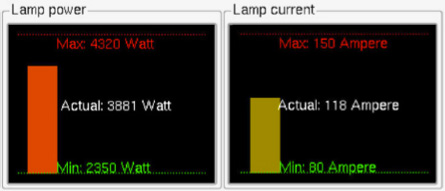
Now, supposing that the lamp is a Philips LTIX-4500W-HS… it has a rated current of 135 A and a min/max range of 80–150 A. As Steve said, Barco won’t let you run the lamp over the ”official” range:
minimum: 80 A = 2350 W = 53 %
rated: 135 A = 4000 W = 90 %
maximum: 150 A = 4320 W = 100 %
It might go a couple of watts over 4320 when running at ”255” (maximum), but not so much that it really matters.
quote: Steve Guttag
there is no good way to have the "proper" amount of light on all formats with a fixed lamp setting. Thems the facts.
Well, you can defocus the bulb manually by adjusting the Z-axis to cut down light levels for 2D. This is relatively easy to do in a Barco: just open the side cover and turn the knob, no tools needed. But I guess that the dual-lamphouse option is almost as easy, and will save you money in the long term.
Posted by Steve Guttag (Member # 268) on 01-21-2012, 07:47 AM:
Defocusing the lamp is rarely a good option, though popular historically. Look at what is happening to the light as you defocus it, its uniformity goes to pot...the reflector was designed with specific foci.
-Steve
Posted by Antti Nayha (Member # 4980) on 01-21-2012, 07:56 AM:
Judging by the naked eye, at least Barco seems to handle defocusing really well. But to keep it scientific, I’ll make some measurements next time!
Posted by Carsten Kurz (Member # 5396) on 01-21-2012, 08:14 PM:
I like the idea of an extractable lamp house, but I have seen prices for Barco Lamphouses in the 4000 US$ range. Might be okay for a large house with multiple screens if swapped between different projectors as needed, but you can spend a lot of lamp runtime for that money otherwise.
Christies, on the other hand, have easy and quick automated lamp loc adjustment, so it might in fact be easier and cheaper to swap bulbs between longer 2D/3D showings without the additional cost for a lamp house.
- Carsten
Posted by Antti Nayha (Member # 4980) on 01-22-2012, 05:10 AM:
There’s also a motorized lamphouse available for Barco’s B-series projectors, although it’s only meant for lamps from 3 kW upwards. With that, you get automatic lamp alignment.
Posted by Carsten Kurz (Member # 5396) on 01-22-2012, 09:32 AM:
Any idea what it costs?
- Carsten
Posted by Steve Guttag (Member # 268) on 01-22-2012, 02:11 PM:
Motorized lamphouses as well as the option of putting the motors on existing lamphouses for the C series have been available since they came out.
In my opinion, Christie has the best auto lamp adjust...Barcos takes longer and doesn't seem to get quite as close...though they have made improvements that I have not verified since I last checked. One thing that Barco does have that Christie does not is the option to JUST tweak the "Z" axis...which is what will drift just with age. Christie can only do all or nothing.
The cost on the "C" lamphouse is closer to $5K street costs and even more for the "B" lamphouses.
However, as to cost of recoupment...you are oh so wrong on how fast that changes...I can often go from a 4K 3D lamp at 1000 hours to a 1.2K lamp at 3000 hours, plus the savings in electricity and the cost of the lamps themselves. The lamphouse will pay for itself in a couple of years...depending on the size of lamps...lamp costs go up geometrically due to the notably increase cost of lamp plus the decrease in runable life.
Another advantage to the lamphouse method is that the skill level of the person changing the lamphouse need be MUCH lower than the one changing the lamp itself. There is nowhere near the safety factor too since the lamphouse can contain an explosion. You can also change a lamphouse with minimal cooling time versus pulling a hot xenon lamp raw.
-Steve
Posted by Dranreb Rosales (Member # 6889) on 06-06-2012, 07:46 AM:
Hi everyone, I found this site very useful for a guy like me. I've been handling lamp replacement for 81 screens and I was just wondering why our lamp cannot reach the 1000 hrs given by OSRAM. Most of our projectors are Barco DP2K-20c and are set in Normal mode.
I normally set the light output at 180 and gradually adjust it as the lamp run hours increases. Is there any other way of maintaining the lamp so it could reach 1000 hours? Currently, my average is at 800 only.
Thanks
Posted by Chase Taylor (Member # 778) on 06-06-2012, 08:14 AM:
While I've had some Osram's 4K's make it to the 1000hr mark lately it has just been that lately, just within the last few months.
I tell everyone to use Ushio's as I've had great luck with them over the last few years.
Posted by Dave Macaulay (Member # 813) on 06-06-2012, 08:58 AM:
I don't see the advantage to using normal mode. The CLO sensor is not perfect but it's pretty good if you calibrate it close to your target ft-L on screen. Also, you must set the lamp back to normal mode for lamp alignment. Barco should have the system go to standard mode when you open the alignment window, possibly it will in a future release.
My experience is that sufficient exhaust air volume is vital to get lamp life approaching warranty. I've seen systems where the extractor was "measured" at well over the minimum volume by using a fan type airflow measurement on the open duct. Then the lamp life is pathetic, and when I measure the airflow using a probe in the duct with it connected... volume is way below spec.
The biggest problem is with 3D screens. To get acceptable light at 70% lamp power requires a lamp that will be double or triple the correct light level in 2D at minimum power. Using two lamphouses - one for 3D and one for 2D with a smaller lamp - in a Barco projector makes sense and will eventually pay for itself, but I haven't seen a theatre actually do this. Defocussing a Barco lamphouse is pretty easy but this can damage the light processor or cold mirror.
Posted by Steve Guttag (Member # 268) on 06-06-2012, 10:49 AM:
Yeah...stop using Osram and switch to a good lamp...like Ushio...then you will make your hours and have more light doing it!
Posted by Antti Nayha (Member # 4980) on 06-06-2012, 01:06 PM:
quote: Dave Macaulay
Defocussing a Barco lamphouse is pretty easy but this can damage the light processor or cold mirror.
A Barco tech rep said that there's no harm in doing this. You can check by yourself by looking at the temperatures in Communicator. Apparently the system is designed well enough. Just curious: has anybody heard a similar (or an opposite) statement from NEC or Christie?
Some people say that defocusing the bulb hurts your light uniformity on the screen, but I haven't seen any problems on a naked eye so far. (On a Barco, that is. Naturally I'm familiar with the phenomenon on film projectors.)
I've been meaning to do some proper testing with a light meter, but didn't get around to it yet... promise do that later in June and post the results!
Posted by Joris Springer (Member # 4175) on 06-17-2012, 07:46 AM:
I find this a very interesting thread, at my work we are having some strange failures with the Osram 4K and 3K lamps when they reach around the 700 hours.
Around that time they have around the 360 strikes and technical support tells us that it is because of the strikes that the lamp refuses to start and even turns itself off during the shows.
However, we have the problem only with the DP2K-20C, 15C and 19B. When they were just installed we heard from a different company that that happends often because the lamps were installed in the factory and so during transport they get quite a lot of bumps but now with the next set of lamps we are having the same problem all over again.
Guess I have to call to Osram and confirm how long the lamps can burn with guarantee.
Powered by Infopop Corporation
UBB.classicTM
6.3.1.2