This is topic Christie CP2210 - ILS Quick Reset in forum Digital Cinema Forum at Film-Tech Forum ARCHIVE.
To visit this topic, use this URL:
https://ft-forum.com/ft/cgi-bin/ubb/ultimatebb.cgi?ubb=get_topic;f=16;t=001022
Posted by Frank Cox (Member # 6258) on 02-09-2012, 05:08 PM:
I noticed that my picture was suddenly slightly too small for the screen; I had about 3 inches of blank space between the bottom of the picture and the top of the masking, and about 2 inches of blank space on either side of the picture.
I talked to the tech who looks after my stuff and he suggested that the zoom lens might be stuck somehow, and I should bring up a test pattern and then click on the Lens Adjust button on the main screen, then zoom the lens in and out and see what happened. Which I did. But I discovered that zooming the lens out to the maximum still didn't quite fill the screen.
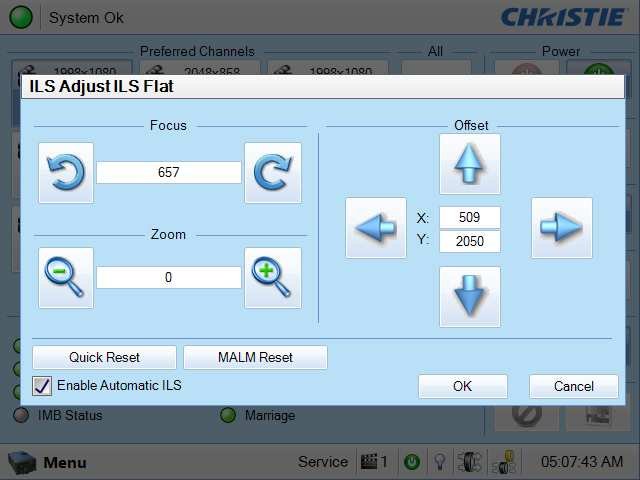
I then clicked on Quick Reset to see what would happen, and suddenly everything is perfect. Perfect screen fill, perfect focus.
So, my question is, what happened here? And since I wasn't logged in as anything when I did the zooming around and the Quick Reset (just the default Operator, not Service or anything) will the Quick Reset fix hold for the regular shows or do I have to reset it again somehow to get it to stick?
To clarify what I'm talking about, here is a photo of the screen (from the manual) that I found the Quick Reset on:
Posted by Tony Bandiera Jr (Member # 2365) on 02-10-2012, 01:27 PM:
The quick reset should hold fine for the rest of your shows.
Chances are that during the original install the ILS wasn't calibrated and that's why it drifted.
As I mentioned in another thread, I forgot to calibrate the ILS on my UC Irvine install so I am going to do it on my next visit just to be safe.
I am not sure (because I haven't tried it yet) but I think if you do the calibration you will need to edit all the lens files (i.e. re-tweak the lens positions) afterwards.
Posted by Frank Cox (Member # 6258) on 02-10-2012, 10:00 PM:
It seems to have "stuck" through tonight's show, so I guess that's a solved problem.
I re-run the LampLOC and LightLOC stuff every second month; I'm now thinking that I should add the ILS Quick Reset to that routine as well.
Posted by Tony Bandiera Jr (Member # 2365) on 02-10-2012, 11:08 PM:
Frank!! DO NOT ever use the LiteLoc....it WILL eventually overdrive your bulb and puts you at very high risk of explosion!! Brad and others will tell you to not use it as well. Read my "Dark Side" thread for more discussion on that.
You can disable it in the service mode and set the lamp power manually, adjusting it as needed as the bulb ages.
If you insist on using LiteLoc, you MUST, I repeat MUST, change your bulbs at or before normal warranty hours.
LiteLoc is a nice idea in theory but it is too dangerous in the real world.
Now LAMP LOC is the auto focus utility and it works great. You DO NOT need to redo it unless you rotate (also unnecessary) or change a bulb. Doing it otherwise is just excess wear and tear on the servo motors, the bulbs' focus is unlikely to drift as it ages.
It is possible to over-maintain something and that sounds like what you're doing.
Posted by Brad Miller (Member # 2) on 02-10-2012, 11:43 PM:
Actually, lamp loc will increase the light output, just like re-focusing a 35mm lamphouse after the bulb ages a bit.
Light loc is evil.
Posted by Steve Guttag (Member # 268) on 02-11-2012, 11:38 AM:
If you are a regular theatre (running shows everyday), running lamp-loc about once a month will go a long way to keeping your light at its brightest. This holds true for EVERY brand of projector (film included)...refocusing the lamp will keep your light system at its most efficient. In Barco's automatic lamphouse, they have a focus-only mode even.
The larger the lamp, the greater the drift/benefit.
-Steve
Posted by Tony Bandiera Jr (Member # 2365) on 02-11-2012, 02:13 PM:
Ok, I will defer to Steve on running Lamp-Loc on a regular basis, as he has a lot more experience in that area. ![[Big Grin]](biggrin.gif)
Steve, how MUCH benefit would you say it has though? 5%, 10%, or greater gain in useable light?
Honestly, in my RCA service days (80's and 90's and again talking only film systems here) I had never noticed any "focus drift" in any of the 200+ screens I had to service, and yes checking light with the trusty Minolta Spot meter was a quarterly thing for me.
Are newer bulbs more prone to arc drift or something?
Posted by Steve Guttag (Member # 268) on 02-11-2012, 03:50 PM:
Film lamps are MUCH faster...and it isn't drift as much as "burn-back" In the first 100-hours you can gain at least 10% of your light back if you refocus...it is closer to 300-hours on a digital lamp. These numbers are estimates as burn-back is design and current dependent.
The "drift" you will see is MUCH less in a 1200-watt lamp than in a 6500-watt lamp.
Now that you have a Christie...wait until your projector gets a good 300-hours on it....light the lamp and let it stabilize over 10-15 minutes. Note the "number" that the light level is reading. Then perform a light loc...and without changing the current, see what the "number" is now. The results may surprise you.
-Steve
Posted by Tony Bandiera Jr (Member # 2365) on 02-11-2012, 06:13 PM:
Ahhh, that makes sense...thanks for the explanation. ![[Smile]](smile.gif)
I will check that Christie after the 300 hours and let you know what I find.
Posted by Brad Miller (Member # 2) on 02-11-2012, 07:42 PM:
You will find Steve and I are correct. That being said, don't go crazy Lamp Loc'ing every week, as that will do more damage to the life of the lamp constantly moving it around. Once a month is really a pretty good interval, but note that is for a normal movie theater running 3-5 shows a day.
Powered by Infopop Corporation
UBB.classicTM
6.3.1.2