This is topic Shut down the server the right way in forum Digital Cinema Forum at Film-Tech Forum ARCHIVE.
To visit this topic, use this URL:
https://ft-forum.com/ft/cgi-bin/ubb/ultimatebb.cgi?ubb=get_topic;f=16;t=001023
Posted by Tommy Zackariasson (Member # 6505) on 02-10-2012, 12:38 PM:
Hej
We have a Dolby DSS-200 server and i wonder if there really is no way to shut it down in a better way than to just shut down the ups? This is how to do it according to the installer, but I dont believe it. Yesterday we had to cancel a show because the server did not boot up, fcheck returned an error 4 because of some corrupt files. The installer was here today and upgraded to fix it. I think that this happens because of the way we kill the server. Any ideas? /T
Posted by Tony Bandiera Jr (Member # 2365) on 02-10-2012, 01:16 PM:
Tommy:
First off, why are you shutting down the server? If you search some threads here you'll find that it is NOT a good idea to keep shutting down the server, as the RAID drives WILL fail sooner. The drives will last a lot longer if they are kept spinning rather than being subject to on/off cycles.
EDIT: Look HERE, bottom of page 5 and look at rest of thread from more info.
That said, if you REALLY MUST shut down the server..on the DSS200, remove the face panel. At the bottom of the row of LEDs you'll see a recessed button. Use a pen or paper clip to push that button and it will initiate a shutdown. Push it again to power up again.
I have been told by Dolby that simply unplugging the server's two power cords is an OK method as well. (Same effect as shutting off your UPS.)
I think the corrupted files are from some other problem, such as shutting down during a RAID Verify or rebuild.
Again, best advice is DO NOT shut down the server!! Most maintenance can even be done with the server on (replacing bad drives, replacing cooling fans, and even swapping a bad power supply.)
Posted by Jason Raftery (Member # 6291) on 02-10-2012, 02:05 PM:
I have also wondered how best to force a graceful shutdown on the DSS100/200. There are occasions (albeit infrequent) where it makes sense to actually power the server off.
As Dolby's servers are built on a Linux core, would a standard Linux command like "shutdown -h now" from the command line successfully power off the server?
To expand on Tommy's question, I've been advised to reboot the servers once a week to keep them fresh and re-sync the clocks. While I can simply do a CTRL-ALT-DEL from the command prompt to initiate a restart manually, is there a way to automate this process and force a restart at a predetermined time or interval using cron or another Linux process?
Posted by Scott Norwood (Member # 30) on 02-10-2012, 02:13 PM:
What Tony said. (Though there are legitimate reasons to power down a server, such as a planned building power outage, equipment moves, etc.)
Another safe method to power down the server would be to do a ctrl-alt-del to initiate a reboot and just power down the equipment before it starts booting again. This is actually potentially dangerous if someone does it during a show (especially someone who is used to working with Windows systems, where ctrl-alt-del is used to call up the login box).
And, yes, "shutdown -h now" works, too, but you would need a root shell to do that. I will not post the root password here, but it is not difficult to get if you really want it. If you get to that point, I would actually suggest editing /etc/inittab to remove the mapping of ctrl-alt-del to reboot the system (just comment out the line that begins with "ca").
Posted by Tommy Zackariasson (Member # 6505) on 02-10-2012, 03:28 PM:
This is a server and servers are supposed to run 24-7 I understand that and it is not an issue if you run shows every day. But we (like I suppose thousands and thousands) theaters around the world run like one or two or maybe three shows a week and then it would be quite irresponible( with global warming and all that) to waste all that energy. It would be interesting to calculate how much energy is consumed for nothing this way globally. My point here is: Why is it that there is no shut down button in the gui? Like every other computer!
Posted by Tony Bandiera Jr (Member # 2365) on 02-10-2012, 05:03 PM:
The answer to your question of why there is no shutdown button is in the first line of your post:
quote: Tommy Zackariasson
This is a server and servers are supposed to run 24-7
While energy conservation is a noble cause let me ask you this: which is more irresponsible: Using the equipment as designed, minimizing unnecessary replacement of parts which consumes more resources, or leaving it on as designed and letting the idle power usage make less of an impact?
Finally, why risk loss of MORE shows (you've already lost one) by doing something which is strongly discouraged, all in the name of "being green"?
You need to pick your "battles" more carefully..like for example looking at your lighting and HVAC systems to see where conservation steps are needed, which will MORE than offset the power used by an idle server. I promise you that with minimal effort you will find waste in your lighting and HVAC systems which is FAR greater than the energy consumed by your server. One example: set your HVAC thermostats 2 degrees warmer in summer and colder in winter and the savings right there alone will buy you about 7 years of idle server power energy, no joke.
Otherwise, just suffer the consequences of repeatedly shutting down the server without complaining about it. ![[Big Grin]](biggrin.gif)
Posted by Steve Guttag (Member # 268) on 02-10-2012, 06:24 PM:
Tommy,
As to your corrupt file issue...if you were running Dolby 4.3.0.36 through 4.3.4.x...then the problem was in the software and it would be random as to when it would come up corrupt.
Starting with 4.3.5.6, the problem was fixed. The current release version of the Dolby software is 4.3.5.9 and is available to all systems in the field. If you are on ANY version of 4.3 already then one need not have a kdm for upgrade. It is a worthy upgrade for anyone. One also gets VNC capability too. 4.3.5.9 is available for download now for those authorized to the Dolby secure site.
-Steve
Posted by Marco Giustini (Member # 4544) on 02-11-2012, 05:00 AM:
still, I do believe that a "shutdown" button would be appropriate.
We all do shut our computers through "shutdown" I reckon. How many of you shut their linux/windows computers unplugging the mains cord?
Hard drives will possibly have a bit more life if not power cycled, but i guess this would be true if you were to power them off several times a day - like power saving does. We are talking about once a day after 10 hours of service. Also, I wouldn't leave any equipment on unsupervised during the night.
Yes, latest version is supposed to fix the corruption issue but I still think that a shutdown button wouldn't hurt. Also, the DSS200 I used did not initiate a shutdown sequence when the on/off button was pressed, but was powering down the unit immediately. Possibly something to be set in the software as you can do the same under windows.
Posted by Tommy Zackariasson (Member # 6505) on 02-11-2012, 07:37 AM:
I agree with you Marco, it is no good to have equipment of any kind running unattended for days and days. I could make the reason-list very long but just to mention one: fire security! Some booths have a mainswitch with a keylock to turn off everything for security reasons. I bet this is a thing that will be fixed in future versions. Time will tell if I'm right. Steve, the version we got yesterday was 4.3.5.6 wonder why they didn't give us the current release, should I ask them to?
Posted by Brad Miller (Member # 2) on 02-11-2012, 09:49 AM:
Incorrect. Powering off hard drives once a day will noticeably decrease their life, and thus the life of the server before failure. Servers are meant to be left running 24/7. There is no legitimate fire hazard.
Posted by Antti Nayha (Member # 4980) on 02-11-2012, 10:25 AM:
Even if Tommy’s theatre really only runs 1–3 shows a week? That means the server’s uptime hours would be around 20 times less than in a 24/7 operation…
I’m not questioning the basic 24/7 principle at all, just wondering if it still holds for such a low-usage venue.
Posted by Marco Giustini (Member # 4544) on 02-11-2012, 11:17 AM:
Brad,
you say "noticeably". Does this mean that our personal computers (TV, laptops, set top box....) are doomed?
In some countries I am not sure this would be allowed - because of fire safety.
Anyway, a DSS200 is 250W rated. Keeping them ON 14 extra hours each day would be 1277KW used every year (based on the rated power of course). I do believe this figure should be taken into consideration.
Back to topic, even though someone wanted to keep their servers on 24/7 I do believe that "reboot" and "shutdown" buttons would be very useful!
Posted by Steve Guttag (Member # 268) on 02-11-2012, 11:36 AM:
Tommy,
4.3.5.9 is a relatively recent release (was posted end of last week or beginning of this week). I would definitely update to 4.3.5.9 as it is a stability increase. If you have a Cinedigm TCC system, I would consider it critical due to an issue started in TCC 3.2.4.0 Patch 10 and not corrected until patch 12.
Posted by Chris Slycord (Member # 4239) on 02-11-2012, 05:24 PM:
quote: Marco Giustini
Does this mean that our personal computers (TV, laptops, set top box....) are doomed?
Not comparable. Your laptop is highly unlikely to be reading/writing anywhere near as much as your digital cinema server.
Posted by Tony Bandiera Jr (Member # 2365) on 02-11-2012, 06:07 PM:
Tommy and Marco:
I don't know why we seem to be failing to get through to you guys...is it a cultural difference or are you guys unwilling to listen to guys with a combined total of well over 100 years of experience in this industry? (Brad, Steve and me)
I guess you guys know everything, and the server manufacturer is wrong, Brad is wrong, Steve is wrong, I am wrong, and thousands of venues who leave their servers running 24/7 are wrong..as are Disney, Six Flags, Knott's Berry Farm and most every other amusement park who leave their audio and video equipment powered 24/7. In the years I worked at Knott's with well over a thousand audio amps and other gear scattered throughout the park, I can't even fill the count on one HAND of equipment failures.
Fire risk? Give me a break. Your theatre is more likely to suffer a fire from staff carelessness, someone sneaking a smoke or HVAC failure than your server going up in flames. ![[Roll Eyes]](rolleyes.gif)
Go ahead and do whatever the hell you want then, but DO NOT come back here whining because you had another server breakdown because you didn't listen.
Oh, and Marco: your power figure is flawed because the idle server consumes less than the rated 250 watts. And did you read what I told Tommy? If you're worried about the power use, a simple audit of your lighting and HVAC will reveal changes that will save you FAR MORE energy that the server uses.
Posted by Marco Giustini (Member # 4544) on 02-11-2012, 07:01 PM:
Tony,
You may disagree with me, but I am free to write my opinion on this forum as soon as it does not break forum's rules - Brad is the judge here or course! I don't necessarily have to agree with you, particularly if you show off your expertise and experience.
That said, I have also respected Steve's and Brad's opinion on this forum. Their opinions and advices are something that have always had a big influence on my job.
The power figure I wrote is based on the rated power - I did point it out - so yes, it's not accurate but I think I got to the point anyway.
Google published a report about hard drives reliability a few years ago. It turned out that hard drives running at lower temperatures were more prone to fail. So why all servers have massive airflow around HDs to keep them cool?
Again, not arguing, just wondering.
Here's the link to the report.
And, again, I assume everybody has to turn their servers off every now and then, for whatever reason. Why on earth I should be forced to unplug a Linux computer to turn it off?
cheers
Marco
Posted by Brad Miller (Member # 2) on 02-11-2012, 07:43 PM:
Marco,
It is because pulling the plug doesn't harm anything the way the server was designed. If it REALLY bothers you though, you can putty into it and shut it down command line.
Posted by Mike Blakesley (Member # 26) on 02-11-2012, 08:21 PM:
It does seem odd they would design it that way.......since every computer owner has it burned into their skull from day one that you NEVER, NEVER, NEVER unplug a computer without shutting it down first, and if you DO do that, Windows sometimes even chews you out for it. So I can understand a person's reluctance to just pull the plug.
Posted by Chris Slycord (Member # 4239) on 02-12-2012, 02:22 AM:
quote: Marco Giustini
Google published a report about hard drives reliability a few years ago. It turned out that hard drives running at lower temperatures were more prone to fail. So why all servers have massive airflow around HDs to keep them cool?
The study doesn't imply that running them at "lower" temperatures increases failure rates. The study shows that by the 3rd and 4th years, the failure rates increase linearly with the increase in temperature. The exception is running them at around 15 deg C, which increases the failure rate significantly in the 1st year over mid-range temps though by that 3rd and 4th year, the hottest ones still fail at a much higher rate.
So in short: They're cooling the HD's because -
1) Cooling isn't, as you imply, the same as cooling them to ~15 deg C.
2) They expect most of their disks to make it 3 years, by which time the increase in temperature increases linearly with the increase in failure rates
Posted by Tommy Zackariasson (Member # 6505) on 02-12-2012, 10:27 AM:
Tony, and everyone - I'm not saying you're wrong I just think this is a bit strange: To run a movie now and then you have to have a machine that sounds like a jet on constantly. Our venue is a versatile one with all kinds of events the week through. Sometimes a light or sound tech resides in the booth with the big window to the theater open. It could be a teatcher or a pupil from the school nearby. Sometimes we have meetings in the booth (it is a big room). Our old machines (born 1939 in Germany and retired last summer) kept very quite between shows! Maybe you see my point? Regards
Posted by Tony Bandiera Jr (Member # 2365) on 02-12-2012, 12:41 PM:
Tommy, if you have read the "DARK SIDE" thread you will note I just installed a server at a University I work at here in California. It stays on 24/7 as designed, and yes the student techs have have to change their habit of operating with the booth door open all the time (It is right at the main entry with a single set of doors separating it from the auditorium) and yet they will also probably only run one DCP per month if even that. The University's own IT department checked with me to remind me to leave it on all the time to avoid early drive failures. They accept this as part of the deal to have the privilege to run D-Cinema. (And this is a LEEDS certified facility.)
I also now have some installs in people's HOMES for their screening rooms and they have no problem with leaving the server on. One client runs 1-2 shows a week and a few others once a month or less.
As for the techs leaving "the big window to the theater open" during shows that is unprofessional in the extreme. When work is being done in the booth there will ALWAYS be noise of some kind, even if the techs just need to talk to one another. Your audience will hear that. Big no-no.
Meetings in the booth? For what purpose? Why not meet in the auditorium?
Do you see my point? You come on here because you had a lost show because the server failed to boot up, you were given several different professional's opinions/instructions telling you to QUIT shutting the server down, you countered with wasted energy use (a good point BTW), you were then given easy and concise options to look at to offset that energy use, you now come back with "Well the techs leave the window open and we have meetings in the booth..." Pathetic.
For the last time, your choice is clear:
Leave the server on like you are supposed to to ensure long-term reliability and be sure it WILL be up and ready for your infrequent shows;
Or continue to not listen to people trying to help you, shut it down whenever you damn well please and suffer the consequences... but if you do don't come back here whining about another server crash.
IMHO it sounds like you and/or your facility are not capable of handling the responsibility of properly operating a D-Cinema system.
Posted by Jim Henk (Member # 3628) on 02-12-2012, 01:32 PM:
Tony, Steve, and Brad are right. Having been responsible for server farms in other industries, we always held our breath (and noses) whenever we had to shut down servers for equipment moves, AC mains maintenance, or even equipment upgrades. Because we knew that we stood a really good chance of losing one server or another on power-up, and we'd have to replace whatever went bad, (yep, mostly drives) and restore from backups, taking valuable time.
Shutting down servers is always nervous time, no matter what industry you're in. Avoid whenever possible, or plan on a lot of disaster recovery time, mostly at the worst possible moment.
How much revenue would you lose if a server refused to come back up again on a show-day, and you have to send an audience home? Would that offset a few watts saved by shutting them down? Ask the owners. I'll think they'll say "No." and then mention something about keeping your job. That's a coin-toss I wouldn't want to make.
Be well.
Posted by Monte L Fullmer (Member # 2797) on 02-12-2012, 01:44 PM:
Just do what you think is best to operate your system - I've seen small cinema locations shut down their servers on a daily basis....and they still are working okey.
Posted by Steve Guttag (Member # 268) on 02-12-2012, 03:14 PM:
BTW...I'm not as emphatic as the others on leaving the servers on for occasional use theatres. While it is true that the HDD will have a higher fail rate...keep a drive around...even shutting down you are going to only lose about a drive a year and that will likely be cheaper than leaving an occasional use theatre always powered. For my regular theatres, yes 24-hour power is the prescribed method.
-Steve
Posted by Tommy Zackariasson (Member # 6505) on 02-12-2012, 04:11 PM:
Well how shall I put this...I am not arguing, just some peaceful reflections over the new way to show movies, that's all...maybe It's hard to get that through in a foreign language.
Posted by Brad Miller (Member # 2) on 02-12-2012, 07:00 PM:
If you are only going to run 2-3 shows a month, I'm fine with shutting down the server. If the server is to be used daily and it is being shut down at night...FOOLISH!!!
Posted by Tony Bandiera Jr (Member # 2365) on 02-13-2012, 01:01 AM:
Brad, would you still make that same recommendation when dealing with a staff of *ahem* less-qualified persons, such as the staff I deal with at the University?
I for one would much rather deal with the occasional drive failure from the 24/7 operation than trust the booth monkeys to know what to do in the event the server fails to boot up properly. UCI is going to have to adapt to the new requirements of D-Cinema, they can no longer do what they have done in the past, which is to bring in a print 15 minutes before showtime and expect a perfect show without time to inspect the film. Since all their shows tend to be one-shots, they are risking a disaster unless they change their habits.
I guess in Tommy's case the real question is do they have a spare drive or two on hand in case of trouble, and more importantly do they know how to swap it and let things rebuild properly?
I picture them, as in the case of the University, expecting to be able to ingest and run in a few hour (or less) "before the show" window..that leaves them NO TIME to deal with a problem (like Mike's slow drive in the other thread.)THIS THREAD
Tommy, I don't see a language barrier issue here...you are very clear in your posts. It is just very frustrating to hear excuses as to why you can't or won't do the right thing.
Now, if as Brad stated, you are only running one or two shows a month, then you can shut down the server between uses..BUT, and this is a big BUT (no comments from the peanut gallery if you please) you MUST make sure you restart the server in plenty of time to deal with any issues, allow time to ingest the show AND run a test show. Is all that effort worth it to you? If so, I wish you nothing but the best of luck. I would suggest you restart the server the day before the scheduled show, ingest and test then leave the server ON until after the show. That might cut the risk a bit.
Oh, and if you don't already have them, get a set of (or at least one) spare hard drives and keep them on hand for the inevitable drive failure. I have a full set on standby for UCI.
And re-read Jim Henk's post....his primary occupation is dealing with servers of all kinds and he knows of what he speaks. ![[thumbsup]](graemlins/thumbsup.gif)
Posted by Bruce Hansen (Member # 281) on 02-13-2012, 05:46 PM:
A few thoughts: A hard drive is a mechanical devce, if it is spinning, it is wearing out. Kind of like what you think of a zenon lamp, do not shut it off for just a few minutes, but if you will not be using it for hours, turn it off. That being said, a lot of break downs happen at power up.
If a server is having trouble booting up, something is wrong, and needs to be fixed before it fails completely. If you are afraid that your server will not boot, call a tech, quick. You may save yourself a lot of time and money in the long run.
A lot of servers are in use 24/7, that is why they are left on 24/7. Just because your server is designed so that it CAN be left on 24/7, does not mean that it MUST be left on 24/7. YOUR server is NOT in use 24/7.
We ALL need to do what we can to save this little planet that we depend on for life, before it decides to get rid of the problem (us).
Posted by Mike Blakesley (Member # 26) on 02-13-2012, 06:12 PM:
Well if the planet decides to get rid of us, a few cinema servers saving watts is going to be the least of our problems.
It's not just servers. I've had three, count'em three, computer monitors die on power-up. One time I just shut mine off because I was going to be gone for a weekend....came back Monday morning, turned it on, "nothing." The other two happened due to extended power outages. (Yes, I turned off the power-strips before the power came back on, so no "spike" did it.) Power restored - switch on - dead monitor.
So now every computer I am involved with is left on, 24-7. I do set up the monitors to go to sleep after a half-hour of inactivity...I'm not a total electricity junkie. But I no longer trust the lowly power switch.
I also wonder about fluorescent lights. We replaced all the ancient lights in our store with 25 of these new, energy-efficient types about five years ago. I swear we've had to replace EVERY SINGLE ballast in those fixtures, some more than once, since then. I wonder if leaving them on all the time would increase their longevity?
Posted by Ian Freer (Member # 1940) on 02-13-2012, 06:40 PM:
This is perhaps slightly off-topic, but what are the possible (negative) consequences of simply rebooting the server? Does this spin down the drives etc?
I have some come across some playback issues where a reboot fixed the problem. I recommend my customers leave their servers on 24/7, but now advise a once weekly reboot, seems to help avoid some occasional problems...
Cheers,
Ian
Posted by Brad Miller (Member # 2) on 02-13-2012, 06:43 PM:
Ideally...reboot the server without pulling the plug. That way the drives don't spin down.
Posted by Frank Cox (Member # 6258) on 02-13-2012, 08:02 PM:
Fluorescent lights and ballasts will last roughly "forever" if they're never turned off. "Start" is what wears them out.
Posted by Jock Blakley (Member # 6552) on 02-13-2012, 08:46 PM:
Don't start me on halogen and CFL replacements for incandescent lamps! Our theatre has 12 V globes installed prior to 1982 that are still happily lighting up the EXIT signs each night but the halogen GLS replacement for normal 240 V lighting fail after only a few months.
As to D-Cinema equipment, our installers never said anything about leaving the server on (and Doremi does provide the ever-so-easily-accessed SHUT DOWN command). We were however told to switch the Barco on and off at the three-phase wall plug rather than use the switch on the back of the projector because the wall plug is much more easily replaced.
Posted by Bruce Hansen (Member # 281) on 02-14-2012, 06:05 PM:
Mike, it sounds like you have power problems. You might want to have the power company check it.
Posted by Monte L Fullmer (Member # 2797) on 02-14-2012, 06:46 PM:
quote: Mike Blakesley
I swear we've had to replace EVERY SINGLE ballast in those fixtures, some more than once, since then. I wonder if leaving them on all the time would increase their longevity?
..what I was wondering on the power thing ... Just a volt or two below the rating loves to kill ballasts since the caps inside will begin to act like resistors, where they get hot and can open.
Same thing if you plug a unit in requiring 230V and your line is only putting out 220V - raises havoc with the innards.
Might need some line condition device or similar...
quote: Jock Blakley
We were however told to switch the Barco on and off at the three-phase wall plug rather than use the switch on the back of the projector because the wall plug is much more easily replaced.
Our Barcos runs through the UPS, thus when I do a bi-weekly projector shutdown, I just pull the plug that is connected to the Barco..wait a few then plug it back in..and leave the switch alone.
-Monte
Posted by David Buckley (Member # 2600) on 02-14-2012, 08:41 PM:
quote: Frank Cox
Fluorescent lights and ballasts will last roughly "forever" if they're never turned off. "Start" is what wears them out.
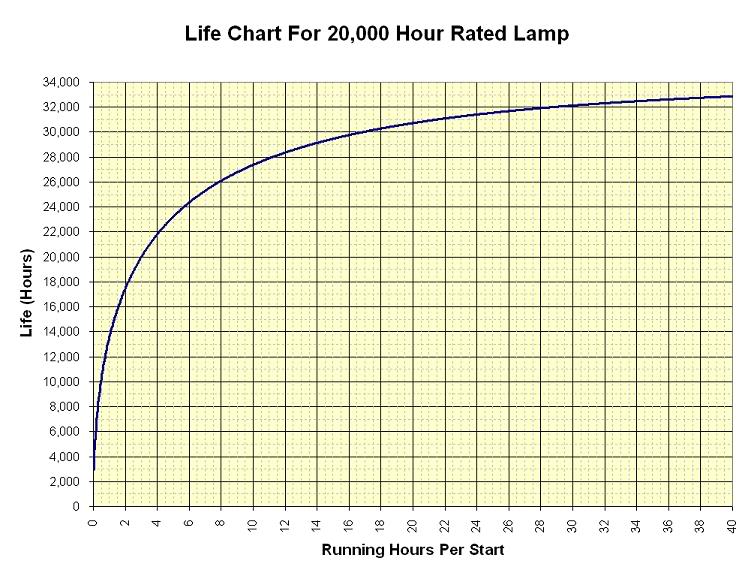
There is a formula linking how you treat a fluorescent tube and it's lifetime, see Economics of switching fluorescent lamps (PDF).
Summarizing, the lamps are only good for a fixed number of strikes, and for certain number of total running hours, and when either one expires the fluoro tube is dead.
Posted by Carsten Kurz (Member # 5396) on 02-15-2012, 07:12 AM:
Having read this thread I start to think wether I should leave my car engine running all the time in order to prevent expensive repairs...
- Carsten
Posted by Mike Blakesley (Member # 26) on 02-15-2012, 11:42 AM:
quote: Bruce Hansen
Mike, it sounds like you have power problems. You might want to have the power company check it.
Oh we definitely have power problems. That's why I have about a half-dozen or more "UPS" devices in my life. Our power grid in this town is subject to outages whenever there is so much as a sprinkle of rain or a flicker of lightning during the summer, or sometimes for no reason at all. They blame it on some "transformer station" outside of town to the east about 25 miles. We had over 30 outages last year, ranging from two seconds to six hours. (Thankfully, most of them are closer to the two-second range.)
I suppose that could be part of what causes our ballast problems, never thought of that before.
Posted by Jim Henk (Member # 3628) on 02-15-2012, 12:32 PM:
quote: Carsten Kurz
Having read this thread I start to think wether I should leave my car engine running all the time in order to prevent expensive repairs...
Funny you should mention that. Because that was the thrust of ads for Slick 50 motor oil some years back. Noting that when you start your car the oil is in the pan, and not in your engine, they said that you should switch to using their specially formulated oil (???) "Because starting your car is a terrible thing to do."
Ha ha, yes, but it was an effective ad.
Posted by Brad Miller (Member # 2) on 02-15-2012, 12:49 PM:
Bad analogy. The car was designed to be started and stopped repeatedly.
Posted by Monte L Fullmer (Member # 2797) on 02-15-2012, 12:56 PM:
quote:
the oil is in the pan, and not in your engine,
(..not to drift off-topic too much, but have to add..)
Or, you can get an add-on device that keeps the oil pressure up in the motor galleys and main bearings when the motor is at rest.
..why a lot of synth oil users that really baby their motors use AMSOIL - this synth oil walks all over "Slick 50".
Posted by Jim Henk (Member # 3628) on 02-15-2012, 02:58 PM:
quote: Brad Miller
Bad analogy.
Of course, of course. Just noting silly trivia, and that there's nothing new under the Sun.
Posted by Carsten Kurz (Member # 5396) on 02-16-2012, 06:10 AM:
quote: Brad Miller
Bad analogy. The car was designed to be started and stopped repeatedly.
And that (or the opposite) is written exactly where in the cars (or the servers/hard drives) manual or datasheet?
The fact that gear is built to be operated 24/7 usually means it CAN be operated 24/7 - not that it must.
Drive failures can occur any time - that's why these things have a RAID.
The thing is to DEMAND gear that is able to be used responsibly. Easy to calculate the hd/energy cost tradeoff. Bulbs blow when switched on or off. Do you leave your bulbs on 24/7? Rectifier inrush current? Do you leave your xenons burning 24/7? No, you calculate a trade off.
Besides that, I don't actually see a benefit here ESPECIALLY on the Dolby. Their drive failure rates obviously do not reflect any of those myths. They simply fail constantly.
- Carsten
Posted by Brad Miller (Member # 2) on 02-16-2012, 12:48 PM:
Carsten, you clearly have Dolby servers with the evil ES drives. That's not the server's fault. Sure it was Dolby's fault for using them, but every server manufacturer has tried different drives and all of them have had their not-so-great drive choices. Overall Dolby's server has provided us with near-perfect uptime and we're talking a LOT of screens. Doremi is extremely reliable too.
Regardless I agree with you on the trade-off. Xenon bulbs are a fantastic example, but I still hold my ground when it comes to servers. In the end we are only talking advice here anyway. The customers do what they wish.
Posted by Tony Bandiera Jr (Member # 2365) on 02-16-2012, 12:52 PM:
quote: Carsten Kurz
........Drive failures can occur any time - that's why these things have a RAID.
(and:)
.......Besides that, I don't actually see a benefit here ESPECIALLY on the Dolby. Their drive failure rates obviously do not reflect any of those myths. They simply fail constantly.
You are right, drive failures CAN occur at ant time, and yes that's why there are RAID arrays BUT it is PROVEN that leaving the drives spinning REDUCES the chances of failure significantly. Like I said before, which is more irresponsible, resource-wise? The energy use (which can be EASILY offset in other areas of operations) or the wasted resources of replacing and junking bad drives? It's a no-brainer.
As for the Dolby drives "simply failing constantly" what server are you talking about? It was brought up in another thread that the DSS100 drives were failure prone. The DSS200 drives are, so far, much more reliable. And if you are one of those turning off your servers nightly then you have seriously skewed the failure rate right there.
Bottom line is this:
If you are an operation that only runs a couple shows a week/month, then it MIGHT benefit you to shut down your servers..but as I said before you would be smart to power back up the DAY BEFORE a show, ingest, verify, then LEAVE THE SERVER ON until after the show. That way you have a better shot at saving the show if anything goes wrong.
If you run daily shows, then you are incredibly stupid if you shut down the server every day, you are killing the lifespan of your drives (PROVEN FACT in both cinema and server farms in other apps) so you are better off leaving it on 24-7 and offsetting the energy use in other areas.
Simple really.
Posted by Carsten Kurz (Member # 5396) on 02-16-2012, 03:00 PM:
'Proven fact' - that one should need numbers and evidence, don't you think?
'No-brainers' means, don't think about it? A 24/7 running server on a singles-show-per day-screen eats about 300US$ of wasted energy a year. Now how many failed drives do you need to fact-prove per year to make this a 'no-brainer'?
And where do you stop - with your office computer, with your laptop, with your lighting, with your HVAC, with your TV? Shouldn't it all keep better and effectively cheaper running it 24/7?
- Carsten
Posted by Tommy Zackariasson (Member # 6505) on 02-16-2012, 03:29 PM:
In a future not too far away I would say offsetting the energy use in ALL areas will be in one way or another forced upon us. From my point of view, it's a disgrace that a modern device to put a motion picture on a screen in front of an audience is all this energyconsuming - when it's not in use! Poor design, proven fact!
Regards
Posted by Carsten Kurz (Member # 5396) on 02-16-2012, 03:39 PM:
I don't care about the energy consumed WHILE showing a picture. That has a sense, earns money and enjoys people. And it's not even that much - 3kW xenon + server plus some lights, etc. Not much more than a few bucks needed to entertain hundreds of people once everything else is in place. Even the production effort is worth it when hundreds of millions watch the feature.
Cost's a lot more when people watch it at home individually ;-)
- Carsten
Posted by Tony Bandiera Jr (Member # 2365) on 02-16-2012, 04:18 PM:
quote: Carsten Kurz
'Proven fact' - that one should need numbers and evidence, don't you think?
'No-brainers' means, don't think about it? A 24/7 running server on a singles-show-per day-screen eats about 300US$ of wasted energy a year. Now how many failed drives do you need to fact-prove per year to make this a 'no-brainer'?
And where do you stop - with your office computer, with your laptop, with your lighting, with your HVAC, with your TV? Shouldn't it all keep better and effectively cheaper running it 24/7?
I am done with you, since you insist on being a smart ass and stirring the pot.
Do whatever you want and suffer the consequences of lost shows and failed drives (BTW 3 drives per year would eat that $300 easily, not counting lost time and or shows.)
You obviously have it set in your mind that you're right and we are all wrong, so have at it and don't even think about crying to us when your server crashes.
You also obviously are just making trouble because if you actually READ my last post you would have seen this:
quote: me
Bottom line is this:
If you are an operation that only runs a couple shows a week/month, then it MIGHT benefit you to shut down your servers..but as I said before you would be smart to power back up the DAY BEFORE a show, ingest, verify, then LEAVE THE SERVER ON until after the show. That way you have a better shot at saving the show if anything goes wrong.
If you run daily shows, then you are incredibly stupid if you shut down the server every day, you are killing the lifespan of your drives (PROVEN FACT in both cinema and server farms in other apps) so you are better off leaving it on 24-7 and offsetting the energy use in other areas.
..where I have conceded the fact that there are some locations that a shutdown probably would not be harmful, given the caveats I mentioned. And Brad mentioned it some posts back as well..did you even bother to read that?
Finally, I don't know if you know this, but I live and work in a state with the toughest energy laws in the nation, and yet they have no problem with these and other servers running 24/7 AS DESIGNED. But you can bet that the energy use is offset in other ways as I mentioned. Part of the LEEDS certification I mentioned REQUIRES that ALL equipment that uses energy or has an impact on HVAC HAS to be accounted for. Guess what? MY screening room STILL has it's full certification despite the evil server running 24/7.
That last part of your post was really lame, especially mentioning HVAC..which is bar none the BIGGEST energy user in ANY theatre. So you are just spouting off to start crap rather than thinking logically. ![[fu]](graemlins/fu.gif)
Oh, and I do agree with Tommy that it is not the greatest design to have something that eats power when not in use...but that applies to so much of our technology devises that it IS a problem in more than just our theatres.
Posted by David Buckley (Member # 2600) on 02-16-2012, 06:18 PM:
It is true that each spinup cycle of a disk "consumes" disk lifetime, and a well referenced paper on this point (Greenawalt: Modeling Power Management for Hard Disks) calculated that for a particular disk, each spinup was equivalent to 3.75 operating hours.
Energy Star state that a computer should be able to survive 40,000 power-ups. I found only a few modern-ish disk drives that actually specify lifetime power cycles, they being in the range of 40,000 to 50,000.
The area of "leave the disks on" or "start them up, shut them down" is a big deal at the moment, with MAID arrays and other technologies that slow or stop disks becoming voguey, so I'd expect this to be an area where disks get better, not worse.
I have spent decades as an IT professional telling people to leave the disks on, but it seems that as a simple piece of advice that is now open to question.
Posted by Jim Henk (Member # 3628) on 02-16-2012, 09:06 PM:
Carsten?
If you're looking for experienced folks here to bless action that I think you've already decided to take to be the best course, it's not going to happen.
You've asked, and been advised by the panel. Do what you will. If the situation blows up on you, then it moves to "You were warned". Otherwise, you're very lucky, and quite home-free. (Except, of course, for the person who comes after you, who is trained to do as you do, and isn't so lucky. Poor sod...) Please stop asking the apple tree to sprout strawberries. Not gonna happen.
As always, be well.
Posted by Brad Miller (Member # 2) on 02-16-2012, 09:24 PM:
This thread is starting to get a bit heated for no reason. The advice and opinions from both sides have all been represented here. Let's leave it at that.
Thanks to the participants.
Powered by Infopop Corporation
UBB.classicTM
6.3.1.2