This is topic Help needed DSS200 in forum Digital Cinema Forum at Film-Tech Forum ARCHIVE.


To visit this topic, use this URL:
https://ft-forum.com/ft/cgi-bin/ubb/ultimatebb.cgi?ubb=get_topic;f=16;t=001112

Posted by Per Hauberg (Member # 529) on 05-17-2012, 05:42 PM:
 
Hi, Everybody

During todays programme building, a nasty problem has occured.
Maybe it's about to wide fingers and too narrow keys, but I do need a tip:

When building a show, timeline suddenly can't be moved (scrolled horisontal), meaning I can not put in cues in the end of the show. When I'm using the mouse to move the timeline, it returns to showstart same moment, I lift my finger from the mouse.

What have I done wrong ?

Thanks in advance

Per
 
Posted by Brad Miller (Member # 2) on 05-18-2012, 12:15 AM:
 
I've never heard of such a thing. Try rebooting first before this thread gets too out of hand with crazy suggestions.
 
Posted by Kris Verhanneman (Member # 5562) on 05-18-2012, 12:41 AM:
 
It happens from time to time.
Just relaunch to TMS interface (CTRL + Q) or do as Brad said relaunch the server.

We had this issue a while ago but it has been a few versions of dolby soft that the problem is solved? Are you up to date with your version?
 
Posted by Tim Asten (Member # 4051) on 05-18-2012, 05:32 AM:
 
We used to have this problem quite often. We called it 'the rubber band effect' where you could not make up a playlist past the width of the monitor screen. As Per said, if you used the curser to drag the timeline along, as soon as you released the mouse button, it would flick back [Mad] . A reboot sorted it, however recent software updates seemed to have cured it.
 
Posted by Per Hauberg (Member # 529) on 05-18-2012, 05:41 PM:
 
Well, Brad

I DID shut everything down, took a break and turned on again 10 minutes later - b e f o r e I went to the forum with my question.
The problem is well-known at Dolby, I've now been told since then, and as far as I understood from the kind german tech on watch at Kinoton, we'll be looking into update on monday.
If You have sometimes thought of my english being crap, You should enjoy my german, but I think that was what he ment, and as I have no editing to do until tuesday, exept for changing a pair of trailers, I'll just keep calm.
But "restart", which I during my first digital year have learned, solves allmost any mishap, did not help this time.
And I sold my last Dp70 last week.... Sic !
I'll get up there now, giving the ctrlQ a try.

Rubber Band Effect - Sweet name, -nasty doing !

Thanks

Per

EDIT 01:25 (local time)

Third "reboot" did it !

Rubber Band Syndrome now gone - HAL9000 works normal again !
Thank You for every kind concern [beer]

P.
 
Posted by Brad Miller (Member # 2) on 05-18-2012, 07:16 PM:
 
So what version are you running? Like I said I've never heard of this problem. I'm betting you have some seriously old software.
 
Posted by Martin Murray (Member # 162) on 05-19-2012, 12:36 AM:
 
Brad, I have seen this same problem on dsp/dss100's as well as on the dss200, it was doing it last week. a re-boot usually fixes it but I don't think its because of older software, you just put the newest version on the dss200. It seems to me that it does it if you don't reboot at least once every 3 weeks or so.
 
Posted by Brad Miller (Member # 2) on 05-19-2012, 12:46 AM:
 
On the newest version???

I think I know now what the problem is. I never access the server directly.
 
Posted by Monte L Fullmer (Member # 2797) on 05-19-2012, 12:55 AM:
 
Happened on me with a Doremi: Editing a playist and my mouse froze. Did a cold reboot and all was good.
 
Posted by Martin Murray (Member # 162) on 05-19-2012, 02:14 AM:
 
Monte this is not a freeze up type of thing, when you build your show on the Dolby and try to add cues the timeline will slide left as long as you hold the mouse but as soon as you release the left mouse button so you can go grab a cue the timeline will slide back to the right and center it self. If you are building a show when its convienent to reboot its not a problem but if your doing like i do and building during a show yo have to get more creative and delete the features to make the line short enough to add the cues then add the features back in.

I hope this makes sense to explain the problem.

And yes Brad the dss200 did it last week, i have not mentioned it because I consider it more of an annoyance than a problem.

And you will be logged in soon enough through the DCS system although i kinda doubt you will see the problem through there.
 
Posted by Kris Verhanneman (Member # 5562) on 05-19-2012, 02:46 AM:
 
Do you guys do your editing on the library / DSS 100 / DSS200 or a seperate pc running the TMS?
This bug has been removed more then a year ago out of the version we are running.
 
Posted by Martin Murray (Member # 162) on 05-19-2012, 02:57 AM:
 
I build /edit right on the server
 
Posted by Steve Guttag (Member # 268) on 05-19-2012, 07:13 AM:
 
I have seen this more than once. If one is running the Jupiter client, you won't necessarily see it since that is a separate client.

I don't know the latest version I've seen this on but definitely as recent as 4.3.2.2. I don't know if it happens on 4.3.5.13 or 4.4.0.48

It is not very regular, for sure. Restarting the client should "fix" the problem but it is definitely annoying when it occurs.
 
Posted by Manny Knowles (Member # 1171) on 05-19-2012, 12:11 PM:
 
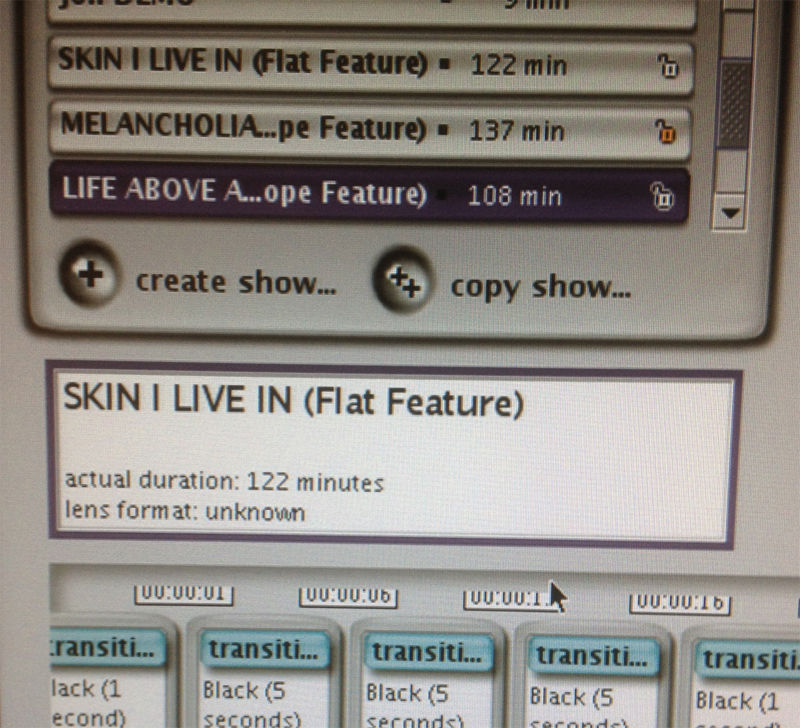
On the topic of "servers behaving badly," here's a related issue:

Clicking on a show title in the "build" environment occasionally will select the next show in the line-up.

In other words, there's a mismatch between the selected (highlighted) show, and the actual show that appears in the editing time line.

Rebooting the DSS200 resolves the issue.
 
Posted by Steve Guttag (Member # 268) on 05-19-2012, 06:44 PM:
 
I've NEVER seen that one, Manny. Never even heard about it until you just mentioned it.
 
Posted by Per Hauberg (Member # 529) on 05-21-2012, 08:54 AM:
 
Hello again -

I'm running DSS 200 with version 4.2.1.3, installed march 2011
Is that bad ?

And right now, I am enjoying my next fun with this thing:
Subtitles are now missing in at least one show a day (different pictures), -and just now, where I'm damned busy to get MIB ingested in both versions (no sun spot extras here, my screen is nicely white), I have my usual capacity problem. I have bought two extra harddrives, to store titles, I have to ingest early before premiere, because the prints must be used in many theatres, but now - after storing in extern drive - I suddenly can't remove the title from local drive. "Can't be done, server is busy" the bastard keeps telling me. -I don't see with what.
All right - while writing this, I've been multi-tasking: Reboot once again was the magic word [dlp] [bs]

I'm getting too old for this modern stuff !

Greetings from extremely sunny Denmark (Noone wants to go to the movies in this early and sudden summer !)

Per
 
Posted by Antti Nayha (Member # 4980) on 05-21-2012, 09:08 AM:
 
You really should update to 4.3.5.13.
 
Posted by Steve Guttag (Member # 268) on 05-21-2012, 12:47 PM:
 
Yeah, you should be on on 4.3.5.9 or 13. And, regarding the subtitle issue...two things...make sure your projector is on the latest ICP firmware and ALWAYS pull a log file on any botched show and submit it to Dolby...Hammer them with this so it is the squeaky wheel that gets fixed.
 
Posted by Brad Miller (Member # 2) on 05-21-2012, 01:01 PM:
 
Per, you can't delete when you are ingesting.
 
Posted by Tony Bandiera Jr (Member # 2365) on 05-21-2012, 01:58 PM:
 
Ain't digital wonderful? [evil] [Big Grin]

I'm still waiting for UCI to book their first D-Cinema feature... [Roll Eyes]
 
Posted by Kevin Fairchild (Member # 4985) on 05-21-2012, 03:13 PM:
 
Cue the film trolls... oh wait. [Roll Eyes]
 
Posted by Tony Bandiera Jr (Member # 2365) on 05-21-2012, 03:23 PM:
 
quote: Kevin Fairchild
Cue the film trolls... oh wait. [Roll Eyes]
So says the troll who has 77 posts in about 4 years ..you need to do a bit of research before you open your trap....I am now a part of the Dark Side doing digital installs. So bite me. [fu] [Big Grin] [Big Grin] [Big Grin]

On topic, I need to check the server at UCI to see if it has the "Rubber Band Effect" when I go there on Thursday.

And no Brad, I haven't installed the new drives with the updated software version yet..We need to chat by PM for why.
 
Posted by Per Hauberg (Member # 529) on 05-21-2012, 03:49 PM:
 
Brad

I think, I've got that - One can't do anything but go to lunch, while ingesting. -And was the funny part - I waited nice and calm until show was ended AND indgest of MIB 2D was ended - and first then I wanted to delete the film just finished to make space for the next one.
Thanks to everyone for kind advise. I learn a bit every day by following Your discussions, and I am very glad, always to have lots of fast and wise words when in mayday-mode [beer]

Per

 -
 
Posted by Kevin Fairchild (Member # 4985) on 05-21-2012, 05:51 PM:
 
No offense Tony, you just seem to pop up in every thread with a comment on how much you dislike digital.

[Time for me to resume my position as a wall flower.. who knows I might make my 79th post by the end of summer]
 
Posted by Tony Bandiera Jr (Member # 2365) on 05-21-2012, 08:52 PM:
 
No offense taken. My dislike of digital stems from it's real drawbacks, which so many digital proponents try to deny or gloss over. Film is not, was not or ever will be a perfect medium, and neither is digital. Digital is good in many aspects, but as debated on here many times it is not the cure-all that was promised to theatre owners and the public.

I was and still am just as vocal about any of the issues with film as well...but face facts, film in general is a mature technology with most of the kinks worked out. The projectors are relatively simple to use and maintain and a lot of breakdowns are easy to fix (as well as less expensive.)

Digital is still undergoing growing pains. And I am willing to bet that 50 or 100 years from now there will be guys like me bitching about the technology that will replace D-Cinema.

Finally, if you don't want to be what you were complaining about, then don't come on here with a post like your first one in this thread as it is a textbook example of trolling. [Roll Eyes]
 
Posted by Kris Verhanneman (Member # 5562) on 05-22-2012, 02:26 AM:
 
Per,

if you need to stock that many features wouldn't it be good to upgrade your server to bigger hard drives. Or add a stockage server with a network connection.
 
Posted by Per Hauberg (Member # 529) on 05-22-2012, 06:40 AM:
 
Kris -

You're right, -and if I have understood things right, The Darks Forces will be coming with a demand of bigger capacity for the¨HFR soon anyway.
It's an endless screw of costs, but we're in it [Roll Eyes]

Per
 
Posted by Manny Knowles (Member # 1171) on 05-23-2012, 09:54 AM:
 
quote: Manny Knowles
On the topic of "servers behaving badly," here's a related issue:

Clicking on a show title in the "build" environment occasionally will select the next show in the line-up.

In other words, there's a mismatch between the selected (highlighted) show, and the actual show that appears in the editing time line.

quote: Steve Guttag
I've NEVER seen that one, Manny. Never even heard about it until you just mentioned it.
As it happens, I'm in the habit of documenting this sort of thing with photos. Note that the selected title is "Life Above All" and yet the presented playlist is that of "Skin I Live In":
 -
 
Posted by Jason Raftery (Member # 6291) on 05-23-2012, 10:47 AM:
 
I've seen Manny's issue on a DSS200 running a pre-release of system 4.3.5 (4.3.5.6 I believe). Moving to 4.3.5.13 fixed it. Manny, what software version do you have on the affected machine?
 
Posted by Manny Knowles (Member # 1171) on 05-23-2012, 11:27 AM:
 
This issue was observed on the older version (4.2.x). It's an intermittent problem, happening about once every 2-3 months or so.

Would be nice if it goes away with the upgrade to 4.3.x, which I'm not doing until next Wednesday.
 
Posted by Steve Guttag (Member # 268) on 05-23-2012, 12:19 PM:
 
Looks Photoshopped [Wink]
 
Posted by Manny Knowles (Member # 1171) on 05-23-2012, 12:28 PM:
 
Oh my.

And here I was thinking a pic would be so helpful.

Sigh.

The only alteration to the original pic involved cropping it to emphasize the important part, and to make it 800 pixels wide for Film-Tech. (I emailed you the unaltered version.)

The glitch itself was not staged or Photoshopped.

Trust me. This situation happens.
 
Posted by Kris Verhanneman (Member # 5562) on 05-24-2012, 10:12 AM:
 
Hey Manny,

just saw the same thing happening on my windows 7 pc here.
Are you running your dolby client on a server or on a pc?
 
Posted by Manny Knowles (Member # 1171) on 05-24-2012, 11:19 AM:
 
No, that's actually the server itself.
 
Posted by Scott Norwood (Member # 30) on 05-24-2012, 12:00 PM:
 
17 seconds of black? Is that for a light show or curtain rise or something?
 
Posted by Manny Knowles (Member # 1171) on 05-24-2012, 12:55 PM:
 
Yup. Curtain raise.
 
Posted by Phil Ranucci (Member # 3820) on 05-24-2012, 10:44 PM:
 
Our NEC needs 40 seconds just to get the douser to open.
 
Posted by Tony Bandiera Jr (Member # 2365) on 06-12-2012, 11:04 PM:
 
I only need 30 seconds to raise my dowser. [Big Grin]

Sorry about that, couldn't resist.

Putting in another server/projector this week....let's see if any of these issues crop up.
 
Posted by System Notices (Member # 2357) on 11-19-2013, 09:44 PM:
 

It has been 524 days since the last post.


Posted by Steve Kraus (Member # 476) on 11-19-2013, 09:44 PM:
 
I see something similar on 4.3.5(9) in the build screen. Deleting a show and it doesn't go away. It's not really there but is still displayed. If you click on it, it does not highlight and at the bottom it gives the "There are no shows to edit in this auditorium..." message even though there are other shows. If you arrive at it via up/down arrows it shows the name and playlist for another show. While on it, and right clicking, remove and properties is grayed out.

I tried once making another show with the same name but that just behaved normally and didn't do anything with the bad one when I removed it. I thought there was some connection to deleting a movie that was part of a show but that was not the case with the one I am looking at right now. Deleting that content later, just put the usual X on it. Previously, I had a couple of these ghost shows and eventually the front end program, whatever it's called, rebooted itself.

One theory I am working on is that maybe editing the show name has some bearing on this error cropping up. Oh well, I guess I will reboot the whole machine. Tech check tomorrow so may as well have a clean start.
 
Posted by Steve Guttag (Member # 268) on 11-20-2013, 06:25 AM:
 
Try using the "purge" button in the "server tools" menu. In fact, you should hit that every week or so...it tends to clean up dangling things that doesn't get deleted when content and such are deleted.
 
Posted by Manny Knowles (Member # 1171) on 11-20-2013, 01:38 PM:
 
Steve, Can you explain exactly what the "Purge" button does?

I was always afraid it might delete anything that's not already part of a built show -- Is my fear unfounded?

(When I worked at Pan Am, the "Purge Data" function was not for the faint of heart. I guess I'm not completely over it.)
 
Posted by Marco Giustini (Member # 4544) on 11-20-2013, 03:24 PM:
 
I thought that rebooting the server had the same effect?

Purge should delete content not linked to any ingested CPL, partial ingests, corrupted files. It should be safe to use.
 
Posted by Steve Guttag (Member # 268) on 11-20-2013, 04:07 PM:
 
It is very safe to use. Rebooting "should" also purge stuff. Manny, open up a FTP link and look at all of the various bits and pieces. Do a Purge and then open it up again...you'll see a lot of crude is gone (if you had junk in there).
 
Posted by Steve Kraus (Member # 476) on 11-24-2013, 12:04 AM:
 
One thing I've noticed is that the firmware that runs the CRU bay must be kind of buggy because it's easy to get into a situation where it refuses to recognize a drive. I had an EXT2 formatted drive that I was going to use as additional storage for some trailers and other unencrypted content (hate just deleting that). I must have messed it up somehow because upon putting it in the bay, not only was it not recognized (the on-screen busy indicator started flashing but no busy-ness shown on the drive bay) but after pulling it, a known good drive was not recognized either. The on-screen indicator stayed flashing the whole time--even with an empty drive bay. Had to reboot.

Reformatting that HD (again to EXT2) didn't change things. Something's funky about it of course but it's disappointing that that can mess things up in way that only a reboot can cure.
 
Posted by Steve Guttag (Member # 268) on 11-24-2013, 12:37 AM:
 
I don't know if I would call it buggy or not. The CRU driver is definitely not the most robust thing in the world though. I've never had a drive cause it to fail on use...but I have had the CRU just stop being recognized. And yes, a reboot was necessary to get the driver going again.
 
Posted by Marco Giustini (Member # 4544) on 11-24-2013, 08:15 AM:
 
I had better luck disabling the automatic power on when you insert a drive (there's a jumper on the back to enable/disable the feature).

Make sure you power the drive off before you remove it.

That being said yes, it's not the most reliable thing on the world.


Powered by Infopop Corporation
UBB.classicTM 6.3.1.2