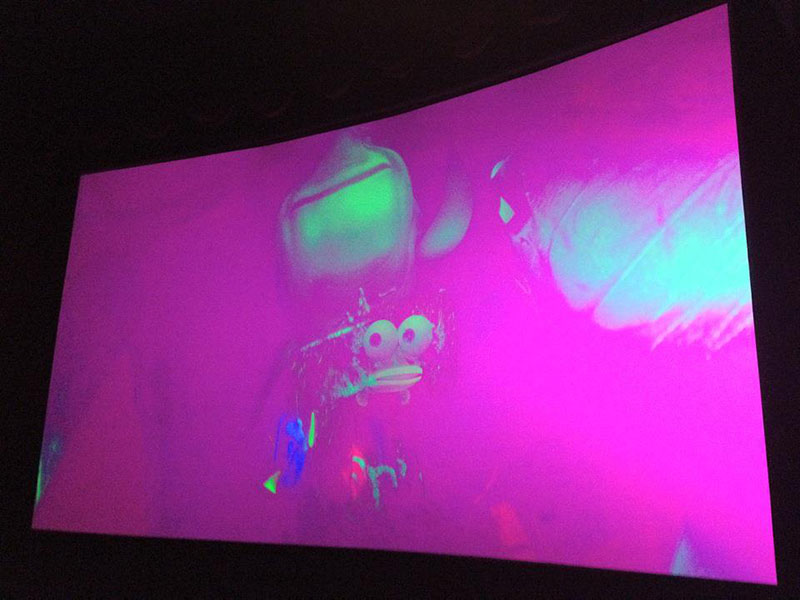
This is topic What causes the screen to go pink? in forum Digital Cinema Forum at Film-Tech Forum ARCHIVE.


To visit this topic, use this URL:
https://ft-forum.com/ft/cgi-bin/ubb/ultimatebb.cgi?ubb=get_topic;f=16;t=001153

Posted by Joe Redifer (Member # 3) on 07-08-2012, 03:52 PM:
 
Look at this. How does this happen?

 -

This happened during the trailers and required a complete reboot. Christie projector, not sure what kind of server. I could probably find that out, though.
 
Posted by Marco Giustini (Member # 4544) on 07-08-2012, 04:09 PM:
 
that should be a wrong colour space. Looks like your projector was set for 2D and you were sending 3D content.
 
Posted by Brad Miller (Member # 2) on 07-08-2012, 04:14 PM:
 
Agreed. That's OPERATOR error, not equipment failure.
 
Posted by Steve Guttag (Member # 268) on 07-08-2012, 04:33 PM:
 
Artistic intent!

While it is operator error. I can't believe in this day and age that SMPTE/DCI and whomever else when all of this was "conceived" that the metadata couldn't ensure such things wouldn't happen. Seriously, the content should instruct the projector how to play as well as the server...this includes for any new fangled sound process too.

The installer can then designate each format as they come out on the projector...for now, 2D/3D Flat/Scope...etc so that the meta data selects the proper format...to help the installer, the projector companies could have them default to the "common" positions.

All it takes is one misplaced 3D CPL in a pack to through off a player and put it into 3D mode for the whole show (it could even be a 3D "blank" that ruins it).
 
Posted by Frank Cox (Member # 6258) on 07-08-2012, 04:50 PM:
 
Not necessarily operator error. I had that happen to me once, about three weeks after I got my digital cinema setup. I rebooted the projector and restarted the movie and all was well. Since I changed nothing from the previous show (which worked) and did nothing other than press PLAY to start the next show, it couldn't have been operator error in my case.
 
Posted by John Thomas (Member # 6509) on 07-08-2012, 04:52 PM:
 
When one of our houses was a CP-2000/DCP-2000 setup, this would happen sporadically. In the middle of the first or second trailer, the projector would just switch to the wrong channel out of nowhere. We never figured out the exact cause, but adding time between commands inside the starting macros seemed to make it happen less often. When it happened, the fix was to just switch to the correct channel.

Or it could be operator error.
 
Posted by Monte L Fullmer (Member # 2797) on 07-08-2012, 05:25 PM:
 
Can happen also when an assigned template is used when building a playlist, but wrong content format is inserted.

One can add some 3D content in a 2D template and the server still will report the playlist as playable.

(this is one nice thing with Sony units: if using a 2D template and 3D content is added in the playlist, the playlist will become unplayable. thus Sony will lock the playlist out).

What can be easily done is to change the macro on the projector back to what content is supposed to be presented.

Also, the projector needs to be rebooted (a cold boot if possible) on a weekly basis if this happens on occasion outside of operator error - help clean out 'stale memory'
 
Posted by Adam Martin (Member # 641) on 07-08-2012, 11:22 PM:
 
quote: Steve Guttag
the metadata couldn't ensure such things wouldn't happen
This presumes that the metadata is correct. The first trailer for Chernobyl Diaries was flagged as a feature!
 
Posted by Mike Blakesley (Member # 26) on 07-09-2012, 11:54 AM:
 
This happens on our NEC machine once in a great while. Maybe once every 4 months, or less. If (for some reason) we have just played a 2-D movie and are switching to a 3-D one, this can happen. On switching from 3-D to 2-D, a similar situation can happen but the screen will be bright green instead.

Usually just restarting the movie will clear it, but occasionally nothing but a full cold reboot will do it. For what these machines cost I don't know why this problem even exists, but I keep hoping someday a "software update" will take care of it.
 
Posted by Monte L Fullmer (Member # 2797) on 07-09-2012, 12:52 PM:
 
Sorry, we have now entered the 'computer world' with screen presentations - a far from perfect method than what film gave us.

Doesn't your NEC have macro buttons where you can just simply press to change between formats - like hold the CTRL button down while pressing the desired macro button?

If so and doing such doesn't work, then you know it's time to do the reboot.

Lot easier and faster than doing a reboot.
 
Posted by Paer Hoegberg (Member # 3133) on 07-09-2012, 01:18 PM:
 
This happens on our NEC machine one or twice a month.
Changing format or rebooting the projector does not help.

But rebooting the Dolby server helps.
 
Posted by Mark Lensenmayer (Member # 134) on 07-09-2012, 04:26 PM:
 
How long does it take to do a reboot?
 
Posted by Joe Redifer (Member # 3) on 07-09-2012, 04:53 PM:
 
I think it's funny that my TV is smarter than digital cinema projectors and servers. It will play whatever's sent to it in the proper mode, 2D or 3D. You guys are playing with kid's stuff which is still full of bugs. The manufacturers of this equipment should feel bad.

quote:
The first trailer for Chernobyl Diaries was flagged as a feature!
Geez! How hard is it for these companies to check for this kind of stuff before they send it out? It's too much to ask for, apparently.
 
Posted by Jeremy Weigel (Member # 4208) on 07-09-2012, 06:22 PM:
 
quote: Paer Hoegberg
This happens on our NEC machine one or twice a month.
Changing format or rebooting the projector does not help.

But rebooting the Dolby server helps.

Yep this happens with our Christies every once in a while. The only thing I've found to "fix" it is to reboot the projector, which on the ZX's takes several minutes.
 
Posted by Tony Bandiera Jr (Member # 2365) on 07-09-2012, 07:08 PM:
 
Some other causes of pink screen:

Loose or bad SDI cable;
Server error;
Running too many lesbian movies;
Running too many breast cancer awareness PSA's.
[Big Grin]

Ain't digital wonderful? [Razz] (Just finished install #4 btw.)
 
Posted by Mike Blakesley (Member # 26) on 07-09-2012, 10:26 PM:
 
quote: Joe Redifer
You guys are playing with kid's stuff which is still full of bugs. The manufacturers of this equipment should feel bad.
I agree with this.

The other weird thing is, on a $60,000 piece of equipment they still use standard, off-the-shelf switches, fans, etc. These things ought to have industrial-strength everything. Of course then they would cost $10,000 more I guess.
 
Posted by Monte L Fullmer (Member # 2797) on 07-10-2012, 12:24 AM:
 
Rebooting an NEC unit takes less than a minute, Barcos are about the same.

SONY's - almost a good 10 minutes since the UPS is in full control of the shutdown which gradually lowers the current and shuts off things in steps (due to the internal media block that gets shut down as well). Then turning the SONY back on to a full on takes about 5 minutes.
 
Posted by Frank Angel (Member # 248) on 07-10-2012, 01:11 AM:
 
quote: Steve Guttag
I can't believe in this day and age that SMPTE/DCI and whomever else when all of this was "conceived" that the metadata couldn't ensure such things wouldn't happen.
Exactly, but even further, where's the built-in, and AUTOMATIC diagnostics you'd expect in software/hardware this sophistocated and this expensive? Like Joe points out, doesn't seem like these manufactures and the DCI wizards spend nearly as much time designing the actual PRESENTATION safeguards as they did the security software. I'll bet the oh-so-precious KEYS don't suddenly unlock for no reason and let the picture play any time of one's choosing!

Good software should be able to diagnose what is wrong, give the operator a warning message AND tell him/her how to fix it. Computer, diagnose thyself!" Ever see what happens when you try to do something that you aren't supposed to do...in almost any application, but for example and specifically I am thinking Photoshop? A window pops up and tells you exactly why you can't do that and what you need to do so that you CAN do what you want, if it's possible. "You cannot do that unless the layer is rasterized. Do you want to rasterize it?"

At this level of software/UI sophistocation in 2012, for such a serious and show-stopping mistake as this pink screen bull sheet to play as if nothing is wrong, I say the software itself should recognize the error and if not able to correct it automatically and one would hope nearly instantly, at the very least diagnose it and tell the operator what to do to fix it, or better, simply disallow the error to be made by the human in the first place. But to play it as if it's correct says it's a serious flaw that needs a swift fix. And at the VERY VERY least, whatever error in formatting might possibly arise, no matter how remote, the system should be able to have that error already computed and disallow it from the get-go, or be able to have someone fix it on the fly...what's this DOS-era TOTAL dog pooh of having to reboot in the middle of a show to fix a formating error?

That said, from all these similar incidents reported by people who know their way around this equipment, the idea that a change from one format to another can happen in the middle of a show-in-progress with no human intervention clearly points to something other than human error, but certainly questions a shortcoming in the stability of the system. Seriously.
 
Posted by Kris Verhanneman (Member # 5562) on 07-10-2012, 03:07 AM:
 
I'll love this discution.
The guys that install the gear said 'operator error' and the projection crew sais 'happens from time to time'.

A great example that we still live on different planets.

And yes this is something that happens from time to time. Somewhere an automation error (or a cue that didn't work).

Too bad nobody has a testing version of projector/server setup without all the protections. It would be nice to compare how litlle bugs that gives.
 
Posted by John Wilson (Member # 269) on 07-10-2012, 05:28 AM:
 
quote: Monte L Fullmer
Rebooting an NEC unit takes less than a minute
Really? times 4 or 5 for mine...
 
Posted by Steve Guttag (Member # 268) on 07-10-2012, 06:04 AM:
 
The diagnostics for this stuff actually is normally pretty extensive.

I can say for all of MY installations...when an incident of Pink or Green screen...the problems have always been traced to operator error...regardless of Christie, Barco or NEC projectors. I DO pull the logs and see what button was pushed/executed. We do remote in when the incident gets called in...thus far, it is always something like a 3D trailer in a 2D feature that causes the player (Server) to be in 3D mode but the projector to be in 2D mode (via a cue placed by the operator or TMS based on the feature type).

Switching color space can be fast, IF you know what you are doing, have the right software, and are connected.

The reason, Frank, this can happen is not that the projector or server think there is anything wrong...they are just displaying what is on the video signal. It doesn't know there is a color issue. It COULD be artistic intent on a particular scene even. Again, this is where I think metadata should have saved the day...the metadata ensures that the server is in the correct mode and that the projector is in the correct mode. The cpl should know how it is to be played back.
 
Posted by Frank Angel (Member # 248) on 07-10-2012, 09:21 AM:
 
I am sure my not having the advantage of working with this equipment is probably the reason I am a bit confounded, but yes, certainly once the projector is displaying content, there is no way any software can decide if the color on the screen or the aspect ratio is correct. But it seems software should be able to EASILY detect that the combination you describe (and as I said, any myriad of similar possibly erroneous operator/metadata instruction combinations).

And still, all that doesn't account for the reports here that this stuff switches in mid-stream. Even if there were metadata instructions somewhere in the middle of the movie -- the director WANTS, say, a change to 2D -- seems easy enough for the server to check all those instructions at the time the playlist is being constructed and ask the operator for confirmation -- "Do you REALLY want to switch formats (color space, whatever)? Please confirm yes or no." Simple stuff software should be able to do without a second thought, IMHO.

Then again, none of this seems relevant if the thing goes pink when no operator is involved and halfway thru a running feature.
 
Posted by Mike Blakesley (Member # 26) on 07-10-2012, 11:40 AM:
 
quote: Steve Guttag
I can say for all of MY installations...when an incident of Pink or Green screen...the problems have always been traced to operator error...regardless of Christie, Barco or NEC projectors.
It can be operator error for sure, but we've had a few occasions where we're running a 3D show at 7:00 and a 2D at 9:00....we put the whole thing on the scheduler and it will switch back and forth between formats flawlessly for five days, and then on day 6 we'll get the pink screen without any particular reason. When it's happened, there's no "every time" fix. I'll try just restarting the movie, sometimes that works but not always. If that doesn't work, a full reboot will cure it. It's a pain in the neck especially considering it happens in front of an audience.
 
Posted by Brad Miller (Member # 2) on 07-10-2012, 12:19 PM:
 
I have *never* had this happen with Barco or Christie. Unless NEC has a quirk where this happens every so often, it is definitely operator error. (I believe Mike though, so I'm betting there is a bug in NEC's firmware.)

quote:
Exactly, but even further, where's the built-in, and AUTOMATIC diagnostics you'd expect in software/hardware this sophistocated and this expensive? Like Joe points out, doesn't seem like these manufactures and the DCI wizards spend nearly as much time designing the actual PRESENTATION safeguards as they did the security software. I'll bet the oh-so-precious KEYS don't suddenly unlock for no reason and let the picture play any time of one's choosing!
That needed to be repeated, because it is sooooo true.
 
Posted by Jason Raftery (Member # 6291) on 07-10-2012, 12:44 PM:
 
Not sure which NEC Mike has but we've had this happen with one of our NEC NC2500S projectors once every six months or so. Only happens on the first show of the day (we put the machine in standby nightly then kill power to it). Last time it happened the machine completely locked up and had to be power cycled at the breaker panel.
 
Posted by Tony Bandiera Jr (Member # 2365) on 07-10-2012, 01:35 PM:
 
quote:
Exactly, but even further, where's the built-in, and AUTOMATIC diagnostics you'd expect in software/hardware this sophistocated and this expensive? Like Joe points out, doesn't seem like these manufactures and the DCI wizards spend nearly as much time designing the actual PRESENTATION safeguards as they did the security software. I'll bet the oh-so-precious KEYS don't suddenly unlock for no reason and let the picture play any time of one's choosing!
Like Brad said, soooo true. And worthy of being made a "sticky" post. [thumbsup]
 
Posted by Scott Norwood (Member # 30) on 07-10-2012, 03:14 PM:
 
So this only happens in 3D houses?

And what needs to be rebooted? The server? The projector? Both?
 
Posted by James Westbrook (Member # 3690) on 07-10-2012, 03:42 PM:
 
I'd reboot the projector.
 
Posted by Frank Cox (Member # 6258) on 07-10-2012, 04:00 PM:
 
There are three ways to boot a computer: cold boot, warm boot and steel-toed boot.

The one-and-only time that this happened to me I powered everything down and did a cold boot of both the projector and the server. Everything worked as it should after that. I was playing the 3D version of Rio at the time.

I have a Christie projector and a GDC server.
 
Posted by Mike Blakesley (Member # 26) on 07-10-2012, 05:18 PM:
 
The first couple of times it happened I didn't know what to do so I would just reboot everything. But only the projector is necessary.
 
Posted by Buck Wilson (Member # 5885) on 07-10-2012, 07:06 PM:
 
Our Barco's do this, but so far it has only been operator error. Unfortunately, you can't just change the format on the playback screen while the show is playing, however, I have had luck switching formats on the side of the projector itself, no re-boot necessary, and you don't even have to stop the show.

The buttons are real finiky though, you have to press extraordinarily hard on them, with both fingers on one another, to get it to take. Quite annoying. Especially when nearly half of the first shows of the day, you have to manually power on the lamp via the same buttons, because it'll only try striking the bulb once.

For that reason, I doubt it'll be possible to just program the shows to start on their own when we go full digital, you have to babysit them as it is just to make sure the bulb even strikes. But I'm just rambling now....

-Buck
 
Posted by Monte L Fullmer (Member # 2797) on 07-10-2012, 08:02 PM:
 
I'll even reboot (cold boot) servers to also clear out stale memory on a weekly basis...along with the projectors.
 
Posted by Buck Wilson (Member # 5885) on 07-10-2012, 09:13 PM:
 
^^That is a good practice in my eyes, and would certainly solve a lot of problems at my location, however for whatever reason, the GM was told to never turn them off and of course he is running with that. Despite the fact we are constantly having to hard-restart them when we have issues with connectivity anyways.

I shudder to think of the problems we will have when we go full digital.
 
Posted by Frank Angel (Member # 248) on 07-10-2012, 10:07 PM:
 
quote: Buck Wilson
The buttons are real finiky though, you have to press extraordinarily hard on them, with both fingers on one another, to get it to take.
WTF? Who is designing these things? Annoying....that's an understatement.
 
Posted by Buck Wilson (Member # 5885) on 07-10-2012, 11:42 PM:
 
You've got that right. The cheapness of these projectors is evident in more than a few places. Awful buttons, sketchy reliability, cheap parts... Even changing the lamp, it's easy to see that many crucial fasteners etc are made of sub-par metal that you must be VERY careful with so as not to break/strip them.

Image quality is great though! When they're working! Lol.
 
Posted by Ken Lackner (Member # 1002) on 07-11-2012, 11:24 AM:
 
quote: Scott Norwood
So this only happens in 3D houses?
Not necessarily. If the server is somehow set for 3D playback and the projector is in a 2D format, which would be all that would be set up in a 2D house, then it could happen in a 2D house.

quote: Scott Norwood
And what needs to be rebooted? The server? The projector? Both?
Depends on the source of the issue. In the case of operator error, which IS likely to be the cause, rebooting anything shouldn't be necessary. Either the server will be set to the wrong playback mode (3D when it should be 2D or 2D when it should be 3D.) Solution: Stop the show, change the server to the correct playback mode, and start the show. If the correct cue is present in the SPL to select the proper macro or channel on the projector, then all should be well. If the sever is set to the correct playback mode and for some reason the projector did not switch to the correct macro or channel, simply select the correct macro or channel and you're done. No need to even pause the show. Later, when you have time, you can figure out why the wrong setting or macro was selected, but for now, there is no need for 5-10 minutes of down time while you reboot the projector.

quote: Brad Miller
I have *never* had this happen with Barco or Christie. Unless NEC has a quirk where this happens every so often, it is definitely operator error. (I believe Mike though, so I'm betting there is a bug in NEC's firmware.)
I've never had this happen, at least that was reported to me, where operator error was not the cause, even on an NEC. The operator error could be as simple as placing a 3D trailer in an otherwise all-2D SPL, which, if you have a Dolby server, would cause the server to switch to 3D playback mode for that show.

quote: Buck Wilson
The buttons are real finiky though, you have to press extraordinarily hard on them, with both fingers on one another, to get it to take. Quite annoying. Especially when nearly half of the first shows of the day, you have to manually power on the lamp via the same buttons, because it'll only try striking the bulb once.
quote: Buck Wilson
The cheapness of these projectors is evident in more than a few places. Awful buttons, sketchy reliability, cheap parts...
Out of curiosity, what model Barco projector(s) do you have? Barco is generally known for being a quality product, and I've never encountered or heard of the reliability issues you speak of. There should be no issues fully automating them.

quote: Buck Wilson
That is a good practice in my eyes, and would certainly solve a lot of problems at my location, however for whatever reason, the GM was told to never turn them off and of course he is running with that.
As discussed elsewhere on this forum, servers should be left running 24/7, and your company likely has a policy to that effect. That is not to say, however, that they can't or shouldn't be reboot periodically. You should be able to do that and still comply with your company's "left powered 24/7" policy.
 
Posted by Buck Wilson (Member # 5885) on 07-11-2012, 02:09 PM:
 
I'll suggest that idea, He may like it as he's looking for solutions to the random issues we regularly have.

We have 3 Barco DP2000 projectors. They're hand-me-downs from another in our theater chain, and therefore have been installed at least twice since new.
 
Posted by Buck Wilson (Member # 5885) on 07-12-2012, 03:01 PM:
 
Had this issue(green-tinted screen) among others today. And it wasn't operator error this time.

Of our three Barcos, for the first walk-in alone today, The following happened:

House #2- Bulb strike cue or dowser open cue didn't take... Manual buttons actually worked with minimal pressure.

House #3- No issues.

House #8- Katy Perry 2D was to start. Was in 3D, switched movie and playing mode to Dolby 3D before starting, then started. Bulb strike cue didn't take, but the dowser did open. Moderate to hard pressure on the manual button got it to strike, and when it did, on screen content was green. It took extreme pressure/repetition on the manual 'flat 2D' button to get it to switch over.

No movies had to be re-started and all was well within the first 30 seconds of each respective movie. Just unfortunate that we have to babysit them like that nearly every day.

I found out last night when we go digital in August/September, we are (unfortunately) keeping the 3 Barco/RealD/silver screen setups, and getting 2 more RealD/silver screens, and 7 NEC projectors, and a central Doremi server setup. Hopefully with much more storage than we currently have.
 
Posted by Tony Bandiera Jr (Member # 2365) on 07-12-2012, 03:24 PM:
 
Ok, what's wrong with this picture? :

quote:
House #8- Katy Perry 2D was to start. Was in 3D, switched movie and playing mode to Dolby 3D before starting, then started. Bulb strike cue didn't take, but the dowser did open. Moderate to hard pressure on the manual button got it to strike, and when it did, on screen content was green. It took extreme pressure/repetition on the manual 'flat 2D' button to get it to switch over.

Now whose fault was this screw-up? Operator or equipment? Hmmmmmmmm....... [Roll Eyes] [Big Grin]

And this one:

quote:
House #2- Bulb strike cue or dowser open cue didn't take... Manual buttons actually worked with minimal pressure.

Which one was it? Did you check to see if the lamp was lit or did you just panic and start pushing buttons?

It sounds more like you are not trained or comfortable with the equipment because from what you posted the issues you're having are all operator caused/related.

As for the cues, it is very important regardless of equipment brands to NOT "Stack" cues on top of each other. Allow at least a few seconds between cues to allow the server and projector to execute the cues and you won't have issues.
 
Posted by Kris Verhanneman (Member # 5562) on 07-12-2012, 04:00 PM:
 
Buck,

from what I read you still have the old buttons that came with the projector.
Have a look at the buttons and see if there are small wires visible.
If not you have the old one.
That can be fixed without big troubles.
 
Posted by Buck Wilson (Member # 5885) on 07-12-2012, 10:34 PM:
 
Haha Tony I typed that wrong. Was in Dolby 3D playing mode, switched it to 2D. I did it right, I promise. LOL

Also, with projector #2, neither cue took. Didn't realize I worded it so stupidly, I understand the confusion. I understand and am comfortable with them, and I would never just 'press buttons'.

I'll change the cue stacking. They aren't ever stacked more than 2, and that said, our 'reset to intermission' clip has like 5 cues stacked on top of each other and they never have an issue.

As for the buttons, I know one of them has wires, I'll check the other 2
 
Posted by Manny Knowles (Member # 1171) on 07-12-2012, 10:55 PM:
 
You guys are ALWAYS making simple things complicated.

Clearly, it's Digital Vinegar Syndrome.
 
Posted by Tony Bandiera Jr (Member # 2365) on 07-13-2012, 01:38 PM:
 
Manny, you're a nut. [Big Grin] [Big Grin]

Buck, no problem. But yeah, get those cues "unstacked" and you'll find life a lot easier. I learned the hard way what happens when you stack cues/events. (My first encounter with the problem predated digital cinema, I wrote an AMX control program where I had multiple strings being sent through serial ports without any delay between, some very odd things would happen.)

But I stand by my statement that your problems are operator caused (not YOU specifically, but whoever sets up your shows).

Even I tripped myself up with my first D-Cinema install, by playing with the projector's pre-programmed "Channels" and by giving the projector discrete input commands rather than channel changes with my AMX controls. Ooops....
 
Posted by Mike Blakesley (Member # 26) on 07-13-2012, 01:49 PM:
 
Weird how the machine will miss a cue sometimes. Not too long ago, show #1 ended and everyone was out, so I closed the douser using the computer and we sold tickets for the late show. When the same show started again via the scheduler, the douser did not open.

Plenty of other times, I've closed the douser the same way and it's worked fine on the next show.
 
Posted by Monte L Fullmer (Member # 2797) on 07-13-2012, 08:01 PM:
 
quote: Mike Blakesley
Weird how the machine will miss a cue sometimes
..we still have the automation in the loop here somewhere.. CNAe 100's are the common ones to be used.

Do anyone of us reboot these units from time to time, plus check for fire alarm messages and clear then?
 
Posted by Phil Ranucci (Member # 3820) on 07-14-2012, 02:11 PM:
 
Having the same issue with NEC. 2D movies play fine in the 3D macro but are pink in the 2D macro. 3D plays fine in 3D macro. Installed the newest service pack but still no change, Any ideas?
 
Posted by Tony Bandiera Jr (Member # 2365) on 07-14-2012, 03:02 PM:
 
Yeah, Your colorspace file in the 2D macro is set wrong or corrupted. Check also the input format, etc.

Should be a simple fix...I have only dealt (briefly) with one NEC projector and had the problem because I didn't save my setup correctly.
 
Posted by Steve Guttag (Member # 268) on 07-14-2012, 09:07 PM:
 
Get you Mr. DCinema Tony! Pretty soon you'll be wearing a mask and breathing with a mechanical clank [Wink]

NEC is BY FAR the most persnickity when it comes to executing its macros (aka titles). Just keep this in mind...it takes (at least) 16-seconds for it to do most ANYTHING...so if you are going to strike the lamp...wait 16-seconds before changing formats and vice-versa...don't try to confuse it by having multiple cues go to it either...it will likely ignore one. I have also been known to hit it with multiple cues...especially if it is being controlled by a GDC server. Load up on the black segments at the beginning of the show to allow for the NEC to do its thing.
 
Posted by Mike Blakesley (Member # 26) on 07-14-2012, 11:02 PM:
 
And why does it take so long to think about stuff? What kind of processor do they use in these things, leftover "286's?"
 
Posted by Buck Wilson (Member # 5885) on 07-14-2012, 11:40 PM:
 
Oh great, just what I like to hear when we're about to get 7 of them.
 
Posted by Monte L Fullmer (Member # 2797) on 07-15-2012, 02:40 AM:
 
NEC's aren't that all bad, but you just have to adjust your way of thinking around these units and learn all of their tricks.

Now, just be thankful that you don't have any SONY units ......

-Monte
 
Posted by Tony Bandiera Jr (Member # 2365) on 07-15-2012, 03:01 PM:
 
quote: Steve Guttag
Get you Mr. DCinema Tony! Pretty soon you'll be wearing a mask and breathing with a mechanical clank [Wink]
[Darth Vader voice on:] I find your lack of respect disturbing. [Darth Vader voice off:] [Big Grin]

quote: Monte L Fullmer
Now, just be thankful that you don't have any SONY units ......
Ahh yes, the dreaded 4-letter S-Word.....avoid them like the plague if you can!!

Buck, listen to what they said re the NEC: allow time for EVERY cue change and don't stack the cues and you'll be ok.
 
Posted by John Wilson (Member # 269) on 07-15-2012, 04:13 PM:
 
quote: Steve Guttag
Get you Mr. DCinema Tony! Pretty soon you'll be wearing a mask and breathing with a mechanical clank
I was thinking the same thing. [Big Grin]
 
Posted by Geoff Newitt (Member # 6663) on 07-20-2012, 05:50 PM:
 
We have 59 screens; 40 odd Christie of various models (mostly Series 1), a dozen NECs (10 NC800 2 NC1600), and six Barco DP2000s. Doremi servers throughout.

From what I've seen - regarding format changes and related glitches - the NECs never glitch, but are painfully slow; the Christies occasionally glitch, dowser commands are very slow on the late Series 1s, specially from the touch panel; the Barcos are pretty poor. Lamp strike is the most likely to fail, followed by the dowser open command.

Sure, sometimes it's operator error or stacked cues; but we're a small enough company that I know and trust most/all of our projectionists. Plus, instances are gradually falling off as firmware updates come through...

And I totally get the comments about the poor control buttons on the Barco. One projectionist (no longer with us) managed to push the buttons through the panel in his frustration! (No, we don't have touch panels for the Barcos.)
 
Posted by Ian Freer (Member # 1940) on 07-20-2012, 09:56 PM:
 
I have found that when using GDC SX2000A servers, stacking cues into NEC Series 2 works fine (my start cue contains Dowser Close, Lamp On, FLAT 2D all at the same time), never missed a cue (unless my customers haven't told me about it!...)

However I've definitely had to make sure there are no stacked cues when using Doremi DCP2000/2K4's into NEC Series 2.

In both cases; Yes, the NEC's are a bit on the slow side to finish performing the format and lamp commands, but dowser is quick enough.
 
Posted by Frank Angel (Member # 248) on 07-20-2012, 10:56 PM:
 
So when cues are not stacked, how much time must be left between them? In terms of the presentation, can you still have things happen say, seconds apart? If I want to hit the screen and at the same time cue the curtains to open, how far apart with those cues need to be in order not to have the stacking issue?
 
Posted by Tony Bandiera Jr (Member # 2365) on 07-21-2012, 12:28 AM:
 
Frank, depending on the projector involved only a second or two is necessary. As mentioned since NEC's take around 16 seconds it would seem that 16 seconds would be the minimum for those.

I am mainly interfacing Dolby DSS 200's with Christie projectors and a second seems to be enough separation for all cues. Also, with the home screening rooms I am doing we are talking to an outboard AMX system with serial cues to do things like lights and curtains. The AMX is picky and will puke if you stack cues, but it only takes as little as 1/2 of a second separation to avoid the problem.
 
Posted by Scott Norwood (Member # 30) on 07-21-2012, 10:11 PM:
 
Couldn't you just incorporate the "douser open" and the "curtain open" functions into one AMX program (script, whatever you call it) and then send one command from the server to the AMX to run that multi-function program, rather than having to send multiple cues spaced out over time?

(I am thinking out loud here...I know little about AMX programming, and my D-cinema experiences have been with manual operation only, either with no automation or with automation bypased.)
 
Posted by Tony Bandiera Jr (Member # 2365) on 07-21-2012, 10:40 PM:
 
Scott, in theory yes, by having the server issue a cue (let's call it "action") and having the timing of the events (dowser, curtains, lights, etc.) written into a subroutine in the AMX program.

The drawback is that let's say for whatever reason you want to change the timing of any of those events..instead of shifting the individual cues on the server's timeline you would have to edit the AMX program code, recompile it and reload it into the AMX system. Very cumbersome. (It is possible to write the AMX code to make user access to cue timings via the AMX touch-panel, but that code would be needlessly complex.)

The reality is, with AMX and serial data, a delay of less than 1/4 second is all that is needed between serial command strings being sent to (or from) the AMX Master.

It is, IMHO far easier to do the individual functions from the server and offset them by a second to keep from overrunning the AMX' serial buffers.
 
Posted by System Notices (Member # 2357) on 05-07-2014, 08:49 PM:
 

It has been 654 days since the last post.


Posted by Martin McCaffery (Member # 37) on 05-07-2014, 08:49 PM:
 
Have it happening right now on our Solaria One. Has any new fix come along other than reboot?
 
Posted by Mike Blakesley (Member # 26) on 05-07-2014, 10:35 PM:
 
No idea about the Christie, but this problem hasn't happened here in probably 2 years or more, so I'm guessing a software fix was implemented on the NEC.
 
Posted by Martin McCaffery (Member # 37) on 05-08-2014, 07:54 AM:
 
It's the first time for us and just updated the software a couple of weeks ago.
Rebooting did do the trick and our tech will be reviewing the logs and reports.
The audience sat thru over an hour of pink film. Maybe being an animated feature (The Wind Rises) helped make it tolerable. No one left or asked for a refund.
 
Posted by Frank Angel (Member # 248) on 05-08-2014, 12:09 PM:
 
Perfect example why you can't use audience complaints as a gauge of the quality of your presentation, or that there isn't a problem.
 
Posted by Mike Blakesley (Member # 26) on 05-08-2014, 12:16 PM:
 
I'm kind of amazed that a person didn't come out within 5 minutes as opposed to an hour.
 
Posted by Frank Cox (Member # 6258) on 05-08-2014, 01:15 PM:
 
I'm more amazed that nobody who works at the theatre noticed the problem for that period of time.
 
Posted by Marco Giustini (Member # 4544) on 05-08-2014, 02:07 PM:
 
Martin,

Are you 100% sure your playlist was correct? I've never seen it happening for other reasons than operator's error.
 
Posted by Martin McCaffery (Member # 37) on 05-08-2014, 03:41 PM:
 
We've been using the playlist all week without problems. I rebooted after the show and everything was fine. The fact that it occurred about 40mins into the show weighs against operator error.

Someone did come out to tell us when it happened. And we made an announcement as we were trying to fix it. We have a patient audience who knows we do pay attention and try to fix problems. They were just willing to sit through the show without the green chip.
 
Posted by Marcel Birgelen (Member # 6801) on 05-08-2014, 06:00 PM:
 
quote: Frank Cox
I'm more amazed that nobody who works at the theatre noticed the problem for that period of time.
Have you been to an average multiplex recently? [Smile]

quote: Marco Giustini
Are you 100% sure your playlist was correct? I've never seen it happening for other reasons than operator's error.
It could equally be just a software or even hardware related glitch. Ever wondered how your picture looks like when you're losing one of the three DMDs for example?
 
Posted by Frank Cox (Member # 6258) on 05-08-2014, 06:31 PM:
 
I haven't watched a movie in any theatre other than my own for the past 20 years.

Apparently I'm not missing anything.
 
Posted by Allan Barnes (Member # 5178) on 05-08-2014, 06:33 PM:
 
On our BARCO with DOLBY SERVERS this is/was.... TRYING TO SHOW 2D CONTENT IN 3D
 
Posted by Monte L Fullmer (Member # 2797) on 05-08-2014, 08:32 PM:
 
Wonder if Allen needs to get a tech over to check the macros in his cues in his Dolby Server unit if his BARCOS are showing 3D where the content is in 2D in his Dolby unit..or just using wrong cues.

I have the same in two houses - BARCO 32B with DS200 servers and no issues with this forced usage with my setup.

If the "was" holds present and issue corrected, then please disregard this note.

Have to make this a mandatory requirement if units are left on all the time: Weekly reboots, or even a total "flip the switch" shutdown, then reboot (cold reboot).
 
Posted by Randy Stankey (Member # 64) on 05-08-2014, 10:23 PM:
 
quote: Buck Wilson
^^That is a good practice in my eyes, and would certainly solve a lot of problems at my location, however for whatever reason, the GM was told to never turn them off and of course he is running with that. Despite the fact we are constantly having to hard-restart them when we have issues with connectivity anyways.

I shudder to think of the problems we will have when we go full digital.

It has been policy at my theater to just do a cold restart of the projector and server every Monday morning before opening.

There have been a few problems where the projector glitches and won't play a show properly. Since we have been doing this policy, we have had no problems like that at all.

Besides that, it also solves the problem with clocks drifting off time.
 
Posted by Frank Cox (Member # 6258) on 05-08-2014, 10:35 PM:
 
I actually do that every Thursday night as part of my changing of the movie routine. I too find that I have less glitches and unexplained issues when I shut the whole thing down and reboot it on Thursday nights.
 
Posted by Martin McCaffery (Member # 37) on 05-09-2014, 09:20 AM:
 
FWIW, we reboot daily. There was a service notice with the Solaria One recommending a shutdown every 24 hours. As we usually have one show a night, shutting down is just part of the end of show routine.
 
Posted by Marco Giustini (Member # 4544) on 05-09-2014, 03:03 PM:
 
Martin,
when the problem happened, was the selected macro the correct one? It's not that I don't believe you, just that I've never heard it before. Actually, I have, but it was wrong macro on the projector, "fixed" by rebooting server and projector and restarting the show manually (and obviously selecting the proper format manually actually fixed the problem!).

That said, anything happens! [Smile]
 
Posted by Martin McCaffery (Member # 37) on 05-10-2014, 09:18 AM:
 
Marco: Yes. Everything was just as it had been the previous nights, and the nights, and the night after. It was on autoplay and the schedule was loaded for the week. As I posted earlier, that it happened 40 mins into the movie indicates computer error rather than operator error.
As far as we can tell, the green chip just got bored and quit.
As this string has been about going pink, does it ever happen with the other chips?
 
Posted by Marco Giustini (Member # 4544) on 05-10-2014, 06:38 PM:
 
Martin,

I thought you were talking about wrong colour space, not missing green! The wrong colour space gives you a pinky picture but it's completely messed up, it's not just the green missing. Removing green from a picture gives you... a picture without green.
That makes more sense to me. Well, I would try running test patterns next time (if you have a chance of doing it): from the ICP first and from the formatters then.
 
Posted by Martin McCaffery (Member # 37) on 06-14-2014, 09:16 PM:
 
Turns out it was a bad light engine. It has been replaced. Let's see if the problem goes away.
 
Posted by Justin Hamaker (Member # 2165) on 06-14-2014, 09:54 PM:
 
I don't know if this was mentioned earlier in the thread, but you'll get a similar effect if your 2D playlist has a 3D clip. Although you'll have the 2D macro selected, the projector will load the 3D color space if it sees a 3D clip in the playlist. At least this is the case with the NEC projectors. In this case, switching to the 3D format for the aspect ratio will resolve the issue during the current show.

I know this isn't the issue Martin was having, but it's something to watch for.


Powered by Infopop Corporation
UBB.classicTM 6.3.1.2