This is topic Best Server? in forum Digital Cinema Forum at Film-Tech Forum ARCHIVE.
To visit this topic, use this URL:
https://ft-forum.com/ft/cgi-bin/ubb/ultimatebb.cgi?ubb=get_topic;f=16;t=001166
Posted by Jack Ondracek (Member # 1466) on 07-21-2012, 12:10 AM:
If this has been covered, please point me in the right direction and lavish me with blistering commentary!
I'm wondering what practical advantage one server would have over the other, personal tastes notwithstanding. I see GDC-this and Doremi-that, but does it really matter?
I'd be hooking them up to Barco projectors, whichever I wind up getting. They'd be used in a drive-in setting.
Posted by Brad Miller (Member # 2) on 07-21-2012, 03:48 AM:
Yes it ABSOLUTELY makes a difference.
As of right now there exists only one option for a hardware raid, and that is on the Dolby DSS200. ALL of the other options use software raids. That right there is all you need to make a purchasing decision if reliability is of utmost importance to you, but price-wise they have now become the least expensive server and also have the best designed interface, are the easiest to service and have the highest uptime over other servers (speaking from our NOC's records). From a servicing aspect, Dolby's support has also exceeded everyone else. There is simply no aspect the DSS200 does not win on except that it takes the longest to boot up, which really isn't much of an issue anyway.
Posted by Carsten Kurz (Member # 5396) on 07-21-2012, 06:09 AM:
Well, Doremi is market leader, but that is not necessarily the point here.
Dolby uses an integrated system approach with their gear, while Doremi is a lot more open for expansion and tweaking. The Dolby GUI is easier, yet more restricted to the plain operational jobs. For a Drive-In as I understand it, where I assume not many issues with automation, TMS, other gear, etc., I guess the Dolby 200 is the better choice. + it has come down in price now considerably.
- Carsten
Posted by Olivier Lemaire (Member # 5579) on 07-21-2012, 07:34 AM:
Depends on what you're looking for - and when you are looking for.
For now:
What a 2K machine and dot bar? GDC, Doremi, Dolby, ... everybody will fit. Lower cost will probably leads to GDC (SX-2000) and Doremi (DCP2K)
What a 2K evolutive 4K and HFR? Doremi already fits (ShowVault) - GDC actually don't (but will probably tomorrow with the SX-3000).
Tomorrow:
Seems that Doremi IMS will be a good choice with Barco and NEC - as embedded and so warranty directly supported.
Alternatively, a Sony projector+mediablock, or a Christie projector+IMB, will probably do the job too.
I'm not really sure the will have tomorrow rooms for so many players as they were with external media block so far. Future will tell anyway.
If Doremi si well represented (market share), this has to do with it's quality (and an well placed price comparing to first competitors). It is, in any case, a no trouble choice (but not the only one possible of course).
And, as Brad said: the Media Block and software with it really really matters in your everyday life.
Posted by Scott Norwood (Member # 30) on 07-21-2012, 07:49 AM:
Data point: the GDC still does not have any redundancy for the OS (boot) drive. This is inexcusable. The Dolby unit does. I don't know about the Doremi.
As far as the audience is concerned, there is no difference as long as the thing works.
Posted by Marco Giustini (Member # 4544) on 07-21-2012, 10:44 AM:
Doremi use an SSD drive which cannot be re-installed on the field (you need to obtain a new one from Doremi).
What Dolby miss is a little bit more flexibility within the configuration. I'd like I could set ethernet commands.
Also, the new automatic script analysis on Doremi website is awesome, is clearly very helpful on the field.
Posted by Olivier Lemaire (Member # 5579) on 07-21-2012, 11:13 AM:
Marco: Doremi give urgency boot sticks (USB sticks) that can save you ass when in trouble with an SSD (that can happens, even in these grade II components).
For GDC: for now (SX-2000/2001), they rely on a casual hard drive - no RAID. You get what you payed for after all ![[Smile]](smile.gif)
Posted by Marco Giustini (Member # 4544) on 07-21-2012, 11:36 AM:
You're right, I had forgotten. However those sticks are supplied with the server - hence they work only on one specific server.
Sometimes cinemas can't find the keys of the projector, I wouldn't even bother asking for a "emergency stick that came with the server"!
Anyway, you need to plug the stick INSIDE the server to boot it up!
Dolby's way is much much better IMHO.
Posted by Dave Macaulay (Member # 813) on 07-21-2012, 12:07 PM:
Probably everyone likes what they use most. Each has its peculiarities, pros, and cons.
I'm have some complaints about Dolby servers, but that's probably because most of my experience is with Doremi.
I don't like the Dolby "setup for dummies" approach where changing from their default settings is tedious. I don't like the closed network setup that can not accommodate non-Dolby network devices. I don't like that different software versions can not communicate with each other; this means a small (up to 3 systems) booth with a non DCI-compliant projection system can not be fully networked using one server as a TMS until that non-compliant system is upgraded to be compliant... unless all systems use non-compliant Dolby software, and you have to specify when ordering that a new DSS comes with such software since DCI compliant software is now the default, and it can not be reverted to a previous non-compliant version (and the current software will not play encrypted content on a non-compliant S1 projector). DCI spec compliance is nice, I suppose, but when an owner asks me "can I still play movies without it?" I have to say "yes, and I don't know if or when that may change". I haven't found any way to shut a DSS server down short of unplugging it or removing the front panel and pressing the recessed power button. You can open a terminal, log in as administrator, and do a hot reboot... pretty tedious as well.
Doremi systems work pretty well. The touchscreen seems to fail after a year or three but I recommend a separate screen and keyboard anyway, and you can VNC to one from anywhere on the network and do all server work from one spot. The OS on flash drive issue exists but it hasn't been a big deal for us. The boot USB stick is a decent backup but you almost need one for every server since many options (network, macros, etc.) are stored on the flash. With a few hundred Doremi servers to support we have had a handful of flash failures, generally on power events and the customers don't want to install power conditioners - all systems are on UPS though. The flash drive takes 5 minutes to install, we put a config backup on the RAID to replace the lost settings. For remote systems we can leave a flash chip and show the owner how to change it. The Doremi IMB is the only one I've used, it again has peculiarities but it does work well - only when trying to do less "normal" things, like using the HDMI connector, do you run into the oddness. All software versions will work with a Doremi TMS, or do transfers between servers if networked with no TMS. Software versions can be reverted, I'm not sure about the latest DCI-compliant SM though: it may not be revertable and won't work with S1 projectors that don't have compatible TI boards ("gore boards").
GDC servers work fine too. No major complaints: minor for sure like how the macro building utility doesn't let you move entries around like Doremi. You have to think out your macros and write them out, adding a function later is a drag. The drag-to-time locate function is nice, with Doremi you have to type in a timecode point.
Posted by Marco Giustini (Member # 4544) on 07-21-2012, 02:08 PM:
I thought those USB emergency sticks were server-coded. I may be mistaken though.
I guess you could easily boot from them disabling the "boot from USB port 6 only" in the BIOS. That - I guess - is for preventing customers' drives to inadvertently boot the server into something else!
Posted by Tony Bandiera Jr (Member # 2365) on 07-21-2012, 02:16 PM:
In a way this discussion could be compared to the "boxers vs. tighties" debate as everyone who has used one compared to the other will tell you that the "other" sucks and is totally unsuitable.
So far I am sticking with Dolby for the reasons Brad stated. That, and IMHO Dolby is more likely to stay involved in the cinema business in the long haul. GDC and Doremi may not be around as long as Dolby will be and as pointed out their designs have some serious drawbacks.
Marco, I agree with you on the ethernet commands situation, but in my application at least I have found the serial command option to be the way to go. You can literally build your own commands and send (and receive) them as characters or code ($0D for example) and you can, within reason call them whatever you want. Even though serial ports are pretty much gone from laptop computers, it is easy to get or build outboard serial to "whatever" interfaces to control anything. I don't miss the ethernet capability at all really. Oh, and the best part: you can still use the ethernet to control the sound processor and projector at the same time while using the serial on the sound processor.
Here's a screen shot of my serial commands for the server at UC Irvine:
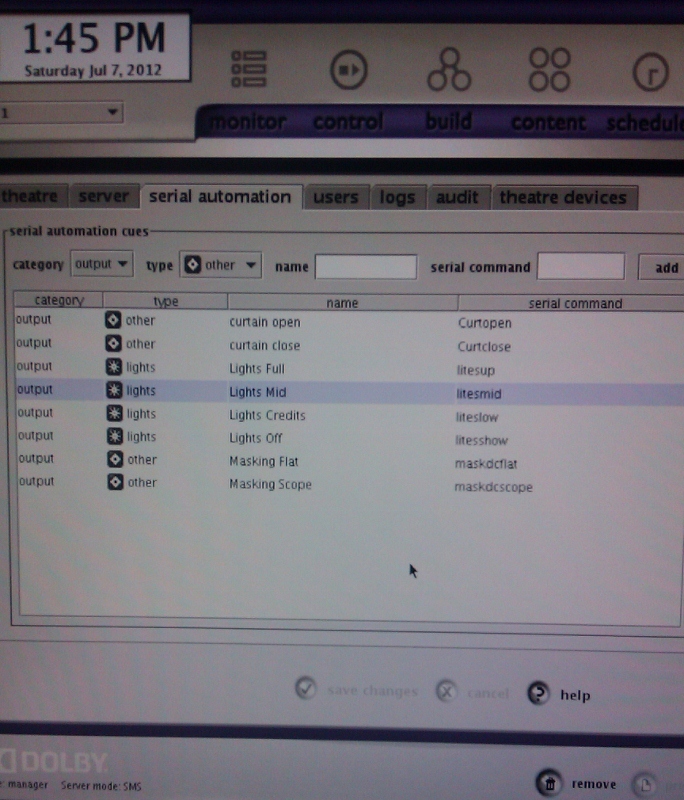
I chose to use text commands for ease of reference in my AMX program.
Posted by Marco Giustini (Member # 4544) on 07-21-2012, 03:07 PM:
Hi Tony,
I wasn't aware that converters serial-ethernet were available. That covers the gap, even though a built-in ethernet control would be just perfect.
What I feel is missing from the DSS is a little more tweaking capabilities. That said, I do appreciate that the friendly user interface is a big feature.
Posted by Steve Guttag (Member # 268) on 07-21-2012, 04:11 PM:
This is the sort of topic that really can't answer the question...everyone has their own likes/dislikes...for whatever reason.
I will say...for remote service, the Dolby has been my favorite, by far. I can do most everything. I think the only thing one can't do remotely is load serial commands via xml file (or GPIO). There is a certain "niceness" to the RS232 port since I always use a REAL automation if the booth is to be automated (my personal favorite is the eCNA series). With RS232...those two devices ALWAYS talk to each other...no Ethernet oddities. That said, I would really like if one could issue commands via Ethernet too. The eCNA automations allow for up to 5 Ethernet devices so that problem isn't such a problem.
For showing customers how to get started...Dolby is SO much faster...its interface is, by FAR, the most intuitive. The only short coming there is the odd "lens turret" icon on the Control screen for "select." It makes no sense. That said...one need not put a "clip" into a show to run it on the Dolby...unlike GDC and Doremi.
Set up time is similar on the various servers (on installation) but the actions are different (for instance, with GDC...you clone one that have set up and merely change the IP particulars...presuming same equipment types).
Doremi seems to constantly be ahead of the others in getting new technology functional...like the IMB, 4K, HFR...etc. It is a pretty stable system.
Posted by Brad Miller (Member # 2) on 07-21-2012, 04:23 PM:
quote: Carsten Kurz
The Dolby GUI is easier, yet more restricted to the plain operational jobs.
The Dolby can do everything the others can, and easier too.
quote: Olivier Lemaire
What a 2K machine and dot bar? GDC, Doremi, Dolby, ... everybody will fit. Lower cost will probably leads to GDC (SX-2000) and Doremi (DCP2K)
In the US, Dolby is absolutely the cheapest. GDC is the most expensive by a pretty substantial margin (which I don't understand why in looking at the build).
quote: Olivier Lemaire
What a 2K evolutive 4K and HFR? Doremi already fits (ShowVault) - GDC actually don't (but will probably tomorrow with the SX-3000).
Currently Doremi is the ONLY solution for 4K. GDC does NOT have a 4K IMB. It merely downscales the 4K image to 2K, then upscales it back to 4K. Their marketing is VERY misleading. I am sure their next generation will fix this, but for now GDC is not an option if 4K is important to you. Likewise Dolby is not yet an option for 4K, but will reportedly be very soon. Do take note only the Dolby IMB will not require a power cycle every morning (supposedly).
quote: Scott Norwood
Data point: the GDC still does not have any redundancy for the OS (boot) drive. This is inexcusable. The Dolby unit does. I don't know about the Doremi.
quote: Marco Giustini
Doremi use an SSD drive which cannot be re-installed on the field (you need to obtain a new one from Doremi).
Yes, GDC not having any redundancy in their OS is absolutely inexcusable. However Marco is wrong about being able to reinstall the SSD in the field. It CAN be done...it is just a HUGE pain in the ass and requires a lot of raw command line actions. After the SSD replacement, the machine is quirky on reporting what keys are valid and such too until the current keyed movies play out.
quote: Dave Macaulay
and you can VNC to one from anywhere on the network and do all server work from one spot
Dave, if you prefer VNC you can use it on a Dolby. Many of us prefer the jupiter client approach. To each his own, but it IS offered on the Dolby...GDC too.
quote: Tony Bandiera Jr
In a way this discussion could be compared to the "boxers vs. tighties" debate as everyone who has used one compared to the other will tell you that the "other" sucks and is totally unsuitable.
Tony that is not the case. The Doremi is a very good server and Doremi's tech support is a close second to Dolby's too. However the question of this thread is what is the BEST server.
We work with all of them and again, the Dolby is the most reliable. In a small multiplex and drive-in setting, this is tremendously critical because with only a couple of screens, losing a screen for a weekend could have serious repercussions on the theater's financials.
And Jack, with the Dolby even if everything took a complete dump, you can literally run down to Best Buy and pick up any old junk hard drives and run the install disc and be back on the screen without any quirks or hassles. That isn't the case with the other options due to the software raids being ABSURDLY picky about which hard drives are used and the difficulty or inability to reinstall the operating system.
BTW GDC has no repair/exchange program for when a problem does happen. That is also inexcusable.
Posted by Marco Giustini (Member # 4544) on 07-21-2012, 05:13 PM:
Thanks Brad,
Good to know the Doremi OS can be reinstalled, after all it's just Linux, no black magic behind it. But as you said, it's far less straightforward than Dolby way: stick a CD in, wait a little while and you have a brand new server. That could be the difference between losing 24 hrs of shows and that has to be kept into consideration because Doremi SSDs DO fail.
Any chance to have that huge sequence of line commands? They could be useful on the field.
Posted by Jack Ondracek (Member # 1466) on 07-22-2012, 12:13 AM:
I had a feeling there was a lot more than I'd already figured out.
Thanks, everyone. Fortunately, I've started this process with enough time to digest all of this.
Jack
BTW, Brad, there's a drive-in in our chat group that has one of your full-charge systems & is extremely pleased with what you set up for him. We hear about it a lot, especially his ability to work with it from far away with just his smart phone.
Posted by Steve Guttag (Member # 268) on 07-22-2012, 12:27 AM:
As for Jupiter Client versus VNC...for myself, I prefer Jupiter client when remoting in. However, for end users that might want control from the manager's office...I prefer VNC...why?
With Jupiter, you must have the same version running as the servers. When one is remoting in and you need to look at the logs...Jupiter will save them on YOUR computer rather than a thumb drive...that I can neither insert, nor retrieve. There is also the disconcerting affect if a server starts to look like it is possessed by the tech remoting in.
For the manager, VNC means that it is version independent and there is no disadvantage to the VNC connection...odds are, they won't freak themselves out by connecting to a server in the booth.
Dolby's logs also seem to be the most comprehensive when trying to track down problems or, more importantly, when trying to head them off.
Posted by Brad Miller (Member # 2) on 07-22-2012, 01:00 AM:
quote: Marco Giustini
Any chance to have that huge sequence of line commands? They could be useful on the field.
Oh boy. I don't have one in front of me to look through the menus, so this is from memory. You're also going to have to have all of the passwords.
First you have to pull power and physically swap the chip. You need a #2 phillips for the task, and literally this is the easiest part.
Next you need to configure the networking. I can't tell you what to enter because each location is different. (Just remember there can only be one gateway, so leave the gateway on eth1 blank.)
Reboot.
You need to setup VNC next. Doremi will send you the file to put in the root directory of a usb stick. Ingest the file.
Reboot.
Go into terminal and set the new password. I think the command is vncpasswd /doremi/etc/vnc/passwd but I could be missing some critical space or something in that command.
Time to rebuild the raid. Again go into terminal and I think it is sh /doremi/sbin/reinit_raid.sh In there you have to select how many drives you are using and go through all of the prompts. After awhile you want to verify both md0 and md1 say "active raid" before proceeding.
Go into the diagnostic tool in the GUI and verify all hard drives are green. You can start ingesting content once the "healthy" message appears.
Next you have to jump into the macro editor and re-setup all of your macros.
After that don't forget to update the certificates. Doremi can send this to you. I usually just FTP it into the rc.once directory and reboot. Keys won't load until you do this!
Time to go back into the device manager and re-add all of your devices such as the projector.
If you are running Dolby 3D you've got to go through a mess trying to get the Doremi to re-acknowledge the license. This is the one part of Doremi that I do not like, because curse words usually are uttered as it takes the license file and setup file, but after going through it all won't actually provide the DFC100 in the device manager when you've done all of it. Don't forget to re-shoot your colors and such.
Like I said you CAN re-install the OS in the field, but it isn't very straightforward and keep in mind I've trivialized the process since I've never sat down and written out a play-by-play on this and neither has Doremi to my knowledge. It will also eat up the better part of your day.
Dolby on the other hand, you just drop the disc in and let it go. 15 minutes later all you must do is set the ip and answer a few basic questions in a wizard and you're done.
Don't take this as anti-Doremi. They do make a very good server and it is definitely my second favorite when all factors are taken into account (including reliability), but again, this thread is about the BEST server, and Dolby just wins on way too many points...the hardware based raid being the most important one. (Well, to some people price is most important, but they win there too.)
Do not underestimate the importance of a hardware based raid!
Going back to the OS question, then there's GDC. They boast that they have a backup OS on each machine. Well, they do, but not really. You see the backup OS is on a PARTITION on the SAME...SINGLE...NON-RAIDED hard drive. Really, what's the point in that? Oh wait, there is none...because when the hard drive fails, there goes your "backup" partition. GDC also stores the media block information on this OS drive, so when it dies, you are at the mercy of buying another one for that specific machine from GDC and waiting for it to be made and shipped to you.
Posted by Olivier Lemaire (Member # 5579) on 07-22-2012, 04:51 AM:
Doremi boot stick: pretty easy to use, no "long command line black magic ..." associated with. Pretty simple and stupid in fact. The most difficult part is probably to open the beast to plug the stick, so... when SSD fail, it's most of the time the operator that does the USB stick boot to save the next show and wait for a replacement action.
And yes SSD can and do fail: on a 2000 machine fleet, we can count about 3 to 7 SSD failures per year.
Anyway, seems to have some differences between States and Europe:
* In Europe, GDC is among the lower price, then comes Doremi, then Dolby. But of course, YMMV as we're talking about money and negotiation can move the lines.
* In Europe, GDC has an exchange/repair program - which is assumed by GDC integrators.
In Europe, the fact that Doremi did, since it's very begging, deliver upgradable machines, with a strong sense of service behind, could explains why Doremi represent more than 85% of market share in some big countries.
The fact they are the only one to have an IMB, sold since 2 years now, that comes with 4K and HFR by a mere software upgrade, explains probably why do peoples thinks Dorremi is a reliable manufacturer that knows is business and try to keep at the forefront of new needs.
From the integrator point of view, I must admin that their machines are also pretty easy to service - no hidden stuff.
I'v got some Dolbys (DSS-100 and 200), and we can spot around 3% of Dolby in the fleet I'm working on. Ok, they are good machines too - but the price was not the best one so far (yes, It's changing) - so that explains this small percentile. From the integrator point of view, I must admit that I personally feel at home with Doremi (pure design, no big bloatware, using embedded oriented software pieces) and somewhat a more a stranger on a Dolby (big SQL engine, Java anywhere, security by obscurity). Of course, it's a personal point of view.
Posted by Marco Giustini (Member # 4544) on 07-22-2012, 05:13 AM:
Thanks Brad, very kind of you.
I was aware of the procedure for replacing the SSD, reconfiguring the entire server, reconfiguring the RAID etc. etc.
What it would nice to know is how to re-install the OS on the field. I know that the procedure is to swap the SSD, but since you mentioned the possibility to reinstall the OS on field, it would be nice to have that procedure too in my 'digital toolbox' just in case. If you ever came across it again, please share it with us!
Olivier: can you confirm that I am mistaken and that the emergency stick is NOT server dependent? I appreciate that the correct certificates have to be reloaded afterwards, but that wouldn't be a problem, those ara 24/7 available on Doremi FTP.
I know it's easy to use, but let's face it, it won't take 5 minutes. Think of a pedestal install, with tight cables on the back. It would take 10 minutes just to access the back and unplug everything, not to mention power the server down, open it, and power it back again. Not a big deal, sure. But on a Dolby you just need to stick in a CD and wait. And you can walk out of the theatre with the server 100% up and running, no need to go back to swap the emergency stick with a proper SSD.
Posted by Olivier Lemaire (Member # 5579) on 07-22-2012, 05:19 AM:
Marco: I confirm, USB sticks are not server dependent. Certificates are dealt by the hardware, and at boot-time, place automagically by them on the SSD/USB stick partition without any intervention.
And yes, the most "complex" operation is using them is surely the hardware manipulation (open the pedestal, unplug the Doremi unit, open it, place the usb stick, replug the unit).
The time needed is not far away to the one needed to change a lamp bulb.
Posted by Antti Nayha (Member # 4980) on 07-22-2012, 05:35 AM:
(about the Dolby interface)
quote: Steve Guttag
The only short coming there is the odd "lens turret" icon on the Control screen for "select." It makes no sense.
I always explain this to users as a poorly-drawn picture of a film reel. After that it makes complete sense to them.
I have most experience on the Dolby DSS200 and I would probably agree that it has the easiest interface, but there are still a couple of things I like in the Doremi. These two are partially related:
1) The ability to create macros that combine several cues. In the Dolby you have to program each and every cue separately on the timeline, and this can result in a rather cluttered view in the case of a complex show. Particularly irritating because the timeline hides a lot of information by default; see below.
2) Even though a lot of people like the Dolby timeline, the Doremi approach has its advantages. You can easily see the exact contents of the whole programme (exact timecodes included) at a single glance – no need to hover the mouse separately over each cue to see its exact content and exact position in time. It would be nice to have the Doremi-style view as an option in the Dolby.
But on the whole of course, reliability is more important than user interface. After all, people tend to get used to the UI peculiarities of any system that they use regularly, but they will never get used to hardware problems...
Posted by Steve Guttag (Member # 268) on 07-22-2012, 09:23 AM:
Okay...so lets call it a film reel (Dolby has to me)...how does that make sense either? Because you are choosing a "film reel?" It is an "open" icon...it opens a menu where you still have to select the appropriate tab (show or clip)...it could have had a name associated with it rather than being a "mystery" icon that does not call any attention to itself.
The Macro thing is something I would like as an option on the Dolby but it has yet to cause any heartache. Since the icons have three varieties the sound ones are very apparent and their position on the time line is pretty graphical. Again, in theatres with typical show types...I use an automation so the show is VERY clean with just a handful of cues total. A Start, Trailer, Feature, Credits, End (not unlike a film cue system). Others use just a "CUE" cue and advance an automation in its sequence. I have one customer that LOVES the ability to set volume cues, even mid trailer (I've only seen him do it on his own content...must not have mastered his policy snipe very well).
What ALL of the server companies really need is a "clone" feature where the installer, once the thing is configured completely can take an out-of-the-box server, load the clone in and get the parameters for the original server back sans content. GDC gets pretty close on this. This should be quick and easy...not a laborious process.
Posted by Marco Giustini (Member # 4544) on 07-22-2012, 11:14 AM:
Doremi has a backup and restore utility which restores certificates as well if needed. I think it restores every settings, including cues and network.
Thanks Olivier for the hint. I'll make sure that one of those sticks is in my digital tool box then!
Posted by Brad Miller (Member # 2) on 07-22-2012, 02:45 PM:
But Steve what GDC calls a "clone" really isn't. Its just saving settings. When the OS drive fails, that "clone" won't help you one bit.
GDC "clone" - not really, its just settings saved.
GDC "backup" - not really, its just a partition that will fail the instant the OS drive fails.
GDC "4k IMB" - not really, its downscaling to 2K, then upscaling the picture to 4K creating a worse overall image.
GDC "free daily reporter software" - not really, you have to buy their TMS software for each screen and this runs as an app on it.
Posted by Monte L Fullmer (Member # 2797) on 07-22-2012, 02:55 PM:
Looks like with all of those attributes that resides with the GDC units, what are they trying to prove outside of cheating the customer out of a genuine product?
Posted by Scott Norwood (Member # 30) on 07-22-2012, 03:22 PM:
GDC isn't cheating anyone out of anything. The product does what it claims to do. The company is not doing anything unethical here. That does not change the fact that there exist competing products which are better designed.
Posted by Brad Miller (Member # 2) on 07-22-2012, 07:00 PM:
Unethical? That depends on your definition of the word. Technically Scott is right they aren't cheating anyone. It IS deceiving marketing though. If you don't know specifically the right questions to ask, you don't get what you think you are getting.
Posted by Monte L Fullmer (Member # 2797) on 07-22-2012, 07:26 PM:
Sounds like some dealers (a general term) will sell product that they know isn't up to par to those who don't have a clue what the product is all about and tell the owner that it's the stuff that you need, knowing that no research is ever done by the owner.
Seen that a few times - why was the owner was sold this stuff? They were told that the product was good for their usage and it was at a good price.
Posted by Brad Miller (Member # 2) on 07-22-2012, 07:39 PM:
Typically that happens because one product will have a lower dealer price than another, so they sell whatever item will net them the most profit, without regard to the actual need of the theater.
Posted by Scott Norwood (Member # 30) on 07-22-2012, 08:02 PM:
Agreed with Brad. I just get a bit annoyed when people use the word "scam" to mean "not a good value for money." It is fairly high on my list of over-used and mis-used terms.
If GDC claimed that their server would cure cancer and bring world peace, that would be a scam (unless it did those things). If they claim that it will play movies and it does, then it is not a scam. It may or may not be a good value, but it is not a scam.
And I agree that it would be unethical for a dealer to recommend a product to a customer because it benefits him to sell that product when he actually knows that some other product would serve the customer's needs better.
Posted by Steve Guttag (Member # 268) on 07-22-2012, 10:16 PM:
I would say the only unethical part is that they charge for their 4K license on the existing IMB and it really doesn't pass true 4K...I doubt many/any customers know that and most installers. it is like a dirty little secret of the industry.
Their new IMB due out any minute is said to be a true 4K IMB.
Posted by Brad Miller (Member # 2) on 07-22-2012, 11:32 PM:
Steve, to play devil's advocate, (and this one works from either a dealer OR an end user standpoint) if you asked GDC if there was any fee to run their VPF reporting software and they said no, and then after you made the sale/purchased the equipment they said you had to buy the TMS license for every screen, would you feel that careful bit of word shifting was unethical, or was it your fault for not phrasing the question in a very specific and careful manner?
Likewise to further play devil's advocate, if you owned a theater chain and told GDC you were buying all 4K projectors did they have a 4K solution, and they told you they had a 4K IMB and you went and bought them, would you feel it was unethical to not tell you that even though it was *technically* a 4K image, it wasn't really a 4K image (due to the downscaling and upscaling)?
To say something is unethical or not requires a bit closer examination, and often requires putting yourself into other's shoes. YOU know what specific questions to ask, and you are stubborn enough to keep rephrasing the question over and over until you get the true answer out of someone, but few other people know what or how to ask things of this nature.
Posted by Gordon McLeod (Member # 33) on 07-23-2012, 12:06 AM:
to date i have nothing but praise for gdc techsupport i findthe server interface a bit cludgy but tms is fine and we have had no problems
Posted by Monte L Fullmer (Member # 2797) on 07-23-2012, 12:46 AM:
Fully agree, "Gord", I've worked with GDC servers and find them very reliable and everything else with them in tune with the quality. Just that we were using 2K units with NEC 1600C units at my prior occupation.
quote: Brad Miller
but few other people know what or how to ask things of this nature.
Like the .05% of us who knows this stuff, where the 99.95% haven't a clue ... and most of the decisions are simple boardroom decisions.
quote: Scott Norwood
unethical for a dealer
Gee, don't we see this at some high volume, major name brand car dealerships?
Posted by Louis Bornwasser (Member # 3063) on 07-23-2012, 06:37 AM:
We have had THAT problem from the beginning of time. Louis
Posted by Sam D. Chavez (Member # 1841) on 07-23-2012, 09:21 AM:
As cinema dealer it has always been our role to advise the non technical cinema owners on getting full value by buying good product.
Sometimes they like bling and are subject to a pitch from unethical manufacturers sales reps and all involved get stuck with the outcome.
Posted by Marnix Koster (Member # 6755) on 07-24-2012, 02:46 AM:
Here in the netherlands we had a project to upgrade all cinema's to digital with the help of the government and other organisations. Because of that project also small independent arthouses (run by volunteers) could upgrade. I am a volunteer at one of those small theaters.
AAM runs the project here and also has made a list of equipment we could choose from. To help us advise on the equipment we got two local service company's over and check our location. They both gave us an different advise. After that AAM comes over to check en 'advise' and also gave a different advice.
Our opinion was that AAM wants us to choose the equipment they make most profit on. They local company don't make profit on the projector/server equipment because those are delivered from aam through the project.
What we did is take a look at different cinema and made an appointment to check the equipment they use. And made our choice based on advise and what we see on different locations.
What did we choose? A Christie CP2210 and a Dolby DSS200. The dolby was choosen because the easy interface. Our first choice of projector was Barco, but we needed to change our cooling what as going to cost us a lot. The Christie was easier on the cooling.
Posted by Dave Macaulay (Member # 813) on 07-24-2012, 06:36 AM:
Brad:
Your instructions for replacing a Doremi flash card are inaccurately over complicated.
There's no need to do anything to the RAID. Unless somehow damaged in the event that killed the flash card it remains intact and all content and playlists are still present.
There's no need to change the default VNC password: if you're using VNC you need a secure network segment: it's inherently insecure and password obscurity is pointless.
Network and macros do have to be set up. Doremi realized that's a pain and provide a very simple alternative. Once a server is set up, you run a single terminal command as root OR ingest a backup package and reboot. This backs up all individual settings to the RAID hard drives. If the flash chip fails you execute another command or ingest the recovery package and reboot after replacing the flash card. Done. The system is on line and fully functional.
You also simplify restoring a Dolby system. My understanding: Create a boot CD (from an ISO file available only to dolbysecure.com registered techs). Then insert this CD, reboot the system with it, and remove CD. Then configure the system (not so simple if you chose to change from the default "our way or the highway" IP scheme). Then recreate or ingest any serial automation cues. And then I don't know if the content is still there, I haven't done this yet (very few DSS200 systems under our support).
Posted by Olivier Lemaire (Member # 5579) on 07-24-2012, 12:04 PM:
Dave: that's what Brad call "playing devil's advocate" ![[Wink]](wink.gif)
More seriously, seems to be a consensus about Doremi and Dolby (some will prefer one brand, others will prefers the other brand) as "best (liked) media block servers".
Posted by Brad Miller (Member # 2) on 07-24-2012, 03:36 PM:
Dave, fair enough on the vnc password, but I've only changed a SSD on a Doremi a couple of times where the raid wasn't damaged. That shouldn't be the case, but it has been. In fact as of today I have had an over-100% failure rate on the SSDs in 4 year's time. That just isn't a problem with Dolby.
FYI changing the Dolby IP scheme is essentially the same as on a Doremi, just a slightly different layout. You would probably be quite surprised to see just how similar they are.
I would like to see your detailed instructions if you have the time to write it out though. I'm just doing it the way the doremi guys taught me, but if you've got some tricks, please share (and be sure to tag any files needed that are only available to Doremi registered techs from the FTP site).
Posted by Steve Guttag (Member # 268) on 07-24-2012, 04:52 PM:
An Installation disc on Dolby WILL wipe the drive...there will not be any content there as such...they don't leave it hanging about for just anyone to "try."
The time it takes to set the Dolby IP is on the order of a minute, two tops for an experienced tech...15 minutes for your first time through.
Reloading default content is as fast as your Ethernet is (I keep a copy on my laptop and our local computers)...the rest of the content will need to be reloaded via normal means.
Having to deal with the serial commands via a USB stick is definitely something I'm not fond of, I'll admit that. On an installation, it isn't a big deal since I have them handy and it is just part of the procedure.
Posted by Brad Miller (Member # 2) on 07-24-2012, 05:07 PM:
Ignoring posts directed at you? That doesn't sound like the normal Steve I know.
Posted by Steve Guttag (Member # 268) on 07-24-2012, 09:16 PM:
If you are referring to the unethical post...I have never been told I didn't need to get their TMS for VPF reporting so my experience is inconsistent with yours.
I have already commented on the sudo 4K IMB and stated that I thought it was a cheat if it did not process the 4K image as 4K.
Posted by Antti Nayha (Member # 4980) on 07-25-2012, 04:13 AM:
Going a bit off-topic, but where does the DSS200 store the KDM files?
I recently upgraded the 500 GB hard drives on a DSS200 to 1 TB ones: powered the server down, removed all drives and mounted the new ones, turned on the server and reinstalled the OS (by first installing an earlier version and then upgrading to 4.3.5.13). All content was gone as expected, but to my surprise all the KDM's were still there.
Also, I don't know if this is a common phenomenon, but after the OS reinstall all the projector cues had disappeared from the "Build" interface. Running the .13 upgrade disc again fixed that.
Posted by Steve Guttag (Member # 268) on 07-25-2012, 05:53 AM:
KDMs are stored in the CAt 862, I'm pretty sure and hence they didn't disappear. If you upgraded the Cat 862 via the "Software Update" program and checked the "reinstall all components" then you would likely have lost your KDMs.
As to the serial cues...an "upgrade" disc will not destroy your serial cues...and install disc will since it completely wipes your drives...and in your case you installed new drives.
My guess is you have a DSL100 (or are in TMS mode via "mini-plex" in a 3-screen or less). If so...that is where your cues were stored. A nice feature of the DSL100 is that it also keeps a database of the servers attached to it so things like cues are restored pretty quickly. Of course, that makes me more frustrated since there is clearly a way to clone such things and handle them via Ethernet...the DSL100 does!
Posted by Antti Nayha (Member # 4980) on 07-25-2012, 06:47 AM:
Yeah, I figured that the Cat. 862 must have some sort of flash memory for storing temporary files such as KDM's then.
This was a single-screen venue with just a single DSS200 paired with a Barco Series 2 projector. The cues that disappeared weren't my serial cues, but the default projector Ethernet commands such as "Lamp on/off", "Dowser open/close" and all the macros for changing formats. I've always understood that those are presets in the DSS200, put in place by the initial config script according to which projector brand you choose (Fig. 3-41 in the Dolby installation manual).
Apparently something went wrong the first time, even though I did choose Barco. Running the config script again didn't help, but as I mentioned, the problem was miraculously fixed by running the 4.3.5.13 upgrade for a second time.
Posted by Steve Guttag (Member # 268) on 07-25-2012, 09:57 PM:
Oh...if it wasn't the serial cues then yes...the DSS200 will poll the devices attached to it and it will get them from the device itself.
Posted by Marco Giustini (Member # 4544) on 07-27-2012, 02:19 PM:
Brad, are you sure that Dolby is the only one with hardware RAID? The fact that doremi use the SATA ports on the motherboard does not mean that the RAID is software. The RAID controller should be buried on the motherboard, but it's a proper RAID controller, I guess from Intel.
A software RAID is managed by the OS since the HD controller does not support a RAID at all.
Posted by Brad Miller (Member # 2) on 07-27-2012, 08:43 PM:
Yup, software raid.
Posted by Marco Giustini (Member # 4544) on 07-28-2012, 04:58 AM:
now I'm thinking about it, you do no need to setup your RAID though the BIOS, while you have to if you're using a Dolby.
I believe that the Supermicro MB has a RAID chip on it, I wonder why they're not using it.
Posted by Olivier Lemaire (Member # 5579) on 07-28-2012, 06:21 AM:
Most "RAID on chip" on low cost mother board is just crappy most of the case, and can't assume RAID-5 or 6.
As RAID-5 via software don't cost a penny... I think manufacturers rely on using software RAID-5 for that : let's go cheaper and sufficient for a player.
Posted by Marco Giustini (Member # 4544) on 07-28-2012, 09:58 AM:
low cost motherboard? I would hope the Server grade Supermicro wouldn't be "low cost"! My Sandy bridge Intel MB supports RAID5 in fact. Anyway, considering the cost of a cinema server, I would not expect anything "low cost" inside.
That said, I have experienced Dolby servers where a dodgy drive was not taken automatically out of the RAID causing constant playback issues on the screen.
Posted by Brad Miller (Member # 2) on 07-28-2012, 12:59 PM:
It is purely a cost-cutting choice to go with a software raid. Plus the fewer the drives in a raid, the harder each one has to work as well to achieve the same output. We used to have problems with Doremi and GDC playing back if we were ingesting at the same time. Moving from 3 to 4 drives in a Doremi raid pretty much eliminated that issue. GDC doesn't have the option, you're stuck with 3. It has never been an issue with Dolby (4 drive and hardware-based raid). You can pull, push and playback at the same time...and its all faster than the competing servers too.
Marco, a dodgy drive will cause problems with either type of raid. I've seen it on both.
Posted by Olivier Lemaire (Member # 5579) on 07-29-2012, 01:56 AM:
Marco: open a server (yes, a Dolby too), have a look on its mother board and other components. You'll end up smiling
Posted by Marco Giustini (Member # 4544) on 07-29-2012, 04:28 AM:
You mean I'd find the same Intel "value" SSD drives in a Dolby too? And the same yellow SATA cables that cause MB/HDD DMA communication errors? And what's that 3Ware card that Doremi does not have? And why Dolby waste space with 4 HDDs?
I like Doremi, but I feel I'm with Brad here!
Posted by Olivier Lemaire (Member # 5579) on 07-29-2012, 05:01 AM:
I mean you will find in any server the same low cost equipments, more or less. Nothing more, nothing less.
Posted by Marco Giustini (Member # 4544) on 07-29-2012, 09:55 AM:
I think motherboards are the same Supermicro but as I said I am not sure the SSD that used to be in a Dolby was an "Intel Value" and as Brad is pointing out Dolby has a 3Ware RAID card inside.
Posted by Richard Orsak (Member # 4472) on 08-01-2012, 01:51 AM:
Did I miss it, or was QUBE not mentioned. Several of those were going in down around me I believe, so I was curious to comments on its features...
I was told they were used in many Studio Screening Rooms, and Large Venues because of their Speed and Accurate Color?
I'm just throwing this out there because I am a single screen, and am trying to get all this in line right now and get it going...thanks!!!
Posted by Marco Giustini (Member # 4544) on 08-01-2012, 05:19 PM:
Do servers show differences in colours reproduction?
Posted by Carsten Kurz (Member # 5396) on 08-01-2012, 09:08 PM:
Certainly not.
There may be minor differences in areas like RealD ghostbusting or Dolby 3D colourcorrection. In all other cases it is a digital 1:1 playout.
- Carsten
Posted by Richard Orsak (Member # 4472) on 08-06-2012, 11:11 PM:
No one has any experience with the Qube XP-D Series 2 Digital Cinema Servers...???
Posted by William F Green (Member # 3192) on 08-07-2012, 08:01 AM:
Brad you mentioned adding a 4th drive to the raid in a Doremi which cured any ingesting-while-playing problems. As we are going to have to do a lot of ingesting while playing soon in new venue I wondered if our DCP 2000 can add a 4th drive to the raid?
Posted by Brad Miller (Member # 2) on 08-07-2012, 06:19 PM:
For adding a 4th drive to the raid on a Doremi, only the DCP2K4 model can do that.
Posted by Dennis Benjamin (Member # 1137) on 08-07-2012, 06:52 PM:
I am finding that Dolby, Doremi, GDC, and whatever the heck Sony calls thier stuff - all have one thing in common: They are fairly new computerized electronic equipment. Software bugs, hardware failures, and glitches seem to be all over the place with these things.
I have spoken with people that swear by all three of the major systems. But what I've realized is: they like what they become familar with. It's just like your personal computer at home - whatever you use the most - is what you end up liking the most.
What I find most interesting of all with this stuff is that people are much more accepting of inferior products. When 35mm ruled the movie theatre world - do you think that any of the major projector manufacturers would stay in business if their equipment failed as often as this stuff does? No.
Posted by Dave Macaulay (Member # 813) on 08-08-2012, 10:22 AM:
My experience is that Doremi ingesting while playing causes no problems with the newer software (v2) - ingest is plenty slow but otherwise all is well.
I haven't tried adding a drive to a 2K4, what's the advantage?
Posted by Brad Miller (Member # 2) on 08-08-2012, 07:24 PM:
When we added the 4th drive to a DCP2K4 the occasional playback stuttering we had during ingest disappeared. If you think about it, each drive has to work less hard for the same output. Even though the Doremi is a software raid, a 4 drive software raid is still better than a 3 drive software raid. This is why I am so disappointed in Dolby for making their upcoming DSS220 a 3 drive software raid. That was a terrible design mistake in my opinion. They did it right with the DSS200.
Posted by Geena Phillips (Member # 3726) on 08-10-2012, 11:17 PM:
Richard, the location I used to work at installed QUBE servers on four screens about three years ago. Each server has been replaced outright at least twice. That doesn't even count other issues.
Posted by Richard Orsak (Member # 4472) on 08-11-2012, 02:25 AM:
Thanks for the info! I was just trying to find out whatever I could since there seem to be various locations using them around here.
Posted by Carsten Kurz (Member # 5396) on 08-11-2012, 07:17 AM:
When you watch news on cinema gear, Qube is the company with the most advanced features - however, also the company with the worst stability it seems.
They always demonstrate HFR, Dual-IMB, 4k-3D, etc. on shows, but it seems they don't care too much about stability. I don't seem them being used much in Europe or the amercian continent. Seems they are more popular in India, Asia, Australia, etc., where they are developed.
Interesting technology, but not ready for primetime, it seems.
- Carsten
Posted by Olivier Lemaire (Member # 5579) on 08-11-2012, 08:04 AM:
Carsten +1
Additionally, considering DCI CTP (compliance test plan) approved equipment is surely not a bad idea for anyboduy that has a business to run on the long term.
Qube has, so far (august 2K12), only the XP-D certified - which is not an IMB concept - so no 4K nor HFR - and from which field reports does not tends to reassure regarding stability.
Posted by Richard Orsak (Member # 4472) on 08-11-2012, 04:50 PM:
Thanks for the follow up to the Qube Server questions....yes, my main concern is reliability and I was really liking the talk on the Dolby, then it seems the new release with 3 drives brings up a new bunch of questions with going software RAID.
I don't want to buy something that will soon be obsolete for sure! But, if I will never probably do 4K (27ft screen) or 3D, is there still an advantage to have HFR or does this seem to be for 3d only...will it move into 2d also?
Is it most important to get the IMB now?
I just don't want a weak link in my future setup that will need to soon be replaced because technology passed it by. This is the main reason I waited this long so I could get the most advanced equipment that could possibly be left as is for a longer period of time.
Posted by Carsten Kurz (Member # 5396) on 08-15-2012, 09:37 AM:
Currently no one knows what will happen around HFR - for now, even Jackson and Cameron promote it mainly for 3D, and only because stereoscopic 3D has that specific flaw with lower framerates. Wether we see 2D features in HFR soon - I have no idea.
That said - certainly HFR is no must, because of the installed base of non-HFR capable equipment, there will always be dual inventory of 24/and 48fps, at least for the coming 3-5 years I would think.
Personally, I don't like HFR, but I still want my equipment to be HFR capable, without investing another 10-15 grand when I need it.
That said - the DSS200 IS upgradable to HFR, and the price difference between an upgraded DSS200 and DSS220+IMB is more or less the same. I personally prefer Doremi, but at the current price point, the DSS200 is quite a bargain - especially since it is now a very solid device with most flaws/irritations sorted out in the current software.
If you don't want 3D for now - get the DSS200 and save the money for a later IMB upgrade. Maybe you will never need it.
- Carsten
Posted by Richard Orsak (Member # 4472) on 08-15-2012, 05:07 PM:
Thanks for the response...being a single screen the most important thing is reliability because if I go "black", I don't have any more screens to recover from.
I waited this long to get all the technology I could with my purchase, so it is still hard not to get all the state of the art technology, but if it doesn't look like I need all the advancements, then I might just end up with a DOLBY DSS200 and just see what the future brings? But, if I see some features in the DSS220 that I deem beneficial, I will seriously consider that option.
Not much comment about the new QUBE XP-I Server, or the QUBE Xi IMB from the posts here...maybe it is just way too much overkill for standard needs, but it still looks interesting???
Richard
Posted by Tony Bandiera Jr (Member # 2365) on 08-15-2012, 05:28 PM:
Richard, being a single screen, I would stay away from ANY QUBE equipment and stick with what's best as discussed in the rest of this thread, i.e. Dolby, Doremi and maybe GDC.
Like you said you need highest uptime and reliability and so far from this and other threads the only choices would be Dolby or Doremi.
Posted by Geoff Newitt (Member # 6663) on 09-03-2012, 12:27 PM:
I've had no first hand experience of Qube servers, but I've heard plenty of horror stories. My previous employers (Odeon) tried a handful - including the cinema I'd just left - they didn't last long!
A couple of years ago, when I was getting the hard sell on the AP20, Datasat told me that their servers ran the same software as Qube on better hardware - essentially a 'badge engineering' exercise. They were a bit miffed that Qube seemed to be upgrading their hardware to match. Are these two still this closely related?
Posted by Carsten Kurz (Member # 5396) on 09-03-2012, 06:17 PM:
Datatsat used to sell the DC20, which was more or less a rebranded or pimped Qube XP-D server. They do no longer sell it, but still offer some support.
http://datasatdigital.com/docs/cinema/?doc_mid=890
- Carsten
Posted by Kirk Futrell (Member # 5006) on 01-09-2013, 06:23 PM:
So for those of you who like the Dolby's riddle me this?
For a 2 screen theatre with 1 Barco 2k-23b and 1 4k-23b:
Would you rather buy 2 DSS200 and add the IMB upgrade for the 4k or have one DSS200 and one DSS220. It would cost about 6000 less to do one and one (going by the list price)?
Additional info this would be with no TMS and just using FTP to transfer files from one another on a gigabit network.
Posted by Dave Macaulay (Member # 813) on 01-09-2013, 06:45 PM:
It doesn't make sense to buy a 200 and upgrade it. I am confused, are you saying it's cheaper that way? With up to 4 screens you can network the servers together and designate one Dolby server as your "TMS" - then do all your ingests and scheduling from that one. I don't think it has the capabilities of a "real" TMS like pulling the schedule from your POS system and basically operating "hands off" one you have playlists linked with POS show names - but I don't know that for sure.
Posted by Kirk Futrell (Member # 5006) on 01-09-2013, 07:31 PM:
quote: Dave Macaulay
It doesn't make sense to buy a 200 and upgrade it. I am confused, are you saying it's cheaper that way?
I think it is more expensive to get a 200 and upgrade it but from reading the posts on this topic it seems a lot of people feel like the DSS220 is a kind of a downgrade to the 3 drive software raid in the 220 vs. the 4 drive hardware raid in the 200. I was making sure it wouldn't be a problem to mix the two on a network and seeing if some folks thought it worth the extra 6 grand to go with 2 200s and an imb upgrade for the 4k projector vs. just getting one 200 and one 220.
Posted by Brad Miller (Member # 2) on 01-09-2013, 08:20 PM:
Yes you can network a 200 and a 220.
No the 220 is nowhere near as good of a unit as the 200.
Yes you can use the "built in TMS" on the Dolby servers to push schedules into and such.
No I would not get the 220 and IMB.
Posted by Geena Phillips (Member # 3726) on 02-16-2013, 09:37 PM:
quote: Richard Orsak
Did I miss it, or was QUBE not mentioned. Several of those were going in down around me I believe, so I was curious to comments on its features...
QUBE has not been mentioned because QUBE is horrible. At my old old workplace, they installed four QUBE servers in the summer of 2009; since that time, every single server has had to be replaced at least twice, with a couple being replaced three or more times.
QUBE's entire business model relies on hoodwinking operators (primarily Indian) who prize a low start-up cost above all other considerations.
When I left my last job a few months ago, my boss asked for my help with digital migration. The FIRST thing I told him was "Don't buy QUBE." So what do I see when I come by a month or so later to troubleshoot a sound problem? Not only did he ignore me, but he bought an XP-E, the ONE QUBE model that absolutely, under no circumstances can be upgraded to DCI compliance. >sigh<
Posted by Gavin Lewarne (Member # 5397) on 02-19-2013, 02:44 PM:
Having used both the Doremi and Dolby servers, i feel we definately made the right choice to go with the DSS200 (we are not 4k or 3d, so we are using HDSDI on a non-imb Barco)
The dolby server has never missed a beat, never needed to be rebooted, ingests everything with no fuss, an ingestion speeds during playback are more or less the same as when not playing.
Ingested the 4k DCP of Django via CRU bay in 30 minutes
What i really like was the effortless plug-and-play control of the dolby CP750 processor with no configuration required.
The user interface is much more friendly than Doremi's, however it does lack the macro functionality when building shows. This is not a problem for us however, as I created 2 template shows, one for flat and one for scope, that I simply copy and change the advert packs and feature. Saves having to build a show with all the cues from scratch each and every time
Powered by Infopop Corporation
UBB.classicTM
6.3.1.2