This is topic Create/convert to DCP in forum Digital Cinema Forum at Film-Tech Forum ARCHIVE.
To visit this topic, use this URL:
https://ft-forum.com/ft/cgi-bin/ubb/ultimatebb.cgi?ubb=get_topic;f=16;t=001270
Posted by Marnix Koster (Member # 6755) on 11-12-2012, 02:28 PM:
this weekend I found the program DVD-o-matic (http://carlh.net/software/dvdomatic/ )
With this program you can easily convert video in a dcp package.
I tested it with a Quicktime trailer of Despicable Me 2. To test i download the 720p version and converted it. It played on a DSS200 with video and sound. I also tried converting a youtube video and it started also.
So an easy program to convert a video to dcp package.
Quote from the site:
DVD-o-matic is a free, open-source program to generate Digital Cinema Packages (DCPs) from videos or images.
It can take files in many different formats, including VOB (from DVDs), M2TS (from Blu-Ray), MP4 and others. It will also read JPEG, PNG, TIFF etc. for still-image DCPs.
It will run on Windows or Linux.
Posted by Dennis Benjamin (Member # 1137) on 11-13-2012, 10:49 AM:
What version of Windows or Linux? Also, what are the hardware requirements? Do you know?
Posted by Marnix Koster (Member # 6755) on 11-13-2012, 03:24 PM:
it doesn't mention any version requirement. I tried it on my laptop with Windows 7 64 bits. for linux there is a manual for ubuntu 12.04 on the website
Posted by Jorgen Larsen (Member # 5302) on 11-13-2012, 03:46 PM:
The program is easy to work with, but I could not get the sound to work. It sounded as if the sound was recorded in a cathedral. Maybe there are settings that can prevent this.
I've been using windows PC 64 bit and Dolby server. No problems with uploading to the server
Posted by Mike Blakesley (Member # 26) on 11-13-2012, 07:33 PM:
I was able to get it to make a DCP of a still image, but when I tried it on a five-minute "iPhone video" it said that I had 8858 bad frames out of 8860. So I don't know WTF. I'm going to do some more experimenting later on.
Using Win 7 64-bit here as well.
Posted by Bajsic Bojan (Member # 4928) on 11-15-2012, 01:13 PM:
Tried already couple times. It does get better with time:
1)vista 32bit, intel core2duo processor
I installed 3 or so months ago, didnt reach the end of installation. I now installed the new version, it installs and i can run it, but when i go to file/open, it always crashes.
2)vista 64bit, intel core2duo processor
New version installs, i can make j2k files, it also makes correct audio and video mxfs, but then crashes at the end to make a proper cpl/assetmap. Have to finish it with openDcp but the result is ok.
Really like the AB option to check which video filter is good for the file you input. Have to experiment with codecs to see which are supported, will report. The video preview is clunky and if you run multiple instances of the same process, the windows go crazy, but thats ok.
Posted by Paul Eckhardt (Member # 6591) on 11-20-2012, 02:40 PM:
@ Mike
iPhone's adjust the frame rate of their video during filming to compensate for differing lighting situations - In order to use it, you'll need to convert it to a file with a stable frame rate with a video editing program. (imovie, finalcut, etc)
I haven't been able to get DVD-o-matic working yet, but it looks promising.
Posted by Mike Blakesley (Member # 26) on 11-20-2012, 03:07 PM:
Thanks, that's good to know.
I tried the program on a Pink Panther cartoon from a DVD. It worked fine once I converted the DVD to mp4 format. Took forever though...for a six minute cartoon it took a little over two hours to make the DCP. Can't imagine how that would work for a BluRay!
Posted by Joris Springer (Member # 4175) on 11-20-2012, 05:41 PM:
I think the conversion time also depends on the processor you are using in your computer.
Posted by Mike Blakesley (Member # 26) on 11-20-2012, 09:55 PM:
Well that's obvious. I tried it on my new office computer but I'm not sure what processor it has...it's nice and fast though. (Dell Vostro desktop.)
Posted by Roy Williams (Member # 7043) on 11-21-2012, 01:35 PM:
Processor will more than anything affect encoding time so the faster the better.
I looked at the program and it's very interesting as it'll take images and videos of any size, which is more than my professional (re: very expensive) DCP creating package allows me to do.
If they add the ability to import image sequences and also be able to create 3D DCPs it'll be awesome.
It's a very good alternative way of doing quick movie conversions to DCP.
I'll definitely be playing around with it some more.
Posted by Carl Hetherington (Member # 7107) on 11-24-2012, 08:34 PM:
Hi all,
I wrote DVD-o-matic (with some help from some fine folks across the net) ... please feel free to get in touch with any problems that you are having and I will see what I can do. Email cth@carlh.net or join the mailing list and post there.
In particular, if you are having problems with particular video files and you can get them to me, I should be able to fix DVD-o-matic to work with them.
The 32-bit windows version 0.57 is known to be fairly knackered due to problems with my build environment... I am working on that as we speak.
Best regards
Carl
Posted by David Favel (Member # 1125) on 11-25-2012, 01:52 PM:
Is there a method to "unpack" a dcinema file to play on a computer. This is an ad to play before the main feature.
Posted by Yinghong Wu (Member # 6908) on 11-25-2012, 07:57 PM:
Any MAC Version Please.THX.
Posted by Hordur Valgardsson (Member # 5482) on 12-01-2012, 06:13 PM:
i´ve been mastering movies using dolby scc2000 wich is a bit of an overkill for some situations like advertisments, so we purchased doremi´s cineasset to convert the smaller videos (advertisments etc...)
looking forward to try this, i am especially curious to see how it handles the x´y´z colour conversions.
the feature of adding encoding servers on the lan looks useful.
good job
Posted by Carsten Kurz (Member # 5396) on 12-01-2012, 07:06 PM:
quote: David Favel
Is there a method to "unpack" a dcinema file to play on a computer. This is an ad to play before the main feature.
There is player software like EasyDCP or the digitall player for unencrypted DCPs.
You can also unwrap or play the individual MXF files in the DCP, e.g. with stereoscopic player or VLC. Again only if they are unencrypted.
- Carsten
Posted by Bajsic Bojan (Member # 4928) on 12-02-2012, 02:06 AM:
Wont start a new topic so here goes.
----
How to encode jpeg2000 the fastest?
I'm using OpenDCP and the converter uses CPU power, allows multi-threading, but don't know if it would use up all cores / threads in letssay i7 6-core. Anyone have any info, how it handles that, and how fast it goes? I'm currently getting roughly 1-1.5 frames per second from my dualcore, which is not bad.
I have been looking at the jpeg2000 plugin for Adobe Premiere, but cannot find if the encoding to jpeg would use up the nVidia CUDA cores, as that would probably speed up things alot. I know Premiere uses CUDA for regular encoding, but no info if it works and how it works on jpeg2000.
Any other programs that do jpeg2000 and utilize GPU power?
I really would like to make things a bit faster and am thinking of upgrading my older computer, but don't want to waste 600$ on an i7 and motherboard if i can get the same encoding speed boost from i.e. a gtx560 with 400 CUDA cores for 200$.
Any info appreciated.
Posted by Antti Nayha (Member # 4980) on 12-02-2012, 05:30 AM:
I seem to remember that the Windows version of OpenDCP won't utilize more than a single core. The Mac version will.
Commercial software such as easyDCP are significantly faster than OpenDCP, which uses the OpenJPEG library for encoding j2k files. OpenJPEG is open source but less optimized performance-wise compared to the commercial stuff.
Posted by Jussi Siponen (Member # 5572) on 12-02-2012, 05:51 AM:
See the Making your own DCP's thread for some discussion on hardware.
To summarize: your system has to find the right balance between different components or you are going to be limited by the weakest link in your setup. The fastest processor in the world is not going to help you any if your discs can't keep up the required data rate.
My current 3 GHz Intel Core i7 950 based PC can achieve 0.4x encode speed (i.e. encoding takes 2.5 times the playback time) with Fraunhofer EasyDCP and is CPU bound (i.e. the CPU is the limiting factor). Now, if I were to upgrade the CPU, the disc I/O would become the limiting factor (i.e. the system would be I/O bound).
Posted by Bajsic Bojan (Member # 4928) on 12-02-2012, 06:18 AM:
using an older intel core2duo, in task manager it says it utilises both cores to near 95%. windows vista 64bit.
some people on the openDcp forum mentioned running 4 cores at roughly 50%, but the posts are somewhat old.
@jussi:
yes, that i am aware of, but at the moment, with 1.5 frames per second max, i am not touching the threshold of the discs in an way. I am looking to improve from 1:20 ratio to something like 1:5 (would be really really great), that is cca 5 frames per second. That would be 25Mbit/s and would still be well below what average disc read/write operations are.
/edit. ah yes, the tiff/bmp files are larger, so esentially the read would have to be at cca 250-300Mbit for 1:5... ok, back to the drawing board ![[Razz]](tongue.gif)
Posted by Carl Hetherington (Member # 7107) on 12-02-2012, 11:59 AM:
If you are hitting disc IO limits with your encodes with OpenDCP then DVD-o-matic might help a bit, as it goes directly from the source video to JPEG2000 without needing a disc write/read to/from TIFF.
There has been some open-source work on J2K encoding using CUDA, which I keep meaning to look into when I get time.
As regards a Mac OS X version of DVD-o-matic, there isn't one at the moment, but I'm happy to take donations to buy a Mac Mini to do a port on ![[Wink]](wink.gif)
I'm still happy to hear about any problems anyone is having; either to the mailing list dvdomatic@carlh.net or my email cth@carlh.net.
Regards
Carl
Posted by Jussi Siponen (Member # 5572) on 12-04-2012, 10:33 AM:
A quick demonstration of the principle of having a balanced system I mentioned earlier:
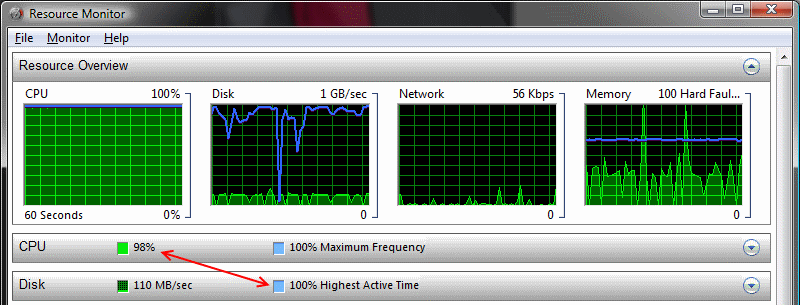
- Discs don't need to be any faster, because the CPU is fully loaded
- CPU couldn't be any faster without the discs becoming a bottleneck
Posted by Terrence Meiczinger (Member # 5059) on 12-06-2012, 12:03 AM:
Recent versions of OpenDCP should use all cores on Windows. Early versions didn't because the application would exceed the 2GB per process memory limit on 32-bit Windows and crash.
There are other processing limits, such as I/O, so more threads doesn't always mean better performance. You may need to adjust the number for your system. For example, on my 8-core Mac Pro, 6 threads is usually optimal when using OpenJPEG. When using the Kakadu encoder, just 1 thread is needed because the encoder is highly optimized and simultaneous encodes starve each other.
GPU encoding for JPEG2000 isn't going to be all that beneficial over well written CPU code. The costs of GPU setup and memory transfers will outweigh the computational gains. GPUs are great for certain tasks, but it's not simple as just throwing GPUs at everything. Decoding on the other hand could benefit from GPU processing.
Posted by Frank Cox (Member # 6258) on 12-06-2012, 12:16 AM:
Where is the opendcp source code? I've looked on both http://code.google.com/p/opendcp/ and http://www.opendcp.org/ and all I can find is compiled binaries for various systems.
Posted by Tom Herendeen (Member # 7314) on 12-12-2012, 11:58 AM:
Anyone have any comments about using Windows Movie Make to create input for DVD-o-matic? In a 90 second clip, the sound go terribly messed up in the last 15 seconds. The sound was a .wav file; the video was a series of stills. WMM's output is a .wmv file as opposed to a .mp4 which seems to work fine.
Posted by Carl Hetherington (Member # 7107) on 12-13-2012, 10:33 AM:
quote: Tom Herendeen
Anyone have any comments about using Windows Movie Make to create input for DVD-o-matic? In a 90 second clip, the sound go terribly messed up in the last 15 seconds
Hi Tom, if you want to send me the WMV file (either email to cth@carlh.net or use yousendit.com, perhaps) then I will take a look at it and see if I can work out what's wrong.
Best regards
Carl Hetherington (dvd-o-matic author)
Posted by Frank Angel (Member # 248) on 12-21-2012, 03:05 PM:
Ok, you've got your new home-made DCP authored and now you ingested it. Question is, will all that high security let the system play it, no questions asked even tho it has no KEY? Or do you create your own key to unlock your own DCP? How does that work?
Posted by Frank Cox (Member # 6258) on 12-21-2012, 03:36 PM:
A dcp can be encrypted or unencrypted. An unencrypted dcp doesn't require any key to play.
Posted by Mike Blakesley (Member # 26) on 12-21-2012, 03:51 PM:
OK, so I made a very nice "Merry Christmas" tag. It features a snowy picture of our downtown, thus it gets ooohs and aahs from the audience every time it plays. But now, we're playing a 3-D movie and when the tag comes up, the screen goes to all-green, so I've had to take it out.
I assume this is due to the movie being 3-D and the tag being 2-D, but 2-D trailers work fine.
Anybody got an idea or a workaround for this? Or am I just missing some setting?
Posted by Carl Hetherington (Member # 7107) on 12-21-2012, 04:33 PM:
quote: Frank Angel
Ok, you've got your new home-made DCP authored and now you ingested it. Question is, will all that high security let the system play it, no questions asked even tho it has no KEY? Or do you create your own key to unlock your own DCP? How does that work?
Many of the free programs (DVD-o-matic included) generate unencrypted DCPs, so they will just play (much like most trailers).
quote: Mike Blakesley
OK, so I made a very nice "Merry Christmas" tag. It features a snowy picture of our downtown, thus it gets ooohs and aahs from the audience every time it plays. But now, we're playing a 3-D movie and when the tag comes up, the screen goes to all-green, so I've had to take it out.
Strange! Is this with DVD-o-matic? I'm pretty sure I checked some of its outputs in 3D mode and they worked ok. What projector/server combination are you using?
I suppose you could drop into 2D mode for the trailer and then go back to 3D for the rest of the script, but it's a bit of a faff...
Carl
Posted by Mike Blakesley (Member # 26) on 12-21-2012, 05:31 PM:
Carl - Yes, using DVD-O-Matic to make the DCP. We have a GDC server and an NEC NC2000 projector. I made the clip in Sony Video Studio as an AVI so it should be fine from the front end at least.
I also have attempted to DCP-ize a couple of Looney Tunes from one of those DVD sets that came out a few years ago. I used DVDfab to extract the video but DVD-O-Matic gets to about 90% through the transcode process and then crashes. Any idea on that one?
Posted by Carl Hetherington (Member # 7107) on 12-21-2012, 06:36 PM:
quote: Mike Blakesley
Carl - Yes, using DVD-O-Matic to make the DCP. We have a GDC server and an NEC NC2000 projector. I made the clip in Sony Video Studio as an AVI so it should be fine from the front end at least.
Very odd. I will have to think a bit about that one. If you get the time, perhaps you could send me all the .xml files from inside the troublesome DCP? (to cth@carlh.net) I will try to see if anything is different between them and a typical 2D trailer.
quote: Mike Blakesley
I also have attempted to DCP-ize a couple of Looney Tunes from one of those DVD sets that came out a few years ago. I used DVDfab to extract the video but DVD-O-Matic gets to about 90% through the transcode process and then crashes. Any idea on that one?
Which version of DVD-o-matic are you using? Is the crash during the "transcode" part or the "make dcp" part? Any chance you could send me the log file that is created inside the film directory?
Glad you are having at least some partial success with the -o-matic!
Best
Carl
Posted by Mike Blakesley (Member # 26) on 01-07-2013, 12:17 AM:
Just wanted to report here that I've been experimenting a bit with DVD-o-matic and have reported a couple of issues to Carl -- he's been most helpful (and fast) in getting things solved and questions answered.
Among other projects, I even downloaded an old "1940s-era" Previews of Coming Attractions clip from Youtube, it looks awesome on the big screen. Never would have thought YouTube content could look that good that big. So now my list of "things to make" is starting to grow quickly.
Bottom line, this program works well and I'm sure I'll be making a lot of use of it. Thanks Carl!
Posted by Gavin Lewarne (Member # 5397) on 01-08-2013, 12:17 PM:
DVD-o-matic is a godsend, thankyou so much!
Using KDEnlive (linux video editing software) to generate a mpeg2 from some still images, and then DVD-o-matic I have been able to create a simple, but effective "Coming Soon" short customised with our business logo and some other stuff. We play it just after the ads before the trailers.
Rendering the mpeg2 @ 24fps in KDEnlive means we dont get any random flashes of junk on the screen, and the ability to name the end DCP anything we want (like PAC-COMING_SOON) without all the other DCI naming stuff is a brilliant feature. Makes building the shows very easy
So, thanks very very much for the brilliant and free software ![[Smile]](smile.gif) If you had a donation link on your website i would buy you a beer!
If you had a donation link on your website i would buy you a beer!
Posted by Mike Blakesley (Member # 26) on 01-08-2013, 02:49 PM:
I created a one-minute plain black DCP called "Roxy Show Open" and a six minute one called "Roxy Close." I put these at the beginning and end of all my various templates, along with the necessary cues for starting the movie, shutting down the projector, etc. This takes the place of having to use multiple 30-second "MOS" clips and this way I can make sure that all the cues stay in the right places. Once the playlist is built, the only cue I have to add is the "lights mid" cue at the start of the end credits.
Posted by Carl Hetherington (Member # 7107) on 01-11-2013, 10:05 AM:
Hi chaps,
Glad it is working and being found useful. Thanks for the comments.
Best
Carl
Posted by Dennis Benjamin (Member # 1137) on 02-20-2013, 07:30 PM:
Thanks Carl, for your help over the weekend regarding that DCP still you made.
I have now made a few DCPs and I have run into a sound issue:
I created a DCP Trailer for the film "Amour". We hadn't received one and we are playing the film as part of our "Encore" series in a few weeks and I like to run the trailer to let people know we are getting it.
I downloaded a 1080p .mp4 version of the trailer and ran it thru Dvd-o-Matic. It created the package just fine. I tested it this evening and the picture was awesome. However, the sound was tremendously loud. I had to run upstairs as it was piercingly loud. What's the best way to handle that? Lower the decibels when I create the file? How would i know to do that ahead of time?
Thanks.
Posted by Mike Blakesley (Member # 26) on 02-20-2013, 08:34 PM:
I have found that it helps to look at a downloaded video in some video editing software that shows graphical waveforms of the soundtrack. It takes a little bit of practice but you will eventually know what the "proper" volume looks like on the waveforms. You can adjust that volume in your video software and then make your DCP.
The software I use is Sony Video Movie Studio (it's something like $79) but I'll bet there are lots of other alternatives out there.
Posted by Carsten Kurz (Member # 5396) on 02-21-2013, 06:18 AM:
Best practical solution is to extract the audio/MXF from commercial trailers and use them as a hearing reference. E.G. you could extract the audio part from a few different types of trailers - action, romantic comedy, whatever.
Then you simply play these through VLC in comparison with the audio you want to compile into your DCP.
There are proper LEQ/ITU based VU meters available for video editing software, but they need some special knowledge to be set up and used, so I think the direct listening reference is the most practical approach.
Another one, of course, is to always create 3-4 different versions with different sound levels, then test each of them on screen and choose the best one.
- Carsten
Posted by Aleksandar Obradovic (Member # 7266) on 02-21-2013, 04:31 PM:
Of of solution is to normalize sound levels with SoX (Sound eXchange) but you have to be familiar with command line/console within your operating system. I am using this occasionally during DCP creation process (OpenDCP is my choice btw).
Command to normalize sound of 5.1 audio channels looks like this (i assume that you already have all channels separated):
sox left.wav norm -20 remix 1
sox right.wav norm -20 remix 2
sox center.wav norm -20 remix 3
sox lfe.wav norm -20 remix 4
sox ls.wav norm -20 remix 5
sox rs.wav norm -20 remix 6
Of course you can build script when you find right level which suits your needs. I made one such script which covers entire DCP creation process with OpenDCP (con is that i have to always use same folder and same filenames except for wrapping which is handled by another script btw)
A little bit off topic question
Some of you guys and girls has knowledge of open source KDM generator???
BR Alexander
Posted by Wolfgang Woehl (Member # 6901) on 02-21-2013, 05:24 PM:
Cinemaslides will generate KDMs.
Posted by Carl Hetherington (Member # 7107) on 02-22-2013, 03:58 AM:
quote: Dennis Benjamin
Thanks Carl, for your help over the weekend regarding that DCP still you made.
No problem, hope it was ok!
quote: Dennis Benjamin
I have now made a few DCPs and I have run into a sound issue:
I created a DCP Trailer for the film "Amour". We hadn't received one and we are playing the film as part of our "Encore" series in a few weeks and I like to run the trailer to let people know we are getting it.
I downloaded a 1080p .mp4 version of the trailer and ran it thru Dvd-o-Matic. It created the package just fine. I tested it this evening and the picture was awesome. However, the sound was tremendously loud. I had to run upstairs as it was piercingly loud. What's the best way to handle that? Lower the decibels when I create the file? How would i know to do that ahead of time?
You can fix it by going to the Audio tab of DVD-o-matic and changing the value for "audio gain". A negative value will make it quieter. If it is way too loud you might start with -12dB and see how that sounds; you will need to recreate the DCP afterwards but it should be fairly quick as it will re-use the video encoded for the previous run.
As for knowing to do that; as others have suggested, you can only really do it by playing back the source file and referencing it to others. There should be a way of getting DVD-o-matic to give some indication of the source audio level, but it might be hard to get a representation that is useful.
Best
Carl
Posted by Kris Verhanneman (Member # 5562) on 02-22-2013, 08:49 AM:
Is there an easy way to get a DCP back to a HD video file (unwrap the clip)? Something with a user interface please.
Posted by Wolfgang Woehl (Member # 6901) on 02-22-2013, 09:02 AM:
Kris, I've written a proxy tool which does exactly that. Handles DKDMs for encrypted packages etc. CLI app, there is really not that much you'd want to interface with. Not open source, get in touch for details.
Posted by Carsten Kurz (Member # 5396) on 02-22-2013, 10:45 AM:
quote: Kris Verhanneman
Is there an easy way to get a DCP back to a HD video file
To do what with it?
Unwrapping is one thing. Playing back a J2C-MXF another.
Unwrapping only gives a folder full of j2c files. Transcoding? Yes, but takes time.
Unwrapping is CLI with asdcp-test, but can be be made drag'ndrop easily under any OS.
A proxy solution with CPL parsing like Wolfgang mentions it is a nice testing tool until capable players (and hardware) turn up.
- Carsten
Posted by Kris Verhanneman (Member # 5562) on 02-22-2013, 11:00 AM:
Maybe I didn't express myself correctly... (would not be a first time).
I would like to be able to take a non crypted dcp trialer/commercial and convert it back to something that can be read on a standart pc.
I don't mind that it takes some time.
Posted by Aleksandar Obradovic (Member # 7266) on 02-22-2013, 11:36 AM:
There is no need for conversion because VLC can play some of MXF files. Otherwise you should buy some piece of software which can convert it. AFAIK there is no open source converter for such stuff.
Posted by Carsten Kurz (Member # 5396) on 02-22-2013, 11:41 AM:
true - 'some MXF files' ... ;-)
Kris - you will have to wait some time, imperfect solutions are there, more are coming.
Transcoding is possible with open source software, but not strictly GUI based. It takes some time and is not suitable for just checking/viewing content on the fly.
If you can spend some money, get dcpPlayer for around 250US$ and run it on a decent machine. It will not just play the MXF Files, but the full composition.
- Carsten
Posted by Aleksandar Obradovic (Member # 7266) on 02-22-2013, 11:53 AM:
@Carsten
Mate do you know why i have green overlay when playing some mxf's in VLC? Colorspace problem maybe?
Posted by Carsten Kurz (Member # 5396) on 02-22-2013, 12:05 PM:
They are working on it. Only VLC 2.02 and 2.03 can play J2C, it's broken again in 2.04 and 2.05. But they are working on a much better decoder for the 2.1 release.
Issue is XYZ 12Bit colour in J2c codestream.
Of course it works with MPEG-2 interop files.
- Carsten
Posted by Kris Verhanneman (Member # 5562) on 02-22-2013, 01:41 PM:
okay it would be nice to be able to edit the trailers on a pc
Posted by Carsten Kurz (Member # 5396) on 02-22-2013, 01:46 PM:
Editing - in how far?
After unwrapping, you can load the single image sequence + associated audio into the usual breed of video editors. Edit - but then you have to recode the J2C with the known free tools and compile it into a new DCP. Possible, but not straightforward with current tools.
There are some quirks in using the MXFs without the CPL - namely, lead-in/lead-out, beeps, etc, Nothing really complicated, but the MXFs are not a 1:1 representation of the trailer as it is played on the server.
- Carsten
Posted by Wolfgang Woehl (Member # 6901) on 02-22-2013, 04:41 PM:
Carsten, there are a bunch of applications. Be aware that in some (not small) markets distribution DCPs are the master source for localization -- there is no access to an actual master.
The proxy tool was initially written for a client who needs to spot and add subtitles for his market. Then there is the issue of censor cuts which they locate via proxy, generate EDLs and apply to compositions.
It's not a testing tool, mind you
Posted by Carsten Kurz (Member # 5396) on 02-23-2013, 09:10 AM:
Any non-commercial/-expensive options? Not that I know of.
As long as one is working/doing edits on the J2C file level, no re-encoding would be necessary.
- Carsten
Posted by Grant Chambers (Member # 7051) on 02-23-2013, 10:26 PM:
Hmm. Interesting. I've been using Open DCP. The sound issues could be from a wrong bit depth (24bit WAV mono/ channel) Not sure. All I know is with open dcp, I do the following:
Convert my media to the right resolution (crop/resize) 2K or 4k depending. Scope or Flat.
Create a 16bit per channel tiff sequence in Adobe After Effects.
Use open dcp to convert the tiff files to Jpeg2000 sequence.
Create MXF from the Jpeg sequence
Create MXF from the Audio (24bit WAV per channel. I use Adobe audition to split stereo to 5.1 surround sound and tweek it if needed, then convert channels to mono WAV files.
Open DCP also does 3D very well. I've been getting some pretty nice Stereo 3D on my Dolby Server. Still learning though.
Posted by Carl Hetherington (Member # 7107) on 03-05-2013, 09:11 AM:
Talking about audio levels when making DCPs...
quote: Carl Hetherington
You can fix it by going to the Audio tab of DVD-o-matic and changing the value for "audio gain". A negative value will make it quieter. If it is way too loud you might start with -12dB and see how that sounds; you will need to recreate the DCP afterwards but it should be fairly quick as it will re-use the video encoded for the previous run.
As for knowing to do that; as others have suggested, you can only really do it by playing back the source file and referencing it to others. There should be a way of getting DVD-o-matic to give some indication of the source audio level, but it might be hard to get a representation that is useful.
I have added a primitive plotting feature to DVD-o-matic 0.76 which displays a graph of sound level (peak / RMS) in the source. It might help out with this problem, a bit ... but I suppose it will need to be tried out in real life to see if it is any use.
DVD-o-matic 0.76 download
Regards
Carl
Posted by Tran Phong (Member # 7477) on 03-12-2013, 02:45 AM:
I used Doremi Cineasset software . I use version 5.2.11 (crack) )
playing good in GDC SX2100 , Dolby DSS200 and Doremi DCP 2k4 . So i just convert advertising 4 dcinema system.
P/S : I'm from Viet Nam , so foreign language is very bad !
Posted by Duc Nguyen (Member # 6988) on 03-15-2013, 08:43 AM:
Hi Phong!
What cinema are you working for ???
Posted by Carsten Kurz (Member # 5396) on 04-12-2013, 09:55 AM:
The recent versions of DVD-o-matic have some nice improvements. I start to like this piece of software ;-), especially since it omits the enormously storage intensive single-image input/intermediate approach of most other DCP creating software, and, for an all-in-one-converter, all processing options are easy to use, well documented and make sense.
It is NOT a competitor to OpenDCP, DCPC, DCPBuilder, etc., but a nice completion of options. It lacks, 3D, 4k, 7.1, but it shines at conversions and ease of use.
There also is a manual ;-)
Currently, it is available for Windows and Linux.
Now, Carl Hetherington has set up an Indiegogo Kickstarter-like project to enable a MacPort. As such he needs the minimum investment into a Mac - a MacMini for porting and testing.
Please support his effort!
DVD-o-matic: http://carlh.net/software/dvdomatic/
Indiegogo Campaign: http://www.indiegogo.com/projects/dvd-o-matic-on-mac-os-x
- Carsten
Posted by Tran Phong (Member # 7477) on 04-13-2013, 08:39 AM:
Hi Duc !
I'm working at galaxy cinema !
Posted by Manuel Acevedo Civantos (Member # 7567) on 04-19-2013, 02:19 PM:
Just wanted to remark the indiegogo campaign for DVD-o-Matic. Please support it!
With its ease of use, it can be a real game changer for many small exhibitors and producers.
Posted by James Skinner (Member # 7385) on 04-21-2013, 01:24 PM:
While it can be tricky to setup initially, I have been very happy with DCP Builder. Its seem much more feature rich than the other free options. http://dcpbuilder.com
Posted by Ronda Fitzsimmons (Member # 1418) on 05-17-2013, 11:25 AM:
Only 11 days left for Carl's indiegogo campaign. Easy to contribute using paypal for any who would like to help him out.
Posted by Carsten Kurz (Member # 5396) on 05-17-2013, 02:41 PM:
Yep. We're nearly there. It's great software and easy to use. Please contribute!
http://www.indiegogo.com/projects/dvd-o-matic-on-mac-os-x/
http://carlh.net/software/dvdomatic/
- Carsten
Posted by Cameron Glendinning (Member # 3516) on 06-08-2013, 09:26 PM:
I recently tried to ingest a DVD o matic made DCP that I have made and run before in several conventional cinemas on the IMAX digital system and it is not being recognized, therefore not ingested. The system does allow ingesting of conventional DCP 2D content, any ideas why or what software would work with IMAX gear?
Posted by Kirk Futrell (Member # 5006) on 06-10-2013, 03:44 PM:
Cameron,
Does the IMAX server possibly only recognize EXT3 formatted drives and the drive you have your file on is not formatted that way?
Carl,
DVD-O-Matic has been a huge help at our theatre. Being an arthouse we often have to make our own DCP trailers for upcoming series or from downloaded or pro-res trailers. We have even found a work around for the default L,R only you typically get when downloading pro-logic LT,RT trailers from the internet. We put those trailers together in our playlist so that we can switch our Datasat AP20 to 2:4 matrix mode for those trailers and switch it back to default when they are over. I haven't yet found a free program that will demux the LT,RT to convert it to 5.1 wav files to drop in to DVD-O-Matic yet so until then this is how we do it. We also use your encode servers on our a couple of other PCs on our network to dramatically cut down encode times. Keep up the good work!
Posted by Carsten Kurz (Member # 5396) on 06-10-2013, 04:59 PM:
I have suggested to Carl to enable an option for stereo->2.1 decoding, maybe even ProLogic etc. ENCODING and ProLogic->discrete decoding.
As far as I know, FFMPEG has that functionality, and indeed, the AP20 does an excellent job - IF the material is actually ProLogic encoded and not just plain stereo.
There is an even better surround option in the AP20, that is, dts NEO6. Unfortunately, it is only available for NonSync Sources, not DCI content. It does an excellent job to place dialog on the center speaker. We use it all the time when we play alternative content with stereo tracks from media-players, notebooks, etc.
- Carsten
Posted by Mike Blakesley (Member # 26) on 07-17-2013, 02:47 PM:
I am trying to convert a piece of video for a special show this weekend and have an "issue."
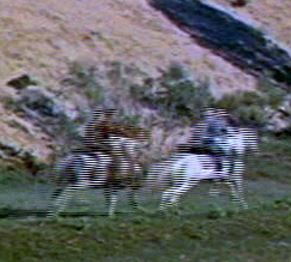
The picture looks good unless something is moving quickly L-R on the screen....then, the moving parts of picture seems to split horizontally into small segments briefly, like part of the picture has to 'catch up' with the rest of the picture.
I'll paste in a section of a picture that illustrates the problem:
I tried looking at the video from the VOB files in the DVD-o-Matic player, and also tried converting the video to an avi using Handbrake...the results are the same either way.
I'm using DVDFab's HD Decrypter to copy the video from the DVD. There don't seem to be any settings in that, and besides it's worked for other video I've converted before. This is an old old video from the '50s I'm working on so could that be part of it? It looks fine when just looking at it in Windows Media player.
Can anyone shed some light on this? I hope I've described the problem understandably enough.
Posted by Joe Redifer (Member # 3) on 07-17-2013, 04:10 PM:
What is the frame rate of the source video and what is the frame rate of the DCP? It may not like 23.98fps. Or 29.97fps. It has to be a hard 24 or 30 for best results, I think. Remember... "hard".
Posted by Mike Blakesley (Member # 26) on 07-17-2013, 05:23 PM:
The DCP is coming out at 30, and the source is 29.97. Here is a portion of a screen shot.
I'm not sure if the DCP frame rate is the problem though because this "bad" look is coming from the preview, before the DCP is even created (and the DCP results look the same as this). And, if the DVD is created at 29.97 how can I get around that...if that's the problem?
Posted by Carsten Kurz (Member # 5396) on 07-17-2013, 06:09 PM:
That's interlacing, your source footage is 'i'. DVD-o-matic has some processors, including a range of different de-interlacers, to get rid of that. You will lose some vertical resolution, but it's your only choice. Don't ask me which deinterlacer module to use. Just try them on a short snip.
http://en.wikipedia.org/wiki/Interlaced_video
http://en.wikipedia.org/wiki/Deinterlacing
That's normal for DVD content. Only very few DVDs are mastered with progressive footage.
Pushing the framerate from 29,97 to 30fps is the best option. DVD-o-matic will automatically resample the audio to adjust for that. If your server/projector can play 30fps, your fine.
- Carsten
Posted by Mike Blakesley (Member # 26) on 07-17-2013, 06:14 PM:
Handbrake has de-interlacing too, I'll try it with that on. I don't think it was on before, at least. I'm doing this while attempting to do my actual job so I keep having to stop/start. Thanks, will let you know what happens.
Posted by Randy Stankey (Member # 64) on 07-17-2013, 08:04 PM:
Definitely interlacing artifacts.
I use MPEG Streamclip to de interlace and to convert to another CODEC before encoding to the final format.
http://www.squared5.com/
It's an extra step and it takes a little longer but it ensures that the video will look as good as it can before you encode to DCP.
Posted by Joe Redifer (Member # 3) on 07-17-2013, 09:50 PM:
Yes, because the more steps of recompression, the better! That's why I always re-encode my MP3s into M4A before I convert them to WAV. I just wish I had time to convert it into more formats before the final one.
Disregard this post if your "Another Codec" is uncompressed or near-lossless.
Posted by Frank B. McLaughlin (Member # 6683) on 07-18-2013, 06:42 AM:
I find 1080/60p in, 29.97 out works rather well.
Posted by Randy Stankey (Member # 64) on 07-18-2013, 07:32 AM:
I guess I'm stupid for assuming that anybody would convert to anything but a lossless CODEC when they are editing or as an intermediate step in converting video from one format or another.
Posted by Mike Blakesley (Member # 26) on 07-18-2013, 10:35 AM:
I'm still on the learning curve when it comes to all this conversion stuff… Well, all things digital I guess.
Posted by Carsten Kurz (Member # 5396) on 07-19-2013, 05:01 PM:
Well, in general you don't need an intermediate encoding process with DVD-o-matic, you can go straight from all FFMPEG supported formats to J2k. Unless you need to do really weird things. DVD-o-matic supports framerate conversion, audio resampling, cropping/scaling, trimming, deinterlacing, artifact filtering. That should do for most conversion-only jobs.
- Carsten
Posted by Randy Stankey (Member # 64) on 10-24-2013, 11:15 PM:
Carsten,
Just want to give you a "heads up" and say thanks.
I recently got hired to create a video to play on DCP and I just got paid for the project. It wasn't a super great video but the customer was satisfied and that's what counts. Right?
Anyhow, I want to send you guys a few bucks in donation for your project. It's not a lot but even $30.00 is something. right?
Do you guys have a PayPal account, or something?
Posted by Carsten Kurz (Member # 5396) on 10-25-2013, 09:00 AM:
Hi Randy,
to Carl: http://carlh.net/software/dvdomatic/donate.php
- Carsten
Posted by Randy Stankey (Member # 64) on 10-25-2013, 10:04 AM:
Thanks, Carsten!
Just got through with PayPal. Should be coming through any time.
BTW: As I was working on the first project, I had a discussion with the woman who made this independent movie called "Furever." It's about the things people do to memorialize their pets when they die.
http://fureverfilm.com/index.shtml
We played this movie at Mercyhurst and there was a meet n' greet with the director, afterward.
During that meeting we started to discuss how she could distribute her movie as a DCP and I told her about DCP-O-Matic. I told her DCP-O-Matic is what I use and I directed her to your website and gave her your name. That was a couple of weeks ago.
I said that the software was FOS but that she should make a donation if she uses it professionally. I suggested 10% of the profit from her first gig. She assured me that she understands about these things and that she would make a donation if she did use it.
You might want to keep an eye open for any hits from the director or her crew. Not so much for financial reasons but, if people are using DCP-O to make and distribute finished product, it would be a good to have it on your list of credits. Publicity. A feather in the cap, so to speak.
Money is good but sometimes publicity is just as good and sometimes even better.
Posted by Carsten Kurz (Member # 5396) on 10-25-2013, 11:13 AM:
I'm just a supporter. Carl is doing all the work.
- Carsten
Posted by Randy Stankey (Member # 64) on 10-25-2013, 11:32 AM:
Oops :oops: Still the program works as advertised. People should know about it. ![[thumbsup]](graemlins/thumbsup.gif)
Posted by Jorgen Larsen (Member # 5302) on 12-23-2013, 03:15 PM:
Hi
Can anybody tell me: Will DCP-o-Matic work with Windows 8.1 64 bit
Thanks and merry Cristmas
JL
Posted by Carl Hetherington (Member # 7107) on 12-24-2013, 09:18 AM:
quote: Jorgen Larsen
Can anybody tell me: Will DCP-o-Matic work with Windows 8.1 64 bit
Should do, although I haven't tested it recently. Let me know if not.
Posted by Jorgen Larsen (Member # 5302) on 01-09-2014, 09:00 AM:
I still can´t get DCP-omatic work on Windows 8.1 64 bit
DVD-omatic runs fine on both w 8.1 and w 7
Has anbody else seen this.
Thanks
Posted by Carl Hetherington (Member # 7107) on 01-09-2014, 09:58 AM:
quote: Jorgen Larsen
I still can´t get DCP-omatic work on Windows 8.1 64 bit
DVD-omatic runs fine on both w 8.1 and w 7
Has anbody else seen this.
Thanks
What's the problem? carl@dcpomatic.com or any of the ways listed here would probably be quicker ways of getting help than posting here
Posted by Jorgen Larsen (Member # 5302) on 01-09-2014, 10:38 AM:
Stanges - suddenly it works fine so i am sure i was doing somethings wrong.
Thank you for a fantastic software....
Posted by Paul Maxon (Member # 6211) on 01-11-2014, 11:33 AM:
I have used this software multiple times to make DCPs for special events. Works good, although in the new version I can't find the option for certain cropping functions(like 16:9 inside scope). So i continue to use DVD-o-matic.
If you have multiple computers on the same network, make sure you use the option to have other computers help with the rendering, makes it go sooo much faster.
Thanks for the software.
Posted by Louis Bornwasser (Member # 3063) on 01-11-2014, 11:58 AM:
None of this was a problem in the "tube" age!
Posted by Carl Hetherington (Member # 7107) on 01-11-2014, 12:49 PM:
quote: Paul Maxon
In the new version I can't find the option for certain cropping functions(like 16:9 inside scope).
Select the aspect ratio of the image in the "video" tab, then the size of the container in the "DCP" tab. So for 16:9 inside scope, choose 16:9 in "video" and Scope in "DCP".
Posted by Mike Blakesley (Member # 26) on 01-11-2014, 12:55 PM:
quote: Paul Maxon
If you have multiple computers on the same network, make sure you use the option to have other computers help with the rendering, makes it go sooo much faster.
Could somebody put up a detailed description of how to set up a group of computers this way? We recently replaced 3 computers at my day job and I'm thinking I could put the retired machines to work on something like this.
Posted by Carsten Kurz (Member # 5396) on 01-12-2014, 10:25 AM:
Basically, you need to install the software on all machines you want to use. Together with the main DCP-o-matic software, a 'smaller' network client version is installed. You can put that into the autostart folder of the machines you want to use. It doesn't eat many resources when not in use, so you can just leave them there.
You need to configure the network clients by indicating their IP numbers in the main application running as the master. Basically, you tell them which of your network machines are available under which IP address.
One possible issue is that in most networks, machines have no static IP address, but get assigned a new address on every boot or every other week, depending on the router configuration. So you need to make sure the main application get's updated about these changed IP addresses, or, better, set these machines to static IP addresses. Some routers allow you to keep the DHCP/dynamic IP address scheme, but then assign the same IP address again and again to the same machine.
Aside from keeping the network client applications running and control the IP addresses, there is no complicated configuration work necessary.
- Carsten
Posted by Carl Hetherington (Member # 7107) on 01-12-2014, 04:54 PM:
It's a bit easier than that on recent versions if your servers and master are on the same subnet. The master will find them auto-magically, so all you should need to do is run the server software on any spare machines and then start a "make DCP".
Posted by Carsten Kurz (Member # 5396) on 01-13-2014, 02:27 PM:
Excellent job, Carl!
- Carsten
Posted by Mike Blakesley (Member # 26) on 02-10-2014, 03:08 PM:
Just one more question on this...can I use a switch to wire these computers together? Or do I need to use a router? (It's not necessary to connect these machines to the internet...or is it?)
Sorry for being so clueless about network stuff but, it's just not something I ever need to work with generally.
Posted by Frank Cox (Member # 6258) on 02-10-2014, 03:24 PM:
A cheap router will generally cost you less than a switch. No idea why since a switch does a lot less than a router, but that's the way it is. Probably a sales volume thing.
You can easily configure a router to hand IP addresses out to the connected machines, too, so adding another machine to your network becomes as simple as plugging in the cable. Can't do that with a switch.
You don't have to hook a router up to the internet or anything external if you don't want to. It's perfectly legitimate to use only the lan plugs and leave the wan plug unused. You then have a switch with a built-in DHCP server.
Posted by Carsten Kurz (Member # 5396) on 02-10-2014, 03:40 PM:
If you want to benefit from network rendering, you absolutely need a Gigabit switch. The network is saturated quickly with the image transfers from DCP-o-matic. A 100MBit network is too slow even for a small number of client computers.
However, you can find 5port Gigabit Switches for 30US$ or so.
- Carsten
Posted by Paul Eckhardt (Member # 6591) on 02-21-2014, 01:46 PM:
quote: Mike Blakesley
Just one more question on this...can I use a switch to wire these computers together? Or do I need to use a router? (It's not necessary to connect these machines to the internet...or is it?)
A switch sends packets to the proper destination, a router blasts the same packets to every single port; switches are better.
Make sure you have a gigabit ethernet switch - it'll let you transfer at proper speeds.
You do not need to be online for the network to function,
However, if you have a few computers and a switch, they may not immediately function as a network and could require additional settings tweaked.
A router that connects to the internet, or connecting your three computers two a switch which connects to the local internet will make them work automatically... (or just having a router that isn't connected) because the router will set up the network for you.
It's complicated, but once it's set up, it's good to go.
Posted by Carsten Kurz (Member # 5396) on 02-21-2014, 04:11 PM:
You confuse switch with the (old) concept of a network hub. A router in the true meaning will usually only have one LAN and one WAN port and can not be used to connect LAN machines. However, most routers nowadays have multiple LAN ports (+WIFI usually). Technically, this is a combination of a small switch with a router (and WIFI AP eventually).
A switch is sufficient to connect multiple machines to each other techwise. However, network settings need to be made manually.
An additional router facilitates this by supporting DHCP services on the LAN, through which most computers per default will obtain proper IP/gateway/network mask/DNS etc. settings so they will be able to communicate with each other without manual settings - cable insertion will usually be sufficient.
Long story short - no problem to cascade a fast switch to an existing router - IP addresses will be assigned by the router to all clients, yet the clients will be able to communicate with each other at Gigabit speeds IF a Gigabit switch is used and the networks cards have that capability. 10/100 is not fast enough for DCP-o-matic network rendering. Same is true even for the fastest WIFI.
- Carsten
Posted by Mark Strube (Member # 4190) on 03-25-2014, 08:23 PM:
Any hints on how to go about a batch conversion? I haven't been able to find anything regarding this in the DCP-O-Matic manual.
I have a list of files I'd like to convert into separate DCP's, which I need done by Thu night, but the full collection will take all night, and I can't be in the office that long.
Thanks for any help!!
Posted by Mike Blakesley (Member # 26) on 03-25-2014, 09:37 PM:
When you install DCP-o-Matic it also installs a separate program called DCP-o-matic Batch Converter which I assume will convert multiple files. I've never used it myself.
Posted by Mark Strube (Member # 4190) on 03-26-2014, 01:35 AM:
Yes, that's the issue I'm having. I start the batch program, but I don't see any way to "add to batch" instead of immediately making a DCP.
I can start a "new" conversion with a new source file while the previous one is already converting, but the program just hangs while analyzing. I sat there for a few minutes while it attempted to analyze the new file (which took a few seconds on the previous file) while already converting the old file, with no results, I ended up canceling it... this is on a fast quad core server, and the software is set up to use only 3 of the 4 cores so that other apps still run at a reasonable speed.
Posted by Philip Jones (Member # 6677) on 03-26-2014, 03:44 AM:
Set up the new job in DCP-O-Matic, then select 'Save'. Don't click Convert to DCP here. Just select 'New' again and keep saving the jobs.
Then open up the DCP-O-Matic Batch Converter (separate programme), select 'Add Film' and select the job you've just saved.
You can then queue up as many DCPs as you want to convert. It only does one at a time but is handy for just leaving to get on with it.
Posted by Mark Strube (Member # 4190) on 03-26-2014, 05:57 PM:
Thanks for the help, but I think I'm missing something here. When I go to "open" in the batch program (after saving my project in the non-batch program), I select the folder it created. It successfully opens the project. Then I go to "Make DCP" and it starts converting. I can open another project while it's converting, but I can't start that one, or queue it up. "Make DCP" is grayed out. What am I missing?
Posted by Carl Hetherington (Member # 7107) on 03-27-2014, 02:50 PM:
quote: Mark Strube
When I go to "open" in the batch program (after saving my project in the non-batch program), I select the folder it created. It successfully opens the project. Then I go to "Make DCP" and it starts converting. I can open another project while it's converting, but I can't start that one, or queue it up. "Make DCP" is grayed out.
The batch converter should look totally different to the standard DCP-o-matic. It sounds like you are loading the same program both times. Are you on Windows 8?
Posted by Mark Strube (Member # 4190) on 03-27-2014, 06:02 PM:
I've tried it on both Windows 8 and Windows Server 2008 R2. On both, the batch converter looks like the same program.
Posted by Mark Strube (Member # 4190) on 03-28-2014, 01:24 AM:
Ah-ha! I've found if I open the batch converter by going into the Program Files\DCP-O-Matic\bin folder, it actually loads the different program. It seems the shortcut was pointing the wrong place. Problem solved!!
(Luckily I managed to get all my content converted in time anyways, spread the work across 3 computers.)
Powered by Infopop Corporation
UBB.classicTM
6.3.1.2