This is topic RealD,Dolby3D,Xpand vs dual-projector setup in forum Digital Cinema Forum at Film-Tech Forum ARCHIVE.
To visit this topic, use this URL:
https://ft-forum.com/ft/cgi-bin/ubb/ultimatebb.cgi?ubb=get_topic;f=16;t=001335
Posted by Nastia Motovilova (Member # 7184) on 01-05-2013, 04:15 AM:
Hello to everyone,
As I am new to 3D tech and I'm trying to clear a few thoughts and was wondering if you could offer some insight.
My question is, if there was a choice, would you go with a "traditional" 3D dual projector setup whereby one projector is for the left eye and the other for the right with the static filters in front of the projectors (of course properly aligned) or would you go with one out of the three, Xpand,Dolby, RealD?
This is for a DCI projection system, for an only 3D cinema, using a silver screen (though the silver screen can be replaced if need be). With the dual projector linear polarized set up, there would be some loss of brightness when the image passes through the filter in front of the projector and again when it passes through the glasses. However, with a dual projector set up, there is a benefit of the increased brightness.
There are other benefits as well, such as not needing to go with a trademarked system which bears license costs of buying the 3D technology, relying on a third party for repairs, potential license costs etc
I would really appreciate your opinion on the above.
Regards
Posted by Antti Nayha (Member # 4980) on 01-05-2013, 05:17 AM:
There was some discussion about the options earlier in this thread.
First up, dual-projector 3D is a good idea, particularly now as the industry is trying to raise the standards for 3D light levels.
Second, any silver-screen based 3D system will compromise your image quality – even more for the 2D content. That leaves you with XpanD and Dolby.
I have no personal experience with dual-projector XpanD, but it’s only common sense that you have to be extremely careful with the alignment of the two projectors as any inaccuracy comes off the resolution.
On the other hand, dual-projector Dolby 3D is a ”traditional dual setup” in the sense you described: each projector is only projecting one eye through a static filter. You should still try to align the two pictures as precisely as possible, but it’s still less critical than XpanD since the eyes are able to correct for slight inaccuracies between them. Dual-projector Dolby 3D is also a bit more light-efficient compared to single-projector Dolby, because there’s no dark time involved. And of course, Dolby’s passive glasses are much less hassle compared to XpanD.
Christie is selling a dual-projector integration kit called Christie Duo, which might be of interest for you. All the four major 3D systems are supported. Of course, a similar system can be built with Barcos – it’s just that Christie has made an ”off-the-shelf” product out of it, complete with a stacking system and a camera and software for automatic alignment. (I wouldn’t bother with NEC projectors for such a setup, due to light efficiency and lamp life issues.)
Posted by Marcel Birgelen (Member # 6801) on 01-05-2013, 05:28 AM:
First of all, Xpand, Dolby3D and RealD all support dual projector setups for increased brightness in large venues.
Xpand has both an active and a new passive polarized system and there are others to consider, like Masterimage.
Of all the 3D technologies mentioned above, only RealD has a recurring licensing fee, the others are one-off.
None of the newer systems use linear polarization (only IMAX 3D still uses linear polarization, but that's not an upgrade, but a complete system). That way, you can tilt your head slightly without blurring the image too much.
Xpand has an active system, using shutter glasses and Dolby3D uses a system with alternating primary colors. Both Dolby3D and Xpand work with white and silver screens.
Xpand (the active system) and Dolby 3D use recyclable glasses. The others use glasses that are, outside of the USA, usually bought by the customer for a small fee. Those glasses can then be used at a next screening, if they don't forget to bring them along.
The Xpand (active) and Dolby3D systems are the best systems regarding ghosting. All other passive systems suffer some ghosting. Ghosting is especially annoying if you're using subtitles frequently.
Posted by Antti Nayha (Member # 4980) on 01-05-2013, 05:33 AM:
Oh yes, totally forgot about XpanD’s passive systems. There are in fact two: one is polarization-based so it requires the dreaded silver screen, but the other is a split-spectrum solution similar to Dolby. Has anyone got any experience from the latter? They seem to call it ”XpanD Color Spacer”.
Posted by Marcel Birgelen (Member # 6801) on 01-05-2013, 05:36 AM:
quote:
Oh yes, totally forgot about XpanD’s passive systems. There are in fact two: one is polarization-based so it requires the dreaded silver screen, but the other is a split-spectrum solution similar to Dolby. Has anyone got any experience from the latter? They seem to call it ”XpanD Color Spacer”.
Yes, I've seen one quite recently and I wasn't impressed. They moved from Xpand active to Xpand passive. Probably because people were complaining about the image brightness and the heavy glasses.
I wasn't impressed. Maybe something was not yet properly setup, but there was a MASSIVE amount of ghosting. The subtitles were almost unreadable.
Posted by Nastia Motovilova (Member # 7184) on 01-05-2013, 05:49 AM:
Thanks for the great replies!
If someone chooses to install a dual projector set up, why not just install the static polarized filters in front of the projectors and use the simple polarized glasses to get the 3D image? Would there still be a need in this case to go with either Dolby,RealD or Xpand?
Thanks!
Posted by Antti Nayha (Member # 4980) on 01-05-2013, 07:02 AM:
That’s exactly what dual-projector RealD or Masterimage is. You’re only buying the (static) filters and glasses from them in that case.
The same with Dolby 3D, except that it’s based on split-spectrum technology so it doesn’t require a silver screen.
quote: Marcel Birgelen
They moved from Xpand active to Xpand passive. Probably because people were complaining about the image brightness and the heavy glasses.
I understand the weight complaints – particularly if they were using the dishwasher-washable X101 glasses – but surely the active system should be a bit brighter? ![[Confused]](confused.gif) (At least if that was a single-projector setup.)
(At least if that was a single-projector setup.)
Posted by Marcel Birgelen (Member # 6801) on 01-05-2013, 07:30 AM:
quote:
I understand the weight complaints, but surely the active system should be brighter? [Confused]
I don't have the actual numbers at hand, but an active system isn't necessarily brighter, you still loose a lot of light with the glasses. Look trough a shutter glass that's open and you'll see for yourself, the loss is often larger than that of a normal polarizer glass.
Additionally, you go from white to silver screen, which is much more reflective. In this particular case, the image was brighter with the passive system than with the active system, but part of it might also be due to the leakage between left and right resulting in said ghosting.
quote: Antti Nayha
The same with Dolby 3D, except that it’s based on split-spectrum technology so it doesn’t require a silver screen.
Please note that the Dolby 3D filters are installed inside the projector, in the light path in front of the imager. That's true for both the "split" and "uniform" filter.
It's also possible to run Dolby3D in a dual projector setup with spinning filter, a lot like Xpand (active) in dual-projector setup would function. In that case, you indeed need to align your projectors perfectly.
Posted by Antti Nayha (Member # 4980) on 01-05-2013, 08:06 AM:
quote: Marcel Birgelen
Look trough a shutter glass that's open and you'll see for yourself, the loss is often larger than that of a normal polarizer glass.
These things can be hard to judge with a naked eye. It’s a common misconception, resulting from an optical illusion of sorts:
Remember that in an active system, there are no filters in the projector. This is why the image is very bright on screen, and most of the light loss takes place in the glasses. The difference between glasses on vs. glasses off appears huge, and you will go around telling your friends that the active system is darker because ”you can see it with your own eyes”.
In contrast, most of the light loss in passive systems happens already in the projector, and the glasses themselves don’t cut that much light. (I’ve even heard educated people claim that putting on the Dolby glasses actually makes the image brighter! ![[Cool]](cool.gif) ) But if you look at the net efficiency of the complete system, an active system usually wins: all other things being equal, you get more foot-lamberts in the eye per a watt of xenon light. Which is what matters, of course.
) But if you look at the net efficiency of the complete system, an active system usually wins: all other things being equal, you get more foot-lamberts in the eye per a watt of xenon light. Which is what matters, of course.
According to the usually quoted figures, the XpanD active system should be around 50% brighter compared to Dolby. That is probably overstating it a bit, but RealD XL is still the only passive system that actually gives you more light than active systems. And RealD XL has its own issues.
That said, and back on topic: even though Dolby 3D won’t win any light efficiency awards, it remains a good choice for both single and dual projector installations.
quote: Marcel Birgelen
It's also possible to run Dolby3D in a dual projector setup with spinning filter, a lot like Xpand (active) in dual-projector setup would function. In that case, you indeed need to align your projectors perfectly.
Yeah, I’ve heard about this… but it puzzles me as to why would you ever do it? In addition to the alignment issues, you will need to set up a dark time which naturally eats up light. Plus you end up with expensive moving parts in the projector. The only advantage I can see is that you can still run 3D if one projector breaks down – but it’s not going to be very bright 3D.
Posted by Marcel Birgelen (Member # 6801) on 01-05-2013, 09:56 AM:
quote: Antti Nayha
According to the usually quoted figures, the XpanD active system should be around 50% brighter compared to Dolby. That is probably overstating it a bit, but RealD XL is still the only passive system that actually gives you more light than active systems. And RealD XL has its own issues.
I agree that those things are hard to judge with eyesight only, although it's the end result that counts.
They came from Xpand 3D active and went for Xpand 3D passive. Maybe the polarizer Xpand uses is more efficient than the Z-Screen RealD uses. It still looks like a "Z-screen" type polarizer, not like the RealD XL polarizer. I don't know why you would otherwise switch from a perfectly OK active system to a passive system. They only switched it for their larger auditoriums, the smaller ones are still on Xpand Active.
quote: Antti Nayha
Yeah, I’ve heard about this… but it puzzles me as to why would you ever do it? In addition to the alignment issues, you will need to set up a dark time which naturally eats up light. Plus you end up with expensive moving parts in the projector. The only advantage I can see is that you can still run 3D if one projector breaks down – but it’s not going to be very bright 3D.
I also don't know why you would try to do this. It would only make sense in an odd projector setup, like with three projectors.
Afaik, the "color wheel" is still rotating inside the projector, even in a dual projector setup with a split left-right, but that's primarily due to cooling.
Posted by Nastia Motovilova (Member # 7184) on 01-05-2013, 10:20 AM:
Everything is clearer now.
Is the RealD technology, the Dolby3D or the Xpand worth the cost compared to installing a linear polarizing system similar to IMAX?
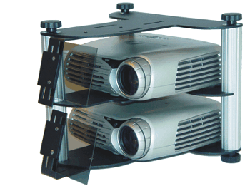
My train of thought is that with the "traditional" linear polarizing set up:
- on the one hand it is required to install a second projector
- on the other hand you save on the cost of needing to install a particular 3D techology such as Dolby/RealD/Xpand which allow you to install two quality projectors such as Christie ![[Razz]](tongue.gif)
- you get the benefit of increased brightness
May thanks!
Posted by Antti Nayha (Member # 4980) on 01-05-2013, 10:44 AM:
quote: Marcel Birgelen
I don't know why you would otherwise switch from a perfectly OK active system to a passive system.
I know of some theatres that have done just that, even though the passive system of their choice gave them less light. A major factor can be the fact that active glasses require active maintenance, with all the associated costs.
XpanD’s machine-washable X101 glasses are also heavy enough to irritate a lot of customers. The lighter models are more convenient, but then you must either have the staff clean them up manually (even more hassle) or hand them out unwashed along with disposable cleaning wipes, so the customers can do the dirty work themselves (also irritates them)…
There’s a lot to like in active 3D systems, but I wouldn’t recommend them for every theatre.
Posted by Marcel Birgelen (Member # 6801) on 01-05-2013, 10:48 AM:
I guess you want to be able to run encrypted DCPs and want to be fully DCI compliant or not?
No matter if you choose RealD, Dolby 3D, Xpand or almost any other competing 3D solution, it will practically always be cheaper in a single projector setup than with a second projector and a "roll your own 3D" setup. A DCI compliant projector starts anywhere around EUR 35K and goes all the way up to infinity. Almost any single projector 3D setup can be had for less than that.
If you're going to do 3D your own way, you need to be aware of the possible complications:
1) Where do you get your glasses?
2) Support from your playback solution, like your Playback server and IMB/Server combination.
3) Positioning your polarizers correctly.
4) Getting your polarizers out of the way for a normal 2D presentation.
So, unless you either have a really big screen and need two projectors and you do not have the few extra bucks for an "industry standard" 3D system, I would just go for a standard, off-the-shelf system.
Posted by Nastia Motovilova (Member # 7184) on 01-05-2013, 11:05 AM:
Yes, the system needs to be DCI compliant. Is it a requirement that a DCI compliant system implements one of the available technologies as these technologies have been officially approved?
Or can one create his own 3D DCI compliant system by using linear filters, as long as the projectors and the server are both DCI approved?
Many thanks for the replies!
Posted by Marcel Birgelen (Member # 6801) on 01-05-2013, 11:28 AM:
quote: Nastia Motovilova
Yes, the system needs to be DCI compliant. Is it a requirement that a DCI compliant system implements one of the available technologies as these technologies have been officially approved?
Or can one create his own 3D DCI compliant system by using linear filters, as long as the projectors and the server are both DCI approved?
In theory you could. Only don't underestimate the potential issues with getting the polarizers right and controlling the polarizers, if you don't want to move them manually each time you're switching from 2D to 3D.
If you choose a 3D system that's fully supported with your Playback server, then you also can control this system via your system. Most systems out there have dual-projector support.
A major problem could be the ghost busting functionality, because your server might not be capable of enabling that on an unknown system.
quote: Antti Nayha
I know of some theatres that have done just that, even though the passive system of their choice gave them less light. A major factor can be the fact that active glasses require active maintenance, with all the associated costs.
I will certainly ask them. Because now both their 2D and 3D are screwed. The 2D now suffers from hotspotting (just like the 3D of course) and unnatural looking colors and the 3D is just worthless with that amount of ghosting. Maybe that can be fixed with a better adjustment of the polarizer or maybe the ghost busting feature was not working, but still, it's a step backward if you ask me.
quote:
XpanD’s machine-washable X101 glasses are also heavy enough to irritate a lot of customers. The lighter models are more convenient, but then you must either have the staff clean them up manually (even more hassle) or hand them out unwashed along with disposable cleaning wipes, so the customers can do the dirty work themselves (also irritates them)…
You're right, those things start to suck after an hour or so of wearing them. I would really want them to innovate on that, getting lighter active glasses that are dish-washer proof...
quote: Antti Nayha
There’s a lot to like in active 3D systems, but I wouldn’t recommend them for every theatre.
That's why I like Dolby 3D the most, if it's done right. You need a lot of light, but your glasses are acceptable in terms of weight and you have almost no ghosting.
Posted by Nastia Motovilova (Member # 7184) on 01-05-2013, 12:26 PM:
Only 3D films will be projected, so there won't be a need to move around the polarizing filters.
So the large film production companies(such as Universal,Paramount etc) don't necessarily require one of the above-mentioned technologies to allow preview of their films in a cinema. It's simply a matter for only the server and projector being DCI compliant.
What would be a quick estimate of the cost for either Dolby,Xpand,RealD? Dolby's system is I believe around $23K + the glasses which are around $12, with no yearly license fees. What about Xpand and RealD?
Also about brightness, is there a universal agreement as to which technology offers more brightness? Is it possible to rank all the technologies if we were to use of course the same projector and lamp for all?
I've read somewhere online that Xpand is used as a reference by major distribution studios. Does this hold any truth?
Sorry for all the questions. Just trying to clear things up.
Many thanks!
Posted by Ian Freer (Member # 1940) on 01-05-2013, 02:27 PM:
I don't think the 3D system forms part of DCI compliance as such, but I know that Disney maintain a list of "Disney Approved 3D Systems" and that other studios seem to use this list as a reference for acceptable 3D installations. I.e. if your 3D system is not on the Disney Approved list, you may face extra problems trying to secure content.
I've only installed systems on the Disney list so don't really know what the consequences would be of going outside the list, but it'd be worth asking your primary content providers what their policies are.
Posted by Carsten Kurz (Member # 5396) on 01-05-2013, 02:47 PM:
Yes, there is no formal '3D compliance', but the Disney list of approved equipment should be checked. But it depends also on your integrator - if you choose a non-standard 3D system, they will usually be able to communicate that properly to distributors.
You should also check out Volfoni - they also have a passive AND active system. No license cost.
You can have static filters in front of your lenses, these could be linear or circular polarized. Linear has better basic stereo separation, but is more prone to ghosting with head tilt. Circular can be bought compatible with RealD/Masterimage glasses, so you have a safe source for glasses.
Single Projector Dolby is a real pain when balancing 2D and 3D brightness due to the large light loss. But since you say this is for a 3D only screen, that is no issue.
I like Dolby 3D - it's probably the best 3D system as far as 3D experience goes, but I don't like the Dolby glasses with their very limited viewing angle. As the system is licensed/under a patent, there will be no third-party suppliers for glasses or simply better/larger glasses. Also Dolby's step towards the cheaper film-type glasses is a step backward.
Neither polarizing filters nor shutter glasses are under a patent, so there is more competition, lower prices, better sourcing, etc. for these systems.
RealDs Z-Screen/XL has a low stereo separation, a lot lower that static filters.
That's the reason RealD applies GhostBusting.
While the silverscreen is the really limiting factor with stereo separation/ghosting, it is certainly not a good idea to start with a bad separation already on the projector.
It's a tough decision...
My personal preference would be either Dolby 3D, Volfoni active (Edge), or a dual projector setup with static circular filters. And get the brightest projector available, as Antti pointed out, the move to brighter 3D is already happening, you should not get a system that maxes out at 4-6fL on your screen. Bad time for Dolby.
- Carsten
Posted by Marcel Birgelen (Member # 6801) on 01-05-2013, 04:15 PM:
quote: Nastia Motovilova
Only 3D films will be projected, so there won't be a need to move around the polarizing filters.
You're absolutely sure about this? It sounds a bit like a waste to me ![[Wink]](wink.gif) . You're also not showing any 2D trailers, advertisements or other pre-show elements that would look at least somewhat awful trough a polarizer?
. You're also not showing any 2D trailers, advertisements or other pre-show elements that would look at least somewhat awful trough a polarizer?
quote: Nastia Motovilova
So the large film production companies(such as Universal,Paramount etc) don't necessarily require one of the above-mentioned technologies to allow preview of their films in a cinema. It's simply a matter for only the server and projector being DCI compliant.
It might sound somewhat strange, but indeed, the whole 3D thing is not yet part of the DCI compliance. There are some recommendations and it might eventually become part of it. But right now, this whole DCI compliancy thing is most of all just all about DRM and securing the content of the big studios. Of course, there is also a soft layer of quality control added, but that's mostly smoke and mirrors and in the end, nobody really gives a damn. It's not like a studio goes out and certifies an auditorium for "compliance", at least not yet. Maybe we better don't give them bad ideas .
But just as Ian and Carsten pointed out, some studios might actually still give a bit about quality, so they maintain a list of "approved 3D systems", I'm only aware of Disney at this moment, but that "list" might be incomplete. I don't know if they really enforce this list though. Maybe it's in the end more an ass-coverage for them: If it doesn't look good and you didn't use an approved 3D system, don't blame us. You might indeed want to check that out with your local content providers.
quote: Nastia Motovilova
I've read somewhere online that Xpand is used as a reference by major distribution studios. Does this hold any truth?
I don't know if that's the truth, but a correctly installed and operated active 3D system still gives the best picture, at least on paper. It doesn't mess with the screen (a white screen is just OK) and also not that much with the colors (like the Dolby system does).
Posted by Dave Macaulay (Member # 813) on 01-05-2013, 04:30 PM:
XpanD 3D is used at the studio/distributor screening rooms I've worked on. This is not a simple case of "XpanD is best", just that these screening rooms are used for a lot of different purposes and a silver screen is unacceptable because of the issues detailed already - so Real-D or other polarized systems are out. I haven't seen Dolby 3D in a screening room, although I haven't heard any reason to avoid it.
Posted by Nastia Motovilova (Member # 7184) on 01-06-2013, 03:43 AM:
You are right Carsten. The 3D technologies are not part of DCI so they are not a requirement on paper as such. Disney though as mentioned above issues its own approved equipment list which includes the all already DCI certified equipment with some additional requirements.
http://digitalcinema.disney.com/assets/pdf/approved_equipment_list.pdf
I've seacrhed a little but it seems it's only Disney for now that employs such a list. For Disney it's a requirement to go with either:
REAL D,DOLBY,MASTER IMAGE,XpanD,NESTRI,Eyes3Shut,IMAX 3D,3Din,Panastereo,3DGE by VOLFONI,Etoniq,3D Tech ,Sony SRX-R320S,Panavision Digital 3D System,DepthQ ,Hi-Shock,X-Mirror 3D,LnR3D,best View,SmartCrystal Cinema by Volfoni,5-Star by WOWELEC,FOCUX 3D,Espedos 3D
So I guess with the uncertainty whether the above requirement will be a part of DCI in the future, it would be wise to go an existing 3D technology.
I have read tons of threads here on the forum and among them I gathered lots of information. As I general business model and quality, I see that it essentially boils down to Dolby vs Xpand.
Which one would be preferred when there's a a small venue (where the projector distance to the screen is less than 8 meters) and when both systems are ideally installed and calibrated?
Many thanks for all the replies!
Posted by Antti Nayha (Member # 4980) on 01-06-2013, 05:50 AM:
It’s not really the distance, it’s the size of the screen…
I would agree that an active system gives you slightly better image quality than Dolby. The colour is a bit more accurate, and the glasses are larger, which means larger viewing angles. I can completely see why active systems are preferred in screening rooms, where colour is critical and the audiences are so small that glasses management doesn’t pose a huge workload. It’s a different thing when you’re running a 700-seat room with several 3D screenings daily, with minimal staff as usual.
That said, I’d say Dolby 3D is perfectly good enough for general audiences. Just make sure you get the older, better Cat 834 glasses, not the flimsier Cat 832 models.
Here’s my take on the pros and cons (+ means positive, * means neutral, – means negative):
XpanD with X101 glasses
+ absolute best image quality
+ good light efficiency
+ dishwasher proof
+ good viewing angle
– heaviest glasses (71 grams; enough to make patrons complain)
– no separate kids’ model; you can buy add-on nose- and earpieces for kids, but the result is nowhere near as comfortable as real kids’ glasses
– you need to constantly test the glasses and keep changing batteries
– uses special batteries that you can only buy from XpanD
– expensive glasses
XpanD with X103 glasses
+ very good image quality (the color is a bit less uniform compared to X101; you will notice this when you tilt your head)
+ best light efficiency (very slightly better than X101, not so much that it matters)
+ largest viewing angle (very slightly larger than X101)
+ a separate kids’ model available (39 grams)
* medium-weight adult glasses (56 grams)
* uses generic CR2032 batteries
– not dishwasher proof: the cleaning has to be done manually
– you need to constantly test the glasses and keep changing batteries
– expensive glasses
Dolby 3D with Cat 834 glasses
+ light adult glasses (44 grams)
+ a separate kids’ model available (even lighter)
+ dishwasher proof
+ easy upkeep: no testing or changing batteries
+ cheap glasses (compared to active systems)
* some color distortion (not a big deal for general audiences though, so not a real ”negative")
– smaller glasses = narrower viewing angle
– worst light efficiency (gets better in a dual projector setup though)
Of course, you can use both X101 and X103 glasses in the same room if you wish. XpanD systems are also extremely fast to install, since nothing has to be done inside the projector and no colour calibration is necessary. You can literally move the system from booth to another (or replace a broken emitter) in 10 minutes. Not so with Dolby.
Carsten also mentioned Volfoni, which is quite similar to XpanD with the usual pros and cons of an active system. I’m not very familiar with Volfoni, but I know that many people like it.
There’s one more positive prospect for active 3D systems: the Full HD 3D Glasses Initiative. The standard is already being embraced, so it looks like many of the various active 3D systems will soon be cross-compatible. A customer may be able to wear his/her own home-theatre 3D glasses to your cinema. Even better, you may soon be able to choose from a wide selection of compatible 3D glasses to use with your XpanD (or Volfoni) emitter system. And of course, competition should give us better products sooner or later. Panasonic is already manufacturing active home-theatre glasses that only weigh 26 grams!
Posted by Nastia Motovilova (Member # 7184) on 01-07-2013, 04:53 AM:
I really appreciate the detailed reply!
So Dolby has the:
- best picture and color quality but losing most of the brightness in the process (compared to all other systems)
- cost effective glasses (compared to Xpand)
- it's a must to use a high wattage lamp (either a dual projector system)
Xpand
- the brightest compared to all other technologies
- picture and color quality comparable to Dolby (but not as good?)
- high cost and maintenance of the glasses
- can use a high wattage lamp
So is it correct to assume that in auditoriums where seats are less than 80-100, it would be best to go with Xpand as the quality would be similar to Dolby with the benefit of the brightness?
While in larger auditoriums it would be best to go with Dolby?
The screen that the system will be installed is around 20ft X 10ft.
Are there any optimum specs recommended by either Xpand or Dolby to get the optimum or ideal results from their systems?
For example:
- Use a silver/matte/white screen no bigger than...
- Use a screen with a gain between X to Y
- use a projector with a minimum of i.e. 4kw lamp
Many thanks for all the responses!
Posted by Antti Nayha (Member # 4980) on 01-07-2013, 06:59 AM:
Read it again – XpanD has slightly better colour quality than Dolby in my experience, not the other way around. ![[Smile]](smile.gif)
On a screen that small, you can easily reach great 3D brightness levels with just a single projector. Even if you change the silver screen to a white one, which you should do if you care about quality.
Small screens offer a great opportunity to build truly high-end 3D setups. I would personally go with XpanD, X103 glasses for comfort, a matt white screen (gain 1.0) for optimal viewing angles and light uniformity, one of the brighter projectors (such as Barco DP2K-23B or Christie CP2230) equipped with a 4–4.5 kW lamp. That should easily reach the ~7 foot-lamberts of light called for in the new DCI Recommended Practice.
Or if you prefer less hassle with glasses, you could go with Dolby 3D and possibly an even bigger lamp to compensate for the light loss. (Note that the Barco 23B maxes out at 4 kW, so you’d need the flagship model 32B to go brighter.) A bigger lamp will raise the total cost of ownership a bit, but on the other hand, the glasses and their upkeep will be cheaper.
Either of those options will give you a fabulous 3D experience that you'll be hard-pressed to find in any mainstream multiplex.
Posted by Nastia Motovilova (Member # 7184) on 01-07-2013, 09:33 AM:
By reading other threads, I thought that the general consensus was that the Dolby system provides a better color reproduction but it's the least light efficient. Personally, it would make sense that - the less "obstacles" are in the projection path, the better the image would be be.
I also found that for a 2D film the recommended brightness is 14fL while for 3D, as you mentioned, is 5 to 7fL. If the cinema will not be showing 2D films, would there be any problem exceeding the DCI recommendation - to reach the same brightness of 14fL of a 2D film?
With the size of our screen (213 square feet), we need only 1491 lumens to get 7fL (with a 1.0 gain screen, 213*7=1491) . However, I imagine this is without taking into account the loss of light by the 3D system installed.
So to compensate (with either Dolby or Xpand where there's a light efficiency of 10% and 18%), to get back to 7fL, we need a 12,226 to 13,419 lumens projector which is not much. We can viably get to a 14fL 3D system with a 24,500 to 26,838 lumens projector for a 3D system.
I don't know if the above calculations are totally correct and how in reality a 3D 14fL system will look and if it's of course within the DCI regulations.
Is a white screen the ideal type for either Dolby or Xpand?
Many thanks!
Posted by Carsten Kurz (Member # 5396) on 01-07-2013, 10:22 AM:
For smaller auditoriums, XpanD oder Volfoni is a good choice, since it is cheaper and offers good quality. On the other hand, smaller auditoriums usually also have smaller screens, so the light loss induced from a Dolby system is not so much of an issue, especially for a 3D only system.
I see a lot of small screens being equiped with shutter glasses. Recollecting and maintaining the more expensive glasses is easier for smaller groups.
Again, check Volfoni as well!
Your screen width is probably something like 7-8m. That's easy to accomplish even for Dolby 3D. However, you should aim for being capable of supplying 10-12fL min in 3D.
Also bear in mind that Dolby is a fixed install inside the projector, while active systems can be moved around to different screens, it works with any projector right out of the box. Just in case you have more than one screen.
I guess that hardly anone will be able to see a difference between Dolby 3D and XpanD or Volfoni.
I just don't like the small viewing angle of the Dolby glasses anymore.
White screen is best choice anyway. With a small screen, I would even opt for a low gain screen like 1.4.
When choosing a projector, bulb economics might be another issue. You won't get 20.000+ lumes from the entry levels systems. If you choose a 0.98" system, you need a higher wattage lamp than with a 1.2". This will eat more power and have shorter runtime. A Solaria 2220 seems slightly overdressed for such a small screen, but certainly not with Dolby3D.
- Carsten
Posted by Antti Nayha (Member # 4980) on 01-07-2013, 11:40 AM:
quote: Nastia Motovilova
By reading other threads, I thought that the general consensus was that the Dolby system provides a better color reproduction but it's the least light efficient.
Most forum regulars will recommend Dolby colour-wise over passive systems (since you can use a white screen). I don’t think anyone is claiming that Dolby’s colour accuracy actually surpasses active systems? It’s just that active systems are not very popular in the States, where most forum regulars tend to reside. Anyway, I agree with Carsten that most people won’t see the difference, so this is rather academic unless you plan on offering screening-room rentals for professional customers or something.
Your calculations are missing some important factors, such as the various light losses in the optical path and (above all) the considerable decline of light output due to lamp life. And XpanD’s real-life light efficiency is closer to about 12 % in my experience, while Dolby’s is even lower.
In real life, you simply won’t reach anywhere near 14 fL in 3D with a 24 500 lumen projector on a 1.0 gain screen. But you don’t really have to. As you can see from the link I posted, the new DCI Recommended Practice is 7±2 foot-lamberts – in other words, 5 to 9 fL is considered acceptable. If you go brighter than that, black levels will start to suffer since nobody is grading 3D DCP’s for such huge light levels yet (barring some specially-mastered copies for one-off special events). That said, seriously over-bright 3D is a very rare problem.
I would go so far as to claim that most mainstream cinemas cannot even reach the previous de-facto 3D standard of 4.5 fL throughout the life of their xenon bulbs. So if you can actually get to ~7 fL, properly measured through glasses in a real life situation, you’re already doing much better than most!
I also agree with Carsten about 0.98" vs 1.2" projectors. And definitely check out Volfoni.
Posted by Carsten Kurz (Member # 5396) on 01-07-2013, 08:46 PM:
Additional reading and numbers:
http://www.edcf.net/edcf_docs/EDCF3DMar5th.pdf
- Carsten
Posted by Nastia Motovilova (Member # 7184) on 01-08-2013, 12:35 PM:
Thank you for the great tips. Yes, I am currently in touch with Dolby, Xpand and Volfroni.
The file in the link was a very informative read!
How do I take into account in the equation in measuring the fL, the loss in the optical path and the decline of light output due to the declining lamp life?
I found this formula here on the forum,
[(Screen Width x Screen Height) x Desired foot Lamberts] / Screen Gain = ANSI lumens
Can a formula be applied to take into account the above two considerations as well?
quote: Carsten Kurz
If you choose a 0.98" system, you need a higher wattage lamp than with a 1.2". This will eat more power and have shorter runtime
So for example, going with a 0.98" system, to get to 22,000 lumens (if a projector is capable of course), a 4kw is required? While going with the 1.2" system, to get to 22,000 lumens, a 3.5kw lamp is required?
Is there a rule/formula that can be applied - that can provide the additional power needed to reach a certain number of lumens, with a more powerful lamp? For example,with a
0.98" chip, to reach 10,000 lumens, we need a 3Kw lamp
1.2" chip, to reach 10,000 lumens, we need a 2Kw lamp
With a
0.98" chip, to reach 18,000 lumens, we need a 4Kw lamp
1.2" chip, to reach 18,000 lumens, we need a 3Kw lamp
Many thanks for all the replies!
Posted by Antti Nayha (Member # 4980) on 01-08-2013, 02:29 PM:
It’s not quite that simple unfortunately… While the chip is a major factor in light efficiency, there are other things to consider too. All 1.2" projectors are not created equal, not to mention all the various lamp choices. One 4 kW lamp will give you less light than another 4 kW lamp, but last much longer. And sometimes a moderate gain screen is a good choice, but that depends on your exact room geometry. Etc.
Everyone uses their own formulas for light budgeting, and others use freely available calculators such as Christie’s Digital Cinema Configurator or Harkness’s Digital Screen Selector. Personally, I find the resulting 3D light budgets severely lacking when using those tools.
If you want any more detailed assistance, I think you’re going to have to hire one of us for a consulting gig.
Good luck!
Posted by Nastia Motovilova (Member # 7184) on 01-09-2013, 12:46 PM:
Thanks to all for the replies!
Powered by Infopop Corporation
UBB.classicTM
6.3.1.2