This is topic Doremi Ingest module - query in forum Digital Cinema Forum at Film-Tech Forum ARCHIVE.
To visit this topic, use this URL:
https://ft-forum.com/ft/cgi-bin/ubb/ultimatebb.cgi?ubb=get_topic;f=16;t=001359
Posted by Steve R Pike (Member # 6238) on 01-24-2013, 02:47 PM:
Hello All
I wonder if anyone could help me. With our Doremi server, it's sometimes hard to see exactly what each component of the drive has and trying to select the correct one.
Please see a picture of our Hobbit drive:
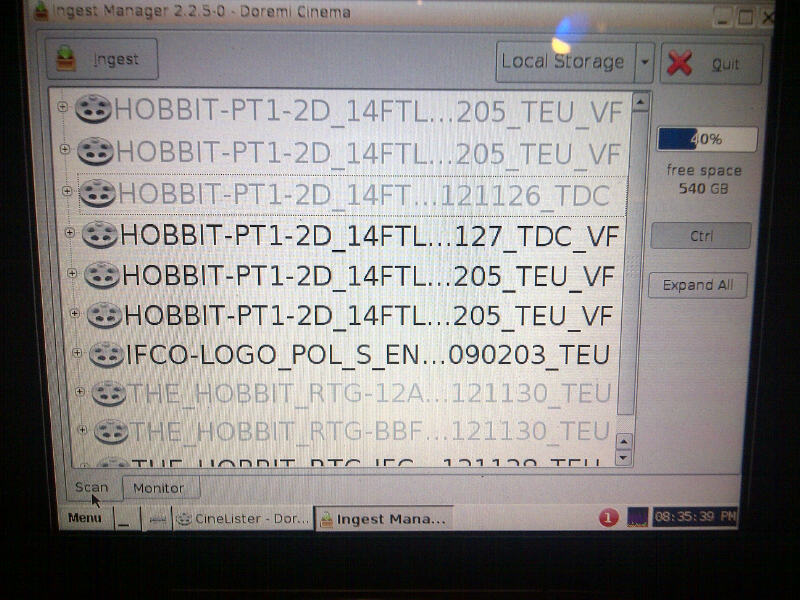
I needed to ingest the OV package plus the specific 5.1 Audio Description and Hard of Hearing files.
The only way I could find the correct files in the package was, was by selecting one that looked like it and start to ingest it.
On the 'Monitor' tab it shows the item in it's full length and so I can cancel the ingest if it's the wrong one.
The loading instructions that came with the drive were not in the same order that they appeared when I plugged the drive in! That's too easy!
This, however, is a bit of a pain!
Is there a way to reduce the text size on the Ingest Managers 'Scan' tab so that I can see the full text of the item (like how it is displayed while ingesting in the 'monitor' tab) or to simply show the FULL title of the items on the 'scan' tab??
If not,then I'll just have to keep guessing when these situations come up...
Posted by Marco Giustini (Member # 4544) on 01-24-2013, 03:32 PM:
I don't think there is, but if you stay still on a title with your pointer, the full title should show up for a few seconds with smaller fonts
Posted by Carsten Kurz (Member # 5396) on 01-24-2013, 04:02 PM:
ISDCF is working on a metadata extension as an addition to the cinema naming convention. That will probably make selection much easier once the server manufacturers have implemented it, as full length human readable descriptions will then be available.
http://isdcf.com/papers/ISDCF-Doc6-Composition-Metadata-Guidelines.pdf
- Carsten
Posted by Marco Giustini (Member # 4544) on 01-24-2013, 05:23 PM:
That'd be great but... some studios are not capable of using the current naming convention, would a new structure help?
Posted by Jock Blakley (Member # 6552) on 01-24-2013, 06:12 PM:
As Marco says, you can hover the cursor over the item and get the full name in the tootip.
This also works in Cinelister.
Posted by Steve Guttag (Member # 268) on 01-24-2013, 06:21 PM:
Lets face it...all of the server manufacturers should be ashamed as should DCI...YOU should not have to choose the file...there should be metadata such that the server knows what file you want. When a serer is installed, one should be able to set a preference by screen of what its capabilities are and with relatively little effort update the software to allow for the new formats/features. The algorithm should also always list the "don't know what that is" files.
Likewise, the projectors should have allowed the installer to designate the "Flat", "Scope"...etc formats so the wrong button never gets pushed.
There simply is no reason why we are still having to choose which format to load, transfer, get keys for. It is just plain silly.
The TMSes should be better too (and some are indeed better than others).
Posted by Carsten Kurz (Member # 5396) on 01-24-2013, 06:50 PM:
quote: Marco Giustini
That'd be great but... some studios are not capable of using the current naming convention, would a new structure help?
The good thing about the metadata is that it is a structure that allows free text without a limited structure that is currently actually imposed by filesystem naming conventions.
The naming convention was once a nice idea, but with the current breed of variants due to format extensions, it has become a joke.
- Carsten
Posted by Marco Giustini (Member # 4544) on 01-25-2013, 03:48 AM:
I Agree, but even with the available code, it's very common to spot around DCPs made without the convention in mind.
Steve,
That may be ok in the US, but what about the rest of the world? One day you show original language, then OV with sub, then OV with 3D subs (which are not generated by the projector so you need to ingest a full CPL), dubbed version etc.
The projectionist/Manager will be always in a position where they have to choose the CPL manually. I reckon that either they improve the existing convention (adding the missing bits like brightness etc etc) or they go for an XML schema as Carsten says, but I am still skeptical: it may not work as the naming convention did not fully work. Once you are familiar with the naming convention schema, it's not rocket science to read a DCP name.
Posted by Steve Guttag (Member # 268) on 01-25-2013, 06:41 AM:
Marco, there still wouldn't be any problem...again you configure the server/projector for the formats you need defined. Even in the US you would want 2D and 3D variations, open captions/closed captions on the same screen. But that is how you should choose your movie...not based on some cryptic longish file name. And the system would be set up to know what it is you would call your normal fare and get those files. I would always allow for being able to run everything but for the day-to-day...that should be as automatic as possible.
Posted by Carsten Kurz (Member # 5396) on 01-25-2013, 06:47 AM:
Yep, apply meta-data presets automatically upon CPL insertion, but have every option to override in the SPL. Sure this will come very soon, as it bears no compatibility issues.
- Carsten
Posted by Steve R Pike (Member # 6238) on 01-25-2013, 01:15 PM:
Thanks all for your replies.
The naming convention makes sense to me when I can see the full name - with the screenshot I had the bit in the middle was being hidden by the '...'.
However (and a silly question coming up) - I can't seem to get the full title when I hover the mouse over the title. I place the touch screen stilus over a file but nothing comes up - is there something else I need to do? If i double click on it, the selection 'expands' but doesn't show the full name.
We are using the touch screen that's built into the Doremi server and not an external PC (if that makes any difference).
Thanks again for your kind assistance ![[Smile]](smile.gif)
Posted by Marco Giustini (Member # 4544) on 01-25-2013, 02:08 PM:
Uhm, that's tough!
Try dragging the cursor with the stylo to the name and then retract the stylo, without selecting the name.
Posted by Dave Macaulay (Member # 813) on 01-27-2013, 04:46 PM:
This may have been added on a software update, what version are you running? These are listed in the menu under Doremi then Diagnostics. Software updates don't break anything, the firmware and SM updates are a bit scarier.
Posted by Marco Giustini (Member # 4544) on 01-27-2013, 04:48 PM:
The picture above says 2.2.5, which is very recent.
Posted by Dave Macaulay (Member # 813) on 01-28-2013, 06:49 AM:
Good eye. The text should definitely pop up on hover with 2.2.5-0. It's a very small font and hard to read in the few seconds it stays up, but should definitely appear. If I can get a picture of it, I will.
Posted by Olivier Lemaire (Member # 5579) on 01-28-2013, 08:25 AM:
latest is 2.4.2 - but not (yet) widely spread anyway.
Posted by Bajsic Bojan (Member # 4928) on 01-28-2013, 09:04 AM:
On version 2.2.2-0 if you hover over the name, the whole title is displayed for 10 seconds.
It works via mouse via usb, or if you vnc into it. It doesnt work with the stylus.
Posted by Marco Giustini (Member # 4544) on 01-28-2013, 01:02 PM:
I have tried and it does not work with 2.2.5 unfortunately. You need an external monitor or VNC.
Powered by Infopop Corporation
UBB.classicTM
6.3.1.2