This is topic How common are NTP servers on theater networks? in forum Digital Cinema Forum at Film-Tech Forum ARCHIVE.
To visit this topic, use this URL:
https://ft-forum.com/ft/cgi-bin/ubb/ultimatebb.cgi?ubb=get_topic;f=16;t=001427
Posted by Harold Hallikainen (Member # 5405) on 03-16-2013, 06:25 PM:
Several USL products (such as the JSD-60 and the JSD-100) have real time clocks that are used in logging. These products also have NTP clients so the RTC can be set automatically. How common are NTP servers on theater networks?
In reviewing some manuals, I find:
1. Dolby DSS-200 mentions an NTP server in the DSS-200 when it is used as a TMS (it says to point the NTP client of other DSS-200s to this DSS-200). Is the NTP server always available on a DSS-200?
2. A text search in my GDC SX-2001A manual makes no mention of NTP.
3. A search of my Doremi DCP-2000 manuals makes no mention of NTP.
So, do you have an NTP server on your theater network?
THANKS!
Harold
Posted by Carsten Kurz (Member # 5396) on 03-16-2013, 06:50 PM:
What do you mean with 'on your network'? Most screens I know of have their servers set to use any general use external NTP server, which makes sure that no larger deviations between the clocks (system/media block) accumulate. Doremi has that option, too. I guess any server has NTP options, even if not documented.
If access to external networks is not allowed or possible for security reasons, an internal NTP server would either need it's own radio oder GPS clock source, or be slaved to an external NTP server. But the latter would also mean a more or less controlled/firewalled access to external networks. So basically I don't see a large difference between using external NTP servers or internal NTP servers. Both need to be set up properly through network devices to accomplish security constraints.
Of course, it's one thing to have all servers on a multiplex synchronized to each other just internally, so that e.g. show starts and housekeeping is running on the same clock, and another thing to have it synced to an absolute external time reference. In some cases, the internal-only option may be sufficient.
- Carsten
Posted by Harold Hallikainen (Member # 5405) on 03-16-2013, 07:12 PM:
Thanks! Since I'm not in theaters, I count on this group to help me with understanding what's out there. It SEEMS that since media blocks are required to have an accurate clock to determine whether playback is allowed by the KDM, that servers would make that time information available via NTP. I also thought there would be mention of NTP servers in manuals, but there appears to be little mention.
So, I guess I can rephrase the question. Generally, do devices on your theater network have access to an NTP server (either on the local network or in the outside world)?
THANKS for all the help. I learn a lot by reading these posts.
Harold
Posted by Dave Macaulay (Member # 813) on 03-16-2013, 07:22 PM:
Theatres with a TNS/LMS have a firewalled internet connection (required for the NOC to access the system) and the TMS/LMS accesses the NOC NTP server. The devices on the theatre network can access the NOC NTP server but usually (to reduce the load on that server) the LMS/TMS runs its own NTP server and the screen servers etc access it. For the Doremi TMS systems I've installed we set the screen server NTP address to the TMS management address. On the Cinedigm LMS I believe it is the same. I have to find out what the procedure is for the Christie LMS for next week but it's probably the same.
For a theatre without a TMS/LMS, you would presumably connect to the general internet through a firewall router allowing NTP traffic and use a public NTP server.
This synchronizes the server clocks automatically: you can periodically adjust each server's clock and get close, but usually with NTP the clock's speed is adjusted to correct drift... I don't think you can make that adjustment manually.
Posted by Steve Guttag (Member # 268) on 03-16-2013, 11:05 PM:
We have found that without an NTP clock, time will drift so we ensure that there is an NTP server locally in each theatre. This will be a TMS that references an external NTP or in smaller plexes (including singles) a PC that will function as an NTP.
It is true that Dolby servers CAN function as an NTP BUT the server acting as an NTP server for other things must have a good NTP source it can reference from.
In a proper Dolby network, it is set up as a spoke-and-wheel. At the center is the TMS/LMS (typically a DSL100 or DSL200). The DSL should have access to an external NTP source (like a NOC's NTP clock or even one like "NIST"). Each server within the complex then references its clock from the DSL. At that point, each individual server will broadcast NTP time for other clients to read the time.
Note, in the Dolby scheme each auditorium is an island and the DSS server acts as the bridge between the individual auditoriums and the theatre as a whole. Thus, any device within the specific auditorium can only "see" as far as its DSS server. The DSS server has to provide the NTP time at that point.
Dolby creates many small networks in this system...which should provide a very robust system since each network is relatively small and has much less traffic than a typical large or flat network.
To use NTP as an example...lets say you have a 10-plex. The DSL gets the time from an external source. Only one device is pinging the external NTP...which keeps traffic down going to the Internet and also keeps the external NTP from seeing a site being over zealous in consuming resources asking for time (also known a "flooding"). The DSL in this situation only has 10 things asking for the time of it...again, not too much traffic. And at each auditorium only a handful of things (at most) would be asking for the time (projector, sound processor, automation and maybe a couple other devices, in a fancy system). In each network, traffic is kept small and reliable. It also means that within an auditorium, if they all reference off of the server's clock, all devices have the same relative time...which for troubleshooting, can be a huge help.
I have found that without an NTP...none of the servers will keep accurate enough time and there will be drift. All DCinema server manufacturers have a means of NTP synchronization but I don't believe all can act as an NTP server. I don't think any of the other DCinema server companies came up with the type of network like Dolby...where it was incumbent on the cinema server to also handle NTP as well as have an internal router.
Posted by Harold Hallikainen (Member # 5405) on 03-17-2013, 12:32 AM:
Thanks for the detailed responses!
Harold
Posted by Pete Naples (Member # 761) on 03-18-2013, 06:12 PM:
Note that with Dolby servers, if the external NTP reference has more than a certain number of hops (I think I remember the number being 12) the software decides the reference isn't accurate enough and will ignore it. You can check in Show Manager, if the configured NTP is not shown as connected, then it's not using the external reference.
Some broadband router/modems have NTP functionality, as do some NAS units. You could also run a small app on a PC on the local network, many sites have such a PC for admin purposes.
We have our own simple low cost NTP server which we use when an internet reference that the Dolby servers like cannot be found.
Doremis don't seem to care, there's a text file you can edit which points it to NTP.
Posted by Steve Guttag (Member # 268) on 03-18-2013, 08:46 PM:
I believe the limit is 15 hops and, as I understand it, that is in the NTP protocol, not something that Dolby arbitrarily made up.
Posted by Danial Simmonds (Member # 4638) on 08-20-2013, 08:26 AM:
What we do over here is have the TMS update the time from a NTP server by giving it access through the firewall. All other theater servers and devices that has NTP updates the time from the TMS.
Doremi does have ntp you can find the script using the terminal.
Posted by Marco Giustini (Member # 4544) on 08-20-2013, 12:25 PM:
I understand that with version 2.4.2 you can set it on the control panel.
Posted by Pete Naples (Member # 761) on 08-20-2013, 01:33 PM:
That was my understanding too Steve. However it seems to be with Doremis looking at NTP pools they aren't fussed. Perhaps it's applicable when there's a single reference, rather than a pool?
As I touched on above, our workaround is to have our low cost NTP server on the network, or to utilise a VPN router device that also has NTP functionality.
Back in the day, the projecitonist phoned the speaking clock and checked his watch ![[Roll Eyes]](rolleyes.gif)
Posted by Dennis Benjamin (Member # 1137) on 08-20-2013, 02:19 PM:
The theatres I have set up have their servers call out to an NTP Time server on the Local Area Network. That NTP Time server is the LMS/TMS computer (Windows Time Server). In turn, that computer (TMS/LMS) calls out to NIST on the Internet to get the time. I haven't had any issues, other than when I have updated software and had to go in and reset the NTP info on the individual Digital Cinema Servers themselves.
Posted by Chris Slycord (Member # 4239) on 08-20-2013, 04:40 PM:
quote: Pete Naples
Back in the day, the projecitonist phoned the speaking clock and checked his watch
I worked with a guy who only checked his watch for the first auditorium and set them all to that time. Too bad that by the time he'd threaded all 8 screens, he was off by over 10 minutes for that final one.
Posted by Jim Cassedy (Member # 4115) on 08-20-2013, 05:15 PM:
How ironic this topic should come up today.
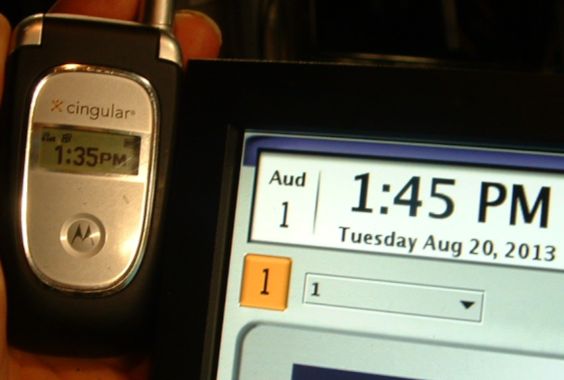
Earlier this afternoon, I was doing some work at a theater
and I noticed the system clock on their digitalserverthingy
was 10min fast.
Rather than fix the clock, they simply schedule everything 10min early.
(So a 4pm show is programmed to start at 3:50)
I offered to fix it for them, but I was told "it would only confuse the staff".
Ooooooohhhhhhh Kaaaaaayyyyyyyy . . . . . . . . . .
ACTUAL PICTURE!
Posted by Frank Cox (Member # 6258) on 08-20-2013, 05:22 PM:
I never knew that you could set the clocks on digital cinema stuff. Isn't that a security hole? If I have a key for last week's movie and set the clock back to last week, I can play it again using last week's key.
The clocks on my digital cinema stuff (GDC server and Christie projector) are nowhere near synchronized either with each other or the actual time. Without actually checking to be sure, I think one is ten minutes or so slow, and the other is several minutes fast. It doesn't appear to affect anything and since I don't use the automatic scheduled start stuff I really don't pay much attention to what those clocks say.
Posted by Marcel Birgelen (Member # 6801) on 08-20-2013, 05:41 PM:
Your media block keeps its own battery-backed clock on UTC and you're only allowed to adjust it +6 minutes or -6 minutes max in a year.
Posted by Harold Hallikainen (Member # 5405) on 08-20-2013, 08:17 PM:
I think you are allowed to adjust the clock in the media block up to 6 minutes a year. That is the clock that KDMs compare to.
This does remind me of a movie marque that showed a movie starting at 7:34. I asked about the odd start time. The reply was that had run out of zeros.
Harold
Posted by Steve Guttag (Member # 268) on 08-21-2013, 06:05 AM:
There are multiple clocks in any DCinema server and system. As some have noted...the secure clock...which should be located on the mediablock or IMB is the one the KDMs reference from and has a very limited time adjustment and it/the keys...etc are always in UTC so changing time zones does not help one "cheat the system.
The show clock is often off of a less accurate clock that depends on a NTP server to keep accurate. Just like most computers...they are not accurate...they only seem accurate because they call out to microsoft or apple's NTP server when they are on the internet.
Note, try rebooting a server that has its clock off...you may find it resets itself on boot up, even without an NTP because some use the secure clock when booting up if the NTP is not available.
Posted by Mark Gulbrandsen (Member # 72) on 08-24-2013, 06:33 PM:
I have installed a couple of GPS locked Net Clocks in locations where internet was unreliable... ie: not always available. IN these systems you just feed the output of the Net clock into the management switch and point the gear at it's I.P. It is automatic from there. Just about any Windows computer can also become an NTP server with a simple easy to do modifications in the regestry and firewall.
I was able to purchase some Symetricom NTP clocks used off of Ebay at around 700 bucks each which is not bad as these units generally go for around 3K new. I also use an old Datum 9390 GPS locked rubidium clock at home as well as several other atomic based clocks here as refrence to calibrate test gear. I am never LATE for a service call!
Mark
Posted by Harold Hallikainen (Member # 5405) on 08-25-2013, 12:43 AM:
A low cost GPS based NTP server is at http://www.broadcasttools.com/view_product.php?pid=208
List price is $409
Harold
Posted by Pete Naples (Member # 761) on 08-25-2013, 01:30 PM:
You can put one together for a lot less than that ![[Cool]](cool.gif)
Posted by Mark Gulbrandsen (Member # 72) on 08-25-2013, 03:37 PM:
That's an interesting clock and at a good price. Doesn't offer the direct plug and play of the more expenmsive units but is certainly a great inexpenmsive alternative. Thanks for posting.
Mark
Posted by David Buckley (Member # 2600) on 08-26-2013, 02:04 AM:
Not only does that BroadcastTools clock look good, it is very unusual for anything aimed at broadcast folks to be agressively priced, which that clock is. It comes complete with a GPS receiver.
Ok, we run Symmetricom clocks at work, but we have a request rate measured in many hundreds per second. For a single compact installation, the BroadcastTools box looks good.
However... the big thing about NTP is that you don't have one clock, you have a global network of clocks, which between them maintain good time. A single clock box with GPS will be a lot more accurate than a machine on the end of an NTP network (nanosecond rather than several millisecond accuracy) but if it goes down then there is no backup.
Even if one is on the end of a dodgy DSL line, with NTP you should still be good to well under a second, as long as one is running "proper" NTP, and not just SNTP.
Posted by Stephen Furley (Member # 1277) on 08-26-2013, 03:11 AM:
quote:
Back in the day, the projecitonist phoned the speaking clock and checked his watch [Roll Eyes]
A connection to film, have you ever seen the original speaking clock? It used optical sound recordings. It had a horizontal shaft, about a metre long, on which were mounted several large glass disks, about the size of a LP record. The shaft rotated at 6 rpm and 'At the third stroke it will be' was played from the first disk. Other disks played the hours, minutes and seconds, and the final one, or I think it may have been the first one again, played the three pips. The recordings were not a continuous spiral, but a series of concentric circles. As the pips were played the head on the seconds disk would step in to the next track to play 'Precisely', And ten 'seconds', 'And twenty seconds' etc. At the end of the minute the minute head would step in one track, and the seconds one would come back the the 'Precisely' track, and so on. For many years it was displayed at the Science Museum in London, and the thing used to fascinate me when I was young.
When I was last there, a few years ago, I couldn't find it. Most of the interesting things there seem to have been removed from display, and put in store.
Posted by David Buckley (Member # 2600) on 08-26-2013, 04:08 AM:
The Speaking Clock - read all about it!
Posted by Mark Gulbrandsen (Member # 72) on 08-26-2013, 01:15 PM:
David...
And a proper NTP clock locked onto multiple gps satellites also averages out those satellites clocks for even more accuracy. Very similar to how the NBS Time Service works. They don't just look at one atomic clock but at the average of a number of atomic clocks located in different places. Another advantage of the higher priced GPS units is that many of them have an internal rubidium oscillator that is locked and frequency corrected based on the incoming satellite data, I doubt the Broadcast unit shown has that! So in case you are in an area that looses satellite lock you can still maintain nanosecond accuracy for quite a long period...
Posted by Marcel Birgelen (Member # 6801) on 08-26-2013, 08:04 PM:
quote: David Buckley
However... the big thing about NTP is that you don't have one clock, you have a global network of clocks, which between them maintain good time. A single clock box with GPS will be a lot more accurate than a machine on the end of an NTP network (nanosecond rather than several millisecond accuracy) but if it goes down then there is no backup.
And you cannot live without a backup for a day or so? Or are people starting to get worried if their movie starts a few milliseconds off schedule? ![[Razz]](tongue.gif)
Posted by Dave Macaulay (Member # 813) on 08-26-2013, 09:23 PM:
I don't think anyone is worried about more than a minute or so off-time.
You can correct the secure clocks in every server I know much about, up to 6 mins per year (cumulative, I believe - after 10 years you would have 60 mins available if you had never changed it).
Using NTP should be better than manual adjustment though: assuming the server's NTP time update utility works the usual way, the internal clock speed will be tweaked - ie the internal clock will be slowed fractionally whenever the time is corrected by being turned back (and the opposite). Eventually the server clock should become adjusted to run very close to "real time" and not drift much any more (some drift is unavoidable because of temperature change at the timing crystal).
Having the server clocks get NTP time from the TMS is the usual practice in places with a TMS, then the TMS (which must be connected to a NOC if you're in a VPF program) pulls time from some offsite time server, usually from the NOC.
Posted by Steve Guttag (Member # 268) on 08-27-2013, 06:19 AM:
The 6 minute drift is NOT cumulative...it is per 12-month period and some use the calendar year (the 6 minute adjustment period begins 1/1 and ends 12/31...at least not all servers allow for a cumulative adjustment.
As for drift...NTP does not necessarily mean that the server's clock internal time keeping is adjusted at all. NTP allows for stepping (immediate change) and skewing (slow change) but it is the NTP services that are doing the adjusting, not the clock mechanism itself.
Whereas all servers do the license check thing at the start of the show (DCI thing)...being accurate to a fraction of a second exceeds the accuracy required. Anything within a second is sufficient.
Note, there are often several clocks at work in a DCinema system. There is the "secure clock" which has the 6 minute limitation...its only required purpose relates to KDMs. Often there is a show clock (determines when shows start if there is a schedule) and that clock can be set to any time you want (and allows for different time zones...the secure clock is always UTC, as are KDMs).
I'm pretty critical about getting all clocks in the system on NTP (Enigma, projector, automation...etc.). When trying to troubleshoot an issue...having everyone on the same time allows one to create a much better chain of events.
Posted by Scott Norwood (Member # 30) on 08-27-2013, 07:06 AM:
Interesting to read about the British speaking clock. The US version of the "time of day announcement" machine is known as an "audichron" machine and it used a magnetic drum to play back the time announcements.
See video here
Most major cities have or had one of these installed (along with a similar device for weather announcements). The Boston one seems to have been disconnected without fanfare a few years ago (it was reachable at 617-637-1234).
Jane Barbe and John Doyle are the most common voices on these units in the US.
(BTW, coming from an IT background, I agree with everything that Steve has posted in this thread with respect to NTP service. In general, mismatched time is bad; therefore, it is a good idea to have a single NTP server on each local network to which all other devices are slaved.)
Posted by Carsten Kurz (Member # 5396) on 08-27-2013, 08:19 AM:
quote: Dave Macaulay
cumulative, I believe - after 10 years you would have 60 mins available if you had never changed it).
As Steve says - not cumulative - any single change larger then 6min will be discarded, and any cumulative per year exceeding a total of 6min. So for some servers being really off, around the end of the year a 12min correction is possible, if needed.
Steve - where on a Dolby can you adjust the show clock time?
- Carsten
Posted by Dave Macaulay (Member # 813) on 08-27-2013, 09:22 AM:
The Dolby DSS/DSP100 (haven't tried a 200) time adjustment limit is cumulative: I just adjusted one running 5 years that showed a +/- 30 minute window, and Dolby tech support confirmed the adjustment window is cumulative. I don't believe Doremi is, but I have never tried: I just get the "increase limit" DLM if it's out more than 6 minutes. This allows 30 minutes per year, I don't know when the year starts/ends.
DSS: In "system" "auditorium" there should be a check box for "allow secure time adjustment" or similar. Check it and the adjustment window pops up, with the pre/post adjustment limits shown. Set the time a minute ahead and click "apply" when your cell phone time rolls over to that minute: cell phone network time is about the most accurate you can get indoors.
The Unix/Linux NTP client process is supposed to adjust the clock speed, but I don't know if all the secure clocks allow this. I have noticed that Doremi systems on NTP seem to correct the clock speed: all server clocks that have been on NTP for a year seem to be very close after a month or so with no NTP. (The Doremi TMS NTP server tends to shut itself off regularly). My experience is that most no-NTP sites will have one Doremi secure clock that's out about 10 seconds in a month (really poor RT clocks I suppose but that's been what I've seen)
Posted by Carsten Kurz (Member # 5396) on 08-27-2013, 08:03 PM:
Older Doremi software versions also had a 30min limit. But as the DSP100, they were not DCI compliant.
- Carsten
Posted by Steve Guttag (Member # 268) on 08-28-2013, 06:04 AM:
Carsten: For the Dolby show clock, you can set that in the BIOS...Note, that clock will be at UTC so only play with the minutes/seconds. It is best to set that without any NTP connection and allow it to boot all of the way up so it "takes"
Note, the DSP100 has attained DCI compliance (as has the DSS100) however, Dolby has not issued the DCI compliant software for those units yet. I suspect we'll see it before 2014. I'm curious if the DSP100/DSS100 would sill allow a cumulative time set running Dolby System 4.5.x or later.
Posted by Sebastian Pienz (Member # 7825) on 10-17-2013, 01:48 AM:
Is there any way to get access to the dolby server that allow start and stop services like ntp ? And access the ntpd.conf ? Because we want get ntp running with the dolby server the ntp server will work correct with all other devices in the network and 3 hopps coudn't be too much.
Thanks for your answers
Posted by Marco Giustini (Member # 4544) on 10-17-2013, 04:29 AM:
You'll need root credentials (don't even ask!) but ntp.conf is then reset every time you reboot the system - unless you tweak the read only partition.
Short answer: no.
I believe Dolby is implementing the NTP too strictly, and NTP cannot work properly with only one server. Either they allow us to set more than one server, or they run ntpdate as a cron job every now and then.
Posted by Sebastian Pienz (Member # 7825) on 10-18-2013, 02:27 AM:
Thanks for your answer do you now is it possible to get root password legal from dolby or kinoton ?
Posted by Marco Giustini (Member # 4544) on 10-18-2013, 04:06 PM:
You didn't read my post then!
Powered by Infopop Corporation
UBB.classicTM
6.3.1.2