This is topic Ingest 5.1 & 7.1 content question ??? in forum Digital Cinema Forum at Film-Tech Forum ARCHIVE.
To visit this topic, use this URL:
https://ft-forum.com/ft/cgi-bin/ubb/ultimatebb.cgi?ubb=get_topic;f=16;t=001453
Posted by Duc Nguyen (Member # 6988) on 03-30-2013, 12:06 PM:
Hello all,
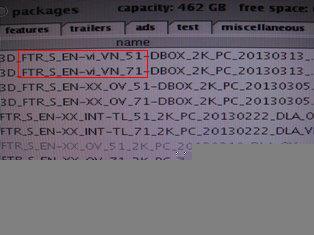
When I recieve a DCP, usually it consists of the feature 5.1 (OV) and 7.1 (VF).If you need the 7.1, how do you ingest? ingest the 5.1 first, then ingest the 7.1; Or just ingest the 7.1 ???
The same with the non sub feature and sub feature
???
Posted by Robert Keeney (Member # 6352) on 03-30-2013, 12:19 PM:
Duc:
Yes I ingest the 5.1 first and then the 7.1. I have also ingested them both at the same time without any issues.
Thanks,
Robert
Posted by Justin Hamaker (Member # 2165) on 03-30-2013, 12:38 PM:
The 5.1 and 7.1 are separate and complete DCPs. It makes no difference what order they are ingested. If you use the CC or OC versions, sometimes you have to ingest the FTR version before the CC or OC.
Posted by Darryl Spicer (Member # 711) on 03-30-2013, 12:43 PM:
There is really no ingest at the same time when it comes off of the same hard drive. The important thing is that the OV version (original Version) is down loaded first. In this case the 5.1 version because that has the entire content for the movie. Then you download the 7.1 version. That only has the sound related files for 7.1. This file is then joined with the original file and this is the one you would use to run on the playlist.
Posted by Duc Nguyen (Member # 6988) on 03-30-2013, 12:44 PM:
Thank Robert,
Me too, but a lot of work-mate just ingest only the 7.1, and the feature is still good. Does sound effect of the 7.1 lose ??
Posted by Darryl Spicer (Member # 711) on 03-30-2013, 12:50 PM:
We don't use the 7.1 at my location but I thought you had to do the 5.1 first. Anyway to verify this look at the end of the file name extension of the 7.1. If it has a VF at the end then you will need to download the 5.1 first then the 7.1. If it has an OV at the end then you only need to down load the 7.1 version.
Posted by Duc Nguyen (Member # 6988) on 03-30-2013, 12:59 PM:
Thank you, I am ingesting like that. But i will try being to do 2 case at 2 cinema. and then compare result.
Posted by Marco Giustini (Member # 4544) on 03-30-2013, 01:45 PM:
If the 7.1 is a "VF" (Version File) you need the "OV" (Original Version) on your server as well, which usually is the 5.1. Doremi SW should take care of it, hence if you load a VF and the server realises that the linked OV is not loaded, it will load it for you.
Unless the 7.1 version is another OV - complete DCP, which would be a massive waste of space! - and in that case you can just ingest the 7.1.
The general rule is to ingest OV first and then the VF even though - as said - modern software will take care of it.
A "VF" is a CPL which only add the relevant bit of content. For example, the 7.1 VF adds the 7.1 soundtrack but will read the Video track from the OV. A subtitled VF works in the same way: there is no need to create a new DCP - 200GB-ish - for adding only a few kilobytes of subtitles: they would usually create a VF which when played uses Audio and Video of the OV and just adds the subtitles track.
Posted by Justin Hamaker (Member # 2165) on 03-30-2013, 02:41 PM:
The last three 7.1 features I have run in my theatre (Croods, GI Joe, and Oz) have all been OV 7.1 DCPs. This is the norm, as far as I know, because I have never had to have both the 5.1 and 7.1 versions present on a player in order to run the 7.1 content.
Posted by Brad Miller (Member # 2) on 03-30-2013, 02:59 PM:
You're running a Dolby server there. Just ingest the version you want. The server is smart enough to get what it needs. There is none of this "ingest this one first then that" nonsense.
Posted by Marco Giustini (Member # 4544) on 03-30-2013, 04:13 PM:
Justin, take a look at the CPLs on your disk, it's very possible that they're named OV but they're in fact VF's.
If they were OV's, that would mean that you have two big DCP's on your disk (two folders, two video tracks), and that is just a big waste of space and time.
I think with some older doremi SW if you ingested the VF without ingesting the OV first, the ingest process would be successfull, but the CPL would not show on the cinelister. After ingesting the OV, it would re-appear though! ![[Smile]](smile.gif)
I think that's why the distribution is still recommending that silly procedure!
Posted by Justin Hamaker (Member # 2165) on 03-30-2013, 05:03 PM:
Marco, that is not the case. The DCPs for the 5.1 and 7.1 are almost the same size - the 7.1 is maybe 3GB larger. Plus, my LMS only sends the 7.1 to the player.
I guess it's possible they are sharing a video file, but nothing I'm seeing suggest that much.
Posted by Philip Jones (Member # 6677) on 03-30-2013, 05:47 PM:
All the versions usually share the base video file.
If we ever copy more than one version on the second one takes like 2 minutes to copy because most of the content is already there.
This is on a Dolby server
Posted by Dave Macaulay (Member # 813) on 03-30-2013, 06:01 PM:
If you look at the distribution drive contents on a computer (not the server) you'll see the OV folder has the image files and sound files. The "VF" folder just has the sound files (both have the other assorted files that make up a DCinema package). Some servers look at the CPL and link to missing files if they're found in another folder. Dolby servers do this. Doremi servers do not: if you load the VF without the OV on a Doremi the content will not be complete. Once the OV is also ingested a Doremi server should find the missing files and be able to play the movie, but it's safer to ingest the OV first.
Anyway, if the image files are identical they are not duplicated on the drive even though it looks that way on a Dolby server.
Posted by Duc Nguyen (Member # 6988) on 03-30-2013, 08:44 PM:
I use server Dolby. I know (I had did this)that if we ingest only the 7.1 (VF) or only the sub ver. (VF) , everthing will OK. Dolby server will help me. But What I care is "Does the 7.1 sound effect lose?"
tks!
Posted by Marco Giustini (Member # 4544) on 03-31-2013, 07:45 AM:
Dave,
If memory serves, last time I checked - I think it was with 2.2.3 - loading a VF on a Doremi will automatically load the OV. It won't appear on the cinelister but the video track will be loaded as well. That was not the case with earlier versions.
Justin,
Where do you check the size of the DCP? I believe the server is giving you the size of both Video and Audio even though it's only a VF. It really depends on the distributor but creating an full DCP for all versions is really a waste of time and space. Depending on the server software, you may just see the VF on your server, but the server is smart enough to grab whatever it needs for running that VF, without necessarily listing the OV CPL.
Check the actual drive, they are usually organised into folders. Check the size of the 7.1 folder. If it's similar to the 5.1 CPL then you have a full DCP.
Posted by Dave Macaulay (Member # 813) on 03-31-2013, 08:05 AM:
"But What I care is "Does the 7.1 sound effect lose?"
The VF file has 5.1 sound, with 2 stereo surround channels. 7.1 adds a stereo rear surround channel so the surround speakers must be wired in four groups (LS, RS, BSL, BSR) with four amplifier channels. Playing a 7.1 film in a 5.1 auditorium doesn't cause any trouble since the rear tracks just are not there and there's really nothing there anyone will miss unless they've memorized the sound from a 7.1 house. Running 5.1 in a 7.1 house with the system set for 7.1 will have no sound from the rear surround speakers. I doubt if anyone will notice that. If you try to play 7.1 without swapping around the digital audio channels as required, you may hear a "visually impaired" descriptive audio track from a rear channel. That is rather annoying.
Posted by Steve Guttag (Member # 268) on 03-31-2013, 09:40 AM:
I disagree without disagreeing with you, Dave.
Note, you had a typo. the OV file has the 5.1 audio tracks, as required by DCI (5.1 audio being a minimum standard).
What I disagree with, while agreeing is the compatibility of a 7.1 version playing well in a 5.1 theatre. One need only play Dolby's Sphere (7.1 version) in 5.1 to hear the problem...that is actual dialog that could be missing (the "All around you" line would be missing parts). Pixar is known for using the separate rear channels with unique audio, including vocal that would vanish if the wrong track was played in the wrong theatre.
What I agree with is that one will "get away with it" in many, if not most situations. This does not condone "sound done wrong," however.
In the reverse (5.1 played back in a 7.1 theatre in 7.1 mode)...that is less likely to show off the problem though people may think the surround level is low since 1/2 the channels are now off and they were used to "balance" the system. It would be worse than a theatre designed without rear surrounds at all and balanced that way.
But again, it is unlikely that the typical movie goer would know what was wrong (aside, maybe, that the surround were not loud enough...since they always think surround should be omnipresent anyway).
I fault the industry for not handling this issue entirely. That is, there should be metadata on each movie that allows the theatre to "configure itself" based on capability. That if a theatre doesn't have the newer, higher features, it should automatically play the "standard" version. Only if the theatre is configured for the new feature should it use the better version. When the tech sets up the server/projector, those features are checked off and the appropriate version is used. As each new feature comes out (doesn't just have to be sound), server software can be patched to allow for the new format.
Alas, we do not live in that world...people must still know what they have and figure out what is proper to use on a case-by-case.
Posted by Brad Miller (Member # 2) on 03-31-2013, 12:45 PM:
I disagree without disagreeing with you, Steve.
The simple solution is to simply duplicate the LS and RS channels on the two rear wall channels on 5.1 mixes so there isn't anything to change. Putting the descriptive audio channels there on 5.1 mixes is just foolish.
This is similar logic to a 1.85 matte 35mm print. That prevents the lesser professionals from showing boom mics and such.
Of course the industry is retarded when it comes to good, simple ideas.
Posted by Justin Hamaker (Member # 2165) on 03-31-2013, 12:50 PM:
@Marco: I am viewing the size of the file in the content list on my library server. I am not able to view what's on the actual hard drive because most my content is delivered via satellite and I rarely receive hard drives - especially not for major studio releases.
Looking back through my projectionist letters, I can see instances where it specifically states the 7.1 is a partial package. In these cases, the CPL has both OV and VF in the file name. However, in the case of the Croods,the CPL name has OV two times.
Posted by Marco Giustini (Member # 4544) on 03-31-2013, 01:59 PM:
Duplicating the Rs and Ls on ch 11 and 12 for 5.1 mixes is simply a great idea in my opinion.
Not only would it prevent the wrong format to be used - as pointed out by Steve - but also it would allow the cinema to leave the sound processor in 7.1 all the time and the surround levels could be set more accurately - the reason is that when I set surround levels to standard, 82dBC, I usually find that when an entire side is used (i.e. Ls+LBs) the result is not necessarily 85dB for, I guess, acoustic reasons.
Brad's simple idea would just avoid a number or issues. And I don't really think that an extra Gigabyte of data would be a problem.
The difference in level when you run a 5.1 soundtrack in 7.1 is around 3dB so yes, it does matter!
Posted by Steve Guttag (Member # 268) on 03-31-2013, 05:31 PM:
See, I would put that burden on the server, not the content creator. GDC can actually sort of can do this with their channel mapping feature.
While there is a 5.1 channel definition in DCI and where those channels go...that is not the case for 7.1. It is the wild-west for greater than 5.1 mixes. Thus, it would be a simple matter for a server to see it is a 5.1 mix (via title naming, or looking at the audio files supplied or metadata) to see that it is a 5.1 mix and merely put the Ls and Rs on the back channels too. This also would allow for mixes that pre-exist BEFORE the new format is created to play back properly.
What is really stupid is the HI/VI-N.
First and foremost...what is the point of the HI track? Anyone that does not use the processor's LCR mix (with center emphasis) is stupid. Why? If the movie doesn't have an HI track, then you get NOTHING for the impaired...so you would have to keep track of what movie is playing to ensure the HI system is always getting something. Then there are the trailers, which don't have HI tracks, from what I can tell.
At the moment, most HI/VI-N tracks are residing on channels 7/8...the "Interrop" format. Why on Earth are we also looking to move them on 15/16? The train has left the station on that one. Yes, 7/8 were supposed to be the LC/RC tracks but let LC/RC move...how many movies have been mixed with them on DCP? How many are using 7/8 for HI/VI-N? Free up 15/16 for something else, let LC/RC move to 9/10 or 15/16...pick one and let it stick. Channels 1-8 should be engraved in stone by now and dependable as to what is on them for all movies, regardless of origin. Server companies should be compelled to handle channel mapping, as needed to be DCI compliant, if they are to handle newer formats.
Posted by Marco Giustini (Member # 4544) on 03-31-2013, 06:13 PM:
I couldn't agree more.
As EX days, where most of the cinemas were either running everything in EX or everything in 5.1 - trusting the 'Auto EX' which too many times was wrong set - the bottom line is: do it automatic. In these Digital days there is really NO reason for that not to happen, in a way or another.
Posted by Harold Hallikainen (Member # 5405) on 03-31-2013, 09:09 PM:
A few comments on audio routing:
1. SMPTE packages support audio routing. Interop does a 1:1 mapping. The assumed Interop mapping at this point is described here. The end result is auditorium wiring of AES/EBU channels according to this layout (ie, Lrs/Rrs on 11/12). Content is still shipping in Interop (not SMPTE) format.
2. Because of the lack of routing in Interop, auditoriums are wired according to the Interop channel layout. Discussions at ISDCF have suggested that the server should assume as a default that the auditorium is wired in this manner and that SMPTE routing should follow this assumption. This comes down putting default values in the SMPTE audio routing table based on wiring due to Interop.
3. Of course, cinema processors have been generating an HI signal for many years. This is generally an LCR mix with dynamic range compression (though the compression is typically done in the HI transmitter instead of the cinema sound processor). It is possible, however, for the content provider to make an even better HI track (with dialog more clear than an LCR mix). I think, however, that the HI tracks currently being delivered are compressed LCR mixes with a fixed mix and compression ration (pretty much what a cinema processor would provide). The HI track seems to be the last thing created and generally does not get created for trailers due to the extremely tight deadlines. Some HI equipment uses AES 7 for its one and only audio input. The result is no HI during trailers. ISDCF has been pushing for an HI track on all content.
Harold
Posted by Carsten Kurz (Member # 5396) on 04-03-2013, 06:31 PM:
We use a datasat AP20 with two DCI format presets, one for 5.1, one for 7.1.
There is no automatic switching yet, due to the lack of metadata or other intelligence in detecting the audio format (which could e.g. be using an SDDS layout as well). Will come with full SMPTE DCPs some day.
We use format cues in the SPL to switch the AP20 from 5.1 during trailers to 7.1 for the main feature. In 5.1 mode, the datasat uses an internal routing to copy surround channels to rear surrounds and compensate levels.
In addition, the Sony SRX-R515 IMB has a simple audio switching matrix to mask out HI/VI and copy 11/12 to 7/8. Could be done on the AP20 (16ch) as well, but for 8ch processors, doing it on the IMB or with a breakout board switching over 7/8 vs. 11/12 AES channels are the only options.
Doremi has the same audio matrix feature.
- Carsten
Posted by Ian Freer (Member # 1940) on 04-06-2013, 11:44 PM:
GDC Servers also have audio routing options built in. You can specify individual routing options based on how many channels of audio are actually presented in the DCP.
Datasat has the H506 adaptor board that has a couple of jumpers to choose how 7/8 & 11/12 are routed that can be used with all 3 versions of the AP20 if software routing is not available from your server.
Powered by Infopop Corporation
UBB.classicTM
6.3.1.2