This is topic Problem ProRes Codec (QuickTime) with CineAsset (DCP) in forum Digital Cinema Forum at Film-Tech Forum ARCHIVE.
To visit this topic, use this URL:
https://ft-forum.com/ft/cgi-bin/ubb/ultimatebb.cgi?ubb=get_topic;f=16;t=001467
Posted by Guy-Laurent Vaney (Member # 7588) on 04-14-2013, 03:53 PM:
Hello to all.
I'm new here.
After much research; can anyone has a solution to my problem.
I try to import a QuickTime file "ProRes" (*.mov) in "CineAsset". (which works fine for other formats).
I always have a Codec error on my "Windows 7 Ultimate 64-bit" machine. (see the example message).
While it works on a machine with "Vista".
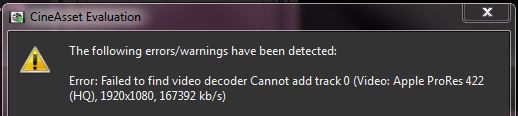
I reinstalled QuickTime Pro 7.7.3 (Apple) and CineAsset 6.2.5 (Doremi Labs).
QuickTime opens without any problem files.
Where is the problem ?
Thank you in advance for your suggestions ![[Wink]](wink.gif)
Posted by Carsten Kurz (Member # 5396) on 04-14-2013, 04:43 PM:
Maybe a 32/64 Bit Problem between Quicktime/Codec and Cineasset.
Is that Vista machine running a 64 Bit OS too?
- Carsten
Posted by Guy-Laurent Vaney (Member # 7588) on 04-14-2013, 04:59 PM:
Indeed Vista is 32-bit.
But with Windows 7 (x64), the two programs (QuickTime & CineAsset) also running in 32-bit [C:\Program Files (x86)\..].
Guy-Laurent
Posted by Marcial Feliciano Ramos (Member # 1989) on 04-14-2013, 09:16 PM:
I have the same problem but when it happened to me I didnt have the time to resolve it. So I changed the format/codec to one that I know it work and thats it. But I will try this week so If I found something I post it.
Posted by Joe Redifer (Member # 3) on 04-14-2013, 10:51 PM:
The problem is that ProRes is a proprietary editing video codec and this thingy you're trying to use probably expects MP4s, AVIs, MOVs encoded with wimpy consumer codecs. I bet if you encoded your ProRes file into an H.264 file of some sort first it would work like a charm.
Have you installed THIS?
Posted by Marcial Feliciano Ramos (Member # 1989) on 04-14-2013, 11:25 PM:
In the old version of Cineasset, I had no prblem with Apple ProRes but when they changed to the new version the problems started. In the manual of the program it said that Apple ProRes codec is supported. But as you mentioned I prefer h.264.
Posted by Guy-Laurent Vaney (Member # 7588) on 04-15-2013, 05:12 PM:
Thank you for your comments.
quote: Joe Redifer
The problem is that ProRes is a proprietary editing video codec and this thingy you're trying to use probably expects MP4s, AVIs, MOVs encoded with wimpy consumer codecs. I bet if you encoded your ProRes file into an H.264 file of some sort first it would work like a charm.
Indeed, the first thing I do is to export from QuickTime "MPEG-4" format and it was OK. But I have clients and friends who value their ProRes encoding (Final Cut Pro). And who does not want to re-encode ![[Frown]](frown.gif)
quote: Joe Redifer
Have you installed THIS?
[Apple ProRes QuickTime Decoder 1.0 for Windows]
Yes, I tried, but at the time of installation, I received a message that I already had a newer version (QuickTime Pro 7.7.3). But with "Apple", impossible to know the version !
quote:
In the old version of Cineasset, I had no problem with Apple ProRes but when they changed to the new version the problems started. In the manual of the program it said that Apple ProRes codec is supported. But as you mentioned I prefer h.264.
Note that I have the same error with "CineAsset 5.2".
We are doing comparisons (DCP), with "H.264" output from "Final Cut Pro".
I have not yet viewed in cinema results (for comparison of compression).
In my research (more in the Registry), I also found the following:
(Not to mention the war between Apple, which does not put ProRes Codec available for Windows (you need FFmpeg), and Microsoft might well have put a limitation to ProRes).
- [K-Lite Codec Pack - 32 & 64-bit] :
Microsoft made several large changes with regard to multimedia playback in Windows 7 compared to previous versions of Windows. It includes a new playback framework called Media Foundation. Microsoft has also added decoders for H.264 video and AAC audio. This has been done with the intention to improve the playback experience and the out-of-the-box playback capabilities of Windows. It has unfortunately also resulted in a more restricted playback environment. It is no longer possible to use third party codecs without needing to resort to complex tweaks. Since the decoders offered by Microsoft aren't perfect, there are situations where it is desirable to use more powerful third party decoders. Win7DSFilterTweaker has been created to provide you with an easy to use interface for adjusting the preferred decoders used by players in Windows 7 (and 8).
"Media Foundation" is used for the following file extensions:
.3g2, .3gp, .3gp2, .3gpp, .asf, .avi, .m2t, .m2ts, .m4a, .m4v, .mod, .mov, .mp2v, .mp4, .mp4v, .mpeg, .mpg, .mts, .ts, .vob, .wav, .wmv.
Tips:
If you have a 64-bit version of Windows, then you will have options for both 32-bit and 64-bit versions of the Microsoft codecs and Media Foundation. You can take advantage of the ability to disable all components individually. You could for example decide to only disable certain 32-bit components, and leave all 64-bit components enabled. This can be useful since all 64-bit versions of Windows still use a 32-bit version of Windows Media Player by default (for compatibility reasons). Media Center is only included as a 64-bit application. Windows 8 "Metro/Modern UI" applications are also 64-bit.
After that I still have not found tips ![[evil]](graemlins/evil.gif)
To be continued ...
Posted by Carl Hetherington (Member # 7107) on 04-15-2013, 05:34 PM:
Without wishing to sound like a broken record ... DVD-o-matic will do ProRes (thanks to FFmpeg, naturally!)
http://carlh.net/software/dvdomatic
Posted by Guy-Laurent Vaney (Member # 7588) on 04-15-2013, 07:46 PM:
I'll try "DVD-o-matic".
Meanwhile, I have no problem importing a "ProRes" in FinalDCP [innovative pixel - Germany] with "Windows 7 Ultimate 64-bit".
Guy-Laurent
Posted by Andrew Slade (Member # 7596) on 05-06-2013, 12:58 PM:
Hello Guy,
AppleProRes is definitely supported by CineAsset so I think it will work. Can you please contact cinemasupport@doremilabs.com. We can take a look at the file and find out why it is not working. I'm sure we can get it working for you.
Thanks,
Andrew Slade
Doremi Technical Support
Posted by Gordon McLeod (Member # 33) on 05-06-2013, 02:08 PM:
check that it was encoded at 24fps not 23.xxfps as we had issues with some servers not playing it
Powered by Infopop Corporation
UBB.classicTM
6.3.1.2