This is topic So how DOES a 2.35:1 DCP get shown at 1.85:1, exactly? in forum Digital Cinema Forum at Film-Tech Forum ARCHIVE.


To visit this topic, use this URL:
https://ft-forum.com/ft/cgi-bin/ubb/ultimatebb.cgi?ubb=get_topic;f=16;t=001482

Posted by William Kucharski (Member # 7246) on 04-25-2013, 06:34 PM:
 
Is there an AR "button" per se? A checkbox or menu pull-down somewhere in control software?

I would have thought, especially as scope films are just letterboxed within DCP frames, that it wouldn't even be technically possible, but somehow Alamo Drafthouse did it. [Confused]

My apologies in advance if I'm mixing intellectual metaphors here; I'm new to the whole area of how DCP works. [Big Grin]
 
Posted by Mike Blakesley (Member # 26) on 04-25-2013, 06:49 PM:
 
Well since it's all done by computers, it just shrinks the picture down to the width of the 1.85:1 frame. (That's if you're using a zoom lens.) So the picture is floating in the middle of the screen. At least, that's what happens here if I push the Flat button with Scope content playing.
 
Posted by Carsten Kurz (Member # 5396) on 04-25-2013, 07:43 PM:
 
There is no easy answer. All DCI compliant projectors use a mix of electronic and optic measures to scale and mask different raster images for flat and scope. flat and scope (+ 16:9/HDTV) are only memory presets that contain a matched set of these parameters to accomplish the presentation for a given screen. They are not equal for all systems, because the projection geometry and screen aspect ratio/masking, as well as projection angle, is different for all screens. There is no 'AR' button on any of these projectors, not like you can find it on HDTV or home video projectors.

Usually, during a presentation, a format cue is called/executed before footage with a given aspect ratio is shown. The server calls the suitable format cue on the projector, which has been setup during the installation of the projection system.

On all systems it is possible to override the current format while the feature is playing. You could e.g. call a scope preset while a flat trailer or feature is shown, and you will see zoom/focus and masking growing into their final preset states.

However, some systems also allow access to individual format parameters during the presentation. E.g. all projectors allow to operate zoom and focus individually while showing a picture.

If you accidentally run a scope feature with a full flat preset, it will be shown letterboxed, nearly full side-to-side and with black top/bottom bars within the flat screen estate (scope is 2048 pixels wide, flat 1998, so some pixels would be lost in the masking). The same as on a typical 16:9 HDTV.

That's what usually happens during trailer shows when mixing flat and scope trailers. While it is possible to show every trailer with it's proper preset, the time it takes to adjust the lens and masking between individual trailers usually prevents this. Instead you would use flat and scope trailers blocks (if programming allows), or show scope trailers only before scope features. Basically this is no different from film, where you would have letterboxed scope trailers in flat, and 'real' scope trailers only ahead of scope features.

However, it is technically possible to either have presets set up the wrong way, or use only partial adjustments, giving all sorts of wrong results. Maybe the guy at the ADH just operated the zoom button because he wasn't sure what to do, or maybe he though it SHOULD be shown that way because the zoom option simply allows him to do it. A proper flat format with a scope feature could not have caused what you saw.

It could even be that someone created a stupid 'show scope feature top-bottom with masked sides' preset just to be able to fill the whole 1.85 AR screen there.
I'm quite sure there is no 1.85 P&S version of that movie. Even if there was one, it couldn't explain the letterboxed opening credits with the initial format setting.

- Carsten
 
Posted by William Kucharski (Member # 7246) on 04-25-2013, 07:52 PM:
 
Right... what happened is that the credits started out in what looked liked the proper AR, then the screen went blank for about five seconds, and when the image returned it was more or less full screen on a flat screen for the balance of the film. :-(
 
Posted by Michael Brown (Member # 890) on 04-26-2013, 04:07 AM:
 
quote: Carsten Kurz
It could even be that someone created a stupid 'show scope feature top-bottom with masked sides' preset just to be able to fill the whole 1.85 AR screen there.


This world be my best guess. As others have said, if they simply were running a scope dcp with the projector running in it's flat preset - then it would be letterboxed not full screen.
 
Posted by Dave Macaulay (Member # 813) on 04-26-2013, 02:24 PM:
 
"the credits started out in what looked liked the proper AR, then the screen went blank for about five seconds, and when the image returned it was more or less full screen on a flat screen"
This exactly describes changing the projector preset during projection. The projector blanks the video while changing presets - hopefully hiding the lens zoom/shift/focus changes and video glitches as input/pcf/mcgd settings are possibly changed. Either the show playlist had this change programmed so that the opening titles were shown letterboxed then it switched over to a "scope cropped to be full height" preset because that way the image fills the screen and "looks better", or someone did it manually at the projector.
 
Posted by Jim Cassedy (Member # 4115) on 04-26-2013, 03:02 PM:
 
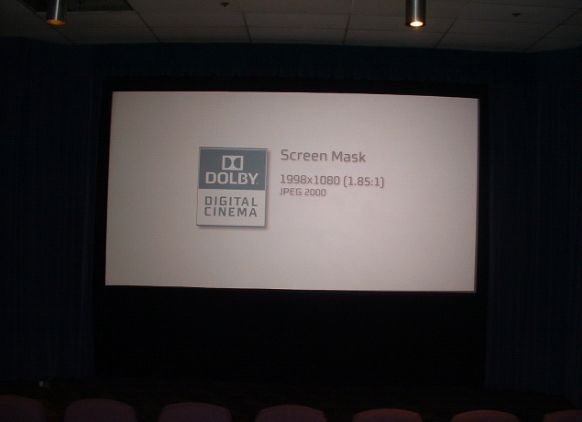
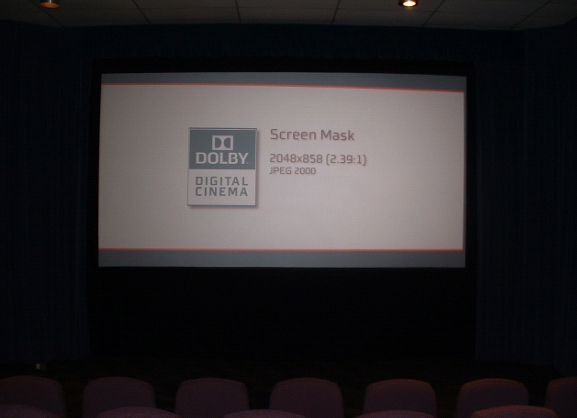
One of my press screenings got cancelled this morning, so I took some ACTUAL PICTURES
to illustrate this topic:

First Picture:
FLAT Image With Lens & Masking Set To FLAT
 -

Second Picture:
SCOPE Image With Lens Masking Set To FLAT - The Scope Image Just Gets Letterboxed
Note there is no 'squeeze' - The DOLBY logo box has same proportions in both pictures
 -

Notes:
The projector is an NEC 2000C.
The picture looks washed out becuase I left the screening
room lights on so you could better see the masking bounderies.
 
Posted by William Kucharski (Member # 7246) on 04-26-2013, 03:51 PM:
 
Thanks, I appreciate the photos!
 
Posted by John Coovert (Member # 7335) on 05-17-2013, 06:47 PM:
 
I'm a newbie to this, so sorry if I come across sounding like a fool. I feel like this is also a bit off topic from the OP so I apologize for that.

We have a DCP presentation of CASABLANCA this weekend. It's aspect is 1.33 but the Sony 220's I have in the house it's playing only has presets for "Scope" and "Flat". My primary concern is running it in "Flat" will result in an improper presentation. Could any one chime in on this? I plan on putting it on screen after hours here tonight but I'm waiting for an ingest in the interm and would appreciate feedback and thoughts.

As an aside its a real shame I don't have a 1. 33 35MM lens for our dual Strong Millennium 35mm setup or I could run the 35MM print siting next to me as I type this. If anyone has a line on someone with a couple of these lens in a 35MM setup they are getting rid of I'd love to talk with them!
 
Posted by Jim Cassedy (Member # 4115) on 05-17-2013, 07:12 PM:
 
John-
Look at the the info on your DCP. It will most likely say "S" or
"F" (for Scope or Flat) just any other DCP.

Most of the time, old films like this have the !:33 or 1:37
aspect ratio either letter or piller boxed within DCP flat or Scope bounderies.

Just FYI- - there are some proposed, but as yet unimplimented changes coming
soon to the DCP naming rules, which will expand the info available in the 'aspect
ratio" field of the DCP name.

In the future, instead of just "F" or "S", they will label films like "Casablanca"
as "F-133" or "S-133" which means a 1:33 aspect ratio within the usual flat
or scope DCP aspect ratio settings.

But as I said- - they haven't started using that new nomenclature yet.
(To the best of my knowledge)

So, for now- - just look to see if it says "F" or "S" on your DCP and set
your projector accordingly
 
Posted by Scott Norwood (Member # 30) on 05-17-2013, 07:46 PM:
 
What focal length do you need for 35mm? Or what is your screen size and throw distance?

You could get away with screening Casablanca in 35mm by taking apart your scope lens and projecting it with the backup lens and the scope aperture plate. I did this once with that film. The resulting image is slightly too tall/square, but much better than cropping it to 1.66 or 1.85. This works best if you have common-height masking.
 
Posted by John Coovert (Member # 7335) on 05-17-2013, 10:09 PM:
 
Jim,
Thank you for the quick reply. Looks like perhaps technicolor has already started doing this? All the info I have is what came on the drive sticker. The Feature Composition is listed as: CASABLANCA_FTR_133_EN_XX_UK-U_10_HD_PRKC_20080423_AAM

As is usual for these "US Classic" features as Technicolor likes to call them I have very little additional information to work off of. Should be able to put it on screen and flip between Scope and Flat after the late round of shows and see which is best.

Scott,
Good questions I must know the answer to if going on the hunt for the lenses. Currently I don't know what either is having just stepped into my roll here a month ago and this being the first time I've encountered needing to run a 1.33 show. The real problem I'll likely encounter is getting the folks that control the funds to give me the needed money once I know those details.
 
Posted by John Coovert (Member # 7335) on 05-18-2013, 01:53 AM:
 
Finally got the CASABLANCA "133" DCP on screen. Looks like it is pillar boxed to 1.33. I took some pictures of the opening credits while pausing the feature to compare between scope and flat.

I have some pictures I need to resize that I'll share to show the difference. For now its late, I'm tired and have to be back bright and early in the morning.

I'm hampered by having side masking that doesn't allow me to properly mask the image. Other than that I believe I'm good to go, the 2K DCP looks good. According to my film booker a 4K of this doesn't exist.

Now back to your regularly scheduled "So how DOES a 2.35:1 DCP get shown at 1.85:1, exactly?" postings. Thanks for being okay with my momentary thread jacking.
 
Posted by Gordon McLeod (Member # 33) on 05-18-2013, 05:26 PM:
 
sidemasking is not a hamper but the betterway for a cinema to be done
 
Posted by Manny Knowles (Member # 1171) on 05-18-2013, 08:49 PM:
 
Note - the opening credits of CASABLANCA (DCP version) are "window boxed" inside the full 1.37 frame, meaning there are black borders on all sides of the image.

After the opening titles, the image will "jump" to a slightly larger 1.37 size.
 
Posted by Michael Kurtzke (Member # 7512) on 05-18-2013, 09:24 PM:
 
Howdy Folks! I have the same projectors the Alamo Drafthouse has in Colorado, because I'm from their new location in Loudoun County. It's a known bug with the Sony SRX-515's and the SRX-320's that if you have scope content and you play it using the "Flat" setting, it will chop off the sides to fit the 1.85:1 ratio. Likewise, if you happen to accidentally put a flat trailer that is not "formatted" for scope [as I did earlier today] in a scope movie, it will chop off the top and bottom of the image.

Tonight Sony is putting out a software/firmware update and *hopefully* this will be all fixed!

What most likely happened is that the kid upstairs didn't adjust the masking for the feature, thought the picture was wrong because it had bars on the top and the bottom, and put it in Flat.
 
Posted by Connor Wilson (Member # 6088) on 05-18-2013, 10:46 PM:
 
The Alamo Drafthouse One Loudoun was buggy when I went there. I saw "Iron Man 3" with the projector set to scope, as it should be, but the masking was set for flat. Good thing it was a common width screen, no parts of the image where chopped off. That unused black area was annoying, though.

I wrote a complaint to them when I got home and I was offered a free ticket and a job. [Wink]
 
Posted by Brad Miller (Member # 2) on 05-18-2013, 10:49 PM:
 
quote:
Howdy Folks! I have the same projectors the Alamo Drafthouse has in Colorado, because I'm from their new location in Loudoun County. It's a known bug with the Sony SRX-515's and the SRX-320's that if you have scope content and you play it using the "Flat" setting, it will chop off the sides to fit the 1.85:1 ratio. Likewise, if you happen to accidentally put a flat trailer that is not "formatted" for scope [as I did earlier today] in a scope movie, it will chop off the top and bottom of the image.

Tonight Sony is putting out a software/firmware update and *hopefully* this will be all fixed!

Michael, that is in no way a "Sony bug". That is DCI spec. I suggest you read up on it because there is no way Sony will ever fix a "bug" that doesn't exist.

This is no different than getting angry at Kinoton because when you play a scope 35mm film through a flat lens it cuts off the top and bottom of the picture and everyone is super skinny. [Roll Eyes]

Look here.

See the red lines? That's scope on the chip, all the way to the sides and NOT to the top and bottom.

See the green lines on the side? That's flat on the chip, using the entire height of the chip but not the full width.

Before someone comes on babbling about 2K vs. 4K, that doesn't matter here. We're talking about aspect ratios.

If you play a flat movie in scope, you won't see anything outside the red lines in that picture (you lose the top and bottom). If you play a scope movie in flat, you won't see anything outside the green lines in that picture (you lose the sides). To make matters worse, if your installation technicians didn't bother to fix the masking to achieve precise aspect ratios (which most installers are too lazy to do), then everything can be exaggerated even more (losing a LOT off of the sides, for example).
 
Posted by Michael Kurtzke (Member # 7512) on 05-19-2013, 02:44 AM:
 
Connor, the masking was buggy because whoever set up the automation for the masking didn't set it up right. No matter what button you push, it reverses the masking. It should work that if I have a cue in there to have the masking for scope, and it is at scope, it should stay there. It doesn't. It seems like they basically installed garage door openers :/ It also doesn't help that when some manager runs upstairs to turn off the bulb because no seats were sold, he doesn't bother to put the masking back to flat [for the pre-shows] which screws up the entire day.

Brad, I thought it was a "Sony Bug" because I never experienced that problem on my Barco 20C's that I used for two years. If I had it set to Scope, and I put a flat trailer on it, it would add in pillarboxes for the flat content. And yes, I knew that if you had scope content and put it at the Flat preset it would crop the picture regardless of your projector.

Also, can we just end this already? An incompetent booth operator, [According to Brad, someone like me] screwed up. That's it. I didn't realize that because I made a mistake I'd be chewed out.

Sorry!
 
Posted by Steve Guttag (Member # 268) on 05-19-2013, 09:36 AM:
 
Michael, I think you are missing the point of Brad's comment.

That is, how DCPs are projected. The Barco is NOT inserting "pillar boxes" It, like the Sony is projecting black because there simply isn't any information there.

When a authoring house creates Flat versions or Scope versions of trailers...the reason they do that is to preserve the aspect ratio of feature they are creating the preview for. Thus, if the upcoming feature happens to be Flat and you are showing that on a Scope movie, then you will see the pillar box because there is no information there. The projector is "dumb" with respect to the actual content, it shows everything that is there until one prevents it (creates a screen file to turn off pixels like an aperture plate). Note, the same is true in the reverse...a Flat feature showing the preview of an upcoming Scope movie...you will get a letter box.

An operator/manager can screw things up by not using the proper format set up in the projector. So if one were to use a Scope preset to show a Flat movie, it would not only enlarge the image (zoom) and crop...since the the Flat image stops at 1998 pixels(using 2K as an example) it will not fill the scope width. Again, the reverse is true if a Flat projector format is used for a Scope movie.

With respect to the masking system installed. There are two ways that one can get a toggle type situation...it can be that the machine itself does indeed toggle between the two positions or the "automation" system functions that way. It could be out of the installer's control to properly correct for either...particularly if there is a means for manual intervention where the automation can get out of sync. I would absolutely agree that using such a strategy (regardless where the limitation is being introduced) is a poor design.

Note, historically, this is how curtains have been wired. This system worked because it allowed for a conventional 3-way/4-way switch system so that a curtain switch could be placed at each projector (think 2-machine changeover as well as a local switch on the machine itself). Since it was full manual, the operator merely flipped the switch in front of him to send the curtain the "other" way. This system never worked well in the automated theatre and I can't think of the last such system I've seen that was INSTALLED in a AUTOMATED theatre.
 
Posted by Marcel Birgelen (Member # 6801) on 05-19-2013, 07:35 PM:
 
quote:
I wrote a complaint to them when I got home and I was offered a free ticket and a job. [Wink]
Did they make you choose between a free ticket or a job or did they really offer both? [Razz]
 
Posted by Carsten Kurz (Member # 5396) on 05-20-2013, 10:23 AM:
 
quote: Michael Kurtzke
Howdy Folks! I have the same projectors the Alamo Drafthouse has in Colorado, because I'm from their new location in Loudoun County.
Michael, may I ask what job function you have there?

- Carsten
 
Posted by Michael Kurtzke (Member # 7512) on 05-20-2013, 06:32 PM:
 
Steve and Brad - Thanks for the advice. As a new guy coming into the world of projection, you and everyone else here help a ton! I'll make sure to correct all of my mistakes. [Smile]

Carsten - I'm a projectionist at the Ashburn Alamo Drafthouse. I know what projectors they have because they bought the projectors for my location, Colorado, and Yonkers right before the VPF's expired.
 
Posted by William Kucharski (Member # 7246) on 06-18-2013, 07:27 PM:
 
Michael, thank you for an explanation of what likely happened; that's really what I was trying to understand in the first place. [beer]
 
Posted by System Notices (Member # 2357) on 04-23-2016, 12:13 AM:
 

It has been 1039 days since the last post.


Powered by Infopop Corporation
UBB.classicTM 6.3.1.2