This is topic Dolby CP750 front display "washed out" in forum Digital Cinema Forum at Film-Tech Forum ARCHIVE.
To visit this topic, use this URL:
https://ft-forum.com/ft/cgi-bin/ubb/ultimatebb.cgi?ubb=get_topic;f=16;t=001502
Posted by Jay Glaus (Member # 6011) on 05-11-2013, 01:25 PM:
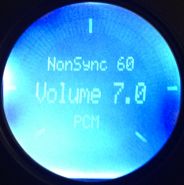
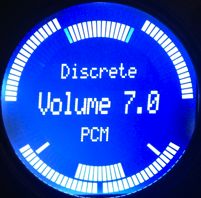
Don't know if anyone else has experienced this, or if this is normal, but I got Dolby CP750's for 2 of our screens which switched to digital. The front display occasionally gets so dim you can't hardly read it. Its almost like the back light stays on but the text gets so dim the screen looks washed out.
If you go into the menu for instance and go to the contrast setting, the second you touch it, the text goes right back up to full brightness instantly. What made me think, is for like the first two weeks this didn't happen. It just started, and they both do it at random times. Sometimes they power up "washed out", and other times they become "washed out" after time.
I almost thought it was a power saving thing, but like I said, this didn't happen when they were put in, and our tech said he never saw them do that and to his knowledge there was no power saving thing in the front display.
I took a picture when it was fine and when it was "washed out". The "washed out" picture actually looks better than it looks in person. In person, it looks way dimmer.
Is this normal?
Posted by Marco Giustini (Member # 4544) on 05-11-2013, 02:55 PM:
Press the menu button several times, you'll end up to a couple of menu where you can set the contrast and brightness of the LCD. Set it where it looks best.
Posted by Jay Glaus (Member # 6011) on 05-11-2013, 03:30 PM:
Yeah I've done that, it looks fine when I set it, then it dims. When I go back in to set it when it is dim, as soon as I move the contrast up or down by just one, it like wakes it back up instantly. That's why I thought it was like a power saver thing like when the screen dims on your laptop and you move the mouse and it comes back up to full. I don't know. ![[Confused]](confused.gif)
Posted by Marco Giustini (Member # 4544) on 05-11-2013, 03:42 PM:
My apologies, I did not read the message carefully.
Never heard that. Silly question, do you save the setting with "V" when you finish?
Also, make sure you are on the latest FW 1.2.8.3
Posted by Stefan Vogels (Member # 5573) on 05-11-2013, 03:50 PM:
I have seen this issue before on some units. If you open up the unit than there's a small cable running towards it. You can reseat it and that often resolves the issue. If not than you propably need to have the unit replaced.
Posted by Jim Cassedy (Member # 4115) on 05-11-2013, 03:57 PM:
I second what Stefan said. I had a couple of DTS XD-10's where the same thing
started happening on the front panel display. Backlight stayed on, but text
became washed out. Opening up the unit & re-seating all the cables between
the front panel display and motherboard solved the problem on both units.
Posted by Steve Guttag (Member # 268) on 05-11-2013, 05:55 PM:
I can confirm that this happens on some units.
Posted by Jay Glaus (Member # 6011) on 05-11-2013, 10:14 PM:
Thanks guys! I'll give the reseating thing a try. I'm not too worried because I believe it's simply cosmetic, unless anyone has seen a unit die from this, but I doubt it?
Posted by Marco Giustini (Member # 4544) on 05-12-2013, 05:17 AM:
I saw units with the washed out display but to be honest I thought someone had messed with them! ![[Smile]](smile.gif)
If the unit is under warranty I'd have it replaced anyway. Swapping the unit - including the settings - is a 5 minute job.
Maybe it's just a cosmetic issue, or maybe one day your LCD will definitely die!
Posted by Jay Glaus (Member # 6011) on 05-12-2013, 01:18 PM:
Thanks, if the reseating doesn't work and it still gets washed out I may check and see what I can find out about the warranty.
Posted by Carsten Kurz (Member # 5396) on 08-04-2013, 04:38 PM:
Any reactions from Dolby regarding this issue? Seems there are quite a few CP750 hit by this issue.
- Carsten
Posted by Marco Giustini (Member # 4544) on 08-04-2013, 04:52 PM:
Indeed, and I am surprised they do not come up with something to fix what I call the Christmas Tree effect - when the unit LEDs are flashing like a Christmas tree!
A reboot always fix it though.
Powered by Infopop Corporation
UBB.classicTM
6.3.1.2