The two usual reasons probably wouldn't apply in this situation:
1. To control devices over a greater distance.
2. To control lots of devices without needing lots of wires.
Posted by Harold Hallikainen (Member # 5405) on 05-26-2013, 02:58 PM:
I generally like the idea of controlling everything over Ethernet for the hardware simplicity of it. But, the discussion HAS raised a point I had not thought of. Do servers in general let you define macros for "Virtual Comm Ports" that are USB to RS232 adapters? Do the servers have the required drivers included? I know that many Linux distributions include drivers for several of these chips including FTDI and Silicon Labs. If we can individually address VCPs when defining macros, it gets around the issue of having one serial port on the server and several serial devices to talk to. But, I have not checked this out at all (I had never thought of it). So, do digital cinema servers support and allow you to define macros to be directed to virtual comm ports that are driving USB to RS232 converters? Maybe it's time for me to experiment a bit when I get back to work...
Harold
Posted by Pete Naples (Member # 761) on 05-26-2013, 05:00 PM:
Stephen I agree,
RS232 is usually good out to 50', longer if you use the right cable. The OP mentioned BluRay players, so I assume he's going to connect that to the projector/scaler via HDMI/DVI, which has a near identical max working cable length.
Using RS232 direct from the server will mean less wiring As it's one cable from the device to the server.
Using RS232 over Ethernet requires Ethernet from the switch, to the convertor box, then RS232 to the device.
That's before we start thinking about the cost of doing RS232 over Ethernet. The venue in question is a "small community theatre", so one would assume doesn't have bottomless pockets.
Harold, with Dolby servers you are stuck with one single RS232 port. Doremi has one port native, but as I said earlier one can add USB to serial convertors. Contact Doremi support for advice as to which ones are supported. You can define macros using those comm ports exactly as you would the onboard comm port or an Ethernet device.
I have found one limitation in the Doremi software with regard to serial devices, that is the termination string seems to be limited to one character.
Posted by Gordon McLeod (Member # 33) on 05-27-2013, 08:13 AM:
Overall i find RS232 far more reliable and robust than ethernet
Posted by Pete Naples (Member # 761) on 05-27-2013, 12:29 PM:
I concur with the learned Canadian fellow above ![[Smile]](smile.gif)
Posted by Brad Miller (Member # 2) on 05-27-2013, 12:59 PM:
Another agree with Gordon. RS232 just works.
Posted by James Skinner (Member # 7385) on 05-27-2013, 05:37 PM:
Thanks for all the great feedback. Sounds like RS232 strait to the Dorami is the best option. I'll give it a try.
Posted by Gordon McLeod (Member # 33) on 05-28-2013, 01:50 PM:
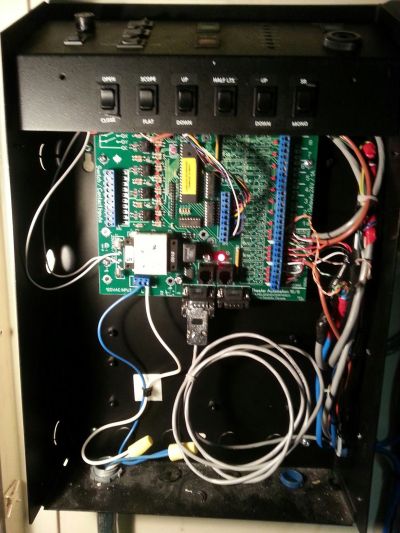
In fact we designed our own RS232 automation that would fit inside the cinemas existing TA10 automation(handy since all the auditorium control wires are already there) It has 8 inputs and 16 dry contact isolated relay outputs and if it recieves a serial string it doesnt understand it passes it through to the com 2 port which can be a processor or even another board
We are starting to put them into all our cinemas now with the first version software
Posted by Steve Guttag (Member # 268) on 05-28-2013, 04:08 PM:
RS232 is certainly a more robust medium than Ethernet. However, it is dependent on the people creating the RS232 protocol for each device and some are pretty bad at it. I guess the same can be true for Ethernet.
RS232 is generally a 1:1 situation...which can be good and bad...nothing to much up the communication and timing is normally perfect. More difficult for remote "monitoring."
Ethernet wins when it comes to remote monitoring with multiple devices talking to the same piece.
Long term though...things are moving more and more Ethernet and away from RS232.
Posted by Stephen Furley (Member # 1277) on 05-29-2013, 07:53 AM:
Ethernet to controller then some sort of serial to the devices being controlled is very common. The serial isn't always RS-232; RS-422 is often used for greater distances, and RS-485 for multiple devices on a serial bus.
This is how our entrance barriers are controlled, and our lighting in the new and refurbished parts of the building, and the few CCTV cameras which have pan, tilt and zoom.
All of these systems are managed by outside companies; we provide them with an Ethernet connection wherever they want to put their controllers, and usually with a VPN connection which allows connection only to the system which their company manages. Most problems are dealt with by one of their engineers coming in over the Internet from whereever they happen to be on their laptop. We certainly have hundreds, possibly over a thousand, devices controlled in this way.
The lighting is DALI lighting will come up as someone enters an area, and go down again a few minutes after they leave. The DALI controllers talk to each other via Ethernet and the whole lot talks to a control and monitoring station in the office of one of our premesis staff, and via the VPN to the lighting company.
Works well in our situation, but seems like overkill if all you want to control is one device, in the same room.
Posted by Stephen Furley (Member # 1277) on 05-29-2013, 09:44 AM:
Here are some pictures of some of this equipment, Ethernet to single port and multi-port serial, and Ethernet to serial to DALI. These are the barriers:
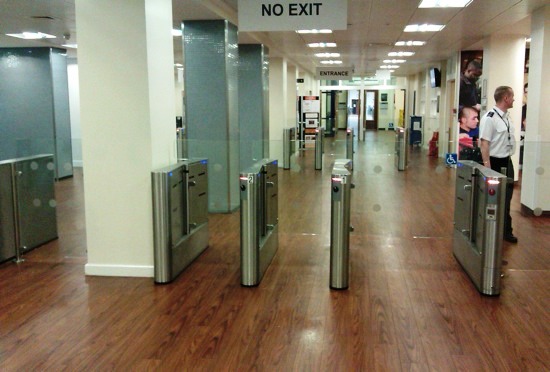
There are five lanes, two out of sight to the left. In the distance are another, similar set. Each of the ten has two contactless smart card readers, one inside and one outside.
This is what controls them:
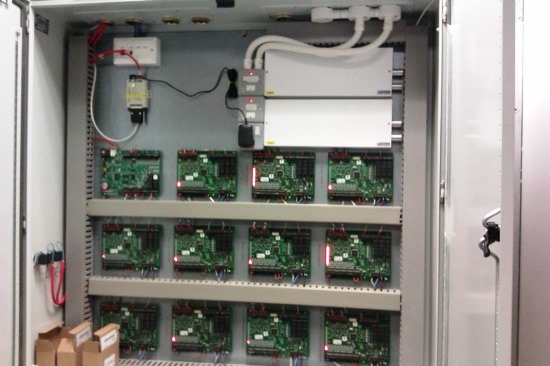
The white box at the top left has four Ethernet ports in it, two in use. One red cable feeds the small grey box just below it, which is a single port serial gateway device with an external power supply; I'm not sure what it is used for. This is the sort of thing that James was asking about.
The other red Ethernet cable is connected to the top left large card. These cards are all connected together in a daisy-chain, via RS-485 I think, and then the cards connect to the barriers via twisted pairs, presumably RS-422. This thing is huge, the cards are almost as big as a sheet of Letter size paper. I've no idea why they're so big. The two large white boxes are power supplies and the thick red cables on the left side are connected into the fire alarm loops, so that all of the barriers open if the fire alarm is activated.
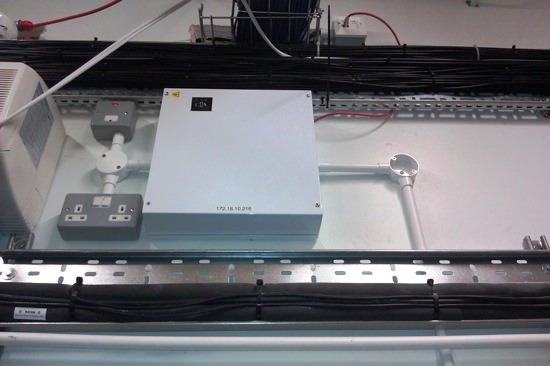
A single card of the type with an Ethernet connection is also installed in white boxes around the building to control access to various doors. Most are hidden above ceilings, but this one is visible, in our PABX room:
Finally, a lighting controller box, there are about a dozen of these located in various service risers around the building:
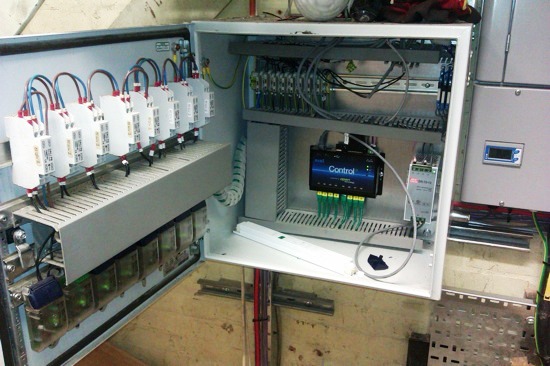
This time the Ethernet cable is grey, and comes into the black box near the centre, with 'Control' on it. The eight green cables coming out of the bottom of this are eight serial ports, which go just a short distance, to the devices with the green lights, mounted on the bottom of the box door; these are the DALI controllers. The white things above them are their power supplies, with brown and blue mains wires looped into each.
Each DALI controller can talk to up to 64 devices, lamp ballasts, sensors etc. The DALI bus uses just two wires for data, rather than a wire, or pair of wires, to each device, as with 0-10 V or 1-10 V analogue lighting control systems.
Posted by James Skinner (Member # 7385) on 06-02-2013, 06:46 PM:
I have been trying to get the Doremi serial automation working and so far haven't had much luck.
I have an external box that I am trying to control that uses 5 bytes for each control signal. I've connected this box to a regular PC via serial and was able to successfully send command to it so I know that it works.
I then connected it up to the Doremi 2K4 serial port. I created a new device in the Device Manager for it with the proper transmission parameters. Next I tried to create a Macro to send some commands to it.
The first problem that I encountered was that the Doremi macro editor only seems to be able to specify data in ASCII or binary. The control command that I have are specified in hex. Is there way to input hex characters in the marco editor using the Raw Send Message feature?
I might have been able to figure it out better if I could see responses from the serial port on the Doremi. I couldn't even tell if it was receiving anything I sent it. When running a macro I could find no way to see the response from the external device?
Does anyone know if its possible to specify the bytes sent in a Raw Send Message on a Doremi in hex? Also is there anyway to monitor the data being sent back from a connected serial device for debugging purposes?
Posted by System Notices (Member # 2357) on 06-05-2019, 02:48 AM:
It has been 2193 days since the last post.
Posted by Spencer Krit (Member # 10898) on 06-05-2019, 02:48 AM:
How did you try to monitor the data that Doremi transmits? Try using the serial port monitor to view information. This software accepts ASCII data format. The program is free, so feel free to try
Posted by Gordon McLeod (Member # 33) on 06-05-2019, 10:17 AM:
The usual issue with DOREMI and RS232 is that it works best if you write your commands in hex
Also it requires the line feed carriage return typed in
We use Termite to view rs232 or serial talk which is in the warehouse here i believe
Posted by Leo Enticknap (Member # 534) on 06-05-2019, 09:33 PM:
The Xeta Converter is a good workaround. They're a little fiddly to set up (this is split between a web UI and an app), but once configured, they work pretty well.
Of course it's another machine in the system, and thus another potential failure point, but if upgrading the device that needs to send and/or receive the RS232 commands to one that can handle IP is not an option, it's a viable alternative.