This is topic Adding an external NAS to Dolby DSS200 in forum Digital Cinema Forum at Film-Tech Forum ARCHIVE.
To visit this topic, use this URL:
https://ft-forum.com/ft/cgi-bin/ubb/ultimatebb.cgi?ubb=get_topic;f=16;t=001607
Posted by Daniel Contreras (Member # 7676) on 08-21-2013, 05:05 PM:
Dear friends:
First of all, I wanted to thank you for all the answers I've found in the forums.
Next, my first cry for help (I didn't get the info, anywhere):
I need to add/connect an external NAS to a Dolby DSS200... I'm trying to connect a Superflex pro Cinema Server Cache to this server, but it doesn't work. I've already connect this NAS to several Christie's IMB, easily.
Could you help me with this, please?
Thanks in advance!
Greetings from Chile! ![[Wink]](wink.gif)
Posted by Pete Naples (Member # 761) on 08-21-2013, 05:29 PM:
you will only be able to use it via ftp.
so, the has will need some sort of ftp server running in it.
I'm not familiar with the has you quote, our experience is that has running Windows server was OK and relatively simple to set up. Nas running linux was tricky to say the least.
Posted by Brad Miller (Member # 2) on 08-21-2013, 08:46 PM:
Why do you want to add a NAS to a DSS200??? What's the goal to achieve here, more storage? How much storage do you want?
Posted by Pete Naples (Member # 761) on 08-22-2013, 01:59 AM:
What I forgot to add, which is probably where Bard is going, is that it is possible to exchange the drives in the RAID for higher capacity ones. We usually take DSS200s up to 4x2Tb drives, giving near as dammit 6Tb storage. That's proven to be sufficient for many sites needs.
Posted by Daniel Contreras (Member # 7676) on 08-22-2013, 07:45 AM:
Sorry, I forgot to tell that it's a satellite receiver... We are receiving several films by satellite, but I've been not able to achive the connection with our dolby Systems, only with Christie...
Thanks!
Posted by Carsten Kurz (Member # 5396) on 08-22-2013, 07:56 AM:
I guess there is no other way than to dig through the FTP settings involved.
Is there no support for the receiver? With only a few common servers in the whole market and the Dolby among the most prominent, they should know how to get it working.
- Carsten
Posted by Brad Miller (Member # 2) on 08-22-2013, 02:08 PM:
Ok so this isn't a STORAGE SPACE issue, it is an issue of being able to connect to your satellite. Do you have the FTP credentials from your satellite? If so, yes the Dolby can connect to it and pull content. If the satellite people want to push to you, then that is also an option, but you have to give more specific info for anyone to help you.
Please do not post FTP credentials here though.
Posted by Daniel Contreras (Member # 7676) on 08-23-2013, 09:51 PM:
Thank you, Guys!. i'm going to dig through the FTP credentials with our satellite administrator and I will tell you how is it going.
Thanks again!
Daniel.-
Posted by Brad Miller (Member # 2) on 08-23-2013, 11:54 PM:
It's super easy on a Dolby. Navigate to this page and click "actions" to see this drop down menu.
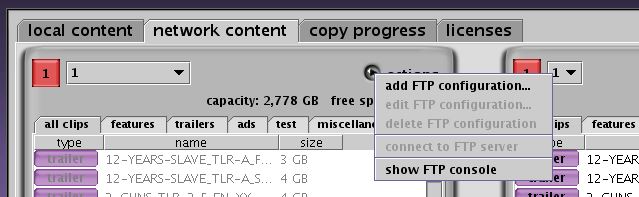
Once you select "add ftp configuration" you get this screen.
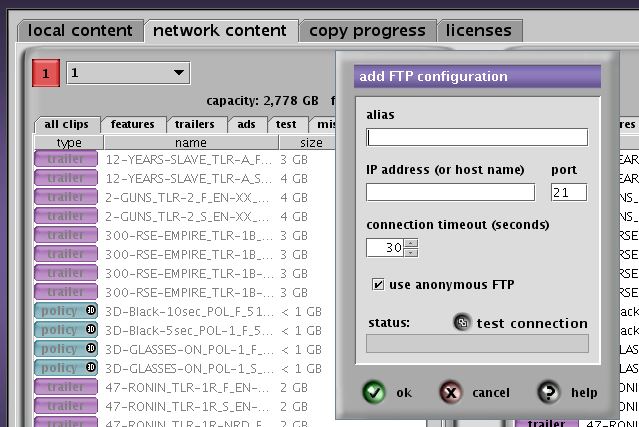
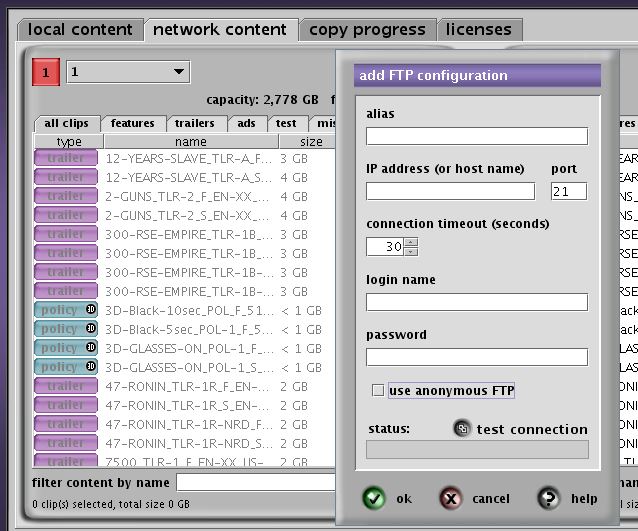
You will need to UN-check the anonymous login to be able to enter specific credentials. Name it at the top under alias, click the test connection button and then hit OK. You're done. From that point forth you can access it via the drop down menu by the auditorium number there.
Posted by Daniel Contreras (Member # 7676) on 08-29-2013, 12:36 PM:
Thanks for your help, guys. I've succesfully comunicate the Dolby Server with the satellite receiver, after fix some stupid mistake that I made with the subnet...
Thanks Again!
Daniel.-
Powered by Infopop Corporation
UBB.classicTM
6.3.1.2