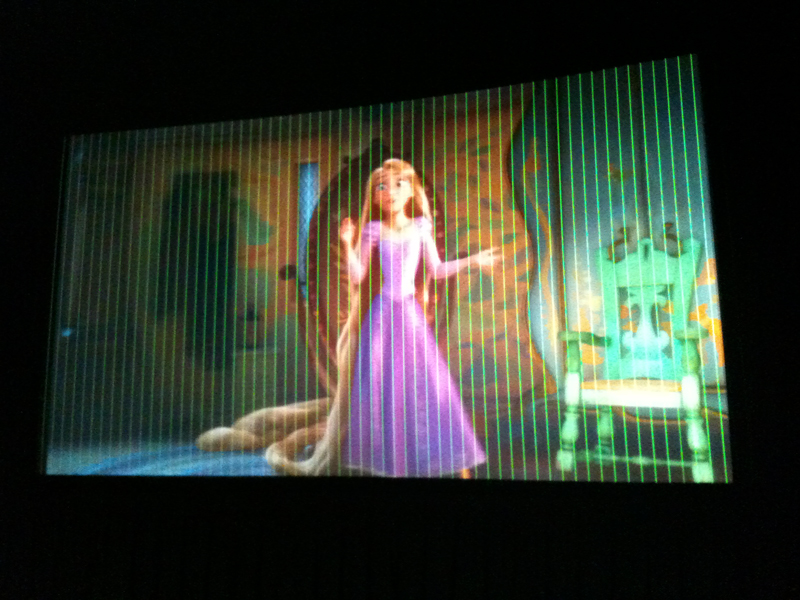
This is topic Green lines with NC2000 in forum Digital Cinema Forum at Film-Tech Forum ARCHIVE.
To visit this topic, use this URL:
https://ft-forum.com/ft/cgi-bin/ubb/ultimatebb.cgi?ubb=get_topic;f=16;t=001627
Posted by Giorgio Volpi (Member # 1182) on 09-11-2013, 07:21 PM:
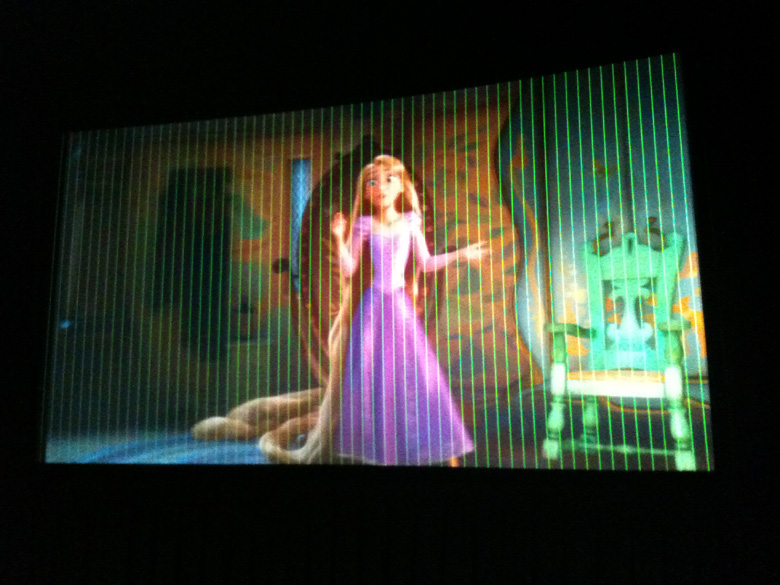
Hi. An NC2000 started projecting some horizontal red lines, changing them to green ones, and growing to complete the entire screen.
Do you have any suggestion about the problem?
Giorgio
Posted by Dave Macaulay (Member # 813) on 09-11-2013, 09:23 PM:
This is probably a failure in the light engine.
You can try a few things - reseat the circuit boards, reseat the light engine - there are a LOT of connections and many of them are critical, corrosion takes its toll after a few years and reseating does wonders.
But... in my experience this kind of problem means a new light engine: it pretty much points to a failure in the formatters or the DMDs.
Call NEC tech support and ask for their opinion?
Posted by Marco Giustini (Member # 4544) on 09-12-2013, 05:39 AM:
You can try reseating the big light engine connector. It's a delicate connector, ask NEC for the procedure. But I wouldn't expect only one colour to be affected to be honest.
As Dave suggested, reseat the boards.
Also, run some test patterns. Colour calibration test patterns are generate on the formatters themselves. If the lines are still present, the issue is on the formatters. If they go away, you can try other tests patterns, which are generated on the ICP. If lines are there, the ICP or a connection is bad. If they're not there, the issue is on the HDSDI/Enigma or the backplane.
On a Barco you can generate patterns on the HDSDI board as well, I don't know on a NEC.
Are the lines on screen with any input or only using a specific one? Do they also show up with no signal applied?
Posted by Mark Gulbrandsen (Member # 72) on 09-12-2013, 02:52 PM:
I had this issue once. If this is something that changes as the projector warms up then check the torque of the screws holding the formatter board to the DMD's. There are not sockets per say for the DMD's but the pins are simply made by contact against the board. All projectors connect the formatter to the DMD's this way. I recomend torquing them down to the specs shown in the NEC manual with the appropriate torque driver kit. I didn't have to pull the engine to fix the one shown but if it's the lower DMD you may have to. This issue could happen in either the horizontal or vertical plane too! This one also cleared itself faithfully each time up after about 20 minutes. Retorquing the green DMD cured this one.
Be VERY careful with the large plug that goes from the light engine to the card cage!!!! Pins bend easily. I believe if you do bunger one up that the pins can be individually replaced though.
Posted by Giorgio Volpi (Member # 1182) on 09-12-2013, 03:21 PM:
Thanks a lot to all of you.
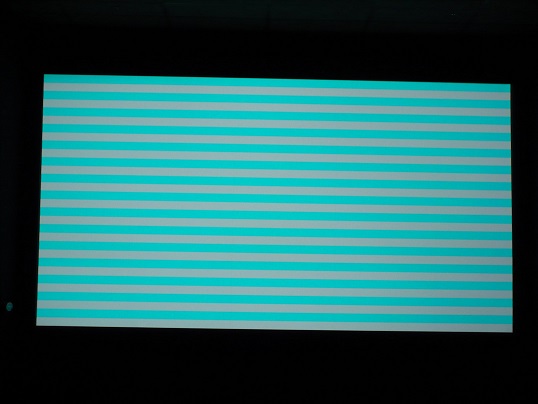
This morning I could check the projector, and see that the problem is only with red color. The other two colors are Ok. I checked all connector, including the big one, but nothing changed. So, the problem is the light engine, specifically the red board.
This is the white test as is projected.
Posted by Mark Gulbrandsen (Member # 72) on 09-12-2013, 03:28 PM:
Are you showing any errors? Also, Have you tried swapping the ICP out?
Posted by Tom Wienholt (Member # 1510) on 09-12-2013, 05:21 PM:
How old is the projector? I had this same issue happen about 6 times on NC1200 units over the past year. NEC sent me a replacement prism assembly every time this happened. Contact your dealer.
Posted by Marco Giustini (Member # 4544) on 09-13-2013, 04:06 PM:
I would recommend opening the big light engine connector and swapping Red with Green (two connectors each, need to have small hands!) and see if the issue stays on RED or goes on GREEN. Then you know where you problem is.
Reseat the connectors on the formatters as well.
As usual, do the above at your own risk and only if you know what you're doing.
Posted by Ian Freer (Member # 1940) on 09-14-2013, 12:56 AM:
Is the projector is still under warranty? As it is most probably a formatter board failure it is likely a warrantable repair, so best to go down that course of action first...
Posted by Giorgio Volpi (Member # 1182) on 09-14-2013, 02:46 PM:
Hi.
The problem is the light engine!
It was changed with another one were we have a 35mm working, waiting for the replacement.
Thanks a lot to everyone of you!
Giorgio.
Posted by Mark Gulbrandsen (Member # 72) on 09-14-2013, 06:12 PM:
Formatter boards CAN be changed in the field on NEC series 2 pretty easily... But if it's in warranty then let them worry about it.
Posted by System Notices (Member # 2357) on 09-20-2016, 01:53 PM:
It has been 1101 days since the last post.
Posted by Tom Wienholt (Member # 1510) on 09-20-2016, 01:53 PM:
Does the light engine need to be fully removed to change a formatter board?
Posted by Mark Gulbrandsen (Member # 72) on 09-20-2016, 02:49 PM:
Yes! If you remove the formatter while its in the projector some of the gold contact pins might (likely will!) fall out.... Its best to have that board facing up at you on a carpeted bench so when you remove it the pins stay in place, and the ones that won't then fall on the carpet and don't continue on to the floor. Handle those with a tweezers so as not to contaminate them. There is also a correct torque setting for the screws that hold it to the DMD socket. While I even have the special tools to torque them properly I have forgotten what the setting is supposed to be. I will have to go back and look in my emails...
I am doing a write up on disassembling and cleaning NEC light engines. NC-1200/NC-2000 and NC-900 will be covered. The NC-900 light engine is way easier to clean by the way, it does involve drilling a hole and reaming it for a dowel pin then pressing in the pin before taking it apart. Then it all goes back together exactly where it was in the beginning.
Mark
Posted by Tom Wienholt (Member # 1510) on 09-20-2016, 05:54 PM:
Any advice for changing the board beyond that? I have replaced the entire prism assembly many times before, just never an individual formatter board. I will be receiving the new red board in the morning and will be replacing for the first time.
Posted by Paul Looker (Member # 5420) on 09-20-2016, 08:01 PM:
Mark, I would be very interested in getting that write up about cleaning the nc900 light engine so that our technician could read it over. How far do you travel for service? You really seem to know a lot about working on these.
Posted by Mark Gulbrandsen (Member # 72) on 09-21-2016, 06:45 PM:
I used to be a lens tech at Canon before my cinema career. I am still developing the exact methods for this, although it is not really all that hard. The main thing is to work out is to reassemble it exactly as it came apart. Nitrile gloves, proper cleaning solution and wipes are most important. It's still a few months off but someone has to do this because there is no cleaning available on the 900 prisms here in the States yet. Prism has to go back to Japan via NEC and I was told it takes months. New prism's are around 9 grand. Since I am in kidney failure I don't travel as far like I used to.
Mark
Posted by Mike Moreno (Member # 4887) on 10-01-2016, 01:06 PM:
i had the same problem with green vertical lines on a Barco 20C recently. i swap ICP´s, replace back panel and nothing. finally i change the light engine from another projector and sadly was the light engine.
you think could be the same problem?
is there any tech manual to check the formater on this one?
Mike moreno
Mexico
Posted by Mark Gulbrandsen (Member # 72) on 10-01-2016, 02:16 PM:
The NC-2000 I had that was doing this was just an improperly tightened formatter board. They have to be tourqued correctly to the socket. The give away on that was the fact that when the projctor was first turned on it didn't do it. Then after things warmed up it did it for about 6 or 7 minutes, after which it cleared up again on it's own. It went though this cycle on every show. I torqued the green formatter to factory specs and its been running for just about six years now...
Since all light engine of the same size use the exact same DMD socket that's what I would try first. It does require a special torque driver kit in order to do it. It would suck to pay the cost of a replacement light engine just because of a lose formatter board.
Mark
Posted by System Notices (Member # 2357) on 06-20-2018, 01:51 PM:
It has been 626 days since the last post.
Posted by Tom Wienholt (Member # 1510) on 06-20-2018, 01:51 PM:
Any info about replacing a bad formatter board on an NC900c unit? I have replaced many boards on NC1200c prisms, and there are torque recommendations. DO any documents exist for the NC900c prism?
Posted by Steve Guttag (Member # 268) on 06-20-2018, 04:26 PM:
There is no way you've replaced lot of boards in the NEC projectors because Mark Gulbrandsen says nothing in GDC or NEC ever fails. You and your patrons must be wrong. ![[Big Grin]](biggrin.gif)
The NC900 is a "dig you way into" sort of projector.
As for the formatters, the three are color coordinated so the RED board is color red, The blue one is BLUE and the Green one is GREEN. On the up side, there are no convergence adjustments when you are done.
The NC900C service manual will give you clues (and torques) but NEC isn't too big on play-by-play instructions.
Posted by Mark Gulbrandsen (Member # 72) on 06-21-2018, 11:33 AM:
Usually the green lines are because the formatter board is not properly torqued. I've had that happen three times on brand new NC-2000's and it always appeared after warm up and then went away after about 20 minutes when the gold figers expanded and made contact again. These do not seem to be related to any certain run either as they were spread out over several years... Properly torquing the formatter cured it in all instances.