This is topic 7.1 and 5.1 using Doremi Showvault and Cp750 in forum Digital Cinema Forum at Film-Tech Forum ARCHIVE.
To visit this topic, use this URL:
https://ft-forum.com/ft/cgi-bin/ubb/ultimatebb.cgi?ubb=get_topic;f=16;t=001628
Posted by Owen Morgan (Member # 7854) on 09-13-2013, 05:36 PM:
Hello Everyone,
First off, this forum has helped me sooooo much in the past so thanks for your existence!
I'm currently rewiring and routing all cables inside the sound rack of the University Student Cinema I am Head Projectionist at. This is in conjunction with the recent installation of our new Barco DP2k-10sx. We were the lucky one's, who due to Doremi's issues with their IMS we were upgraded to a showvault (Dcp2k, the one with the touch screen) with the doremi IMB.
My question is with regards to 7.1.....
Unfortunately the Cp750 and Doremi documentation offers no help with this at all.......
The CP750 only has a 4x AES input from the doremi, meaning one Cat6 cable from the imb to the 750 is needed (channels 1-8 from the imb via the cat6 to db25 adapter doremi supplied). Under normal 5.1 this is of no issue because the first 6 channels are 5.1 audio with channels 7 and 8 containing HI and AD which from the back of the 750 is routed to our IR Tx.
However, for 7.1 playback, this implies that with HI and AD on channels 7 and 8 and Bsr and Bsl on 13 and 14 (I think, its something like that anyways) the audio on channels 7 and 8 would be coming out of the rear speakers in the auditorium.
Looking in the set up of the Cp750 in digital 1 7.1 mode, you can use digital 2 input simultaneously with Digital 1 to decode the HI/AD. What I have done, is taken the cat6 cable from the second audio output on the doremi (channels 9 - 16) and used the two conductors that carry the channel 15 and 16 audio and soldered a connector to plug into Digital 2.
My question then is, how do I (when creating the film playlist) tell the doremi to use the custom audio map I have created for the 7.1 case?
I cannot change the default channel assignment on the doremi, only create one custom map..
Sorry that this post is long and probably not easy to follow! My theory is, the default 6 channel map is correct for 5.1 playback with HI/AD, its then about using the custom map for 8 channel playback with HI/AD also present but mapped to 15/16.
Also, looking at the cp750 command list, there seems no obvious way to set it from 5.1 into 7.1 (say to move from trailers to film)....
Any help would be appreciated!
Thank you,
Owen.
Posted by Steve Guttag (Member # 268) on 09-13-2013, 06:35 PM:
What you want to do is have pairs 1/2, 3/4, 5/6 and 11/12 going to the Digital 1 connector. For your VI-N stuff that can be on 7/8 or 15/16...that you would send to Digital 2 (I would put a switch in line so you can choose which pair you need...once SMPTE rules are in place, it will all be on 15/16 and hear most of Europe is already on 15/16 now). Note, Digital 2 is a 75-Ohm input...you'll need a transformer (110 to 75) to properly terminate it.
In the CP750 set up (general) you tell it your configuration, 7.1 with Digital 2 so that it effectively has 10-channels of input (note, you must be on current CP750 firmware for this feature). the VI-N will come out of the "8" RCA terminal that you already have connected.
As for changing formats (5.1, 7.1) you can do that on the front panel or via automation (serial or Ethernet). The commands are in the manual. And if that isn't handy and you are connected up to it via computer, go to Window>Expert view and you'll see all of the possible commands and the current state. If you need to know how what the parameter is, you can change it manually and see what comes up on the Expert View. So for sound formats...
cp750.state.decode_mode is the command and lr_discrete is the format. 4_discrete_sur would be surround 7.1
Posted by Owen Morgan (Member # 7854) on 09-13-2013, 07:58 PM:
Hi Thanks for your response,
You raise an interesting point about digital 2 being on a BNC thus implying a 75 ohms characteristic impedance, and the cat6 being 100 ohms. However with Digital AES the concept of impedance matching using a transformer is flawed. Transformers only work with AC signals. Unless I'm missing something? (I understand Fourier so can see how digital square waves can be composed of sinusoidal harmonics but that wouldn't allow a transformer to work).
For dolby to set the option of decoding the digital aes signal on Digital 2 they had to know that the servers would output via ethernet cables surely?
You answered my question about changing mode which I greatly appreciated, I would never have seen that as its not made hugely clear...
My main question still is how can I set the doremi to select my custom audio map? And you raise an interesting point, would the doremi apply my custom audio map to Interop and SMPTE packages?
Thank you,
Owen.
Ps. I have seen the Neutrik inline impedance matching box. I will have to investigate... digital 2 would be used for AD and not overly used.... I will need to investigate.
Posted by Carsten Kurz (Member # 5396) on 09-13-2013, 08:24 PM:
AES and S/P-DIF are BiPhase Signals and can (in the case of AES/EBU must/should) be transformer coupled. In many cases, direct connection is possible, although a least simple resistor matching is recommended.
Regarding the Doremi audio mapping - have you read this document?
http://www.doremilabs.com/downloads/manuals/Audio_Configuration_GUI_User_Manual_001587_v1_3.pdf
The Doremi supports fixed manual mapping, with SMPTE DCPs automatic mapping, AND, recent software revisions allow to assign a specific mapping to a CPL ('composition playlist configuration').
You can make your own custom mapping, routing DCI 11&12 to output 7 and 8.
You don't need to create a full custom mapping, you can just modify any existing mapping. Frankly, I don't understand why none of the preset mappings is handling 11/12 in a useful way, as 7.1 is now the only widely used variation from 5.1 and many processors or D/A converters have only 8 input channels.
A lot of people simply rewire their AES cables. Then only a channel copy 5&6 to 7&8 is needed for 5.1 playback.
Odyssey offers suitable converter boards.
http://www.odyssey-products.com/products/digital_cinema_solutions/7.1_audio_solutions.html
- Carsten
Posted by Owen Morgan (Member # 7854) on 09-13-2013, 08:28 PM:
Hi
Thanks, I knew I overlooked something! As they will be differential pairs it makes sense!
I still am not 100% sure how to get the doremi to use a custom audio map though, you would think if the setting is there, there would be some mention from them on how to use it....
Thank you,
Owen
Posted by Tim Sherman (Member # 569) on 09-13-2013, 11:13 PM:
I believe to do individual mapping on a feature you do this. Someone correct me if i'm wrong.
Build your playlist in the editor of CineLister
Double click on the dcp (movie, trailer ect)that you want to remap the audio channels.
Click on Detail
Click on the Audio mapping tab and change it however you like.
Posted by Owen Morgan (Member # 7854) on 09-14-2013, 03:32 AM:
Hi,
Yes I had seen Doremi's Gui but I cant change any of the default maps........ That would be amazing if I could!
And Thanks for the tip about changing it in the CPL.
Cheers,
Owen.
Posted by Steve Guttag (Member # 268) on 09-14-2013, 07:00 AM:
Owen...Dolby would never presume that Ethernet cables would be used for audio...the DSS200 was always AES EBU out...the Digital 2 thing was something that they later did and was always 75-Ohms. One always should use a proper transformer and they are not that expensive. Remember, Ethernet cables are a short-cut to AES wiring, not the proper cable and there have been reports of issues with Ethernet being used where as proper AES cable has a near 100% success record.
Posted by Owen Morgan (Member # 7854) on 09-14-2013, 07:16 AM:
Hi,
That makes sense. I suppose the one thing I would say (From my Electronic Engineering Background) is that the documentation provided by all parties (Doremi, Dolby and to an extent Barco) is pretty poor!! Doesn't allow me to read and learn.
But I'm slowly getting there! All I really need to suss out now is if I'm able to change the default audio mapping (with the way I've wired up, changing the mapping is better than changing the wiring)... Ever time I go to change any of the default channel maps in the GUI, it only lets me save the 'Custom' preset.
Maybe I'm missing something!
I do however find it odd that with the dci spec stipulating 16 channels of audio that the Cp750 only has a 4x aes connector...
I will need to buy the Nuetrik Impedance matcher unit for sure.
Thanks for everyone's help thus far, we will get there in the end!
Owen.
Posted by Carsten Kurz (Member # 5396) on 09-14-2013, 07:19 AM:
That's the way it's meant to be. Use the Custom preset for your 7.1 routing.
You are right that it's a bit confusing with the preset mappings. Someone should approach Doremi to fix these preset mappings, because none of the presets is useful for a typical 7.1 config. Most of them are simply wasted, especially since you can only use them as a template for the single custom preset, but not alter these presets themselves. Wondering what they were thinking when they set up these presets...
Fortunately, we have a 16ch AP20 which can do all the mapping in itself.
- Carsten
Posted by Owen Morgan (Member # 7854) on 09-14-2013, 07:23 AM:
Hi,
Cheers. How do I tell the doremi to then use my custom preset instead of the default? I assume I can then build a macro to make it easier for the Projectionist...
Would the custom preset work for interop ans smpte standards?
Cheers,
Owen.
Posted by Carsten Kurz (Member # 5396) on 09-14-2013, 07:26 AM:
For now, you just assign the custom preset in the CPL properties dialog.
That is, you leave the standard mapping (5.1) for trailers etc., and assign the custom mapping to 7.1 main feature CPLs only.
- Carsten
Posted by Owen Morgan (Member # 7854) on 09-14-2013, 07:42 AM:
Hello,
That very much, that sorts my issues! Just need to use the dolby codes for the sound!
The manuals don't always make that clear!
Cheers,
Any issues I'm sure I'll be back!
Owen.
Posted by Owen Morgan (Member # 7854) on 09-14-2013, 07:47 AM:
System reposted a post from earlier so please ignore this! Owen.
Posted by Steve Guttag (Member # 268) on 09-14-2013, 08:19 AM:
DCI spec ALLOWS for 16 channels and requires it as a capability on a DCI CPL...but no such requirement is on a sound processor. In fact, 5.1 is the minimum standard so, technically, only 6-channels are required since all movies must have a 5.1 mix as per DCI. Hence, the USL DAX 602 is very popular. The CP750 is a price-point processor and it applies to about 80-90% of the cinemas out there. It has sold very well, world wide.
Datasat, QSC and USL and even Dolby have 16 channel (plus) processors (AP20, DCP 200/300, JSD100, CP850). So one can "deluxe" a sound system too. Fruthermore, since it is all AES stuff, one need not even go with the cinema industry...you could use a Rane, Biamp, MediaMatrix BSS...etc and create your own fancy DCinema sound processor.
Posted by Owen Morgan (Member # 7854) on 09-14-2013, 08:27 AM:
Hi,
Cheers for the information. I must admit we only had the Cp750 as it was part of the package we bought!
It's worth keeping other processors in mi d for the future! I'm sure the dolby is the most expensive....
Thanks, I've (as is the way with this forum) learnt so much thank you.
Owen.
Posted by Dave Macaulay (Member # 813) on 09-14-2013, 01:36 PM:
You can leave the Doremi in 7.1 channel mapping. That eliminates the HI/VI output which almost nobody uses -there are ways to get them back if you really need them though; ask if that's an issue.
Go into control panel/audio and set up a custom channel map. Map output 7 to input 11, output 8 to input 12.
You now just have to switch the CP750 between 5.1 and 7.1 with the commands Steve gave you.
I set up new "show start 7.1" flat/scope/3D flat/3D scope macros with the CP750 "7.1" command, to use only for 7.1 features. This disables the rear surrounds for 5.1 trailers in that show but who cares. In the "show end" macro I put a command switching the 750 back to 5.1, and add a 5.1 command to the original "show start" macros for good measure.
If you leave the Doremi channel map unchanged and go into 7.1 you will hear any HI/VI narration from the rear surround channels. Setting the server to always swap the channels is safest as there's no other audio on 11/12.
If you forgot to do the channel map swap (as suggested previously) but do go into CP750 7.1 mode, you would hear the narration instead of the actual BSL/BSR audio.
I believe SMPTE packages can have a channel mapping specified which will avoid all this nonsense - if your server will do what that asks. SMPTE packages are still mostly vaporware though. Hopefully whatever approach we kludge together to get 7.1 with Interop packages will still work with SMPTE ones.
Posted by Owen Morgan (Member # 7854) on 09-14-2013, 02:29 PM:
Hi,
Once again Thanks for the amazing amount of info I've learnt!
We hope to use the AD more often (more so than with the old DTS CSS, as even though I got a direct download from datasat, less and less prints had them..... And my understanding is that most dcp's nowadays come with some form of AD) due to our proximity to a RNIB college (of which their student's are also a part oofthe student's union of which our Cinema’s management committee is made up of (myself included) along with the majority of our Patrons.
The process would be the same of moving the Ad track to the aes pair attached to Digital 2. Although rewiring the aes pairs to hardwire the channel swaps, I think it much easier to assign a custom map to the CPL and then switch the cp750 as you suggest. This means only 7.1 films need the extra step and 5.1 films need no special steps at all (I assume the doremi would automatically apply the right default 6 channel map!).
Thanks for you time and effort I've personally learnt a lot!
Thank you,
Owen.
Posted by Pete Naples (Member # 761) on 09-16-2013, 03:35 AM:
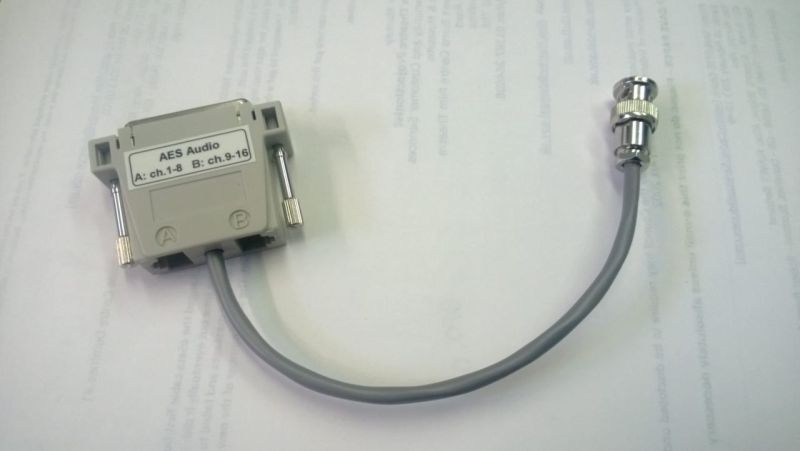
With one of these, life becomes rather easier.
Posted by System Notices (Member # 2357) on 12-29-2018, 03:12 PM:
It has been 1930 days since the last post.
Posted by Max M. Fuhlendorf (Member # 6342) on 12-29-2018, 03:12 PM:
Hi.
I'm working part time at a movie theater (so I can't rewire anything...) with 7.1 sound with a terrible implementation. They had to rent an emergency system due to projector issues, and the installer brought a Dolby IMS2000 and wired it to the CP750 with a single ethernet cable (ch1-8).
When I got here the projectionists had turned off the amps to the back surrounds, as all HI/VI audio was being routed to the auditorium. So I went into the IMS2000 Channel Mapping tab and adjusted Ch1-6 to input channels 1-6, channel 7 to input 11 and channel 8 to input 12.
For Interop DCPs it worked perfectly, with 7.1 sound as expected and no HI/VI played in the theater auditorium, but SMPTE DCPs keep using a passthrough configuration (inputs 1-16 going to channels 1-16 respectively), so that SMPTE DCPs still require that we turn off the amps for the back channels...
Is there a configuration panel I'm missing, or any other way to force the IMS2000 (soft. version 2.8.2-0) to use my custom channel routing for ALL DCPs, be it IOV or SMPTE?
Thanks in advance!
Posted by Carsten Kurz (Member # 5396) on 12-29-2018, 03:18 PM:
The mapping window should offer separate channel labels for interop and smpte input labels. That said, Doremis/Dolbys documentation on interop vs. SMPTE channel handling is completely opaque.
In a training document I saw this screenshot:
http://www.film-tech.com/ubb/f16/t003381.html
but I have never found that dialog on a real Doremi system. Maybe it didn't make it into production software.
- Carsten
Posted by Max M. Fuhlendorf (Member # 6342) on 12-29-2018, 03:43 PM:
![[Frown]](frown.gif)