This is topic Faint Grid Pattern on NEC Output in forum Digital Cinema Forum at Film-Tech Forum ARCHIVE.
To visit this topic, use this URL:
https://ft-forum.com/ft/cgi-bin/ubb/ultimatebb.cgi?ubb=get_topic;f=16;t=001677
Posted by Steve Kraus (Member # 476) on 10-24-2013, 06:52 PM:
Lately I've been noticing a faint grid pattern in lighter or white areas of images projected from my NEC NC1200C. It just turned 1 year old a few weeks ago and as we are a screening room, not a theatre, there's only about 900 hrs on it (at least that's the bulb hours.) I'm not talking about the actual pixel grid; this is quite a bit larger. Same flat or scope except for size. It is just barely noticeable during a screening but I see it quite plainly in large light areas or white test patterns. I have not yet looked at R,G,B separately.
The way I've been describing it is if you took a photo of graph paper with very soft focus, ran the contrast down so you can barely see the lines, and inverted the light / dark values so the lines would be a little lighter, the squares a little darker. I've asked several knowledgeable people and no one has seen anything like this, at least not from the verbal description. Now I have photos to show:
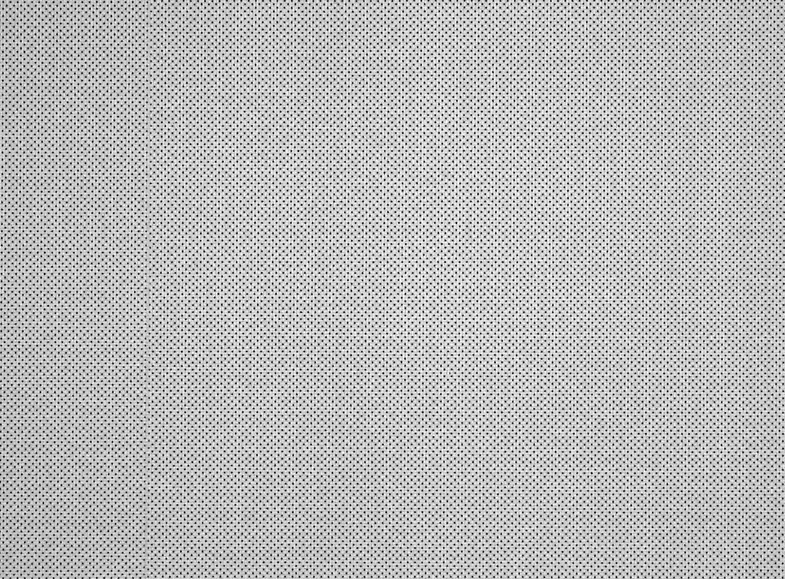
It is a tandard perf screen.
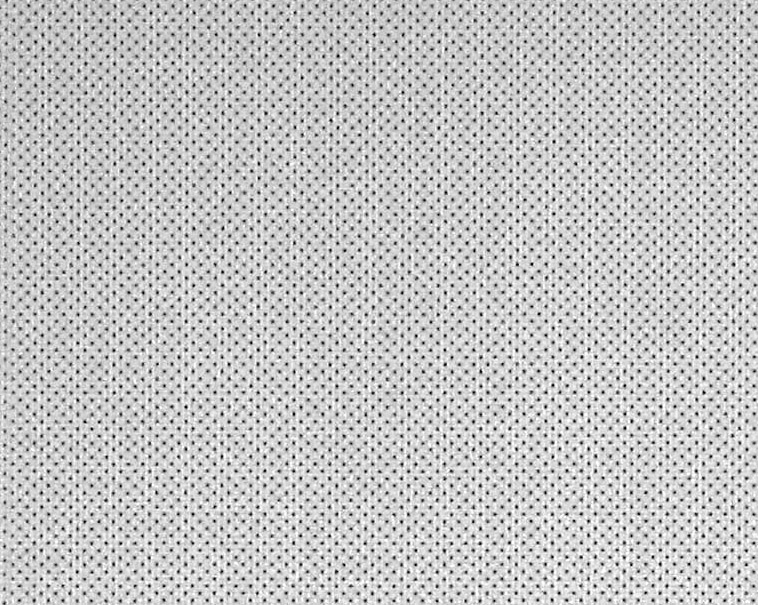
I see this in light areas of the image. At first I thought maybe it was funky jpeg decoding in the server but I see the same thing with projecting a white screen projector test pattern.
(If you are seeing any moiré pattern please ignore it as it's just an interaction between this issue, the screen perfs, the camera pixel grid, and/or your display. I saw that when preparing these images but do not see any moiré there in the theatre.)
All I've heard so far is that maybe pulling and reseating cards in the projector might cure it OR...and I dread this...the light engine is failing. I hope it's not that.
Here is one intriguing possibility. About 3 weeks back, a studio had some techs come through and check things over prior to a screening. I noted they were not too familiar with NEC and its DCC setup software. I kind of dismissed them as causing this because for one thing I would think they'd have noticed it during the run-through. But who knows. We tweaked light level, color values, and they made a tiny size change on the zoom for Scope only. Considering that it took a few tries to get the new size set and attached to the Scope preset, who knows if something else could have been altered without realizing it.
Any ideas?
Posted by Carsten Kurz (Member # 5396) on 10-24-2013, 07:27 PM:
Have you tried putting plain white paper over part of the screen? I still think it could be moire patterns. They would 'suddenly' become visible after zooming and/or refocussing the lens. Try the paper or play with the zoom/focus controls and see if they go away or change.
- Carsten
Posted by Steve Kraus (Member # 476) on 10-24-2013, 07:55 PM:
I will look at that and see; maybe project onto the back of a poster. At least it will make things clearer without the screen perforations confusing things. In theory it's possible that maybe the tiny *re-size somehow hit some magic size that is doing this. But I don't think so since I can see it projecting 1.85 as well.
One question that has come up which I have not checked on yet is whether the techs accidentally invoked some sort of scaling feature and I am seeing artifacts of that. I don't even know if that is possible.
* They somehow wanted every pixel on the screen--now when I run the simple Dolby chart, the red that used to go on the masking is now on the screen. I may go back to the old setting.
Posted by Carsten Kurz (Member # 5396) on 10-25-2013, 09:04 AM:
These patterns occur with projector test-images as well? You do play DCP content from a server?
To my knowledge, there is no option for such scaling, at least not with the common tools provided. FullFrame will usually only need an adjustment of zoom/focus and masking/cropping.
- Carsten
Posted by Steve Guttag (Member # 268) on 10-25-2013, 11:45 AM:
Yeah, one can scale either a DCP or a test image...give it a try and look at the ugly results.
Posted by Steve Kraus (Member # 476) on 10-25-2013, 12:37 PM:
Where in DCC do I see scaling, if invoked?
BTW, a quick test projecting white onto the back of a poster, and I did not see it, though I could make out the pixels very clearly, better than on the perf screen. Maybe it has something to do with the high gain surface but I must admit that the jury is still out on moiré after all, though why I would just see it now after a year makes no sense. I also cycled through R G B and saw it there, more so in G than in R or B.
If I recall correctly, my Fast Fold screen is non perf. Some experimentation is indicated. I would be greatly relieved if it's not the projector of course. But interaction between pixels and perfs only coming to light (ahem) a year later would be a deeper mystery. But I'll take mysteries over equipment failures.
Posted by Randy Stankey (Member # 64) on 10-25-2013, 02:05 PM:
What would happen if you bumped or jiggled the projector a bit? Would the pattern move as the projector moved?
Or maybe rotate the projector just a hair bit? Raise the leveling feet, just on one side, a quarter turn?
In other words, shift or rotate the pixel grid with respect to the screen to see if the pattern gets better or worse.
Posted by Carsten Kurz (Member # 5396) on 10-25-2013, 03:21 PM:
As I said, if they changed the lens setting during their readjustment for fullscreen, either zoom or focus, that can make the DLP pixel patterns suddenly 'snap in' onto the perforation pattern, resulting in a sudden increase in moire. Moire was probably there before, but with a considerable lower local frequency so you would hardly have noticed it. Some techs defocus the lens intentionally to reduce moire. It all depends on various critical match pairs of screen width and perforation pattern.
You should try to play with the zoom and focus buttons to see if that changes anything. Then you could actually try to minimize the effect.
- Carsten
Posted by Steve Guttag (Member # 268) on 10-25-2013, 04:53 PM:
In the DCC...look under the "Screen Presentation" settings in the "Screen" file. That is where one can invoke the scaler functions. However, using the TI program, one can not only see that but there is a tick-box to turn it on/off too.
Posted by Steve Kraus (Member # 476) on 10-26-2013, 09:38 AM:
Thanks.
I am starting to come to the rather stunned conclusion that it is in fact an interaction with the perfs just not the classic moiré patterns one usually thinks of. (Any interaction-based pattern qualifies for the term.) Yesterday I partly set up my non perf Fast Fold screen. Overkill for something that can be done with a big sheet of white paper but something I needed to do anyway since it's been sitting so many years after one location job. I did not see it.
Which leads to the question of why would I see it now after a year. I look at white light pretty often and I saw it first in actual images which means it was strong enough to be visible there. I am guessing the recent slight zoom adjustment just happen to hit on something so I'm going to see if it goes away if I bump it up a few pixels-worth in size (or what happens if I shrink it as well). There was no change in Flat and I do see it there but it's less and maybe I just never noticed it there.
Posted by Carsten Kurz (Member # 5396) on 10-26-2013, 11:57 AM:
As I said - the moire patterns do not develop 'perceptually linear'. Visible moire patterns kick in in different combinations of projected image width and perforation pattern frequency. And that can occur quite suddenly, so a slight change in zoom and focus can cause this.
- Carsten
Posted by Mark Gulbrandsen (Member # 72) on 10-27-2013, 01:00 PM:
That's exactly what it is. Time for a new screen... screen perfs are now done differently to attempt to minimize that problem. Your screen won't cost very much to replace anyways...
Posted by Brad Miller (Member # 2) on 10-27-2013, 01:56 PM:
quote: Steve Kraus
Yesterday I partly set up my non perf Fast Fold screen. Overkill for something that can be done with a big sheet of white paper but something I needed to do anyway since it's been sitting so many years after one location job. I did not see it.
Since you setup the fast fold screen in front your normal screen, did you re-focus sharply onto the fast fold screen? If you set up the fast fold screen a foot in front of your existing screen and didn't re-focus on a test pattern, its possible the lines are still there but you can't see them because the projected white is out of focus. (You probably did this, but I'm checking just in case.)
Posted by Steve Kraus (Member # 476) on 10-27-2013, 07:49 PM:
Yeah I did though there is not much difference. And the original experiment was putting up a white poster backside against the screen. I am seeing a tiny bit of chromatic aberration on crosshatch but that's another matter.
Posted by Kirk Futrell (Member # 5006) on 11-01-2013, 12:09 PM:
I was just staring closer at your first image and I am going to go with definitely some sort of optical illusion / moire effect. If you look closely at your screen seam you will notice the squares on the left side of the seam don't line up with the ones on the right. That is where the row of perforations don't line up as well. Not likely your projector could cause that without the perfs.
Powered by Infopop Corporation
UBB.classicTM
6.3.1.2