This is topic how to create a new channel in forum Digital Cinema Forum at Film-Tech Forum ARCHIVE.
To visit this topic, use this URL:
https://ft-forum.com/ft/cgi-bin/ubb/ultimatebb.cgi?ubb=get_topic;f=16;t=001745
Posted by Robertt Haddad (Member # 7421) on 12-30-2013, 08:22 AM:
dear all
i want to ask how can i create a channel for barco dp2k-19b using barco communicator and modify it to the macro .
example : when i do the masking for the scope channel i want to save it and modify it to the macro keeping my original scope channel
Posted by Paul Maxon (Member # 6211) on 12-30-2013, 11:34 AM:
Are you asking if you can make a new Scope Masking file, and put it into the existing MACRO? Therefore only changing the masking file and nothing else?
You can do that, its fairly easy.
Posted by Brad Miller (Member # 2) on 12-30-2013, 11:46 AM:
See the button on the left with the blue coloring?
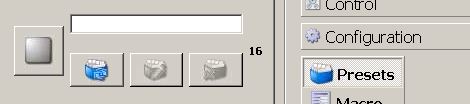
Click that and then a popup appears.
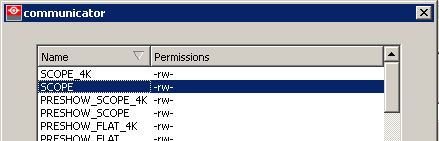
Select the channel you want to copy.
Now click the middle of the 3 blue buttons (the edit one).
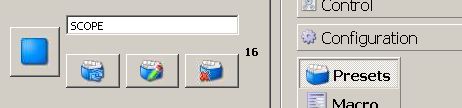
Now just change the name of the macro at the top and hit save.

You can then edit this newly saved macro however you want.
Posted by Robertt Haddad (Member # 7421) on 12-30-2013, 12:09 PM:
thank you it is enough
but i want to ask when i hit save it should be save to macro it is right not just normal save
Posted by Brad Miller (Member # 2) on 12-30-2013, 12:23 PM:
Normal
Posted by Robertt Haddad (Member # 7421) on 12-30-2013, 12:42 PM:
thank u brad this method keeps my original scope. the new scope takes another channel
Powered by Infopop Corporation
UBB.classicTM
6.3.1.2