This is topic D-Cinema...post your pros and cons of the different equipment in forum Digital Cinema Forum at Film-Tech Forum ARCHIVE.


To visit this topic, use this URL:
https://ft-forum.com/ft/cgi-bin/ubb/ultimatebb.cgi?ubb=get_topic;f=16;t=001747

Posted by Brad Miller (Member # 2) on 04-03-2008, 03:34 PM:
 
This is for anyone working with the various equipment out there...Dolby, Christie, Barco, Doremi, etc. If you do not have first hand knowledge of the equipment being discussed, make sure your questions/comments are NOT stated "as fact".

This is simple. Please post your pros and cons of each of the various pieces of equipment. For example, various features, anamorphic lens vs. zooming, bulb life, reliability, serviceability, etc.

If you have comments to be made and wish to remain anonymous, send me a private email properly identifying yourself and I will pass along the comments to the thread. (I have a feeling this is much of how the true negative aspects will end up making it to publication.)

Manufacturer feedback is very much encouraged. If you are representing any of the equipment here and do not have a forum account, please register and drop me an email asking me to push your registration through quickly.
 
Posted by Mark Gulbrandsen (Member # 72) on 04-03-2008, 05:38 PM:
 
Ok, I'll go first. I don't have direct experience with ALL D-Cinema equiment out there but I do with several different brands and I've had close up/hands on time with a number of other brands. We also have ALOT of D-Cinema screens here in SLC so hopefully some of those guys wll also chime in. Oh and Brad... this WOULD HAVE been a first good thread for your new forthcomming D-Cinema wing here on F-T...

Projectors:
Christie CP-2000S and ZX.

Christie is THE ONLY company in my book for D-Cinema projectors. They are THE ONLY company who has its act together 100%. Their projectors are the easiest to service by far and extremely reliable. They have a patented optical coating on their prism block that no one else has, their products have a laminar air flow device across the face of the DMD to aid in cooling and dust that no one else has. They have MORE EXPERIENCE at manufacturing D-Cinema projectors than anyone else out there bar T.I. They also account for about 80% of the North American Market! Also, parts if ever needed are much more resonably priced than any other manufacturer. There are no $6,000.00 glass reflectors used in these projectors. You have a company on your side that is buying huge quantities of stuff to assemble these machines and that is a big advantage on your side.

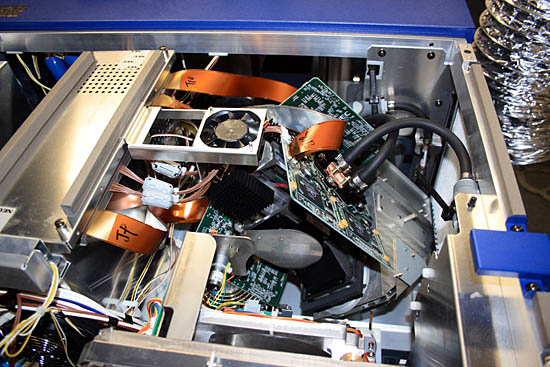
NEC: Having seen the insides of all the different NEC projectors I will declare them the most thrown together projector out there, when I get back I'll post a photo of the " rats nest". The 2500 is a virtual rats nest that looks like very little thought went into its layout. Oh and by the way Strong International is now on its third(reinvented) version of the base [Confused] [Eek!] [Roll Eyes] .

Barco: DP-100

Barco is the least responsive company I've ever delt with period. They are so very slow at providing parts... There is no real definate advantage to their sealed light engine that anyone ahs been able to show and the fact that it's sealed makes it much more expensive to replace if ever needed. In fact open type light engines can SOMETIMES be repaired right on site by a capable tech... Sealed engines have to go back to the service center.
BARCO is still a contender however but the last one in my book. Their equipment performs adaquately and is fairly reliable. They have however made some stupid mistakes... like the extra star washer on the DP-100 lamp module positive post that caused numerous ignitors to burn up and fail. The pressurized cooling loop is also a nuisance but has been pretty reliable.. but don't move it to a different altitude without de-pressurizing it!! The cooling loop needs checking once a month where others don't. Parts are SUPER EXPENSIVE, you are dealing with a European Company!!! There has never been any financial advantage in doing that.

Servers:

Dolby... So far in my book its the top server on the market. Its the easiest to use.. so easy a four year old could do it! Dolby is also a very well supported company and parts are no problem. One gripe I have with them is that they've gone stagnant on dual projector 3-D. The average theater owner is not interested in a $24,000.00 add on box and 50.00 per pair 3-D glasses with the added inconvenience of having to wash them in between shows. The add on box and amount of glasses the average theater will need pays for the second projector for a stacked 3-D system... this also gives the plex an entire back up projector since 3-D releases are not going to occur every week!! While the Dolby 3-D system is super impressive it just ain't going to fly. Hence... Dolby needs to get to work on 2-projector 3-D asap if they want any of the 3-D market at all.

DTS Server:

DTS has its act together big time on this server and its based on the Ultra Reliable Dell Poweredge server as the platform. DTS is basically ready with stacked 3-D, Stacked 2-D and plain ole 2-D. Their server is also quite reasonably priced compared to others. We will be installing one in about a months time so I will report back after that time. Also, the Keyport Key Management system is more or less what the studios are asking for in order to place the keys directly into your system. All you'd need is a line and modem. The Keypost is also reasonably priced. All in all a very promising system to look to!!!

D-Cinema Lamps: Christie of course... there IS no other consideration in my book and since they are making another manufacturers short gap lamps is there really any other brand to consider.

Mark
 
Posted by Tristan Lane (Member # 1169) on 04-03-2008, 06:13 PM:
 
Projectors:

Christie CP2000h / s
Pros:
*Easy access to all components. Easily serviceable. Great support by the manufacturer. Simple design with less points for failure. Great history within the industry. High Light output. HEPA filtration for engine compartment. Cross-compatible lamps, IREM ignitors.

Cons:
Thyristor Ballast (older models). Non-motorized lens mount requires the use of an anamorphic or manual zoom adjustments for format changes. All connections located on the bottom of projector.

Barco DP100 / DP200
Pros:
DP200 30,000 lumens(currently), Motorized lens focus and zoom with memory. Easy access to connections.

Cons:
Costly parts, difficult to access all components for service, over-engineered lamphouse, sealed light engine, pressurized cooling system

NEC:

It's Japanese, It's purple-blue, and it has tailights. (I don't have much experience with the projector) all of the aluminum parts have a glossy finish.

Players / Servers:

Doremi DCP2000:
Generic parts, proprietary video decoder, unrefined GUI. Previously unreliable, but has improved greatly, and is currently the server of choice for AccessIT. Debian Linux OS. Can support dual projector 3D.

Dolby Show Player / Show Store:
Separate content storage and media block make for less expensive repairs if a component fails. Very well designed GUI and Show Manager. Ability to play Dolby3D features. Show Store operates on a Linux OS. NA-10 add on allows for total control of all auditorium components.

DCA-21 - Christie/Pennywise automation
Excellent product but TOTALLY unneeded in Dcinema. GPIO output on current servers allows for control of relays for auditorium functions. Most servers also allow for projector control via ethernet. Utilizing a Pennywise requires an operator to physically change the program settings on the automation to change formats. This defeats one of the key points of D-cinema s being a system that "Runs itself". The pennywise setup emulates a single cue film automation system to provide a 35mm automation experience to the operator.

NA-10 - Good product, but much more functionality than what is needed now for auditorium control. Unfortunately, must be used if any dry contacts are needed for auditorium control.
 
Posted by David Zylstra (Member # 4230) on 04-03-2008, 07:13 PM:
 
OK, my staff has over 2 years with an AccessIt solution - all Christie CP2000H and DoReMi servers. We also have 2 RealD screens

CP2000H
After a flurry of initial post-install repairs the projector itself has proven itself close to a 35mm projector in reliability. So far the only recurring issue we have is with the H ballast - out of 36 at our 2 18 screen locations I'd say Christie has replaced 13 in the past year and a half; there is a modification kit coming with beefier thyristers and better airflow for cooling - this should help the issue. The claim is that the S ballast has no where near the failure rate of the H, but I have no experience to back it up. Another weak point is the lamp cooling fan, for us maybe only a 10% yearly failure rate. The DVI inputs are NOT HDCP compliant, and I'm told there are no plans to come up with any modifications that will make it HDCP compliant. Power usage during a show is similar to a 35mm system, but between shows the digital draws the same as a 35mm system with the projector motor running. DVI connectors are hard to reach.

DoReMi
I would say after 2 years 75% of our units have been replaced, even in year 2 we saw a 15-20% failure rate. I am not sure if the issue is related to the core DoReMi or the AIX TCC software that runs on top of the core system. USB 2.0 ingest is really slow, but using the TMS (Access calls it LMS) network transfers take significantly less time - a small movie file can transfer in 45 mins or less. I am told that all our DoReMis will be changed out eventually to the DCI compliant version (the version that passed FIPS).

Scaling for common height pictures
This puts the light output exactly the same between formats - i.e. 14FL for flat results in 14FL for scope. The studios and DCI do not like this option since the flat picture is scaled down resulting in lost resolution (and someone somewhere claimed there is a color gamut shift involved) - Christie is currently retrofitting all the AIX installs with their WAC (Wide Angle Converstion) lens that magnifies the scope image to fit the flat image height.

Anamorphics
This solution puts only a 14% difference in light output between formats - i.e. flat at 14FL results in scope at 12FL using the same power level. If all my screens had anamorphics I could significantly save on yearly lamp costs due to being able to drop a lamp size over scaling. I understand some studios do not like this option.

WAC lens
This results in more like a 35% difference in light output between flat and scope (i.e. 14FL flat results in 9FL scope using the same power level); but this option displays each format in it's native resolution. Downside is you have to size your lamp for the scope picture and reduce power when running flat.

CDXL lamps from Christie
So far the CDXL-60 has proven to consistently last warranty +25% with no issues and enough light output for our large screens. 2 CDXL-30s I tested saw almost a 50% drop in lumen output after only 1,000 hours. I am currently conducting a lamp survey with all the CDXL lamps (and some CXL) to prove "lumens over time" so we can properly size lamps for each screen (i.e. size for the worst output and not assume the manufacturer's spec is consistent over the lamp life).

RealD
Licensing costs aside there have been no issues with the hardware. A non-RealD and non-Dolby person claims that RealD has better light output than Dolby 3D, especially with their latest Z-screen that puts through more light (I have no data to back up this claim)
 
Posted by Bill Enos (Member # 440) on 04-03-2008, 08:19 PM:
 
Only projector I have experience with if the Barco DP100. Was extremely ornery until all the sundry softwares/firmwares were
upgraded from the early versions to the most recent, now is about
90% better. The weak link in our machine has been and continues to be the damned liquid cooling system which seems to have been designed by a COMPLETE MORON.
 
Posted by Tristan Lane (Member # 1169) on 04-04-2008, 03:07 AM:
 
In response to David's input:

quote: David Zylstra
The claim is that the S ballast has no where near the failure rate of the H, but I have no experience to back it up.
I'm not sure there's been enough field time for anyone to claim that the "S" power supply better than the SanRex thyristor ballast from H pedestals. As Mark likes to say, if the power going to the switcher is dirty....it won't last long. I tend to agree. There are a few facts about the S pedestal's switcher: It weighs 1/3 less than the thyristor unit, makes less noise, and is a switching type rather than a high reactance / thyristor type. I tend to dislike the term "Ballast" since in a way it is a misnomer. Why didn't Christie just refer to in in familiar terms and call it a "Rectifier" does nomenclature really have to change with D-cinema, even though the technology for lamps hasn't?

quote: David Zylstra
I am not sure if the issue is related to the core DoReMi or the AIX TCC software that runs on top of the core system.
From my experience, I would say that it was a 50-50 split between TCC software related issues, and native Doremi hardware / software related failures. With playback issues I would usually bump the unit out of TCC and play content within Cinelister and if the problem persisted, I would chalk it up to a Doremi problem. Many times the Dolphin board would fail, or the RAID would go bad. But many times, the failure would occur after a remote TCC upgrade and the unit would be replaced so that the old one could be sent back for evaluation.

quote: David Zylstra
This puts the light output exactly the same between formats - i.e. 14FL for flat results in 14FL for scope.
This of course, wasn't the reason that Christie/AIX opted scale the picture on side-masked houses. The cost of the anamorphic lens and mount were very high and it made economical sense. There was a gray area within the DCI spec that didn't specify whether or not an anamorphic was required, and so they ran with it. Some sites demanded anamorphics and got them, some didn't. The WCL is just a fixed zoom lens that provides a more economical solution, but achieves much the same result as an anamorphic, with slightly less light. Resolution is not compromised with the WCL.

quote: David Zylstra
This solution puts only a 14% difference in light output between formats - i.e. flat at 14FL results in scope at 12FL using the same power level.
I haven't done any real testing to back this up, but I tend to doubt that the light loss is that bad. The anamorphic lens eats up light, but if the entire chip is being used for picture, more light is being output.

quote: David Zylstra
A non-RealD and non-Dolby person claims that RealD has better light output than Dolby 3D
I'd have to see results using the same projector in the same theater before believing this. There's far too many variables to make a broad statement like this. RealD relies on a silver screen, and thus would have heavy drop-off near the edges when compared to Dolby3D (even on a high-gain screen). To truely tell a difference you would have to use the same projector, lamp, screen size, throw length, lens, etc....

Good info David. Please don't think I'm tearing apart your post (I'm not). I just wanted to respond with my thoughts.
 
Posted by Frank Angel (Member # 248) on 04-04-2008, 04:37 AM:
 
DELETED -- question answered in the Disney Approved thread
 
Posted by Mark Gulbrandsen (Member # 72) on 04-04-2008, 07:56 AM:
 
quote: David Zylstra
WAC lens
This results in more like a 35% difference in light output between flat and scope (i.e. 14FL flat results in 9FL scope using the same power level); but this option displays each format in it's native resolution. Downside is you have to size your lamp for the scope picture and reduce power when running flat.

I just installed some of these on ZX's and they don't loose near that amount of light... I saw more like 6 to 8% difference. Its just a simple magnacom although a much higher quality one than we are used to for film. This one does not cause any image distortion. Yes, you use the lamp per format adjustment to keep light output constant wen changing formats. The ISCO anamorphic I installed that came with the DP-100 was another story in itself but it didn't loose all that much light... I just don't remember exactly how much.

One thing the thyristor ballast does do is to generate its own visible artifacts due to its switching frequency beating with the scanning rate of the pixels... this only happens under very certain circumstances though. This is the main reason why Christie went to the SanRex switcher in the later models. The ZX also utilizes a smaller SanRex switcher. I don't know if the older IREM rectifiers in the DP-100's are thyristor or switchers but BARCO made a major change in rectifier type in later units.

RE: Failures. Switchers don't like any surges of over 160 volts AC per leg. Proper surge protection for the entire building and or at each booth panel will stop repeated switcher failures. We just don't see any switchers fail at any locations we install and spec. because they al get proper surge protectors. All the switchers I get in for repair are from locations other than the ones we spec'd. Also all of our D-Cinema installs have to have surge protection installed as part of the normal install proceedure. Its not expensive... lost shows cost alot more... and the other equipment running in the booth also benefits as well.

Mark
 
Posted by David Zylstra (Member # 4230) on 04-04-2008, 08:09 AM:
 
quote: Tristan Lane
I haven't done any real testing to back this up, but I tend to doubt that the light loss is that bad. The anamorphic lens eats up light, but if the entire chip is being used for picture, more light is being output.

I've proven with the math as well as field measurements that 14FL onscreen with flat results in 11-12FL with the anamorphic lens - it's not a matter of light loss with the lens, it's a matter of screen area being filled (scope screen is 27% larger than flat and uses only 3% more of the chip over flat). They have not installed our WAC lenses yet so I don't have field measurements yet, but the math does show the 35% difference between formats - I'll update this when I get field measurements.

Tristan - no problem, I didn't take it as criticism - we are all looking at this from different directions with different slices of experience and manufacturer "inside information" so we each have insight that will complement others information. I too don't like the term ballast, I kept calling it a rectifier and our local Christie CSEs had no idea what I meant so for communication reasons I started referred to it as a ballast.

quote: Mark Gulbrandsen
I just installed some of these on ZX's and they don't loose near that amount of light... I saw more like 6 to 8% difference.
To be clear my original post talked about the difference between formats due to taking 80% of the flat image area and magnifying it to 27% more screen area using the same lamp power level and not the light loss from the lens - this difference does requires the use of "lamp per channel" - I wanted to put it in the perspective of needing to size lamps for the scope picture and not assume that 100% of the rated lumen output will hit the screen. Please let me know if real life measurements proves the math wrong (i.e. take a FL reading from both flat and scope/WAC with no power change)

-edited to clarify my thoughts-

[ 04-04-2008, 09:21 AM: Message edited by: David Zylstra ]
 
Posted by Tristan Lane (Member # 1169) on 04-04-2008, 01:55 PM:
 
quote: David Zylstra
I too don't like the term ballast, I kept calling it a rectifier and our local Christie CSEs had no idea what I meant so for communication reasons I started referred to it as a ballast.
I too got the same questions when talking among fellow CSE's. I would get blank stares when I referred to the power supply as a rectifier. I found it to be an indication of who had prior cinema tech experience, and who did not.
 
Posted by Jon Miller (Member # 163) on 04-04-2008, 08:48 PM:
 
quote: Tristan Lane regarding the Christie CP-2000H
Cons:
Thyristor Ballast (older models).

Is that the power supply that screams? The theatre where I run film festivals (on 35mm, still) has [dlp] on every screen; I've noticed the ballasts in their Christie CP-2000Hs make a very pronounced high-pitched whine.
 
Posted by Frank Angel (Member # 248) on 04-08-2008, 10:31 PM:
 
So is it official? -- D-Cinema has changed the commonly recognized word rectifier to ballast? Ballast doesn't rectify and it's a more generic, less precise term (fluorescent lights have ballasts -- ac through and through; submarines have ballasts; ships have pontoon ballasts).

I am with David and Tristan on this.... why is it necessary to change perfectly well-understood electrical nomenclature? We are still talking about electricity, are we not? Any electrician who is about to work on a D-Cinema install and looks at you with a blank stare when you mention "rectifier,"....well, I for one would be afraid; very afraid.
 
Posted by Tristan Lane (Member # 1169) on 04-10-2008, 01:52 PM:
 
quote: Frank Angel
Any electrician who is about to work on a D-Cinema install and looks at you with a blank stare when you mention "rectifier,"....well, I for one would be afraid; very afraid.
These blank stares didn't come from electricians....they came from fellow "techs" that had no film experience, but were in the field working on digital projectors [Eek!] Most of these people didn't even know how to thread a loop.

Anyways, I think the term Ballast came from SanRex themselves. All of their documentation refers to this RECTIFIER as ballast.

EDIT:
One thing to add. The noisy thyristor ballasts can't be replaced with switchers in the H pedestal without updating software, control wiring, and possibly the SSM module.
 
Posted by Joe Redifer (Member # 3) on 08-26-2008, 01:05 AM:
 
Mark,

We're still waiting for pictures of your NEC "rat's nest". You have gotten back from wherever you were, correct?
 
Posted by Ed Mauger (Member # 4813) on 08-26-2008, 10:03 AM:
 
Projectors:
Control: The Barco DP100 wins hands down on this. The Communicator software is easy to use, and straightforward to understand. The GPI inputs can be used for turning on and off the lamp and closing/opening the dowser. The RS232 control can easily be used for selecting a macro from a control unit such as a Crestron. If the touchscreen fails, there are buttons on the side, or it's still controllable from the software. So, there is built-in back up.
The Christie CP1000 does not have these features above, and if the touchscreen fails, you don't have a show! Having said this, I've only had a screen fail once in 3 years, but this was on an important show. I have recently installed a Christie ZX and found the web interface to be slow and cumbersome. I think they are dealing with this in the next software update. One improvement is the SCCI (simple contact closure interface), which allows easy control of the lamp and shutter.
Mechanical: Not sure why people are having so much trouble with the Barco cooling loop; I admit I only look after 1 Barco, but no problems in 2 years with this. The convergence is 100 times easier to perform on the Barco!
Light output: Yes, the Christie wins on this.
The perfect projector: A Christie with Barco control system.

Servers:
Why does no one seem positive about the Doremi? Only 1 problem in 2 years (out of 4 servers) - one RAID collapsed.
Doremi advantages over Dolby: a) you can switch the noisy thing off when not in use! b) You can fast forward (to an extent). I don't think this is possible with Dolby (certainly not with the Qube), but they may have corrected this. c) Doremi is smaller and actually fits into a 19 inch rack without needing a crowbar.

Scalar/routers:
Cine-IPM wins by a long way here over the Folsom (or the latest ACSAR, which I believe is a Folsom in disguise). Much easier for the projectionist to use; up to 99 channels easily saved (or only 50 if you believe the manual). Biggest advantage comes when you need to change from 50Hz to 59.94 Hz: the Cine-IPM will do this automatically and output the same frequency as the input. Folsom is quite awkward to change, if for example you have a clip show with different frequencies.
The advantage of the Folsom is the possibility of making small changes without a menu on the screen, and the logo saving feature can be useful.
 
Posted by Mark Gulbrandsen (Member # 72) on 08-26-2008, 11:47 AM:
 
quote: Ed Mauger
Mechanical: Not sure why people are having so much trouble with the Barco cooling loop; I admit I only look after 1 Barco, but no problems in 2 years with this.
Of the 30+ Barcos here in town and one I dea Il with directly many have seen many failed pressure gauges and multiple water pump failures. If the gauge goes you can use a tire pressure gauge... 1 bar is equal to about 14psi. The parts for Barco are also super expensive!!! The stupid thing here is that there is absolutely NO NEED nor any real advantage for a pressurized cooling loop on DLP.

No objections to Doremi at all. They now have an LMS you can buy and although they went through the exact same growth pains everyone else has they stand equal at the top with Dolby IMHO. For the most part I can now live equally with either of them. One small advantagea the Doremi has over the Dolby is that it can ingest while it is playing albeit at a slower rate but non the les it can do this... Unless Dolby now has this feature in the latest software upgrade the Doremi has this clear advantage.


Oops, the CP-2000SB has the highest inherent contrast ratio allowing full range of use of the high contrast series of zooms... Not something to casually snuff off!

Mark
 
Posted by Pete Naples (Member # 761) on 08-26-2008, 02:33 PM:
 
The Kinoton DCP range, which I'm sure you all know utilises the Barco light engine, does not use the pressurised cooling system, so any problems associated with that go away. Convergence is a breeze on these, much nicer than it was on the old D-CineStar machines if anyone's ever seen or worked with those. Kinoton DCP of course uses the same Communicator software etc as the Barco.

As far as I'm aware on imminent Dolby server software you can ingest whilst playing, I do remember some recent discussion about that the fast forward/reverse thing. If I remember rightly the buttons on the front panel are not implemented just now, but you can skip using the show manger client application on a PC... I may not be 100% on that, so feel free to correct me if you know different. They are noisy with all those fans, but just turn it off when it's not being used, in this age of going green and energy price increases, that should be on everyone's mind really.

I've played around with Doremi, QuVis and Dolby servers now, and have found the Dolby by far the most intuitive and user friendly.
 
Posted by Mark Gulbrandsen (Member # 72) on 08-27-2008, 09:39 PM:
 
quote: Pete Naples
The Kinoton DCP range, which I'm sure you all know utilises the Barco light engine/Kinoton DCP of course uses the same Communicator software etc as the Barco.

Why not just buy the BARCO and be done with it.... Like Cinemecanicca... these companies are "me too companies" just trying to hang in there with stolen Barco parts.

quote: Joe Redifer
We're still waiting for pictures of your NEC "rat's nest". You have gotten back from wherever you were, correct?

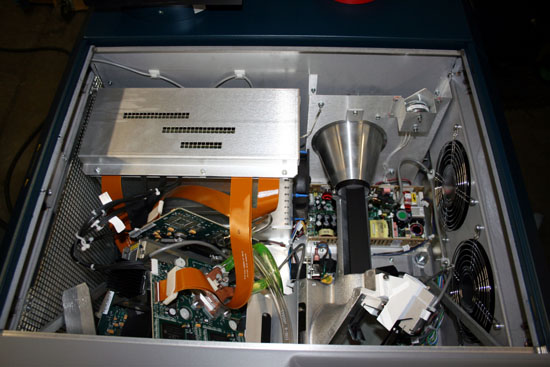
Yea, been back for a week now... Its harder and harder to leave Montana every time I go up there!! I finally found the pics burried in with thousands of theater pics... Now I gotta just find the pics of the CP-2000SB insides... got em somewhere.... [Confused]

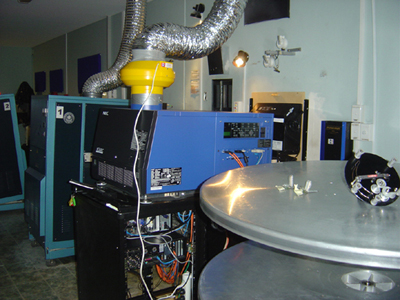
I present you the NEC 2500

 -
 
Posted by Joe Redifer (Member # 3) on 08-27-2008, 10:10 PM:
 
That doesn't even look like it's properly assembled.
 
Posted by Mark Gulbrandsen (Member # 72) on 08-28-2008, 10:42 AM:
 
Ok, Here is the CP2000SB innards... as you can see this company only employs people that have a real good idea how to do things right! The ZX is very similar... haven't seen the new Cine-Mini (M) yet but will see it in a couple of weeks

 -
 
Posted by Sam D. Chavez (Member # 1841) on 08-28-2008, 01:19 PM:
 
Why not just buy the BARCO and be done with it.... Like Cinemecanicca... these companies are "me too companies" just trying to hang in there with stolen Barco parts.

Mark,

You just don't quit. No one is "stealing" Barco parts. According to you, they are not worth stealing anyway.

These are licensing arrangements between European entities and these projector companies have loyal customers.

Also, learn to spell Cinemeccanica before you trash them, OK?
 
Posted by Mark Gulbrandsen (Member # 72) on 08-28-2008, 02:46 PM:
 
Sam,

I'm hardly trashing anyone in that statement. In fact last I heard BARCO will no longer license Cinemeccanica for the DLP projector. To me and I'm sure to many others this certainly looks like a "Me To" sort of an arrangement. Thanks for the correction on the spelling though... that one's not in the spell check.

Mark
 
Posted by Demetris Thoupis (Member # 833) on 08-28-2008, 03:20 PM:
 
I don't think that company names like Kinoton or Cinemeccanica would jeopardise risking their reputation with co-orporating with a weak video projection company. You know I am not in favour mostly for Digital projection but I would like to state the following:
Barco IS the leading company in professional home cinema applications. They have been proven more reliable and with superb quality in any application being used. If you are aware of Cedia awards, check which projection most serious installers prefer. Barco. You pay the price for the best quality.
You state that Christie employs people that have their stuff right. You need to remember the numerous times the Christie projector was redesigned due to mechanical and idiotic faults which were stated from the beginning that they worked fine like the famous Christie Basement reader. They DID eventually manage to improve it but they have not perfected so I doubt that they have their stuff right from the beginning. I believe that Christie is the first company which actually beta tests their equipment after they sell it to people waiting for feedback from on site for improvements.
Kinoton is a pioneering name in Europe. Due to the unfavourable exchange rate of Euro vs Dollar, unfortunately you people in the US (besides Steve it seems) do not really give a lot of credit to the many achievements that Kinoton has accomplished over the years. I have seen at Cinema Expo two or three years ago the DCP series and I was actually quite impressed with the quality although I state again that I am not in favour of Digital projection for many reasons which I will not state again here and start the famous film vs digital debate. I believe that Kinoton does have a good product although they do not have the advantage you gain in their 35mm projector line since other companies offer respective Digital Cinema products. I do though have to say this about Kinoton. They have the BEST after sales service and are always swift in their responses even if it is for quotations, parts or simple queries.
Cinemeccanica has been in business perhaps longer than most of us have lived! They have remained in business with their most renouned model the V5 and of course the V8 and remember that they were the first to develop in co-operation with Dolby the basement reader. They have developed a lot a proven model which, with the proper care does offer great image. I have also seen the Cinemeccanica Digital projector and it is the Brightest right now in the market since its the only one which can take xenon lamps up to 8K. No one can say that they shake since there is no intermittent cross. The construction of the pedestal might seem extreme but the electronics put in their projector justifies the size and it's lovely seeing a projector which looks like a console 35mm projector. Again you have the same issue with the unfavourable Euro vs Dollar and that is why most of you people do not favour Cinemeccanica. If you pay good attention you can achieve wonders out of these machines.
Nec: When did Nec make any professional Cinema machines? They have never touched the 35mm area and who can prove that their projectors will last in time? At least Christie, Kinoton and Cinemeccanica all have a long experience in Cinema applications with their 35mm lines.

To summarise the above, I do appreciate the fact that some companies might offer better support, after sales e.t.c. I though, do not believe that any projector should be considered better than the other. It is DIGITAL and you can set one projector to look exactly the same as the other on screen and NO ONE can tell the difference. Would anyone realise if a Digital image is coming from a Kinoton or Christie or Barco or Cinemeccanica projector? I really think not if all projectors are set up to achieve the same colour temperature, brightness, colours e.t.c. The only issues that differs is servicability, features e.t.c but the final outcome which is the image on screen is the same in all. This of course is not the same with film projectors are they all differ in steadiness, colours e.t.c since you have minimal adjustment you can do there. Now server wise, I can accept that one server is more user friendly than the other but I really doubt that one player outputs better resolution than another. The reason is that the playback comes from the same file in each server. In computer world, would watching an Mpeg4 video on a Mac look different than watching it on a PC? I doubt it. But I have to agree that the only company one should consider is someone with long proven experience in professional cinema applications like Dolby, DTS, USL and not the piano named Doremi or Qu something server. Where do these people ever had any involvement in Cinema? Sanyo who is considered one of the best projector makers for commercial applications has not even tried making yet a DCP compliant projector. They make superb projector for E-cinema but they probably realised that "is not our area of expertise so why trouble"! Of course in the future they might make but who knows.
Demetris
 
Posted by Pete Naples (Member # 761) on 08-28-2008, 03:35 PM:
 
quote: Sam D. Chavez was the last to post
Why not just buy the BARCO and be done with it.... Like Cinemecanicca... these companies are "me too companies" just trying to hang in there with stolen Barco parts.
By that logic every machine on the market is from a "me too" company, where do the DMDs actually come from? [Roll Eyes]
 
Posted by Mark Gulbrandsen (Member # 72) on 08-28-2008, 04:44 PM:
 
My point was not to say these are weak companies... hardly! Were they they wold not even have the resources to pull this off. But buying someone's light engine, software and or chassis and then re badging it seems pointless to me. Indeed, why not just go right to the source? About the only instance I could see any advantage would be in countries where imports for this type of equipment are limited (India for instance) but they may be on very friendly trade relationships with the countries these companies operate in.

Also make note that a couple of the lower priced Christie projectors utilize Sanyo chassis built to Christie specs. However, they run on Christie software and are supported and repaired by Christie parts and service. You don't have to go to Sanyo for parts or service.

Pete,
All parts to manufacture anything come from some manufacturer someplace including the DMD's, and other semiconductors. In the case of the big three however they completely build their own light engines... meaning formatter board with the DMD, prism, mount, etc. The rest of the boards to make it all happen come from TI except the input interface board. This is only because much of the science and engineering behind DLP is still a very closely guarded secret at TI... most of these manufacturers would gladly produce their own system boards if they were given the chance.

quote: Demetris Thoupis
You state that Christie employs people that have their stuff right.
Yes, a number of years back Christie did a big house cleaning and got rid of alot of people that were bogging things down. The new folks hired on to replace these people have done more positive things (both film and digital) than the other people did the entire time they worked there. In the last three years Christie has done an amazing turn around. The digital folks are complately seperate from the projector folks in this case a nd always have been. The digital folks being in Canada and the projector folks in California.

Christie does not beta test on the customers buck although they may have a customer do some beta testing for them. The field beta testing of the new "M" and several problems found with it are what has been delaying it's release. Now scheduled for October. We will be demoing one here in a few weeks to also give Christie some feedback.

quote: Demetris Thoupis
Would anyone realise if a Digital image is coming from a Kinoton or Christie or Barco or Cinemeccanica projector?
To answer your question... YES! I can get a good idea by how much snap there is in the image. CP2000 and ZX typically have a much wider contrast range in the image, especially in the blacks. Contrast range isn't affected as much by the image resolution capabilities at this level as it is by the prism and lens being used. Older Christies made before the ZX was released definately look identical to a BARCO or NEC of the same era. They don't have the good optical coating that was used on the light engine starting with the introduction of the ZX.

Mark
 
Posted by Joe Redifer (Member # 3) on 08-28-2008, 05:18 PM:
 
Shouldn't all of those boards be in slots instead of just piled in there like trash?
 
Posted by Sam D. Chavez (Member # 1841) on 08-28-2008, 06:10 PM:
 
Nicely done Demetris.

Mark,

The use of the word stolen with regard to licensed users of Barco or any one else is ill advised and ill mannered.

You should give this thread and the rest of us a rest.

Remember Carville's law of holes?

When you find yourself in one, put down the shovel.
 
Posted by Chris Slycord (Member # 4239) on 08-28-2008, 07:41 PM:
 
quote: Mark Gulbrandsen
But buying someone's light engine, software and or chassis and then re badging it seems pointless to me. Indeed, why not just go right to the source? About the only instance I could see any advantage would be in countries where imports for this type of equipment are limited (India for instance) but they may be on very friendly trade relationships with the countries these companies operate in.
You're reaching for straws here.

Firstly, just because I like one part of some company's projector system doesn't mean I want to purchase their entire projector. Combining parts/designs from multiple sources can give you a superior product in the end.

Secondly, even if I could "go straight to the source" depending on my location it might be a bad decision to do so, monetarily. Like even if you were in Europe it might cost too much extra to get parts imported from the US. But if a company in Europe is now manufacturing the fantastic thing you wanted, you no longer pay the tariffs and/or "Dollar vs Euro" stuff.
 
Posted by Steve Guttag (Member # 268) on 08-28-2008, 10:31 PM:
 
If someone knows the history better, please correct me...but...

As I understand it, TI is not licensing any more DCinema entities. In fact, NEC was able to become a DCinema manufacturer when DP dropped their license...in fact, I think they sold it to NEC. It is not like just anyone can declare they are making DCinema projectors, call TI and open up.

Next....look at the DLP manufacturers for DCinema...they were are DLP manufacturers prior to DCinema coming on line...they already had a relationship with TI and already had the infrastructure in the video world to develop the product. This is not the case for a traditional cinema equipment manufacturer...before you speak the Christie name...they BOUGHT the technology/background by buying Electrohome...that our Canadian friends would be familiar with long before DCinema...in fact, where do you think CP2000s are made?

So, if you are a traditional Cinema equipment manufacturer, it is going to be much easier to partner with someone that has been well versed in the new technology rather than start from scratch. Note too, these video manufacturers have DCinema as but on tiny division of their much larger operation. Most Cinema manufacturers have film based systems as a major part of their business. It would cost a fortune in money and a large amount of time to get up to speed...even IF the DCinema license was available.

What a traditionally film company can offer is a broad experience of what exhibitors/service techs will want in a projection device. In a sense, they are "value addded resellers." Barco makes out because they sell their technology and more units every time one of their licensees sell a unit. It is a win-win. If a customer goes to Kinoton normally for film equipment and likes the company a lot, then they will want to continue to obtain that level of service. If only Barco, NEC, and Christie were offered...a choice would need to be made and, from Barco's stand point, it might not be Barco (since the customer, in this example, is predisposed to buy Kinoton)...a lost sale.
 
Posted by Demetris Thoupis (Member # 833) on 08-29-2008, 03:16 AM:
 
Aha!! So Christie stole Sanyo chassis!!! [Eek!]

(Edited to add the following link)

Cinemeccanica & Barco Press Release
 
Posted by Mark Gulbrandsen (Member # 72) on 08-29-2008, 07:08 AM:
 
quote: Demetris Thoupis
Cinemeccanica & Barco Press Release

Yes Demitrus, I knew about that... it's the U.S. market they lost... Why?

quote: Steve Guttag
they BOUGHT the technology/background by buying Electrohome...
Not quite true. Electrohome in it's days primarily manufactured LCD and CRT based projectors with the EPS and LVD series of projectors. The last series manufactured by Electrohome and just very briefly were the "Roadie" and "Vista" DLP series just before Christie took over. Christie went on to expand these series and sold thousands of them. Christie claims to be the very first manufacturer to sign up with T.I. for manufacture of D-Cinema DLP projectors and had the purchase of Electrohome in mind specifically for that product. There were many other smaller single chip and three chip Christie DLP projectors before there existed the D-Cinema versions. So you might also say that Christie has the most DLP design experience and the longest standing relationship with T.I. in regards to DLP projector manufacturing. Nothing but the building and some employees)er Brain Trust) exists of Electrohome as it originally was.

quote: Chris Slycord
Firstly, just because I like one part of some company's projector system doesn't mean I want to purchase their entire projector.
I agree that is very true of filom equipment... but actually T.I. dictates what can be and what can't be bought, used, etc. more than you'd like to know... even the lenses, filters and such. The only pieces another manufacturer can add would be case,lamphouse, and rectifier and even this stuff has to be approved by T.I.!! Everything but the prism and formatter boards... which are built to very specific T.I. designs comes from T.I., Christie right now has the edge over everyone else because they patented their own ultra high performance optical coating... none of the other D-Cinema manufacturers have it.

Mark
 
Posted by Sam D. Chavez (Member # 1841) on 08-29-2008, 09:55 AM:
 
Nicely diagrammed Mr. Guttag, but I'm no longer sure who we are trying to educate.

Not to be forgotten, TI's license fee is pretty steep so that alone narrows down the field.
 
Posted by Ian Parfrey (Member # 5122) on 05-18-2009, 04:20 PM:
 
To quote Mark's post re equipment rebadging.

"But buying someone's light engine, software and or chassis and then re badging it seems pointless to me. Indeed, why not just go right to the source?"

Then why don't we just call Christie xenon lamps by their "proper" name...Ushio? [Confused]
 
Posted by Demetris Thoupis (Member # 833) on 05-19-2009, 10:25 AM:
 
quote: Ian Parfrey
Then why don't we just call Christie xenon lamps by their "proper" name...Ushio?
No no no. Christie has always been the pioneering name in the movie industry. That is why! They were never bought by anyone. They just stayed unique all the way through the years.
 
Posted by Gordon McLeod (Member # 33) on 05-20-2009, 08:35 PM:
 
Actually DLP of the UK under IMAX built the first prototype cinema machine
 
Posted by Jake Spell (Member # 5294) on 07-03-2009, 06:56 PM:
 
the only D-Cinema projectors I have used were the Christie CP-2000's installed as part of carmike's upgrade.

PROS:

Plenty of air flow, HEPA filters and liquid cooling of the DLP chips, easy to maintain, very reliable and good looking

CONS:

LOUD fans, have to manually adjust lens when changing from 2-D to 3-D.

Another con was the truly TERRIBLE instillation that Christie did for Carmike. Knowing CArmike they rushed Cristie and didn't pay on time. But now that they have a tech that cares, the problems have been fixed.
 
Posted by Phil Blake (Member # 2012) on 08-27-2009, 06:08 AM:
 
We have just recently completed a digital DCI digital install in one of our 3 cinemas.

We ran with the NEC 1600 and Qube and a few other devices. I have not experienced any other digital projectors at this stage, but i must say the NEC does put up a very good quality image indeed. I am very impressed with quality , the macro settings do take a while to change, one drawback.

As we are running DTS and it only has one external input we rigged up a Pioneer preamp processor whit is switchable via serial connection. As we will be splitting inputs from the 1.3K cinex for preshow etc and the 2k Qube . The Cinex has been interfaced with the Panalogic so it now controls the automation.

It was a big job setting all this up, but now one button on the panalogic and the show rolls with preshow from cinex the main show from qube using basic cues from the Qube to control the Cinex for lights up at credits and end show , reset defaults.

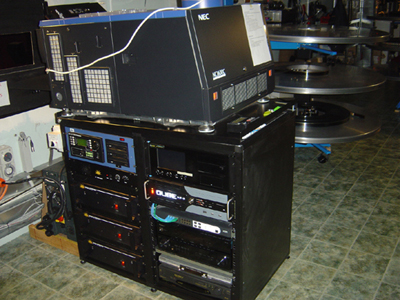
The Old and the New side by side
 -

The working side of the unit incorporating the sound system and the servers .

 -

Biggest job was relocating the sound system into the new rack.

Phil
 
Posted by Brendan Penny (Member # 5041) on 09-05-2009, 09:36 PM:
 
quote: Phil Blake
we rigged up a Pioneer preamp processor whit is switchable via serial connection
We do people spend all this money and then cut corners on the little things. What's an extra 5k in the scheme of things to do it properly???
 
Posted by Bill Enos (Member # 440) on 12-04-2009, 01:18 PM:
 
We had constant issues with water flow on our Barco DP100 until I removed the lamp assy and put a large container of the cooling juice in the lamp area and put the suction hose down to the bottom of the container and placed the discharge line just above the liquid level so that it could be seen and ran the pump for an hour. It took about 40 minutes for the last spurt of air to come out. After closing off everything and closing the valve, the system was pressurized, that was 3 months ago and the cooling system now works as it should. Previously we never ran the system long enough in the open mode to get all the air out, it takes much longer than Barco's instructions indicate.
 
Posted by Mark Gulbrandsen (Member # 72) on 12-04-2009, 06:52 PM:
 
Bill,
I agree that Barco's pressurized cooling system is a joke and totally un-necessary. I never had issues with water flow, just seen a number of pressure gauges fail. You can still pressurize it properly with just a tire pressure gauge though!
 
Posted by Steve Guttag (Member # 268) on 12-04-2009, 08:29 PM:
 
Barco is the only projector of the DLPs that can hang inverted too due to their cooling system.

They have improved the ability to bleed the air out on subsequent units.

However, the long burping process is still recommended.

Steve
 
Posted by Mark Gulbrandsen (Member # 72) on 12-04-2009, 10:52 PM:
 
Actually I believe a Christie M or ZX could also operate inverted if you were to also invert the coolant tank... no real reason it couldn't that I can forsee.

Mark
 
Posted by Brendan Penny (Member # 5041) on 12-05-2009, 12:40 AM:
 
I've heard mumblings that the M has some pretty serious design issues, heat being one of them. Anyone had any experience with these? I've only seen one in operation once and don't have any experience with them.
 
Posted by Steve Guttag (Member # 268) on 12-05-2009, 05:00 AM:
 
I asked Christie about that Mark and I got an emphatic NO!

As for heat issues on the "M"...I haven't encountered that yet. I believe there were/are power supply issues operating it out to 2KW...they have an 1.8KW lamp for it now though. All of my "Ms" are running as low as they can go though so that hasn't been an issue.

I have run into a strange lens problem with an "M". When zoomed out for "scope" it could not focus (not even close) and it was uniformly out of focus.

Steve
 
Posted by Mark Gulbrandsen (Member # 72) on 12-05-2009, 11:06 AM:
 
The biggest problem with the M is the boresight adjustment. It's literally impossible to get it re-set correctly if someone has thrown it way out of adjustment... even the main Christie Tech that teaches the training classes couldn't bring one demo unit back into proper flat focus. As bad as this critical aspect is I'd never sell one to anyone. The SB and ZX don't have this issue. The NEC 1600 is far better off in this aspect and many other aspects too!! Just not as compact. I'm not aware of any heat issues with the M but at high altitudes with thinner air and attempting to use just the internal blower system there probably would be... you'd certainly want an external draft kit on it when running one with the 2kw lamp AT ANY ALTITUDE!!!

Steve, It could be that your lens is also not properly set up internally. All zooms have internal focus/zoom stops to keep a design within it's intended constraints. It is more likely on your M that the boresight adjustment is so far off but still set equally so it is flat focused when the lens does focus... but the rear element to DLP prism is off far enough that the extreme other end of the zoom range won't focus. This focus issue may well be the end of the zoom that creates the most magnification optically... not the end of the zoom the gives largest image on screen... this is the more critical end for any optical system. It could also be just the opposite all depends on the boresight distance to the prism. There is a central point that is normally established at the factory, probably using a test jig or some fixture and gauges.

Television camera zooms and many other zooms for that matter have a built in back focus adjustment that is field accessable on the lens, usually very slightly moving the rear element group slightly fore or aft. This is because like in the M or any other DLP projector the CCDs in a camera or the DLP Chips in a projector are in a fixed plane. IMHO the lans makers went about this whole thing from the wrong end... they went for the adjustment at the projector instead of at the lens. Sure Christie claims you can offset the boresight slightly to compensate for some focus issues but from an optical standpoint it is not the proper thing to do. I asked Strong about a boresight adjustment for the 1600 and they were not aware that there is even one and were pretty sure there wasn't.

Mark
 
Posted by Steve Guttag (Member # 268) on 12-05-2009, 12:56 PM:
 
I've used Ms where ZXs would have been TOO BIG. Not just lamp size...but physically they would not have fit. In those locations, two film projectors were also on site too and they were not moving. Heck, one of my "Ms" is hovering in mid-air.

I'm wondering too if the lens stop on the M was clamped at the right point (the lens is not in the right position fore/aft).

Not to worry about specifying any more Ms though...they are not to be in the new series 2 world. Everything will have a ZX look to it but with three sizes.

Steve
 
Posted by Mark Gulbrandsen (Member # 72) on 12-05-2009, 01:28 PM:
 
Yea, am aware of that but it's too bad that all that development work that went into the M is all for naught... It certainly does have it's place and it certainly does well with a 1600 watt cinema lamp installed!! Oh, another downside on the M is the 30 or so screws you have to remove to get it to the light engine compartment... What on earth were they thinking???

Mark
 
Posted by Steve Guttag (Member # 268) on 12-05-2009, 04:03 PM:
 
It isn't quite 30 but there are quite a few of them. Having one unit shipped with its Red and Blue cables crossed got me a quick lesson on getting into it.

Steve
 
Posted by Kris Verhanneman (Member # 5562) on 12-30-2009, 04:28 PM:
 
Hello, what are your opinions on the different 3D systems that are available?

For the moment we have 2 dolby 3D sets (small to medium size theaters). 1 set of Expand (active glasses on a medium size screen) and they are thinking of switching everything over to master image (on 4 medium size screens).
 
Posted by Demetris Thoupis (Member # 833) on 12-30-2009, 04:54 PM:
 
Ha ha. Good luck. No preference. Dolby for quality, X-Pand for brightness and Master Image for cheap glasses (you will need a silver screen so there goes your side audience).
 
Posted by Julio Roberto (Member # 4976) on 12-31-2009, 07:41 AM:
 
Pretty much agree with Demetris.

My only preference is trying to avoid RealD, as I don't like the notion of paying royalties to a third party to exhibit a film. Besides, their system is the one with the worst 'ghosting' (double/blurry image) to the point of needing some treatment to the film to keep it low enough (ghostbusting). On the other side, their XL system provides good illumination performance.

The one that probably gets the best results in the widest range of situations/installations quality-wise is Dolby. But it is also fairly expensive. Needing a LOT of light to use it, the worst in this aspect, doesn't make it any cheaper. Usually has to install a high gain screen, which usually suffers uneven illumination, and expen$ive high-wattage projection lamps. Also, their glasses are very expensive in case of loss of damage and require labor-intensive maintenance (cleaning/drying after each single show ... imagine what happens if your dish washer breaks down on a weekend). Their slightly different color-per-eye makes the neutral-grey areas of the image have a noticeable 'rival-color-cast', but the color artifacts are not too large, nor is the color-correction performed on the servers too degrading or the retinal color rivalry too headache-inducing. Ghosting is almost zero with this system.

XpanD is cheap to install (no new screen needed, cheap hardware), good in light performance, but it's the one with the most expensive glasses just as labor-intensive to recover/clean as Dolby. Even more, since they also need battery replacements almost every month. Also, if they "break", they can just stop working entirely while Dolby's may perhaps be repaired. Also, I don't know why (no need to in theory), there seems to be cases of excessive ghosting reported (I suspect that they come from people with defective glasses or weak batteries).

Master Image offers slightly overpriced hardware (for what it is) with good light performance but silver screen required. Their ghosting performance is better than RealD's but worse than the others. Filters must be kept clean. Glasses are cheap and "trouble free" disposables. Overall, a system that makes economic sense and middle-of-the-pack in performance, specially if they lower the price a bit or you can get a good deal.

Dual-projection like Imax would have an advantage in illumination, performance (good light, low ghosting from passive filters, high quality signal use), your choice of silver screen or not (you can use passive infitec filters and use Dolby glasses or polarizers and use disposable ones), etc. But needless to say you need to buy two projectors instead of one. But since a Dolby system can mean $30k, well, it's not too far off from a new projector. Having two projectors can mean you can buy two-cheaper, smaller lamp models instead of a single, more expensive one that can use a higher wattage lamp for 3D. And you can always use the second projector as a spare one or something (i.e. more of an valued-investment than a Dolby wheel).

As you can see, no system is perfect. I think that as long as you avoid RealD, any of the others is a good choice. If losing expensive glasses is an issue in your market or the added labor is a problem, your only real options are Master Image or passive filters dual-projection.

How is your experience with XpanD? Do you lose many glasses to breakage/theft? Do you get complains of ghosting? How often do you have to change the batteries? Any issues cleaning them, like water spots etc?
 
Posted by Demetris Thoupis (Member # 833) on 12-31-2009, 08:31 AM:
 
Julio is spot on. The only additional comment I would made regarding the MI system, is the fact that their filter wheel is prone to dust catching quite a lot. Cleaning the filter wheel is not for the faint hearted as a clumsy projectionist can easily break it.
Demetris
 
Posted by Kris Verhanneman (Member # 5562) on 12-31-2009, 10:00 AM:
 
We have been using Xpand for the last 6 months. It's okay as long you keep it on small screens (up to 200/250 seats). For the release of Avatar we moved it to a 400 seater (20m screen base), sometimes glasses fail due to baterie but no poblems of ghost images.

The big problem is getting the glasses back after the screening and getting them to the clients for the next screening.
But that is a problem we also have with our Dolby glasses.
 
Posted by Demetris Thoupis (Member # 833) on 12-31-2009, 04:19 PM:
 
In Cyprus our vendors installed thief detection at only one entrance of the cinema with 3D and 2 ushers stand at the entry at start and end of film to collect 3D Glasses and give them out. From all 5 venues I did the last few months and more than 3000 Dolby glasses they only managed to loose 2.
Demetris
 
Posted by Mark Gulbrandsen (Member # 72) on 12-31-2009, 05:51 PM:
 
I think one could make a copy of the the M.I. system really, really easily...

Mark
 
Posted by Peter Castle (Member # 1997) on 12-31-2009, 06:09 PM:
 
Can anyone tell me what 'inexpensive' is when it comes to XPand?
The quotes I've got in Australia are not. They're even close to Dolby.
 
Posted by Jussi Siponen (Member # 5572) on 01-26-2010, 07:15 AM:
 
After about 10 months working with the XpanD system:

We've had no complaints about ghosting or image quality in general, in fact we've had compliments about the brightness of the 3D presentations.

It should be noted that the default settings for dark time and timing advance/delay stated in the XpanD installation documents are only useful as a starting point and we had to tune them to minimize the crosstalk (ie. ghosting) and to get a linear tonal response (with the default timings dark shades showed banding).

This experience has led me to believe most image quality problems with XpanD and Dolby (and possibly to a point with Real-D) are due bad installations where nobody has taken the time to tune in the system for the best possible performance.

Glasses are handed out and collected by staff, so very few (if any) have been stolen. Maybe three have been broken by getting dropped.

Battery life seems reasonable. I don't know if this is by design or just a lucky accident, but when the battery is about to die, the glasses usually manage to make it through the show perfectly fine but will start blinking on lost sync signal and refuse to power down. For this reason visually inspecting a tray of 40 glasses for bad batteries takes only seconds and swapping the battery is pretty quick and easy (although the old style battery tools provided by XpanD are cr*p -- had to have a metal key made for us a local metal shop).

Cleaning is handled by handing out disposable wipes -- at least for now. We will propably switch to running the glasses through a dish washer eventually.
 
Posted by Pietro Clarici (Member # 4937) on 01-26-2010, 10:56 AM:
 
quote: Jussi Siponen
(...) default settings for dark time and timing advance/delay stated in the XpanD installation documents are only useful as a starting point (...)
I took my time checking the default settings with a few trailers and adjusting them on-the-fly, and I haven't been able to spot significant differences. Could you share your settings?

quote: Jussi Siponen
(...) I don't know if this is by design or just a lucky accident, but when the battery is about to die, the glasses usually manage to make it through the show perfectly fine but will start blinking on lost sync signal and refuse to power down (...)
Yes, this is how they should behave normally.
But I had a few glasses failing mid-show without any warning, which is quite inconvenient for our customers. And 3 or 4 pairs out of 600 wake up and work fine under the IR tester, but then refuse to sync with the projector. Something going wrong with control electronics, I think.

The plastic tool is *definitely* crap. Is there a new one?
 
Posted by Jussi Siponen (Member # 5572) on 01-28-2010, 03:47 PM:
 
Could you share your settings?

Sure!

The manufacturers recommended values for triple flash are:
Dark Time: 1000 μsec
Output Reference Delay: -700 μsec

We use:
Dark Time: 1100 μsec
Output Reference Delay: -400 μsec

If color banding or posterization oocurs, the recommended action is to increase the dark time and to make the delay time more negative (both should give the glasses more time to open before the frame is displayed).

For us the key to making the banding disappear was adjusting the reference delay -- the 100 μsec increase in dark time is mostly "just to be sure", I didn't notice significant crosstalk at 1000 μsec.

The plastic tool is *definitely* crap. Is there a new one?

The new battery design has larger diameter "holes" for the battery key and a loop. The seal is now included in the battery itself, not as a separate seal ring, and is wider than before. The key locks under the loop so the battery is now easy to pull out.

The key is still plastic but it shouldn't be as easy to break as it used to be. The old design was rather brain dead, this seems much better (as in now it might even actually work on the field).
 
Posted by Steve Guttag (Member # 268) on 05-21-2010, 09:58 PM:
 
A big "pro" goes to Barco for their convergence design as implemented in the DP2K series.

This is an improvement over their already superior design, I might add.

While most projectors come (from any manufacturer) with convergence pretty close, rarely are they perfect everywhere (if you really look) but normally, it is more trouble than its worth to try to get it that last little bit.

Those familiar with the series 1 Barco projectors will recognize the system but it has changed in a couple of ways. First, one no longer needs the reeeeeaaaaaalllllyyyyy long allen drivers for the red alignment. In fact, one need not use ANY TOOLs except to get the covers off! There are 6 knobs mounted on flex shafts, each numbered (and color coded). Barco has a new convergence test target too. This target has numbers to tell you which knob to turn while looking at that target. There are really just three locations to adjust for with a specific knob for each .

The other big change is you don't have to loosen the DMDs to adjust them...they are pretensioned.

Since Blue is the chip that isn't easy to get to, it is the "fixed" dmd and the other two are adjusted to it. So you adjust Red to align with the blue at the three locations, then do the same with the green referenced to the blue. You do have to "go around" a couple of times since the controls are interactive but when you are done, it is pretty close to perfect. You can then load a target that puts the "star" pattern in many places over the screen to verify that all is good everywhere.

If you use the USL convergence camera (which I consider essential for doing a proper convergence), this should be a 15 minute job from start to finish and the difference it makes is pretty stunning since you don't get that color fringing and the overall sharpness seems to increase.

Steve
 
Posted by Demetris Thoupis (Member # 833) on 05-22-2010, 02:06 AM:
 
Steve those knobs where introduced at the end of Series 1 DP1200-1500-2000 projectors. They did have though the locking screws as opposed to the new design. Also they FINALLY coppied the cooling system which Cinemeccanica and I think Kinoton used in their editions which uses a cooling tank and a pump rather than that bizzare strange pressurised system which you needed an MBA in physics to callibrate correctly!! I think Barcos' approach in the first edition was that ppl would be mounting the projectors on the ceiling!!!!!
Demetris
 
Posted by Steve Guttag (Member # 268) on 05-22-2010, 09:57 PM:
 
I dunno...I took delivery of a DP2000 in December 2009 and it still had the old convergence system. The Manual alluded to the new design but I have never seen it on the series 1.

I have mixed views of the pressurized cooling system. Having an inverted mount option would be nice in some installations (put the projector on a lift and have it drop down between the two film projectors when it is needed and tuck back up when done).

In truth...the cooling system was easy to figure out once you've done it once or twice. The big thing to remember (other than calibrating the pressure...again easy) is to let it bleed the air out over the course of about an hour. Just let it get the air bubbles out while you do something else. Then pressurize and seal it up.

That said...99% of the installations don't need a pressurized system so it is merely a point of failure to be concerned about so I'm good with it going away. I'm not as pleased about the washable filters though. We started with that and people don't clean them as well as they should. While disposables are expensive, they do ensure that the filters are clean, when changed.

Steve
 
Posted by Mark Gulbrandsen (Member # 72) on 05-22-2010, 10:32 PM:
 
Amazingly, the thing that seems to fail the most in the pressurized system IS the pressure gauge itself!! You can get a tire pump with a gauge in it and just add one atmosphere of pressure for most conditions.
 
Posted by David Favel (Member # 1125) on 06-11-2010, 01:48 AM:
 
OK guys, looking for reccomendations for a 3 cinema install.
Cinemas 1 & 2 9metre wide screen (29feet)
Cinema 3 11metre wide (36feet)
At the moment, am leaning towards RealD, NEC and DoReMi. But am really looking for experienced guidance.
 
Posted by Demetris Thoupis (Member # 833) on 06-11-2010, 01:59 AM:
 
It's more a matter of taste really. I would use the Barco DP20C and master image instead of real d. The doremi server is excellent and greatly maneuverable in terms of customization. On the other hand do you want the silver screen? If not then you need a 1,8 gain screen and replace master image with xpand if its brightness you seek more or with dolby 3d correctly callibrated if its quality you seek.
Demetris
 
Posted by Brendan Penny (Member # 5041) on 06-11-2010, 03:12 AM:
 
Agree, Dolby 3D for 9m ones. We have installed a bunch under 10m and they look [bs] hot! Pretty cost effective too.

Master Image is also a good option and on the 11m screen a DP2k15C with 3kw lamp will get you across the line even.

You should shop around and get quotes on a variety of configurations before you jump in.
 
Posted by Demetris Thoupis (Member # 833) on 06-11-2010, 04:04 AM:
 
The cost difference between the DP15C and DP20C is minimal. Its better to have the advantage of being able to install a bigger lamp than being at the limit. Also the great benefit of the Barco units is the fact that they can have the Dolby filter wheel embedded in the projector with a lesser cost than the actual Dolby 3D Kit.
Demetris
 
Posted by Tom Bert (Member # 5719) on 06-29-2010, 10:12 AM:
 
Note that the Barco devices can be equipped with smaller lamps as well (e.g. 20C comes with 4kW inside, but no reason not to switch afterwards).

For the smallest screens you could go down to a 1.2kW lamp (6000 lumen)
 
Posted by Demetris Thoupis (Member # 833) on 09-28-2010, 12:41 PM:
 
The Doremi server gets a [thumbsup] from me. It is built on a basic "windows explorer" platform for the projectionist/operator although it uses a Linux OS. The think I love most is the flexibility of the automation cue creation unlike Dolby DSS unit which simply draws all info from the projector with all the sensless macros being listed, with the Doremi you can select ONLY the ones you want. Also Doremi keeps releasing a lot of updates on their DCP2000 based server and handle any device with ease. Just make sure you have the pkl in your USB drives [Big Grin]
Demetris
 
Posted by Carsten Kurz (Member # 5396) on 02-17-2011, 12:47 PM:
 
Okay, I'll repost it here:

I recently read a few setup manuals of series-II projectors. Currently I am lacking manuals for Kinoton and Barco machines.

However, I found that the setup options for the Christie series-II are much broader than for NEC series II. The NEC seems to offer the same basic functionality over the WEB interface as on the local machine panel.
I am sure the NEC setup options are enough for most simple installations, but I ask myself wether more options are hidden in a special installers menu? The christie has a very well thought out system of access limitations for different grades of users. I don't see anything like that on the NEC. I see the same mentioned for the Barco Communicator software, though I have no idea about the range of Barcos setup options compared to Christie.

Any thoughts about the general setup featureset of the Barcos/Kinoton/Cinemeccanica? I'd really like to discuss the setup-differences of the current Series-II machines more deeply.

The Barco manuals are not freely downloadable it seems. Maybe someone can make them available in the warehouse download section?

I know I can download them after registration with Barco, but it seems you already need to have a Barco machine in order to register. That doesn't help in decision making.

- Carsten
 
Posted by Steve Guttag (Member # 268) on 02-17-2011, 02:46 PM:
 
NEC and Barco have different user levels too. Though I find that most seem to have the all-access level or the no-access level (all or nothing).

It all depends on what features you are looking for as to how limited a projector will seem to be.

I've generally found Barco's software to be the most thought out and best but I have not played with the Christie series IIs to see all of the improvements...the web versions of the ZX and M were slow pigs that were most frustrating to work with. The TPC was better but also nothing compared to Barco.

NECs software is "okay" but clunky in its layout and not quite as intuitive as it should be but if you keep at it, it can let you do most anything...it is just awkward.

-Steve
 
Posted by Carsten Kurz (Member # 5396) on 02-17-2011, 03:41 PM:
 
I can't see anything in the NEC series-II setup manuals. All the basic things are there, but no user/access right management.
The browser interface just duplicated the minimal LCD-Screen/button interface in functionality. Is there an advanced mode that is not mentioned in the manuals? These manuals are not just an operating guide, they seemed to be meant for installers (lens adjustments, Title settings). The Series-I manuals are more explicit.

I'd really like to see what Barco offers. The Christie documentation and functionality is excellent.

Interesting question though, as to how much functionality the 'advanced projectionist' should expect to be enabled for him.

- Carsten
 
Posted by Steve Guttag (Member # 268) on 02-18-2011, 06:48 AM:
 
On the NEC ICC program, they have the "service" level...which I think is the top level. There will be an (s) showing on the main page when you are on that level. It is password protected...I think there are 4 levels total though I have only ever been on the service one.

Get an account on my.barco.com and you will have access to all of their manuals. The Communicator has a manual all of its own. Barco manuals are largish (10s of Megabytes, typically) so they might be awkward for uploads/downloads here. Plus, Barco does have them for download (including previous versions, typically).

-Steve
 
Posted by Dave Macaulay (Member # 813) on 02-19-2011, 01:05 AM:
 
Barco projectors ship with a "default user" level that the communicator software (on the touchscreen or your computer) boots into and a "service technician" level that lets you do most anything to the projector, including some "bad idea" stuff. There's a root level too, but the password is not given to mere mortals. We have no need for root access anyway... unless we want to "revise" the logs I suppose. You can fairly easily set up your own added user levels with access to whatever functions you want from a list of what the "service technician" is allowed.
There's a master key for the Christie Medeco locks, but Christie is pretty tight with them. The Christie marriage procedure is dead simple. With Barco you need the supplied iButton fob and a keypress combination "password" to marry the system after opening a secure cover or removing a board... but a "service technician" can add any iButton rfid fob to the system, set its password, and get on with the marriage.
I suppose some DCI regulation requires a key of some sort. The first rule of computer security, though, is "if an attacker has physical access to the computer there is no security". This stuff just makes working on the things more difficult without increasing real security.
Hint: the Barco security cover intrusion microswitches are wired as normally closed.
 
Posted by Steve Guttag (Member # 268) on 02-19-2011, 07:30 AM:
 
Dave,

That is a pretty good explanation...I do have access to the root level and its primary function is for the employee with a vengeance that changes passwords on their way out the door. Someone that has root level can restore the passwords to the factory defaults.

However, the passwords are referenced to the communicator program, not the projector...so if you are using YOUR copy of the software, you won't be locked out

While the security switches are indeed N.C. ... on the backplane of the projector, those cables plug into an area that requires triggering one of the switches...so one would have to plan in advance.

It isn't that it is hard to remarry the boards or clear a security issue...however, it WILL be logged and it will also not who did it (another reason I don't like that the Service Tech password is left at the factory setting and is used by most). You have no idea who has been in there...just that someone has.

-Steve
 
Posted by Dave Macaulay (Member # 813) on 02-19-2011, 07:44 AM:
 
It's "convenient" if you don't have an iButton on site (they do get misplaced) and don't want to get one. The next time you do convergence you don't have to worry about it. If you pull a card you'll still need it of course.
 
Posted by Steve Guttag (Member # 268) on 02-19-2011, 10:08 AM:
 
When we install a Barco, we chain it to the pedestal...the chain is long enough to use not long enough to leave!

It won't be long before I have my own Dallas Key just to deal with this sort of thing.

-Steve
 
Posted by Phil Ranucci (Member # 3820) on 02-19-2011, 02:01 PM:
 
Last time I tried to price a Dallas key from Barco it was $138. The ones that Google can find look identical. Anybody know if they'll work?
I'd like to reset the service technician password since too many people know it. Is that possible?
 
Posted by Dave Macaulay (Member # 813) on 02-20-2011, 11:19 AM:
 
Any iButton will work, you want the "ID Only" model" which is, helpfully, the cheapest one. This should be in the $5.00 each range. If you want a bunch with the same ID number (so you can program all projectors to the same key and have all your techs carry one) this will be a custom order and cost more.
 
Posted by Amanda Mundin (Member # 3386) on 02-26-2011, 02:11 PM:
 
There seems to be very little said about Kinoton's range of digital projectors, does anyone have opinions on these having installed or used them? Or perhaps why they chose not to install or use them?
 
Posted by Carsten Kurz (Member # 5396) on 02-26-2011, 04:27 PM:
 
It's a german company with a large german installation base. I have no idea in how far it is a good idea servicewise to buy them outside central europa. I have no idea about their service capabilities outside germany.

They are in the cinema business for a long time, they still build reknown FP30 35mm machines and accessoires. In germany, they are both manufacturer and integrator with local service stations.

The base of their digital machines is BARCO components. The main things they add is lamphouse, rectifier, housing. Plus service.

A lot of cinemas in germany choose Kinoton because they have a long lasting relation with them in 35mm equipment and service. That's probably the main reason Barco accepted them as OEM - unlike Christie, Barco wasn't in the cinema business before they started their DCI business.

- Carsten
 
Posted by Pete Naples (Member # 761) on 03-28-2011, 04:19 PM:
 
Amanda, I've installed a bunch of Kinotons, in the UK and the ROI.

Recently a colleague installed one in Nigeria of all places.

What would you like to know?
 
Posted by Frank Bolkovac (Member # 6201) on 04-16-2011, 12:53 PM:
 
Pros and Cons about Digital projection: Pro's, none. Audience doesn't care. Con's (CON) making you buy it...
 
Posted by Mike Blakesley (Member # 26) on 04-18-2011, 11:40 AM:
 
Thanks, Frank. Awesome first post. [Roll Eyes]
 
Posted by Amanda Mundin (Member # 3386) on 04-19-2011, 06:51 AM:
 
Hi Pete
I was just wanting to know what people thought of Kinoton Digital Projectors, whether they are any better or worse than other Digital Projectors, people tend to speak very highly of Kinoton's 35mm projectors but I have seen very little said about the Kinoton digital range, I assumed that means that not many people are installing them, I just wondered why?
 
Posted by Bajsic Bojan (Member # 4928) on 04-19-2011, 11:06 AM:
 
i would guess that the main one would be as carsten pointed out, its german based and so its not so readily available to some parts of the world (like the us). so its most of the times also more expensive than their counterparts.

for us here, we have a different scenario for instance and installing kinoton is a prime choice, whereas christie, nec or barco dont have a service center within 400miles and definitely not in the country, no dealership so you basically contact them direct, little or limited support,...

by comparison, its barco light engine with a kinoton projector chassis, really looks and feels more like a 35mm projector inside than most of the other 'video-like' projectors. it uses regular osram/ushio lamps so running cost for these is more comparable to 35mm than to expensive 'module' based systems.

maybe what put inital buyers off is the fact that it looks clunky and unlike a 'digital projector' should, and that it is bulkier than the average build (few inches here and there).

from what i was around of and having spoken to people who use them here (with integrated dolby 3d system), they are reliable and have been playing well, dont need many upgrades or changes made, they seem quite happy with lamp life (got up to 1600 with some noticable flicker on some 4kw ones), they are robust and quite intuitive.

most dont use the alternative content switcher/scaler so cannot comment on those
 
Posted by Steve Guttag (Member # 268) on 04-19-2011, 12:03 PM:
 
Kinoton is said to float the the light engine/lens so it is not susceptible to vibrations too.

I think a key reason you don't see them in the USA is cost. The Dollar/Euro makes Kinoton particularly expensive, if for no other reason than exchange rate.

-Steve
 
Posted by Pete Naples (Member # 761) on 04-24-2011, 03:18 PM:
 
That is true Steve, the whole 'optical bench' is resilient mounted. It works well.

They are more robustly built than the others, but heavier. Lamphouse is roomier than the others therefore easier to service and it uses their ignitor, mirror etc.

Pricewise for you they'd be comparable with anything else. The principal reason we don't see many in the UK is that the DSN got their first with Christie and NEC, people are sheep and follow the herd, mostly. However there are an increasing number installed in the UK and Ireland now, Zeferellis in Ambleside is all Kinoton digital, Ambassadors Woking has them and the West End in Boston Lincs too. Plaza Workington, Palace Devizes, Eye Galway ROI and a handful of other places, even the odd miners welfare.
 
Posted by Mark Gulbrandsen (Member # 72) on 04-24-2011, 03:36 PM:
 
quote: Steve Guttag
I think a key reason you don't see them in the USA is cost.
The real reason you don't see them and Cinemecanicca here in the states is because they are liscensed by BARCO and the greed runs high at BARCO USA. They want the states all to themselves. There was a kinoton on display at Cinemacon though.

I see no advantage in floating the light engine unless you are running an operation like the Bijou Kinema [Big Grin] . In fact it may actually may be detrimental to lens to screen alignment over time. I certainly don't see it as anything that would help in the long run. DLP Projectors don't really have any internal vibration sources excepting the internal fans unless the 6:00 Northbound is flying past the north wall of the Kinema. The rubber isolators used might deterioate with age and then alignment would drift slowly off. Most rubber isolators I have seen used in equipment do deterioate over time!! The better idea might be to isolate large cooling fans, cooling pump, and the rectifier if it's of the iron core type, or what ever might produce vibration inside the unit. The rest of the unit ought to be very solid.

I don't know what if anything Cinemecanicca does in this regard.

Mark
 
Posted by Steve Guttag (Member # 268) on 04-24-2011, 06:09 PM:
 
Kinotons are said to have much less noticeable vibration on screen by those that have actually seen them.

I can accept it as a design improvement. Your statement about Kinoton in the US due to Barco greed is ALL WRONG...As a Kinoton dealer, I've asked about importing them...the only hanging point was the cost. In Europe, Kinoton projector costs are in line with other projectors in Europe. But in the states...if a projector costs say 40K Euro, it turns into $58,400 once it hits the shores, excluding freight. The 46% increase is way too much to absorb in these days of near zero profit sales.

-Steve
 
Posted by Mark Gulbrandsen (Member # 72) on 04-24-2011, 09:54 PM:
 
Steve...

Thats not really that much more $$$ if it's all that much of an improvement... but I say hogwash! Digital projectors and the electromotive forces within the DMD chips moving micron sized mirrors are sufficient force not to be bothered by mild extranious vibrations like film projectors can suffer and hopefully neither do modern buiidings of today. However this presents another entirely different matter... if the booth mezanine is going to move, bounce or vibrate from induced load sources then even an isolated optical bench won't help that issue because the entire projector will be moving in relationship to the screen... Secondly isolating the bench wouldn't be all that difficult to do and if it were very beneficial everyone would be isolating the optical path and it would have been in the TI specs from day one. This is really one of the most rediculous claims I've ever read but nothing surprises me today. Like which hair brush do you use... really silly stuff!

Mark
 
Posted by Steve Guttag (Member # 268) on 04-25-2011, 06:28 AM:
 
YOU, who has not seen it or compared it (A/B) to a non-isolated bench have ZERO qualifications to say what improvements it does or does not make. Most machines have sufficient air movement created by their own fans to shake the system.

I have not seen it either and and will not make the claim that it does improve things...but I'm not as dismissive as you seem to be.

-Steve
 
Posted by Mark Gulbrandsen (Member # 72) on 04-25-2011, 08:33 AM:
 
Steve...

Common sense prevails on this. Most of the shaking going on is going to be the mezzanine floor itself... and isolating the bench isn't going to overcome the shaking mezzanine vs the rock steady screen frame and screen.
 
Posted by Brad Miller (Member # 2) on 04-25-2011, 01:57 PM:
 
Maybe I'm just crazy here, but I think the projector fans themselves have a much greater chance of creating movement on the pedestal than the mezzanine floor. [Razz]

That being said, most "movement" I've seen was due to people leveling the feet quickly and not paying attention to actually grabbing the pedestal and making sure the feet are truly balanced against the floor during setup. (And later as the foundation settles.)

But whatever. Kinoton DLP will never be seen in the states due to the costs. People have watched movies for over 100 years with movement in the image. I can't see this making enough of a difference that customers would seek out a particular location because it was "so much steadier". That being said, if there is a Kinoton DLP available for me to look at without having to go way out of my way, I would be interested in seeing if I could detect a difference.
 
Posted by Pete Naples (Member # 761) on 04-25-2011, 04:07 PM:
 
quote: Steve Guttag
Most machines have sufficient air movement created by their own fans to shake the system.

Absolutely, and worse are the cases where they insist on sticking the exhaust extract fan right on top of the stack, adding the vibration from that big 200mm or whatever sized fan into the equation. Not a great idea! However it really doesn't bother the Kinotons. Barcos are not so happy, I have seen what I can only assume is mirror shake in that scenario.
 
Posted by Bruce McGee (Member # 131) on 04-25-2011, 05:23 PM:
 
Please, someone, talk about the Sony 220's and 320's.
 
Posted by Mark Gulbrandsen (Member # 72) on 04-25-2011, 07:34 PM:
 
Indeed I have been in a few buildings where you can feel the mezanine shake slightly when some one runs the length of the booth. Structural steel buildings are designed to be this way. Next time you are in a multi level shopping mall on a busy day you will see what I mean... or left sitting atop a bridge waiting for a light to change and heavy trucks going the other way. If buildings did not shake slightly the rivits would eventually crack as might the steel beams themselves... ditto for airplanes.
As for fans causing vibration... I have yet to have any in Christie, BARCO or NEC. Of course if a fan fails and goes out of balance or is defective then that is another story... Of course most of us would simply replace it.


quote: Bruce McGee
Please, someone, talk about the Sony 220's and 320's.

How many light engines have you lost and how is your lamp life Bruce? Remember Sony "make.believe"! Indeed...
 
Posted by Mike Blakesley (Member # 26) on 04-25-2011, 10:58 PM:
 
When a BNSF coal train goes by (125 feet from our front door) I can feel the ground a-shakin. If I'm standing by our projector I can see the monitor screen vibrating. I can't see any movement of the image on the screen though, so I guess the projector optics must be isolated from the cabinet pretty well.
 
Posted by Mark Gulbrandsen (Member # 72) on 04-26-2011, 09:20 AM:
 
Mike... You need to rename your theater the Forsyth Kinema. I forgot about the 7:10 express that roars past just 200 feet away...
 
Posted by Bruce McGee (Member # 131) on 04-26-2011, 05:57 PM:
 
Hi Mark.

We are replacing lamps at 580 hours, and around 100 hours before time to change them, I start noticing the image getting dark and reddish looking. We've lost no light engines yet.

I've had to replace lamps early, due to unstable arcs.
 
Posted by Mark Gulbrandsen (Member # 72) on 05-15-2011, 01:55 PM:
 
Hi Brice, sorry... didn't see your reply and it's been some time. Your case sounds typical of all the other Sony's I know of. Ushio has to love manufacturing those lamps and they are expensive to buy. I have to wonder whats so different about them vs. a regular short gap digital lamp?? Or does the short life lie in the design of the Sony projector itself?

Mark
 
Posted by Danial Simmonds (Member # 4638) on 06-14-2011, 11:31 AM:
 
How user friendly is these projectors Barco vs Christie on the Series 2?

Would like to find out..
 
Posted by Tom Bert (Member # 5719) on 07-26-2011, 09:20 AM:
 
Danial,

if you contact me by email, I'll send you some pictures that visualise our ease-of-use (SW screenshots, modularity of components, metal filters, lamp house,...).

Two examples:
- our Communicator software is available in 14 languages and 100% uniform across all models; across touchpanel/PC; ... Very easy to use.
- Barco has only 45 spare parts to support al 8 projector models: very high ease-of-servicing.
 
Posted by Olivier Lemaire (Member # 5579) on 07-26-2011, 01:00 PM:
 
Barco's serie-II are pretty nice: simple and modular, easy to install, setup and service.

Chrisite's serie-II are nice too: classical architecture (robustness), nice software, allow precise setup, but longer to install.

Servicing both, frankly, there is pro's and con's for each of them - but at the end of the day, that's rock in production either.
 
Posted by John Gavin (Member # 5949) on 08-02-2011, 02:52 AM:
 
Daniel,

Both Barco and Christie are easy to use. Plus you can set up
Presets for channel configurations, so your operators will just
have to press buttons to switch configurations.
 
Posted by Brad Miller (Member # 2) on 08-02-2011, 06:12 AM:
 
quote: John Gavin
you can set up
Presets for channel configurations, so your operators will just
have to...

Operators??? Whatever. [Roll Eyes] [Razz]
 
Posted by Justin Hamaker (Member # 2165) on 08-02-2011, 01:43 PM:
 
I have been using the NEC NC2000S Series 2 projector for almost a year, along with the GDC server and MasterImage 3D.

For the most part I've found the NEC projector to be stable and have had no major problems. We do have the occasional freeze where a trailer seems to get "stuck" during playback and the projector has to be rebooted - but this has been less of an issue since installing the 3.0 updates.

The DCC software for the NEC projector is not very intuitive, but I have become fairly comfortable with it over the year. One example is that rather than having a "Save" button to save setting, you click the "Entry" button. As I said, not very intuitive.

I have found the GDC server to be very stable. I don't recall a single problem over the year. The GUI is functional, but not very pretty. And access to some of the commands is awkward. For example, it take too many "clicks" to get to the screen where you can manually execute automation cues. However, I did see considerable improvements when we went from version 7.7a to 7.7b. Hopefully this will improve even more with future updates, although I understand that the Cinedigm LMS with substantially change the GDC interface.

The MasterImage 3D does it's job. It's been running virtually non-stop for a year with no issues beyond cleaning the polarization disk. We did have a bug or something get sucked into the disk and result in it needing to be changed. That is probably the most serious issue/disadvantage I've come across with the MasterImage unit.

Right now I have two of five screens with the setup described above. Very shortly I will be getting the other three screens converted to the same - minus the 3D. Because I have never worked with any other equipment, I have no basis for comparison.

I did help install a RealD unit at another location and I will say the one advantage to MasterImage is that it can easily be moved to another 3D capable screen.
 
Posted by Mark Gulbrandsen (Member # 72) on 08-02-2011, 03:03 PM:
 
Justin...

Be sure you have the latest Projector Control Software on your computer 3.1.0.0 and that your firmware is at 3.002(the latest) or at least at 3.00. When they went to 3.00 the Projector Control Software added an auto-load feature under the "Check Version" button on the update tab and you could probably do the update your self. I do it by remote from my desk at home quite a bit of the time. There are some ICP updates in 3.002 that might help your freeze issue...

I've installed almost 50 NEC's since they were introduced after the last Showest and have had tremendous luck with them. They are uber easy to work on if you ever do need to work on them. I've had 2 of the On-Off Switch/breakers fail so unless you leave it in standby all the time you may want to keep a spare in the booth... The Switch/Breaker failure is pretty crappy considering it's a German made part! Also one CPU module failure after about 200 run hours on a brand new 4K projector and stuck blue pixels on another 4K projector but hey 4K is still brand brand new anyway. The stuck pixels started showing up after about 6 run hours. I have to replace the light engine on the latter this weekend. That will take about a half hour or so to swap out not counting checking convergence and shooting colors.

The nice thing about the NEC's and some other brands of Series 2 projectors is all the modules are interchangable between NC-2000 and the other NEC series 2 projectors. You just have to re-install the correct Projector Firmware if you swap modules between different projector models, particuluarly the CPU module. A complete Firmware update generally takes all of 5 to 7 minutes. No problem getting parts when needed, I've everything I've ordered the very next day.

As to GDC... They are certainly THE standard to compare ALL other companies in this industry to. A good example was... I had a server hiccup because of a defective touch screen monitor on the 4th of July. I told the manager to call GDC Tech support but to remember it was July 4 and good luck and they were probably shooting off fireworks some place. The head GDC tech support guy called him back with in 10 min. and remoted in to the server in Elko, NV and took care of it for me while I was out camping. The theater location had no down time at all! I never did hear exactly what the real problem was but I assume they just had to run the server from the keyboard until a replacement monitor arrived... The GDC update procedure is also uber easy only requiring the software or update/Patch be put on a USB stick and loaded in with an accompanying password from the maintainance screen USB Button. No generated KDM is required from the manufacturer to update anything as some other brands require! The current version is 7.7b. So be sure you have that loaded in as well. Hope some of this helps you out...

Mark
 
Posted by Justin Hamaker (Member # 2165) on 08-02-2011, 03:41 PM:
 
Mark
I am on version 3 of the DCC software and have applied the 3.0 update to the NEC projector - the second projector had the update prior to installation. And I did the update to the 7.7b on the GDC.

Both of the projectors at my locations have worked virtually flawlessly since installation, but we did lose an ICP board in one at our other location about 3 months in, but Strong was very proactive about getting us the part and support - they even wound up sending a tech out from Omaha.

Overall, my experience with digital cinema has been nothing but positive. Customer push back on 3D not withstanding.

 -

This is a custom ventilation setup to help cool the projector. There is a booster fan sitting immediately on top of the projector and an enclose box of galvanized steel sitting on the pedestal over the rear exhaust. This is something we had made up at a local sheet metal place at a cost of about $30. This addition has dramatically cooled our booth, even with just two running. Once we have the other three digital projectors installed with this setup, I imagine the booth will be down right cold.
 
Posted by Mark Gulbrandsen (Member # 72) on 08-02-2011, 04:33 PM:
 
I'd reccomend installing version 3.002... I thnk that'll take care of what few problems you are having. Cool coolers but that has to make changing out the lamp more difficult. I haven't had any cooling issues in multiplex's and some of our's are at 5000' altitude. I had thought of doing a similar thing but made from plastic so it's lighter and it would extract at the end and not interfear with lamp changes... Really, NEC should come out with an attachment for this!!

Mark
 
Posted by Justin Hamaker (Member # 2165) on 08-02-2011, 04:46 PM:
 
I haven't had to change a bulb since we added this about 30 days ago, but it shouldn't be a big deal since nothing is permanently attached.

I verified that I do have firmware version 3.0.0.2 on my older projector. I'm fairly certain the newer one came with that version installed.
 
Posted by Joris Springer (Member # 4175) on 09-15-2011, 05:58 PM:
 
We use at my work a Barco DP2k32B for the largest theater combined with Master Image and DoReMi server. A Barco DP100 for the 2nd largest combined with DoReMi and Master Image and for the smallest theater we have a Barco DP90 combined with Master Image.

Personally I think the DP2k32B is just awesome, we don't have the small screen but just use the communicator software and despite for a small glitch (screen needs to be put in focus after every bulb change) it just works perfectly (though the DoReMi is one of their first 3D capable ones and so it is very slow when uploading movies through USB, I mean seriously, a Pentium 4 processor...)

The DP100 on the other hand is wel, a problem child, think it is running on engine number 9! (no joke) It runs quite hot and it does not like that we switched it to 6.5K bulbs because well, a CLO of 5.5 is not what we wanted, now it runs at 10, still not enough but better. The machine is just one of the first ones (2004) and it is on the list of being replaced but it just takes time. And well, it has earned it's retirement after all it has been through you could say. The DoReMi is however also slow since it is the same one as in the other theater.

The DP90 is working quite great actually, never had any real problems besides with the DLPS which keeps on giving the "atleast one could not be found" error once in a while, sometimes a reboot can fix it but sometimes it means the DLPS needs to be replaced. Think we are with that one already at number 4. Also here the DoReMi is just very slow so hope to get new ones soon [Smile] .

I am glad however that we no longer have Xpandd, not because of the picture quality but because people just kept on destroying the glasses here in my city.

We don't have a TMS yet so we still need to upload all by moving the HDD from one theater to the other one and well, sometimes it means that it is just a real tight squeeze [Wink] . But we are getting there slowly.

What I mostly like about the Barco's however is their lamp house, exchanging bulbs is just very easy and very fast. Hard to make a mistake there and all the room you can wish for when you replace them. Not like the Vic5's we have running here [Wink] [Smile] .
 
Posted by Robert Grandrath (Member # 6483) on 11-17-2011, 03:16 PM:
 
Justin i sent you a PM
 
Posted by Bryan Pratt (Member # 6602) on 11-20-2011, 01:44 AM:
 
We are running the Christie cp2210, with Doremi DCP-2K4, and master image for almost 1 year now. Only real problem was 1 dolphin board crapped out. Only takes about 5 minutes per week to clean MI disc, but the benefit of disposable glasses and no usage fees is well worth it. Also no big light loss while playing through it. We are in the process of converting our 2nd screen before Christmas, but I'm torn about having to order the IMB in the second projector to be able to play HFR's IF that is going to be the big push from the studios down the road. I know it's the way technology advances, but I'm pissed that my projector that is only 9 months old has to have a hardware upgrade that is 3 times the price of ordering it with hardware factory installed. [Mad]
 
Posted by Fenando Caveira (Member # 6223) on 11-20-2011, 10:30 AM:
 
Is de Doremi DCP 2000 completly out of date?
And does any one have any thing to say about the kinoton DCP30 series II? is it any good?
Thanks
 
Posted by Pete Naples (Member # 761) on 11-24-2011, 12:10 PM:
 
Fenando,

The Kinotons are essentially Barcos under the skin. They use their own lamphouse, and they mount the optical assembly on vibration reducing mounts.

I install and maintain both Kinotons and Barcos. There's nothing to choose in terms of image. Kinotons are slightly bigger and heavier, but stronger put together (the outer skeleton is typically Kinoton, welded steel.) I find the Kinotons easier to service because access to the internals is better.
 
Posted by Joris Springer (Member # 4175) on 12-07-2011, 06:58 PM:
 
@Fernando, nope they are not out of date, we are still using two of them though we are replacing them in the coming weeks with Doremi's Showvault servers. Their biggest problem is the storage and well, at least the version's we are using, are running on Intel Pentium 4's and that means that USB2.0, well, it hardly has any use and uploading a movie while playing one will take hours (Transformers 3 3D took 5 hours! with 1 hour of no movie playing between two shows btw, I haven't measured the time at the Showvault server yet while a movie is playing).
 
Posted by Dave Macaulay (Member # 813) on 12-10-2011, 02:12 PM:
 
Showvault, really? This is a server with no media block so you need an IMB to use it, pointless unless you want 4K resolution. Plus the CRU drive is an option, I think, available only on the 4U version.
The DCP-2K4 would be your logical choice if all you want is a CRU bay. You just need to have a monitor etc to replace the DCP2000 touchscreen.
 
Posted by Carsten Kurz (Member # 5396) on 12-12-2011, 06:33 AM:
 
Aside from 4k, ShowVault is also a better choice if you want to have an option on HighFrameRate 3D. The costs for ShowVault + IMB is not higher than for a plain-vanilla DCP-2k4, and it splits the possible replacement/upgrade cost for the future between Server/SMS and IMB.

With the limited options of Dual HDSI, I would consider conventional servers outdated already now. Dolby has their SMS/IMB solution ready, Barco, Christie, etc.

Although I would prefer if the Doremi had a Gigabit-Interface following DCOSA , not their, well, proprietary, PCI-e port.

- Carsten
 
Posted by Joris Springer (Member # 4175) on 12-23-2011, 05:34 PM:
 
We have the Doremi IMB with their Showvault servers so all goes through PCI-Express and a nice thick cable that blocks partially a couple of inputs (so we don't use them since we heard that disrupting the cable connection will make sure all data/security is lost.

But we are here still learning since we upgraded from DP100's and a DP90 (and 5 other booths with just Vic5's).
 
Posted by Steve Guttag (Member # 268) on 12-23-2011, 07:14 PM:
 
That is a way of looking at it...I find the whole IMB thing annoying...it moves the sound to the projector and often requires a cable of limited length capability. It can cause boot up issues since now the media block is powered off the projector rather than the player.

I'm not quite sure what the 2K IMBs really get one other than high frame rate 3D. 48fps 2D is already available on HIGHLY RELIABLE SDI cables. Then again, the Enigma module can kiss my a**.
 
Posted by Philip Jones (Member # 6677) on 01-03-2012, 05:01 PM:
 
Are there any keyboard commands you can use with the Dolby DSS-200 rather than using the mouse to press play etc?
 
Posted by Steve Guttag (Member # 268) on 01-03-2012, 05:33 PM:
 
None that I am aware of but...

You can create hard wired Start/Stop/Pause buttons using the GPIO connector on the player and not have to use any particular screen to access them. One can also, serially, create Start/Stop/Pause commands for remote control...including via automations.

-Steve
 
Posted by Juan Carlos Vasquez Cahua (Member # 6721) on 03-20-2012, 05:34 PM:
 
I work at Peru's main exhibitor, and we have 35 digital screens, all of them running with NEC projectors, and only in this first 2 and a half months of 2012 we had replaced 1 CPU BOARD, 2 PJKEY BOARDS and 1 ICP BOARD. (4 board failures, in 2.5 months, with 35 screens).

For me it's quite a large ammount of Board failures, because doing the maths that ammount of board failures means that I would have every other projector have a board failure every year; but I have no point of comparison because I haven't used any other projectors.

Anybody that could help me making that comparison? Thanks a lot in advance!
 
Posted by Justin Hamaker (Member # 2165) on 03-20-2012, 10:14 PM:
 
Juan, my understanding is that if you're going to have a board failure, it will usually happen in the first 500 hours or so. While we had some issues immediately after install, everything has been running without issue since.
 
Posted by Juan Carlos Vasquez Cahua (Member # 6721) on 03-22-2012, 10:21 AM:
 
Well, the 4 projectors where we had those problems have been working since first half of last year. Their "ages" go from 8 to 12 months. And we make them work aprox 300 hours per month, so they are a lot above 2000 hours. Is that normal on NEC projectors to have failures at 2000 hours?
 
Posted by System Notices (Member # 2357) on 07-03-2013, 04:42 AM:
 

It has been 467 days since the last post.

 
Posted by Saquib Baqai (Member # 7659) on 07-03-2013, 04:42 AM:
 
Hello everyone from Karachi Pakistan. In our theater we had a Barco DP2K-23B which was a breeze to work on, Last year i went to Kinoton Gmbh (Munich, Germany) for Level 1 Installation/Technician certification where i got hands on experience on Kinoton version of 2K projectors, I found Barco to be much more easier to work on especially changing the lamp, On the other hand Kinton were more robust in comparison. I have yet to get my hands on Kristie but have heard good things about them.
 
Posted by Brad Miller (Member # 2) on 07-03-2013, 11:00 AM:
 
Kinoton and Barco are essentially the same projector.

Christie is far easier to change a lamp in.
 
Posted by Keith Stata (Member # 7139) on 07-04-2013, 10:38 PM:
 
I have a small 5 screen movie theatre in cottage country Ontario Canada. www.highlandscinemas.com The business is seasonal with the bulk of it being done in 9 short weeks. We also have an extensive museum which you can see a bit of on our web-site. I debated for some time whether to close or continue because of the huge cost, problems I had heard of and short season. We did switch to digital and are using the new Barco DP2K-10S with Doremi Show Vault servers.
There have been quite a few bugs to say the least, the most disconcerting is on installation they had to replace a Doremi IMB card which is in the projector. Now 50 hours in another one has gone and cost us 3 days down time on that screen. I know of another theatre near us that had one go 10 days in. This certainly does not inspire confidence in Doremi or the reliability of this product. Is anyone out there familiar with this machine and similar problems with the Doremi IMB card??
 
Posted by Justin Hamaker (Member # 2165) on 07-05-2013, 02:11 AM:
 
We just installed a Barco 32B 2K in our drive-in about 2 weeks ago. We're using the GDC SX2000AR server with IMB, and USL JSD-60 sound processor. We're using a Ushio 6500W bulb.

We have a 90' x 40' screen with about a 450' throw. I don't have the lens information handy, but we are just a few inches short of filling the screen horizontally in scope, and completely fill the screen vertically in flat - essentially the same as with 35mm.

I have to say I am amazed by how much light we're getting on the screen. I don't have a light meter, so I don't have an actual measurement. But I would guess we are getting at least twice the light as we were with 35mm. And the quality of the picture is amazing.

This is the taken shortly after the projector was powered up for the first time. At this point I had just loaded our logo as a test pattern. The picture was taken at 8:55pm, about 20 minutes before our normal start time.
 -

This one was taken at 9:15pm the same night, which would be our normal start time.
 -

And finally, this is just to show something familiar. This was taken well after dark and the business was closed, so there were no lights on at all. I would have to go back and check the original image to see what aperture and shutter settings I used, but it was taken by hand (no tripod). Playback was paused on the Fox logo for the sake of the picture.
 -

Since we're just 2 weeks in, I can't give anything more than my initial impression, but I am extremely impressed with what's on screen. Our audio is transmitted in FM stereo, so having a digital source has resulted in a cleaner sound.

The only issue I've had to date was when we played After Earth, which is 4K content. Because the server is capable of playing 2K and 4K content, we had to change a setting in the GDC to always play at 2K. But this was caught during testing, and fixed before any paid presentation.
 
Posted by Jack Ondracek (Member # 1466) on 07-05-2013, 11:43 AM:
 
I would echo Justin's comments about the Barco. We have one 32B and two 23B's here.

Initial issues revolved around a software glitch between the Doremi server and something in the projector. Occasionally, we would start things up and get no picture. The problem was fixed with a software update and we've had no problems since.

Currently, my only issue is with the Ushio 6500 watt bulb. The andode on the "B" version droops within 140 hours or so, eventually preventing the bulb from lighting. We're currently on our 3rd bulb in our first season. However, this doesn't appear to be an issue with the projector or server.

Given that, I have no problem with changing the bulb. It's a matter of what you get used to. I like the sealed nature of the system, given that our drive-in is a bit dusty. We vent the projectors into the booth and pull the heat out with (really big) air conditioners, which also helps the dust issue.

Another drive-in in our state upgraded to a Christie. From what I hear, they're happy with the choice they made.

To each his own. I made my choices, based on what I considered good information at the time. I'm well into my first season and am very comfortable that I did the right thing for this location.
 
Posted by Steve Guttag (Member # 268) on 07-05-2013, 06:19 PM:
 
For the record, none of our Ushio 6.5KW lamps have had striking issues in the rated period. I only get striking issues with Osram lamps (pick a size) or with older lamps. Barco does give up on striking the lamp a bit too easy. I hear that they are working on that issue and a change is coming...when, I don't know. They just issued 1.10.118 software but I didn't see that issue in the release notes so I'm guessing it will wait for 1.11
 
Posted by Steve Guttag (Member # 268) on 09-26-2013, 09:51 PM:
 
Following up on this topic. Barco just issued 1.11.133. This is supposed to improve lamp strike reliability. I have loaded it and it not only updates the main software, it is the first update in a LONG, LONG time that updates the Lamp Power Supply software. My guess is that they are also ramping it during the whole lamp striking process.
 
Posted by Michael Johnston (Member # 7535) on 09-26-2013, 09:58 PM:
 
Anyone know how to disable the touchscreen function on the Doremi servers? The mouse jumps and is driving me crazy.
 
Posted by Justin Hamaker (Member # 2165) on 09-26-2013, 10:31 PM:
 
Thanks for that info Steve. We've been having some lamp strike issues on a Ushio 6500w bulb which is at about 450 hours. The lamp is fine once lit, but the projector times out after two strike attempts. I added a second lamp strike to the Macros, but we're still getting failures about 50% of the time.

I'll wait to apply the update until after this weekend.
 
Posted by Mathias Decru (Member # 7857) on 09-27-2013, 09:51 AM:
 
quote: Steve Guttag
Following up on this topic. Barco just issued 1.11.133. This is supposed to improve lamp strike reliability. I have loaded it and it not only updates the main software, it is the first update in a LONG, LONG time that updates the Lamp Power Supply software. My guess is that they are also ramping it during the whole lamp striking process.
There are developments on different levels happening.

Some part of it is due to how the Barco software boots up the lamp and some part is due to design changes on the lamp manufacturer side (which they sometimes forget to mention).

The software update isn't the holy grail, but it's a first step.

Edit: and add to that that some lamp manufacturers have a more consistent product. The engineering is very delicate..
 
Posted by Marco Giustini (Member # 4544) on 09-28-2013, 05:40 AM:
 
quote: Steve Guttag
They just issued 1.10.118 software but I didn't see that issue in the release notes so I'm guessing it will wait for 1.11
quote:
Changes / Bugfixes in 1.11.133

The lamp strikes are improved

You're a massive source of information Steve! [Smile]
 
Posted by Steve Guttag (Member # 268) on 09-28-2013, 05:37 PM:
 
Potential bug in 1.11.133 on Barco software. While using Communicator, you may not see the icons of all of the projectors in your complex.
 
Posted by Marco Giustini (Member # 4544) on 09-29-2013, 04:34 AM:
 
Thanks, this is great to know.
 
Posted by Mark Gulbrandsen (Member # 72) on 09-29-2013, 02:35 PM:
 
I just hit 193 installs as of last week. The list of issues I've had are actually all minor and are as follows...

My installs have been ALL NEC,GDC and USL. I've done just two installs of used Series One stuff, both Barco and Dolby. It usually just doesn't pay to buy used. Most banks around this area also won't finance used gear.

GDC 2000AR: IMB most recently. Luckily I was on site when this happened. Symptom was no network com even though the green light indicated chatter. The result was no SM Connection ad of course no Cinelink.

NC-3240: Two bad 4K light engines both with stuck blue pixels. These were not stuck at first and actually grew in numbers as time went on over several months. This was on Projector Serial numbers 11 and 14 when 4K stuff had just started shipping. I replaced both engines under warranty. The installation time could have been cut in half if NEC had supplied the engine along with it's carrage and cables instead of just a bare light egine. But hey, they're paying for it!

NC-2000 Had one building full of NC-2000's get hit by lightening three years ago and several days later one of the Sanrex switchers died near where the lightning hit the building. Strong sent out Paul Mayer to repair that unit under warranty and it was only down one day.

NEC General: The white AC On power switches continue to break. This is a German made product too! Strong gets $80.00 for them but they are available over seas for about $12.00.

AC On Fan Warning. For fan 6. NEC Tech Support (Not Strong) states a minimum 20K hour fan life while the fan manufacturer states 50K hours minimum. I have not had this go off on all projectors I tend to that have exceeded 20K hours, it's only happened on three. NEC says to just reset the warning and keep an eye on fan speed at normal service intervals. Projectors will throw a different warning anyway if the fan goes under speed. So whats the need for the warning in the first place? NEC can't answer that. I think NEC can do away with this warning! You get red lights but it doesn't stop the show.

RAID Hard drive failures... mostly Seagate on everyone's servers, just a couple of Hitachi's. No OS drive failures. I don't really count hard drives as failures. I count them as an expendable item anyway. Many of the GDC's I've installed have a back up OS drive in them. There is room for at least three drives in the OS carrage. GDC will also sell new servers equipped this way if you ask them. Mute point on the SX-3000 as it uses an SSD of sorts.

No Lamp explosions, no fan failures, no projector module failures. Lots of early Osram lamp failures. Just one or two early Ushio failures. Only a few firmware upgrade failures that failed in progress which required the ICP rescue app. These failures were early on. No failures of NC-900 or SX-3000's at all. The NC-900 continues to amaze me.

A couple of TMS issues, mostly with Cinedigm but patches take care of those issues usually in quick order. A few issues with GDC TMS. Cinedigm is way too comprehensive and GDC is way too lacking. Both serve their purpose though.

Servicing is much much easier and most is handled remotely and... I am no longer impregnated with projector oil!

Mark
 
Posted by Dennis Benjamin (Member # 1137) on 09-29-2013, 03:35 PM:
 
I wanted to come on here today and mention something:

It's been a little over a year now since Integrity installed our G.D.C./Christie Digital equipment. After I fixed all the installation problems -we have been running virtually problem free ever since. (*knocks on wood) I want to say that the G.D.C. servers and the Christie 2210 projectors have actually impressed me - so far. The biggest issue has absolutely been the I.M.B.s. Other than that I feel very lucky to work with this equipment. I've seen multiplex theatres with Solaria Ones not networked together and the managers having to ingest through USB every week. Other problems that just boggle my mind. Anyways...
 
Posted by Steve Guttag (Member # 268) on 10-04-2013, 12:30 PM:
 
It would appear that I had an issue with just one site with Communicator and Barco 1.11.133 not "finding" the projectors on its own. All other sites that we have installed 1.11.133 have had zero issues thus far with either operation or interaction with "Communicator."
 
Posted by Mike Blakesley (Member # 26) on 10-12-2013, 12:21 AM:
 
For what it's worth...a friend of mine has a 24-screen circuit; they have two four-plexes, and the rest are twins and singles. All locations have Barco projectors with Doremi servers. They finished their conversion about a year ago.

Talking to him at the convention this week, he said so far they have had 3 hard drive failures, and 1 bulb explosion. I forgot to ask him what kind of bulbs he was using....and he wasn't sure what the hard drives were. Other than the above, most of their problems were operator error and/or training issues.
 
Posted by Steve Guttag (Member # 268) on 10-12-2013, 07:41 AM:
 
Thus far, all of my HDD failures were Seagates. I won't use them anymore. All lamp explosions have been Osram. I have had a couple of Ushio failures...one was a DOA, the other was heat damage due to lack of exhaust.
 
Posted by Joe Redifer (Member # 3) on 10-12-2013, 01:11 PM:
 
Seagates love to fail. Every single Seagate of mine has failed long before it should have. I've never had a lamp explode ever.
 
Posted by Mark Gulbrandsen (Member # 72) on 10-14-2013, 12:25 PM:
 
I agree on the Seagate thing except for their SAS drives. They seem to run for just about ever. I've also had a couple of Hitachi SATA's fail.... including one at Mike's theater that was only about a year old. I use the same 2 tb Hitachi's in my TMS's and I've now also see one failure there. So don't think that even a high end hard drive won't ever fail! I always considered Hard Drives an expendable item like a lamp.

Have only ever seen one explosion in a CP-2000 running a Ushio 6kw lamp. Idiot manager allowed it to go 43 hours over time. Ushio and Christie still covered the repairs anyway... No lamp explosions in an NEC's yet. I only run Ushios any more.
 
Posted by Mike Blakesley (Member # 26) on 10-14-2013, 12:49 PM:
 
We did have one Ushio bulb (4kw) fail but it just stopped igniting at about 250 hours or so. That's the only bulb failure we've ever had in my years in the business. We used Christie bulbs in the film era and almost all Ushios since we've been digital.


Powered by Infopop Corporation
UBB.classicTM 6.3.1.2