This is topic Doremi not rebuilding Raid in forum Digital Cinema Forum at Film-Tech Forum ARCHIVE.
To visit this topic, use this URL:
https://ft-forum.com/ft/cgi-bin/ubb/ultimatebb.cgi?ubb=get_topic;f=16;t=001779
Posted by Steve Moore (Member # 4753) on 01-28-2014, 04:49 PM:
Well thanks for everyone's help so far, however the saga continues. I did the 200 miles trip today to our cinema armed with a 2nd Hand identical Hitachi drive, which I had tested and then wiped the MBR and also an brand new Western Digital Doremi approved 1TB drive. I also took new SATA leads.
I swapped out the leads, booted the server, no change.
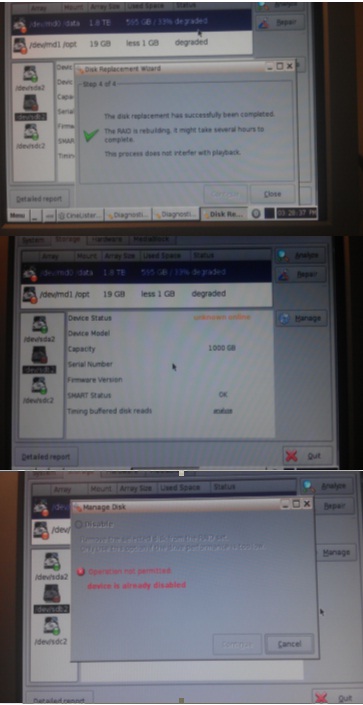
I followed the Doremi "repair" process which takes drive "B" out of service, swapped the disk, let it mount that drive and it said "The disc replacement has been successful - The raid is rebuilding" and a green tick
However when you go back to the diagnostic tools, the Raid says it is degraded and no drive info comes up, nor does it say rebuilding raid and a % done
Then I tried removing the Hitachi and swapping for a Doremi approved Western Digital BRAND NEW sealed 1TB drive and did the same process and again it said successful however it did't actually rebuild the raid again.
I looked in the Bios and also did a detailed report which i uploaded to Doremi and received the report back. It did claim it could see either of the new discs with correct serial numbers. However in diagnostic tools a yellow dot and degraded Raid status.
After all that went into drive manage and it said the drive "B" operation not permitted - Device already disabled
I have a photo (not too clear of the screens if that helps
Sorry that was a long one. I'm a bit stuck now.
Just out of interest, could I power off the server and fit three brand new matching drives, reboot and try build a raid to see if it can do that. Then if that didn't work simply power down and put the three original drives back in and be back where I was; or would it need to re-register the old drive, so to speak, thus possibly rendering them useless.
Sorry that was a long Post, but any help would be appreciated.
Posted by Danial Simmonds (Member # 4638) on 01-28-2014, 09:56 PM:
That's weird i never encountered this yet.
Anyway, replacing all 3 hard drives with identical ones, you can reinitialize the Raid, but this would make the server start fresh with no content in it.
If it doesnt work in the GUI, you could try to reinitialize using the terminal code sh /doremi/sbin/reinit_raid.sh
Refer to the installer manual it will have the instructions there.
reinitialize is not a raid repair.
Posted by Brad Miller (Member # 2) on 01-29-2014, 12:18 AM:
Assuming you have a TMS or the content backed up somewhere, really your best bet is to just re-initialize the raid and be done with it. Just back up your files first because they WILL be gone if you do this.
MENU / SYSTEM / TERMINAL
Type: su <ENTER>
Type the super user password which I will not post here <ENTER>
Type: sh /doremi/sbin/reinit_raid.sh <ENTER>
After a 10 second countdown, enter raid size “3”
The script will check disk status, size coherency, shut down services, etc. Let it do its thing until you reach “raid re-initialized”.
Type: more /proc/mdstat <ENTER>
Verify md1 = active raid 5
Verify md0 = active raid 5
MENU / DOREMI APPS / DIAGNOSTIC TOOL / Storage folder
Verify all 3 hard drives are green.
At the top of the screen “/data” and “/opt” will typically be orange. After several minutes a popup will appear “the RAID partition is now healthy”.
You may now re-ingest content.
Posted by Carsten Kurz (Member # 5396) on 01-29-2014, 08:11 AM:
Not exactly sure wether I really understood the procedures and timing involved - but it is natural that RAID repair will take quite a long time to finish, and for this time RAID status will still have to be degraded.
If you don't care about content on the drives, go ahead as the others advised and reinit the RAID completely. If you do care, insert the DOREMI supported drive, reboot, and try another repair and give it some time to finish (over night).
Take your time and read the manuals.
- Carsten
Posted by Gary Benn (Member # 7858) on 01-29-2014, 08:15 AM:
Carsten, Thanks for your reply.
When the raid is re-building a drive the status should change from degraded to "Rebuilding 33%" where the % being the percent completed. This is not happening in Steve's case.
Posted by Steve Moore (Member # 4753) on 01-29-2014, 12:07 PM:
Thanks for everyone's suggestions. Will have to make a return visit and further investigations. Will update you with any news. If anyone else has further thoughts I'd appreciate it.
Brad- sorry for the double post; as I posted my PC hung on the original thread (twice) so I thought I would restart. As it happened it did post after all. I wont do it again!
Posted by Amanda Mundin (Member # 3386) on 01-30-2014, 04:23 AM:
Our diagnostic tool screen looked like the 2nd photo recently, it had no information next to Device Model, Serial Number & Firmware Version the same as your picture, and when we tried to do a RAID rebuild it went through the rebuild menu and gave us the green tick like your 1st photo, but did nothing, and didn't bring up the rebuild (%).
We switched the internal SATA cable to an old yellow one, rebuilt the raid with the existing drive and it has worked since.
Posted by Steve Moore (Member # 4753) on 01-30-2014, 12:02 PM:
Thanks, Amanda, upon my return perhaps i will try both the original cables and get some more new ones too.
Posted by Carsten Kurz (Member # 5396) on 01-30-2014, 08:43 PM:
BTW - there is a nice and complete overview of all Doremi RAID conditions and how to solve them in this training-pdf (RAID issues from page 254):
http://support.doremitechno.org/images/Portal/Cinema_Players/Resources/doremi_training_slides_20121121.pdf
- Carsten
Posted by Steve Moore (Member # 4753) on 01-31-2014, 11:02 AM:
Thanks, that helpful Carsten.
Posted by Steve Moore (Member # 4753) on 02-08-2014, 03:22 PM:
So the next step in this saga is a return visit to the site this week, armed with three brand new doremi approved drives. So just to confirm with people who have tried this. All i need to do is swap the drives out, rebuild the raid and re-ingest content, right? All the macros, settings, I.P. details and 3D setting etc will still be in place as before?
I do plan to do a backup of all those to a USB stick too (as I know the normal backup in stored on the RAID)
Rebuilding the raid I presume automatically re-creates the two partitions the(md0/data and md1 /opt) itself?
Regards
Steve
Posted by Dave Macaulay (Member # 813) on 02-08-2014, 04:03 PM:
Yes, just reinitialize and it sets up both logical partitions. The macros, network settings, controlview stuff, and probably more are on the flash drive and don't get deleted. I'm not so sure of the playlists but I think they are OK as well.
Posted by Brad Miller (Member # 2) on 02-08-2014, 04:20 PM:
Steve, see my post above.
Posted by Dave Macaulay (Member # 813) on 02-08-2014, 08:18 PM:
You can initialize from diagnostic tool as well, or use the terminal command - same result. The only thing to keep in mind is that it will take maybe 5 hours to complete initialization. If a site tech has to do this I suggest they start it after the last show, it will be done in the morning and if there's a problem then time remains to do it over.
Posted by Steve Moore (Member # 4753) on 02-09-2014, 12:58 PM:
Trouble is i am projecting at my cinema the night before, so going over early next day and possibly stopping over. the plan is to put new discs in so if something does not work and can revert to old ones instead.
I will be doing through the diagnostics, Brad, unfortunately the installer has changed the su password from the normal one and wants to charge a fortune to change it back. I can get into diags with admin password.
Posted by Brad Miller (Member # 2) on 02-09-2014, 01:09 PM:
quote: Steve Moore
unfortunately the installer has changed the su password from the normal one and wants to charge a fortune to change it back.
It's YOUR company's server, right? You guys BOUGHT and OWN the server, NOT your installer, right?
It's not your fault they changed it. You shouldn't be the one being raped financially just to get it changed back. DEMAND they give it to you or travel on THEIR DIME to change it for you.
We went through this with some takeovers recently. Anyone who alters passwords is welcome to do so but MUST give it up or put it back themselves once they are no longer in the mix. Total bullshit.
You really should post whoever these installers are so other people can be warned to stay away from them.
Posted by Steve Moore (Member # 4753) on 02-09-2014, 01:24 PM:
Erm, yes I should, and before I dis them completely, i am going to try one last plead to swap it back/ give it to me/ remotely dial in. as im wasting plenty of time; thank goodness I installed my own machine myself so non of this shite.
The annoying thing is yes; this is our kit, which we bought and these machines were never on a contract with the installer, however they set it up (and never told us) with their "normal" password ready for if/when we took on a contract with them.
Im not asking for an answer here, however I had been doing some reading on over righting a linux SU password, though don't want to try it on a server that probably isn;t set up like a regular machine.
Just out of interest (and just looking for a yes/no answer here) has anyone ever managed to reset an unknown password on these things. Stress again, I dont want an answer posting on here!
Posted by Dave Macaulay (Member # 813) on 02-09-2014, 01:59 PM:
Linux is basically very secure. I don't know of any way to recover or change the su password without already having it; it's saved as a hash - not anywhere in the system as the actual password. A few attacks are possible but they won't be fast. You would have to boot to a live linux cd/dvd and do it from there, that would not disturb the server integrity (as far as I know!).
I'm with Brad, just get the new password and then change it back to normal: since the system should be isolated from the public internet this would be safe - and future techs won't have to face the same problem. Since you own the equipment, you can demand this... and there are legal options should they refuse, like suing for the lost revenue while you restore the system and while it's down but recoverable with the password.
Otherwise you need to go back to the "as new" state: there are a few ways to do this but ask Doremi about it if you have to. All your data on the flash drive will be lost but you can back up most of it as admin user, maybe all of it.
Posted by Marco Giustini (Member # 4544) on 02-09-2014, 04:01 PM:
I'm a little torn on the matter.
Yes, Brad is right, the server is yours and you should be able to use it.
At the same time your previous service company should not spend their own money to attend site because you wanted to change service company. And probably the password they use is the same for all their customers and they don't want anybody to know.
Doremi passwords are kind of public, even the root one can be found on the manuals. I wouldn't blame the previous company for choosing a new one.
What I believe they should suggest is for you to setup a laptop connected to the Doremi and the internet, they dial in and change the password for you.
But I feel I wouldn't blame the company to be honest.
Years ago I was looking after a network. I had setup some passwords on some equipment (you don't really want to leave the default ADMIN password on a router, do you?). Years later they changed IT guy. When they realised they could not access the router, they replaced it. They couldn't really blame me for the password and they were ashamed of asking me to go back and sort it out! ![[Smile]](smile.gif)
Posted by Brad Miller (Member # 2) on 02-09-2014, 05:27 PM:
Marco, it depends on the exact scenario.
If the guys installed the equipment without any sort of service contract with them, then they are absolutely in the wrong for changing the default passwords and not be willing to give it to them or change it back for them (regardless of how many other clients use their private passwords).
That jives with what Steve wrote above.
Now regardless, at this point he doesn't have access to his own equipment. If he went so far as to give them a TeamViewer login or something, then they really have absolutely no excuse not to take 10 minutes and correct their screwup. He shouldn't have to go to that much trouble though, as again they were never on contract in the first place. This screams to me nothing more than that company trying to force them to use their services...which is just wrong, wrong, wrong.
Now let's say they HAD a contract with them for service and he pulled the plug without warning. At that point he would be at fault, not the service company for cutting off their access and the service company should be paid to come out and restore default passwords. (Alternatively a TeamViewer login should be acceptable for them to remote in and put them back, provided they didn't skip out on their contract or bills.) That didn't happen though.
Posted by Pete Naples (Member # 761) on 02-10-2014, 01:22 PM:
I suspect I know where Steve's company got their equipment. And this scenario is very common indeed.
More than once on Doremi I've ended up changing the bootflash to get round this. The company in question absolutely will not reveal the password, I can understand why not. But I cannot understand, like Brad, why anyone thinks they have any right whatsoever to change the passwords on equipment not owned wholly by them.
We don't change passwords on DcineX provided equipment, not on equipment we supply directly. It's not ours to do that with.
Posted by Marco Giustini (Member # 4544) on 02-10-2014, 04:09 PM:
Brad,
We are on the same frequency.
Pete,
If the company in question is not willing to reveal the password, that's horribly wrong!
Posted by Dave Macaulay (Member # 813) on 02-11-2014, 11:02 AM:
I believe there is a bootflash recovery USB drive image available from Doremi that reprograms the existing flash card to a default state.
Posted by Marco Giustini (Member # 4544) on 02-11-2014, 05:38 PM:
Yes, it should be buried in the support website
Posted by Steve Moore (Member # 4753) on 02-13-2014, 01:06 PM:
Well, on the positive side (and thank you everyone for your help) at least on the machine with the degraded RAID, the Admin password works (the only one on the site) and after fitting three new drives and re-ingesting, the server is back to a fully working state with a healthy raid - so that was something good to come out of yesterday - play lists made up and tested with half an hour to spare before the first show.
As for the password, the plan is (at a time they are able to ) to remote into my laptop and hopefully reset the password.
Brad was correct in stating that these machines, for us at least, were never on a maintenance plan (might have been in their previous homes); but that aside, when we can't even log in as admin we are not even able to re-calibrate the touch screens which as they are quite a lot out of alignment, which is a bit of a problem. Fingers crossed that that will be sorted out too fairly soon!
Posted by Pete Naples (Member # 761) on 02-13-2014, 03:07 PM:
Steve, see your pms ![[Wink]](wink.gif)
Posted by Steve Moore (Member # 4753) on 02-14-2014, 11:50 AM:
Well more good news, the installer logged in today and did swap the passwords back to something we can now gain access with (at no charge); of course we have now changed them again ourselves.
Posted by Vegard Olsen (Member # 8102) on 02-16-2014, 03:53 AM:
It was possible to create a new "root" user using the account manager in Control Panel and then log in as that user in terminal and change the root password. Doremi might have fixed this in later software versions though.
Posted by Gary Benn (Member # 7858) on 02-16-2014, 09:29 AM:
That's true, but you can only do it with an administrator or root login to start with.
Powered by Infopop Corporation
UBB.classicTM
6.3.1.2