This is topic NTP fails to periodically update after inital sync. Frequency Error? in forum Digital Cinema Forum at Film-Tech Forum ARCHIVE.
To visit this topic, use this URL:
https://ft-forum.com/ft/cgi-bin/ubb/ultimatebb.cgi?ubb=get_topic;f=16;t=001802
Posted by Tim Hillstromb (Member # 8133) on 02-21-2014, 09:23 PM:
I recently started working in the projection booth at a local 16-plex and I was shocked to find staff manually starting shows due to a drifting clock, that would drift a minute or so a day unless the show server was reset Now, I don’t have a whole lot of projection or even job based IT experience, but I do have (what I would like to think) a head placed firmly on my shoulders and thankfully, some linux experience.
Configuration Information
- DSL100 TMS
- 16 Auditoriums, 14 running a DSS220/CP650/NA10 setup with a CP2230 Projector
- 2 running a DSS200/CP850/NA10 setup with a CP2230 Projector
- Server Software: 4.6.1.4
After fixing some blatant software misconfiguration issues
- DSL100 TMS configured for a non-existent NTP server
- Auditoriums configured to access external NTP servers they couldn’t access due to firewall
- IMB clocks that were off
Things are running much better, the theatre clock in the show manager always displays the correct time but the automatic starts (though much more reliable than they were) are still off, the main difference now being that a restart of the auditorium’s screen server fixes it, but only for a couple days or so. Some auditoriums are worse than others in this regard.
checking /status/log/ntp.log directly yields the most interesting info
quote:
timestamp ntpd[####] synchronized to 192.168.241.2, Stratum 2
timestamp ntpd[####] Frequency Error 502 PPM exceeds tolerance 500 PPM
After a server restart, ntpd successfully synchronizes with the TMS But every sync after that results in an error roughly every minute or so ~1h30m after start.
Looking this up, I can see that it basically means the local clock is too inaccurate for the ntp update to take, which unfortunately is why I need the ntp in the first place! Some of the non d-cinema sources I found discussing the problem state the error could be indicative of an issue with the clock hardware, which I find somewhat difficult to believe considering the same error occurs in all 16 auditoriums.
Checking the logs in the ShowManager GUI for the NA10, I see another interesting but potentially irrelevant line
Thread RealTimeSync: ntp: unable to bind to socket
Any Ideas?
Posted by David Buckley (Member # 2600) on 02-21-2014, 09:49 PM:
General advice on running ntp, I am currently cinema-less and yet to join the digital revolution...
Lets start with ntpq -p on the TMS and on a couple of the DSSs.
Can't bind to socket could be very bad; see what is bound to the socket by doing netstat -ap |grep ntp
The way you should have a network full of boxes configured for time is just one machine is the time master, and it syncs with external clocks, and then all your internal machines should just point to that one server. The way this is configured is the server keyword in /etc/ntp.conf.
Posted by Tim Hillstromb (Member # 8133) on 02-21-2014, 10:50 PM:
Thank you for the response David
The way I understand, dolby system software is designed to not allow me to enter those commands without root privileges, and according to this forum there is no way to legitimately obtain said privilege.
The account I am using has been given permission to execute pre-supplied scripts in the home directory, use cat or less to display a subset of the system logs, and ssh into the other networked boxes and do the same. I cannot even see the part of the filesystem the ntpd binary is on.
When I was troubleshooting the issue initially I configured all of the servers to contact the TMS for time, and the TMS to contact external server for time. Looking at the logs, it seems that the connection is being made at least once each start, but only the TMS has been keeping time. The DSSes are drifting as much as 5min in 4 days (usually less).
Posted by David Buckley (Member # 2600) on 02-21-2014, 11:35 PM:
That is indeed unfortunate; its rather hard to diagnose NTP driftiness (and many other problems!) with ones hands tied behind ones back. Sounds like you may be in a chroot jail.
As a longshot, one could try ntpq -p [ip_address_of_server] from a random "proper" linux box, or perhaps a Windows machine booted onto a linux live CD. Though its probable that the servers have been locked down to prevent this kind of remote query.
Properly configured NTP is not supposed to "set and forget", though many machines, particularly of the Windows variety, behave that way; ntp is supposed to keep the clocks syncronised together continuously by making tiny adjustments and comparing machine time to reference(s).
As a passing observation, the fact that sixteen machines agree the time and one doesn't could point to an issue with the TMS timekeeping. Alternatively, the Dolby software may cause the playback machine timekeeping to go wonky through the demands it makes on the hardware.
Posted by Steve Guttag (Member # 268) on 02-22-2014, 06:29 AM:
I have a bit of experience here...
First...get the local clocks on all servers as accurate as you can WITHOUT any NTP reference...this means disconnecting the "Theatre Network" cable (no need to configure the NTP out in the config script). Since you are using the DSL100 as your local NTP reference, that is the first thing that needs to be made accurate.
Dolby has always used the BIOS clock as its "Show Clock" so to get it accurate without an NTP reference, reboot the sever and on boot up, press (repeatedly) the <del> key until you get the BIOS screen. The clock will be in UTC time so you should only need to work with the minutes and seconds...again...get this as accurate as possible. <F10> out and let the DSL100 boot up fully. Then reboot it with NTP connected...during the boot up you should see when it connects to NTP and notes the offset to be applied...hopefully, it is less than a second out.
The DSL100 clock (as was the DSS100 and DSP100) were pretty accurate on their own. The same cannot be said of the DSS200 clocks...they are all over the place. The CAT745 clock shouldn't even be called a clock...sundials are more accurate than that.
For each server...again, disconnect the Theatre Network, and reboot the server...let it come up fully off network. Set the secure clock in the GUI (projector must be on). Try to get it as accurate as you can. On the CAT745s, it may have drifted fast (always fast) to the point it can't be set...if so, there is a CLI command that will let you adjust its range to something usable again. You'll need CLI administrator privileges to use it. Do an "ls" and the script will be apparent and will provide instructions. Once the secure clock is set. Reboot it up fully.
Now set the BIOS clock as was done with the DSL100 (again everything off of NTP) and let it boot up fully. Once you see everything on time in the GUI it is time to reboot it but with NTP connected. Presuming you have good NTP, within an hour or two, the servers should acknowledge good NTP (NTP Configured and NTP Connected should read the same IP address on all devices).
But wait...there is more!
Update ALL systems to System 4.7.1 (10)...this is VERY important. Aside from the other issues that exist in Systems 4.5 and 4.6 that 4.7 actually fixes, Dolby has dramatically improved the NTP function. It will poll NTP at double the rate to catch NTP drift and not let it get out of range. Only those BIOS clocks that are too hopeless will fall out of range and that is a case for a warranty replacement of the defective server (if they are still in the warranty period).
Once on System 4.7, periodically, particularly in the first couple of weeks, reboot the servers and library. System 4.7 will apply a clock drift offset (you can see this on the boot up.
And, of course, make sure your NTP source is steady. Dolby is a bit strict on NTP protocol. If the NTP source disappears for a small amount of time and the DSL100 doesn't get its update...you'll see EVERY sever complain about NTP issues and it will take a couple of hours of good NTP to calm them down. Since you say it is calling the DSL100 Stratum 2...I'm guessing you are having the DSL100 call out, directly to some master NTP source like NIST. I've found that to be less than reliable (not NIST but calling, directly out to a Stratum 1). They seem to get bombarded by everybody and every once in a while, when NTP is checked...it can't connect and you get the NTP connection warnings. I generally go for one Stratum down from a 1. Often that is as easy as having a PC on site talk to a site like NIST or use the ntp pool (and a pc can use a DNS to work with the ntp pool)...though you'll need to set up the PC to act as an NTP source and then have the DSL reference that clock. You'll then never see the NTP errors...everything will stay in good sync too. Naturally, you can also purchase an actual NTP source for the site...but that is typically more expensive and one has to set up antennas and such.
So, to refresh. Disconnect the Theatre Network...get both the secure clock and the BIOS clock set as accurately as possible and allow to boot up fully. Connect up a GOOD NTP source and reboot everything with that. Get to System 4.7 ASAP. In fact, it would probably be better to move to System 4.7 first. Oh, and once on System 4.7, those CAT745 HDMI ports will also work.
I also normally make sure that the ICP clock, projector clock and Enigma clock (if present), are also as accurate as possible...thus when looking at logs, everything lines up. Note, Christie uses the IMB clock as its clock so you'll see drift on your Christie TPCs as the CAT745 drifts...and it will and it doesn't use NTP though I wish it did...or at least reference the BIOS clock once it is set right).
Posted by David Buckley (Member # 2600) on 02-22-2014, 01:54 PM:
Flipping heck!
quote: Steve Guttag
Dolby has dramatically improved the NTP function. It will poll NTP at double the rate to catch NTP drift and not let it get out of range.
I must need a new set of glasses. I'm sure that says "Dolby has made the broken NTP implementation broken in a little different way".
Implemented correctly, NTP is really clever, and self-manages how often it needs to poll other time sources.
Steve's advice to have an on site NTP server is good though, and even more so if the servers are "picky". Go out and buy a raspberry pi plus case plus SD card combo, a USB power supply and cable, (all up well under a hundred bucks) peer it with two or three GPS clocks, hide it in a corner and forget it exists.
Here how my local timesource is performing:

This illustrates I'm synced with three stratum 1 GPS clocks (two in New Zealand, one in the USA), NTP has chosen to poll them once every 1024 seconds (it starts off at 64 seconds, and then adjusts as NTP gains confidence in the realative timekeeping of the local host and the external sources), and all the times for delay, offset and jitter are in milliseconds. The asterisk is the chosen upstream clock source, and the plus signs show that NTP believes these other sources are also acceptable.
This is pretty typical NTP, with the time on this host within milliseconds of perfection.
Posted by Steve Guttag (Member # 268) on 02-22-2014, 03:00 PM:
It is my belief that the BIOS clocks used in the servers are so wild that NTP has a tough time keeping them in line. The server will show that one has a good NTP source and the clock will drift anyway ("exceeds 500ppm"). To ensure a constant time-line, the clock can only be slewed to correct time (except, seemingly, at boot up).
Posted by David Buckley (Member # 2600) on 02-22-2014, 03:41 PM:
BIOS clocks can be problematic; I have an old PC in the garage that uploads weather data to the interwebs, and it has a knackered BIOS clock; it gets synced to network time every five minutes to try and keep it in line, and even so its gaining (average) about 5 seconds every 5 minutes!
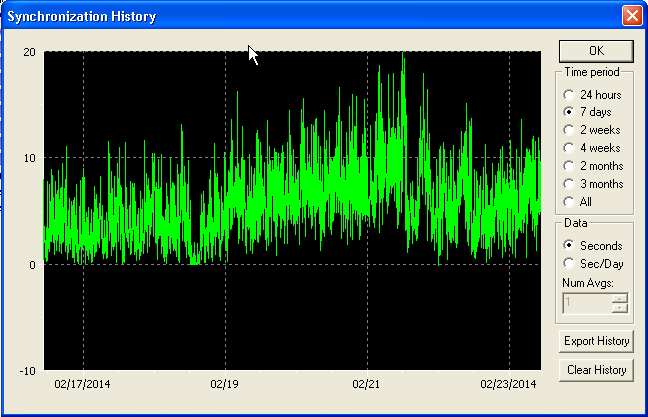
But this is a many old machine, and its running Windows, and I run a third party NTP client on it. This third party client is not proper NTP by any means, just grab and set...
Powered by Infopop Corporation
UBB.classicTM
6.3.1.2