This is topic DOLBY SERVER = QUESTIONS in forum Digital Cinema Forum at Film-Tech Forum ARCHIVE.
To visit this topic, use this URL:
https://ft-forum.com/ft/cgi-bin/ubb/ultimatebb.cgi?ubb=get_topic;f=16;t=001879
Posted by Allan Barnes (Member # 5178) on 04-28-2014, 06:39 PM:
I think I have 2 bad "Seagate" brand drives on my DSS100. Rebulding isn't working. CORRECT ME IF I'M WRONG. I must replace both DRIVES with exact same size 500Gb unit. But I can mix different drive manufactors.
Could I replace all 4 drives at the same time and increase each size to 1 TrB each?
Do I need software to format all 4 drives?
Posted by Brad Miller (Member # 2) on 04-28-2014, 07:07 PM:
You can throw any 500GB drives in there and let it rebuild. If you want more storage, you could replace them all with larger drives, but be forewarned you will need to run a "clean install" disc to reinstall the operating system.
If you are running 4.4 or less the max is 2TB drives.
If you are running 4.5 or greater the max is 4TB drives.
Posted by Steve Guttag (Member # 268) on 04-29-2014, 05:39 AM:
Brad, have you tried 4TB drive in a DSS100???? There are a percentage of DSS100s that can't even handle the 1TB drive...depends on the hardware inside.
Odds are, if you have two bad drives on that DSS100, you are at the clean install stage anyway. I would pull the logs and look at the SMART data to see which drives have issues. If you have one with errors that is preventing the rebuild...you can TRY to change just that one first to see if you can rebuild.
If you are doing an install, I'd get four 1TB drives (avoid Seagate is my opinion, I prefer the Hitachi and/or Western Digital). Dolby has an approved list.
Posted by Marco Giustini (Member # 4544) on 04-29-2014, 11:20 AM:
I believe Brad comment was about DSS200/220 since 4.4 cannot be installed on DSS100.
That being said: 4TB? The biggest drive on the qualified disk list is 2TB, are officially 4TB supposed to work with a DSS200/220? That would be a nice upgrade.
Posted by Allan Barnes (Member # 5178) on 04-29-2014, 11:30 AM:
Can I do a "clean install" myself or is it time for a service call? Considering the price of a 1TB drive and benefits therein - I think I'd buy 4 new larger drives.
Thanks all for advice
Posted by Phil Ranucci (Member # 3820) on 04-29-2014, 12:40 PM:
I just did this on a DSS200. If you're registered with Dolby they will send you an install file to burn to CD. Slow but it works. You will lose all content.
Posted by Steve Guttag (Member # 268) on 04-29-2014, 01:00 PM:
The DSS100 will work with Dolby software up to 4.7.2.1 (and there is a rumored "Last" software (again) that will be available for the DSS100/DSP100 though it should be in the 4.7.x variety. My guess is that they found something they needed to correct. 4.4.x was an awkward time when they were separating the DSS100 as the DSS200 was achieving DCI compliance. With 4.7.1, the DSS100/DSP100 achieves DCI compliance.
Since the question specifically states that they are working with a DSS100...hence my question of Brad's response.
I'm more surprised he didn't jump on the "teaser title."
Posted by Mark Gulbrandsen (Member # 72) on 04-29-2014, 01:17 PM:
I have had zero issues upgrading DSS-100's to 1 TB drives and several of the one's I've done are very very old. One was serial number 34! I do always use Hitachi drives though...
Mark
Posted by Marco Giustini (Member # 4544) on 04-29-2014, 01:19 PM:
It's not rumored, it's on the notification email: before the end of May, since June 1st is the end of support for DSS100.
Posted by Brad Miller (Member # 2) on 04-29-2014, 02:36 PM:
I have yet to find a DSS100 that wouldn't take drives larger than 500GB. I'm sure Steve has found some, but so far I haven't.
Regardless the comment was moreso based on software limitations, not hardware limitations. With v4.5 the firmware for the hardware raid controller card was updated and it will now see 4TB drives. Yes I have done this, and yes it works just fine. I don't think Dolby has officially endorsed specific 4TB drives yet, but if you have the need for a larger raid size and are willing to "take the risk", go for it.
Posted by Steve Guttag (Member # 268) on 04-29-2014, 05:01 PM:
Marco...to be clear...any software (or hardware) not physically out...is nothing more than a rumor...even from within the company and even if on official document. If it was ready for release, it would be already...if it isn't they are working on it and there may be additional delays that could cause a missed "desired" ship date.
As for the DSS100 running larger than 500GB...I haven't found any that wouldn't take them either. That said, people I trust at Dolby have claimed that there are some that will not so I have to take them at their word on that. What incentive would there be to lie?
We only have one DSS100 that is still on 500GB drives.
Brad, are you saying you've run 4TB drives in a DSS100?
Posted by Brad Miller (Member # 2) on 04-29-2014, 05:57 PM:
No, just a 200 in a special scenario.
Posted by Dave Macaulay (Member # 813) on 04-30-2014, 02:19 PM:
Allan:
I don't think there IS DCI compliant software for the -100 servers but if there is... beware: I don't think the #1 projector is compatible with DCI software (it has an old TI interface card) and you would need a new "gore board" to play from a DCI compliant server. If you do install DCI software you are stuck, it can not be reverted to a previous version.
I don't recall what interface card the drive-in projector has, DCI compliant or not. I think that's where you want to use the 100? Or is it a spare?
Posted by Steve Guttag (Member # 268) on 04-30-2014, 03:01 PM:
Dave Dolby 4.7.1.10 and 4.7.2.1 are both DCI compliant to the DSS100/DSP100. Unlike the DSS200, I'm pretty sure it is reversable.
Note, at this time, the DCI software is not enforcing the Gore Board thing (security enclosure armed). It knows if it is or not but I have systems running DCI software that are connected to non-DCI Series 1 projectors and everything works fine so long as projector will operate with Cinelink II TLS encryption.
Posted by Allan Barnes (Member # 5178) on 04-30-2014, 06:13 PM:
Dave... dolby dss100 dsp100 (2 screen - 2 systems) this is all for the drive-in with Barco 1500. I'll email you my repair list but I'm waiting the arrival of my BARCO SPECIAL EVENTS LENS before setting a date.
Still 35mm for May & June on release starting 2 May
Posted by Dave Macaulay (Member # 813) on 04-30-2014, 08:04 PM:
Steve - yes it's more that the older boards won't do TLS.
A Doremi engineer told me the non-reversible thing was official DCI policy - removable software could not be compliant - so I'm surprised that Dolby will allow it.
Posted by Mark Gulbrandsen (Member # 72) on 04-30-2014, 09:09 PM:
GDC is also reversible to 7.81 non DCI but only the tech support can do it. By remote, usually.
Mark
Posted by Steve Guttag (Member # 268) on 05-01-2014, 07:58 AM:
For GDC...it isn't just GDC's tech support but also authorized technicians.
If you check the release notes for 4.7.1.x...it makes no mention of the DSP100 being a 1-way upgrade. That is not the case for the DSS200 (CAT862).
If the studios were that worried...they could just make their DCPs only work on DCI compliant servers...thus you can downgrade all you want but they wouldn't play unless you were in DCI mode. As it is, you CAN turn TLS off and run unencrypted content on any projector.
As for the clock...the KDMs only care about the "secure clock" in any system. For Dolby, that has always been the Mediablock (DSP100, CAT862, CAT745). The Show clock can be any clock you want since the KDM is tied to a secure clock that has heavy restrictions on what it references from and how much it can be moved per year. You want to set your show clock to something other than local time...go ahead...it won't help you for your KDMs and when they expire.
GDC used to use their BIOS clock for their secure clock...for DCI...they had to move it to their mediablock to make it less accessable for DCI. GDC also seems to have only had the one clock to reference...for reasons beyond me (why not keep the show clock on the Bios clock)...so after they went to 8.01, the GDC...which used to lock onto NTP real well...now is typically about 15-seconds off (give or take 5 seconds). I believe it only updates AT SHOW START or it did when 8.01 up to build 108 was running. Not the end of the world but it seems odd that they could not let the show clock remain locked to NTP and let the secure clock just do its thing in the background for the KDMs. They could still have it check itself to NTP to stay accurate at show starts.
For the life of me, I don't know why Dolby can't have their CAT745 check itself to NTP periodically...it has the worst clock ever made...sun dials are better references. Compared to the DSP100 which was very accurate but at a price.
Posted by Steve Kraus (Member # 476) on 05-01-2014, 10:21 AM:
With regard to the end of support for the 100 coming soon, I presume that is referenced to when they stopped selling them. How many years has that been? When the time comes for the 200, is it likely to be the same time frame or might it be longer given the larger number in service?
Posted by Carsten Kurz (Member # 5396) on 05-01-2014, 03:21 PM:
The DSS200 is still being sold. That, of course doesn't make your question irrelevant.
I don't know if Dolby has a straight published or internal general timeline that would predict end of support deadlines for their digital cinema products. Given the way these products and markets develop, I would doubt it. I guess they decide on a case-by-case basis. Actual replacement part availability, remaining stock, failure rate estimates, etc.... As these servers are built in large parts from externally sourced general computer parts, they also depend on availability of parts that Dolby can not control themselves.
- Carsten
Posted by Steve Guttag (Member # 268) on 05-02-2014, 05:52 AM:
Steve,
I believe Carsten is correct on the end of life. It would really be on a case-by-case basis.
The DSS100/DSP100 ceased production in mid 2009 so we are talking about support 5-years after the last one came off the line and about 10-years after the first one...which for a computer based product is pretty good.
I think another issue on the DSS100/DSP100 system is that it was designed in a different era...before JPEG2000 was to become the standard...its content ingest was originally via the "Promise" drive, not the CRU...it had to live through the evolution to where we are now.
You then have the issue of having all software going forward being compatible with what is becoming an antiquated computer. At some point, having backwards compatibility in the software becomes a bit of a ball and chain. When a new version comes out, they have to test it on ALL previous models to see if a conflict pops up. As it is, there are some features that the DSS100/DSP100 system are already not supporting...like 4K and "I think" ATMOS.
The most likely things to fail in it are the HDDs, fans and the power supplies...both available in abundance still. I would say the real killer would be if the DSP100 fails internally...that would pretty much kill the system if Dolby won't repair it anymore since one CAN'T repair it themselves (beyond the fans)...it was designed to keep people from tampering.
Posted by Carsten Kurz (Member # 5396) on 05-15-2014, 07:56 AM:
Here is a recent statement from Dolby regarding drives >2TB on DSS200, after an incident of lost content:
---
Dear xxxxxx,
As you say, there is no trace of anyone having deleted the content manually, and no signs of it having been deleted by the system, so this was a bit of a mystery.
However, I notice that the server has 4x 3TB hard drives installed. The RAID controller in the DSS200 is not compatible with 3TB drives and can only address a maximum of 2TB of space on each drive. There are many errors reported in the RAID logs relating to the inability to access sectors of the drive and many disc checks being run which indicate problems. This will explain why content is going missing. I would recommend replacing the drives with 2TB maximum per drive.
---
- Carsten
Posted by Carsten Kurz (Member # 5396) on 05-16-2014, 05:41 AM:
And one more statement from Dave Edwards from Dolby:
---
The DSS200 will only address hard drives of 2Tb or smaller. There is no option for larger drives due to limitations of both the operating system and RAID card type. Using larger 2Tb drives will mean the RAID utilities like rebuilds etc may take a large amount of time to complete.
---
- Carsten
Posted by Brad Miller (Member # 2) on 05-16-2014, 01:21 PM:
quote: Carsten Kurz
There is no option for larger drives due to limitations of both the operating system and RAID card type.
Incorrect. I've done it, but you must be past version 4.5 which updates the raid card to a better version that was released last year and incorporated into the installer. Obviously it must also be a clean install, not some sort of upgrade/drive swap.
quote: Carsten Kurz
Using larger 2Tb drives will mean the RAID utilities like rebuilds etc may take a large amount of time to complete.
Well duh. Eating a 4 course meal will also make you poop more than if you just ate a candy bar too.
Posted by Sam D. Chavez (Member # 1841) on 05-16-2014, 02:58 PM:
Yech, but funny!
Posted by Matt Fields (Member # 3211) on 05-16-2014, 03:11 PM:
Tried to order a spare power supply for my DSP 100 (cat 901z) and Dolby told us they were out. Do any dealers out there have one in stock?
Posted by Carsten Kurz (Member # 5396) on 05-16-2014, 05:16 PM:
quote: Brad Miller
Incorrect. I've done it, but you must be past version 4.5 which updates the raid card to a better version that was released last year and incorporated into the installer. Obviously it must also be a clean install, not some sort of upgrade/drive swap.
Is that documented somewhere? Wondering why two different Dolby techs say it's not possible?
- Carsten
Posted by Marco Giustini (Member # 4544) on 05-16-2014, 05:58 PM:
I've recently updated a DSS200 from 4.3 to 4.8 and I believe the installer did not upgrade the controller FW. Maybe it depends on the board installed in the server?
Posted by Carsten Kurz (Member # 5396) on 05-16-2014, 06:47 PM:
A fellow tech tells me that both very old and recent DSS200 he looked into have the same LSI 3ware Raid Controller 9650SE-4LPML.
If you look it up, it quotes 64Bit addressing capability, that means, larger drives than 2TB should be possible.
I'm just wondering why these Dolby techs are so strict about it being not possible.
- Carsten
Posted by Brad Miller (Member # 2) on 05-17-2014, 12:08 AM:
quote: Carsten Kurz
I'm just wondering why these Dolby techs are so strict about it being not possible.
They don't want you throwing some crap-O drives in them and then barking at them that something didn't play right. The servers are tested with specific drives and anything else you do is "at your own risk".
You can also replace the 9650SE-4LPML raid card with a 9650SE-8LPML raid card and get double the storage. Here is a picture with 8, 2TB drives loaded into one.....
Double that if you go to 4TB drives! ![[Razz]](tongue.gif)
And if you're feeling particularly awesome, you can replace the raid card with a 9650SE-24M8 and add a 16 bay raid cage such as the Supermicro CSE-8361-R800B for a total of up to 24, 4TB drives totaling about 86,000GB!
(Disclaimer, I haven't actually tried the 24 drive theory yet. There could be some sort of limitation in the Dolby software, but it sure would be sexy.)
You just can't have any fun like that with those silly software raid servers.
Posted by Steve Guttag (Member # 268) on 05-17-2014, 07:54 AM:
Brad...but wouldn't that mean it would take longer to initialize?
A manufacturer's rep (any) can only recommend or authorized what the company has authorized. At the moment, Dolby is only issuing their servers with 2TB drives. When they test software, they only test it with 500GB, 1TB and 2TB drives because that is all they have issued with their servers. One reason, I'm sure, they are cutting off support on the DSS100/DSP100 is to remove the burden of testing all software on all of its permutations. As a company, they have to support their software on the hardware they supplied (approved). If you do something on your own, that is your business but you can't expect them to support your experimentations. And, you can bet if you have ANY problems, they will tie it all to the modifications you did.
Posted by Mattias Mattsson (Member # 4308) on 06-24-2014, 06:55 PM:
As a follow up: I have now successfully installed four 6 TB disks in a DSS200. Please see the attached picture.
To make it work you have to tweak the settings in the RAID controller BIOS and set "Boot Volume" to 16000 GiB (i.e. you waste approx 750 GiB). This is because Dolby is currently using a 32bit kernel and therefore the upper limit is 16 TiB. If you don't do this you get the "mount: file too large" error when the system tries to mount the partition.
XFS running with a 64 bit kernel can manage file systems as large as 18 Million TB (see: http://xfs.org/docs/xfsdocs-xml-dev/XFS_User_Guide/tmp/en-US/html/ch02s04.html ).
This server is running Dolby version 4.8.0(33) and using the 9750-4i RAID-controller. For reference, here is the output from tw_cli:
# tw_cli /c0 show all
/c0 Driver Version = 3.26.02.000
/c0 Model = 9750-4i
/c0 Available Memory = 488MB
/c0 Firmware Version = FH9X 5.12.00.013
/c0 Bios Version = BE9X 5.11.00.007
/c0 Boot Loader Version = BT9X 6.00.00.004
/c0 Serial Number = SV32213788
/c0 PCB Version = Rev 001
/c0 PCHIP Version = B4
/c0 ACHIP Version = 05000e00
/c0 Controller Phys = 8
/c0 Connections = 4 of 128
/c0 Drives = 4 of 127
/c0 Units = 1 of 127
/c0 Active Drives = 4 of 127
/c0 Active Units = 1 of 32
/c0 Max Drives Per Unit = 32
/c0 Total Optimal Units = 1
/c0 Not Optimal Units = 0
/c0 Disk Spinup Policy = 1
/c0 Spinup Stagger Time Policy (sec) = 1
/c0 Auto-Carving Policy = off
/c0 Auto-Carving Size = 2048 GB
/c0 Auto-Rebuild Policy = on
/c0 Rebuild Mode = Low Latency
/c0 Rebuild Rate = 1
/c0 Verify Mode = Low Latency
/c0 Verify Rate = 1
/c0 Controller Bus Type = PCIe
/c0 Controller Bus Width = 4 lanes
/c0 Controller Bus Speed = 2.5 Gbps/lane
Unit UnitType Status %RCmpl %V/I/M Stripe Size(GB) Cache AVrfy
------------------------------------------------------------------------------
u0 RAID-5 OK - - 256K 16763.8 RiW ON
VPort Status Unit Size Type Phy Encl-Slot Model
------------------------------------------------------------------------------
p0 OK u0 5.45 TB SATA 0 - HGST HUS726060ALA640
p1 OK u0 5.45 TB SATA 1 - HGST HUS726060ALA640
p2 OK u0 5.45 TB SATA 2 - HGST HUS726060ALA640
p3 OK u0 5.45 TB SATA 3 - HGST HUS726060ALA640
Posted by Leo Enticknap (Member # 534) on 07-20-2014, 12:19 PM:
In relation to Brad's comment, one of our theaters has a DSS200 (plus DMA8) that is currently on version 4.3.5.13. Our understanding is that we cannot update this to anything more recent, because the server is connected to a series 1 projector (NEC NC2500S), and this is the last version of the Dolby software that is compatible with it.
We have two festivals coming up within a week of each other in September, both of which will involve an assload of DCPs doing one-time shows. Preliminary estimates are that we'll be dealing with between 60 and 80 features, not to mention loads of shorts. Our current RAID capacity is 1.3TB. The last time we had a "DCP heavy" festival it was a nightmare, because the shortage of server space meant we were ingesting just in time, filmmakers wanting to preview a few minutes of their show a couple of days early couldn't, etc. etc.
Therefore, I want to put bigger hard drives in our server, and my boss has approved the expenditure (thank you Barbara! ![[Smile]](smile.gif) ). Brad mentions that 4TB ones are only supported by version 4.5 or later of the software. I therefore have two questions: is it indeed correct that we cannot upgrade our software to anything newer, as this will break the compatibility between our server and projector? If not, any suggestions as to which version we should update to would be appreciated. If it's true that we can't risk updating, what is the largest hard drive capacity that I can put in our servers?
). Brad mentions that 4TB ones are only supported by version 4.5 or later of the software. I therefore have two questions: is it indeed correct that we cannot upgrade our software to anything newer, as this will break the compatibility between our server and projector? If not, any suggestions as to which version we should update to would be appreciated. If it's true that we can't risk updating, what is the largest hard drive capacity that I can put in our servers?
Many thanks in advance.
Posted by Marco Giustini (Member # 4544) on 07-20-2014, 12:56 PM:
Go to System-Theatre Devices and check your 862 cinelink mode. If it says TLS mode, you are safe and you can upgrade to whatever you want. If it says anything different, you can try forcing TLS mode by command prompt. If that works, you're safe. If it does not you're limited to the version you already have.
Posted by Steve Guttag (Member # 268) on 07-20-2014, 01:27 PM:
As Marco says...the key is TLS mode. Put your DSS200 in TLS mode via CLI :
Log in as administrator, change to the scripts directory and use the linkencyrpt.sh script.
You may need to reboot both the server and the projector afterwards (it will prompt you to do this regardless). IF for some reason it does not work, don't give up hope yet.
Check some things...see if your TI board has its certificate...if you are on TI version 14.0, it should be there...if you've updated to one of the DCI compliant versions (15.1 is the latest) and you DON'T have the certificate, then you may need to recover it. But presuming that you do have the certificate...
Reinstall the CAT862 software using the Dolby Software Update utility and tick the "reinstall all components" That may restore a TLS session (I had a CAT862 give me grief until I did that...everything checked out but it would not work in TLS mode).
Once you establish you can work in TLS mode...then you may move your software version up (PERMANENTLY) to 4.8.1 and beyond.
Posted by Brad Miller (Member # 2) on 07-20-2014, 01:50 PM:
Leo, don't upgrade to 4.4.x (or higher). You're better off without the additional DCI security bs.
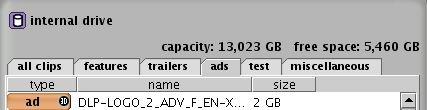
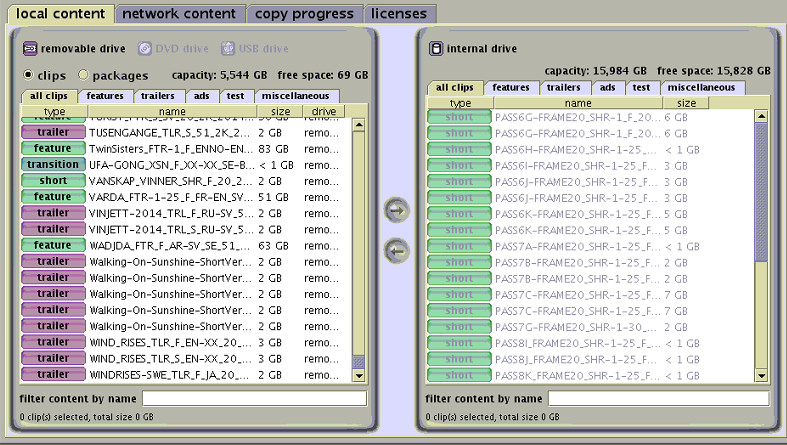
Instead buy 8 2TB drives and a 3Ware 9650SE-8LPML card such as this one. Then run a clean install disc of 4.3.5.13 and you're all set. You will have a usable capacity of 13,023GB and you won't have to bring about the unnecessary potential for quirkiness that comes with the additional DCI security of 4.4.x or higher. Trust me on this.

Posted by Marco Giustini (Member # 4544) on 07-20-2014, 03:29 PM:
Personally I would not modify the HW of a server. Any issue which turns up and Dolby will say "your controller is not supported".
4.8 will be slower than 4.3, but I can't really see the evil in it.
Thanks Steve about the TLS not working on the 862. Never happened to me, but if it did I'll keep your suggestion in mind.
Posted by Mattias Mattsson (Member # 4308) on 07-20-2014, 03:35 PM:
I agree that 4.3.5.13 is a stable version but there are real bugs fixed in later versions that are important if you are running a festival. Especially if you have DCP:s coming in from sources from beyond the large US studios.
These fixes are (among other things) related to subtitles and non-24 fps material.
Also, in my experience if you are running "strange" material (SMPTE subtitles, 25 fps, etc) it is always safer to run the bare clip rather than make it part of a playlist.
Posted by Steve Guttag (Member # 268) on 07-20-2014, 03:59 PM:
My usual comment on 4.3.5.x...build 9 was the best.
I definitely respect Brad's position on this one. However, for most of my customers, the benefits of 4.7 and beyond are too compelling to pass up on. We still have some that remain on 4.3.5.9 because the things that 4.7+ fix do not apply at those sites (yet). Note, in Leo's case, since it is a Series 1, there isn't an Enigma to fill up so one of the key things that 4.7 brought doesn't apply here.
There are valid points though on the frame rates and subtitle handling...particularly going forward as things move from interop to SMPTE. It isn't a matter of "if" but a matter of "when."
Posted by Mark Gulbrandsen (Member # 72) on 07-20-2014, 04:07 PM:
I have 4.7 running on two DSS-100's. No update key needed since it isn't updating the media block.
Mark
Posted by Marco Giustini (Member # 4544) on 07-20-2014, 04:19 PM:
Mark,
The DSP100 has been upgraded on 4.7.1 and 4.5. If you come from 4.3 you will definitely need a KDM for your DSP100.
Posted by Mattias Mattsson (Member # 4308) on 07-20-2014, 04:23 PM:
Dolby version 4.7.3.3 comes with DSP100 version 4.0.10.37 issued 2014-02-25.
Posted by Leo Enticknap (Member # 534) on 07-20-2014, 09:33 PM:
Many thanks everyone.
I'm next in that booth on Tuesday, and will check to see if the server is running in TLS mode. We have had problems with SMPTE subtitles in the past, and so updating our software is something we'll probably have to do in the end.
In the meantime, if I get and install 8 2TB drives but don't replace the RAID card, would I be right in thinking that this will give me around 14TB (RAID5)?
Posted by Brad Miller (Member # 2) on 07-20-2014, 09:44 PM:
Leo, if you don't replace the raid card, you will have 5.3TB of usable space. See my post above.
quote: Marco Giustini
Personally I would not modify the HW of a server. Any issue which turns up and Dolby will say "your controller is not supported".
Putting larger hard drives in is exactly the same thing Marco. "Those drives are not supported." For the record, it is the same model raid card, just capable of driving 8 drives instead of 4.
Posted by Leo Enticknap (Member # 534) on 07-20-2014, 09:56 PM:
Many thanks Brad. I am a bit cagey about making an unauthorized (as in, not OEM-supported) modification to such a mission critical machine, especially if this means that if it breaks down beyond our competence to fix, having an aftermarket RAID card in there would result in a Dolby tech refusing to touch it.
When you say that the OEM card can only support four drives, does this mean that although there are eight physical slots for hard drives in the machine, only the four on the left can actually be used unless I replace the RAID card? If so and if I put 2TB drives in those four slots, will I also get 5.3TB of usable storage? If so I think that's what I'm going to do. 5.3TB is 30 to 40 typical 2K features, which should let us get one festival load ingested before it starts. That in itself would be a huge step forward from the last one. Furthermore, if we ever did get into trouble, we could always put the original drives back quickly and easily (i.e. we wouldn't have to take the server out of the rack and perform internal surgery to replace the RAID card) before calling in "official" support.
Thanks again for everyone's help.
Posted by Brad Miller (Member # 2) on 07-20-2014, 10:59 PM:
quote: Leo Enticknap
When you say that the OEM card can only support four drives, does this mean that although there are eight physical slots for hard drives in the machine, only the four on the left can actually be used unless I replace the RAID card? If so and if I put 2TB drives in those four slots, will I also get 5.3TB of usable storage?
Yes to all the above, except I think you will find Dolby isn't a snooty company like some manufacturers. It isn't like you are changing to a different after market raid card. Again, you would still be using the same raid card. If Dolby stuck their nose up at that, they would also stick their nose up at the idea of using (as an example) Seagate 2TB drives instead of the OEM Hitachi 1TB drives. But if 5.3TB is enough for you, then that's the easiest way out. If you want to update and put 4TB drives in, you can do that too, but you must be on 4.5 or higher for that to work on a 4-drive raid.
Also before you go getting all clever and decide to put the original 4 drives into the 4 slots on the right, you should note that those 4 slots DO have power going to them, so you won't be "storing" that set of drives, you will actually be "burning life off of" that set of drives. It's best to keep them on the shelf labeled 1, 2, 3, 4.
Posted by Marco Giustini (Member # 4544) on 07-21-2014, 03:46 AM:
quote: Brad Miller
Putting larger hard drives in is exactly the same thing Marco. "Those drives are not supported."
Sure, that's why I would stick with 4x2TB from the approved list. I appreciate what you are suggesting will work but it's not something I would do.
Posted by Leo Enticknap (Member # 534) on 07-21-2014, 12:20 PM:
If this was a home theater setup or we had a spare DSS200 that we could simply swap into place in the event of any serious gremlins, I'd be all for upgrading the RAID card and going to an eight-drive RAID. However, it's running shows in a 600-seat downtown theater and it's mission critical, so I'm going to be ultra cautious and go the 4x2TB route, leaving the software as it is, for now. Quite apart from anything else, taking the machine out of the rack wouldn't be a quick or easy job, thanks to all the stuff around it. As one of my co-workers is going to be away for the whole of August and the show schedule is pretty demanding anyway, I'm not keen to bite off more than we can chew. During one of those weeks the schedule appears to be almost entirely 35mm, and that's when I've got in mind for installing the new hard drives.
I will check out whether it's running in TLS mode tomorrow. This will be useful to know, because if we run into SMPTE subtitle issues while testing any of these DCPs (and given that one of these festivals in September is Japanese and the other the Guadalajara festival, I suspect that this could well happen - we certainly had one subtitle-problematic DCP with the Greek festival a couple of months ago), then if we already have TLS mode, at least we have the option of a software update to solve that problem at that point. That would then give us the option of going to a 4x4TB RAID if we're still short of space. My gut feeling is that having 5TB to play with will take a lot of the pressure off, and should enable us to have all the DCPs ingested and playable (keys permitting, though thankfully, indie and festival DCPs tend to be unencrypted) at least a week ahead of time.
Thanks again for all the suggestions, especially the heads-up that slots 5-8 are powered and should be left empty.
Posted by Mattias Mattsson (Member # 4308) on 07-21-2014, 01:37 PM:
Note that as Brad wrote earlier you will need to use an install CD (you can burn one yourself from Dolbys ISO-file) when you replace drives as the OS is stored on the RAID-disks. (On the older DSS200 units, the kernel and initrd are stored on an IDE flash, but not the root fs).
Also note that along with DCPs, configuration settings like GPIO, serial commands, show playlists, network configuration etc. will have to be redone.
You can back up serial commands to an external USB stick but I know of no (easy) way to backup SPLs, GPIO-definitions or the other settings.
Posted by Leo Enticknap (Member # 534) on 07-23-2014, 12:36 AM:
No TLS, by the look of things.
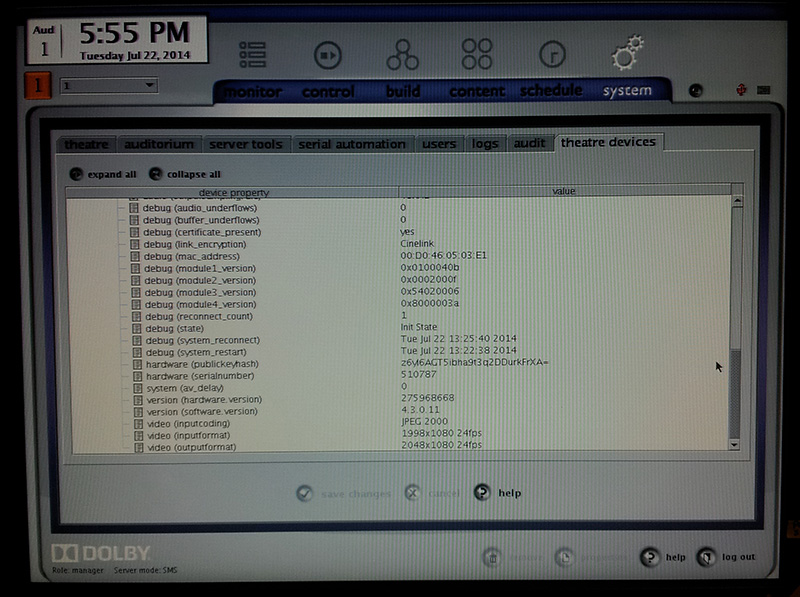
Anyway, I now have an ISO of the software version that is currently in use, and therefore am all set to install the new set of 2TB drives when they arrive. Thanks again for everyone's suggestions.
Posted by Marco Giustini (Member # 4544) on 07-23-2014, 03:09 AM:
No, it's Cinelink. You can change it temporarily by following Steve's advice.
The command is
./linkencrypt.sh TLS
reboot everything, if when it's back up it wouldn't connect to the projector, you can put it back to what it was with
./linkencrypt.sh DH
(if you just type ./linkencrypt.sh you'll have the available encryption types listed)
Posted by Steve Guttag (Member # 268) on 07-23-2014, 06:43 AM:
Note...he is on Cinelink 1 so to go back to that level it would ./linkencrypt.sh CINELINK.
The point is though...before you update, you have the ability to get back to safety of a working form of link encryption. With DCI, Cinelink II DH is no longer an option but I believe CINELINK is.
Posted by Marco Giustini (Member # 4544) on 07-23-2014, 04:00 PM:
Ops, sorry!
Posted by Leo Enticknap (Member # 534) on 07-23-2014, 06:29 PM:
Many thanks. I'll try this tomorrow. Just to be clear, if TLS mode does work, this means that I can update the software to whatever version I like and the projector will still be able to show what the server sends it through the dual-link SDI?
I have no immediate plans to update the software, but knowing that we can if we have a serious subtitle problem would be a weight off my mind. Thanks again.
Posted by Steve Guttag (Member # 268) on 07-24-2014, 06:44 AM:
Yes, if Cinelink II TLS works now...it will work in later forms of the software.
Posted by Antti Nayha (Member # 4980) on 07-24-2014, 10:59 AM:
Note that it's not only SMPTE subtitles. I recently ran into an Interop DCP where the subtitles refused to play in 4.3 because the subtitle file name had a space in it. That one wasn't fixed until 4.6.
Quoting myself from an earlier thread, with a list of relevant issues that I've encountered at festivals:
quote:
Fixed in 4.6.0 (32): "a condition where subtitle files with one or more spaces in the file/folder name could not be read and transferred to the projector."
Fixed in 4.7.0: "a subtitle font problem that occasionally occurred when ingesting content via FTP."
Fixed in 4.8.0 (33): "a subtitles problem for shows with both Interop and SMPTE content."
Not bugs per se, but improvements that have helped me:
- 4.4.2(?): mediablock forces a restart of the CineCanvas subtitle engine automatically, in case subtitles are dropped during playback.
- 4.7.0: content can now be ingested from an exFAT drive.
Posted by Mattias Mattsson (Member # 4308) on 07-24-2014, 04:02 PM:
There is also the problem of Interop (CineCanvas) subtitle font files larger than 640 KB.
Unfortunately there is no cure for this issue other then re-author the DCP or use a Series 2 projector.
EDIT: Or you could use the Subtitle Engine of a Doremi server if you have one. It's MUCH more robust then the TI subtitle software in the projector.
Posted by Marco Giustini (Member # 4544) on 07-24-2014, 05:37 PM:
I thought everybody was using Arial as a font for subtitles?
Posted by Mattias Mattsson (Member # 4308) on 07-24-2014, 06:15 PM:
quote: Marco Giustini
I thought everybody was using Arial as a font for subtitles?
Most are (but not all). The thing is, even if they are using Arial, instead of relying on the default font file stored in the projector almost all DCP:s come with their own font files (duplicates even, one font file for each reel!). Sometimes these files are over 640 KB in size and then they don't get rendered by a Series 1 projector!
The best thing you can do if you are running a festival is to check your DCP:s beforehand with Wolfgang Woehls excellent dcp_inspect ( https://github.com/wolfgangw/backports ). It warns you of this issue among many others.
Posted by Marco Giustini (Member # 4544) on 07-25-2014, 01:22 PM:
As far as I know the font file is required, not sure there are default files in the server.
Once I had someone complaining that a DCP was sometimes missing the subs. Found that the ttf file was not included (arial) and if the server had just been rebooted - and hence the cache cleared - the engine wouldn't find the file. If run after another subbed CPL, the server would find the previous, cached, ttf file.
I believe the font file is supposed to be there all the time. Not sure whether some foreign languages may need special subs, but I would use PNGs in such cases, to avoid trouble.
Posted by Leo Enticknap (Member # 534) on 07-25-2014, 01:24 PM:
Didn't have a chance to check out TLS mode last night. It was a high profile show: preview of Lucy with Luc Besson doing a Q & A afterwards and a studio tech run in the afternoon, and so I didn't want to do anything that stood even the tiniest chance of making the server play up in the run-up to that. I was intending to try it afterwards, but members of the audience were mobbing the poor guy for autographs and such afterwards, and by the time they were all out I was pretty tired and it was time to head home.
Saturday evening is a relatively early finish and just a routine show, and so I'll try it then.
Posted by Steve Guttag (Member # 268) on 07-25-2014, 01:43 PM:
A font file is required for each reel. Basically, if the subtitle calls for a font, it is to be there on each reel that calls for it.
Posted by Mattias Mattsson (Member # 4308) on 07-25-2014, 01:54 PM:
quote: Steve Guttag
A font file is required for each reel. Basically, if the subtitle calls for a font, it is to be there on each reel that calls for it.
That is not entirely correct. Please see section 2.7 of the CineCanvas spec ( http://www.dlp.com/downloads/pdf_dlp_cinema_cinecanvas_rev_c.pdf ):
"If no LoadFont element is present in the XML file, then a default font will be used."
Posted by Marco Giustini (Member # 4544) on 07-25-2014, 02:59 PM:
And the DCI say
quote:
In event that an external font file is missing or damaged, the subtitle rendering device is required
to use a default font supplied by the manufacturer.
Interesting. Unfortunately it does not work like that!
Posted by Mattias Mattsson (Member # 4308) on 07-25-2014, 03:09 PM:
I have seen Interop subtitled DCP:s in the wild without LoadFont elements in their XMLs and shipped without ttfs that got their subtitles rendered just fine.
Actually, these DCPs (Interop subtitled, intentionally shipped without ttfs) were the only ones immune to this Dolby bug fixed in version 4.7.0.42:
"DC-11977: Fixed a subtitle font problem that occasionally occurred when ingesting content via FTP."
This bug concerned ttfs not being copied to the correct location on the content partition (on ingest) which resulted in the TI software unable to render them because the http request from the projector was unable to locate the file.
Posted by Marco Giustini (Member # 4544) on 07-25-2014, 03:17 PM:
I see. Interesting.
Well, I guess it's a good practice to include the font file nevertheless. I guess the customer wants to make sure the subs are as they're during the QC session, and not what the "manufacturer" sets as default.
I see now what the problem was with my CPL: the file was mentioned, but was actually missing.
Posted by Leo Enticknap (Member # 534) on 07-28-2014, 12:44 AM:
TLS mode = no bueno. I suppose I could claim that it's a new experimental movie - a sort of film version of John Cage's 4'33", only with a black screen instead of silence - but I'm not sure that this would wash with our customers. All was OK when I went back to Cinelink, though. So it looks like we're stuck with this version of the DSS200 software basically for as long as we're using this projector, but given that it will support up 5.7GB of accessible RAID space, that shouldn't be a problem. Thanks again for everyone's help.
Posted by Steve Guttag (Member # 268) on 07-28-2014, 03:15 AM:
Leo...the next step should be to find out WHY TLS would not work. If your TI board is old enough, then that would be the reason. I've found that most series 1 machines can make the jump to TLS.
Posted by Marco Giustini (Member # 4544) on 07-28-2014, 03:33 AM:
Can you find out what TI board you have on your projector?
Posted by Leo Enticknap (Member # 534) on 08-07-2014, 10:11 PM:
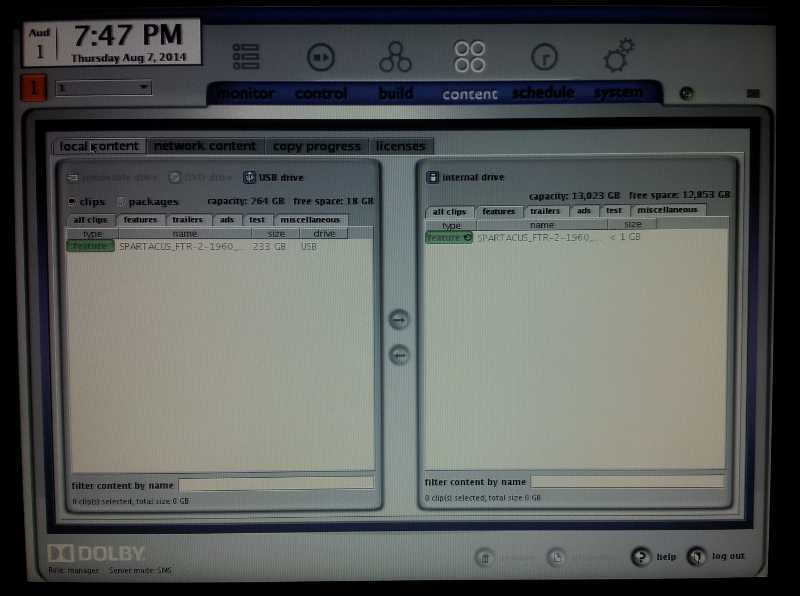
For starters, many thanks to Brad for his RAID upgrade to eight drives suggestion. In the end I took the plunge and did it, and it went without any problem whatsoever: the new drives are in, the same version of the software reinstalled and the RAID is now initializing itself (but it's still letting me ingest a feature while it does so, which is cool!). Communication with the projector and audio processor is good, and I've got a picture and sound on the screen.
The only heart-in-mouth moment was a relatively trivial one: I couldn't for the life of me find out how to set the date and time in Show Manager (I replaced the CMOS battery while I had the server out of the rack, and lost the date and time in the process). In the end I reset it in the BIOS during a reboot, and despite there being a lot of lines about security time violations during the boot process that followed, Show Manager is displaying the new date and time correctly. I'm guessing that Dolby doesn't want to make it too easy to do this in order to discourage people from trying to cheat expired KDMs.
The info I have under "Cinema Board" for the projector (showing in info tab in DCC) is:
Interface = Series 1S
FIB = EFIB
Formatter = DDP1000
Thanks again, Brad. Having that extra space will be a lifesaver for next month's festivals.
Posted by Steve Guttag (Member # 268) on 08-08-2014, 06:48 AM:
You can't cheat KDMs...they are based off of the secure clock and everything is in GMT so changing your time zone doesn't work either.
The Bios clock is the show clock and while in the BIOS it has to be set to GMT and in configuring your server on the "Theatre" tab, you set the offset.
As for your TI module...I'm pretty sure a 1S (type 3) should be good...in fact, I think Types 3-5 are the ones that should work with TLS just fine...the certificate has to be there. If you are not able to function with TLS...re install the CAT862 software and tick the "install all components" check box. Note you will lose your Dolby 3D settings. If you have Dolby 3D, you should save those settings before the update...what is needed is the transform matrix for the two eyes...the Mediablock software will allow you to save them as a text file and that is all you want. You do NOT want to use any save files you may have made that have a d3d extension...that file will load the problem right back in. The text file will just put in the Dolby 3D matrix.
Posted by Mike Renlund (Member # 4675) on 08-08-2014, 02:58 PM:
You may need to run the TI Series 1 Certificate Recovery Procedure. There is a bug that can prevent the Interface board from sending its certificate to the server which makes the TLS connection impossible. See your projector manufacturer's support site for more information about the procedure.
Powered by Infopop Corporation
UBB.classicTM
6.3.1.2