This is topic Barco DP2K Lamp not striking in forum Digital Cinema Forum at Film-Tech Forum ARCHIVE.
To visit this topic, use this URL:
https://ft-forum.com/ft/cgi-bin/ubb/ultimatebb.cgi?ubb=get_topic;f=16;t=001911
Posted by Geoff Power (Member # 6880) on 05-19-2014, 06:32 AM:
We have a recurrent issue with the lamp failing to strike on our Barco DP2K projector. The lamp is not halfway through its life and we always start from a clean boot-up of server and projector etc, but about 1 time in 3 when the Playlist starts in Doremi it reports an error of lamp failing to start, and often a red light on the back of the Barco. It's usually corrected by manually kick-starting the lamp in Communicator, but sometimes even that needs 2 or 3 tries. We've had a service and software upgrade, but no improvement.
The better "fix" is to fire up the lamp manually in Communicator before starting the playlist, but we're a small 'arthouse' cinema with a pool of 12+ volunteer projectionists who don't like manual interventions (some claim they don't work).
Any ideas what the problem might be ... and a fix?
Posted by Carsten Kurz (Member # 5396) on 05-19-2014, 06:48 AM:
Search the forum, there are quite a few threads on this. Barco has a recent software upgrade that improves the lamp striking. May solve your problem. What type of lamp is installed?
- Carsten
Posted by Gavin Lewarne (Member # 5397) on 05-19-2014, 07:00 AM:
We had this, tried everything
Switched from Osram lamps to Ushio, never a problem again
Check what brand you have installed and swap it as first step. Pretty sure everyone else will concur with that
Posted by Dave Macaulay (Member # 813) on 05-19-2014, 07:01 AM:
What projector model? What lamp model?
On the "B" projectors the SPG cover was causing strike failures and should be removed. If you take off the left side cover (the main black plastic cover) you should see the SPG (igniter) out in the open mounted near the back. If you see a metal cover hiding it, remove that.
On "C" models that is not a problem. Lamp striking has been an issue with them though. Barco changed the lamp start routine in a software update - make sure you have the latest version (1.11.133 currently).
I can't see automatcally blaming your projector for lamp strike failures if you have the cover off (B), current software, and sufficient exhaust flow. I would consider a lamp problem, and try a new lamp.
Some lamps don't make it through warranty hours. Make a warranty claim on the lamp if it refuses to strike.
Some Film-Tech regulars working with hundreds of projectors strongly favor Ushio lamps. If you're having this trouble with an Osram lamp ... it isn't too surprising.
You can revise your server and projector macros to ask for multiple lamp strikes. They should be about 5 seconds apart. Add a lamp start as line 1 in each projector macro then add a lamp on command at the end of your server startup macros. Lamp on commands don't cause any problems - or do anything at all - if the lamp is actually on already.
Posted by Geoff Power (Member # 6880) on 05-19-2014, 07:59 AM:
Many thanks for these invaluable comments (and yes, I normally do a forum search before posting - apologies!). Our projector model is 2K15C, and the support engineers did a software upgrade mid March - we can check if we now have v 1.11.133 and the make of lamp. Hopefully there's an answer here ![[beer]](graemlins/beer.gif)
Posted by Tim Sherman (Member # 569) on 05-19-2014, 09:52 AM:
This is happening with the Ushio lamps as well. Most Drive-Ins are running the DP2k-32B. The comment about removing the SPG metal cover is correct. The B series that have come out in the past couple of years don't include that cover, but the older ones did. The software updates have helped, but not completely eliminated the problem.
When you have the repeated lamp strike issues the bulb needs to be replaced. There is physical damage on the bulb that you can see. Usually a dark spot on the lamp envelope. Not the entire surface, just a spot. So far I hear that the bulb manufacturers have been good about warranty.
Posted by Steve Guttag (Member # 268) on 05-19-2014, 10:28 AM:
The only Ushio lamp I've heard of with any issue on longevity is the DXL-60BA2/L. We have not personally had this issue but I've heard it enough to believe that there could be something there...perhaps a bad batch that we missed.
Osrams...they are ALL junk.
Posted by Geoff Power (Member # 6880) on 05-19-2014, 11:37 AM:
Have confirmed we have v 1.11.133 software and the make of lamps is a Phillips, which has done 943 hours from 489 strikes and is showing as having 557 hours of life left. Our spare is no doubt Phillips too, but maybe worth changing anyway.
Posted by Steve Guttag (Member # 268) on 05-19-2014, 12:19 PM:
It is definitely worth adding a couple more lamp-strike cues to your automation or perhaps to the projector preset.
Posted by Pete Naples (Member # 761) on 05-19-2014, 04:21 PM:
Yup, we've seen this for a long time with Osram, now seeing it with Ushio, Phillips and Christie lamps too.
Perhaps the industry needs to move back to a T&R/Irem N3/Strong switcher with a good old fashioned Irem/Kinoton/Strong ignitor!
FYI we do not see the same ignition problem in Kinoton DLPs, regardless of the lamp brand. The few ignition issues we have seen in the Kinotons have had another bona fide cause. IE the sort of things you'd expect to cause ignition problems, rather than just a crap lamp.
Posted by Steve Guttag (Member # 268) on 05-19-2014, 04:27 PM:
The Barco ignition is definitely a little too persnickety. That is for sure. But it does not excuse Osram for making a crap lamp...and they do. I see Osrams "flame out" and don't see that from the others (or at least not Ushio).
Perhaps if Barco made igniters rather than Spark Gap Generators they would work better. ![[Big Grin]](biggrin.gif)
Posted by Tim Sherman (Member # 569) on 05-19-2014, 05:30 PM:
Most of the lamp strike issues in the Drive-in space have been with the DXL-65BA2. It also seems to have no connection to running at max or min power or CLO mode.
Posted by Adam Sherwood (Member # 7802) on 05-19-2014, 05:31 PM:
hi.. i had the same problem with the same model. dp 2k 15c. about half way tru its life the tech guys did an update which they said would help the ignition. actually managed to get this justup to 2250 hrs if i rember right.. yeah manually striking fixed it most of the time. at the time we had doremi running itself now we have a tms, and the lamps in all screens are set to stay on if gap between shows is 30m. this solved a big part of the lamp strike. esp on first show now after first lamp start its rare if ever had a problem with the lamp.. and at the time i had osrams in, now we have moved to ushio and are on our last few of them, have had so many problems with osram lamps, i currently have 4 in play 2k with 2200 hours, every few days one wont start but after geting it on the lamp runs fine and no power jumping and screen b is fine. due to change them soon . puting in ushio 2k. ... back to ur originally post u might try getting ur tech person to put in a setting that keep's th lamp on if the gap is only 20 mins or so this wil stop u having lamp striking issues between shows..
. ive found the ignition seems differnt on the barco dp 2k 23 b.. it seems to have a more powerfull start when striking.
Posted by Monte L Fullmer (Member # 2797) on 05-19-2014, 11:24 PM:
I have two, 15C's with DXL-20BAF/L bulbs in them with over 2400hrs with no issues. These "L" bulbs allow more warranty hours, where these bulbs mentioned above are warranted at 3200hrs.
How are the exhaust situations in all of these issues mentioned?
I'm having a slight issue with one 32B when the 65BA2 bulb gets close to 400hrs where I have to strike it manually on occasion when it fails on the initial strike from the cue and I get the 'lamp ignition failure' message.
I even took it out of CLO so I can adjust the amperage since I know that every large strike, it blows a small bit of tungsten off the end of the anode.
I also do keep an eye on the strike count along with hours.
Exhaust is adequate, but still wondering if I need to get a booster fan mounted on top to really pull the heat out of these 'big bad boys'.
Posted by Paul Maxon (Member # 6211) on 05-20-2014, 02:32 AM:
This seems to be a normal problem with Barco projectors. I was using OSRAM bulbs since they were the ones that came installed. Those didn't last but I just thought it may have been because they came shipped in the projectors from a very long way away. Nope, the brand new ones also failed at similar hours. I used a total of 17 or 18 of them(8 of which were included in the projectors) and only ONE of them made it to warranty hours. Switched to USHIO
After the latest barco update the striking is much more reliable, but that doesn't help when the crappy lamp goes out during the show. All the houses now have USHIO lamps in them and I have one that is starting to miss strikes now, but is stable once lit. But it is the 3D house so the lamp power is changed when the format is changed, so that could have something to do with it. I just redid all of my automation since we got a new advertising system installed, so I added an extra lamp on command.
Nothing like a OSRAM going out 20% into its life during the "Let it Go" scene of FROZEN with a sold out 200 seat house. That was the point I gave up thinking I was doing something wrong.
Just thought I'd share my story.
Posted by Antti Nayha (Member # 4980) on 05-20-2014, 09:57 AM:
Here's an earlier thread about this.
quote: Paul Maxon
I have one that is starting to miss strikes now, but is stable once lit. But it is the 3D house so the lamp power is changed when the format is changed, so that could have something to do with it.
I've had the dreaded Barco strike problem with several Ushio lamps, and this was in a house where we used to run 2D flat at minimum power and 3D at maximum power. I think it's pretty much accepted knowledge that going back and forth between the extremes is not exactly good for any xenon lamp... And as Pete suggested in the previous thread, particularly running at minimum power may cause strike failures in the long run.
Even when you're only using CLO to even out the difference between 2D flat and 2d scope on a common height screen, the power difference is quite substantial - let alone between 2D and 3D. Since I've found no way to restrict the CLO minimum and maximum power to something more conservative than Barco's presets, I've started to rely less on CLO and more on manual power settings.
For example, the aforementioned house uses an Ushio DXL-30BAF/L, which Barco's CLO happily runs at 1800-3000 W. I've now disabled CLO and set it up manually to always run 2D flat at 2000 W and 2D scope at 2800 W. Both 3D formats are also now being run at 2800 W.
The projectionists then focus the bulb z-axis manually to get maximum light output for 3D shows, and defocus it down to 14-16 fL for 2D. (The light uniformity is pretty good despite defocusing, although of course it would be nicer to have another lamphouse for 3D...)
This way, the lamp is never fed either extreme minimum or extreme maximum power. And although I lose about 0.3-0.4 fL in 3D (measured through glasses) because I run the lamp at 2800 instead of full 3000 watts, I guess this is evened out towards the end of bulb life, since avoiding maximum power makes it lose its brightness a bit slower.
So far so good, although it's a bit early to tell. Would be interesting to know if any of you guys with dozens of screens have tried something similar to combat strike problems.
Posted by Monte L Fullmer (Member # 2797) on 05-21-2014, 11:33 PM:
quote: Antti Nayha
The projectionists then focus the bulb z-axis manually to get maximum light output for 3D shows, and defocus it down to 14-16 fL for 2D. (The light uniformity is pretty good despite defocusing, although of course it would be nicer to have another lamphouse for 3D...)
I like this phrase if held true if projectionists are still in hire. But, with locations run by "suits" and floor staff, can one see any member of the above personnel perform these above techniques on a regular basis?
Thus, for this "new system of operation" we have nowdays, what would be the simplest "KISS" method to use to have the most effective usage with these BARCOS (since I have 15 of them and no booths to speak of.. ?)
EDIT: On this same topic of bulbs in general with these BARCOS: We all know that a xenon bulb works the best when in operation at 80% of it's rated wattage, then gradually work upwards when age gets on bulbs.
Now, in the CLO mode, the light sensor file has been set at a certain foot lamberts so the bulb ramps up automatically when age is gaining on the bulb itself. Yet, with some FL readings, that the bulb is operating way below the 80% run (e.g. a DXL-30BAF/L is only operating just about 2200 watts with a 14fl setting in the sensor file) making me wonder if I'm actually killing the bulbs running this low of wattage where I wish I was using 20BAF/L bulbs, but have too big of screens for this smaller bulb.
..or, am I just worrying about nothing and these bulbs can handle this lower wattage and still be effective throughout its warranty life.
-thx Monte
Posted by Antti Nayha (Member # 4980) on 05-22-2014, 02:35 AM:
I suppose that starting at 70–75% power and gradually raising by CLO should be OK for a 3000 W lamp. See this Manice article and Christie's "Best Practices" document.
If you have common-height screens, you're still faced with the problem of evening out the light levels between flat and scope without huge current changes. Cue Steve G with his recommendation to use automated anamorphic lenses to deal with that.
For 3D, I suppose the best low-maintenance option is to dedicate some of your auditoriums completely to 3D if programming allows that. Or use a dual-projector system, which has other advantages. Then there's always RealD XL, which helps you even out your 2D/3D light levels due to its superior 3D light efficiency - it's not without its problems, though.
Posted by Monte L Fullmer (Member # 2797) on 05-22-2014, 02:56 AM:
Thx for this added info from these two sites.
Makes sense even though I've seen some BARCO units never ramp up the amperage when bulbs get the age on them, but actually decrease amperage to where, in the service window to monitor the bulb run, the power scale is below the minimum wattage range.
This is when I'll take it out of CLO and go standard to manually ramp up some more power get some more light out of the bulb.
Posted by Antti Nayha (Member # 4980) on 05-22-2014, 03:05 AM:
Sounds like incorrectly calibrated or non-calibrated LSC files to me. I've never heard of that kind of problem with a correctly set up Barco CLO - not saying it's not possible though.
Posted by Monte L Fullmer (Member # 2797) on 05-23-2014, 12:27 AM:
After reading David's and Steve's post on adding multiple ignition cues, I tried it tonight prior to my late showings of X-Men:DOFP.
In the SPL build and before the lens cue, which contains the "lamp on" command, I added a 10sec Black MOS clip prior to this and added a "Lamp On" cue with a one second delay at the beginning of this clip to cure this hard strike issue with my 32B unit.
Works like a charm.
Posted by Steve Guttag (Member # 268) on 05-23-2014, 12:54 AM:
Monte,
Note, you can put the multiple lamp strike cue right in the projector macro too. If you have an automation that will do macros...again, one can add multiple lamp strike cues in there.
Posted by Brad Miller (Member # 2) on 05-23-2014, 01:02 AM:
Well Steve, Barco service said non-pleasant things to us about putting the lamp on command more than once in a projector macro...even though their very own training school recommended it.
If you're going to put it more than once in a projector macro, at least add a delay in there before the second one.
Posted by Marcel Birgelen (Member # 6801) on 05-23-2014, 03:07 AM:
quote: Brad Miller
Well Steve, Barco service said non-pleasant things to us about putting the lamp on command more than once in a projector macro...even though their very own training school recommended it.
Putting a few seconds between strikes sounds reasonable in all aspects, but...
Besides support just being support and bitching about some procedures only they know, what could be the potential problem with that? Are they afraid you damage either the lamp or igniter circuit in doing so? That might be the case if you put like 10 or 15 or so of those cues in a sequence, which would be pretty useless anyway. But it's not like it will try to strike again when the previous strike was successful...
Posted by Steve Guttag (Member # 268) on 05-23-2014, 07:59 AM:
Barco support actually recommended it to me. But yes, with a delay...I forgot to mention that but it should seem obvious that it be multiple attempts, not just some idiot hitting the elevator call button successively.
-Steve
Posted by Monte L Fullmer (Member # 2797) on 06-22-2014, 02:09 AM:
Back on topic on hard strikes:
UPDATE - I did make contact via email (support.digitalcinema.usa@barco.com) with BARCO on this hard strike issue.
Reply back was that they sent an .pdf attachment pertaining to the arc stabilizer magnet located in the lower half of the module.
That stabilizer magnet was known in copper rod, non-rotating carbon arc lamphouses to push the flame upwards from the gap for an even arc by increasing flux lines in the negative rod.
For if the magnet wasn't there, the flame would just "ball" in in the arc itself. Plus, the alignment was to keep the flame in the middle and not tilted off-center of the rod layout.
Same with xenon bulbs - flame must be pushed upward for proper operation and if magnet reversed, the flame will just gather around the electrodes and cause irregular burn.
BARCO will send the user a bar magnet with one end painted to recognize the North end of the stick, and the South end of the stabilizer magnet is to be on the left side facing the user for correct placement. One moves the red end of the test magnet to the left end to determine attraction or repel of the bar magnet.
One can prob do this with a compass to check magnet polarity placement - red end of the needle swings towards the magnet end for proper field attraction.
Some info to share - thx, Monte
Posted by Marco Giustini (Member # 4544) on 06-22-2014, 03:08 PM:
Are you saying Barco are sending magnets to users?
Posted by Steve Guttag (Member # 268) on 06-22-2014, 05:54 PM:
It is news for me. Normally, they would have an Info-T on such a thing. Then again, they should have an Info-T on the B series lens mount shakes too since there is an improved mount now.
Posted by Brad Miller (Member # 2) on 06-22-2014, 06:29 PM:
They did. InfoT1160. I'll email it to you.
Posted by Steve Guttag (Member # 268) on 06-22-2014, 07:03 PM:
How did you get it? I don't see it on "My Barco" with the rest of the InfoTs.
Posted by Brad Miller (Member # 2) on 06-22-2014, 07:05 PM:
They aren't exactly advertising it nor the lens mount issue, as both were screw-ups from the manufacturing plant, but they have been honoring the warranty on them without a fight by sending what's needed to fix it (even though the tech time is on us).
Posted by Steve Guttag (Member # 268) on 06-22-2014, 07:24 PM:
That is just it...most of the InfoTs are basically admission of a problem. I've had them honor an InfoT on a DP100 as recently as last year! It was LONG out of warranty. Generally speaking, an InfoT means that they will fix the problem, regardless of age.
Posted by Jason Raftery (Member # 6291) on 06-22-2014, 07:48 PM:
To clarify, the issue is the stabilizer magnet was installed backwards in some DPxK-32B lamp houses. The check magnet will allow one to verify and correct the issue in a couple minutes per lamp house.
It is my understanding only diecast 32B lamp houses are affected--the older sand cast design did not have this problem and 23B, C-series, and S-series lamp houses do not have the magnet and are thus unaffected.
Posted by Marco Giustini (Member # 4544) on 06-23-2014, 03:39 AM:
Brad,
Any chance you could send me that info-T as well?
Thanks
Posted by Pete Naples (Member # 761) on 06-23-2014, 07:35 AM:
Likewise, we have a lot of Barco kit out there.
Posted by Steve Guttag (Member # 268) on 06-23-2014, 12:37 PM:
Since it is an official InfoT...odds are it will either show up on My Barco or you could request it from the horse's mouth.
Posted by Monte L Fullmer (Member # 2797) on 06-23-2014, 01:50 PM:
Since I also have the InfoT1160 pertaining to this magnet issue, I could send it out if needed.
Posted by Pete Naples (Member # 761) on 06-24-2014, 02:23 AM:
From Barco,
"This info-T is only applicable for customers that are using the Large Lamp houses for projectors from the type ' 32B '.
Therefore is this info-T only forwarded to customers that are having issues with this type projectors."
Posted by Monte L Fullmer (Member # 2797) on 06-24-2014, 03:23 AM:
... in which there are four 32B installs in my area this last two years.. and I take care of the four units!
Why I'd better order the magnet (or find a compass), for I know of two of them have strike issues.
Posted by Ken Lackner (Member # 1002) on 06-24-2014, 09:36 AM:
Regarding removal of the SPG cover on the B series, is this an "if it ain't broke, don't fix it" situation? I have a 32B that has been in service for nearly four years and have never had lamp strike issues (at least not that have ever been reported to me), and it is old enough that the SPG cover is installed.
Posted by Monte L Fullmer (Member # 2797) on 06-24-2014, 12:57 PM:
Way it should be-no hard strike issues.
The document mentions this magnet placement error of 32B units manufactured within the last year and the two 32B's of mine were manufactured in the spring of 2013..what started all of this to where I found the email address to send to Barco on this issue since I was hitting dead ends everywhere.
Posted by Antti Nayha (Member # 4980) on 06-24-2014, 06:21 PM:
quote: Ken Lackner
Regarding removal of the SPG cover on the B series, is this an "if it ain't broke, don't fix it" situation? I have a 32B that has been in service for nearly four years and have never had lamp strike issues (at least not that have ever been reported to me), and it is old enough that the SPG cover is installed.
Our Barco supplier told me that there's no harm in removing the SPG cover, so you might just as well do it on all the B projectors that still have it.
Also, the release notes for the latest Barco software (1.12.160, out for some weeks now) include a "lamp strikes are improved" line once again - so apparently they have improved the strike routine further since 1.11.133 last year.
Posted by Ken Lackner (Member # 1002) on 06-25-2014, 11:17 AM:
The question isn't whether there's any harm removing it. Obviously not since the Info-T says to remove it. The question is whether there's any harm in NOT removing it if that projector has never experienced strike issues.
Posted by Steve Guttag (Member # 268) on 06-25-2014, 05:48 PM:
With it in place, there is always the chance that it will arc to the cover rather than strike the lamp. So it is better to remove it since it offers no improvement.
Posted by Justin Hamaker (Member # 2165) on 06-25-2014, 05:58 PM:
Regarding the check magnet: I called Barco today (6/25/14) to order one. They do not have them in stock yet and do not have a shipping ETA. They did create a ticket for me, so presumably one will ship when they come in.
Posted by Chris Markiewicz (Member # 1415) on 06-25-2014, 06:37 PM:
I ordered 2 small bar magnets from Edmund Scientifics, since Barco had no magnets available. We converted 33 screens last year with 32Bs; all magnets were reversed.
Posted by Monte L Fullmer (Member # 2797) on 06-25-2014, 09:17 PM:
Going to head to Wally World and get a compass from their Sports Dept. I bet mine are reversed also.
Posted by Monte L Fullmer (Member # 2797) on 06-26-2014, 02:39 AM:
Yep ..they were... !
Posted by Monte L Fullmer (Member # 2797) on 06-27-2014, 01:47 AM:
Okey, got my magnet issues solved and glad to see that I'm not the only one with reversed magnets. Thus this is the end of this magnet topic.
But a question arises: Why doesn't the other modules require the magnet since it's basically no different than the 32B's module outside of running a much larger bulb?
thx - Monte
Posted by Steve Guttag (Member # 268) on 06-27-2014, 06:33 AM:
You'll find that is the rational...the larger lamps need more arc control than the smaller lamps with their much shorter arcs.
Personally, I've always questioned why there were not magnets and a means to see how the arc is performing like we had in the film lamphouses.
Posted by Antti Nayha (Member # 4980) on 07-08-2014, 10:13 AM:
quote: Antti Nayha
Since I've found no way to restrict the CLO minimum and maximum power to something more conservative than Barco's presets, I've started to rely less on CLO and more on manual power settings.
For example, the aforementioned house uses an Ushio DXL-30BAF/L, which Barco's CLO happily runs at 1800-3000 W. I've now disabled CLO and set it up manually to always run 2D flat at 2000 W and 2D scope at 2800 W. Both 3D formats are also now being run at 2800 W.
Well, what do you know: Barco's new software (1.12.160) has changed the minimum/maximum wattages to more conservative values. At least the DXL-30BAF is now shown to have a range of 1960-3000 W in Communicator, instead of 1800-3000 W. On top of that, even when you try to set the lamp power to maximum manually, it already maxes out at around 2830 W!
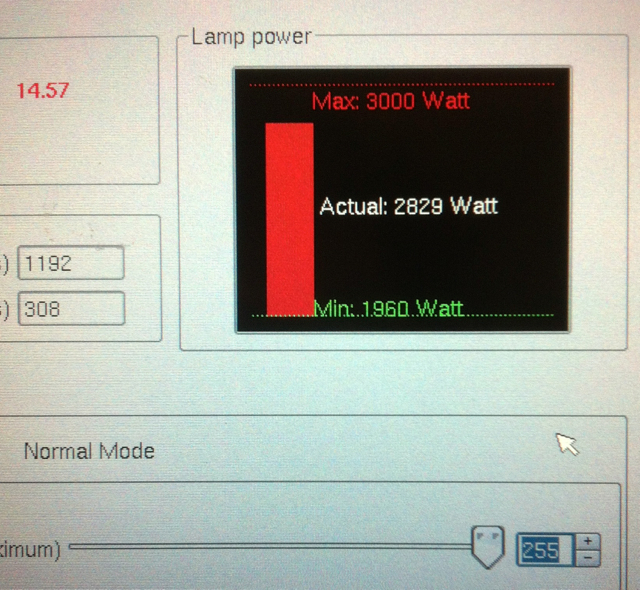
I had to tweak my manual (non-CLO) settings, since the 0-255 scale doesn't mean the same thing anymore. For example, 205 used to correspond to 2800 W; now I have to go up to 245 to get 2800 W.
Lamp power changes are now also ramped more slowly, compared to the instant current change that has been the Barco tradition. Presumably both changes will help somewhat with premature strike/aging issues.
Edit: in my earlier post, I misidentified the lamp as DXL-30BAF/L... it's actually DXL-30BAF - for a little while longer, until we run out of those soon and move permanently to BAF/L's.
Edit 2: anyone care to check whether the maximum power is also reduced with larger lamps?
Posted by Steve Guttag (Member # 268) on 07-08-2014, 12:36 PM:
If you have a user level sufficient, you can go to the Installation>Lamp>Light Output and see both power and current for the lamp. Barco is set up such that any parameter can restrict the range (wattage, voltage or current).
If you go to the Installation>Advanced>FileManager screen...on the projector files...select the "Lamp files" There you will see all of the lamp files that have been installed. You can then select the one of interest, move it over to your computer and use your favorite text editor to see what the parameters are.
So you can satisfy your own curiosity as to what each file has in it.
This begs the question...can you modify one of those files to your liking and send it back over...the answer is mostly no! You can't send one of their files back, they are protected. But there IS a means to create your own (at your own risk, of course). For that information though, you will need to speak to Barco.
Posted by Antti Nayha (Member # 4980) on 07-15-2014, 08:11 AM:
quote: Steve Guttag
If you have a user level sufficient, you can go to the Installation>Lamp>Light Output and see both power and current for the lamp.
Yeah, sure. At 255 manual power, the current reaches 2830 W and 104 A.
After some further playing around with the new software, I noticed that the new limitation is only in effect in the "normal mode". In CLO mode, the DXL-30BAF will happily run at 3000 W (and a bit more).
quote: Steve Guttag
If you go to the Installation>Advanced>FileManager screen...on the projector files...select the "Lamp files" There you will see all of the lamp files that have been installed.
Why am I not seeing a "Lamp files" directory in the File Manager? ![[Confused]](confused.gif) That was the first place I looked, but since they weren't there, I figured that the lamp files are hidden somewhere in the Barco sw package with no way to look at them...
That was the first place I looked, but since they weren't there, I figured that the lamp files are hidden somewhere in the Barco sw package with no way to look at them...
Posted by Justin Hamaker (Member # 2165) on 03-23-2015, 03:28 PM:
I was just curious to know what the results were from flipping the magnet? Are you seeing longer lamp life?
Posted by Chris Markiewicz (Member # 1415) on 03-23-2015, 11:20 PM:
Yes, all bulbs are now reaching warranted hours. No more hard striking, and little if any wear on the electrodes. Very little darkening of envelope.
Posted by Sam D. Chavez (Member # 1841) on 03-24-2015, 12:06 PM:
Does anyone have the field bulletin detailing the test to determine whether the magnet is reversed? I've lot track of my copy and having trouble finding it on Barco's site?
Posted by Steve Guttag (Member # 268) on 03-24-2015, 12:42 PM:
It is InfoT-1160.
Posted by Mark Wylie (Member # 8794) on 03-27-2015, 02:30 AM:
Hi I'm a newbie to DCI, so apologies if I am speaking out of turn. Although I have not had a lamp strike issues with Barco, I have had IP strings between an automation controller and projector fail - the projector accepted some commands but not others, it was random. So we changed to RS232 and now every command string is acknowledged and carried out. With IP commands if the PJ misses part of the string its lost.
Probably nothing to do with your problem and we don't have Doremi but the ICMP.
Posted by Pete Naples (Member # 761) on 03-27-2015, 03:15 AM:
It's possibly opening the port, sending the string and closing the port again too fast for your automation.
Have a seek around these forums, there's a solution that works with Doremi and should work with strings in general.
Powered by Infopop Corporation
UBB.classicTM
6.3.1.2