This is topic Barco "s" series - USB communication in forum Digital Cinema Forum at Film-Tech Forum ARCHIVE.
To visit this topic, use this URL:
https://ft-forum.com/ft/cgi-bin/ubb/ultimatebb.cgi?ubb=get_topic;f=16;t=001916
Posted by Dave Macaulay (Member # 813) on 05-26-2014, 02:33 PM:
Barco DP2K-8s/10s projectors do not have a serial port connection (except through the touchpanel cable which I don't have). The manual says the USB "B" connector can be used for control but it is called "virtual comport RS232".
Has anyone tried using this connector for projector control/setup, and if so... how do you do it? It's a holiday and the tech on duty at Barco doesn't have the answer.
Thanks!
Posted by Steve Guttag (Member # 268) on 05-26-2014, 03:06 PM:
Out of curiosity, have you tried hooking up a computer to it via USB and then seeing what options show up in the serial drop-down box? I would give that a try. Definitely have the latest Communicator, 4.8.13 when you give it a go.
Posted by Marco Giustini (Member # 4544) on 05-26-2014, 04:25 PM:
Interesting, I was wondering how to connect to a Barco S when the IP was unknown. Let us know!
Posted by Carsten Kurz (Member # 5396) on 05-26-2014, 04:45 PM:
Could be one of the popular USB->RS232 converters built in, so that you're able to connect to the Barco without a notebook with physical COM Ports. In that case you would see a driver installation popup when plugging the cable in. Or, you have that particular chipset driver already installed from a previous converter installation (Prolific, SILABS, FTDI, etc.) and the Barco then would simply show up on a virtual COM Port. Just give it a try and look into windows' device manager.
If the Barco implements it's own USB-Serial Bridge, then a recent version of Communicator would need to have a driver built in the software or the installation routine.
- Carsten
Posted by Pete Naples (Member # 761) on 05-26-2014, 05:44 PM:
Carsten may well have it.
You plug it into your laptop, run DCP Communicator, you'll notice that you can select a serial port you didn't have before.
Posted by Dave Macaulay (Member # 813) on 05-27-2014, 08:01 PM:
Nope. Windows doesn't even notice anything is plugged into USB, no "installing new device" popup, no unknown device in device manager.
Posted by Pete Naples (Member # 761) on 05-28-2014, 12:38 AM:
Windows doesn't report anything for me either Dave, I mean a serial port you didn't have before in DCP Communicator. I'll take a screen grab next time I'm near one.
Posted by Carsten Kurz (Member # 5396) on 05-28-2014, 02:18 AM:
I know FTDI has devices that report as generic HID devices with no explicit installation dialog - like a keyboard or mouse. It's there, but not as an unknown device.
Then an application can use internal drivers to access it.
- Carsten
Posted by Marco Giustini (Member # 4544) on 05-28-2014, 05:26 AM:
I haven't checked myself but last time a device was not listed on the device manager I found it under "devices and printers"
Posted by Dave Macaulay (Member # 813) on 05-28-2014, 09:04 AM:
Nothing found in device manager, no new ports in communicator. maybe someone at Barco knows but no answer yet. The tech I spoke to did say there were no drivers that would load on connection, just that there was "some way" to use the USB as serial.
If I can get that devilish round touchpanel connector I can make a serial cheater cord.
Posted by Pete Naples (Member # 761) on 05-29-2014, 12:28 PM:
I'm with a 8S tomorrow morning, I'll have a look at how it works. I've never given it any real thought as it's always just worked for me.
Posted by Marco Giustini (Member # 4544) on 05-30-2014, 05:15 AM:
Cool, it installs a device called "USB <-> Serial" and a "USB Serial port" shows up in the device manager.
Very clever. Windows 7 found the drivers itself, not sure if they come with Windows or with Communicator.
Posted by Pete Naples (Member # 761) on 05-30-2014, 12:12 PM:
Or are on the projector?
I'll put the screengrabs up in due course.
Posted by Carsten Kurz (Member # 5396) on 05-30-2014, 02:11 PM:
port driver properties should indicate which kind of device it is, e.g. Manufacturer ID.
- Carsten
Posted by Marco Giustini (Member # 4544) on 05-30-2014, 05:25 PM:
I don't think a driver could be downloaded from the device you need the drivers to connect to!
I am not sure if it got the drivers from Windows Update or from the OS, I wasn't looking.
Posted by Steve Guttag (Member # 268) on 05-30-2014, 05:44 PM:
I will post screen shots later but...
Yes...it is pretty much automatic. I used a Win 7 pro, 64-bit machine. I was using Communicator 4.8.13. I left Communicator off while the drivers were loading.
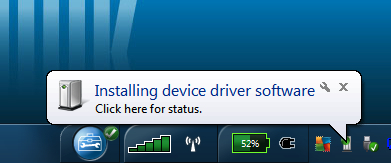
Upon connecting the USB...I got the "loading new device" thing in the tray.
Then it wanted to search the internet for the driver (USB<>serial)
Upon finding that it loaded another driver also seemingly relating to a serial driver.
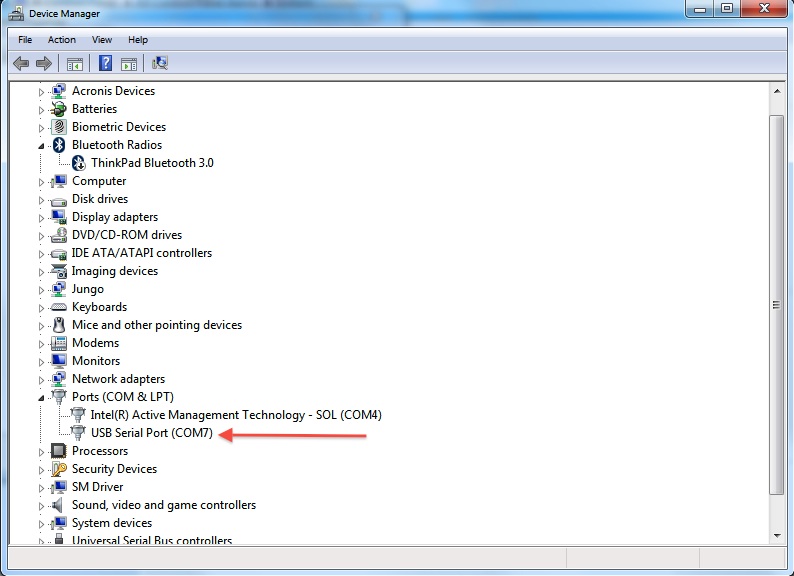
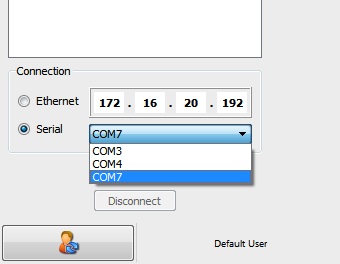
Once all of that was done...I had a "new" com port...in my case, COM 7 that was not there before.
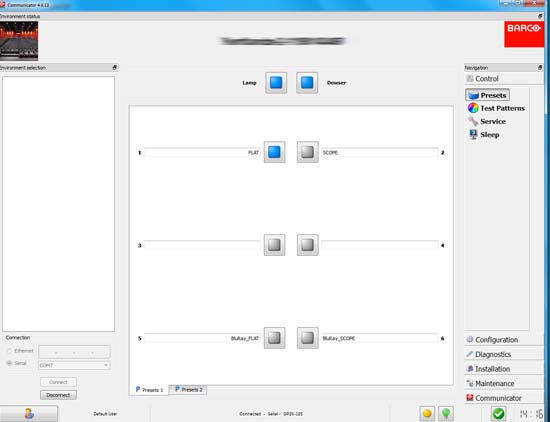
Then, selecting COM 7 I was able to talk to the 10S via USB.
Again, I'll post screen shots later
Posted by Marco Giustini (Member # 4544) on 05-31-2014, 06:33 AM:
I am still at 4.7.9
Posted by Steve Guttag (Member # 268) on 06-05-2014, 06:42 AM:
Okay...here are the screen shots:
Upon plugging in the USB cable I got this in the System Tray (again, Windows 7 Pro, 64 bit).
After that, I clicked on the icon in the tray to see what it was doing:
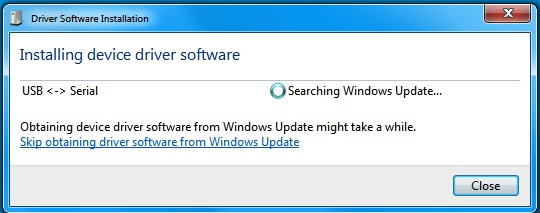
Followed by:
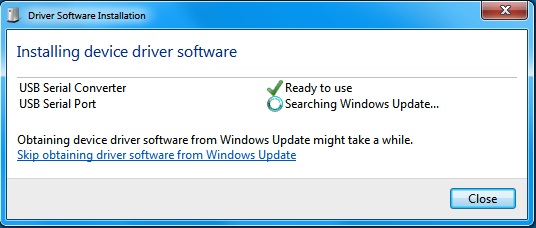
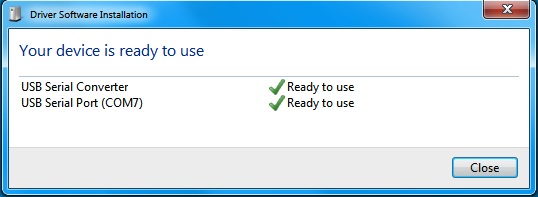
Then Checking in the Device Manager I have a new COM port, COM 7
Now in Communicator, a new COM 7 port is available:
So finally we are connected serially:
Posted by Pete Naples (Member # 761) on 06-05-2014, 12:29 PM:
I must have had the the same process, just never noticed it happening, or can't remember (small boy child has killed what memory I had!).
Powered by Infopop Corporation
UBB.classicTM
6.3.1.2