This is topic dcp-o-matic recommended audio levels in forum Digital Cinema Forum at Film-Tech Forum ARCHIVE.
To visit this topic, use this URL:
https://ft-forum.com/ft/cgi-bin/ubb/ultimatebb.cgi?ubb=get_topic;f=16;t=001918
Posted by Frank Cox (Member # 6258) on 05-27-2014, 07:31 PM:
I have just started playing with dcp-o-matic and have a question about the recommended audio levels.
The example in the manual shows this:
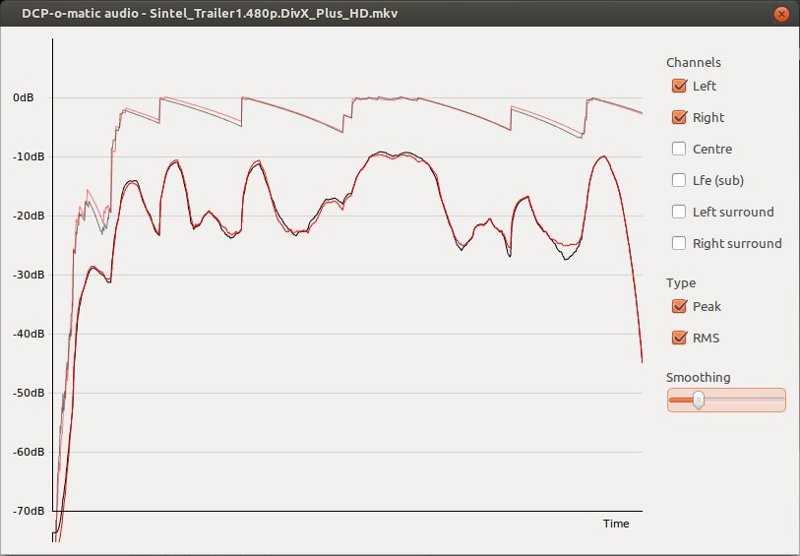
And right under that it says:
quote:
The plot gives the audio level (vertical axis, in dB) with time (horizontal axis). 0dB represents full scale, so if there is anything near this you are in danger of clipping the projector's audio outputs.
The "peak" line in the example appears to be bouncing off of the 0db line. Doesn't that mean that if the audio is incorporated into the dcp at this level would be overdriving it? Does that matter?
What is a reasonable or recommended level for "regular" audio in a dcp that would more-or-less match the majority of the audio in other dcp's? What levels should I be looking at for standard music or dialog accompanying something like a slide show -- something that you can hear without blowing the roof off of the room, that is. I guess I'm looking for a regular talking-type of setting, with the understanding that I can crank it up or down from there for additional effect.
Frankly, I'm a bit afraid to play a home-grown dcp on my system until I get an idea of what audio level I should be using in it.
Posted by Mark Strube (Member # 4190) on 05-27-2014, 08:03 PM:
If it's pre-show content (read: not trailers) that you want people to hear but also be able to talk over, I aim for averaging around -20dB. For standard movie-style content (feature with a lot of dynamic range) I'll generally let it peak around -3, and it tends to average around -10. For a full-volume trailer, that usually bounces around between -8 and -3 for the right effect. I never let anything hit that top line like in your example. Also, if you're converting multi-channel content, don't forget to click ALL the channels, so you're not ignoring the level on one that could potentially clip.
It really depends on the dynamic range of your content, but I hope this gives you a good start.
Posted by Brad Miller (Member # 2) on 05-27-2014, 09:07 PM:
If it hits 0 you will hear a loud POP from your speakers that could very well blow them. Stay away from 0. I would do at least -3db as peak.
Posted by Mike Blakesley (Member # 26) on 05-27-2014, 09:25 PM:
When converting a Blu-Ray for use in the theater I always set the audio level to "-6db" which is generally somewhat softer than a standard DCP from the studios, but gives you some room to work with. Before I started using this setting I converted "Apollo 13" with no reduction and it was definitely giving the "pop" sounds that Brad speaks of on the loud bits during the "liftoff" scenes. I think that's the fastest I ever got to the STOP button!
For an ad package I guess it depends on whether you want people to hear the ad's audio, or if it's just background music. -20 seems like it might be too soft if there's voiceover to be heard. If I were you I would just convert one ad at a fairly low level and do a trial run.
Posted by Manny Knowles (Member # 1171) on 05-28-2014, 12:21 AM:
For trailers, I want the peaks to be at -20dBFS. The peaks in that example are at 0dBFS, so I would adjust them by -20dB. The aim is to have them play in the 6.5 to 7.5 volume range -- the exact number is determined by actually listening to each trailer -- but the important point is that I want all of my fader settings above 4.0 -- because below 4.0, you just don't have fine control over the volume level (with a Dolby processor) -- there is a HUGE difference between 3.9 and 4.0, but not much difference between 4.0 and 4.1.
Posted by Carsten Kurz (Member # 5396) on 05-28-2014, 02:28 AM:
It depends basically on the source of the material to be converted. Multichannel files from DVD or Bluray have similiar headroom as DCPs have, so usually they convert fine at just 1:1 or need only slight attentuation like -6dB. Most 'typical' multimedia files with stereo content is leveled to reach near 0dB and is far to loud to be played in a cinema around Dolby level 5-7. These need at least -12 to -18dB of attentuation.
The graphs are of limited use. With some experience, they can give a rough estimate, but you can't derive any specific dB thresholds from them.
Proper multichannel logging or offline LEQ meters are expensive and complicated to set up.
I usually suggest to create two or three DCPs with camera like 'bracketing' around -15dB - one version at -15dB, one at -9dB, one at -21dB.
DCP-o-matic will only create a new audio version and keeps the unaltered video, so this can be done quickly within the batch utility, then the DCPs need to be tested on site.
- Carsten
Posted by Antonio Casado (Member # 7592) on 05-29-2014, 03:17 AM:
The best is to use a "Loudness Radar", that give to you the EXACT levels that the sound has.
I´m using currently Audition CC that have one, and I found that is very accurate and easy to use. They come with a CINEMA preset that ensure you that are using the correct levels:
http://tv.adobe.com/watch/learn-audition-cc/adobe-audition-cc-tc-electronic-itu-loudness-radar/
Posted by Mike Moreno (Member # 4887) on 06-05-2014, 05:41 PM:
did somebody convert something on 3D?
i am trying but i cant
Powered by Infopop Corporation
UBB.classicTM
6.3.1.2