This is topic T.M.S. software programs (stand alone) in forum Digital Cinema Forum at Film-Tech Forum ARCHIVE.
To visit this topic, use this URL:
https://ft-forum.com/ft/cgi-bin/ubb/ultimatebb.cgi?ubb=get_topic;f=16;t=001934
Posted by Dennis Benjamin (Member # 1137) on 06-11-2014, 08:32 AM:
O.K. So I looked through out the forums and did some online research. Does anyone have a breakdown on stand alone T.M.S. software programs available and their pricing? Does anyone have a preference on the T.M.S. program they use?
The reason I ask: I have two theatres opening this summer. They are installing Christie Solaria One Pluses with the internal I.M.B.s They have no plans to put in an LMS or TMS. I am trying to convince them to put in at least a TMS (without the storage). However, I was going to go with a certain company's program - that is until I got their estimate (The per screen price was outrageous). So, I am in the process of getting estimates from other companies. I am building the computer that the program will run on, so I am simply looking for a price on the software program itself. I'd prefer to run it on Linux, but Windows is fine. There wouldn't be anyone out there that knows the pricing on the programs available out there, would there be? No chance of an open source program running out there? I am not trying to break the bank here - just trying to make some people's lives easier.
Thanks. Feel free to P.M. me about this subject too.
Posted by Carsten Kurz (Member # 5396) on 06-11-2014, 08:46 AM:
Well, at least you need a TMS software that can deal with the Christie IMS. That should be the first consideration.
How many screens will these two locations have each?
- Carsten
Posted by Pete Naples (Member # 761) on 06-11-2014, 09:21 AM:
You can do a lot worse than this:
CDM
Not sure about the Christie IMS, but that's just a matter of APIs. if CDM haven't got them in yet, they will in due course.
Posted by Kevin Tan (Member # 8150) on 06-11-2014, 10:09 AM:
Can you try GDC TMS, it does support christie IMB.
Posted by Dennis Benjamin (Member # 1137) on 06-11-2014, 02:19 PM:
I am aware of the fact that GDC says that it now supports the Christie IMBs. Certain people at Christie were not aware of it though, ironically.
So, after many conference calls and e-mails today, a question actually came up about the Network attached Storage devices.
So here is my new question: Is there anyone out there that is running ANY type of TMS program with multiple Christie Solaria Ones with the Christie IMBs and NAS? I ask this as I have multiple people telling me different things as to whether or not this can work. I believe that most of the people that are telling me it will not work - are the same ones that are trying to sell me a Library Media Server with thier TMS software running on it. Which is NOT what I am interested in. I am solely interested in building my own computer and running a stand alone TMS program that can interface with these projectors and IMBs. I am also interested in having the ability to tranfer content around on the network from auditorium to auditorium.
At this point, it does look like the GDC TMS is the only viable source for this - but I wanted to keep my options open.
By the way - Pete - thank you for that link. I have a single screen theatre that is interested in expanding their capabilities with thier digital projector and that CDM software might be the answer they were looking for.
Posted by Dave Macaulay (Member # 813) on 06-11-2014, 03:22 PM:
If a package supports the Christie IMS then the NAS is included. The NAS is just the content storage for the Christie IMS which can't work without it... so if something supports the IMS then it must be OK with the NAS.
Posted by Kevin Tan (Member # 8150) on 06-11-2014, 08:45 PM:
The content transfer in theatre wide shall be a must functionally for every TMS.
I think what you need is a pure software solution (build your own hardware) with Christie IMB & NAS supported TMS.(As Dave mentioned NAS just connect with Christie IMB), but the only issue is there are not much pure software TMS solution out there.
Posted by Dennis Benjamin (Member # 1137) on 06-13-2014, 03:27 PM:
Since my original post, I have become familiar with almost EVERY piece of TMS Software offered on the planet. I do not think I am exaggerating either:
Arts Alliance
Unique Digital
Christie - Avias
CineDigital Manager
GDC TMS (which I already am very familiar with)
I received a crash course on how they price this software out (sometimes per screen, sometimes per screen - per year). Sometimes they will give you the software for free, if you buy a giant LMS from them for 10 grand!
I was able to be a part of conference calls and webinars to learn all about thier products.
Guess what? They all do pretty much the same thing.
***note: interestingly enough I listed another company in this post - but apparently that company's name raised a red flag and I received some type of warning about it - so I deleted their name***
Posted by Mark Gulbrandsen (Member # 72) on 06-13-2014, 04:00 PM:
I've built 30 some GDC based systems and I have to say that until the very latest version of the software it was a tad bit unstable at times... especially during transfers. The current version of the program does not fold up on you when it gets really busy. It's the least expensive off the shelf alternative at this point in time that I am aware of.
Mine are based around a Dell 2950III refurbished server with 16 gigs of ram and dual 3.2 ghz quad cores. I only run W-7 pro 64 bit on them and OS install is very easy as all the special drivers for the Dell are included on W-7 64 bit. Some tech's think W-2008 is the only way to go but we're not dealing with shares or accounts here, only running an app that does all of that with in itself... None of that stuff in 2008 (or newer) that you have paid the big bucks for for ever gets utilized. So I settled on W-7 Pro 64 bit. I turn off windows update once I have updated it the first time. Sure, the Dell 2950's are older but they come out of clean type server rooms and the 2950's were always one of the most reliable servers dell ever produced. There is a tower version of the same server known as the 2900 and I have used a few of those in twins and three screen locations. The main thing is to buy the version 3 if you buy refurbished.
NTP also works fine once set up according to GDC and IF you maintain internet clock refrence or external GPS locked clock source as a refrence.
I use a 500GB SAS 15k rpm based raid 1 for OS and a SATA raid 5 for media storage with 5.4 tb of storage. I add in an extra GB NIC card for internet and POS hookup as well as an eSATA card for the dual cru ingest bay, the server's internal NICS are used for management and media networks. I have used both regular plain old GB switches from Newegg and in other installs I've used locked programmable switches. You can choose depending on your network.
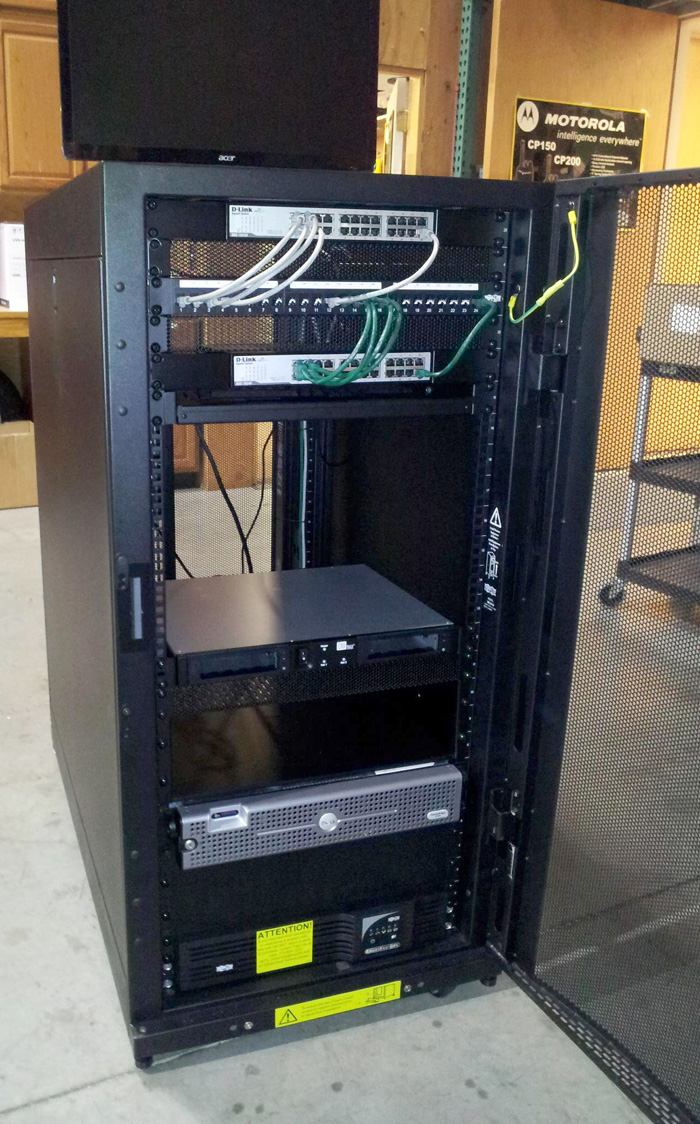
Everything in these racks is brand new except the server. This system can be built for about 1/3 the cost of a new rack from Strong and it will perform about as well, it will certainly be as reliable. Assuming you'd be running the GDC software on your Strong rack you are going to get the exact same results I get. I have customers that transfer all six or eight screens worth of content around the building at once and it's actually pretty fast at moving it all with good switches.
Below is a photo of the first prototype I built up four years ago. It's still running in a theater today and the Dell's just never die!!
Also... I configure all my theater networks the same as it would be for say a Cinedigm system... This way any service tech that's familiar with other TMS systems can service these systems.
Also... The center of the rack is open for say a KVM or for satellite receiver/servers.
Mark
Posted by Kevin Tan (Member # 8150) on 06-14-2014, 01:00 AM:
Well, Actually Christie TMS is using the same TMS software as AAM TMS, as my understanding.
There are still some tms vendor out there but mainly not in US, for example ADDE ...
But might all come with gain hardware.
Posted by Steve Guttag (Member # 268) on 06-14-2014, 03:10 AM:
So what are people's opinions of the Ethernet patch bays that the IT types have thrown in on us now? I find them a huge waste of time and a potential source of failure. Just what purpose do they server in a cinema environment? Why not just plug the cable straight into the switch and label it properly. Almost all of the patch bays I see also aren't labeled so there isn't really any organization there.
Typically, these racks are about a mile deep and the bays are often near the top...who wants to do a punch down into that? Or one can do a feedthrough RJ45 but if you are going to squeeze on an RJ45...why not just skip a step and go right to the switch? I just don't get the fascination with the patch bays. Just what are we patching?
Note, my opinion is the same for audio patch bays. Where we have used them is in situations where one would likely want to patch those signals and the patch bay would "normal" the regular day-to-day.
I tend to agree with Mark that the GDC TMS does not really benefit from a full blown server implementation since it is just an application running and there really isn't the traditional client-server relationship you would see in an office type situation. It isn't the server per-say that is talking to the individual theatres so much as the one application. Win 7 Pro seems to do the job. I've done some real low-cost systems using just a Dell tower (Optiplex) and the systems seem to still be going strong after nearly 2-years. Since the GDC TMS can't really handle multiple log-ins (e.g. using RDP to have a different log-in while the end user is logged in on the main screen...oh it will do it but be prepared for problems).
Posted by Dave Macaulay (Member # 813) on 06-14-2014, 09:15 AM:
I can imagine the wiring chaos of doing a TMS installation without termination panels ("patch bays"). And the logistical nightmare. Maybe for 3 screens and projectors in the same room it could be OK. Fore a large multiplex and multiple booths... nope.
- A professional installation requires certified 1000b-T cabling. I don't have a cable certifier and have no plans to spend thousands of $$$ on one. So a cabling contractor puts in the cables and supplies certification test documents. They come in well before the TMS is installed and do the ceiling lifting, ladder wrangling, etc for the cabling. If there is no TMS rack on site yet (there should be!) they install the cabling and do the certification after the rack is in so they can install the patchpanel, this is a fairly quick job. Having the cable guys on site at the same time we're doing projector and TMS installation would be extremely difficult.
- You are using idiots to install network cabling if the patch panel is not labeled.
- Network wiring "done right" uses patch panels. They are reliable. Even with pull-thru plugs, terminating a patch panel RJ45-F block with punch-downs is much more reliable than doing a RJ45-M cable termination. Decent (not the cheapest available, in other words) patch cables are quite reliable and can easily be replaced if not.
- In-rack cabling can be made very tidy with patch cables. It isn't always done that way, but working with loose cables of indeterminate length is asking for a "dropped spaghetti" mess.
Posted by Steve Guttag (Member # 268) on 06-14-2014, 10:05 AM:
Dave,
We do the cable qualifications (Use a Fluke Networks cable qualifier and provide the results to the NOC if asked...everything is qualified to 1000 Base-T).
I agree that patch panels should be labeled but 90% of the time, they don't seem to be or are labeled haphazardly with labels that don't really fit.
Why does "networking done right" use patch panels?
What makes a punch down, that relies one to strip back a cable, route the ends to the IDC punchdown point and strain relieve that cable, without violating any bend-radius rules, and have many unrelated pairs in close proximity have over a properly terminated RJ45M where the jacket remains in tact all of the way into the connector? The patch bay becomes mostly another point of failure.
I agree that patch cables can be cheap and reliable...though there is always a bad apple in there too. We qualify everything...every once in a while, there is a dud.
As for loose cables of indeterminate length...who said anything about that? I don't advocate putting it in all crazy. Route them through the rack properly send them out through a suitable panel (can be one like the Middle Atlantic Products BR1 or even a proper patch cable wire trough. Nothing says it can't be neat.
Even in a large plex, it just isn't that big a deal to dress up the two cables per theatre into a TMS system. What we normally specify is that if the client wants to install their own cables ahead of us (we prefer it actually) then they can terminate into biscuits (surface mount boxes) at each theatre and just have the TMS drop down with a minimum length and marked. Invariably, if there is a problem, it is where they punched down into biscuits at the theatre end. There are times I'd rather just put both ends on since when we pull our own Ethernet...it just works.
I'm just not a fan of unnecessary patch bays that will never actually be patched. They seem like a waste of time, money and can lead to unnecessary failures.
Posted by Mark Gulbrandsen (Member # 72) on 06-14-2014, 12:50 PM:
I've never had any issues with patch bays... a few bad patch cables... yes! They allow a lot of flexibility in the system for not a lot of extra cost. As a facility adds screens or split up existing ones you just plug in the theaters to the patch bay and the jumper to the switch. No need to attempt to work inside or behind the rack in the dark.
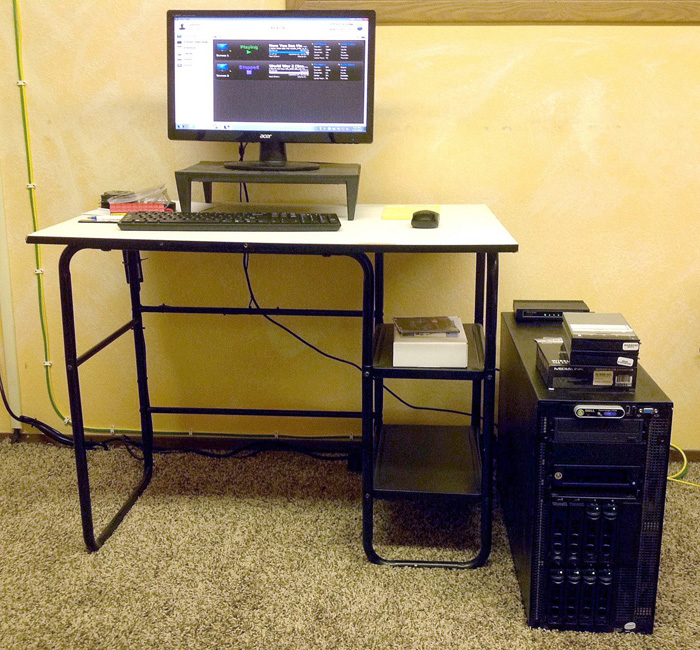
In my Dell 2900 based systems I do not use patch bays or even a rack for that matter. I go directly into the switches. But this is only for up to three screens. Past that the cabling gets pretty unwieldy and needs a permanent home to be secured in and to prevent damage to it. The 2900 does offer the same exact CPU speed, RAM, media storage capacity, power supply and fan redundancy that the rack mount server does. It only has a single internal CRU bay instead of a dual. The 2900's are not as common and I don't even know if there is a newer version Dell that replaced it like there is with the rack servers. The picture is of a TMS in a twin cinema.
Posted by Steve Guttag (Member # 268) on 06-15-2014, 08:58 AM:
And I come back to...what better flexibility? Without the patch bay, you get the SAME flexibility...if not more. Add screens and need to renumber? No problem if you plug straight to the switch...just move the cable over to the other port. Add new cables...same effort, just bring it in and plug in.
You've shown zero improvement in anything by using a patch bay. You've only added work and added connection (failure points) to the system.
Posted by Ken Lackner (Member # 1002) on 06-16-2014, 02:59 PM:
Someone please correct me if I am wrong. Maybe I am confused.
quote: Dennis Benjamin
They have no plans to put in an LMS or TMS. I am trying to convince them to put in at least a TMS (without the storage).
From what I have seen, "LMS" and "TMS" mean the same thing, and are used interchangeably. One manufacturer in particular calls their system the "LMS," while most others refer to it as a "TMS," but they are functionally equivalent.
quote: Dennis Benjamin
a TMS (without the storage)
How is that possible? A key component of a TMS is having central storage that you load all content on to, and from there transfer the content to the auditoriums, so that you don't need to manually ingest the content onto each server it is playing on.
Dennis, are you thinking of "LMS" as meaning the entire system including hardware, and "TMS" as the management software? I've not see that type of breakdown in terminology before, but again, I could be wrong.
Posted by Brad Miller (Member # 2) on 06-16-2014, 03:45 PM:
It is entirely possible to have a TMS with 1GB of storage (meaning, not enough for even a trailer). It just means the content moves from screen to screen INSTEAD of from the TMS itself, and all content is ingested on a screen server.
It's a little dangerous though if you don't have the content on at least two screen servers, as if one machine crashed, you would lose the content. (Assuming you got it via satellite download or sent your hard drive back immediately upon ingesting.)
Posted by Ken Lackner (Member # 1002) on 06-16-2014, 05:07 PM:
Possible, yes. I know the software doesn't care what size the drive (or hopefully array) is. But what would be the point?
Posted by Tim Sherman (Member # 569) on 06-16-2014, 08:22 PM:
Small theaters with few screens for VPF reporting. Two screens here at my theater, we use the Cinedigm Micro LMS (no storage) for that reason only. So I guess technically it is a TMS because there is no library storage. But it has always been referred to as a LMS
Posted by Carsten Kurz (Member # 5396) on 06-17-2014, 05:59 AM:
It's not completely insane to have content only on your screen-servers and do just the programming and KDM housekeeping through the TMS.
Sure it doesn't make much sense since adding a RAID to the TMS machine doesn't cost much.
- Carsten
Posted by Dennis Benjamin (Member # 1137) on 06-17-2014, 06:10 AM:
I have two 4 screen locations that have been running the TMS program without storage for two years now. The managers have come to appreciate it, since at first, they didn't have anything.
With the theatre opening in the immediate future (7 screens) - we have already discussed adding a Raid Array to the TMS computer. We felt it will be important since they are installing the Christie Solarias with internal IMBs and no servers. While they will have Network attached storage, we felt it would make more sense to have storage at the TMS computer - therefore turning into a Library Media Server.
With the two four screen locations they both have GDC servers. Typically the content is ingested onto a server and then it is moved to another one (while keeping a copy on the original server).
So, I hope that clarifies.
Posted by Mark Gulbrandsen (Member # 72) on 06-17-2014, 03:55 PM:
Of course you can run it without storage... not wise IMHO though, storage is uber cheap these days. By default storage is created iregardless on the OS drive where the TMS APP lives. You can choose to ignore it in Filezilla though.
Steve G.
It does give added flexibility, especially for adding other satellite gear later down the road. It is also less of a kludge. But my main reason is because once you get above three sets of CAT 6 plenum rated cables attaching them directly to the switch is a bit unwieldy. I have found that more then three pair of wires should really have a permanent cable tied in home afforded by the rack and patch bay, it also takes any strain off the RJ-45's on the switches. It also eliminates anyone from ever handling the main cabling if a switch should ever go down. Like you I also certify each run with the Fluke. So no one handling it after the fact is a bonus.
Mark
Posted by Steve Guttag (Member # 268) on 06-18-2014, 03:52 AM:
Sorry Mark...I just don't see it. It looks pretty much the same to me as well as the stress...also looks to be pretty much the same. If anything, the patch bay punch down process and the means to tie down the cable to the patch bay on the punch down side seems to put more stress on the cable. Since no one ever really handles the cable after it is installed, there just doesn't seem to be any point to the patch bay. If you bring in a satellite (or anything) after the initial install...bring it in. It is no different with/without the patch bay. The only difference is where you terminate it...the rest of the cable dress is identical.
Posted by Dave Macaulay (Member # 813) on 06-18-2014, 11:42 PM:
OK Steve, you don't like patch bays. If you're doing the cabling work yourself, direct cabling is doable. I still think it a poor choice in a larger installation.
Every non-trivial (many cables to many locations) CAT5/6 network cabling installation I've seen in the world uses punchdown patch bays. I've seen a lot of them.
You do it your way, you're welcome to it.
Posted by Steve Guttag (Member # 268) on 06-19-2014, 05:53 AM:
Yes...and I've yet to see a benefit to it and none of you have shown any demonstrated reason why a punch down bay is superior. Furthermore, I've had failures in the quality of the work done by the guy who did the punch down (before the TMS was in place...they had the rack and patch bay, as you suggest).
Just because everyone's doing it doesn't make it a good reason. I could possibly understand in a traditional IT environment where there could be more than a set/forget environment...but in a cinema...it is an install once and forget. Maybe in 10-years one will have to mess with it or use whatever is current then too.
Mind you...I've never understood the massive use of audio patchbays either. I understand their use and have indeed designed them in (see the AFI/Silver pictures)...and, in my opinion, a well designed patch bay system has the "normals" be what is used 90+% of time and the rest be reasonably patched for selected needs. With even with audio patch bays (or video) you run the risk of them becoming a point of failure too.
But back to Ethernet patch bays...the standards a practices of IT, historically have been rather lax at best...not something I would want to emulate "just because."
Posted by Ronda Fitzsimmons (Member # 1418) on 06-25-2014, 06:15 PM:
Just so you know, Dennis, we have two 4-screen and one 6-screen theatres running Chistie Solaria One's and we don't use either a TMS or an LMS. We do have a simple Windows 7 computer connected to the manager's office with a gigabit switch, and I think the tech just used some simple direct connect software to each projector with a clickable link on the main screen. Once you log into each projector, you can initiate a transfer directly between them if you've set each NAS up with a unique identifier (eg. /theatre2 and GOD don't forget to use the slash!!). It's been a year now, and our manager's seem happy with the setup. Not a single one has complained or requested a TMS/LMS be installed, although Christie has asked a number of times.
We've had a ton of issues with the Solaria One's (we were part of the first run, and had IMB and LVPS problems galore), so you might want to recommend at least a spare LVPS and CF Card to be keep on hand.
Good luck!
Ronda
Posted by Carsten Kurz (Member # 5396) on 06-25-2014, 06:37 PM:
Steve - what cables and connectors do you use for this kind of cabling?
- Carsten
Posted by Steve Guttag (Member # 268) on 06-25-2014, 07:01 PM:
Our cables are by Belden and the connectors are by AMP (TE).
Posted by Carsten Kurz (Member # 5396) on 06-25-2014, 08:03 PM:
I didn't mean brands, but type. Because there is quite a difference in available connectors, cables and tools between massive conductor for permamnent wiring and flexible/stranded cables when it comes to crimps. When there is no need for a central patch-panel, I still prefer wall-sockets for terminating cable runs.
- Carsten
Posted by Steve Guttag (Member # 268) on 06-25-2014, 09:55 PM:
I'd have to check...I don't have the numbers memorized. We use solid conductor cable though. I've heard stranded cable can be much easier to work with.
Posted by Mark Gulbrandsen (Member # 72) on 06-26-2014, 10:59 AM:
Ahhh, but you can't use ANY punch blocks with stranded... They won't make good connection.
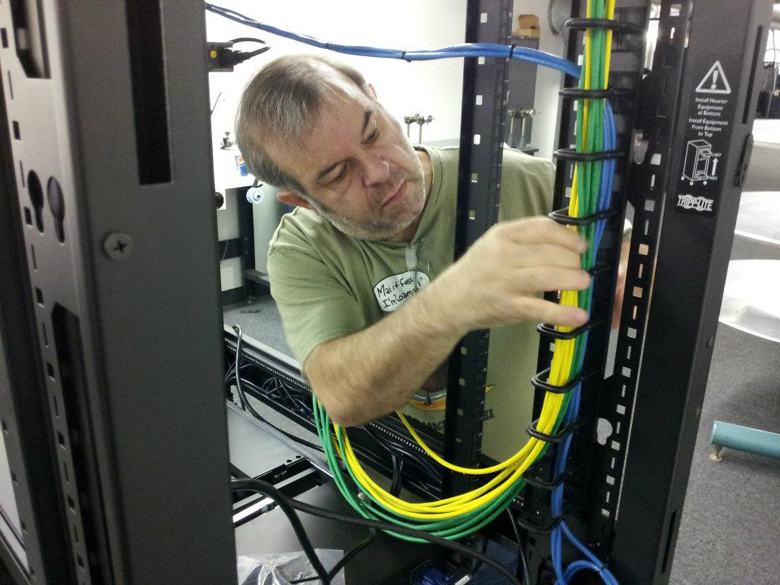
The reason you use a patch bay... so the cabling can be tied in place and out of harms way. The only other option is to mount it on the wall... not a good option really. Standard IT practice pretty much dictates at least doing what I am doing here in the picture... No one can f*ck with your cabling either because the rack is locked up. There really IS no argument for doing this the wrong way!
Posted by Andrew Thomas (Member # 7000) on 06-26-2014, 11:34 PM:
Does anybody have a copy of the GDC TMS software they could send me? They sent me a temporary license but have so far not replied to my request for a download link to the software itself!
Posted by Greg Routenburg (Member # 1742) on 06-27-2014, 10:14 AM:
You really don't gain or lose anything with signal quality using patch bays if they are done properly. The principal advantage is being able to very quickly and easily identify cables coming into a large network rack. As Steve mentions, properly labeled cables are quite effective and I like to label all of my cables anyways but when you're dealing with many tens or hundreds of cables terminating within the same rack, locating the cable you want can be a time consuming process when you're relying solely on small, often hard to read, cable markers. A network done right will have a complete network map identifying what is terminated in which rack and what port numbers are used for each cable. When pulling extra cables to allow for future expansion, it makes it very easy to know what to connect where. It also helps with administration of the network from afar when you can instruct a third party network technician to jumper specific ports on managed switches or routers to specific ports on a patch panel to change a networking configuration.
Posted by Steve Guttag (Member # 268) on 06-28-2014, 07:34 AM:
Greg,
I'm agreeing with you (well just about 99%). ANY connection creates a signal loss or degradation. With a patch panel, you add the IDC of the punch down and then an extra RJ45 connection so there are a couple of extra connections to each core. Then there is the method of landing the cable on the back side of the patch bay such that the cable is properly strain relieved, doesn't violate any of the Ethernet cabling rules in terms of grouping and bend radius and the fact you have the cores no longer in their twist/spacing. Some patch bays have one terminate all conductors in a line (typical of dual row)...others have one terminate half on the top and half on the bottom (typical of single row) and one should keep the conductors of different cables separated to avoid EMI.
But okay...lets say you are good at all of that. Cinemas are not typical IT rooms where I see very valid reasons for traditional patch bays.
Typical cinemas are 15 screens or less. In most of the layouts I've seen (and installed), it is customary to have a switch in the pedestal or sound rack of each auditorium such that all of the auditorium specific devices (projector, sound...etc.) plug into that and from that switch, a single CAT cable is pulled to the TMS. In addition to that cable, there is a dedicated cable just for transport of the media (every server I've dealt with has at least two NICs so one can move the "media" while the other is typically used for "management." So there are two cables coming from each screen...so we are talking about 30 or fewer cables. However, those two cables are almost always landing on separate patch bays (and switches) so we are talking about 15 or less cables to keep track of. They are extremely unlikely to expand and it is also unlikely the patch system has been designed for any expansion either. Then, for logical layout, most have the patch ports as well as the ports on the switches in the TMS racks line up theatre-for-theatre. And by that, I mean that all ports in the same horizontal row line up with the theatres so if you are starting your theatres at say port "8" (but it could be any number)...they would be at 8, 10, 12, ...etc) so no cables are crossing over between patch panel and switch. So you got these 15 diagonally oriented patch cables (because there is a law that patch panels and switches can never align their ports). You patch them all up and you are done. This is a system that is VERY unlikely to change. Furthermore, unlike in a typical IT room, the cables coming in from the outside are pretty well defined and not likely to change...perhaps a few new sources (e.g. satellite feed of something). It isn't too hard to figure out what each cable is doing/coming from...proper cable labeling...something that should be done anyway. The advantage of a patch bay system just vanishes.
Yeah, the switch may change to different brand/model as things break or technology changes (but it isn't going to change too much since that would likely require a cable change too). So unless you violate cabling rules and pull your cables piano-string tight you can accommodate different port placement on the replacement switch.
All of the dressing that Mark shows (though zip ties are frowned upon in IT since any crushing of the cable disturbs its performance) would still apply...I merely claim that you will get an equally or superior performing system by merely continuing the cable to the front via a panel like Mid Atlantic's BR1 or a cable management trough (has holes on the back, wiring trough on the front with slots to allow cables to come up to the switch). It is equally as neat and serviceable but results in a faster and superior installation with higher reliability. I think DCinema tried to mimic IT's practices with patch bays without really thinking about WHY they do things that they do and if they apply to cinema. You know, in professional audio or video, most everything is landed on a patch bay too. We never did that in cinema because not only is it not necessary, it is a point of failure with virtually no benefit for us.
Posted by Andrew Thomas (Member # 7000) on 06-28-2014, 08:24 PM:
Do any of you guys have experience setting up the GDC TMS software?
I've got mostly the same set up in all four of my auditoriums.
Projector (1 CP4220, 3 Solaria Ones)
Audio Processor (USL JSD-60)
NAS (Iomega PX4-300R)
Automation (Jnior 310)
Managed Switch (Some Cisco something or other)
All of the switches at the projectors are connected to another managed switch.
I'm having a few issues on the networking side of things to start. If I run a ethernet wire into the main switch, I get no connectivity with any of the devices. If I run the wire into one of the switches at the projector itself, I can connect to any device on the network.
I'm also just not quite sure what I should be entering in the various fields when I try to add projectors and servers within the software.
Any thoughts?
Posted by Dennis Benjamin (Member # 1137) on 06-28-2014, 08:49 PM:
Are all the ports active on the switch that gets no connectivity? If you have a managed switch from Christie, they only have certain ports active. I can't remember which ones, but there are only certain ones.
Posted by Andrew Thomas (Member # 7000) on 06-28-2014, 09:26 PM:
Well, as usually happens, after hours and hours of modifying settings I come here to ask questions and end up fixing it myself. I can know get connected to all four projectors and see their live states through the GDC TMS interface.
If I have any other issues, I'll be sure to post again. Thanks for the quick reply!
Posted by Steve Guttag (Member # 268) on 06-29-2014, 12:58 AM:
And yet you don't describe what you did so other may benefit from your experience.
Posted by Kerry Fleming (Member # 1657) on 06-29-2014, 08:19 AM:
Did you check out Sensible Cinema?
sensiblecinema.com
Posted by Mark Gulbrandsen (Member # 72) on 06-29-2014, 01:06 PM:
quote: Steve Guttag
All of the dressing that Mark shows (though zip ties are frowned upon in IT since any crushing of the cable disturbs its performance) would still apply
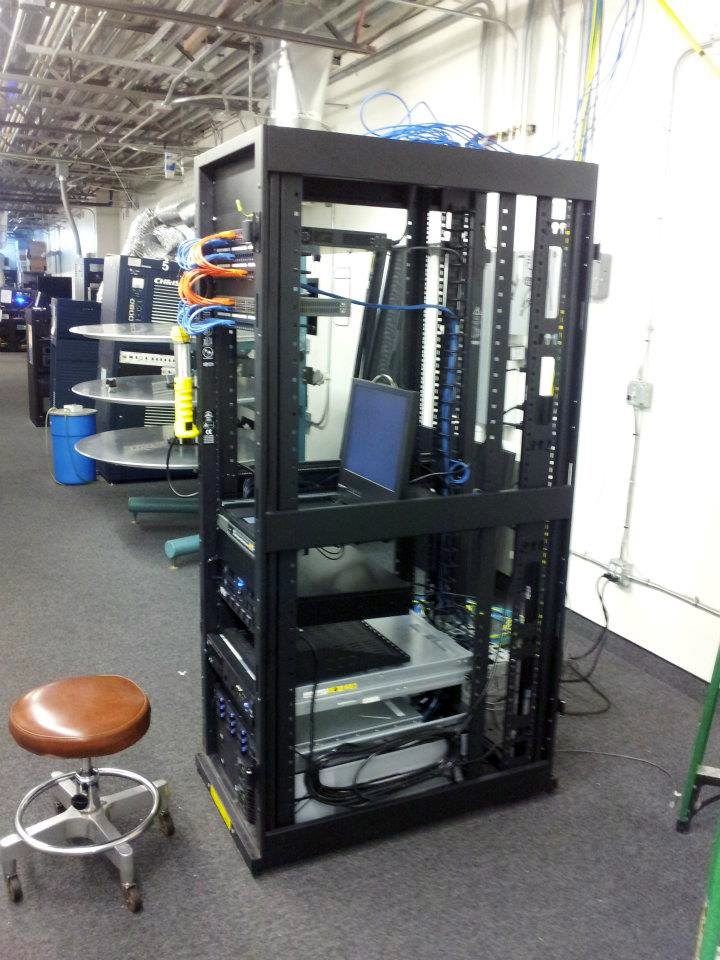
It all depends on how you use the zip ties Steve. With any networking cabling you never pull the zip ties tight. In that picture it is a Cinedigm rack... in St. George probably. I can tell by looking closely because it's taller than a half height rack which is all I ever use. So those cables were tied by who ever built that rack at Insight, but they do not appear to be tight. I use ties, especially on long runs with multiple cables to hold them in place. I have yet to have a single theater owner want to pay for cable tray to lay them in. So I run them along the flat edges of the roofing joists so that in effect becomes a cable tray. And because the cable tie creates a sort of triangular area for the cabling it actually can't be squeezed at all. If there is no joist where the cables need to go I use plastic loops and screw them to the all to hang the cables... about every foot or so. The plastic loops are much wider then cable ties.
Here is that rack... I am pretty sure...
Mark
Posted by Steve Guttag (Member # 268) on 06-29-2014, 07:21 PM:
The "approved" strapping is generally Velcro. Note, we generally use wire ties as well and ensure that they are relatively loose because Velco tends to cost about 100 times more. However, when adding or changing the cabling...Velco is certainly convenient.
Posted by Andrew Thomas (Member # 7000) on 06-30-2014, 12:11 AM:
quote: Steve Guttag
And yet you don't describe what you did so other may benefit from your experience.
I think the main thing on the connectivity side is that I installed DD-WRT on the wifi router and disabled EVERYTHING that didn't need to be on to do what I needed done. Not sure what specifically was gumming up the works, but that allowed me direct access to everything on the network from the main switch.
I'm now needing to get a gigabit switch to get all the media network stuff setup for transfers.
Posted by Kevin Tan (Member # 8150) on 06-30-2014, 04:48 AM:
quote: Kerry Fleming
Did you check out Sensible Cinema?
sensiblecinema.com
Kerry,
I thought they are selling POS ?
Posted by Carsten Kurz (Member # 5396) on 06-30-2014, 07:53 AM:
There is obviously to different types of software available under the term 'TMS'. The traditional one, already available in times of 35mm, is dealing with general theater operations, POS, bookings, restock, etc the other is dealing with digital playout/projection systems. They may interface at some point or the other, e.g. exchange of schedule data from POS to screen TMS. I have not seen a single TMS that covers both aspects. Anyone?
- Carsten
Posted by Dennis Benjamin (Member # 1137) on 06-30-2014, 09:58 AM:
My search and research has come to an end. I was able to convince the powers that be to let us continue using GDC's TMS software at the two new locations to manage the projection booth networks. All of our other locations successfully use this software to manage their systems and we will have continuity throughout the company. While they are not using it to it's fullest potential, they do use it and my next project is to fully train the managers on the software's full range of capabilities.
Thanks to all that replied.
This in no way takes away from the amazing software that other companies have to offer.
Posted by Mark Gulbrandsen (Member # 72) on 06-30-2014, 02:48 PM:
Makes good sense to continue to use it since you are using it at other sites and those people are familiar with it. If you transfer managers around very much then it's also no brainer for them.
Steve Guttag...
You don't have to resort to Velcro. Get a box of cable hanger loops at the electric supply. They come in all sorts of sizes and are quite inexpensive. They are typically 5/8" wide with larger sizes being even wider.
Mark
Posted by Dennis Benjamin (Member # 1137) on 07-21-2014, 02:26 PM:
Here we go:
We have a seven screen location using 7 Christie Solaria Ones. They have the Netgear ReadyNas network attached storage devices being used to store content. We would like to be utilizing GDC's TMS program to monitor and control content. Here's where we have run into a problem and I am trying to get a straight answer from someone, so it brings me to the forums:
The Media Network. What is the best way to set up a Media Network so we can transfer content from auditorium to auditorium? There is no manual or instructions for this. Where I have run into a problem is - that I keep getting different answers from different people. Since the theatre will be monitored by a N.O.C., the second N.I.C. port on the back of the N.A.S. is supposed to go into the management switch and have an I.P. address on the Management network. The other N.I.C. on the back of the N.A.S. goes directly into the I.M.B.
I was told to utilize the NAS 2 N.I.C. port on the side of the projector/I.M.B. for media communication. I tried this and it did not work. It may have not worked for various reasons. But, does this sound correct? I have one vendor telling me that you can only transfer content from NAS to NAS, and another vendor telling me that you can only transfer content from IMB to IMB.
Does anyone know for sure which is true?
Posted by Brad Miller (Member # 2) on 07-21-2014, 02:45 PM:
The simple (and surprisingly obvious answer) is to set it up however your NOC tells you to. They are the ones monitoring. Also each NOC has various subnets they need utilized for reasons internal to their monitoring structure.
If your NOC can't tell you how to set it up, clearly you're using the wrong NOC!
Posted by Dennis Benjamin (Member # 1137) on 07-21-2014, 03:12 PM:
There lies the problem.
They cannot or will not answer that question.
I did not chose the N.O.C. service that is being used.
I believe I got my answer from someone else outside this forum.
But it does not change the fact that these companies cannot provide a manual or instructions for this new equipment. Yes, I have a Solaria One installation and user's guide. But it does not specify how to network multiple projectors together. I also have a Netgear ReadyNas user's manual - but it doesn't tell me either.
Anyways, while I have this one solved, I have stumbled upon other puzzling questions. Like - Why does a N.O.C. need the Network Attached Storage on the Projection Management network?
Posted by Mark Gulbrandsen (Member # 72) on 07-21-2014, 03:53 PM:
If it's Strong they supply a sheet for each site with the specified IP, subnets and other related settings. Makes it pretty easy to set up a TMS. If it is them and they are not sending you a sheet then get another NOC!
Mark
Posted by Steve Guttag (Member # 268) on 07-21-2014, 03:57 PM:
BTW...if you have this one solved...why not share it for the next guy?
Posted by Carsten Kurz (Member # 5396) on 07-21-2014, 04:18 PM:
Dennis,
the Solaria One(+) has/had a few flaws, but in general, Christie provides good documentation. Of, course, it always depends on who you talk to. And if you are using a non-Christie TMS, then you're on our own on that part.
Regarding network topology for Christies IMB + NAS, read this:
http://www.christiedigital.com/SupportDocs/Anonymous/020-200258-02-Christie-BUL-INFO-IMB-Best-Practices.pdf
- Carsten
Posted by Dennis Benjamin (Member # 1137) on 07-22-2014, 09:37 AM:
Steve,
This information bulletin is what I have been looking for. Even though I had it verbally told to me - what is in the above post is exactly what I have been looking for - for over a month now.
No one at Christie told me about it.
Thank you!
Posted by Dennis Benjamin (Member # 1137) on 08-26-2014, 11:13 PM:
As of 8/27/14 I have successfully installed the G.D.C. T.M.S. software at a location using exclusively Christie Solaria Ones. I am able to send content across the network, send out schedules, ingest keys, etc. etc. While it was painful and nerve racking to say the least - I am happy to report that it is up and running.
Now on to the next site...
Posted by Mark Gulbrandsen (Member # 72) on 08-27-2014, 12:12 PM:
Isn't Christie's TMS app pretty much just a copy of the GDC app? They sure look similar.
Mark
Posted by David Buckley (Member # 2600) on 08-27-2014, 05:20 PM:
Steve asks:
quote: Steve Guttag
Why does "networking done right" use patch panels?
It doesn't.
There is a large distinction between "networking" and "wiring".
An installation with patch panels and wall outlets is a "structured wiring system". It is designed in accordance with standards, and it is built that way because it follows the standards. Once constructed in accordance with the standard, it can then be tested to confirm it is in compliance with the standard, and then certified.
You do not need to use a structured wiring system to do networking! You can just use a bunch of patch cables, plug them up as needed, and off you go, job done.
What you can't (or, perhaps, shouldn't) do is to build something that looks like a structured wiring system, but isn't.
Why have a structured wiring system at all? Before structured wiring existed, there were a multitude of standards for signal connections (e.g. Ethernet (thick, thin, AUI), Token Ring, RS232, IBM terminals (Coax and twinax), telephone, intercom, video, audio, GPIO), and cabling for each was typically installed as needed.
The structured wiring system, based on RJ45 connectors and, originally, Cat5 cable swept away all that existed before it. And more than that, a premise was flood wired with cabling before anything else moved in. So the right cabling was in the right place (ie - everywhere!) at outset. Everything then used the structured wiring system.
Does a booth need a structured wiring system? No. Does a booth benefit a structured wiring system? Maybe, maybe not. If only the amount of cabling that is absolutely needed today is installed, then there is pretty much guaranteed to be zero benefit. Over-install (ie - flood) so that something that pops up tomorrow cab be installed without needing to run new cable, then there may be a benefit.
But the premises as a whole will benefit from having structured wiring installed, so in years to come it's easy to move a phone or add a LED sign.
Posted by Dennis Benjamin (Member # 1137) on 08-28-2014, 09:25 AM:
quote: Mark Gulbrandsen
Isn't Christie's TMS app pretty much just a copy of the GDC app? They sure look similar.
Actually, I think Christie's TMS program is actually a clone of a different companies TMS program. I can't remember which one though.
What is different is the pricing.
Posted by Steve Guttag (Member # 268) on 08-28-2014, 02:19 PM:
Doesn't Christie use Arts Alliance?
Posted by Mark Gulbrandsen (Member # 72) on 08-28-2014, 03:08 PM:
I would agree IF switches that had rear connections were commonly available. Unfortunately they aren't. That way I could bring the bundle for management and the bundle for Media directly into their perspective switches without having to do any nasty bends. But since all my TMS systems have been 100% trouble free I'll keep using patch bays. The patch bay I use obviously ISN'T a source of trouble.
Mark
Powered by Infopop Corporation
UBB.classicTM
6.3.1.2