This is topic Red Frame Symbol on Dolby Server in forum Digital Cinema Forum at Film-Tech Forum ARCHIVE.
To visit this topic, use this URL:
https://ft-forum.com/ft/cgi-bin/ubb/ultimatebb.cgi?ubb=get_topic;f=16;t=001936
Posted by Steve Kraus (Member # 476) on 06-14-2014, 02:03 PM:
Last night I did the normal once a month or reboot of my Dolby DSS200 and checking in from home I noticed this:
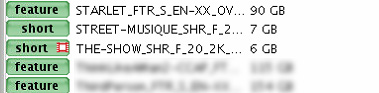
What does the red film frame mean? Notice it is not the red X that means incomplete or corrupted material. That's a DCP I made from internet material using DVD-O-MATIC and it's been on there for months and has played correctly. The same mark appears on one other, also a self-made short. I would think that it might mean a different frame rate but it was never shown before. I even have an image showing this one displayed with no red flag. So my questions are what does it mean and why is it only appearing now. (I have not retested this material since it appeared.) What am I not thinking of?
I am running 4.3.5.9.
Posted by Marco Giustini (Member # 4544) on 06-14-2014, 03:34 PM:
It means "unsupported" (framerate or codec). Not sure why it's become unsupported after a reboot though...
Posted by Steve Kraus (Member # 476) on 06-14-2014, 06:26 PM:
Weird. I'll have to go try to play it. And reboot again.
It can't be the codec if it came out of DVD-O-MATIC, can it? The end result is just a container file filled with JPEG2000 files, no? So maybe frame rate.
Posted by Steve Kraus (Member # 476) on 06-15-2014, 01:07 AM:
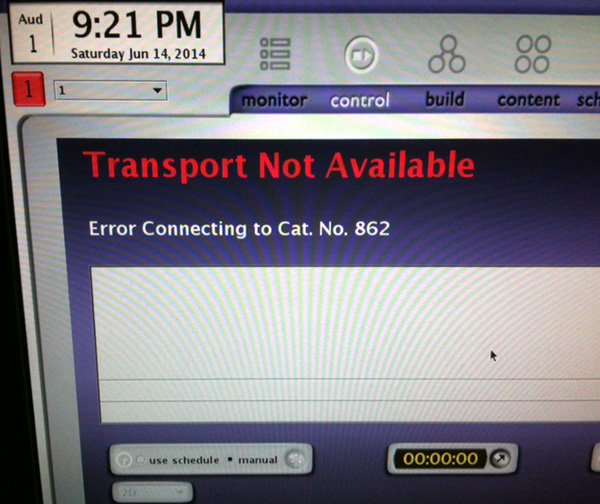
Apparently I have a significant problem. How that relates to the weird symbol I don't know.
Posted by Marco Giustini (Member # 4544) on 06-15-2014, 04:27 AM:
Well the 862 is the media block and it's responsible for playing back content but I wouldn't link the two issues.
First, remove power from the server (make sure it's not ingesting) and leave it off a few minutes. Power the projector off as well and disconnect the ethernet.
Wait 5 minutes, power everything on again, with the ethernet disconnected. When the GUI is up and running, plug the projector back. Then wait and see if it works. Don't rush, give it plenty of time.
If that does not work, reseat the short blue "link" cable on the back and repeat the above.
I've also seen cat 862s dying after a reboot. If you have the mediablock software, try to connect to the 862 by USB: if you cannot connect to it locally, you'll need a new 862.
Posted by Steve Kraus (Member # 476) on 06-15-2014, 07:42 AM:
Oh, I'm sure they're connected; too much of a coincidence not to be. The symbol may well relate to something about an odd frame rate but maybe some bug in the software prevents it from being shown normally. The tech from Dolby couldn't remember what it means either.
I've tried rebooting multiple times; likewise with the projector. Since going to larger RAID drives, I keep the originals in trays ready to go (same software). Putting them in made no difference. Reseated / replaced the jumper cable (though not yet the internal one). Going to the system area of the control display, pulling the cable causes an error message in red; it goes away when it's replaced. Where the cable plugs into the motherboard or whatever that is at lower left, the LED on the left of the socket is illuminated; the one on the right winks occasionally like they are talking but maybe that's only an attempt to talk.
Going to try to reload the 862 software. Hope that's all that's needed.
Could hardware fail on rebooting? Sure, especially since Dolby's rebooting requires powering down and thus thermal cycling. But I'm hoping it's just corrupt. A month running is plenty of time for the stored software to become corrupt and the action of rebooting is when it gets loaded in for use. Fingers and other appendages crossed.
Posted by Steve Guttag (Member # 268) on 06-15-2014, 09:23 AM:
The red box is definitely an unsupported format. Since the CAT862 is what has to deal with the various formats...the lack of communication there likely is also not telling the system that you can support something like a 30fps Clip. I think the standard 24fps stuff is intrinsic into the system...but any formats that were added, like 30fps (and probably 25fps) will show the red box if the mediablock (or IMB) does not say that they can support it.
When you try to reinstall the software via the software update program, be sure to tick the "install all components" check box. That will wipe all of the settings to it and put it factory fresh...your KDMs will also need to be reloaded...but if it is software related, that should take care of it.
Posted by Marco Giustini (Member # 4544) on 06-15-2014, 09:36 AM:
If you are running Dolby 3D, reinstalling as Steve said - which I recommend as well - will wipe the Dolby 3D calibration and AV delay.
Posted by Steve Kraus (Member # 476) on 06-15-2014, 09:41 AM:
No 3D. Thanks!
Posted by Jim Cassedy (Member # 4115) on 06-15-2014, 10:42 AM:
I've gotten that symbol when I ingested some material that was encoded at
a frame rate that the system I was using did not support.
Apparantly there are some combinations of older projector & server software
that can not play back all frame rates even though they are supported in the DCI.
You can build that [X]'ed item into a playlist, but when you
run the show, the
system will just skip over it, as though it's not there.
Posted by Leo Enticknap (Member # 534) on 06-15-2014, 11:08 AM:
When I get the "transport not available" message, it means that I've forgotten to turn the power supply to the projector on. When I do, the error goes away. I've only ever once had a red flag on a DCP I've created with DCP-o-matic: that was one where I'd set the number of audio channels to 1 in the target DCP (because my source file was mono). After experimenting, I found that setting the number of audio channels to anything other than 6 in the output DCP, regardless of the number of channels in the source files, causes the red flag error on the DSS200. Despite the red flag, my mono DCP actually played OK, though, with the CP650 display showing a signal on the center channel only, as desired.
However, with one of the DSS200s I operate, I do sometimes get an intermittent problem whereby I get a "disconnected" in the bottom right of the control screen, and projector "douser open" / "douser close" cues in my playlists don't work (but the audio cues to drive the CP650, e.g. change the fader level, still do). Nine times out of then, performing a German reboot of the DSS200 solves the problem, but not always.
Posted by Sam D. Chavez (Member # 1841) on 06-15-2014, 11:36 AM:
OK, I'll bite. What is a German reboot? I conjure up a combat boot kicking the projector.
Posted by Pete Naples (Member # 761) on 06-15-2014, 12:55 PM:
It's not unheard of for incorrectly formatted content to badly corrupt the servers database, and then all sorts of weirdness starts to happen.
The usual route out of that is to run unconfig, deleting all content. There is option 2 which basically does nothing beyond force it to rebuild the database.
Posted by Steve Kraus (Member # 476) on 06-15-2014, 01:33 PM:
If there's a problem with the two marked DCPs it's odd that they were not marked before and played fine.
After seeing the message about the 862 I rebooted with no change in the situation and then I swapped out the RAID drives. A while back I switched to larger drives and I still have the previous ones, mounted in the extra trays (but not kept in the server) so any suspected corruption can be dealt with by putting those in and restarting. I did that and still no change.
I was supplied with 862 update software & keys by Dolby but have been unable to connect from both a laptop and a PC to the Cat.862, either by USB or ethernet. No response to pings either. When the data link junper is in place I see flickering on both the motherboard and and the 862 end (have to look at the internal connector for that).
Norm from Dolby said a normally functioning 862 should have some of the four surface mount LED's near the power connection lit up. I have none.
I think the 862 is bad and not much more can be done.
Posted by Leo Enticknap (Member # 534) on 06-16-2014, 08:21 PM:
quote: Sam D. Chavez
OK, I'll bite. What is a German reboot? I conjure up a combat boot kicking the projector.
Metaphorically, that's basically it.
Sorry - that's a very politically incorrect phrase, which my father, who worked on mainframes in the '60s and '70s (when rebooting a computer was a major and risky engineering operation), taught me. What I meant by it was to reboot the server simply by disconnecting and reconnecting the mains power, without bothering to perform any of the recommended shutdown and/or restart procedures. I'm guessing that the adjective refers to the absence of subtlety and the implied use of brute force, ideas which have underpinned English jokes about Germany going at least as far back as WWI, if not earlier.
In any case, on a DSS200 (AFAIK) you can't perform any other kind of reboot anyway - there simply isn't any shutdown/restart option in any of the menus. To my knowledge, pulling the IEC plugs out of the back and putting them back in again, ideally at a moment when none of the hard disc lights are glowing, is the only way to do it.
Posted by Dave Macaulay (Member # 813) on 06-16-2014, 09:45 PM:
Nothing in the menus, but you can do a reboot from a terminal after logging in as installer.
Posted by Frank Cox (Member # 6258) on 06-16-2014, 09:52 PM:
quote: Leo Enticknap
What I meant by it was to reboot the server simply by disconnecting and reconnecting the mains power, without bothering to perform any of the recommended shutdown and/or restart procedures.
There are three ways to reboot a computer:
1. Warm Boot
2. Cold Boot
3. Steel-toed boot
Posted by Pete Naples (Member # 761) on 06-17-2014, 04:33 AM:
CTRL+ALT+F1 will take you out of the GUI to a terminal prompt.
then
CTRL+ALT+DEL will reboot.
Posted by Steve Kraus (Member # 476) on 06-17-2014, 07:17 PM:
BUT...will that reboot the media block? If not I think that would probably cause trouble.
As to my saga, yeah the Cat.862 crapped out. Many thanks to Brad and Jeremy of Film-Tech for getting one overnighted from Dolby. The media block software was newer than my system software so that need updating one tick higher as well.
I was teasing Facebook friends with "I had no idea those things were so big" so for those who've never seen one, here it is, the legendary media block. About the size of a sheet of letter paper, it sits atop the rest of the Dolby server, fin side down. It is only directly connected to the server for power. Everything else is via the connections on the rear panel.
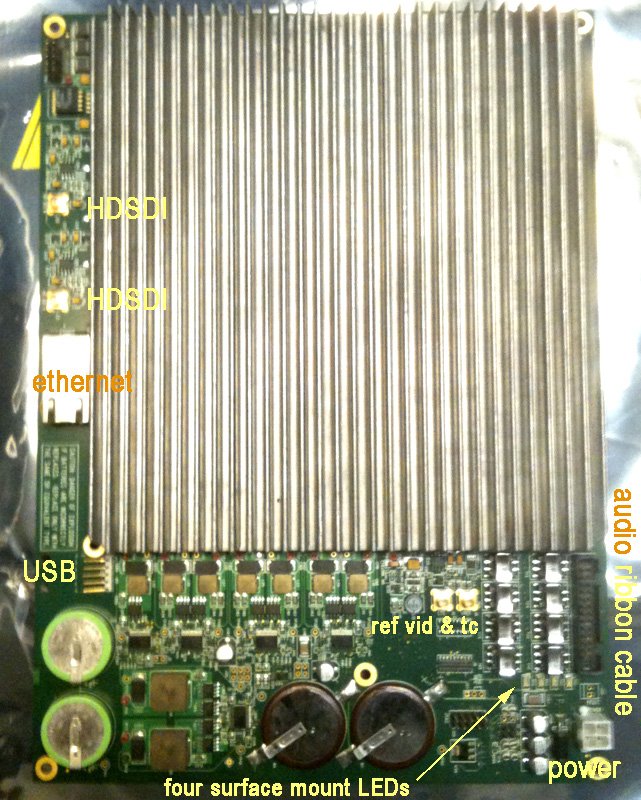
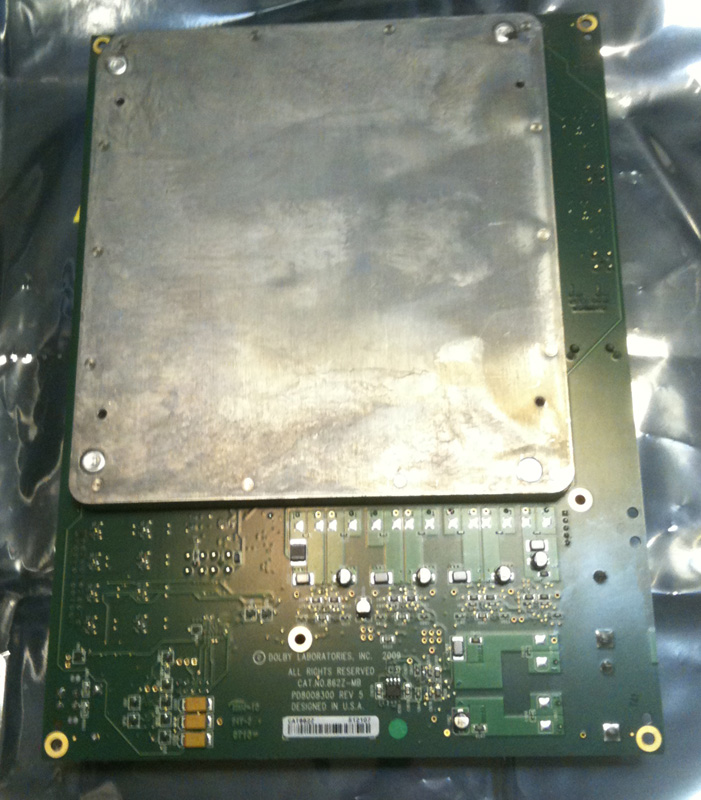
I point out the LEDs because none were lit on the bad one; at least two on the replacement.
Posted by Steve Kraus (Member # 476) on 06-18-2014, 12:34 PM:
In switching from 4.3.5(9) to 4.3.5(13), my CRU bay indicator LED flashes red/blue whenever there is a drive inserted and apparently regardless of usage. Is this a peculiarity of this software?
Posted by Marco Giustini (Member # 4544) on 06-18-2014, 12:48 PM:
it's common with the CRU drives when they get nuts. Power cycle the system.
Did you get an 862 with version 4.3.9-13 on it? I was told that was not possible, had to upgrade a whole multiplex on a rush when one of their 862 crashed and the new one was on 4.4!!!
Posted by Steve Kraus (Member # 476) on 06-18-2014, 01:07 PM:
I can't remember the number but it was the 862 software that goes with 13.
Right now I'm trying to work past the lengthy downloading security logs thing. The odd thing is that instead of a moving time bar it immediately says COMPLETED (519/519) with the actual number varying. It takes just over 3 minutes to go back to normal. There have only been a few hundred screenings done on this projector. Maybe a reboot of the projector will help.
Did 9 require manually setting Cinelink to TLS? I don't recall that. Nice to know they are on the ball against those who would tap into the cables between server and projector!
Edit to add:
Rebooting the projector and it came up with a Downloading Projector Security Logs and a normal moving % bar (to 512). I ran a 5 second test show and once again it goes back to the non moving bar (COMPLETED 512/512) and 3 minutes of waiting. Something is not right.
Posted by Brad Miller (Member # 2) on 06-18-2014, 03:41 PM:
Marco - Steve's cat862 came with 4.3.0.11 which translates to 4.3.5.13
He was previously running 4.3.0.9 with 4.3.5.9 which I prefer, but 4.3.5.13 isn't bad.
If you are on a VPF program, you HAVE to be "DCI compliant", which in Dolby-land translates to 4.4.x so that is probably why you were forced to upgrade. Alternatively the new cat862 came to you on 4.4.0.48 and for your complex to communicate with each other you had to upgrade the rest. (I think this latter is what actually happened to you. The reason is because once you to go 4.4.x you are stuck there. You can't go back to non-DCI-compliant software at 4.3.x).
All Dolby software through the last version of 4.3.x by default setup for DH in cinelink. This was on the assumption everyone was running series 1 projectors. You must use TLS for series 2.
Give projector and server a hard reboot at the same time. See if the logs don't go back to acting normally after a few plays of a short black clip.
Posted by Steve Guttag (Member # 268) on 06-18-2014, 05:34 PM:
Steve, you can "downgrade" to 4.3.5.9...just need the KDM...which Dolby will issue since that was available for your server when new. I've done numerous 4.3.5.13 back to 4.3.5.9...it is better, more stable in my experience.
Posted by Steve Kraus (Member # 476) on 06-18-2014, 05:35 PM:
@Brad: Thanks; will try. I did several soft restarts in the process of running the config script to manually set the auditorium address so VNC would respond, then again back to default on the off chance that played a role in the log business, then back to manual setting. And one projector restart amidst this. Very odd.
But it runs, it plays encrypted content, VNC is answering, and no unsupported flag on that DCP. Woot!
@Steve: That's an interesting possibility. I do have the stuff Norm sent. But maybe best not to mess with it?
Posted by Marco Giustini (Member # 4544) on 06-18-2014, 06:37 PM:
I've seen the "completed" issue with 4.3.5-13, I believe it's a bug.
Brad, no VPF. An 862 broke down and a new one was ordered from Dolby. Asked for one with 4.3.x software and was told that all 862's were coming with 4.4 software - hence I had to upgrade the rest of the servers as well.
Posted by Steve Guttag (Member # 268) on 06-18-2014, 07:11 PM:
I'd mess with it...I've had too many problems with 4.3.5.13. 4.3.5.9 was really the best, most stable of them all.
Posted by Steve Kraus (Member # 476) on 06-18-2014, 09:52 PM:
Marco, is that bug simply with the display, that it says completed when it's actually doing something and will eventually go away once everything is transferred? Or am I stuck with a 3 minute delay before I get control back forever? I've been trying Brad's suggestion of running 5 second shows to clear things out but the numbers do not seem to be getting smaller.
Posted by Steve Guttag (Member # 268) on 06-19-2014, 05:44 AM:
Steve,
You need to run 16 shows to clear all of the logs out. Just set up 16 5-second shows spaced 5 minutes apart on a schedule...go away for an hour and half and you should be all done.
Posted by Steve Kraus (Member # 476) on 06-19-2014, 01:40 PM:
Done! I set up 10 4 second shows at 5 minute intervals but it only took a few to finish them off. Will ponder going back to 9 though. As I still have 9 on the old RAID drives, if I reset the 862 with the software Dolby gave me, I'd pop them in and know right away if it worked. But no going back without help from Dolby including KDMs.
Is it safe to presume that a Cat.862 is a Cat.862, not that the replacement demands newer software?
Posted by Steve Guttag (Member # 268) on 06-19-2014, 03:26 PM:
The CAT862 has to have the correct firmware for the software you are running on the server or you will get a version mismatch. You need a KDM from Dolby to do a CAT862 software update (regardless of method.
For System 4.3.5 (9)...you would need 4.3.0.9 CAT862 firmware/key.
Posted by Marco Giustini (Member # 4544) on 06-19-2014, 04:30 PM:
Steve K.
The bug is only on the GUI. The 862 is indeed transferring but you don't see it. As Steve G. says, once all the logs have been read, it will begin showing normal transfers. But if you ever had 512+ logs to be transferred, you may have to wait 2-3 minutes while the 862 downloads the logs, even though the GUI says "completed". Nothing to be worried about.
Posted by Steve Kraus (Member # 476) on 06-19-2014, 05:52 PM:
@Steve: Are you talking about mismatch between 862 and the server system software? Or is there actual firmware on the 862 that demands that it run with only the newer 862 software?
We did have an 862 vs. DSS200 system mismatch when I put in the replacement. The choice was to downgrade the 862 or upgrade the system. We went with the latter and went to 4.3.5(13).
This is what Dolby gave me in an attempt to repair the old one. Obviously that would agree with 4.3.5(9).

If the 862 will run that then I guess I could go back to system 4.3.5(9) if the consensus is that it's better. Still pondering.
If I try this and it doesn't work I'd need Dolby to send me the newer 862 software and the KDMs to make it work again.
I guess it depends on what sort of glitches are found with 13. If it's stupid things like the download logs bar no problem. If it increases the odds that a show will get glitched, then I am all ears.
Posted by Steve Kraus (Member # 476) on 06-19-2014, 08:26 PM:
Oh wait...
I can't downgrade the Cat.862 with those KDMs as they were for my old one. So I'd need Dolby's help to downgrade as well as software to come back.
Posted by Mark Gulbrandsen (Member # 72) on 06-19-2014, 08:48 PM:
This is ridiculous!! You should really be upgrading to the latest release version. It's very good and solves a number of long standing issues. I doubt Dolby would charge you for the upgrade key. Just don't make it DCI when presented with the choice to do so during install... There's no going back.
Mark
Posted by Steve Kraus (Member # 476) on 06-19-2014, 10:01 PM:
I know less than probably anyone in this conversation but I still would never take the latest of anything until it's been out long enough to have proven itself.
Posted by Marco Giustini (Member # 4544) on 06-21-2014, 11:36 AM:
Mark,
I've never heard of an option to "make the system DCI" on a Dolby install disc. Version 4.4+ ARE DCI and only support TLS cinelink. If your projector cannot handle it, then you cannot downgrade.
Same with Doremi and their DCI versions.
Steve K.
If you have upgraded to 4.3.5-13, I wouldn't worry but if you really want to downgrade to 4.3.5-9 you will have to reinstall the whole server.
If the server works and you don't have sw mismatch (the server would notify you if there is one, don't worry) why do anything else? If you really want a new version, why not moving to 4.7.2 (or maybe 4.8.x, with which I haven't got much experience yet though)? But FIRST make sure your projector can cope with TLS, it's dead easy with a Dolby, it's probably already on TLS, you can check it under theatre devices, under cat.862: if it's on TLS now, you can safely upgrade. If it is not, you can switch to TLS manually by terminal: if it works you're good to go; if it doesn't, you are stuck on 4.3.x forever! ![[Smile]](smile.gif)
Posted by Steve Guttag (Member # 268) on 06-21-2014, 12:15 PM:
Um...not exactly accurate.
With 4.4+ you only loose Cinelink II DH. OFF and Cinelink 1 still work as well as Cinelink 2 TLS.
Moving from 4.3.5.13 to 4.3.5.9 requires NO unconfig or reconfiguring one's server...I've done it enough times to know.
Steve has a series 2 projector so, by definition, it is TLS compliant...in fact, that is the only form of Cinelink it will work with because IT is DCI compliant.
Posted by Marco Giustini (Member # 4544) on 06-21-2014, 12:51 PM:
Interesting. Do all series 1 support Cinelink I?
Steve K
If your projector is series II, then upgrade!
Posted by Steve Guttag (Member # 268) on 06-21-2014, 01:03 PM:
I don't know, honestly. I would say that all EFIB and earlier series 1s seem to.
Posted by Brad Miller (Member # 2) on 06-21-2014, 01:18 PM:
There is no reason for Steve to "upgrade". It's not an upgrade when things get worse, and anything DCI compliant certainly qualifies as a "downgrade" in stability because there's all of the stricter checks and balances the system has to go through to give the movie studios that false sense of security they seem to love so much.
In Dolby-land, 4.3.5.9 is the defacto gold standard, although unlike Steve I've never had any issues with 4.3.5.13
Steve isn't getting VPFs, so there is no reason for him to futz with the DCI compliant stuff. Just because the literal definition of the word upgrade is to improve the quality doesn't in any way mean that's actually what is happening. In DCI-land, it's exactly the opposite.
Also Mark there is no such thing as selecting for version 4.x to not to be DCI compliant. Anything past 4.3.x simply is.
Posted by Steve Kraus (Member # 476) on 06-21-2014, 01:48 PM:
My priority is maximum reliability in terms of ordinary shows so it depends on the issues that 13 might have. Stupid things like the log download bar or anything that does not affect the actual are one thing. Something that could impact shows are another. The bulk of my business are studio previews for critics, guilds or the occasional VIP. So I need to be as close to 100% perfect as possible. Wish I had two of everything. Getting a backup server is something I'd consider.
I'm curious if my CRU drive bay flashing blue/red continually whenever a drive is inserted is related to 13 or is the drive coincidentally going bad. I still have 4.3.5(9) on my original RAID drives; I may pop them in to see.
BTW, in what form is the video going to the projector (leaving aside the Cinelink encryption)? Is it RGB data ready to apply to the DMD chips--sort of like motion-BMP--or is there still come compression involved?
Posted by Marco Giustini (Member # 4544) on 06-21-2014, 03:03 PM:
Steve G.
Then upgrading to 4.4+ is basically safe with most of the projectors. Dolby told me that TLS only was supported on 4.4+ - but never checked myself.
Brad
Sure, DCI versions are a sort of downgrade but besides 4.4 and 4.5 lots of bugs have been solved. I have never upgraded a 4.3 with a 4.4/5/6 but now I am usually doing it with 4.7/4.8.
In terms of reliability, Dolby's are usually very good, the main issue I can see are the periodic disconnections of the media block. The 862 has been out for ages though and I am not aware of any major issues with the latest versions.
I am not too familiar with 4.7 and 4.8, but I liked 4.6 which proved to be very stable, particularly with the 862.
4.6.1-4 has been out for a long time and I managed to get an idea of its robustness. 4.7 has been replaced by 4.8 in no time and I still haven't installed enough 4.8 to form an opinion of it.
But I feel that 4.3 is now a tad old. That said, I am not aware of any complaints about it.
Posted by Brad Miller (Member # 2) on 06-21-2014, 03:29 PM:
Marco, you seem to strike me as one of those guys with the mindset "newer MUST be better".
All I ask is you name ONE thing that got better for reliability after 4.3x Otherwise your recommendation is not in Steve's best interest. He doesn't collect VPFs and as such has no reason to be running DCI compliant firmware.
Posted by Marco Giustini (Member # 4544) on 06-21-2014, 03:50 PM:
I did not mean to start a battle on versions with you. I agree with your point but I do believe the latest versions brought some improvements. Ok, mainly for the cat 745 but checking on the release notes I can only mention FTP transfers, subtitles, intermission, NTP, compatibility with some TMS (widely used in the UK), new purge scripts for enigma. Nothing extraordinary and as I said nobody has ever complained about 4.3.5 though.
Posted by Brad Miller (Member # 2) on 06-21-2014, 03:55 PM:
I'm not trying to start a battle with you either, but the fact remains you are giving Steve bad advice. Why? Because not a single one of those "improvements" you listed above applies to Steve's scenario. Upgrades should only be performed when they bring a new feature that is needed or an improvement in reliability.
And of course, any company's release notes are to be taken at face value. Just because they THINK they fixed something doesn't mean they did. Also even if they DO fix one thing, they could've easily broken other things.
Posted by Marco Giustini (Member # 4544) on 06-21-2014, 04:01 PM:
ok,
I'll wait for Steve's next posts "projector logs full" or "Dolby System clock drifting" then
Posted by Brad Miller (Member # 2) on 06-21-2014, 04:33 PM:
4.7.x doesn't fix the projector logs full. I've witnessed it a few times already myself even after all of the purging. That's a TI issue.
Steve starts his shows manually.
So what was the reason again? ![[Razz]](tongue.gif)
Posted by Marco Giustini (Member # 4544) on 06-21-2014, 04:39 PM:
Then Steve G. is wrong about that!
uhm... clock? (even though that is not fixing it completely), subtitle issues? Bigger number on the splash screen?
![[Cool]](cool.gif)
Posted by Brad Miller (Member # 2) on 06-21-2014, 04:54 PM:
As odd as it may seem, a bigger number on the splash screen actually won't benefit Steve K.
I don't think Mr. Guttag actually said 4.7 fixes the problem, I think he most likely stated that it has not caused him any issues. He normally words his posts very carefully.
Posted by Steve Guttag (Member # 268) on 06-21-2014, 05:09 PM:
Correct, I didn't say that 4.7 "fixes" the problem. I said I was able to purge many Enigmas that were "almost full" to a clean and green state. Thus far, none of the ones that I have pre-emptively purged has become "almost full" or "full."
I've kept all of my non VPF customers on 4.3.5.9 until a feature they wanted came out or for compatibility to a new system installed was put in. I still have folks on 4.3.5.9.
Posted by Steve Kraus (Member # 476) on 06-21-2014, 07:42 PM:
But you took people on 13 back to 9. Was it for a reason that affects shows or other things like interactions with library survers, NTP, automation, etc.? If 13 is rock solid in terms of show playback then I won't mess with it.
@Brad: Love the bugs graphic. Stealing...
Posted by Steve Guttag (Member # 268) on 06-22-2014, 06:30 AM:
Yes, I had show issues with 13. Call it coincidence or not...but with 13 I had odd and random things occur...with 9, never had the problems. Even in the config screen, 13 acts weird. All of the sudden you get other parts of the CLI starting to print through the screen with gibberish. It should also be noted that 4.3.5.13 uses a different form of linux than all other versions...it looks completely different on boot up than all other versions.
You do what you want...I have no vested interest in what version you run. I've said my piece.
Posted by Marco Giustini (Member # 4544) on 06-22-2014, 07:32 AM:
ok, I'll rephrase then: "projector logs almost full"
Steve K.: you won't have problems with either 4.3.5-13 or 9 or virtually any other versions (besides the evil 4.5!), I wouldn't worry too much, what we are debating here are little glitches, nothing serious - IMHO.
Posted by Steve Kraus (Member # 476) on 06-22-2014, 10:15 AM:
Well, maybe I should take it back to 9 but not until I have a long interval in case there are problems reloading the 862. Hmmm. I suppose I should ask if 13 really did solve any issues that I might care about.
For sake of completeness of this thread I should confirm that the incompatible DCP graphic in the thread title did go away with the repair so what Steve said must be confirmed: 24 fps playback is a given but anything else might be approved only if the system can talk to the 862 about it. Dead 862 means not approved.
Posted by Antti Nayha (Member # 4980) on 06-23-2014, 10:10 AM:
I just ran into a weird issue involving the red frame icon on DSS200/4.3:
1) I ingested a 25fps SMPTE DCP with a minor error in the subtitle file: there was one extraneous blank subtitle in the end, which had a timecode that was outside the duration of the CPL. Something like 02:00:00:00, when the duration of the video/audio tracks was less than 90 minutes.
2) The ingested CPL showed no problems and played back just fine when tested, with subtitles and all.
3) Suddenly, the next day, this CPL was marked with the red frame icon. I didn't try playing it, but was going to re-ingest it from a CRU drive instead to see if that helps. I simply inserted the CRU drive in order to do that, and at the same moment, the red frame icon disappeared from the CPL that was already loaded on the server. I didn't even get to start the re-ingestion!
4) I ejected the CRU drive and the red frame icon on the server never returned. The screening went just fine.
5) I logged on to Film-Tech and saw that Steve K had started a relevant thread just two hours earlier. ![[Eek!]](eek.gif)
No idea whether that had something to do with the minor subtitle error, or if it was just some kind of a glitch which made the server/mediablock temporarily think that it's not able to play back 25fps content.
* * *
Regarding the Dolby software versions, here's a list of bugs that I've personally encountered and were fixed in later versions:
Fixed in 4.6.0 (32): "a condition where subtitle files with one or more spaces in the file/folder name could not be read and transferred to the projector."
Fixed in 4.7.0: "a subtitle font problem that occasionally occurred when ingesting content via FTP."
Fixed in 4.8.0 (33): "a subtitles problem for shows with both Interop and SMPTE content."
Not bugs per se, but improvements that have helped me:
- 4.4.2(?): mediablock forces a restart of the CineCanvas subtitle engine automatically, in case subtitles are dropped during playback.
- 4.7.0: content can now be ingested from an exFAT drive.
So all in all, I currently prefer 4.8.0. Granted, I do a lot of festivals and those listed above may not be common headaches with studio DCP's (particularly when they're unsubtitled ).
Posted by Steve Kraus (Member # 476) on 06-25-2014, 09:39 PM:
One thing I see 13 did not address was when oddities cause the input drives to be unreadable, at least, in this case the USB. I had a movie on a LaCie 4 TB portable drive (NTFS formatted) and it didn't see it. Maybe it's too big (it doesn't work with Windows XP either, with a 2TB limit). But that's beside the point. But after pulling the plug on it, the system still thinks the connection is busy (flashing red transfer symbol). So the easy-to-screw-up nature is still there. Maybe both versions use the same driver. Had to reboot.
Posted by Steve Kraus (Member # 476) on 06-28-2014, 09:20 AM:
Well, here is something. Two "slides" (10 sec DCP's made from stills, flat and scope) made with DVD-O-MATIC that played fine on 9 don't play on 13 (with related Cat.862 software). No incompatibility flag or anything. You just get to that point in the time line and playback simply tops. It says running but the time stops. Remade with DCP-O-MATIC, they work. Glad I tested.
Other DCP shorts (made with DVD-O-MATIC) made from downloaded video (including those flagged as non compliant when the 862 was dead) seem to be okay.
Posted by Antti Nayha (Member # 4980) on 07-01-2014, 05:56 AM:
quote: Steve Kraus
One thing I see 13 did not address was when oddities cause the input drives to be unreadable, at least, in this case the USB. I had a movie on a LaCie 4 TB portable drive (NTFS formatted) and it didn't see it. Maybe it's too big (it doesn't work with Windows XP either, with a 2TB limit). But that's beside the point. But after pulling the plug on it, the system still thinks the connection is busy (flashing red transfer symbol).
Does the drive contain a lot of files, particularly non-DCP stuff? This behaviour remains even with the latest software versions:
When a disk is connected, the Dolby server always goes through the whole disk looking for ingestible content before showing a content listing in Show Manager. If the disk contains a lot of files (such as hundreds of thousands of small j2k files left over from the DCP authoring process), this will take literally days!
So you have no choice but to quit the process. With a CRU drive, you can safely use the disconnect button in the CRU bay. After doing that, try simply connecting a new drive to see if that clears the blinking CRU transfer symbol.
If it's a USB drive, on the other hand, I never feel safe just unplugging it while the drive is being read - so I prefer to shut down the server first.
Note that the Dolby also goes through files in the Trash / Recycle Bin, at least on some file systems. Ideally, a DCP drive should only contain DCP's and nothing else - and any recycle bins should be emptied before connecting the drive.
To make things worse, NTFS drives often have user-specific recycle bins which can sometimes be a bit tricky to remove.
Posted by Carsten Kurz (Member # 5396) on 07-01-2014, 07:36 AM:
The Dolby will only support drives larger than 2TB since version 4.4 or so.
- Carsten
Posted by Brad Miller (Member # 2) on 07-01-2014, 07:26 PM:
It was version 4.5 when that change happened.
Posted by Carsten Kurz (Member # 5396) on 07-01-2014, 09:41 PM:
I think already 4.4 supported ingest drives larger than 2TB. The RAID is another story.
- Carsten
Posted by Steve Kraus (Member # 476) on 07-01-2014, 09:59 PM:
No, this was material including test patterns and a non encrypted movie which I transferred off my backup drive (SATA, EXT2, in a CRU) after I loaded 13. I do think I will go back to 9 when I have a long gap to deal with any hiccups. I can load the 9 related 862 software and put in my old RAID set (500GB's) which still has 9 on it and see right away if all is well, before reloading it on the newer RAID drive set (1TB's).
Posted by Brad Miller (Member # 2) on 07-01-2014, 10:51 PM:
For clarity, the raid card itself had an update in December which is what permitted the larger drives to work. However because you can't update the raid card and then load older (4.4.x) software (because it will downgrade the raid software to the older version that can't handle it), when I say 4.5 is what brought the larger drive support to the table, that is the reality of it.
Powered by Infopop Corporation
UBB.classicTM
6.3.1.2