This is topic Create DCP in forum Digital Cinema Forum at Film-Tech Forum ARCHIVE.
To visit this topic, use this URL:
https://ft-forum.com/ft/cgi-bin/ubb/ultimatebb.cgi?ubb=get_topic;f=16;t=001945
Posted by Paul Looker (Member # 5420) on 06-20-2014, 01:42 PM:
I tried doing a search for this but is there an idiots guide to taking some home made policy stuff, or trailers for local independent movies, in a standard digital format like avi or mkv and turning it into DCP?
Posted by Mike Blakesley (Member # 26) on 06-20-2014, 02:36 PM:
Use this program:
DCP-O-Matic
It's free, simple to use, and best of all you can get support for it right here on Film-Tech because the guy who created it, and at least one other member of the team behind it, are members here.
If you read the manual, it's short, to the point and written in terms anyone can understand so don't be scared to jump in.
Basically all you have to do is:
- Name your project and decide where to store the finished DCP
- Point the program to where your source file is located
- Tell the program what format to use (scope, flat or something else) - there is a screen where you can see what your final images will look like
- Tell the program what type of DCP you're creating (ad, trailer, policy, feature etc)
- Adjust the audio if necessary (once you've done it a few times you can do this step when creating your actual videos)
- Create your DCP by going to Jobs > Make DCP.
It's just that easy. I've converted everything from home-made policy trailers to full-length features and it works great.
Posted by Yinghong Wu (Member # 6908) on 06-20-2014, 06:50 PM:
Adobe Premiere CC 2014 now contain a DCP output Format.Enjoy it. ![[beer]](graemlins/beer.gif)
Posted by Paul Looker (Member # 5420) on 06-21-2014, 12:15 PM:
i tried the dcp o matic last night and got a lot of crackle in the audio. any tips?
Posted by Brad Miller (Member # 2) on 06-21-2014, 12:50 PM:
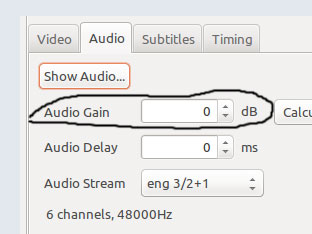
Your source material is clipping the limit. Go to the audio tab and lower the level down.
Posted by Paul Looker (Member # 5420) on 06-21-2014, 01:48 PM:
under the audio tab i just see gain and delay. I'm fairly new to all this. Is gain one of those things where a negative number means it is higher and vice versa or to lower the level do i just pick a negative gain?
Posted by Mike Blakesley (Member # 26) on 06-21-2014, 02:29 PM:
quote: Paul Looker
Is gain one of those things where a negative number means it is higher and vice versa
Yes. Just set the audio gain to some negative value. I usually use -6 but most of the movies I convert are older ones. For newly created content you might want to try -12 and experiment from there.
Posted by Mark Strube (Member # 4190) on 06-21-2014, 10:49 PM:
Why guess? Click "show audio," select all the channels, and at MOST have the top peak about 3dB below 0.
Posted by Mike Blakesley (Member # 26) on 06-21-2014, 11:42 PM:
There was a long-ago version where that feature would crash the program on my system so I got out of the habit of trying it...need to try it again. But -6db works perfect every time for me.
Posted by Monte L Fullmer (Member # 2797) on 06-22-2014, 03:08 AM:
Our technician installed the free DCP "Sintel" on out systems to test all formats - that he copied from the website mentioned in the link of this DCP-o-matic.
Posted by Fernando Caldeira (Member # 5680) on 10-06-2014, 11:15 AM:
What should be the optimum audio lvl in the "show audio" graphic?
I´m thinking about bringing everything down or up to -10db.
That is, the highest peak should never go over -10db
What do you guys think?
Posted by Monte L Fullmer (Member # 2797) on 10-06-2014, 01:22 PM:
I'm making great DCP's with this program above!
I set my audio to -20dB being that's the level to use when doing "B" chains for DTS output.
Comes out great every time!
- Monte
Powered by Infopop Corporation
UBB.classicTM
6.3.1.2