This is topic EXT 4 FORMATTED DRIVES FOR DCP S in forum Digital Cinema Forum at Film-Tech Forum ARCHIVE.
To visit this topic, use this URL:
https://ft-forum.com/ft/cgi-bin/ubb/ultimatebb.cgi?ubb=get_topic;f=16;t=002081
Posted by John Rizzo (Member # 1289) on 11-01-2014, 04:34 PM:
Can someone tell me if EXT 4 formatted drives are acceptable to theaters for DCP Delivery. We just had to up grade our linux to the newest Centos and I can only format in EXT 4
Posted by Gavin Lewarne (Member # 5397) on 11-01-2014, 04:41 PM:
I have used ext4 drives successfully on my Dolby DSS200 and a doremi
Posted by Carsten Kurz (Member # 5396) on 11-02-2014, 10:27 AM:
John - what do you mean with 'delivery'? EXT4 is not officially supported and there are a lot of servers out there who do not support it and more with unknown support for it.
I don't think it's a good idea to make a choice towards a distribution filesystem because your own machine supports it. You should aim for the format that all servers support.
If you know the machines you are creating/copying the content for, then of course you can use any format they support or that you have tested.
The fact that your CENTOS version creates EXT4 by default does not mean it can not create EXT2/3 partitions.
Also, bear in mind, you should use MBR partition scheme, not GPT/GUID.
Gavin - to my knowledge, ext4 experimental support was added in linux kernel 2.6.19, and finalized in 2.6.28. Doremis I know run kernel version 2.6.18. Of course Doremi could have added ext4 support on their own roadmap, but I think one is safe by using ext2/3, followed by NTFS on MBR partitioned dics.
http://dcinemaforum.com/forum/index.php?topic=440.0
- Carsten
Posted by Dave Macaulay (Member # 813) on 11-02-2014, 11:08 AM:
Centos 7 uses ext4 as default during setup for its system and data drives, but you can format drives as ext2 or ext3 (or many other fs choices) using the normal makefs command. Centos 7 will mount ext2 or ext3 drives with no issues.
I would format external drives destined for content storage/moving as ext2. The journaling feature of ext3 isn't very valuable for an archive drive in my opinion.
Posted by Frank Cox (Member # 6258) on 11-02-2014, 02:20 PM:
Centos (RHEL) 7 uses the xfs format by default; Centos 6 uses xfs4. Other formats can be specified if desired.
Posted by Marcel Birgelen (Member # 6801) on 11-02-2014, 05:17 PM:
I fully agree with Dave and Carsten, only because some popular servers with "recentish" software do support it, it's no reason to go against the accepted standard.
Also, like Dave already put it, ext3 only adds journaling to ext2 and journaling isn't a particular useful feature for a filesystem that's supposed to be read-only.
I have no hands-on experience with the most recent CentOS (mostly Debian and some Ubuntu around here), but I highly doubt they stripped all functionality to create EXT2 partitions and filesystems. Maybe the GUI tool you're using somehow stripped it and maybe the installation process doesn't offer it anymore, but I'm almost certain the cli utilities like fdisk and mkfs still will support EXT2 and your system will surely still be capable of mounting EXT2 partitions.
Posted by Frank Cox (Member # 6258) on 11-02-2014, 05:34 PM:
I just noticed that I put xfs4 (which isn't a thing) instead of ext4 as being the default filesystem in Centos 6. The time to edit that post expired, so this is to correct that bit of misinformation.
Sorry about that, folks!
To add to my previous post, Centos 7 comes with mkfs builders for the following filesystems: btrfs, ext2, ext4, minix, vfat, cramfs, ext3, fat, msdos, and xfs.
Posted by John Rizzo (Member # 1289) on 11-03-2014, 11:18 AM:
Thank You All for your help
I see that with Centos 7 we can format to ext 2 or ext4 however
I still can't copy the dcp s Im making onto the newly formatted drives. Does anyone know what I can do so I would be able to write to these newly formatted drives?
Another question I have is one of my customers asked me to put her dcp on a mac formatted drive (so she can easily make copies) She told me that all of the venues were she played it
at had no problem copying off of a mac drive. any thoughts on that?
Posted by Marcel Birgelen (Member # 6801) on 11-03-2014, 12:56 PM:
If you give us some details of how you're copying those files to the distribution disk and provide the errors you encounter, it would probably help tremendously.
Furthermore, if the Mac-formatted disk story is true, it's just asking for trouble. HFS+ support in Linux is still far from perfect, although for Read-Only purposes it should be sufficiently stable. Doremi servers with recent software are capable of reading HFS+ disks, I'm not sure about Dolby though and I'm quite certain systems based on Windows are having a hard time reading it. MacOS X is capable of reading and writing ext2, so why you would you even try HFS+ for this purpose?
Posted by Gavin Lewarne (Member # 5397) on 11-03-2014, 02:29 PM:
My dolby DSS200 does not read HFS drives at all, I have to copy them using my Windows PC with the HFS file system driver.
Posted by Carsten Kurz (Member # 5396) on 11-03-2014, 05:33 PM:
As far as I know, Dolby and Doremi support HFS+ officially. Wether that means it is really solid for full feature ingests, I do not know. I guess support for NTFS and HFS+ has been implemented to facilitate trailer and KDM ingest through USB memory sticks. We never had issues ingesting NTFS, but I would still recommend ext2/3. OS X fuse with fuse-ext2 will also allow to format drives to ext2 under OS X. For most people not running Linux regularly, formatting is a problem as well.
Also, very important, most current versions of windows and OS X create GPT/GUID partition schemes by default for EFI based machines. This will not work with any server I know - they need MBR partition schemes. Practically, this also limits ingest drives to 2TB max. Similarly, most current Linux releases default to inode size=256, while the best compatible format is MBR, ext2, inode size=128, for those servers running under windows with ext-drivers (most of these drivers can not deal with inode size=256).
Whenever I need to format a drive for distribution, I boot into a minimal linux on a CDR or USB stick and use mkfs and tunefs to create a file system.
I guess it would also work on USB drives connected to a VM.
I never had issues with alien ext2 or NTFS drivers, but then I would never use these volumes as working/OS/system volumes, only for single-process copying of directory structures and leave the system alone during the copying process.
- Carsten
Posted by Marcel Birgelen (Member # 6801) on 11-04-2014, 04:29 AM:
quote: Carsten Kurz
Similarly, most current Linux releases default to inode size=256, while the best compatible format is MBR, ext2, inode size=128, for those servers running under windows with ext-drivers (most of these drivers can not deal with inode size=256).
Do you know which drivers are being used by the vendors using Windows?
There are two popular (one freeware, the other open source) products supporting EXT2 under Windows. Ext2-ifs is known to have this limit, but ext2fsd, while it used to be rather wonky, now works fine with inodes of 256 bytes.
I've seen GPT work with recentish Doremi servers. Which would make sense, since later kernels (don't know which kernel added it by default though) all support GPT. Still I fully agree that, for reasons of compatibility, you should go the MBR route. Unless your distribution really grows beyond 2TByte, it wouldn't make sense to do anything different.
Posted by Mattias Mattsson (Member # 4308) on 11-04-2014, 09:51 AM:
quote: Carsten Kurz
Also, very important, most current versions of windows and OS X create GPT/GUID partition schemes by default for EFI based machines. This will not work with any server I know - they need MBR partition schemes.
This is not the case. At least Dolby (with recent firmware) supports GPT just fine.
The problem is that e.g. Mac OS X creates an EFI System Partition (ESP) as the first partition on a GPT partitioned drive. This is a small FAT partition at the beginning of the drive normally hidden from Apple's Disk Utility (unless "debug mode" is enabled). The user partition is created directly after this partition.
The reason it will not work on a Dolby (and most other?) D-Cinema servers is that the ESP will be mounted instead of the user partition because it is the first filesystem on the disk.
I have successfully used >2 TB disks with a single GPT partition as backup disks with Dolby DSS200 servers. The easiest way is to partition the disk using a Linux based program like GParted, gdisk, parted etc.
Posted by Marcel Birgelen (Member # 6801) on 11-04-2014, 11:33 AM:
Yeah, both Doremi and Dolby seem to accept GPT partitioned disks in their later releases. Still, I'm not sure it is officially supported though.
And Carsten's point is still valid though. We're talking about disks for distribution, not about disks for internal use only.
Regarding this MacOS X Disk Utility... That's an interesting note which I will try to remember for cases I would need their Disk Utility. Still, I think it's somewhat wrong to just put an EPS on each disk. Those partitions should only be used for disks that are supposed to be booted via EFI.
Posted by Carsten Kurz (Member # 5396) on 11-04-2014, 01:52 PM:
I tried mounting a GPT partition recently on a Doremi running 2.6.4 - nothing showed up in ingest manager. Some on a Dolby running 4.8.1.
I have seen the EFI/Windows thing on GUID partitioned drives coming from a Mac, yes.
But the disc I am talking about was a 2TB drive formatted on a WIN7 system using the default GPT partition scheme. Both machines had no issues once the same drive was changed to MBR/ext2. Before, I was able to mount the GPT drive on a TMS machine running a current Linux system with GPT support enabled, and copied the content over the network to the Dolby.
GPT discs also carry a protective MBR so non-GPT capable OS's do not consider the drive being unformatted and refrain from suggesting Inititialization, etc.
http://en.wikipedia.org/wiki/GUID_Partition_Table#Legacy_MBR_.28LBA_0.29
- Carsten
Posted by Mattias Mattsson (Member # 4308) on 11-04-2014, 03:49 PM:
That's strange..
I forgot to mention another thing that I have come across recently.
Newer Dolby versions (4.8.x) seems to have problems with unaligned partitions. All sorts of problems arises when a partition has an odd (or low?) starting sector. Including what you describe above, Carsten. Making the starting sector 2048 seems to resolve these issues.
I also agree that for distribution you should use the lowest common denominator that works. Which probably is to follow the recommendations of ISDCF: MBR, ext3, inode size of 128, etc..
Posted by Carsten Kurz (Member # 5396) on 11-04-2014, 06:47 PM:
I don't think there are Doremis in the wild with different kernel versions, are there? Maybe aside from their IMS. Does anyone know what kernel Dolbys DSS200 is running, and wether that changed/got updated over the course of their software upgrades?
Some Doremi software notes mention kernel versions 2.6.18-2 or 2.6.22-6, and the last change was in 2.2.5 to accomodate PCIe hotplugging in support for the IMB external interface.
GPT is officially supported since 2.6.25.
- Carsten
Posted by Mattias Mattsson (Member # 4308) on 11-05-2014, 04:26 AM:
This is for the latest Dolby release. I haven't really kept track of the kernel versions but I think they have been updated along with previous firmware versions.
Linux showstore-1 2.6.35.13 #1 SMP PREEMPT Wed Sep 24 21:29:57 PDT 2014 i686
Dolby D-Cinema System Software Version 4.8.2 (23)
Posted by Carsten Kurz (Member # 5396) on 11-06-2014, 02:17 PM:
quote: Marcel Birgelen
There are two popular (one freeware, the other open source) products supporting EXT2 under Windows. Ext2-ifs is known to have this limit, but ext2fsd, while it used to be rather wonky, now works fine with inodes of 256 bytes.
Those servers with a windows based ext driver are old servers and will usually not receive any updates on that level anymore. At the time they were bundled with the server software, the server manufacturers probably tested all available options and decided for the most stable ones.
Just a couple of minutes ago I received notice from a cinema operating a Doremi and one of those windows based servers. Two discs from a professional distribution service they received could be ingested by the Doremi, but would not be recognized by the windows based server. This clearly looks like an inode size issue.
People should read and follow http://isdcf.com/papers/ISDCF-Doc3-Filesystem-Structure.pdf
- Carsten
Posted by Mattias Mattsson (Member # 4308) on 11-06-2014, 03:16 PM:
quote: Carsten Kurz
Some Doremi software notes mention kernel versions 2.6.18-2 or 2.6.22-6, and the last change was in 2.2.5 to accomodate PCIe hotplugging in support for the IMB external interface.
Interesting, just checked a Doremi server with 2.6.4:
Linux dcp2000.dc.doremilabs.com 2.6.18.2 #5 SMP PREEMPT Mon Aug 26 16:11:57 CEST 2013 i686
Where does Doremi mention a later kernel version?
Posted by Carsten Kurz (Member # 5396) on 11-06-2014, 05:24 PM:
http://support.doremitechno.org/images/drmftp/ftpservice/Software/SW_Release_Notes/DCP2000_Software_Release_Notes_0 00288_v4_7.pdf
'9.7.4 System Changes
Upgrade to Linux kernel 2.6.22.6.'
'9.2.4 System Changes
- System: • Linux kernel is downgraded to version 2.6.18-2'
So they had a later revision kernel on older 0.5x software versions, then downgraded to 2.6.18-2 with later software releases. No reason given in this document. But seems obvious that Doremi stuck to this kernel and preferred to build enhancements into it on their own - e.g. GPT. Still it seems Doremi does not support discs larger than 2TB.
- Carsten
Posted by Antti Nayha (Member # 4980) on 11-13-2014, 02:39 PM:
quote: Dave Macaulay
I would format external drives destined for content storage/moving as ext2. The journaling feature of ext3 isn't very valuable for an archive drive in my opinion.
That’s exactly that the ISDCF thinks, too:
quote:
Allow EXT2 for storage format partitions. EXT2 is EXT3 without a journal, and a journaled file system is of questionable value for a distribution format.
So the consensus seems to be that ext3 offers no advantage over ext2 in this use.
But is there any real disadvantage in using ext3 compared to ext2? Does journaling affect performance or something?
Posted by Carsten Kurz (Member # 5396) on 11-13-2014, 07:00 PM:
No. ext3 really is just ext2 with journaling as extra. Don't use it, makes no difference for the server.
- Carsten
Posted by Antti Nayha (Member # 4980) on 11-15-2014, 12:51 PM:
Carsten, let me rephrase: how exactly do you guys deduce "don't use ext3" from "ext2 vs ext3 makes no difference"?
Looking into it, I found some benchmark comparisons:
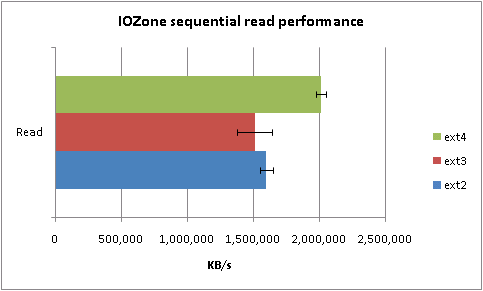
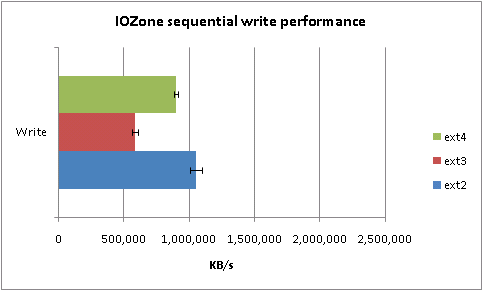
Those are about sequential read/write performance, which is what matters when dealing with large files such as those found on DCP’s. So it looks like ext2 is faster – particularly when writing – which makes sense given the lack of journaling overhead. Now, that does sound like a valid reason for choosing ext2 over ext3 to me, particularly when you're writing/copying lots of DCP's.
Supposedly, journaling makes the file system more resilient to unclean shutdowns/unmounts. But that's only a factor when you're writing to the drive, which is why it's not considered useful for transport drives – did I get that right?
Posted by Dave Macaulay (Member # 813) on 11-15-2014, 02:52 PM:
Yes. The ext3 journaling is primarily to protect data integrity when writing. Since distro drives are copied as clones and verified, journaling is pretty much useless there... and totally useless for reads into the server storage. The journaling activity takes time on each block transfer, slowing down transfer speed.
Posted by Mattias Mattsson (Member # 4308) on 12-14-2014, 08:18 AM:
Dolby does indeed differentiate the kernel version depending on server hardware. This is the kernel version used on a DSS220 running 4.8.2(23):
Linux showstore-1 3.2.23 #1 SMP Wed Sep 24 21:45:42 PDT 2014 i686
Dolby D-Cinema System Software Version 4.8.2 (23)
They probably need a more modern kernel on DSS220 because they are using the Linux software RAID (mdraid) on these machines. Also interesting is that this kernel for DSS220 lacks the RT-Preempt Patch that the kernel for DSS200 seems to have.
Posted by Marcel Birgelen (Member # 6801) on 12-15-2014, 02:49 AM:
quote: Antti Nayha
Those are about sequential read/write performance, which is what matters when dealing with large files such as those found on DCP’s. So it looks like ext2 is faster – particularly when writing – which makes sense given the lack of journaling overhead. Now, that does sound like a valid reason for choosing ext2 over ext3 to me, particularly when you're writing/copying lots of DCP's.
I think the main motivator in choosing the file system should still be compatibility. If you need to churn out a lot of disks in a limited time frame, you could easily come up with an affordable rig which would allow you to create multiple disks in parallel.
Posted by Antti Nayha (Member # 4980) on 12-20-2014, 06:33 AM:
But surely the real-world compatibility is equal? That is, how could any conceivable system support only ext3 and not ext2?
Posted by Carsten Kurz (Member # 5396) on 12-20-2014, 06:46 PM:
I am not a specialist there, but as far as I understood, ext3 is just 'some additional information' - the journaling info. As such, it is more or less impossible for ext2 to be incompatible with ext3 supporting systems. An ext2-only capable system would simply ignore the journaling information, which would cause no harm if fs and journal are synced.
And afaik there is no Linux system that doesn't support both. The only way to exclude ext2 would be to reject ext2/non-ext3 filesystems explicitly and intentionally for specific reasons, i.e. because the specific system would be configured to consider a non-journaling fs as outdated or unsafe.
I don't know if the journaling overhead figures given above are also true for large contiguous files as used for DCPs. Anyway - you may do your own testing on that, writing a typical DCP on the same system to an ext2 formatted disc, and then again to the same disc formatted as ext3.
- Carsten
Posted by Antti Nayha (Member # 4980) on 12-20-2014, 07:10 PM:
quote: Carsten Kurz
The only way to exclude ext2 would be to reject ext2/non-ext3 filesystems explicitly and intentionally
I'm not quite convinced that even that is possible…
And sequential read/write = large continuous files.
Posted by Carsten Kurz (Member # 5396) on 12-20-2014, 07:52 PM:
Well of course a system configured specifically for this task could identify a file system as ext2 only (=missing journal) and e.g. reject to mount it. But as I wrote above, this would have be configured like this intentionally. And the rejection would happen on a higher level than fs-driver.
- Carsten
Powered by Infopop Corporation
UBB.classicTM
6.3.1.2