This is topic Problem with Datasat (QUBE) DC20 database. in forum Digital Cinema Forum at Film-Tech Forum ARCHIVE.
To visit this topic, use this URL:
https://ft-forum.com/ft/cgi-bin/ubb/ultimatebb.cgi?ubb=get_topic;f=16;t=002101
Posted by Juan Jose Garcia Calvo (Member # 1702) on 11-18-2014, 11:57 AM:
Hello everybody.
Yesterday I found a problema in our Datasat (qube) DC20.
It's running the qube versión 2.5.5.8
When I went to the "media" tab, it appears to be empty. So I went to the "shows" tag and there was all the ítems, trailers, features, etc...
Even after that I played the show INTERSTELLAR whitout problems.
I tried to ingest a new film, but I had an error message (you can see it in the attached picture).
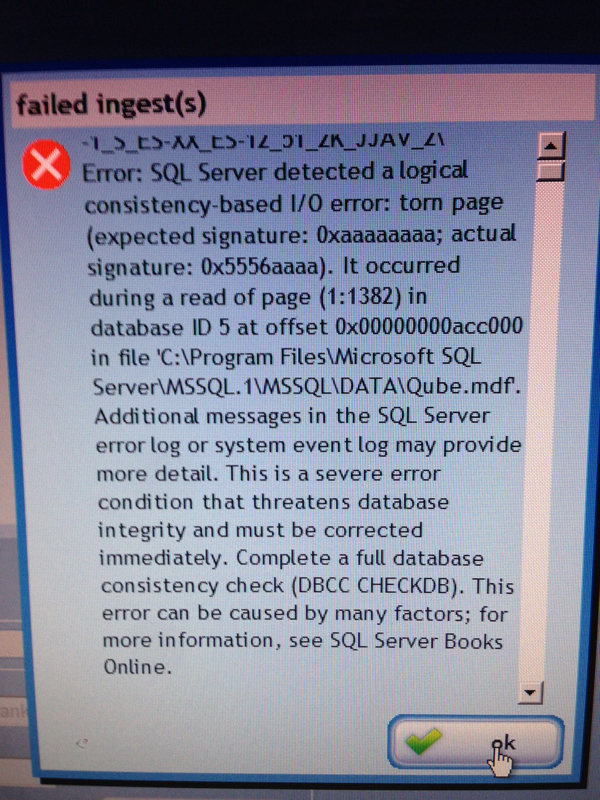
It seems to be something about the database and I have to perform a database check, but I don't know how can I do it. I have no idea about SQL server...
I can log into the server as Support, but I can find where is the application to perform this database check...
and if I find it, maybe I need any user/password to log in, and I need to find what's the database I need to check...
Anyone can help us?
Do we need to uninstall the software, perform a raid HD format and reinstall the software?
This way we are going to lost all the trailers, cues, ...
and maybe we need to make a lot of work...
Thank you!!!
JuanJo
Posted by Juan Jose Garcia Calvo (Member # 1702) on 11-18-2014, 01:25 PM:
I have found these .exe inside the DC20, in a folder called "Support", and subfolder called "Database Utilities":
Clean_DB.bak
Database_Reset.exe
Database_Restore.exe
And I have found in the raid disk (qubemedia (D:), in the folder "qubeDB" these files:
QCPD-xxxxx-20-09 QubeDB 16-11-2014.bak
QCPD-xxxxx-20-09 QubeDB 17-11-2014.bak
QCPD-xxxxx-20-09 QubeDB 18-11-2014.bak
(Where xxxxx are the serial number of the server...)
Maybe all these files could be what I need?
Do I need to have any caution with the .exe ?
Thanks again!
Posted by Marcel Birgelen (Member # 6801) on 11-19-2014, 02:30 AM:
My experience with the Datasat DB20 is really quite limited, but what you're posting is a hard MS SQL error.
The files you're posting seem to be database recovery tools by Datasat/Qube. Maybe you can use them as a last resort. The ".bak" files look like ordinary MS SQL database backups. You might be able to restore it with the Database_Restore.exe utility.
I think it's best to get in touch with Qube (they're doing the support as of now), since this will be beyond normal operating procedures.
This indicates a database corruption and is often caused by hardware issues. First of all, you might want to check the Windows Event Log (Event Viewer) and look for other I/O problems.
If you're not able to find anything obvious there, you might just have had some bad luck with your database. Maybe the system lost power while performing a database transaction?
You can probably fix it by issuing a "DBCC CHECKDB Qube" command to MS SQL, but for that to happen, you need to be able to connect to the database as an administrator (Windows administrator user and/or "sa" database user, depending on the authentication model). Furthermore, you need a client. Microsoft's own client is called "Microsoft SQL Management Studio" and is a rather bloated beast which may not be installed on the machine.
An alternative I've used in the past (for other purposes) is Navicat for MSSQL, a free trail is available here, you might be able to load it on the DC20 or maybe you will even be able to connect remotely if the database configuration on the DC20 allows for it and you do have access over Ethernet to the machine. Still, you will need credentials to connect to it. The only exception would be if you do it locally and if the database runs in mixed or Windows authentication mode and you're logged in as a user with administrator privileges.
Posted by Juan Jose Garcia Calvo (Member # 1702) on 11-19-2014, 08:43 AM:
Hello.
Thanks to the QUBE guys problem is solved. They assist us through a remote conection.
We finally tought that the easiest and "clean" solution was to uninstall qube software, perform a format of the storage drive (raid) and then reinstall the software.
Before that, We backed up the DCPs I wanted to save and after all, reingest these DCPs.
Thank you Marcel for your help!
Best regards!
Powered by Infopop Corporation
UBB.classicTM
6.3.1.2