This is topic Ingestion Dolby DSS220 CRU Dataport in forum Digital Cinema Forum at Film-Tech Forum ARCHIVE.


To visit this topic, use this URL:
https://ft-forum.com/ft/cgi-bin/ubb/ultimatebb.cgi?ubb=get_topic;f=16;t=002105

Posted by Peter Maddock (Member # 7652) on 11-19-2014, 07:36 PM:
 
We are having problems ingesting content onto our Dolby DSS220 Server through the CRU Dataport. Some drives continually fail to ingest while others have no problem. If a drive fails to ingest via the CRU it will always ingest using a sleeve connected to the server by eSata cable.
Note that ingestion speeds are similar using both connections.
Another issue with the 2U CRU Dataport is that the server will only connect to one of the 4 ports; the top left port. Our installer says that this is normal. Seems a waste on ports!
Wondering what experience people may have had with ingestion on the DSS220.
 
Posted by Marcel Birgelen (Member # 6801) on 11-19-2014, 07:47 PM:
 
Why do you need four ports for one server anyway? If you want a rack mountable solution, there is also a 1U version with two ports, which would make a whole lot more sense. There are three models available of that 2U CRU Dataport, which one do you have?

And what kind of errors do you get while ingesting?
 
Posted by Jim Cassedy (Member # 4115) on 11-19-2014, 08:47 PM:
 
Does is actually fail to ingest or does it completely fail to recognize the drive?

At the risk of asking a silly question- - when is the last time you re-booted your server?

I've have DSS 220's at two different locations that will occasionally fail to recognize a
drive when it's pluged into the CRU bay, but will ingest fine through the USB or e-sata port.

Re-booting always solves the problem for me.
 
Posted by Steve Guttag (Member # 268) on 11-19-2014, 08:54 PM:
 
At the moment, anyone running reasonably current Dolby software and a DSS220 are advised to reboot with a months time.

Dolby's CRU drivers don't seem to be the strongest things...I've found internal CRUs to even quit to recognize the port...particularly on DSL100/DSL200s.

As for the DSS220...CRU Dataport has a 1U, single bay for the DSS220 and uses an eSATA connection...it should ingest at least double the speed of a USB ingest too.

I have not run into the problem of the CRU being flaky on a particular drive but USB being okay...I have run into drives that are not recognized under any circumstances in places that tend to run festivals where the formatting seems to be as the author cared to do it.
 
Posted by Peter Maddock (Member # 7652) on 11-19-2014, 09:21 PM:
 
The drives are recognised by the server although sometimes not immediately. Can't actually ingest until the drive is recognised.

During ingestion failure may occur either while copying or verifying. Only get a Failed indication on the server.

We were advised to get a 2U CRU and we wonder why if the server only recognises one bay!

Our installer thought a recent software update on the server might have solved the problem; it hasn't.

The CRU data port ingestion is very unreliable. We usually default to sleeve and eSata. Only trying again to try and sort out the problem.

eSata is the faster method for ingestion from the sleeve compared to USB 2.0. And Dolby are not offering opportunity to upgrade to USB 3.0 which is a pity as we are getting many files delivered on USB 3.0 drives which can only be ingested via the slower USB 2.0 port.
 
Posted by Steve Guttag (Member # 268) on 11-20-2014, 09:27 AM:
 
Whomever recommended the 4-drive bay unit didn't do their research or ill advised you. I wouldn't expect Dolby (or the others) to ever recognize multiple drives...there isn't much call for that sort of thing. The server will recognize a USB and CRU simultaneously though.

The official CRU product that is supposed to be used with the DSS220 is the 41610-0499-0001. It has only one drive in a 1U frame. It is eSATA out and will plug into the rear eSATA port of the DSS220.

http://www.cru-inc.com/products/digital-cinema/digital-cinema-215dc-1u-rackmount/

I have used it with several DSS220s without incident.
 
Posted by Carsten Kurz (Member # 5396) on 11-20-2014, 09:47 AM:
 
quote: Peter Maddock
eSata is the faster method for ingestion from the sleeve compared to USB 2.0. And Dolby are not offering opportunity to upgrade to USB 3.0 which is a pity as we are getting many files delivered on USB 3.0 drives which can only be ingested via the slower USB 2.0 port.

Something is wrong here. The DSS220 has no built-in CRU slot. The only option is to use USB - which is USB3.0 on the DSS220, or an external CRU slot connected through eSATA.

So, Peter, I assume you are not having a problem with a DSS220, but a DSS200?

- Carsten
 
Posted by Marcel Birgelen (Member # 6801) on 11-20-2014, 12:20 PM:
 
quote: Carsten Kurz
Something is wrong here. The DSS220 has no built-in CRU slot. The only option is to use USB - which is USB3.0 on the DSS220, or an external CRU slot connected through eSATA.
Well, he's telling you that he's using a 2U 4-port CRU dataport, connected to the eSATA port on the server.

The problem with those things is, only one bay can be used. There are three models of this 4-bay version. Two are using a MiniSAS connector, which is not going to work on a DSS220 and the other model has 4 separate eSATA ports, one for each CRU bay. So, port #1, which would map to the top-left bay is connected to the DSS220 via eSATA, the other three ports are just for show.

While this setup is inefficient, it doesn't automatically explain his ingest problems though.
 
Posted by Marco Giustini (Member # 4544) on 11-20-2014, 12:46 PM:
 
Whoever recommended a 4 CRU chassis made a mistake.

That said, do you wait till the CRU icon is not RED anymore and turn the CRU off before removing the drive?
I've found that Linux will leave the drive mounted if you do it otherwise and then a reboot is in order to sort that out.
 
Posted by Carsten Kurz (Member # 5396) on 11-20-2014, 05:34 PM:
 
quote: Marcel Birgelen
Well, he's telling you that he's using a 2U 4-port CRU dataport, connected to the eSATA port on the server.
He is telling a lot of things, but most of them do not make sense for either a DSS200 with USB2.0 and internal CRU or a DSS220 with USB3.0 and eSata only.:

quote: Peter Maddock
If a drive fails to ingest via the CRU it will always ingest using a sleeve connected to the server by eSata cable.
Note that ingestion speeds are similar using both connections.
Another issue with the 2U CRU Dataport

quote: Peter Maddock
eSata is the faster method for ingestion from the sleeve compared to USB 2.0. And Dolby are not offering opportunity to upgrade to USB 3.0 which is a pity as we are getting many files delivered on USB 3.0 drives which can only be ingested via the slower USB 2.0 port.
Did anyone verify formal USB 3.0 capability on the DSS220? I know it was in the specs at some time. The ingest speeds I have seen seem to indicate USB3.0, not USB2.0

- Carsten
 
Posted by Gavin Lewarne (Member # 5397) on 11-21-2014, 02:19 AM:
 
I get the same non-response out of out DSS200 built in cru port sometimes. a reboot always fixes it
 
Posted by Marcel Birgelen (Member # 6801) on 11-21-2014, 05:05 AM:
 
quote: Carsten Kurz
Did anyone verify formal USB 3.0 capability on the DSS220? I know it was in the specs at some time. The ingest speeds I have seen seem to indicate USB3.0, not USB2.0
Well, Dolby is very sketchy about that and AFAIK it's just USB 2.0. Maybe there are multiple revisions? USB 3.0 became "the norm" around the time the machine was released. But USB 2.0 can do 50~60 MByte/s in optimal conditions, you will not get that much more performance out of USB 3.0 with many regular SATA drives and USB-SATA drive caddies.

In all honesty, the DSS220 is by all means a downgrade compared to the DSS200 (which is sadly end-of-sale). No hadware RAID, no built-in CRU port and there is simply no way to get it to work with Series 1 projectors.
 
Posted by Marco Giustini (Member # 4544) on 11-21-2014, 06:25 AM:
 
quote: Marcel Birgelen
there is simply no way to get it to work with Series 1 projectors.
What about 4K and HFR? It's the reason why you have an IMB.
 
Posted by Steve Guttag (Member # 268) on 11-21-2014, 06:38 AM:
 
After numerous conversations with Dolby, I've yet to hear that the DSS200i/CAT745 is at end of sale and it remains on their 11/2014 price list and is our "standard" Dolby server. Since they will need to continue the DSL200 for the foreseeable future...the difference in hardware between the DSS200i versus the DSL200 is a bigger RAID card two drives.

One nice thing I've noted on the DSS220 is the bootup time, which on Dolby is embarrassingly slow is cut in half for the DSS220 as compared to the DSS200 (running the same software).

I can certainly appreciate that in the typical multiplex where a TMS will likely exist...the need for a CRU port in each server is likely never used. Also, the lack of a spare power supply always running and being exposed to the same spikes/transients may also not necessarily justify having one in each server...however having one or two spares for the complex should cover the back up situation at a lower cost. I know that for our CP750 customers, we only have one back up power supply for a complex since they are simply a plug-in.
 
Posted by Marcel Birgelen (Member # 6801) on 11-21-2014, 07:31 AM:
 
The DSS220 was clearly developed for multiplex operations, with central content ingestion. The faster boot times partly come from the absence of a hardware RAID controller, which otherwise takes its fair amount of time to initialize.

quote: Marco Giustini
What about 4K and HFR? It's the reason why you have an IMB.
The DSS200 supports both the IMB and the old server-side mediablock configurations.
 
Posted by Marco Giustini (Member # 4544) on 11-21-2014, 09:15 AM:
 
you're right, my point was nonsense [Smile]
 
Posted by Marcel Birgelen (Member # 6801) on 11-21-2014, 12:34 PM:
 
No problem [Wink] . I guess not many did upgrade their existing DSS200s with the IMB option though. And with the advancement of the "fully integrated" IMBs, not only being offered by the former server suppliers, but also by the projector manufacturers themselves, the function of the traditional server becomes far less important in the future.

quote: Steve Guttag
After numerous conversations with Dolby, I've yet to hear that the DSS200i/CAT745 is at end of sale and it remains on their 11/2014 price list and is our "standard" Dolby server. Since they will need to continue the DSL200 for the foreseeable future...the difference in hardware between the DSS200i versus the DSL200 is a bigger RAID card two drives.
The DSS200i and CAT745 combo is indeed still available, but with the ongoing acquisition of Doremi and the integration of their servers, I expect some rather drastic changes in the product lineup in the not so near future.
 
Posted by Peter Maddock (Member # 7652) on 11-21-2014, 07:09 PM:
 
Just clarifying again. We have a DSS220 which on the front panel has 2 USB 2.0 ports and 1 eSata port for cable ingestion from attached drives.
We also have a 2U CRU Datport (4 Bay) which is connected to the rear of the server by sata cable. Only the top left bay is operative.
Most of our distributors use Deluxe who deliver on DX115DC drive carriers. Ingesting these drives via the CRU drive bay is proving unreliable. About 50% fail but will ingest when the drive is placed in a DX115 Move Dock which provides USB 2.0 and eSata cable connection to the front of the server. The Move Dock, using the eSata connection is our most reliable and speedy ingestion method. So we wonder why we have the 4U CRU Dataport.
This single bay 1U Data port from CRU appears to be a better option for the DSS220, http://www.cru-inc.com/products/digital-cinema/digital-cinema-215dc-1u-rackmount/. Note that the link says the unit was designed for the DSS220. However we might still get unreliable ingestion using this unit.
The DSS220 often gets stuck during many operations and must be rebooted to overcome the problems. We are only a small cinema so it is being rebooted daily. And we find it must be rebooted occasionally during show setup operations to overcome problems. We find the drive icons at the top right of the screen are slow to reflect changes to the system. Rebooting the system is often the best way to refresh to mount state of an external drive.
 
Posted by Marco Giustini (Member # 4544) on 11-22-2014, 07:21 AM:
 
Peter,
The CRU unit linked is just CRU bays with a SATA cable which links to the back. A single unit or a 8-unit will give you the same result.

What the difference could be, IMHO, is that when you use the rack-mounted unit you are introducing an extra joint in the SATA cable. If not mistaken the DSS220 has an eSATA connector on the back. Does the CRU rackmounted unit has an eSATA as well? If you use SATA, those are not really designed for that and I've seen before failures because the cable does not really fit in properly.

If you are using an eSATA, you may want to try a better cable, and make sure it's the shortest possible. You also may want to use a different bay, you have 3 unused, move the cable to the second one.

You shouldn't need to reboot the Dolby daily to overcome problems. Make sure you wait till the SATA icon turns white again before TURNING OFF the bay and remove the disk. If you remove the disk when it's being used and (maybe) before turning it off, the disk will stay mounted in Linux and a reboot would be required.

Also, please note the latest Dolby sw has a little issue with drives which stay mounted even though the transfer has completed. I've seen this with USB drives, not sure whether it happens with SATA as well. Dolby are aware of that.
 
Posted by Steve Guttag (Member # 268) on 11-22-2014, 08:33 AM:
 
In general, I've found that most external eSATA/SATA cables to be of questionable quality. The connector itself is such that it doesn't really have the friction needed to keep it reliable.

Don't use a cheap cable (quality). For what its worth, I've found Tripplite's cables to be pretty darn reliable...I've changed out other brand cables for those and CRU problems have disappeared (this has mainly been in Cinedigm racks where the CRU is feeding a Dell or IBM server). I have found a DSS220 where the INTERNAL cable was the faulty one! (that is much more rare...only had that once).

I will say that bad CRU response is not intrinsic to the DSS220 or we would have heard about it by now. We have multiple sites with the external CRU (1U single bay) and they are not reporting ingest problems with them.

I would have your DSS220 on System 4.8.1.19 at least...4.8.1.19 has many, many fixes for the CAT745...System 4.8.2.23 is current and brings yet another fix for NTP, if that has ever been an issue for you.

I really think that your problem may be one of poor connectivity.
 
Posted by Dave Macaulay (Member # 813) on 11-22-2014, 08:40 AM:
 
"So we wonder why we have the 4U CRU Dataport"
Simple. The 4U one costs more. Your supplier got more profit by selling it to you.
 
Posted by Marco Giustini (Member # 4544) on 11-22-2014, 11:34 AM:
 
well, that's a stupid way of making money since the customer soon realises they cannot use three of them!
 
Posted by Dave Macaulay (Member # 813) on 11-22-2014, 05:32 PM:
 
The cheque has already been cashed by then.
 
Posted by Marco Giustini (Member # 4544) on 11-22-2014, 05:56 PM:
 
yes but they won't cash another one.

You can make more money by selling bigger speakers, larger storage, bigger projectors. They all may be useful somehow.
Something you cannot use will never be useful and even the dumbest customer will eventually realise that!
 
Posted by Dave Macaulay (Member # 813) on 11-22-2014, 09:27 PM:
 
Well.. you have 3 spares for when they break...
 
Posted by Marco Giustini (Member # 4544) on 11-23-2014, 04:53 AM:
 
[Cool] [Big Grin]
 
Posted by Peter Maddock (Member # 7652) on 02-06-2015, 04:32 AM:
 
Its been a while but we finally established there is a problem with the rear eSata input on the DSS220. We now have a single drive bay unit from our installer and it ingests fine from the front eSata but will not connect via the rear eSata.
The cost of getting it repaired will be another thing. Although still under warranty the unit has to be freighted at our expense from Melbourne to Asia for repairs.
 
Posted by Steve Guttag (Member # 268) on 02-06-2015, 06:39 AM:
 
Yeah...screw that. I've had one that also did that. My quick/immediate solution was to take one of the card covers off and run the cable straight to the Motherboard...problem solved. The problem was with the Card Coverplate with the eSATA connector and short red cable. Either change that (for just a few dollars..they are not pricey) or do as I did and just run it to the main board. Changing an entire unit out, at considerable expense, due to a cheap cable is silly.

On the DSS220 software front...4.8.2.24 is now current...the latest build addresses a CAT745 issue with KDMs expiring during the performance...normally just a screening room concern.
 
Posted by Marcel Birgelen (Member # 6801) on 02-06-2015, 08:40 AM:
 
If the issue really is just the eSATA/SATA extender (the red SATA wire and eSATA plug), then the fix is indeed easy. Order a replacement for a few bucks from a nearby electronics retailer (just Google a bit for SATA to eSATA). If it is the SATA port itself, you could still internally swap the SATA ports used for the front and back eSATA connectors as an alternative.

The stupid thing is, this could potentially void your warranty, so maybe you best keep the components you swapped, so you can swap them back in, in case you really need to make use of the warranty services...
 
Posted by System Notices (Member # 2357) on 01-15-2019, 04:46 PM:
 

It has been 1439 days since the last post.


Posted by Leo Enticknap (Member # 534) on 01-15-2019, 04:46 PM:
 
Does anyone know what the model of the eSATA card in a DSS220 is? We have a customer with one on which the back panel jack has been physically damaged, who wants it replaced. I'm guessing that there's no point in asking Dolby, as they've discontinued support for the DSS line, but was wondering if, like the 3Ware RAID cards in 200s, it's a generic card that is still readily available from third party vendors.

I guess it could be a motherboard header that just goes to one of the SATA jacks on the motherboard - it's so long since I've opened up a 220 that I can't remember. Any pointers would be gratefully received.
 
Posted by Mike Renlund (Member # 4675) on 01-15-2019, 05:59 PM:
 
Hi Leo,

Even though we can no longer provide parts for these systems, we will happily answer questions about any of our products and try and help you find the parts you need.

We still answer questions for systems made decades ago and try to help as much as we can. CinemaSupport@dolby.com will reach us.

In this case, it is a motherboard connection and not a specific card for this Sata port.

The cable we used was: Startech SATA2ESATA6 or PAN-INTERNATIONAL DLB8320270-LF

If you need the metal PCI slot blank that has 2 eSATA size holes, that is SIIG INC CB-BR0011-S1 or Startech ESATAPLATE1

Mike Renlund
Dolby
 
Posted by Leo Enticknap (Member # 534) on 01-15-2019, 06:30 PM:
 
Many thanks - very much appreciated. It seems that someone tried to pull a connector out at an awkward angle, and destroyed one of the jacks. Will get a dual PCI eSATA to SATA assembly.
 
Posted by Jim Cassedy (Member # 4115) on 01-24-2019, 12:01 PM:
 
quote: Leo Enticknap
It seems that someone tried to pull a connector out at an awkward
angle, and destroyed one of the jacks

One of the USB ports on the front of the DSS-200 at one of the screening
rooms I work at got broken when somebody smashed into a thumbdrive that
was sticking out the front. I was told by one of the guys I work with with at
Dolby that the USB port was part of a larger assembly & that the only way to
'fix' it was to replace the large (expensive) circuit board that it was attached to...
assuming I could get a replacement at all.

This DSS 200 has a CRU port for DCP ingestion, but I was nervous about only
having one working USB port on front to ingest keys or occasional non-CRU
drive content. So, I wound up getting a short USB M-F extension cable
which I leave connected to the DSS200 at all times, and use the female end
for all USB key or content ingestion so as to put less wear on the one, good
remaining USB port.

Which brings me to this question:
> I would like to be able to push keys to the DSS 200 using a spare laptop
I have in the booth.

This is a screening room. There is no TMS. It's a 'closed' network, connected
only with the server, projector, & 3D controller. (All via Cat5)
There is no TMS or automation. Everything is run manually.

I can successfully connect to the to the dolbydigitalserverthingy using FileZila,
but I can't see the Dolby's directory listing, or transfer files.
I know it's probably some simple setting I've got wrong in FileZilla, or the
laptop (MacbookPro) network settings that I"m just not seeing.

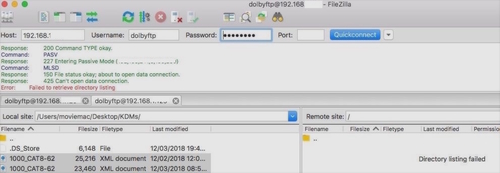
Here are the error messages I get when I try to connect.
(IP Addresses Removed For Security)

Here's the FileZilla Screen:
 -

And also this message, which is why I think I have some setting wrong:

 -

>What am I doing wrong?<

Tnx!
 
Posted by Leo Enticknap (Member # 534) on 01-24-2019, 12:25 PM:
 
The front panel USB jack is the cat915Z board. They're not that pricey, and pretty easy to swap out. Dolby no longer formally support the DSS200, but I suppose it might be worth contacting them to see if they have any remaining in stock.

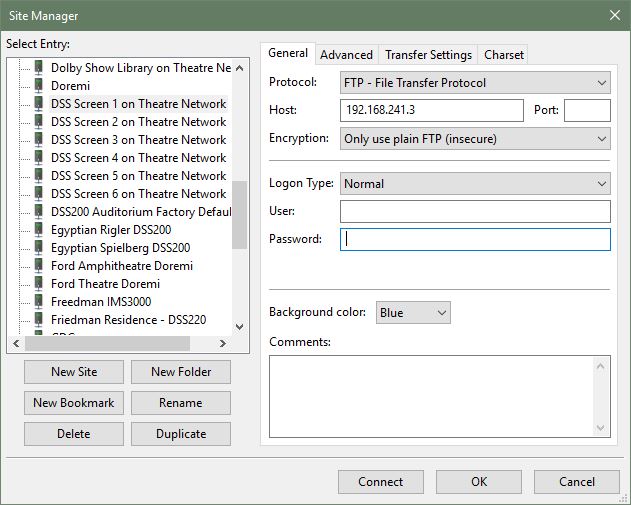
For Filezilla, you need the following settings. In the Filezilla site manager entry for your server, ensure that in the general tab, the encryption type is set to "Only use plain FTP," and the logon type is "normal."

 -

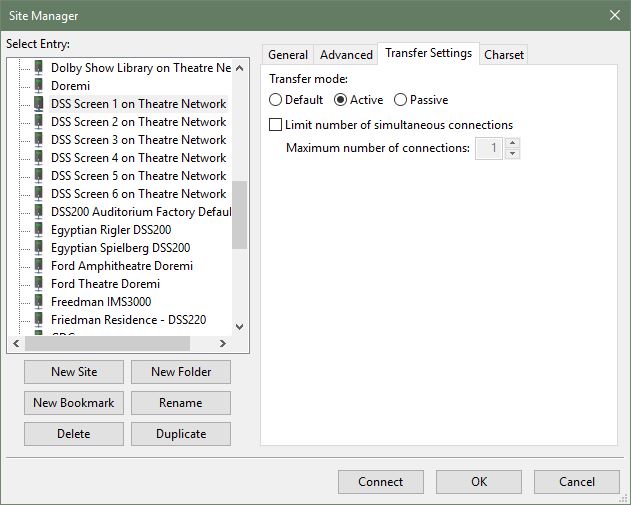
In the transfer settings type, the transfer mode should be set to active. If it's set to default, it'll use the global setting in tools > options, which I believe is passive unless you change it.

 -

You should then be all set.
 
Posted by Jim Cassedy (Member # 4115) on 01-24-2019, 02:22 PM:
 
Thanks Leo- [thumbsup]
I've got a couple of screenings tonight so I'll check my
configuration settings when I go downtown later this afternoon.
 
Posted by Steve Guttag (Member # 268) on 01-24-2019, 05:12 PM:
 
We took to repairing the USB board ourselves. So we keep RX units for them. All that ever goes bad is the USB port and occasionally the power switch.


Powered by Infopop Corporation
UBB.classicTM 6.3.1.2