This is topic sony srx-r515p SY-401 Board in forum Digital Cinema Forum at Film-Tech Forum ARCHIVE.
To visit this topic, use this URL:
https://ft-forum.com/ft/cgi-bin/ubb/ultimatebb.cgi?ubb=get_topic;f=16;t=002110
Posted by Ariel Vocal (Member # 6912) on 11-22-2014, 12:01 AM:
Hello, recently inaugurate some rooms equipped with projectors sony srx - r515p , one after 12 days of operation failure , the projector will turn off and did not return to light , checked that reached the voltage transformers and all was apparently well , I contact the technical service of sony and they recommended changing the SY 401 card, which is in a vertical position just behind the RGB crystals. I did so and the projector is turned on , but when trying to design some test DCP or any patern only cast white light ... you have to charge some sort of software to the new card ?, the technical service told me to do a backup of settings from the previous card , but of course , is damaged and will not let me not even turn it on, I was told something about gamma correction , has something to do ? someone happened anything like this before ??
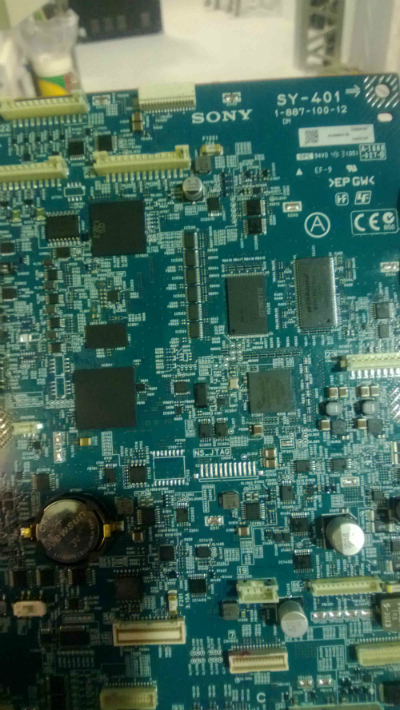
pd: sorry for my English , I do not master very well.
Greetings !
Posted by Marco Giustini (Member # 4544) on 11-22-2014, 07:08 AM:
You may need to ask Sony for gamma and uniformity files to be loaded back into the board, but I am not sure that is the board holding that information, I reckon it's the one behind the light engine, where the ribbon cables are going. But I am not 100% sure.
I still feel you should be able to see some kind of picture, even with the wrong uniformity and gamma calibration.
Posted by Ariel Vocal (Member # 6912) on 11-22-2014, 12:58 PM:
I think it takes that kind of information is the board that has a microSD . change the board from another projector that worked and I was able to project image , trailers , test 's etc ... but when I change the new parts came on the screen only see a white light .... now Sony is sending me a board " initialized " I hope to work ... it seems quite unusual to have to calibrate the gamma when the board is replaced.
will comment as it goes with the new .. greetings !
Posted by Marco Giustini (Member # 4544) on 11-22-2014, 04:24 PM:
you do the same on 4K DLP where a uniformity file is loaded from the factory. If you swap the ICP or the light engine you have to load it again. Sony provide uniformity and gamma calibration file for their light engine. You don't have to do it, just load the files. THEN, you do a colour calibration to account for the rest of the optics, the screen, porthole glass etcetera. But as I said I don't think that you need that when a SY-401 is replaced.
Posted by Michael Kurtzke (Member # 7512) on 11-22-2014, 04:37 PM:
Is this Projector 3D Enabled?
We had to replace an SY Board on Four of our 515's, and had this same issue [Bright white screen] only our 3D House.
Posted by Ariel Vocal (Member # 6912) on 11-23-2014, 08:15 PM:
Well, I just got one Board SY 401 from Miami, the mount to the projector and run , obviously you have to mask the image , adjust the focus , size, create formats .. but it works !!!
The projector is 3D enabled Michael , had not had a similar failure before in over 40 rooms we have with 515p, it is the first time .
SONY I also sent me a tool for calibara the gamma, the picture shown below, tell me calibrating the gamma with the 3 board showing me white light should function properly , will tell you how it goes.
Greetings ! and thank you very much !
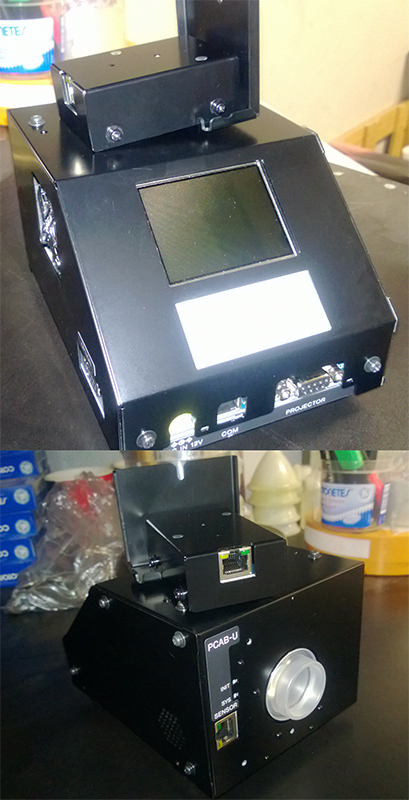
Posted by Michael Kurtzke (Member # 7512) on 11-24-2014, 01:15 AM:
Ariel,
First try switching from Gamma 1 to Gamma 2, and then back to Gamma 1. Sometimes this solves the issue.
It's located under Configuration --> Projector 3D --> Colour
For us, correcting Gamma went fine with the PCAB-U. However, we kept receiving an error when trying to correct uniformity.
If it fails at around 5%, you will need to have SONY give you a special .bat file. This is a firmware update for the 515's to work with the PCAB-U.
Good Luck!
Posted by Carsten Kurz (Member # 5396) on 11-24-2014, 11:49 AM:
When you change boards, it is important to apply the last software upgrade again, so that all modules are on the same software level. It may not always cause problems if you don't, but as a general rule, you should. On the 515, this simply means you should apply the most recent software update again, which is no big deal.
Same applies to DLP based systems.
The SY401 board is the CPU, network and system/sensor control board of the projector. So to say the heart of the system.
Gamma and uniformity is stored in the LPD-7, which is attached to the light-engine back.
- Carsten
Posted by Marco Giustini (Member # 4544) on 11-24-2014, 03:56 PM:
Thanks Carsten, I thought that SY401 did not store gamma and uniformity.
I am a little puzzled that Sony sent you the tools to adjust the uniformity? Ok with gamma - service manual states that gamma should be checked every so hours - but I guess uniformity should be adjusted in a lab with a perfectly white and uniform screen - better with the metre pointed towards the projector, as Barco do.
If you screen has a hotspot, are you correcting the hotspot for the seating are you are taking the reading?? I don't think uniformity should be done on site.
Posted by Carsten Kurz (Member # 5396) on 11-24-2014, 04:22 PM:
You can actually buy the gamma and uniformity tools from Sony, they are not restricted.
If you have a decent number of screens under your control, you might save on maintenance. I know a 'private' Sony owner bought both tools because he wanted to be able to do these adjustments by his own schedule.
Yes, correcting for a hot spot screen is a bit of an issue. Even if this could actually be beneficial to a certain extent, I would prefer to buy a small matte white screen in order to be able to do a full uniformity calibration. You could buy the smallest screen size possible with your lens, it doesn't necessarily need to be your regular screen size.
- Carsten
Posted by Marco Giustini (Member # 4544) on 11-25-2014, 12:41 PM:
Carsten,
that is just unrealistic IMHO. Are you saying that Sony are expecting cinema engineers to go around with a white screen in their vans, hang it in the auditorium and do a uniformity calibration...
AFAIK the uniformity does not need to be adjusted, the gamma does - which can be indeed adjusted on any screen - even though I would be curious to see gamma results when the auditorium has a shiny emergency light which cannot be turned off.
My question is: are Sony a little over-enthusiastic here, are DLP much superior or are DLP manufacturers just ignoring the problem (I was told that gamma is calibrated at the factory on a DLP light engine and that was it)?
Posted by Carsten Kurz (Member # 5396) on 11-25-2014, 02:31 PM:
Marco, I didn't say that Sony is expecting anyone to carry around a matte screen for uniformity calibration. In fact, factory uniformity should do. The Gamma calibration tool has the sensor in front of the lens and doesn't need the screen for calibration at all.
And yes, a great strength of DLP systems is that gamma is defined by absolute pulse times due to the way DLP modulates the light. While the light path, lens, room, do have a certain influence on gamma, the basic gamma model of a DLP can be expressed more or less mathematically for all models and should need no recalibration, because the pulse times create the light modulation, and the imager itself will introduce no significant variations of these time based brightness references.
- Carsten
Posted by Marco Giustini (Member # 4544) on 11-25-2014, 04:01 PM:
Thanks again, I asked the question several times but I was only answered that it was not needed.
Re. uniformity, I hope it is as you say, but I wouldn't be surprised if one day I saw a cinema engineer climbing on a long ladder with a Sony camera in their hands while the projector is showing a uniformity pattern! ![[Smile]](smile.gif)
Re. Gamma, the 515 manual says it should be done every 5000 hrs if memory serves. Not a huge amount of hours.
Powered by Infopop Corporation
UBB.classicTM
6.3.1.2