This is topic Urgent help: Ingested content not showing up in forum Digital Cinema Forum at Film-Tech Forum ARCHIVE.
To visit this topic, use this URL:
https://ft-forum.com/ft/cgi-bin/ubb/ultimatebb.cgi?ubb=get_topic;f=16;t=002115
Posted by Andreas Hjorth (Member # 6618) on 11-28-2014, 12:42 PM:
Hello
I have an early screening tomorrow and have tried ingesting the movie, which seems to go fine. But The content doesn't show up among the features, or anywhere. I've tried it twice. I can see the content in the file manager among the assets. It's a doremi dcp2000 we got here. any advice would be greatly appreciated.
Thanks
Posted by Frank Cox (Member # 6258) on 11-28-2014, 01:09 PM:
Are you sure it's a "feature"? Maybe someone classified it as a trailer or something and it's showing up elsewhere on the list. Check the ContentKind tag in the xml file to see what it's classified as.
Posted by Carsten Kurz (Member # 5396) on 11-28-2014, 01:11 PM:
Some assets turn up under strange names, especially in europe. Sometimes there is a leading 'PKG' in the name. Another possibility is that it has been compiled with a wrong content designator and then is sorted away down in the cinelister content window. Are you sure you went through ALL the items listed in the cinelister content window? Did you check for errors during the ingest? Did you try to reingest the package?
- Carsten
Posted by Andreas Hjorth (Member # 6618) on 11-28-2014, 01:35 PM:
Hi
I was a bit stressed before, and it seems as though it hasn't ingested at all. Had some numbers wrong in my head, so it's not among the assets. But when I connected the harddrive and it started to ingest I didn't get any error messages, and it seemed to go smoothly.
I had some initial problem with the harddrive the movie came on, an ext3 formated one that the doremi couldn't read. So i transfered the content to an ext2 formated disk that we use here. Maybe this could have caused something?
Edit:
So I tried ingesting it into our other server, also a doremi, and I got this error message.
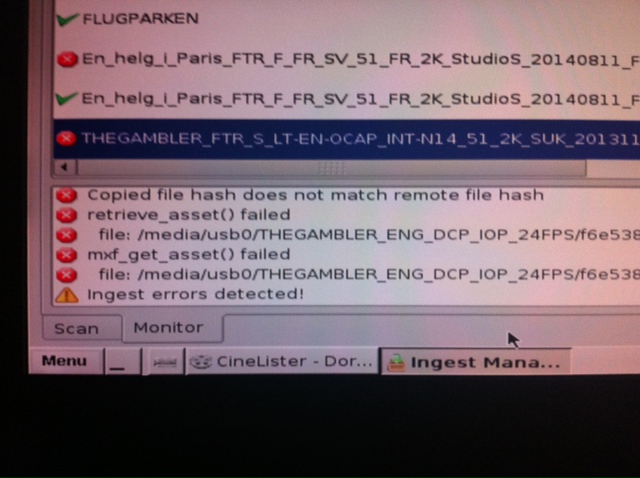
Is there anything I can do?
Posted by Frank Cox (Member # 6258) on 11-28-2014, 02:23 PM:
mxf_get_asset() failed
Are you sure you copied all of the files off of the other hard drive?
Posted by Andreas Hjorth (Member # 6618) on 11-28-2014, 02:26 PM:
Yes. All the files are there, and the sizes are correct from what I can tell.
Posted by Mike Blakesley (Member # 26) on 11-28-2014, 02:51 PM:
The file that's highlighted is an "OCAP" file -- are you trying to ingest the OCAP version? (Open captioning) If so, maybe it won't work unless the base file is ingested first...?
Posted by Marcel Birgelen (Member # 6801) on 11-28-2014, 02:51 PM:
To me this looks like the files on the disk are corrupted, that's why the hashes do fail. Either this, or the DCP was defective to begin with. You should try to get a new disk from your distributor.
Posted by Marco Giustini (Member # 4544) on 11-28-2014, 03:03 PM:
The hash check has failed. Either the content is badly mastered or the content is corrupted. Nothing you can do, unfortunately.
Posted by Andreas Hjorth (Member # 6618) on 11-28-2014, 03:14 PM:
Can the doremi read ext3 disks? Doesn't seem to work here anyway.
So right now I'm trying to figure out who's to blame here. Me for copying the movie from an ext3 disk to an ext2 disk, and so creating the problem, or if the main file is corrupt. I'm talking to the people who are organizing the screening, and they want to know whos fault it is.
Posted by Marcel Birgelen (Member # 6801) on 11-28-2014, 04:09 PM:
Any Doremi with recent firmware can mount ext3 partitions. But the simple fact the disk was formatted in ext3 points to some unprofessional handling. The universal standard for DCP delivery is ext2. Ext3 adds nothing of any value to a file system which is used for read-only/archival purposes.
But maybe you can tell us a bit what you used to copy the DCP from the distribution disk to your disk?
Posted by Andreas Hjorth (Member # 6618) on 11-28-2014, 04:17 PM:
Hm, ok. Should see if the firmware is updated then.
I use the rather shitty office laptop with Windows and use an ext2 file manager to mount the disks. This has never failed me before, but maybe I had it coming.
Posted by Marcel Birgelen (Member # 6801) on 11-28-2014, 04:32 PM:
What you can do is:
- Download an MD5 checksum utility for Windows like this one
- Do an MD5 hash on both the files on the original and the disk you created.
Please note: Even on fast hardware, this will take quite some time to complete.
If the hashes for both set of files are identical, you can safely assume the DCPs on both disks are binary equivalent. If they are not, something did go wrong during the duplication process.
Posted by Andreas Hjorth (Member # 6618) on 11-28-2014, 04:41 PM:
Ok, I'll try that when I get back to work tomorrow. Now I'm gonna have a drink and forget all about today.
Thanks for the help.
Powered by Infopop Corporation
UBB.classicTM
6.3.1.2