This is topic Series 1 Christie CP2000SB batteries in forum Digital Cinema Forum at Film-Tech Forum ARCHIVE.
To visit this topic, use this URL:
https://ft-forum.com/ft/cgi-bin/ubb/ultimatebb.cgi?ubb=get_topic;f=16;t=002116
Posted by Steve Moore (Member # 4753) on 11-28-2014, 01:19 PM:
I'm aware these machines are now ageing, but still have a great picture, but I got thinking. I've changed the batteries in my doremi serrver on the MB and dolphin board; also on my cineIPM; but does anyone know if there are batteries either in the projector or in the TPC that retain the screen/presentation settings that I should be getting worried about?
Has anyone had any issues or involvement around this? Thank you in advance for anyones thoughts.
Posted by Steve Guttag (Member # 268) on 11-28-2014, 01:52 PM:
On the CP20000SB...yes, there is a CR2032 battery on the TPC that should be changed about every 5-years or so. There is a Christie bulletin on it but it does not require an advanced degree to find it. It is underneath a round cover. Suffice to say, it should be somewhat apparent and you don't have to dig very far at all.
Now, on the CP2000M and CP2000ZX...they have a CR2032 battery on their PCM modules...they HAVE to be changed within 5-years (and some are now recommending every 3-years) because if they fail...their logs will fill up and the projector WILL CRASH with an iffy procedure to recover it. I've never lost a projector to it but I have had one come close. I'm now on a "battery watch" and date (on the outside of the projector) when it was last changed.
The ICP on series 2 projectors has a CR2032 (see a trend here?) battery...I don't know the severity of it failing but I'd have to recommend changing it every 5-years too based on past experience. Only NEC, oddly enough, actually mentions doing it and shows a procedure.
It is reasonable to presume all of these servers have a BIOS clock battery...my guess it is a high probability that it is a CR2032 and probably has a safe life of 5-years or so.
So...I suggest investing in some CR2032 batteries if you have a lot of DCinema stuff that is 5-years old or older. Their pacemaker batteries are starting to wear out.
Posted by Steve Moore (Member # 4753) on 11-28-2014, 04:01 PM:
Thanks, Steve, That is most helpful to know. Yes around a year ago I did the motherboard batteries on the DCP2000s on all the other kit, as mentioned earlier on all nine screens of ours (spread out between 20 and 80 miles from where I live). The oddball here is the dolphin battery, which ruins your pattern, being a CR1220. (you could actually say you are on "watch battery watch!!")
Just out of interest; though I know how to backup to my laptop, the settings of the TCP - do you know if the battery is removed if it retains its settings or if I would need to upload the screen ratios and setup IP etc again?
Much appreciated for your quick response. All the best
Posted by Dave Macaulay (Member # 813) on 11-28-2014, 04:23 PM:
I would have a look and find the battery location so that changing it won't take long. Then have the new battery ready and then shut the projector power off, replacing the battery within 5 minutes or so. Most boards and devices with battery backup also have a capacitor for a few minutes of power to allow battery change without data loss.
If the battery is easy to access without ANY risk of shorting out the PCB components while changing it, you could change it with power on. If the battery is on a socket or clip directly on the PCB, the risk of dropping a battery into the works with resultant sparks and smoke is too great.
Have the unit without power on or a battery installed for as short a time as practical, but hurrying generally slows things down for me.
You may want to pull backup files from the TCP before doing it. If system data is lost you can then restore it.
For boards like the Dolphin, you have to be more careful because the key data loss can not be recovered on site.
Note: the Doremi IMB uses a BR-3032 battery and I have found BR-2032 batteries on ICPs. Doremi says NIT to substitute a CR battery although the differences are minor. I haven't asked about the ICP battery yet. BR batteries are much harder to find than CR.
Posted by Steve Guttag (Member # 268) on 11-28-2014, 07:18 PM:
I don't recall losing anything changing the TPC battery...maybe the clock but definitely not the rest. Those are all stored on files...not as part of the memory. If you don't have backups anyway...you should. For the Christie CP2000S series (with all suffixes), it is best to obtain a registered copy of DCP Librarian...that handy tool will let you pull all of the TI stuff (screen files, MCGD...that sort of thing) in one fell swoop. It was real handy on GlueCable upgrades for the DCI compliance thing since you'll even loose your test patterns when you swap that board.
Posted by Steve Moore (Member # 4753) on 11-29-2014, 08:45 AM:
Thanks again. I've pulled the files from the TCP via ftp software with a laptop as a backup, and I also have the DLP control software on windows, which I've used to setup the projectors and the "head"'s IP etc. I looked at my nearest site's TCP last night and mine appears to be the newer type (the whole machine from 2009) all within a plastic case and no sign of a round cover, just the CF card at the top and the connections under a flap at the back. I know most of my other sites are metal outers, which i presume were the original model (those machines are all dated 2006/7)
I don't suppose you have a link to that original bulletin do you? Regards all, as always.
Posted by Steve Guttag (Member # 268) on 11-29-2014, 10:46 AM:
The bulletin access requires password privileges. But again, there is nothing special there. Take the back off of the TPC and the round cover of the battery will be staring you in the face.
Posted by Mark Gulbrandsen (Member # 72) on 11-29-2014, 11:03 AM:
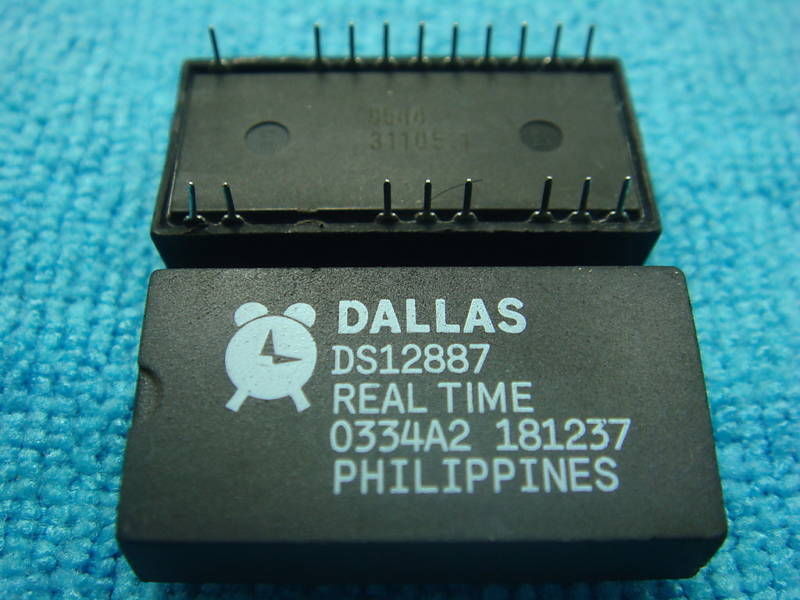
There are also the Dallas Clocks that are in almost all Series 1 projectors. These clocks keep ticking when the power is off and keep certain boards certificates alive. Sadly, Dallas clocks of just about all types also seem to have a finite life span of 12 to 15 years even in a normally functioning projector thats used daily. They DO have an internal battery! Projectors that loose certificates are usually caused by a bad Dallas clock. Doesn't mean the end of the projector but it generally means replacement of that board for most people or at least the Dallas clock itself and reloading the certificate if you are able to aquire it and do so your self.
I have had Dallas clocks fail in Series 1 and in some test equipment. Not usually a big deal in test equipment because most just store the prefered equipment settings so the unit powers up that way again. Solder in a new clock and reset your preference settings you're back in business again.
Mark
Posted by Steve Moore (Member # 4753) on 11-29-2014, 03:02 PM:
Heck, this is worrying. So even if these machines manage to live through resolution and frame rate changes, SMPTE and DCI changes and the DMDs live beyond a trillion trillion movements... a flippin' £1/$1 battery will eventually catch us all out.
It does remind you of the fact that I've never had to change a watch battery in a Cinemeccania or Kalee yet!!
Posted by Mark Gulbrandsen (Member # 72) on 12-01-2014, 09:23 AM:
No, the Dallas Clocks cost a little more than a dollar. Around 15 to 30 USD actually. I have not seen any in series 2 projectors though, so thats a good thing. They come in many shapes and sizes but the ones I've seen in Series 1 look like this. They are a real time clock and SDRAM for storage of the certificates plus self contained battery back up. It is the battery that has the finite life.
Mark
Posted by Steve Moore (Member # 4753) on 12-01-2014, 12:06 PM:
Oh heck... thats little frustrating. Easily replaced; except the certificates.
Powered by Infopop Corporation
UBB.classicTM
6.3.1.2