This is topic Stuck Blue Pixels! in forum Digital Cinema Forum at Film-Tech Forum ARCHIVE.


To visit this topic, use this URL:
https://ft-forum.com/ft/cgi-bin/ubb/ultimatebb.cgi?ubb=get_topic;f=16;t=002119

Posted by Mark Gulbrandsen (Member # 72) on 12-01-2014, 04:54 PM:
 
Lately this is seeming like the plague.
Have any of you had issues with stuck blue pixels on your dlp projectors? I have two units with this issue now and this past Saturday I went to a movie at a local Cinemark that has all 4K Barco's and there was a stuck blue pixel in that projector. Two of my service sites are also suffering from this issue, at one there is just a single stuck pixel running just a 2kw lamp, but at another it is really bad with multiple pixels stuck in different areas of the image and totaling 86 in all, they are running a H.O 4kw lamp. Would like to hear from others that have had this issue or at least seen it. I am hoping this doesn't turn out to be a big plague!

Also, if you have had this issue what series projector was it in?

Mark
 
Posted by Sam D. Chavez (Member # 1841) on 12-01-2014, 05:27 PM:
 
New Christie 2220 mid last year, just a month old. Blue

Old CP2000XB red. also this summer
 
Posted by Dave Macaulay (Member # 813) on 12-01-2014, 06:07 PM:
 
The only one I know of is an NEC NC2000C with a blue pixel stuck on, fortunately just off screen (special venue). 4kW lamp, running 12+ hours a day non stop.
 
Posted by Allan Barnes (Member # 5178) on 12-01-2014, 07:52 PM:
 
MARK

HOW MANY HOURS ON THESE "BLUE" PROJECTORS?
 
Posted by Carsten Kurz (Member # 5396) on 12-01-2014, 07:55 PM:
 
Does anyone know about any stuck pixel issues ever been solved through on-site maintenance, e.g. formatter board, cable reseating, etc.?

- Carsten
 
Posted by Marcel Birgelen (Member # 6801) on 12-01-2014, 08:13 PM:
 
I doubt that any damage to the formatter board or lose/damaged contact will yield in a single, fixed stuck pixel on one of the three DMDs.

Stuck pixels are almost certainly mechanical defects in the DMD. Given the size of those mirror elements, especially at 4K, a single dust particle is sufficient to cause havoc. I've had some luck with a consumer DLP projector once, where I got all medieval on the light engine. Shaking it around actually revived the stuck pixel. It's not something you want to try on a proper DCI projector though.

Maybe TI could implement a function to selectively disable single pixels entirely. This could, maybe, help in a select number off defects, where the pixel isn't completely mechanically stuck in the "on" position.
 
Posted by Steve Guttag (Member # 268) on 12-01-2014, 09:30 PM:
 
I have just one projector with some stuck green pixels...but I think it is electronic rather than mechanical...the pixels (several) are in a straight line, not random across the raster.
 
Posted by Marcel Birgelen (Member # 6801) on 12-02-2014, 02:11 AM:
 
I've seen clusters of four pixels in a square or two or three pixels side-by-side being stuck in always-on positions. There might be quite a lot more stuck in an always-off position, but those are considerably harder to spot in normal production use. They become rather evident on an all-white image though.

Those clustered failures are probably due to the same mechanical issue. A row of pixels being stuck indeed sounds more like a problem in the underlying transistor layer. Still probably nothing you will be able to fix by re-seating some boards, unfortunately.

Some of those early DLP chips primarily used in rear-projection TVs had this "white-snow" defect, where lots of pixels would become stuck within a rather short timeframe. Due to the single DMD design, the pixels were white rather than one of the primary colors. This was clearly some kind of quality issue with those DLP chips, I haven't seen anything similar with newer DLP engines though.
 
Posted by Gavin Lewarne (Member # 5397) on 12-02-2014, 06:09 AM:
 
my local multiplex has a mix of 2k/4k and on some screens there are some stuck blue pixels.

However, my 2 year old 2k Barco at our place has none whatsoever

Saying that, I would be interested to hear the Warranty standpoint on this should they ever occur, we are a VPF site
 
Posted by Steve Guttag (Member # 268) on 12-02-2014, 06:27 AM:
 
If you have stuck pixels...it is a light engine change...so if your projector is in warranty, Barco will consider that a reason for a light engine swap. If it is out of warranty...it is up to you if you want to pay for a new light engine.
 
Posted by Marcel Birgelen (Member # 6801) on 12-02-2014, 08:56 AM:
 
Like Steve already mentioned, they're a valid warranty case, at least for professional cinema gear. They're also annoying as hell, especially if it hits multiple pixels or if they're in the center region. Even a single always active or dead pixel should be covered. So while your gear is still under warranty (VPF or not shouldn't matter, as the VPF provider can still file a warranty claim on behalf of their customer) you should regularly check for it. If you're out of warranty on the equipment itself, but still under VPF, it's best to check if your contract states anything about it and who pays for replacement parts and service.

Because, indeed, the only way to get rid of it is by replacing the light engine and those things aren't cheap...

But, some of those multiplexes care so little about presentation quality, they don't even take the opportunity to get this fixed, even if it's still covered by warranty.
 
Posted by Mark Gulbrandsen (Member # 72) on 12-02-2014, 12:14 PM:
 
Fortunately NEC refurbishes their light engines so you are only going to pay about 20% of the cost of a new engine.

I have to get the hours on these projectors. One is almost 4 years old... that's the one with 86 stuck blue pixels. The other one is just out of warranty and NEC is considering that one because it's an important "Hollywood Type" location.

Mark
 
Posted by Ken Lackner (Member # 1002) on 12-02-2014, 01:08 PM:
 
quote: Mark Gulbrandsen
the one with 86 stuck blue pixels
Did you sit there and count them??
 
Posted by Marco Giustini (Member # 4544) on 12-02-2014, 03:28 PM:
 
4-5y old Barco 2K, one stuck blue pixel. I've seen a Christie with a stuck blu one, 2y ago.

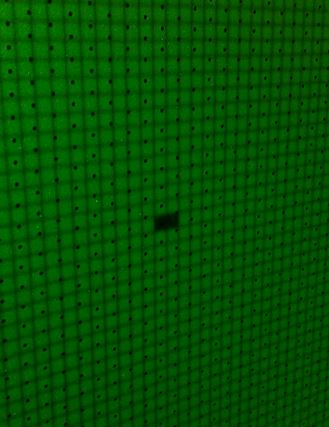
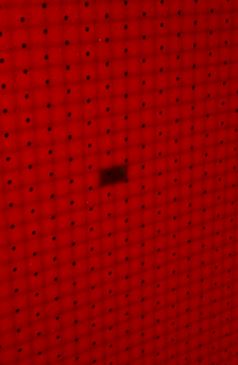
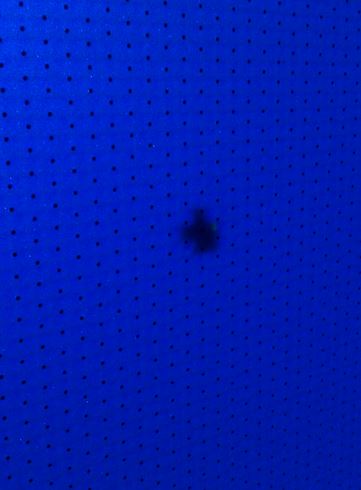
Then I have a Barco with what seems to be the same pixel dead - all three colours! I know, it can't be the DMD. But it is exactly the shape of one pixel, in red and green. Blue is more of a small blotch. I can't think of a place inside the light engine where something like that could happen!
 
Posted by Gavin Lewarne (Member # 5397) on 12-02-2014, 04:21 PM:
 
Marco, could that be caused by a small chip / scratch on the output prism?
 
Posted by Carsten Kurz (Member # 5396) on 12-02-2014, 04:37 PM:
 
Would be interesting to see what happens when convergence is adjusted in this case?

- Carsten
 
Posted by Marco Giustini (Member # 4544) on 12-02-2014, 04:39 PM:
 
Here you go.

They do look like dead pixels (but blue)! These are calibration colours, generated on the formatters. Barco suggested a light engine swap of course.
I don't understand why blue has an irregular shape, and the whole thing does not make any sense to me.

 -
 -
 -
 
Posted by Steve Guttag (Member # 268) on 12-02-2014, 04:44 PM:
 
I'm wondering if it isn't something "in focus" but in the light path...input or output of the integrating rod that is obstructing the light...this would make blue be perhaps more out of focus.

As to refurbing the light engine...sure, to the best of my knowledge, they all will do that for a fraction of the cost of new...BUT you have to buy that first one or be down while they do the R&R. For some, I hear it can be up to 8-weeks. If you have a fair number of screens...then it would make sense to have a spare light engine...when one goes...put the spare in...get that fixed and put it on the shelf for the next one.

Naturally, this scheme works best if you have all of the same model of projector so that the same engine is used in all.
 
Posted by Marco Giustini (Member # 4544) on 12-02-2014, 04:55 PM:
 
Steve,
Maybe. Had it been a shape with sharp edges, I would have looked on the integrator rod or around it. But exactly the shape of TWO pixels?
 
Posted by Gavin Lewarne (Member # 5397) on 12-02-2014, 06:41 PM:
 
isn't blue the most "out of position" dmd in the light engine? ie, it has to have more convergence adjustment to get it in line with green (fixed) and red
 
Posted by Mark Gulbrandsen (Member # 72) on 12-02-2014, 08:33 PM:
 
quote: Steve Guttag
As to refurbing the light engine...sure, to the best of my knowledge, they all will do that for a fraction of the cost of new...BUT you have to buy that first one or be down while they do the R&R.
Nope. NEC has them ready to ship out as needed on an RA. You send in a P.O. for 20 grand they ship you the advance replacement prism. Strong also does limited repairs to them as well. But very limited.

Mark
 
Posted by Marcel Birgelen (Member # 6801) on 12-03-2014, 02:07 AM:
 
This looks like someone shot with a VERY powerful laser at your projector and managed to just burn those pixels, and since blue was a bit out of focus, it hit more of them... Yeah, it's somehow totally bollocks, but it just can't be something else in the light path, which happens to be neatly in focus and perfectly pixel shaped but has another shape for blue than for red and green...

Does anybody know if TI implements (hidden) features to alter the behavior of individual (sub)pixels?

And just out of curiosity, does this theater, maybe, have a laser show installed? [Smile]
 
Posted by Steve Guttag (Member # 268) on 12-03-2014, 06:51 AM:
 
So after the 20-grand...then what...do they credit you back once your bad one comes in? It is a R&R or a Repair Exchange?
 
Posted by Ioannis Syrogiannis (Member # 3235) on 12-04-2014, 01:43 AM:
 
quote: Gavin Lewarne
isn't blue the most "out of position" dmd in the light engine? ie, it has to have more convergence adjustment to get it in line with green (fixed) and red
If I am not missing something concerning the earlier models, the Barco light engines have no fixed green DMD. Only blue and, in case of the S series, red.

I would go for the "burned by a laser" explanation, but it doesn't quite explain the non-exact blue gap. It is true that blue light is hard to focus. Yet, if the pixel edges are distinguishable, so should be the burned micro-mirrors' gap. The possibility of a bended (instead of non-working) micro-mirror, that only sends light for half a pixel is extremely low.
 
Posted by Marcel Birgelen (Member # 6801) on 12-04-2014, 02:19 AM:
 
To me the blue pattern still looks like 6 fully dead pixels, but out of focus. It looks like a cross with an extra dead pixel at the bottom right.

Maybe the picture itself also is also somewhat out of focus (although the screen perforation doesn't look like it's more out of focus than in the other pictures), which may add to the blurriness. In the two previous pictures, you can clearly see the raster, in the blue one, it's much less evident, so something is clearly out of focus and most probably the DMD, which easily explains the soft edges.

It also somehow makes sense (to me at least): If a high power, focused laser beam would enter the lens from the other side, it would focus this beam even more. Since the blue DMD is somewhat out of focus, the beam ends up being broader on this DMD than on the other two.

Still, this kind of damage could never come from something like a simple laser pointer. That's why I asked about the laser show. Maybe if somebody was playing around with it and a high energy laser beam ended up shining directly at the lens for a prolonged time (maybe someone even liked how it reflected back from there [Wink] ), it could be just enough to burn those mirrors in their off position.

Although those mirrors clearly can cope with a lot of light and heat, if you do the numbers, you'll see that every mirror only reflects a few mW of light during production. A powerful highly focused laser beam could, potentially, deliver a far higher punch.
 
Posted by Mark Gulbrandsen (Member # 72) on 12-04-2014, 12:31 PM:
 
quote: Steve Guttag
So after the 20-grand...then what
They credit you the difference between the 20 grand and what it cost to repair the one you sent back in that was bad. Average is 6 to 8 grand and 2500.00 cleaning charge if it is full of popcorn oil or crud and has to be completely broken down. Certainly NOT the end of the world type pricing!

Marcel... There is always one that ends up out of focus because of physical constraints of the prism. With Christie I believe is the red chip that's in a slight blur.

Mark
 
Posted by Marco Giustini (Member # 4544) on 12-04-2014, 01:49 PM:
 
That's an interesting hypothesis. I'll ask for the lasers.
 
Posted by Aleksandar Obradovic (Member # 7266) on 12-05-2014, 07:06 AM:
 
Hi guys,

I am reading this conversation and i have some (little bit off-topic) question:

Can someone adjust DMD's manually (Barco DP100) if adjustment screws are not enough. Point is that i can not adjust convergence on mentioned projector with provided 6 screws on top of LE because they allow you +/- 10 pixels and i need 40-50 pixels at least.
LE was teared apart for cleaning (cooling liquid was spilled inside all over DMD's - broken pipe of cooling system inside LE) and then re-assembled again from scratch. After projector boot-up i have tried to adjust convergence but was unable for earlier mentioned reason.

Any good/bad idea?

BR Alex

P.S. How much do technicians in your area/country charge for this "operation"?
 
Posted by Marcel Birgelen (Member # 6801) on 12-05-2014, 08:23 AM:
 
Do you have this misalignment with just a single color or with multiple colors?
 
Posted by Aleksandar Obradovic (Member # 7266) on 12-05-2014, 09:05 AM:
 
Both Red and Green DMD's. Blue one is in place (it is fixed like someone said in one of previous posts) and looks ok.

BTW Does someone have information who repairs/cleans LE's, LVPS, etc. in Europe? I am talking about projectors outside of warranty

BR Alex
 
Posted by Marco Giustini (Member # 4544) on 12-05-2014, 10:43 AM:
 
I am not familiar with dismantling a LE, but since blue is "fixed", maybe you have to move that to align it to RED and GREEN? Reset the convergence adjustment mechanism to the middle position, move blue (maybe red and green too?) till it roughly converges, then tighten it and do the fine adjustment by using the convergence knobs.

Not sure how RED and GREEN can be moved as well. I guess that there is a little play when tightening the DMDs back, half of a millimeter on a DMD is your 50 pixels on screen!

So, I reckon you have to do a sort of mechanical adjustment before tightening the DMDs in place.

Does that make sense?
 
Posted by Marcel Birgelen (Member # 6801) on 12-05-2014, 12:16 PM:
 
Like Marco already hinted, your blue might be the main culprit. Can you get red and green converged on screen? If so, try to converge them in the center of the adjustment range. Then you might want to try if you can somehow wiggle the blue DMD those tiny fractions you need to get it into "convergence range".

Most service companies don't really rebuild something like a light engine themselves, as it is infinitely tricky to get all the parts aligned correctly and you cannot test it without a compatible projector.
 
Posted by Aleksandar Obradovic (Member # 7266) on 12-06-2014, 07:34 AM:
 
hehehe

I think you can call me an adventurous guy and a gambler when we are talking about electronics. [Smile]

Like you said Marco/Marcel (and proved my idea) there is probably way to solve my problem with minor mechanical adjustments but there is a tricky part doing this (for all enthusiast walking my path) person must have steady hands, keen eye and a lot of patience because he/she must disassemble/reassemble LE several times until this is done.

Tnx a lot friends and wish me good luck in my efforts [Big Grin]

BR Alex
 
Posted by Marco Giustini (Member # 4544) on 12-06-2014, 02:05 PM:
 
I have no idea on how this is done at the factory, maybe it is done on a bench, with a low level light source before the LE is installed in the projector? Maybe they have some templates when tightening the DMDs in place.
 
Posted by Marcel Birgelen (Member # 6801) on 12-06-2014, 03:59 PM:
 
I guess they will indeed have some templates to get everything exactly in place. And I guess they even have some kind of test bench where they check the alignment before they mount those light engines into the chassis. At least you would expect proper quality control given the price of the equipment.

quote: Aleksandar Obradovic
Like you said Marco/Marcel (and proved my idea) there is probably way to solve my problem with minor mechanical adjustments but there is a tricky part doing this (for all enthusiast walking my path) person must have steady hands, keen eye and a lot of patience because he/she must disassemble/reassemble LE several times until this is done.
Yeah, the problem is made more complex because you cannot adjust this with a test pattern on screen.

Maybe you should make some pictures of the intermediate result to look if your actions are improving it or making it worse [Wink] .
 
Posted by Mark Gulbrandsen (Member # 72) on 12-08-2014, 07:04 PM:
 
On equipment that's no longer supported self repair of light engines is probably the only choice... if it's possible... Or scrap the entire projector.

Mark
 
Posted by Marcel Birgelen (Member # 6801) on 12-09-2014, 02:45 PM:
 
As far as I know, the DP-100 isn't entirely end of support yet, so Barco will still honor service requests. But the price of a replacement light engine will probably make you think of rather investing in a new projector [Wink] .
 
Posted by System Notices (Member # 2357) on 06-06-2019, 05:10 PM:
 

It has been 1640 days since the last post.


Posted by Justin Hamaker (Member # 2165) on 06-06-2019, 05:10 PM:
 
I just discovered a stuck red pixel on an NEC NC2000C. Seeing as this thread has been inactive for 5 years, I was wondering if there is anything that can be done to try and fix this.
 
Posted by Carsten Kurz (Member # 5396) on 06-06-2019, 05:15 PM:
 
There's a more recent thread here:

http://www.film-tech.com/cgi-bin/ubb/ultimatebb.cgi?ubb=get_topic;f=16;t=003617#000001

I still doubt the effect of the 'alternating checkerboard pattern', but, for certain types of defects it may simply work to operate the machine for an extended time span. Note you don't necessarily need to have the bulb on.

- Carsten
 
Posted by Stephan Shelley (Member # 8587) on 06-06-2019, 05:57 PM:
 
NEC does not have the alternating checkerboard and it is not a standard PNG test pattern either so one can not transfer it from say a Barco.
 
Posted by Marcel Birgelen (Member # 6801) on 06-06-2019, 06:16 PM:
 
Sorry for not moving to the more recent topic, but since that was dormant for a few months, I guess it's not really that important, which one is continued.

The pattern Carsten mentions is not a still image, but rather a movie of rapidly alternating checkerboards. If you look on-line, you can see some more of those "flicker movies", that supposedly help you to get DLP mirrors unstuck. There are some success stories, also in the older topic mentioned by Carsten. I've personally never been successful with any of those. The only patterns that worked for me, are those for getting rid of image retention on LCD/TFT screens...

The idea is probably, by wildly actuating the stuck sub-pixel and those around it, it will eventually "free itself" again and act as a normal pixel again. I guess that the success depends highly on the type of damage in the affected DMD. If it's a piece of dust or debris, it may eventually become loose and with a bit of luck, it lands somewhere, where it doesn't negatively affect other sub-pixels.
 
Posted by Justin Hamaker (Member # 2165) on 06-06-2019, 07:29 PM:
 
In my case I guess it was just a glitch because it went away when I checked it later.
 
Posted by Stephan Shelley (Member # 8587) on 06-06-2019, 07:39 PM:
 
Your a luck man Justin. By a lottery ticker.
 
Posted by Mark Gulbrandsen (Member # 72) on 06-09-2019, 01:46 PM:
 
quote: Ken Lackner
Did you sit there and count them??
The theater manager actually did count them Ken, and it was multiples of all three colors. This was a problem on a lot of ealry 4K DMD's when 4K projectors were just released back in the day. Out of 330 systems I only ended up with one other system (NC-2000) that has one stuck blue pixel.

Mark
 
Posted by Justin Hamaker (Member # 2165) on 07-08-2019, 04:40 PM:
 
As it turns out the pixel is actually stuck. I don't know why it went away for a while on the next show, but it came back. I've tried several of the flashing patterns and they made no difference.

Fortunately the pixel is pretty low down on the scope picture. I might be able to get away with moving the picture to the top of the chip and not playing flat content. I know that moving the picture to the top of the chip is less than ideal because it impacts the amount of light. However, I think it's preferable to having an annoying red dot constantly on the picture.


Powered by Infopop Corporation
UBB.classicTM 6.3.1.2