This is topic Dolby DSS-200 KDM Problem in forum Digital Cinema Forum at Film-Tech Forum ARCHIVE.
To visit this topic, use this URL:
https://ft-forum.com/ft/cgi-bin/ubb/ultimatebb.cgi?ubb=get_topic;f=16;t=002154
Posted by Marcial Feliciano Ramos (Member # 1989) on 12-23-2014, 09:41 PM:
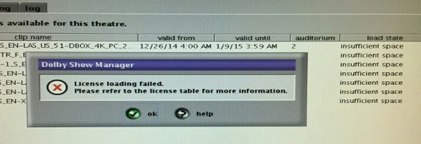
We are having problems ingesting KDM's to a Dolby DSS-200 server. When we try to send a KDM from the LMS or directly from a USB gives us an error saying "insuficient space..." but the server as a lot of space in the hard drives.
We are able to do transfers of content and SPL's.
Posted by Brad Miller (Member # 2) on 12-23-2014, 10:27 PM:
What LMS are you using?
Is this a cat862 based DSS200? Or is there an IMB in the projector?
Count the KDMs currently loaded. How many are in there?
What version of software are you using?
Posted by Adam Martin (Member # 641) on 12-24-2014, 01:26 AM:
Licenses are stored on the media block. There is limited space on the Cat 862 (and, I would assume, the Cat 745 as well) to store KDMs and unused KDMs are not deleted until they expire.
Delete all KDMs from the player (you can't selectively delete them) and re-ingest just the ones you need. Just make sure you have a copy of all needed KDMs before you delete them from the player.
Posted by Philip Jones (Member # 6677) on 12-24-2014, 02:15 AM:
Our KDMs have stopped being deleted automatically on our DSS200.. there are ones from months ago still showing on there as expired. I assume I should delete them all and reingest the current ones to prevent this problem?
Posted by Marco Giustini (Member # 4544) on 12-24-2014, 04:20 AM:
I've heard that before but I thought the KDMs would be automatically deleted. What version are you running? Any chance something got broken on some sw version?
Posted by Steve Guttag (Member # 268) on 12-24-2014, 05:37 AM:
The weird thing with this...I've had exactly one site go through the CAT862 being full of KDMs...and it happened to effectively ALL screens at the site. They use a Cinedigm TMS system but I have many sites that have the same configuration but just the one site had the problem and the age of the servers varies from 2009 (Hello Avatar!) on up to the big conversions that started after series 2s came out...I want to say the bulk of the servers were installed in 2011.
They are currently on System 4.7.3.3 (we update about twice per year and based on potential benefits of the new version...they have a DSS100/DSP100 on site and 4.7.3.3 is the last version for that and is DCI compliant...a requirement for VPF plans).
I'm wondering if it was the path that was taken (which updates it had) that "broke" the auto KDM deletion though I didn't count 200 active KDMs in the CAT862 (that is the limit). However, deleting the KDMs did "fix" the problem. So I wonder if it will ever come back. And if the problem didn't start with 4.7.3.3 now that the CAT862s are empty (well, since the deletion about 3 weeks ago) if all is good now. I suspect that all but the DSS100 will be updated to some form of 4.8 or 4.9 by this time next year and there are CAT862 software changes in those.
I have not had it happen in any other site yet and they all are of similar age in terms of the DCinema conversion.
Posted by Philip Jones (Member # 6677) on 12-24-2014, 05:54 AM:
Show manager version 4.7.2.33
Media Block version 4.6.0.12
Screen Server version 4.7.2.1
It is affecting both screens here (we have 2 screens and use one as a TMS)
Just counted and we have 190 KDMs so if there is a 200 limit I better delete them ASAP!
Might I be better waiting until after the holiday period to press delete just in case we run into any problems? Can't imagine many techs being happy having to come out over the Christmas period if we did run into any issues. We shouldn't be getting any more KDMs until the week commencing 2nd January..
Posted by Steve Guttag (Member # 268) on 12-24-2014, 05:57 AM:
If you have the KDMs...you're safe...just make sure you have the KDMs! And yes, it is a 200 limit.
Posted by Philip Jones (Member # 6677) on 12-24-2014, 06:05 AM:
Thanks Steve, will have a go later. We'll have all the KDMs as they're all emailed and I save all the emails. I'll double check before hitting the button though!
Posted by Marco Giustini (Member # 4544) on 12-24-2014, 11:42 AM:
The fun is that we've just sorted out the Enigma getting full of logs... now we have the MediaBlock full of KDMs! ![[Smile]](smile.gif)
Posted by Pete Naples (Member # 761) on 12-24-2014, 11:57 AM:
We've seen a lot of this lately.
It all started with KDMs for trailers from Warner Bros, which were badly formatted, one had an closing date set before it had actually opened, the replacement had the same UUID as the original (you can easily see why that isn't going to work).
It would appear that the software doesn't deal with stupid human mistakes such as the above, and that the KDM angine or whatever we're calling it 'stalls' for want of a better word.
Deleting all KDMs and ingesting only those you need sorts it.
Posted by Philip Jones (Member # 6677) on 12-24-2014, 12:23 PM:
That'll be what caused it for us then - a dodgy Interstellar KDM. Quite why trailers need KDMs is another thing..
Posted by Steve Guttag (Member # 268) on 12-24-2014, 01:38 PM:
There is another potential bombshell that is starting to crop up...particularly in VPF sites with a Cinedigm TCC...the CAT862 Audit Logs can fill up. With a Cinedigm system, you get a bout 2-years before the CAT862 will reboot itself because the logs are full (interrupting a show). It would appear that the TCC can "flood" the CAT862 with audit requests and each request is logged so it fills them up extra fast.
I know Dolby is working on a "fix" for it in an upcoming release.
If you have the problem, tech support can help with a way to purge the audit logs (to give you another 2-years or so). Purging the audit logs is not always ideal in a VPF plan since those are the logs used for VPFs.
The logs can also be purged by reinstalling the CAT862 software and ticking the "install all components" checkbox. This can't be done remotely, however.
Posted by Adam Martin (Member # 641) on 12-24-2014, 01:41 PM:
quote: Steve Guttag
200 active KDMs in the CAT862
In addition to this "soft" 200 KDM limit, there is still the "hard" physical storage limit.
If you open a KDM, you will find that there is actually a license for each "reel". A "6-reel" movie will have 6 licenses within that KDM. This takes up a certain amount of storage space for each license.
In my conversations with Dolby when we first ran into this issue, they recounted someone creating a 50-plus reel piece of content that flooded the license storage on the media block.
We have started using the term "keypocalypse" as a description of when (usually) Fox sends out keys to a theater for absolutely every version of their 2D/3D/5.1/7.1/CC/OC/EN/LAS features.
Posted by Marcial Feliciano Ramos (Member # 1989) on 12-25-2014, 05:48 PM:
quote: Brad Miller
What LMS are you using?
Is this a cat862 based DSS200? Or is there an IMB in the projector?
Count the KDMs currently loaded. How many are in there?
What version of software are you using?
LMS - Cinedigm
Dolby DSS-200 - Internal Media Block (not in projector)
KDM - 12 (currently)
Version - 4.2.1.3 This is the only system that is in this version because the projector is a NEC 1600A. It was working well till the day a made the first post.
We still having the problem.
Here is a pic of the problem.
Posted by Marco Giustini (Member # 4544) on 12-25-2014, 06:11 PM:
if you click on the "existing" tab you say you have 12 KDMs?
1st, I would upgrade that software. You have no reasons to stay on 4.2. You should have at least 4.3.5-x, with X currently being 13 but Brad will advise you to stay on 9.
2nd. Try deleting all the KDMs and reloading just the ones you need. Obviously you will have to make sure you have the KDMs you need on a drive before you delete the whole lot.
Posted by Marcial Feliciano Ramos (Member # 1989) on 12-25-2014, 07:28 PM:
Does Im going to have compatibility issues/problems with upgrading to version 4.3.5-x with a series 1 NEC 1600C projector?
Posted by Brad Miller (Member # 2) on 12-25-2014, 11:25 PM:
quote: Marcial Feliciano Ramos
LMS - Cinedigm
Dolby DSS-200 - Internal Media Block (not in projector)
KDM - 12 (currently)
Version - 4.2.1.3
Yeah, it's simply full. Make SURE you have a copy of all your KDMs for content playback, then at the end of the night delete all of the licenses. Then reload only the KDMs you actually need for the encrypted content you will be running. That will fix you up.
4.2.1.3 is not a bad version, but I would recommend you upgrade to 4.3.5.9 It will still work just fine with your existing NEC setup.
Posted by Marco Giustini (Member # 4544) on 12-26-2014, 05:18 AM:
Marcial,
As Brad pointed out, you can safely upgrade to 4.3.5-13. DCI only versions are 4.4+. Your NEC may support them, but someone has to check before upgrading. You're safe up to 4.3.5-13.
Posted by Philip Jones (Member # 6677) on 12-26-2014, 01:19 PM:
Just to say thanks again to Steve - I deleted our KDMs and reingested the ones we needed and all seems fine now with just 14 KDMs instead of 190!
Posted by Steve Guttag (Member # 268) on 12-26-2014, 01:49 PM:
Personally, I'd stay away from 4.3.5.13...it was problematic for us...we ended up reverting back to 4.3.5.9...which was the most rock solid Dolby software and will work on ALL series 1 or series 2 projectors. It just isn't DCI compliant...but neither are any of the PLF theatres without masking!
The only trick to 4.3.5.9 is that they don't post that version for download but it is obtainable and they will definitely make keys for it. 4.3.5.9 uses different keys than 4.3.5.13.
Posted by Mitchell Robinson (Member # 8693) on 01-25-2015, 07:17 AM:
Don't ingest KDMs While there is a film playing if you try different usb as its usually the usb that plays up and it wont let you ingest KDMs
Posted by Marco Giustini (Member # 4544) on 01-25-2015, 12:48 PM:
a little punctuation?
Powered by Infopop Corporation
UBB.classicTM
6.3.1.2