This is topic Display the name of the machine in VNC in forum Digital Cinema Forum at Film-Tech Forum ARCHIVE.
To visit this topic, use this URL:
https://ft-forum.com/ft/cgi-bin/ubb/ultimatebb.cgi?ubb=get_topic;f=16;t=002161
Posted by Raz Tovy (Member # 8295) on 12-29-2014, 05:23 AM:
hi all,
I would like to change the display of my Christie CP2210/20/30 in the VNC.
I have an example here:
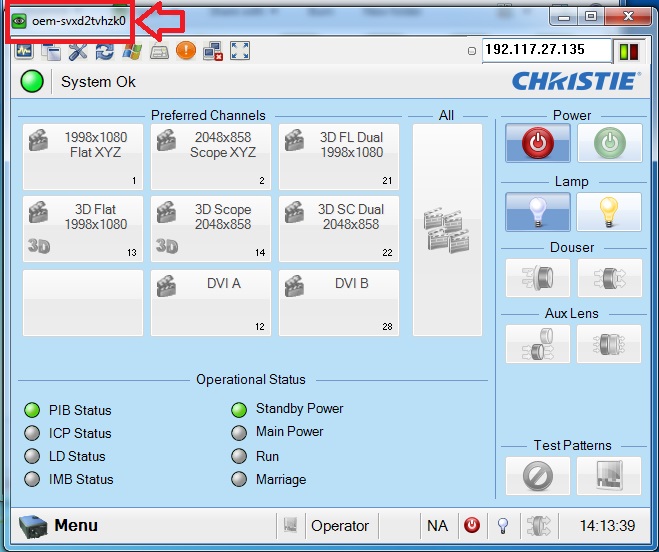
How i do it?
I would also like to this with DCP-2000.
Thx all.
Posted by Carsten Kurz (Member # 5396) on 12-29-2014, 09:35 AM:
If you use a VNC client with presetable connections, the VNC client may allow you to assign your own connection titles. Some VNC hosts allow to assign names, but I think it's better if the client allows to assign free titles to ALL devices.
- Carsten
Posted by Dave Macaulay (Member # 813) on 12-29-2014, 09:57 AM:
If it displays anything from the connected device, it will be the device's network hostname.
The hostname is configured in the projector (or server, Jnior, whatever) network settings. It can be set to some identifying info when the systems is installed, but is often just left at whatever the default was from the factory.
Note that changing network settings can really screw up the projection system network (no shows until corrected) - so unless you know what you're doing and how to recover from mistakes... leave them alone.
The domain and hostname can be critical for local network connectivity. Most installations are on domainless isolated network segments though, and these names can be changed to anything you like. If the domain is obviously a factory default (ie chistiedigital.com, doremilabs.com) then you can probably change it and the hostname at will.
If that's the Christie web browser connection page you show in the image, the text at the top is probably just the version of tightVNC used (the projector uses a Java (I think) version of tightVNC in the webpage to connect to the TPC).
That text doesn't look like a projector hostname. I do not have a projector available to connect to to check this theory out.
I generally use RealVNC (installed on my PC) to connect, and I don't recall it displaying any hostname info for anything.
Posted by Brad Miller (Member # 2) on 12-29-2014, 11:05 AM:
Login with service credentials.
Menu/Service Setup/System Access.
Windows Explorer
Control Panel/System
Computer Name/Change
Enter what you want and hit OK/OK.
Posted by Raz Tovy (Member # 8295) on 12-30-2014, 05:38 AM:
Thx "Brad Miller"
It worked.
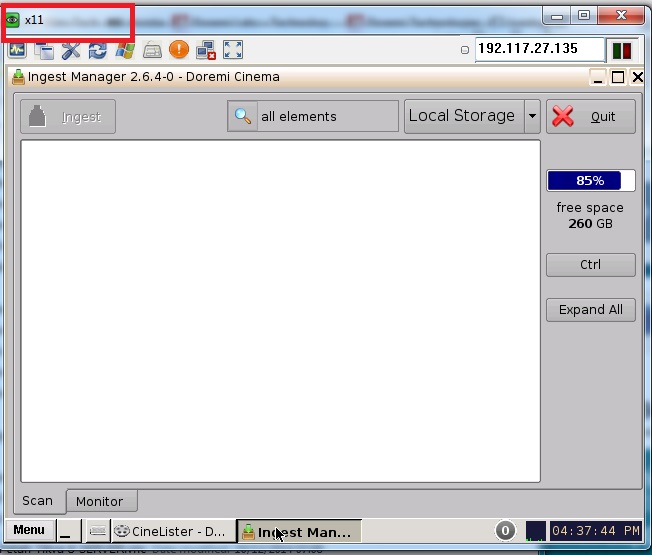
How i do it in my Doremi Dcp 2000?
Posted by Raz Tovy (Member # 8295) on 12-30-2014, 07:40 AM:
How i do it in my Doremi Dcp 2000?
Posted by Anders Nordentoft-Madsen (Member # 3334) on 01-02-2015, 08:37 AM:
It cannot be done on the Doremi's ![[Frown]](frown.gif)
Posted by Manuel Acevedo Civantos (Member # 7567) on 02-08-2015, 12:05 PM:
Some VNC clients will allow to change the name of the connection.
For Doremi, I add a line in the Control Tab of Cinelister with the screen number. Easier than looking at the IP.
Posted by Gary Benn (Member # 7858) on 02-08-2015, 02:56 PM:
Which VNC client is that?
Posted by Raz Tovy (Member # 8295) on 02-09-2015, 02:07 AM:
Manuel Acevedo Civantos: How you do it?
Gary Benn: I use UltraVNC Viewer.
Posted by Manuel Acevedo Civantos (Member # 7567) on 02-10-2015, 03:56 PM:
I use Chicken of the VNC on OSX. On windows I have seen promising configuration options, but never worked.
Looking at the IP is easy in some clients, that's another option.
I still prefer having the screen number wrote on the Control Tab, as that's the tab the "normal" operators should only use, with the various basic operations they need.
Posted by Ken Lackner (Member # 1002) on 02-12-2015, 11:20 AM:
Manuel: The only place I can find to add a screen number is in the Theater Properties section of the Control Panel. I've done it on two different servers, and this information does not appear on the Control tab. How are you putting the screen number on the Control tab?
Posted by Manuel Acevedo Civantos (Member # 7567) on 02-12-2015, 12:17 PM:
Add a section name and write whatever you want in it, even a button with no function.
It's not a feature, it's a hack ![[Wink]](wink.gif)
Powered by Infopop Corporation
UBB.classicTM
6.3.1.2