This is topic getting a dss-200 out of standby in forum Digital Cinema Forum at Film-Tech Forum ARCHIVE.
To visit this topic, use this URL:
https://ft-forum.com/ft/cgi-bin/ubb/ultimatebb.cgi?ubb=get_topic;f=16;t=002175
Posted by Stephan Shelley (Member # 8587) on 01-16-2015, 07:32 PM:
Anyone know where the start button is hidden? A couple of time I have had this dss-200 wake up in standby. Power supply lights are yellow, lan port lights lit. I have been able to wake it up by creating lan activity as it seems to be in a wake on lan state. A button to push would be nice. I have tried different power supplies no change.
Anyone know what number the motherboard battery is?
Posted by Brad Miller (Member # 2) on 01-16-2015, 08:05 PM:
I've never experienced that on a DSS200, but perhaps someone else here has. Regardless the power button is right beside the front panel USB ports. Use a pen or paper clip to hit it.
Posted by Jim Cassedy (Member # 4115) on 01-16-2015, 08:45 PM:
Like Brad, I've never had to mess with the power button. And, in case it
wasn't clear from his reply, you've to to remove the front panel to see it.
"Actual Photo"
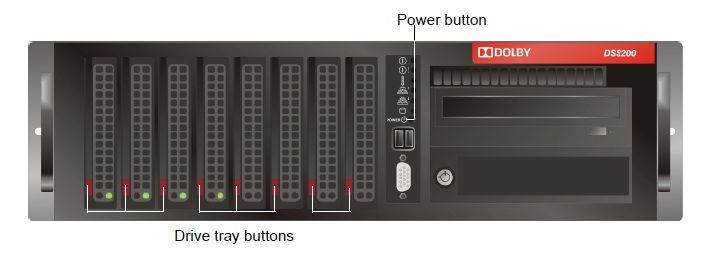
-jc-
Posted by Marco Giustini (Member # 4544) on 01-17-2015, 03:38 AM:
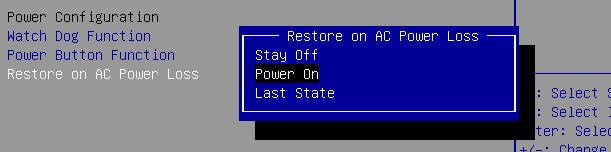
I believe there is an option in the BIOS to tell the MB to turn on the system when power is applied.
Posted by Steve Guttag (Member # 268) on 01-17-2015, 06:33 AM:
To remove the front bezel, you slide the upper-red part of the bezel with the Dolby Logo to the left.
Posted by Gavin Lewarne (Member # 5397) on 01-17-2015, 12:23 PM:
I have never seen our DSS200 in anything like a standby mode. Are you sure someone hasn't been futzing around in the bios? there are some option in there that could cause such a thing (if its anything like the supermicro motherboard bios im familiar with that comes in the same chassis)
Posted by Stephan Shelley (Member # 8587) on 01-17-2015, 01:56 PM:
They are good there about not fooling around without asking. The first time it happened around a year plus or so ago was the result of a power failure. One that stumbled around before going out. It is plugged into an UPS. Second time was when I swapped the cat 862 media block. I have posted in another thread about the secure clock issue. The third time was yesterday and the UPS is indicating a battery problem. It is also possible that there is an issue with the server motherboard battery getting weak and the bios went back to defaults. Often that is to wake in the state it was last in. Power issues can scramble what state it thinks it was last in. Always on should be an option but not necessarily the default.
Posted by Marco Giustini (Member # 4544) on 01-17-2015, 02:24 PM:
Stephan
If you pull the plugs off the server - when it's idle - wait 30s and then plug them again, what happens?
Posted by Stephan Shelley (Member # 8587) on 01-17-2015, 03:18 PM:
When I was at the location with the cat 862 problem. I tried what you suggest and it just goes back into standby. When power is fist applied the fans move a bit and stop. The lights on the back of the power supplies are yellow instead of green. I also tried different power supplies from another screen that I knew were good. No change. In the standby state there was power to the motherboard network ports. The link leds were on. The network activity of powering up the projector woke it up. I am sure pushing the power button would as well.
Posted by Marco Giustini (Member # 4544) on 01-17-2015, 05:09 PM:
then get into the BIOS and change the value of RESTORE ON AC POWER LOSS to POWER ON.
Powered by Infopop Corporation
UBB.classicTM
6.3.1.2