This is topic DSS100 Server Connection Problem in forum Digital Cinema Forum at Film-Tech Forum ARCHIVE.
To visit this topic, use this URL:
https://ft-forum.com/ft/cgi-bin/ubb/ultimatebb.cgi?ubb=get_topic;f=16;t=002201
Posted by Greg Routenburg (Member # 1742) on 02-02-2015, 02:52 PM:
Greetings All,
I've got a bit of a mystery with a DSS100 that I was hoping someone might be able to shed some light on.
The showstore is running as a standalone server in SMS mode in a complex of 6 screens with no dolby library server on the network. When it reboots, the only way to get it to connect to the Show Manager server is to press Ctrl-L at the dolby splash screen. On all of our other screens in the complex the showstores will connect to the local server after about a minute when they can't find a showlibrary. I've tried completely unconfiguring and configuring it, running the install CD and I've even replaced the IDE flash drive thinking that might be somehow involved but it continues to exhibit this behaviour. Is there a trick that I'm missing?
Cheers!
Posted by Steve Guttag (Member # 268) on 02-02-2015, 03:43 PM:
What version of the software are you running on the DSS100? Is it networked with any other servers that are in a form of TMS mode...even if they are "mini-plexes"
When it is connecting it will likely show what IP it is trying to connect to (or what it thought was the TMS)...once it thinks there is a TMS for it to connect to...it will forever try to connect to that TMS. I believe with 4.7, an unconfig option 3 will clear that memory out. However, if there is a TMS on the same network, it will try to join up.
Posted by Greg Routenburg (Member # 1742) on 02-02-2015, 03:52 PM:
We're running software version 4.7.0.42. There are no servers in TMS mode on the network. All of the servers are running as independent SMS mode servers.
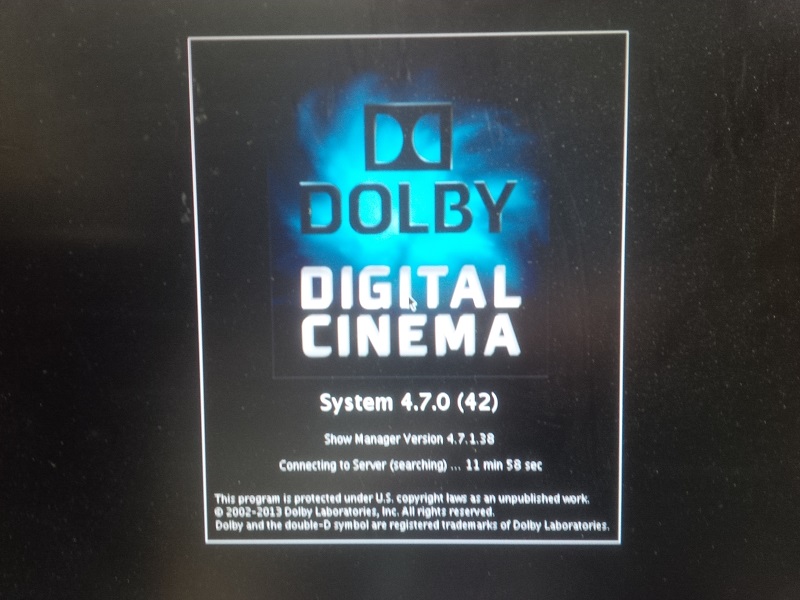
It doesn't show an IP address, it just says "Searching" beside the little timer clock that counts up from 0 on the Dolby splash screen.
I've tried the Unconfig option 3 already and it didn't help.
Posted by Marco Giustini (Member # 4544) on 02-02-2015, 06:06 PM:
I've seen that before, it does not connect even though it's trying to connect to its own IP address.
I sorted by unconfiguring it.
Uhm... as Steve said, there should be an IP listed when it's trying to connect, what is it?
Silly thing, can you try setting all the IP's manually (i.e. don't leave them on AUTO)?
You said there isn't another Dolby Library on the network: is there another Dolby server on the same network? Does it connect on its own if the server is left unplugged from the network?
Posted by Steve Guttag (Member # 268) on 02-02-2015, 09:08 PM:
Exactly. First, unplug any network connections where it can "see" another server on the network...then do an unconfig option 3 (I'm pretty sure it is an option 3 it may be an option 2 or in conjunction with option 2.
If it boots up fine without anything else on the network...then you are well on your way to a solution. You'll want to make sure there are not IP conflicts there and probably move the "management" over to the auditorium network. This would help to keep it from ever finding other servers providing that you keep the Theatre and Auditorium networks completely separate.
Posted by Greg Routenburg (Member # 1742) on 02-03-2015, 01:18 PM:
OK, so I've removed the server from the rack and perched it on my work bench. It is not connected to any networks. I've tried doing both option 2 and option 3 on the unconfigure but it still won't finish booting. Here's a photo of the screen where it hangs.
Posted by Mike Renlund (Member # 4675) on 02-03-2015, 02:07 PM:
Hey Greg, This does sound like some kind of software corruption.
You might be able to see errors related to the Show Manager server (located inside that DSS100) by pressing CTRL-ALT-F6.
You might also be able to see errors related to the Show Manager client (also located inside that DSS100) by pressing CTRL-ALT-F7.
One of these two pages should provide clues as to where the problem lies. If the server says it cannot start, or the client says it cannot start, then you know where the problem lies.
Press CTRL-ALT-F8 to get back to the Show Manager display.
You can send screenshots to customersupport@dolby.com and the team can look at what you have and make a recommendation.
Most likely the recommendation will be to burn a new upgrade ISO disc and try that. There is the option of attempting to wipe the entire machine back to factory default as well.
Posted by Marco Giustini (Member # 4544) on 02-03-2015, 03:32 PM:
When it's about to connect, after CTRL-L, it should come up with some sort of IP number?
Did you try running the unconfig option 1 as well and manually input the required IPs?
Also, what Mike suggested. Have a look at the console and see what's actually happening.
Posted by Stephan Shelley (Member # 8587) on 02-04-2015, 05:23 PM:
As it looks like you have tried the other choices have you tried unconfigure option 1? It will set all the network settings back to factory default. You will then need to run the configure script to get the sound processors auditorium number and projector type back in. As it is not finding an IP address for the SMS try it. Make sure you know any custom IP configuration if you are not using the stock Dolby one.
Posted by Greg Routenburg (Member # 1742) on 02-05-2015, 03:43 PM:
It appears to have been a motherboard issue with the server, if I had to guess I'd say more specifically the chipset component that controls the network interfaces. After a couple more reboots, the server failed to boot at all and gave a long series of POST beep codes. It appears that the motherboard was of the verge of failing and that's what caused all of the grief. I've replaced the motherboard and after doing so everything booted up normally.
I've had these motherboards fail in the past but never quite like this. Thanks all for your suggestions. I very much appreciate it.
Cheers!
Powered by Infopop Corporation
UBB.classicTM
6.3.1.2