This is topic Blu Ray into HDMI in forum Digital Cinema Forum at Film-Tech Forum ARCHIVE.
To visit this topic, use this URL:
https://ft-forum.com/ft/cgi-bin/ubb/ultimatebb.cgi?ubb=get_topic;f=16;t=002208
Posted by Phil Ranucci (Member # 3820) on 02-07-2015, 12:23 PM:
We've been trying to run a BluRay into the HDMI input on a GDC media block. Picture is fine, but the audio is only L/R, not 5.1.
Audio routing on the server seems correct. According to GDC, the media block just passes thru the audio. Anybody have an idea? the players are set to output PCM, is this correct?
Thanks!
Posted by Leo Enticknap (Member # 534) on 02-07-2015, 12:54 PM:
What's the sound on the BD, and what sort of audio processor are you using?
At one of our theaters, I have a BD player going into a cat745 thru HDMI, and the audio from the 745 to a CP650. If the disc has Dolby 5.1 or 7.1 on it and the player is set to use that, it plays OK. But if the disc only has DTS multi-channel sound, I can only get L/R stereo. To get the Dolby 5.1 or 7.1, I have to select bitstream audio out on the player, but if the disc is DTS only I have to configure the player to mix it down to 2.0 L/R, or else there is no sound at all (because the CP650 can't decode DTS).
At the other theater, we have two DVD/BD players (one for region A, the other for region B) going into an Intelix scaler, with the output from that going thru HDMI into an AP20. The AP20 can decode Dolby and DTS and automatically recognizes each one. But again, you have to select bitstream (in effect, audio data pass-through) on the players, or else again, you get L/R only.
For some reason, most consumer DVD/BD players seem to mix down the HDMI audio output to 2.0 L/R as a factory default setting, I'm guessing to minimize the number of "low information consumers" who would fail to get any sound when connecting them to a cheap TV that doesn't have Dolby and/or DTS decoding, and then return them to the store if the default was bitstream/pass-through and let the device on the other end decode the proprietary system compressed audio.
Posted by Stephan Shelley (Member # 8587) on 02-07-2015, 01:55 PM:
I know others have said no elsewhere but I have tried it and the Dolby Cat 745 does decode the Blu-Ray AC3 5.1. via hdmi and the configuration script on 4.8.x asks if your sound processor can do advanced sound like 96khz sample rate. I suspect that that is Dolby supporting there own AC3 format. I know it does not work on pre-Dolby Doremi IMBs. Software may fix that in the future.
Posted by Harold Hallikainen (Member # 5405) on 02-07-2015, 02:17 PM:
Is that true? I was not aware of any IMB that decodes encoded audio since they were designed to play DCPs, which are PCM. I do think that IMBs may pass encoded streams from HDMI to AES/EBU for decoding in the sound processor. To me, it would be so much simpler if the BLU ray player would do the decoding and just put PCM on the HDMI. It's much less expensive decoding in the BLU ray player since they are made in much higher volume than cinema equipment.
Harold
Posted by Stephan Shelley (Member # 8587) on 02-07-2015, 02:38 PM:
I have tried it at two different locations with Dolby Cat 745 with CP650s. It does work. 650 was set to 6 channel pcm. Playing a Blu-Ray into the HDMI on the Cat 745, Blu-Ray set to Dolby 5.1 there was sound coming out of all the channels like it should. Like I said I think it is Dolby supporting their own. One of the locations was with the original USL made Cat 745.
Posted by Monte L Fullmer (Member # 2797) on 02-07-2015, 03:08 PM:
Could be a setting in the ADMIN/GDC panel to adjust audio from HDMI, but this area is password protected.
Call up GDC Support on this question.
good luck-Monte
Posted by Brad Miller (Member # 2) on 02-07-2015, 03:37 PM:
quote: Phil Ranucci
the players are set to output PCM, is this correct?
Nope, set the bluray player's output to "bitstream".
Also if the player has a setting for secondary audio, set it to off so it doesn't compress the HD original mixes.
Posted by Steve Guttag (Member # 268) on 02-07-2015, 04:19 PM:
I believe the AC3 thing is allowing it to passthrough and having the EDID table list that audio as an option...not that the decoding is done in the IMB. So when you configure your DSS server, you are really also setting the EDID table.
But in general, what you hear from an HDMI feed is what was coming off the player/source. If you use "Bitstream" then you are allowing encoded data (Dolby OR DTS) to be on the HDMI line...you better make sure you have a suitable decoder downstream that can handle it. As others have noted, Dolby only decodes Dolby brand audio streams (the CP750 only does AC3, at that) (and LPCM). Datasat decodes High and Low bandwidth DTS and low-bandwidth Dolby (e.g AC3 but NOT True HD).
If all you have is a BluRay player as a source, I agree with Harold on this one, let the player decode whatever audio is on the disc to the maximum capability of your sound system (5.1 or 7.1) and let it come to the sound processor (via the IMB, in this case) already decoded. It is the safest bet that everything will work and at the highest quality.
Posted by Marco Giustini (Member # 4544) on 02-07-2015, 05:52 PM:
Stephan,
How does the 745 identify the source on the screen?
Posted by Stephan Shelley (Member # 8587) on 02-07-2015, 07:04 PM:
The audio source? I think it would do like the DMA 8+ does on the s/pdif and toslink inputs, if it detects an AC3 bitstream it decodes it otherwise it expects PCM. DMA 8+ can also do Dolby E which it also auto detects.
Posted by Leo Enticknap (Member # 534) on 02-07-2015, 07:58 PM:
quote: Marco Giustini
How does the 745 identify the source on the screen?
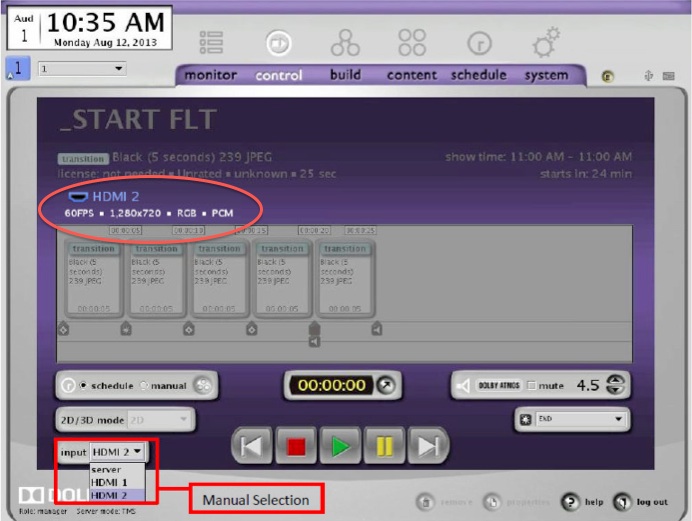
In the control tab of Show Manager, there's a pull down menu toward the bottom left, from which you select server (i.e. DCP data coming in thru cat6), HDMI1 or HDMI2.
Posted by Marco Giustini (Member # 4544) on 02-08-2015, 04:32 AM:
Sorry guys, I was not clear! ![[Smile]](smile.gif)
What I meant was: what does the ShowManager say about the source being fed to the 745 on the screen?
I can't remember on top of my head if it displays the audio or just the picture properties.
If the 650 is set to 6ch input, then the 650 is not decoding anything. What I am trying to find out is whether the BD player is actually sending AC3 or 5.1 LPCM - the latter being officially supported by the 745.
Sometimes it's hard to find out what a BD player is actually outputting.
Posted by Steve Guttag (Member # 268) on 02-08-2015, 11:43 AM:
Above the time line on the control screen, it will indicate the format (picture and sound).
I know that the CAT745 handles AC3 in some form (and I think it is from an EDID point of view so the processor downstream can decode it). I say that because AC3 was addressed in on of the release notes of the Dolby software. I have personally never sent AC3 down the HDMI pipe to the CAT745.
Here is an image from the 4.7.0 release notes. I ovaled the area where it will tell you the formats involved.
Posted by Marco Giustini (Member # 4544) on 02-08-2015, 01:58 PM:
Ok, so what happens when AC3 is sent to the 745 and the sound processor is not capable of AC3 decoding?
Posted by Steve Guttag (Member # 268) on 02-08-2015, 05:26 PM:
As the Dolby slogan used to be..."Silence." But that is what EDID is supposed to prevent. If nothing says it can handle AC3 (or whatever format) then the source shouldn't put it on the line.
Next time I get a chance (and I think I will pretty soon), I'll give it a try though.
Posted by Marcel Birgelen (Member # 6801) on 02-08-2015, 05:36 PM:
quote: Marco Giustini
What I am trying to find out is whether the BD player is actually sending AC3 or 5.1 LPCM - the latter being officially supported by the 745.
It might sound like an awkward solution, but you don't have some kind of consumer AVR lying around with HDMI 1.4 input (HDMI 1.4 capable AVRs usually also support LPCM surround)? Those things are often far better at telling you what comes trough at the other end of the HDMI wire than most of this expensive digital cinema gear that considers HDMI to be a toy interface ![[Wink]](wink.gif) . Those things are also far cheaper than those professional HDMI analyzers, which also happen to suck in this regards, as they usually can tell you all about the signal quality, but less about what's actually in the signal.
. Those things are also far cheaper than those professional HDMI analyzers, which also happen to suck in this regards, as they usually can tell you all about the signal quality, but less about what's actually in the signal.
The problem here, off course, is that the EDID of your AVR will be different, but there's an interesting little device called Dr. HDMI that can fake EDIDs for you.
Posted by Carsten Kurz (Member # 5396) on 02-08-2015, 05:59 PM:
Which BluRay player was that? HDMI codecs is done handshaking. You can not force an AC3 stream into a sink that is not capable of AC3. This is different from S/P-DIF, which is unidirectional. You can configure Bitstream AC3 or dts on an output even if the receiver knows nothing about these codecs.
Last Dolby release note I read said that only LPCM is possible.
However, some Players decode common codecs to LPCM automatically if the sink is not codec-capable. You may choose a dts or Dolby track in the disc, but the player sends LPCM to the output. If the sink has no status display for incoming audio, you don't recognize this.
- Carsten
Posted by Steve Guttag (Member # 268) on 02-09-2015, 06:34 AM:
From what I can tell, an upcoming Dolby release (4.8.4) will support AC3 in some way...if that means it will actually decode on the CAT745 or not, I don't know. I suspect that 4.8.4 will hit the streets within a month or so.
Posted by Marcel Birgelen (Member # 6801) on 02-09-2015, 06:47 AM:
Your average digital cinema processor expects discrete LPCM channels on the AES EBU connections between your server/IMB and the processor, so where else could the decoding take place? Or what does "support" otherwise entail?
The safest bet when using external surround sound sources is still to bypass your server/IMB completely if at all possible.
Powered by Infopop Corporation
UBB.classicTM
6.3.1.2