This is topic Barco DP2K-10S: Cropping around image? in forum Digital Cinema Forum at Film-Tech Forum ARCHIVE.
To visit this topic, use this URL:
https://ft-forum.com/ft/cgi-bin/ubb/ultimatebb.cgi?ubb=get_topic;f=16;t=002291
Posted by Marlon Martins (Member # 8823) on 05-04-2015, 04:08 PM:
Hi, im new here.
I have a friend who works as projectionist in the only cinema in my city (rural area in brazil)
They have a Barco DP2K-10S projector, everything works fine. ive made some test DCP videos in Scope, and noticed a "decent" amount of cropping around the image.
As the movies does not have any border or needed to crop (and 2048x858 is already "very cropped" in my eyes ![[Wink]](wink.gif) ) i was wondering what is the cause of that. its a software crop? cause i believe the lens are proper adjusted (no spill over the screen).
) i was wondering what is the cause of that. its a software crop? cause i believe the lens are proper adjusted (no spill over the screen).
They are using like that. It bothers me a lot that, cause i know scope videos have a tight "head-crop", and loosing more "image area" to me is sacrilege (every pixel count).
I work with video production, and tried to find installations manual and set-up for this projector with no luck.
Thanks for any help and sorry for my poor english
Posted by Justin Hamaker (Member # 2165) on 05-04-2015, 04:40 PM:
A few things here.
First, it is incorrect to say that 2048x858 is cropped. These are the dimensions of the Scope image. If you choose to film in the scope format, you need to compose your image so the elements fit within that image. If you don't have enough height, then pull back from your subject, or use the Flat format.
As for the cropping on the screen, you have to remember that not all cinema screens are set to be perfectly masked in the scope and/or flat aspects. When setting up screen files, it's normal to have some cropping in order to make the image fit within the masking. Usually this will mean up to 5% of the image. Unless you are using the entire scope dimensions, then the small amount of cropping should not be an issue.
It is also possible the cinema's screen files were not properly set up. If the lens file was zoomed too much, then they could be cropping more than the appropriate amount.
Posted by Marlon Martins (Member # 8823) on 05-04-2015, 05:20 PM:
yes, you are right, i should not use the term "cropped". i should say "not much room" for crop the image without affect the scene.
by my tests, looks like the cropped area is about 10 to 12% of the screen. (i made some crop patterns just cause i was worried about cropping)
i understand that "it can be cropped" with no problems, but if its not needed, then better not to crop right?
I'm not sure the guys that installed did the proper job. Here in Brazil it's kind of "normal" even the specialized people for a job to not to do it properly (sad but true). They already did a sub-par job on the power wiring, and i'm not confident they did a proper job on the projector set-up either.
edit: a sample of the cropped area:

Posted by Carsten Kurz (Member # 5396) on 05-04-2015, 05:51 PM:
Marlon - download these:
http://www.freedcp.net/dcp/test/xdc/xdc_test_pattern_XYZ_1-85.zip
http://www.freedcp.net/dcp/test/xdc/xdc_test_pattern_XYZ_2-39.zip
And check again. They are 'official' and have cropmarks with them.
All cinema projectors have the option to apply masking to the image edges. It may be that in your case they overdid it. But maybe it's a combination on lens setting and masking. These systems are usually protected from manipulations to assure a proper image for each days presentations. You may need to contact the owner or installer to find out what is actually going on.
If you are interested, google for a 2014 edition PDF of 'Barco Communicator user guide' and make yourself familiar with it.
- Carsten
Posted by Justin Hamaker (Member # 2165) on 05-04-2015, 06:21 PM:
Marlon, looking at the image you posted, I would guess that whomever set up the projector had zoomed the image too much and then cropped to fit the masking.
When I'm setting the screen files, I put up a framing pattern - Barco's default is pretty good. Then I adjust the zoom and shift settings just to the point where the image is centered and all of the format's markings are buried in the masking - for example, just to the point where all of the red scope lines (on the Barco pattern) are into the masking.
Then I crop to the point where I have a nice clean image all the way around the masking - usually a pixel or two overlapping the masking. My experience has been that when the top and bottom are set to the right size, there may be 10-25 pixels on either side of the image that need to be cropped. Even if it's 25 pixels on either side, it's only going to be about 2.5% of the image. Plus, you should always be able to get the image to fit either vertically or horizontally with zero cropping.
Posted by Marlon Martins (Member # 8823) on 05-04-2015, 06:42 PM:
thanks guys for the help.
i will use those two patterns to test the crop tonight.
@Carsten
Barco Communicator is a software or that device you connect on the side to configure the projector?
@Justin
mmmm, good to know the procedure. thanks for detailed info.
but the question: how and where to set up screen files?
i will google a bit more...
Posted by Carsten Kurz (Member # 5396) on 05-04-2015, 06:53 PM:
Barco Communicator is a software running on a computer to set up and control Barcos projectors. If you are familiar with typical video projectors, you will be surprised how complex options on cinema projectors are in comparison.
Barco also offers a touch-panel-pc running that same software. Some projectors have this touch-panel mounted on, some not. It is not needed for everydays operation, since the side panel and cinema server are capable to control the most important functions as well.
Communicator offers different user access levels. Depending on these levels, you have different access rights to change settings (or not).
- Carsten
Posted by Marlon Martins (Member # 8823) on 05-04-2015, 07:06 PM:
thanks. will see if the laptop that is used to control the projector have the software.
Posted by Marlon Martins (Member # 8823) on 05-04-2015, 11:18 PM:
Got back, below the test results:
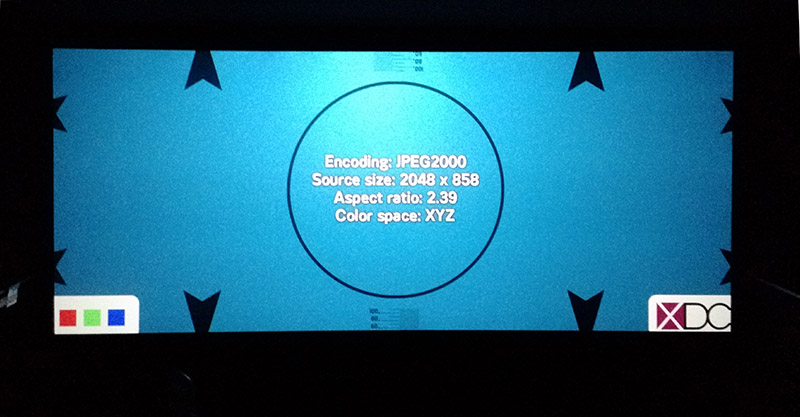
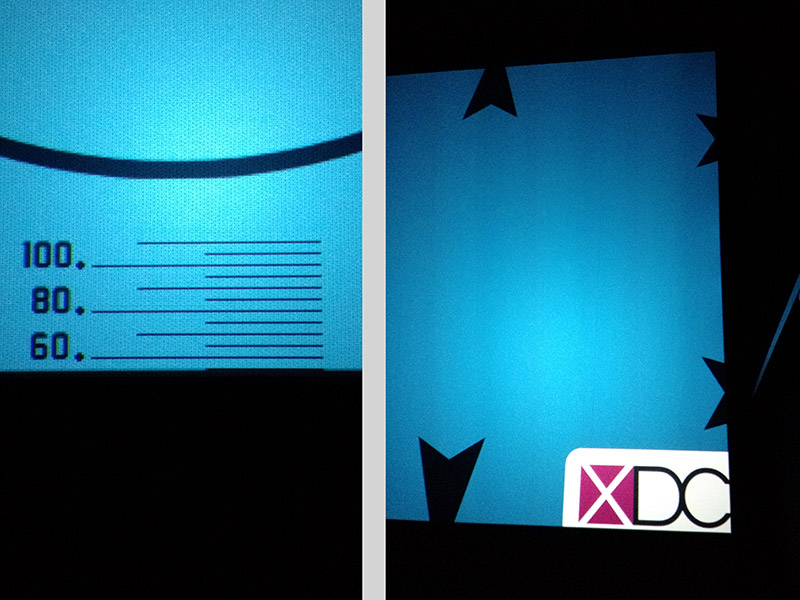
as you can see, the crop is very strong (measured 12% on both directions). the scale on the left didn't even appear. the test pattern on the barco itself have no crop at all, but i believe it does not use the adjustments of the screen preset (so i believe the projector/lens are properly aligned)
the notebook have the barco communicator, so i guess i can fix it. normally i would look around to find my way, but as i would not like to "mess stuff" (they have sessions every day), anyone can point me where is the adjustment?
PS: the "professionals" that installed used low amperage switches, some of them are getting very hot and not working properly. I will have change them... ![[Frown]](frown.gif)
Posted by Justin Hamaker (Member # 2165) on 05-05-2015, 12:14 AM:
That's just sloppy workmanship. They should adjust the zoom until the vertical arrows are just touching the masking. This is likely going to leave the left and right still outside the masking, but would be a much smaller crop.
The only reason I could see for leaving it like this is if there is an issue with the lens's motors. Some InVision lenses are prone to having the focus drift between format changes - sometimes fairly drastically every time the format changes. In this case, the theatre may have set the flat and scope images so the motors do not have to move when switching formats. This isn't an acceptable excuse for not getting the lens repaired or replaced, just an explanation for why it might have been done.
Posted by Marlon Martins (Member # 8823) on 05-05-2015, 12:17 AM:
but the built-in test pattern are properly aligned, with almost no crop at all (less than 1%) with scope lens
so this does not mean its a software only problem?
Posted by Justin Hamaker (Member # 2165) on 05-05-2015, 01:09 AM:
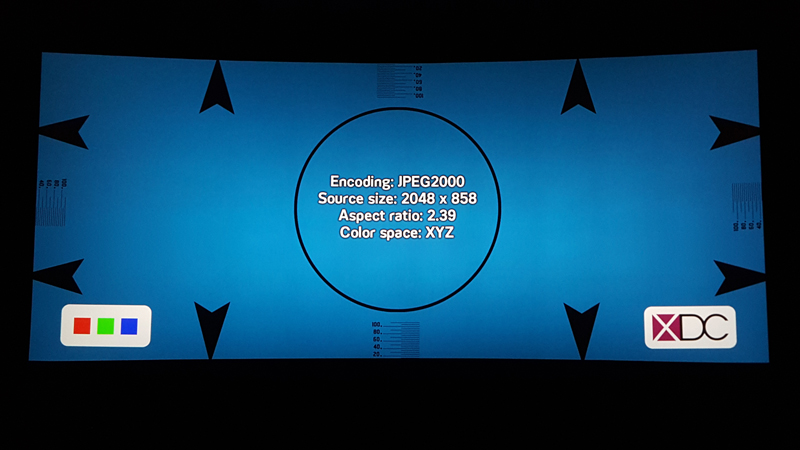
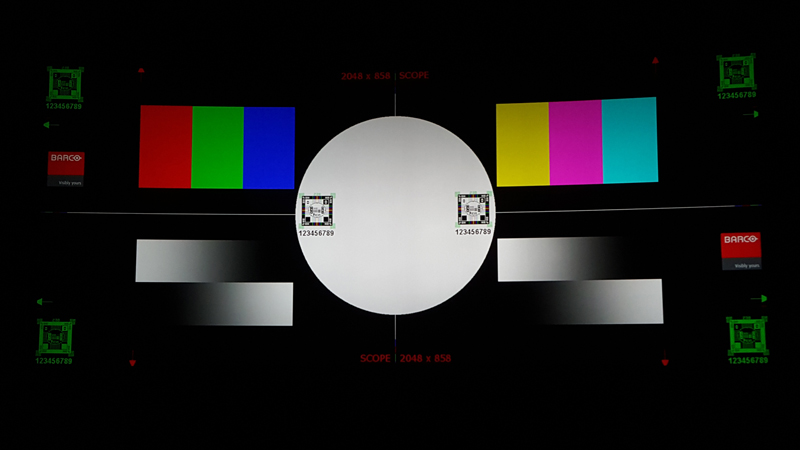
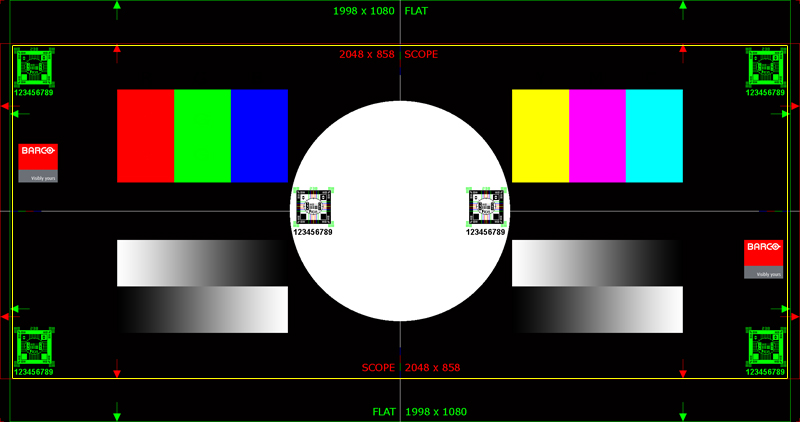
Here's a comparison of the test pattern on one of my projectors vs the Barco test pattern on the same projector. Note that I have curved screens, so the image looks a little warped when photographed.
For the sake of comparison I've included the full Barco framing pattern with an approximation of my screen's crop outlined in yellow so you can see how little is missing. The full scope image is edge to edge.
Posted by Carsten Kurz (Member # 5396) on 05-05-2015, 03:50 AM:
Marlon - sometimes the zoom range of the lens is not able to fit the screen for scope and flat, and then masking shortcuts have been taken. The Barco have zoom/focus buttons on the side panels - you should first check wether there is some zoom in/out range for both formats. Does this screen have 'masking', in this case, physical masking (black cloth). Is the current cropped image fitting within that masking?
If the lens has enough range, you can go on and change the electronic masking in the projector. I can only advise to read through that Barco manual completely in order to understand what you are doing. The good thing is - the Barco has lot's of free presets to use for playing, so you can keep the existing presets (as bad as they may be), until you arrived somewhere.
The important thing to know for all DLP based cinema projectors is, the presets all build on top of each other and the individual items are interchangeable. Typically, you do not built a full new preset, but only exchange one item of a preset (e.g. signal input, or color conversion), and leave all others untouched. So e.g. the lens setting and masking can be used for all inputs the same, and once adjusted, will again be correct and identical for all presets that use it.
It's a hierarchical system - let's take this signal input preset a, apply that color interpretation preset b, send it through this signal processing c, then apply masking and lens memory d. We ant only the focus to adjust for all existing presets? Then we only change lens memory d, and it will be applied by all format presets using it.
So, whatever you do, try to create doubles of existing presets first and play around with them. The communicator software, btw., will also allow you to backup all the settings to files, so you should probably start there.
- Carsten
Posted by Marlon Martins (Member # 8823) on 05-05-2015, 04:10 AM:
thanks Justin and Carsten. I Will try to fix it tomorrow, together with the electrical fixes
Posted by Steve Guttag (Member # 268) on 05-05-2015, 07:26 AM:
There may also be a problem on the PCF or IMB front where a magnification is coming in. Check on the Barco projector in the PCF section to see if the input size is 2048x858. If not, Barco now has some "default" buttons to set them correct for things like 2K Scope. If it does make the image fit properly, you'll need to save the PCF and also make sure your saved file is used for the Scope preset (typically button 2).
You are correct though...the scaler in the ICP is deactivated when a test pattern is active (though it gets confused if you have an anamorphic squeeze in the Screen file and will then scale the test pattern down but not apply the squeeze).
Posted by Dave Macaulay (Member # 813) on 05-05-2015, 07:35 AM:
If you select the preset you want, then go to configuration/screen you can select a full screen file (2048x1080 no crop) and it will project the full uncropped image so you can zoom and shift the lens to see what looks best to you. This does not modify the preset, select it again and the original zoom/shift and cropping will be back. To make "permanent" changes you need to link new screen and lens files to the preset macros.
Posted by Marlon Martins (Member # 8823) on 05-05-2015, 05:21 PM:
SUCCESS!!!
was able to remove the crop, and adjusted the zoom a liiitle bit (no pixel left behind ![[Big Grin]](biggrin.gif) )
)
tested the lens change process a few times to make sure nothing was wrong there.
saved the new setting, changed the macros (thanks for the tip Dave) and now works fine with no change in the programming lists.
Also fixed the electrical wiring problem ;P
A big thank-you guys for your time and expertise to help me in this problem ![[thumbsup]](graemlins/thumbsup.gif)
Now i can see Avengers "uncropped" version ![[beer]](graemlins/beer.gif)
Posted by Marlon Martins (Member # 8823) on 05-07-2015, 12:39 AM:
Well, turns out the audio is not so great either.
the voices where sometimes hard to understand (volume was too low) but in action scenes was OK.
don't know if is the original audio is like that (i believe the CP750 decoder only convert the D>A and do a bit of processing to 5.1 > 7.1 in Surround EX no?) or its the volume settings on the amplifiers/CP750. Maybe the dubbing to Portuguese is bad quality...
well, here we go again on the manuals and search for the CP750 software (looks like the notebook does not have it)
will also made a audio test to do a bit of "analysis" on the audio
what a crap installers...
Posted by Carsten Kurz (Member # 5396) on 05-07-2015, 05:14 AM:
Channelwise, cinemaprocessors will do a 1:1 translation from the audio channels contained in the DCP to the audio channels installed in the cinema. The only exception is 5.1 vs. 7.1, if 7.1 is installed at all.
When playing 7.1, the processor will feed 7.1 to the auditorium speakers, in detail: Left surround to Left surround, Right Surround to Right Surround, Left Backsurround to left Backsurround, Right Backsurround to Right Back Surround. When Playing 5.1 over the 7.1 system, the processor has to copy the audio from Left Surround to Left Backsurround, and from Right Surround to Right Backsurround, and adjust the level slightly so the surrounds do not come up to loud. If you have only a 5.1 system installed, you should not play 7.1 DCPs (back surrounds would be silent then). Most likely, you will never receive a 7.1 key to play it anyway. All 7.1 features also come with 5.1 versions, but both use/need separate keys to play.
The CP will also do EQ and level for all channels. If the installers were not skilled, the EQ will probably be bad just as well.
You should probably check speech intelligibility by using local native language, as well as original english language movies or trailers.
It's never a good idea to change EQ settings based on a single feature.
Dolby manuals are hard to find. If you need one for the 750, send me a private mail. Get at least issue5 of the CP750 manual.
- Carsten
Posted by Marlon Martins (Member # 8823) on 05-07-2015, 12:30 PM:
thanks again Carsten for the technical info.
will do a comparison with avengers with original audio/subtitles and avenges dubbed (PT-BR) to see if its the original mixing. as the decoder has the "VU", i think i can get a comparison on same scene to see if its the movie itself the problem.
will make also a "test audio" to see if everything is working correctly ("we never know"...)
Posted by Marlon Martins (Member # 8823) on 05-08-2015, 03:58 PM:
The Subwoofer is burned and i believe some speakers for the surround that are connected in pairs are out of phase...
This keeps getting better and better ![[Eek!]](eek.gif)
Posted by Marcel Birgelen (Member # 6801) on 05-09-2015, 11:47 PM:
It's even better to disconnect those out of phase speakers than to leave them in the array... Out of phase speakers do more harm than dead speakers. On the other hand, fixing this takes roughly the same amount of time as disconnecting them. ![[Smile]](smile.gif)
I guess none of the speakers are bi-amped?
Posted by Sam D. Chavez (Member # 1841) on 05-10-2015, 01:03 AM:
IMHO Phase of surround speakers boxes one to another is not all that critical. It's ideal of course but often not verified.
Posted by Marcel Birgelen (Member # 6801) on 05-10-2015, 02:16 AM:
How critical it is probably depends a lot on the actual situation and what content is being played. If it's not heavy on the surrounds and there's just a single surround speaker out of phase, the effects are probably just minimal.
Still, I prefer no or less evenly dispersed sound over the weird side effects out-of-phase speakers can produce.
Posted by Marlon Martins (Member # 8823) on 05-10-2015, 03:57 PM:
The speakers weren't out of phase. the dolby decoder was the culprit. the equalizer was ALL OVER THE PLACE, like you give a 200 knob equalizer and child played over it all day long. i Have no idea how they did something like that. that was the cause of the weird effect on the speakers, that i mistake as phase problems.
i will add a few mid-range speakers with another amplifier to help center channel, to improve voice clarity. then i believe the audio will be good enought
thanks again for the tips guys.
I just don't know if this "saga" is over yet
Posted by Carsten Kurz (Member # 5396) on 05-11-2015, 02:47 AM:
EQ all over the place is the most typical indication for a non-skilled technician having done the install.
- Carsten
Posted by Marlon Martins (Member # 8823) on 05-14-2015, 02:45 AM:
Today i believe we are "finished" (phew!)
the reason i believe the EQ was all over the place was the room, it wasn't isolated, causing resonance i believe in some frequencies, causing dialog to be hard to understand.
some test tones, sine swipe, some recording tests with a large diaphragm condenser mic, i was able to get a good equalization, to improve voice clarity and reduce a bit the resonance.
we also improved the LFE with another 18" speaker, and we HAD to get a compressor for the center channel. some movies (mainly dubbed ones) the difference between quiet and loud scenes was just too much. or we let the audio hard to understand in some scenes, or we let the speakers blow the ears to make better in quiet scenes. installed a behringer compressor, now the audio has less dynamic. i didn't like the idea of change the "originality" of the audio, but we really didn't have a choice. i could not recognize speech properly in some scenes on Avengers, and my ears are A+
today we will test Mad Max and tweak a bit more the audio settings.
thanks again to you guys, now my little town have a proper cinema that i can go and be proud of
Posted by Marlon Martins (Member # 8823) on 05-15-2015, 10:39 PM:
Alll goooood
Thanks again guys!
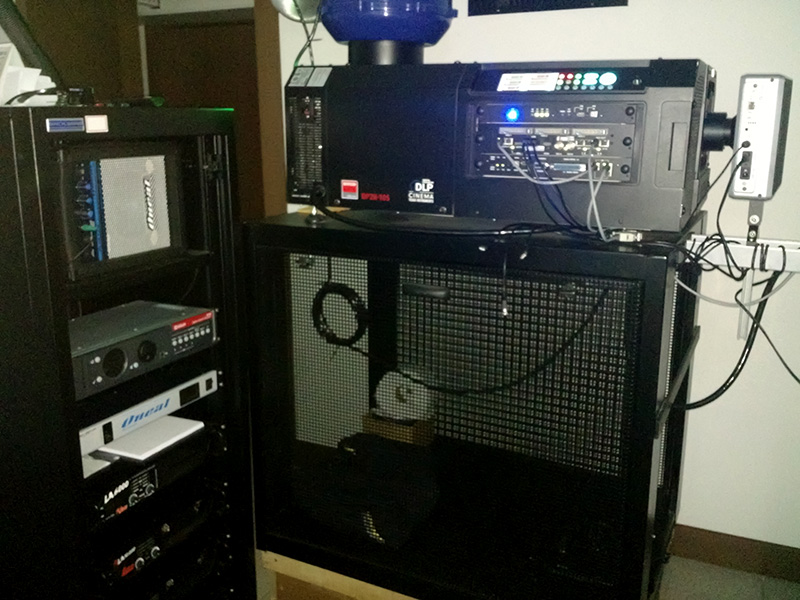
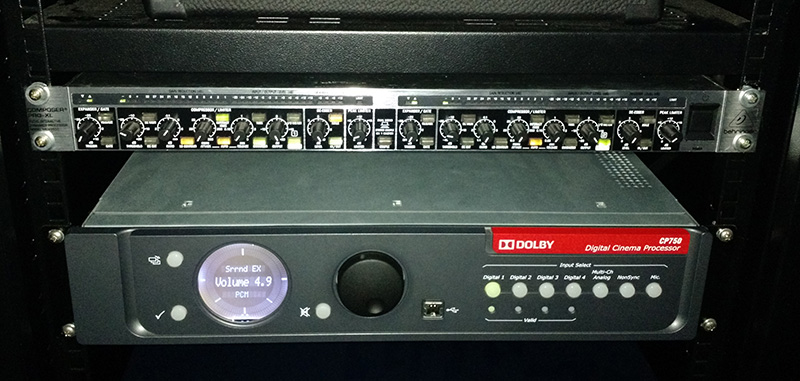
"The Room":
Posted by Marco Giustini (Member # 4544) on 05-16-2015, 11:13 AM:
Questions:
What is that thing in front of the projector?
Why your CP650 is set to Surround EX?
Why there's toiler paper underneath the projector?
Posted by Marlon Martins (Member # 8823) on 05-16-2015, 11:55 AM:
1: is a polariser for the 3D
2: some movies came in 5.1, so Surround EX "expand" to 7.1
3: is the backup TP for the projectionist bathroom
Posted by Marco Giustini (Member # 4544) on 05-16-2015, 04:57 PM:
1. What is the brand of the 3D?
2. You shouldn't do that. If the film is 5.1 you really should play it back in 5.1 with no surround EX. Even though your system is 7.1 applying a pro logic codec to a soundtrack which is not pro logic encoded is not the right way to go.
Posted by Marlon Martins (Member # 8823) on 05-16-2015, 07:24 PM:
1: Volfoni Smart Crystal Horizontal:
http://www.volfoni.com/en/product/Cinema/SmartCrystal%20Cinema%20Horizontal
2: mmm... will look into that... thanks
Posted by Marlon Martins (Member # 8823) on 08-27-2015, 06:15 PM:
I would like to tanks everyone again, for helping in this "saga". the compressor for the central channel is working wonderfully.
We add another compressor for the front channels, but using only the limiter function, to prevent too much loudness in "bang" scenes.
We also did a proper equalization using the RTA on the CP750 with a proper flat-response mic. Dialogue now is "clearer" and easier to understand. Decode mode and configuration is now correct.
Ant-man, M-I5, the audio sounds nice. even when whispering, can understand easily. loud scenes, gunshots, etc, have a good dynamic but without hurting my ears. now they will screen a horror movie, will be a good movie to see the result also
now everything is working great (after a lamp power supply failure )
the equipment for the second room has arrived, this time will be installed with more skilled people, and i will help with the audio there.
the only problems now is very old people, still complain the volume is too loud. (when clearly is not) ![[Confused]](confused.gif)
Posted by Marlon Martins (Member # 8823) on 08-29-2015, 10:42 PM:
the horror movie went great. "jump-scare" scenes didn't bleed my ear. the limiter was a good choice
Tip: there's a android app to control the CP750 decoder (CP750 Controller). makes very easy to define the volume inside the cinema room when running the movie for the first time.
i got everything hooked up on a 3com gigabit switch and wifi router.
Powered by Infopop Corporation
UBB.classicTM
6.3.1.2